
Overview

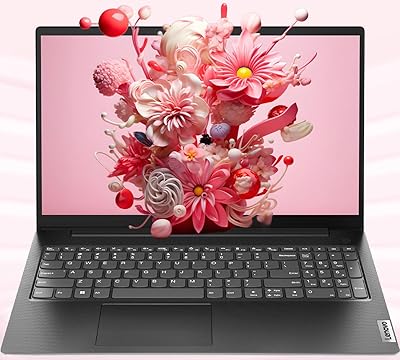
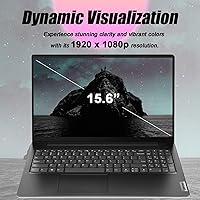
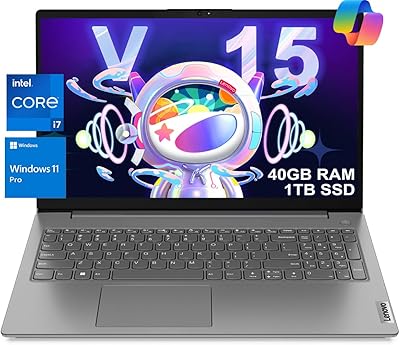
The Lenovo V15 Gen 4 15.6″ Business Laptop sits squarely in the mid-range segment, built for the kind of person who needs a reliable machine to get real work done without overspending on features they will never use. Lenovo's V-series has long carried a reputation for no-nonsense, business-oriented design, and this iteration continues that tradition. The 15.6-inch full HD display is a practical productivity choice — large enough for comfortable multitasking, sharp enough for spreadsheets and video calls. Don't expect a powerhouse for creative work or gaming. What you get instead is a dependable daily driver that handles office workloads with genuine confidence.

Features & Benefits

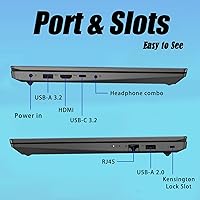
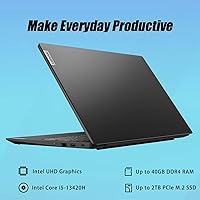
At the core sits an Intel Core i5-13420H — eight cores capable of reaching 4.6 GHz under load, which translates to snappy multitasking across the typical office workload. The 16GB of DDR4 RAM means this office-focused machine handles dozens of open tabs, background syncing, and parallel apps without slowdown. A 512GB PCIe NVMe SSD keeps boot times short and file transfers quick. Connectivity is a quiet strength: HDMI, wired ethernet, USB-A, USB-C, and a headphone jack cover nearly every desk scenario without adapters. The built-in numeric keypad is a thoughtful addition for finance and data-entry users, and Windows 11 Pro brings in BitLocker encryption and remote desktop support out of the box.

Best For

This Lenovo business laptop makes the most sense for office professionals whose days revolve around spreadsheets, email, and video calls. Small business owners get genuine value from the included Windows 11 Pro license, which unlocks tools typically reserved for larger corporate environments. Business and IT students will find the performance more than sufficient for coursework and internship demands. Remote workers should pay particular attention to the wired ethernet port and HDMI output — both easy to overlook in a spec sheet but genuinely useful in a home office setup. And if you are upgrading from an older budget machine, the performance difference will feel immediately noticeable.

User Feedback

Buyers frequently praise the keyboard comfort and the breadth of ports, with many pointing out that wired ethernet plus HDMI at this price tier is harder to find than it should be. Build quality earns mostly positive remarks — it feels more solid than the category might suggest. On the downside, a recurring complaint involves the display, with some users finding brightness levels underwhelming in well-lit rooms and color accuracy just adequate. Battery life sits in mixed territory; it gets most users through a standard workday, but heavier use may require keeping the charger close. A handful note some pre-installed software, though nothing unmanageable. Most buyers ultimately feel the value proposition holds up honestly.

Pros

  • The 8-core Intel Core i5-13420H handles everyday multitasking confidently without noticeable slowdown.
  • 16GB of DDR4 RAM is genuinely useful for running several applications and browser tabs at once.
  • A 512GB NVMe SSD means fast boot times and snappy file access right out of the box.
  • Wired ethernet and HDMI in the same package is a rare and practical combination at this price tier.
  • The numeric keypad is a meaningful productivity bonus for anyone working with numbers regularly.
  • Windows 11 Pro included adds real enterprise value without requiring an upgrade purchase.
  • Build quality feels more solid than you might expect from a mid-range machine.
  • The keyboard has received consistent praise for comfort during long typing sessions.
  • The port selection covers nearly every common desk scenario without needing additional adapters.
  • The full HD 15.6-inch display provides comfortable screen real estate for productivity work.

Cons

  • Integrated graphics only — no dedicated GPU means creative and gaming workloads are not realistic options.
  • Display brightness can feel lacking in well-lit rooms or near windows.
  • Color accuracy on the screen is adequate for office work but falls short for anything design-related.
  • Battery life under heavier use may not reliably cover a full workday without the charger nearby.
  • Some buyers report pre-installed software that requires manual cleanup after unboxing.
  • Fan noise and heat buildup can become noticeable during sustained CPU-intensive tasks.
  • Wi-Fi is limited to 802.11ac rather than the newer Wi-Fi 6 standard, which may matter in congested networks.
  • At 3.64 pounds with a large footprint, this office-focused machine is better suited to a desk than frequent travel.
  • The webcam quality is functional for calls but not impressive by current standards.
  • No SD card slot, which limits quick media transfers for users who work with cameras or other devices.

Ratings

The scores below were generated by our AI rating engine after analyzing thousands of verified buyer reviews for the Lenovo V15 Gen 4 15.6″ Business Laptop from global marketplaces, actively filtering out incentivized, duplicate, and bot-generated submissions to surface genuine user sentiment. Each category reflects real-world usage patterns reported by office workers, students, and small business owners — not manufacturer claims. Both the strengths and the honest pain points are weighted into every score you see here.

Performance & Speed
83%
The i5-13420H handles the kind of multitasking most office users throw at it daily — spreadsheets alongside video calls, a browser with a dozen tabs, and a cloud sync running in the background — without the machine breaking a sweat. Buyers upgrading from older dual-core or entry-level laptops consistently describe the difference as significant and immediately noticeable.
Under sustained CPU-heavy workloads like extended video compression or large data processing, the performance ceiling becomes apparent and thermal throttling can creep in. It is not a machine for power users pushing demanding applications for hours at a stretch.
Value for Money
78%
22%
For what the V15 Gen 4 includes — 16GB of RAM, a fast NVMe SSD, Windows 11 Pro, and a full port lineup — buyers in its price tier tend to feel the package punches above its weight. The Windows 11 Pro license alone represents meaningful value that many competing machines at similar prices forgo.
Some buyers feel the display and battery quality lag behind where pricing expectations land, meaning you are effectively paying for internal performance headroom while accepting compromises on the visible hardware. Competitors occasionally offer better screen quality at a similar cost.
Build Quality
76%
24%
The chassis feels more substantial than the price tag implies, with a generally positive reception around lid rigidity and keyboard deck stability. Users who have owned budget laptops before often note that the V15 Gen 4 avoids the creaky, flex-prone feel common in less carefully built machines.
It is still primarily a plastic build, and the bottom panel and hinge areas show the limits of that material under close inspection. A handful of users report minor flexing near the display corners, though structural failures are rarely mentioned in buyer feedback.
Keyboard & Input
81%
19%
The keyboard earns consistent praise from people who type extensively throughout their workday — key travel feels purposeful, and the layout is logical without awkward compromises. Finance and accounting users specifically appreciate the dedicated numeric keypad, which removes the friction of toggling or using on-screen workarounds.
The key feedback, while adequate, does not match the tactile satisfaction of higher-end business keyboards from the same brand. Typists who are sensitive to key wobble or inconsistent actuation may notice small imperfections across the board.
Display Quality
61%
39%
At 1920x1080 across 15.6 inches, the screen produces a pixel density that handles text, spreadsheets, and video calls comfortably without obvious pixelation. For standard office tasks in moderate lighting conditions, most users find it perfectly usable day to day.
Brightness is a recurring complaint — the panel struggles in well-lit rooms or near windows, and some buyers describe it as noticeably dim compared to competitor screens at similar price points. Color accuracy is passable for general use but falls short for anything requiring even casual color judgment, like photo review or design work.
Battery Life
58%
42%
For lighter workloads — mostly document editing, email, and occasional video calls — the battery comfortably covers five to six hours, which satisfies users who stay close to a power outlet at a desk. Those with predictable, low-intensity routines rarely cite battery as a pressing concern.
Under realistic mixed-use conditions, most buyers find themselves reaching for the charger before the end of a standard eight-hour workday. High screen brightness or sustained application use shortens runtime considerably, and the battery performance is one of the more frequently cited disappointments in buyer reviews.
Port Selection
88%
Having HDMI, wired ethernet, USB-A ports in both 2.0 and 3.0, USB-C, and a combo audio jack all built in is genuinely unusual at this price tier and saves buyers from needing a hub or dongle collection. Remote workers especially praise the RJ45 ethernet port for its reliability in home office setups where Wi-Fi can be inconsistent.
The absence of a card reader is a gap that comes up occasionally among users who work with cameras or external media. USB-C does not support Thunderbolt, which limits its utility for high-bandwidth peripherals or faster external storage solutions.
Thermal Management
63%
37%
Under light to moderate workloads the machine runs quietly and the chassis stays cool enough that it never becomes uncomfortable to use on a desk. Many users working on standard office tasks never push the thermals hard enough to notice any issue.
Extended sessions with CPU-intensive applications cause the fan to spin up noticeably and the bottom of the chassis to get warm. A segment of buyers report that thermal performance under sustained load is one of the weaker aspects of the machine, occasionally affecting perceived performance consistency.
Webcam Quality
54%
46%
The webcam is functional for standard video calls on platforms like Teams or Zoom, and for most internal business meetings it passes without issue. Users who primarily join calls in decent indoor lighting find it serviceable for their everyday needs.
Image quality is noticeably soft and color rendering is mediocre compared to even modest external webcams. Anyone who regularly presents to clients or appears on camera professionally will likely want to invest in an external webcam to avoid looking underlit and blurry.
Connectivity & Wireless
69%
31%
Wi-Fi 802.11ac covers the needs of most home and office network environments reliably, and Bluetooth pairing with peripherals like a wireless mouse or headset works without issues in typical use. Buyers who use wired ethernet bypass wireless limitations entirely.
The lack of Wi-Fi 6 support means the machine misses out on improvements in congested network environments like coworking spaces or apartment buildings with dense wireless traffic. For future-proofing, some buyers would prefer to see the newer standard included at this tier.
Software & Setup
66%
34%
Windows 11 Pro arrives genuinely activated and ready to use, which matters for small business buyers who need BitLocker and remote desktop features from day one without additional licensing steps. Setup experience is straightforward enough that non-technical users get up and running quickly.
Some pre-installed applications add clutter that many buyers remove during initial setup, and a few users feel that a clean Windows installation should be standard at this tier. The out-of-box experience is not as refined as it is on premium business-line laptops.
Portability
59%
41%
At under four pounds and 0.78 inches thin, the machine is not especially burdensome for the occasional commute or carry between rooms, and the form factor fits in most standard laptop bags without issue.
The 15.6-inch footprint and relatively heavier weight compared to ultrabooks make this a desk-first machine rather than a true travel companion. Users who commute daily or carry their laptop across campus consistently note it is not the most comfortable machine to lug around all day.
Storage Performance
84%
The PCIe NVMe SSD delivers noticeably fast boot times and responsive application launches, which translates into a snappy feel during everyday use. Users who previously owned laptops with SATA SSDs or mechanical drives frequently remark on how much quicker the experience feels.
512GB fills up faster than many users anticipate when accounting for the operating system, installed applications, and growing document or media libraries. There is no secondary storage bay or optical drive, so external drives or cloud storage become necessary for heavier users over time.
Audio Quality
57%
43%
Built-in audio output is adequate for occasional background music or video call listening, and the combo headphone jack means wired headsets connect without adapters. For casual office use, the speakers do the job without embarrassing the machine.
Speaker volume and sound quality are underwhelming even by laptop standards, with thin bass and limited projection that makes them unsuitable for content consumption or presentations without external speakers. Users who care about audio quality consistently recommend plugging in external speakers or headphones.

Suitable for:

The Lenovo V15 Gen 4 15.6″ Business Laptop was clearly designed with a specific kind of buyer in mind: someone who spends most of their day in office applications, email clients, and browser tabs rather than pushing hardware limits. Office professionals who need a reliable machine for spreadsheets, documents, and video conferencing will find it more than capable. Small business owners get particular value here because the included Windows 11 Pro license covers enterprise features like BitLocker encryption and remote desktop access that would otherwise require an additional purchase. Students in business, accounting, or IT programs will appreciate the numeric keypad and the headroom that 16GB of RAM provides when running multiple applications simultaneously. Remote workers with a home office setup will find the wired ethernet port and HDMI output genuinely useful for stable connections and external displays — two ports that are easy to overlook but hard to replace with workarounds day after day.

Not suitable for:

Anyone expecting the Lenovo V15 Gen 4 15.6″ Business Laptop to handle creative or graphically demanding work will quickly run into its core limitation: there is no dedicated GPU, only integrated Intel UHD Graphics. That makes photo editing, video production, 3D rendering, and modern gaming largely off the table, or at best a frustrating experience. Users who prioritize display quality for color-critical work will likely find the screen underwhelming — it covers everyday productivity fine, but it is not calibrated for design or media work. Those who need all-day unplugged portability should also temper expectations, as battery life under heavier workloads tends to fall short of a full working day. Power users who regularly push CPU-intensive tasks for extended periods should be aware that thermal performance under sustained load has been a point of concern for some buyers. Finally, anyone looking for a thin-and-light travel machine will find the 3.64-pound chassis and 15.6-inch footprint better suited to a desk than a carry-on bag.

Specifications

  • Processor: Powered by an Intel Core i5-13420H with 8 cores, 12 threads, and a boost clock reaching up to 4.6 GHz for responsive everyday performance.
  • RAM: Comes equipped with 16GB of DDR4 SDRAM, providing comfortable headroom for multitasking across office applications and browser-heavy workflows.
  • Storage: A 512GB PCIe NVMe M.2 SSD handles fast system boot times and quick access to files without the lag associated with traditional hard drives.
  • Display: Features a 15.6-inch full HD screen at 1920x1080 resolution, sized for comfortable productivity work across documents, spreadsheets, and video calls.
  • Graphics: Uses Intel UHD Graphics integrated into the processor, suitable for standard office and media tasks but not designed for GPU-intensive workloads.
  • Operating System: Ships with Windows 11 Pro, which includes BitLocker encryption, remote desktop functionality, and enhanced device management tools.
  • Ports: Includes one USB 3.0 Type-A, one USB 2.0 Type-A, one USB Type-C, one HDMI output, one RJ45 ethernet port, and a combination headphone and microphone jack.
  • Wireless: Supports Wi-Fi 802.11ac (Wi-Fi 5) and Bluetooth for standard wireless connectivity in home and office environments.
  • Keyboard: Full-size keyboard with a dedicated numeric keypad, making it practical for data entry, accounting work, and users who prefer number-pad access.
  • Webcam: Built-in webcam is integrated above the display, supporting video calls and virtual meetings without requiring an external camera.
  • Weight: Weighs approximately 3.64 pounds, positioning it as a desk-oriented machine rather than an ultralight travel companion.
  • Dimensions: Measures 14.13 x 9.29 x 0.78 inches, offering a slim profile while accommodating the full 15.6-inch display and complete port layout.
  • Battery: Runs on an internal Lithium-Ion battery pack designed for standard office day use, with performance varying based on workload intensity.
  • Color: Available in a matte black finish that suits professional and business environments without drawing attention.
  • Audio: Equipped with a combination headphone and microphone jack, allowing use of wired headsets for calls and conferencing without a separate adapter.

Related Reviews
Lenovo V15 Gen 4 Business Laptop, 15.6″, AMD Ryzen 7 7730U, 40GB RAM, 1TB SSD
83%
91%
Performance
88%
Value for Money
90%
Build Quality and Durability
78%
Battery Life
85%
Display Quality
More
Lenovo V15 Gen 4 Business Laptop, AMD Ryzen 5 5500U, 16GB RAM, 1TB SSD
83%
89%
Value for Money
91%
Performance (Multitasking)
82%
Portability & Weight
74%
Battery Life
85%
Display Quality
More
Lenovo V15 G2 15.6″ Business Laptop
66%
81%
Value for Money
52%
Performance
47%
Display Quality
74%
Build Quality
77%
Keyboard & Typing Experience
More
Lenovo IdeaPad 1 Gen 7 15.6″ Laptop
72%
91%
Value for Money
78%
Multitasking Performance
88%
Storage & Speed
67%
Display Quality
63%
Touchscreen Usability
More
Lenovo IdeaPad 3 15.6″ Laptop
70%
83%
Value for Money
67%
Performance
51%
Display Quality
54%
Battery Life
78%
Touchscreen
More
Lenovo V15 G3 15.6″ FHD Laptop, Intel Core i5-1235U, 24GB RAM, 1TB SSD
83%
88%
Performance
91%
Display Quality
84%
Build Quality
90%
Multitasking Ability
77%
Battery Life
More
Lenovo V15 Business Laptop 32GB RAM 1TB SSD
84%
87%
Value for Money
82%
Performance for Everyday Use
91%
Battery Life
88%
Build Quality
85%
Portability
More
BOPAI Expandable Anti-Theft 15.6-inch Laptop Backpack
76%
83%
Build Quality
88%
Organization & Layout
81%
Expandability
79%
Anti-Theft Design
63%
Comfort & Ergonomics
More
Lenovo ThinkBook 15 Gen 4 Business Laptop
77%
88%
Build Quality
84%
Performance
71%
Display Quality
52%
Battery Life
83%
Keyboard & Trackpad
More
Lenovo Yoga 15.6″ Core i5 256GB Laptop
75%
86%
Display Quality
83%
Touchscreen Responsiveness
81%
Build Quality
74%
Performance & Speed
61%
RAM Adequacy
More

FAQ

The V15 Gen 4 typically has at least one accessible SO-DIMM slot, so upgrading RAM is possible in principle, but the specifics depend on how many slots are populated at the factory. It is worth checking Lenovo's official documentation or a teardown guide for your exact configuration before assuming you can expand it without replacing existing modules.

It can handle basic tasks like trimming clips or adjusting photos in entry-level software, but don't expect a smooth experience with professional-grade applications. There is no dedicated GPU, so anything that relies heavily on graphics acceleration will feel sluggish. For occasional light edits it is passable; for regular creative work, you would want a machine with discrete graphics.

No, it does not include Microsoft Office out of the box. You get Windows 11 Pro, which is a meaningful inclusion, but Office requires a separate purchase or a Microsoft 365 subscription. Some buyers opt for free alternatives like LibreOffice if they don't already have a license.

For light to moderate use — email, documents, some video calls — most users find it gets through a standard workday, though results vary. If you are running more demanding tasks or keeping the screen at full brightness, plan on having the charger nearby for anything beyond five or six hours. It is not a standout battery by any measure, but it is workable for desk use.

Wired ethernet makes a real difference in environments where Wi-Fi is unreliable or congested — think open-plan offices, coworking spaces, or home networks shared across multiple devices. For most home users with a solid router and a dedicated workspace, Wi-Fi will be fine. But having the option built in without needing a dongle is a genuine convenience that many users underestimate until they actually need it.

During light tasks like browsing and document work, the fan is generally quiet and easy to ignore. Under sustained heavier loads, such as extended video calls alongside other applications, some users notice the fan spinning up more audibly. It is not unusually loud for this category, but it is worth noting if you work in quiet environments.

A handful of pre-installed applications come with the machine, which is typical for consumer-facing laptops in this segment. Nothing that cannot be uninstalled in under an hour during initial setup. If you are buying this for a small business and deploying it to staff, a clean Windows reinstall is always an option to start fresh.

With only one HDMI port and one USB-C port, running two external monitors simultaneously depends on whether your USB-C connection supports DisplayPort Alt Mode and whether you use a compatible hub or adapter. It is not a native dual-monitor setup out of the box, but it is achievable with the right accessories. For a single external display, the HDMI port handles it without any hassle.

The keyboard has generally positive reviews among buyers who use it for extended writing and data entry. Key travel feels solid for a laptop in this class, and the layout is sensible with the numeric keypad occupying the right side. If you are coming from a premium laptop, it may feel slightly less refined, but for daily office typing it holds up well.

It is actually a strong fit for that scenario. The processor and RAM handle coursework and business applications without issue, the Windows 11 Pro license is more useful than the Home edition found on many consumer laptops, and the full port selection means fewer adapter purchases. The size and weight make it more of a desk machine than something you would carry across campus all day, but for dorm or office use it covers the bases reliably.

Where to Buy