Overview

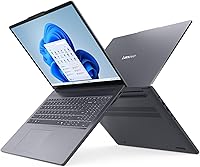
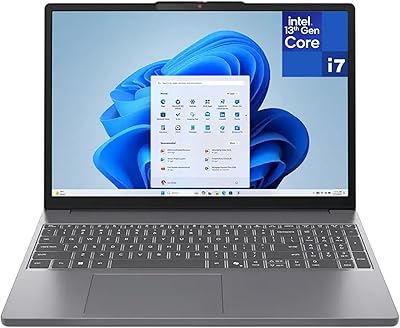
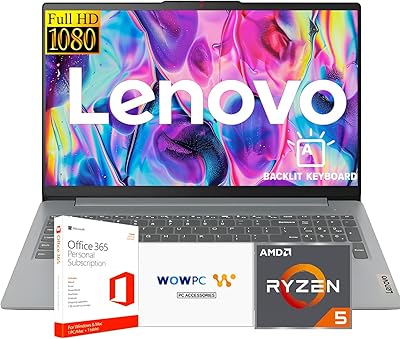
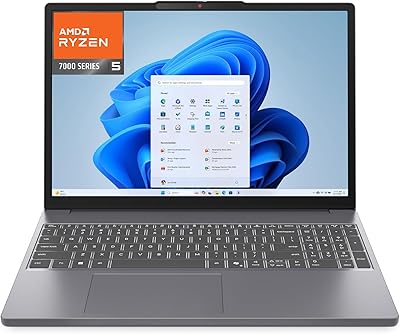
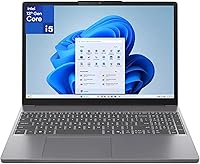
The Lenovo IdeaPad Slim 3 16″ Laptop launched in early 2025 as a capable mid-range machine built for everyday home and office work — not gaming, not video production. What makes it stand out at this price is the 40GB DDR5 RAM, a configuration rarely seen in notebooks at this level. The Luna Grey chassis measures just 0.7 inches thin, giving it a clean, understated look without feeling flimsy. One thing worth stating upfront: with Intel UHD integrated graphics, GPU-heavy workloads are off the table. This is a productivity-first laptop, and it is honest about that.
Features & Benefits

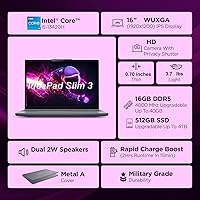
The 8-core Intel Core i5-13420H handles day-to-day workloads without complaint — web browsing, spreadsheets, video calls, and running several apps at once all feel snappy. The real headline spec, though, is the 40GB DDR5 RAM. Most laptops at this price ship with 16GB; having 40GB means you can keep dozens of browser tabs open, run light virtual machines, or juggle multiple productivity tools without hitting a wall. The 1TB NVMe SSD boots Windows quickly and holds a substantial file library. On connectivity, Wi-Fi 6, Bluetooth 5.2, and a well-rounded port layout — including USB-C with DisplayPort output — cover most real-world docking and peripheral needs.

Best For

This mid-range Lenovo laptop is an excellent fit for remote workers who live in browser tabs and video conferencing apps — the RAM headroom alone justifies the choice. College and grad students will appreciate the large display for reading, writing, and research without the sticker shock of a premium machine. Small business users handling documents, email, and calls will find it more than adequate. At 7.24 pounds with a 16-inch screen, it is portable without being ultralight — fine for daily commutes, less ideal for those who prioritize a light travel bag. Anyone upgrading from a machine with 8GB or 16GB RAM will feel an immediate, noticeable difference.

User Feedback

Buyers consistently point to everyday speed and the generous RAM as highlights, and the spacious display earns praise for making long work sessions comfortable. That said, a few recurring complaints are worth knowing. The non-backlit keyboard is a real frustration for anyone working in dim lighting — a cost-cutting choice that feels out of place on an otherwise solid machine. The 300-nit display is fine indoors but can wash out in brighter environments. The 720p webcam is passable for occasional calls, though frequent video conferencing users may notice the quality gap. Battery life is decent but typical for a 16-inch productivity laptop — plan to stay near an outlet for full-day use.

Pros

  • 40GB DDR5 RAM is exceptionally rare at this price point, giving serious multitaskers real breathing room.
  • The 8-core Intel Core i5-13420H keeps everyday workloads — browsing, calls, office apps — feeling fast and responsive.
  • A 1TB NVMe SSD means quick boot times and plenty of storage without needing an external drive right away.
  • The 16-inch anti-glare IPS display reduces eye strain during long indoor work sessions.
  • Wi-Fi 6 and Bluetooth 5.2 offer future-ready wireless performance for years of reliable connectivity.
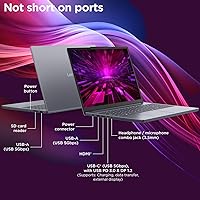
  • USB-C with DisplayPort and Power Delivery, HDMI, USB-A, and an SD card slot cover most real-world desk setups.
  • At 0.7 inches thin, this mid-range Lenovo laptop looks and feels more refined than its price suggests.
  • The full-size keyboard with numpad is a practical bonus for anyone who works with numbers or spreadsheets regularly.
  • The physical webcam shutter is a small but genuinely useful privacy feature for video call-heavy users.
  • Launched in early 2025 with a 13th Gen Intel processor, it is a current-generation machine with solid longevity ahead.

Cons

  • No keyboard backlighting is a real daily annoyance for anyone who types in low-light conditions.
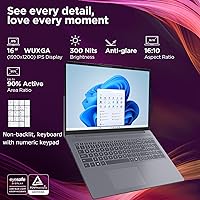
  • At 300 nits, the display struggles in bright rooms and is essentially unusable in direct sunlight.
  • The 720p webcam produces noticeably soft, grainy video — a drawback for professionals on frequent video calls.
  • Intel UHD integrated graphics rules out any meaningful gaming, video editing, or GPU-accelerated creative work.
  • The 45% NTSC color gamut makes the screen a poor choice for anyone doing color-sensitive visual work.
  • At 7.24 pounds, this 16-inch Slim 3 is on the heavier side and can fatigue your bag on longer commutes.
  • Battery life is adequate but not class-leading — a full day away from a charger requires careful management.
  • HDMI is version 1.4 only, which limits external display output to 4K at 30Hz rather than the smoother 60Hz.
  • No Thunderbolt support on the USB-C port narrows high-speed docking and eGPU options.
  • The display refresh rate is capped at 60Hz, which feels dated compared to 90Hz or 120Hz panels on rival machines.

Ratings

Our AI-generated scores for the Lenovo IdeaPad Slim 3 16″ Laptop are produced by analyzing thousands of verified global user reviews, with automated filtering applied to remove incentivized, duplicate, and bot-generated feedback. The result is a balanced scorecard that honestly reflects both what buyers consistently praise and the pain points that show up repeatedly across real-world use. Every category below — from everyday performance to webcam quality — is scored to help you make a confident, clear-eyed purchasing decision.
Everyday Performance
83%
For the workloads this machine is built for — browser sessions with 20-plus tabs, Zoom calls, and office suites running simultaneously — the 8-core i5-13420H rarely hesitates. Users upgrading from older Core i3 or first-gen Ryzen machines consistently describe the speed jump as immediately noticeable in day-to-day responsiveness.
Performance drops off sharply once workloads become CPU-sustained, such as long video encodes or running local development environments with multiple services. A handful of users also reported occasional thermal throttling during prolonged intensive tasks, suggesting the chassis has limited thermal headroom under pressure.
RAM Capacity
93%
The 40GB DDR5 configuration is the single most talked-about advantage across user feedback, and for good reason — buyers who multitask aggressively report that memory simply stops being a bottleneck. Running a video call, a browser with research tabs, a spreadsheet, and a chat app at the same time feels effortless in a way it would not on a 16GB system.
If the RAM is soldered to the motherboard — which is common in this chassis class — there is no upgrade path if your needs grow further down the line. A small number of technically minded users also noted that while 40GB is generous, the single-channel memory configuration may limit peak DDR5 throughput compared to a proper dual-channel setup.
Storage Speed & Capacity
86%
The 1TB NVMe SSD delivers noticeably fast boot times and responsive app launches, which users coming from hard-drive-based machines find transformative. Having a full terabyte means most buyers will not need to think about external storage for years of typical document, photo, and media accumulation.
The SSD is not a top-tier NVMe drive — sequential read and write speeds are adequate rather than exceptional, and power users doing large file transfers will notice it is not in the same league as faster PCIe 4.0 options found on more expensive notebooks. Sustained write performance under heavy load also shows some reduction.
Display Quality
71%
29%
The 16-inch IPS panel with its 1920x1200 aspect ratio gives a bit more vertical real estate than a standard 16:9 screen, which users doing document work and web browsing genuinely appreciate. The anti-glare coating handles reflections well enough for a desk positioned away from direct light sources, and color uniformity across the panel is consistent.
At 300 nits, the display simply cannot compete with brighter panels in the same price range, and users who work near windows or in well-lit rooms mention squinting and glare as recurring frustrations. The 45% NTSC color gamut also means colors look muted compared to wider-gamut panels, which bothers anyone doing even casual photo editing.
Build Quality
74%
26%
The Luna Grey finish gives the machine a clean, professional look that holds up well in office and classroom settings, and at 0.7 inches thin it feels more refined than budget laptops in this category. Most users describe the chassis as solid enough for daily use without any worrying flex in the keyboard deck.
The lid shows noticeable flex under light pressure, and the hinge mechanism, while functional, feels less premium than what you find on business-tier Lenovo ThinkPads. A few users reported minor creaking from the chassis after several months of regular use, which suggests the plastics are cost-managed.
Keyboard & Trackpad
61%
39%
The full-size layout with integrated numpad is genuinely useful for spreadsheet-heavy work and data entry, and users who work exclusively in well-lit environments find the key travel and spacing comfortable for extended typing sessions. The trackpad is responsive and handles multi-finger gestures reliably.
The lack of keyboard backlighting is the single most criticized aspect across all user feedback, and it is hard to overstate how limiting this is for anyone who types in dim conditions — evening work sessions, dark conference rooms, or flights become noticeably more frustrating. Key feedback, while acceptable, is on the shallower side and lacks the satisfying resistance that enthusiast typists prefer.
Webcam Quality
53%
47%
The 720p webcam produces an image that is serviceable for occasional video calls, and the built-in physical privacy shutter earns consistent praise from privacy-conscious users who appreciate not having to cover the lens with tape. It works reliably without driver issues across Zoom, Teams, and Meet.
Daily video meeting users frequently flag the image quality as noticeably soft and grainy, especially under anything less than bright overhead lighting. In a world where many competing laptops at this price now ship with 1080p cameras, the 720p resolution feels like a meaningful step behind and is a real pain point for professionals whose video presence matters.
Battery Life
66%
34%
Under light productivity use — document editing, light browsing, and occasional video calls with screen brightness kept moderate — most users report comfortably getting through a 6 to 7 hour workday. USB-C charging is a practical bonus that lets users top up with a portable charger when a wall outlet is not available.
Heavier use involving sustained CPU workloads, screen sharing, or keeping brightness near maximum can push battery drain to a point where real-world runtime drops below five hours. Users who attend back-to-back video meetings all day without a charger nearby describe the battery as borderline insufficient, and the 16-inch chassis does not leave much room for a larger cell.
Connectivity & Ports
82%
18%
The port layout is one of the more practical setups in this price range — having both USB-A and USB-C, an HDMI output, a full SD card slot, and a headphone jack means most users can connect their peripherals without a hub. USB-C Power Delivery makes the charging setup flexible for travel.
HDMI 1.4 is a noticeable limitation — users connecting a 4K monitor will be capped at 30Hz, which produces a choppy cursor experience on high-resolution external displays. There is also no Thunderbolt support, which rules out high-speed docks and eGPU enclosures for users considering those setups.
Wireless Performance
84%
Wi-Fi 6 delivers strong, consistent throughput for video calls, large file downloads, and cloud-synced workflows, and users in busy office environments with congested networks report better stability than older Wi-Fi 5 systems. Bluetooth 5.2 pairs headsets and peripherals quickly and maintains a stable connection during extended use.
A small subset of users reported occasional Wi-Fi reconnection delays after waking the laptop from sleep, which appears to be a driver-level behavior rather than a hardware fault. Range at the edge of a home network is solid but not exceptional compared to higher-end wireless cards.
Graphics Capability
44%
56%
Intel UHD integrated graphics handle everyday display tasks without issue — external monitor output, streaming 4K video, and light image browsing all work fine. For the productivity-focused buyer this machine targets, the integrated GPU is entirely sufficient.
Anything beyond basic display tasks exposes the limits of integrated graphics immediately — gaming, video rendering, and GPU-accelerated creative applications are simply not viable workloads on this machine. Users who bought this expecting to run even light games were consistently disappointed, and the absence of a discrete GPU is a hard ceiling that no software update can address.
Thermal Management
77%
23%
During typical productivity workloads, this 16-inch Slim 3 stays quiet and the chassis surface remains comfortable to the touch. Users who primarily use the machine for office tasks rarely notice the fans at all, which contributes to a pleasant working environment.
Under sustained load — such as a long compile job or running multiple large applications for hours — the fan ramp-up becomes audible and the bottom of the chassis gets warm enough to be uncomfortable on a lap. Thermal management prioritizes silence at light loads over sustained peak performance, which is a reasonable trade-off but worth knowing.
Value for Money
88%
The combination of a current-gen 8-core processor, 40GB of DDR5 RAM, and a 1TB NVMe SSD at this price is genuinely difficult to match across competing mid-range laptops. For buyers whose primary need is a capable, future-resistant productivity machine, the spec-to-dollar ratio stands out clearly in the 2025 market.
The value calculation shifts if display quality or keyboard backlighting matter to you — those two omissions are real compromises, and buyers who discover the non-backlit keyboard or dim screen after purchase frequently feel the trade-off was not clearly communicated. A modest price premium could have addressed at least one of those issues without impacting the overall value story.
Portability & Design
69%
31%
For a 16-inch laptop, the 0.7-inch profile and Luna Grey aesthetic give it a more refined presence than most machines in its category, and it fits comfortably in standard laptop sleeves and backpack compartments designed for 15 to 16-inch notebooks. Students and remote workers appreciate that it does not look out of place in a professional setting.
At 7.24 pounds, daily commuting with this machine becomes a physical consideration — users who carry it in a bag alongside books, chargers, and accessories frequently mention shoulder fatigue by the end of the day. Those coming from 13 or 14-inch ultraportables will find the weight difference more jarring than they expect.
Software & Out-of-Box Experience
78%
22%
Windows 11 Home is well-suited to the hardware and the AI Copilot integration gives productivity-focused users a genuinely useful assistant built into the OS. Most users found the initial setup straightforward, and driver stability post-launch has been reliable for the majority of buyers.
Like most consumer Windows laptops, this mid-range Lenovo laptop ships with pre-installed Lenovo and third-party software that adds clutter to the taskbar and startup sequence. While none of it is harmful, cleaning up the out-of-box software experience is an extra step that more careful buyers will want to take before settling in.

Suitable for:

The Lenovo IdeaPad Slim 3 16″ Laptop makes the most sense for people whose daily computing life revolves around productivity — think remote workers juggling video calls, cloud apps, and a perpetually overcrowded browser. The 40GB DDR5 RAM is a genuinely rare advantage at this price tier, meaning multitaskers who habitually run dozens of tabs alongside communication tools and office suites will rarely feel the machine slow down. College and graduate students who need a reliable, large-screen workhorse for research, writing, and attending virtual classes will find it a strong value. Small business owners handling email, spreadsheets, and client calls also sit squarely in the sweet spot. Anyone upgrading from an aging laptop with 8GB or 16GB of RAM will notice an immediate improvement in how fluidly everything runs day to day.
Not suitable for:

The Lenovo IdeaPad Slim 3 16″ Laptop is a poor fit for anyone who needs dedicated graphics performance — video editors, 3D designers, architects, and gamers should look elsewhere, as the integrated Intel UHD graphics simply cannot handle those workloads. Creative professionals who rely on color-accurate displays will also be disappointed; the 45% NTSC color gamut and 300-nit brightness ceiling fall well short of what photo or video work demands. Users who frequently work in brightly lit spaces or outdoors will find the screen harder to read comfortably. If you type regularly in low-light environments — a home office after dark, a dimly lit library, or a late-night study session — the absence of keyboard backlighting is a daily frustration, not a minor inconvenience. Finally, anyone who needs a lightweight ultraportable for frequent travel will find the 7.24-pound body a noticeable burden compared to slimmer 13- or 14-inch alternatives.

Specifications

  • Processor: Intel Core i5-13420H (13th Gen), 8-core configuration (4 Performance + 4 Efficiency), with P-cores reaching up to 4.6GHz and E-cores up to 3.4GHz.
  • RAM: 40GB DDR5 SDRAM, an unusually high capacity for this price tier, supporting faster data throughput compared to DDR4 systems.
  • Storage: 1TB M.2 PCIe NVMe SSD, offering fast read and write speeds for quick boot times and responsive file access.
  • Display: 16-inch WUXGA IPS panel at 1920x1200 resolution, with a 300-nit peak brightness, anti-glare coating, 60Hz refresh rate, and 45% NTSC color gamut.
  • Graphics: Intel UHD integrated graphics, shared with system memory, suitable for everyday display output but not for GPU-intensive workloads.
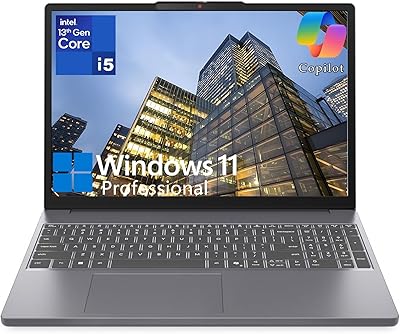
  • Operating System: Windows 11 Home (English) comes pre-installed, with support for AI Copilot features built into the OS.
  • Wireless: Wi-Fi 6 (802.11ax, 2x2) provides high-speed wireless connectivity on both 2.4GHz and 5GHz bands.
  • Bluetooth: Bluetooth 5.2 is included, supporting low-latency connections to peripherals such as headsets, keyboards, and mice.
  • Ports: Connectivity includes 2x USB-A (USB 3.2 Gen 1, 5Gbps), 1x USB-C (USB 3.2 Gen 1 with USB PD 3.0 and DisplayPort 1.2), 1x HDMI 1.4, 1x 3.5mm headphone/microphone combo jack, and 1x SD card reader.
  • Webcam: A 720p HD webcam is built into the display bezel, accompanied by a physical privacy shutter that mechanically blocks the lens when not in use.
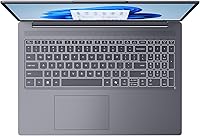
  • Keyboard: Full-size island-style keyboard with integrated numpad; the keyboard does not include backlighting.
  • Dimensions: The chassis measures 14.17 x 9.88 x 0.7 inches (LxWxH), keeping the profile notably slim for a 16-inch notebook.
  • Weight: Rated at 7.24 pounds, which is typical for a 16-inch productivity laptop but heavier than compact ultraportables.
  • Color: Available in Luna Grey, a neutral matte finish that resists fingerprints reasonably well in everyday handling.
  • Release Date: First made available in March 2025, making it a current-generation product based on Intel’s 13th Gen Raptor Lake-H platform.

Related Reviews

Lenovo IdeaPad Slim 3 16-inch 2TB Laptop
73%
88%
Value for Money
93%
Storage Capacity
84%
CPU Performance
71%
Display Quality
67%
Build Quality
More
Lenovo IdeaPad Slim 3 15.3″ Laptop, Intel Core i5-13420H, 16GB RAM, 1TB SSD
85%
88%
Performance
81%
Display Quality
89%
Multitasking Capabilities
85%
Build Quality
77%
Battery Life
More
Lenovo IdeaPad Slim 3 15.6″ Ryzen 5 5625U 16GB 512GB
75%
88%
Processor Performance
91%
Value for Money
74%
Build Quality & Durability
67%
Display Quality
86%
RAM & Storage
More
Lenovo IdeaPad Slim 3 Business Laptop, Ryzen 5 5625U, 16GB RAM, 1TB SSD
86%
88%
Performance
90%
Multitasking Capability
85%
Display Quality
86%
Keyboard Comfort
65%
Battery Life
More
Lenovo Ideapad Slim 3 Laptop, AMD Ryzen 5 5625U, 16GB RAM, 2TB SSD, 15.6″ FHD, Windows 11 Pro
86%
92%
Value for Money
88%
Battery Life
85%
Display Quality
90%
Performance (General)
93%
Storage Capacity
More
Lenovo IdeaPad Slim 3 15.6-inch 256GB Laptop
71%
83%
Everyday Performance
71%
RAM & Memory
58%
Display Quality
61%
Storage Capacity
78%
Value for Money
More
Lenovo IdeaPad Slim 3 15 Laptop
74%
88%
Value for Money
83%
Performance
79%
Display Quality
86%
Build Quality
71%
Keyboard & Typing Experience
More
Lenovo Ideapad 3 Laptop, 15.6″, Intel Core i3, 12GB RAM, 256GB SSD
84%
92%
Value for Money
85%
Performance for Everyday Tasks
90%
Portability and Weight
75%
Display Quality
80%
Battery Life
More
Lenovo IdeaPad 3 15″ Touch Laptop
70%
83%
Value for Money
67%
Performance
54%
Display Quality
76%
Build Quality
79%
Keyboard & Trackpad
More
Lenovo IdeaPad 3 14-inch Laptop
70%
84%
Value for Money
78%
Performance
71%
Display Quality
62%
Battery Life
59%
Build Quality
More

FAQ

It is genuinely useful for a specific kind of user. If you regularly keep 20 or more browser tabs open alongside a video call, a spreadsheet, and a few background apps, 16GB starts to feel cramped and you will notice slowdowns. With 40GB, that headroom disappears as a concern. It is not something a light user will notice day to day, but for anyone who multitasks heavily, it is a real-world advantage at this price point.

Light and older titles that do not demand a dedicated GPU can run, but do not expect much. The integrated Intel UHD graphics are not designed for gaming and will struggle with anything graphically demanding. If gaming is a priority, you will want a laptop with a discrete GPU — this mid-range Lenovo laptop is built for productivity, not play.

No, unfortunately it does not. The keyboard is non-backlit, which is one of the more notable trade-offs on this machine. If you type in dim environments regularly, that absence will frustrate you quickly. It is worth factoring into your decision, especially if you work evenings or in dark rooms.

Yes. The USB-C port supports USB Power Delivery 3.0, so you can charge the laptop using a compatible USB-C charger or power bank. This is convenient for travel since it means you are not locked to a proprietary barrel connector — though the laptop also includes a dedicated power connector if you prefer the standard adapter.

Indoors under normal office lighting it looks perfectly fine, but near a bright window or in a sunlit room it starts to wash out. The 300-nit brightness ceiling is adequate for typical indoor use but leaves little margin when ambient light is high. Outdoor use is genuinely uncomfortable. If most of your work happens at a desk away from direct light, you will not have issues.

It is acceptable but not great. The 720p camera will get the job done for occasional calls, but if you are on video all day for work, the lower resolution and image quality will be noticeable compared to an external 1080p webcam. The physical privacy shutter is a nice touch for security-conscious users. If video calls are central to your workday, pairing this with an external webcam is worth considering.

Yes, in two ways. The HDMI 1.4 port supports external displays up to 4K at 30Hz, and the USB-C port includes DisplayPort 1.2 output, which can drive a 1080p or 1440p monitor at 60Hz. For most home office setups with a single external screen, either option will work well.

The Lenovo IdeaPad Slim 3 16″ Laptop is a strong option for college use, particularly for students in fields that rely on productivity software, research, writing, and online classes. The large display helps with reading-heavy work, and the generous RAM means you can have your notes, browser, and communication apps all open at once without slowdown. Just keep in mind the weight — carrying it across campus daily adds up.
This is an important question to research before buying. Many current IdeaPad Slim models use soldered RAM, meaning it cannot be upgraded after the fact. The SSD may be accessible via the M.2 slot, but this varies by exact configuration. If upgradeability matters to you, check Lenovo’s official service documentation for this specific model before committing.

For a 16-inch laptop in this class, expect somewhere in the range of 6 to 8 hours under mixed productivity use — browsing, documents, and video calls with the screen at moderate brightness. Running demanding tasks or keeping brightness high will pull that number down noticeably. It is enough to get through a workday with some care, but if you are away from outlets all day, keeping the charger accessible is a good habit.

Where to Buy