
Overview

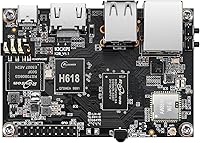
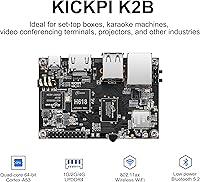
The KICKPI K2B Single Board Computer is a compact ARM-based board aimed at hobbyists, developers, and anyone exploring light industrial applications without spending a lot. Running on Allwinner's H618 quad-core Cortex-A53 with a Mali-G31 MP2 GPU, the K2B board sits firmly in budget SBC territory — think Orange Pi Zero 3 rather than Raspberry Pi 5. It measures just 3.15 x 2.2 inches, so it tucks into tight enclosures without fuss. Both Android 12 and Ubuntu 22.04 are supported out of the box, which gives it genuine flexibility across use cases. Worth noting: it only hit the market in late 2024, so the community around it is still finding its footing.

Features & Benefits

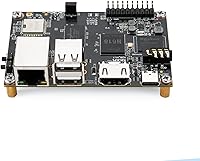
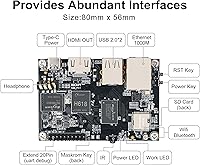
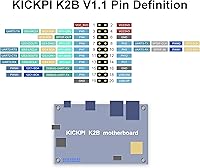
The K2B board's connectivity story is one of its stronger selling points — you get Gigabit Ethernet alongside dual-band WiFi 5 and Bluetooth 5.2, which covers most networked project scenarios without extra modules. The HDMI output runs up to 4K at 60Hz with hardware decoding for H.265 and VP9, making it a credible pick for low-cost digital signage or a basic media box. On the hardware interface side, the 20-pin GPIO header covers UART, SPI, I2C, I2S, PWM, and SPDIF — plenty of variety for sensor and peripheral work. Three physical buttons for recovery, reset, and FEL flashing are a practical touch that saves real time during firmware development. Power arrives via Type-C, keeping the bench setup clean.

Best For

This Allwinner H618 SBC makes the most sense for makers and students who want a capable Linux or Android playground without a big outlay. It fits particularly well in IoT and smart home builds where onboard WiFi and Bluetooth reduce the need for extra dongles. The 4K HDMI support opens the door to affordable digital signage or kiosk installs — situations where a Raspberry Pi 4 might feel over-priced for the job. Light robotics and automation projects can lean on the GPIO variety, especially the multiple I2C and UART channels. It also works as a hardware evaluation platform for developers considering the H618 SoC in a commercial product before committing to a full custom PCB. Keep raw compute expectations realistic.

User Feedback

With around 69 ratings and a 3.9-star average, the KICKPI board has a reasonable early track record — but that sample is thin for a product launched in late 2024, so treat the consensus cautiously. Buyers tend to appreciate the easy initial setup and the fact that both OS images run without major headaches. Criticisms cluster around two areas: the 2GB RAM ceiling feels limiting when running heavier Android apps or multiple Ubuntu services, and English documentation is sparse — most official resources are in Chinese, which frustrates non-Mandarin developers. A few buyers compare it favorably to the Orange Pi Zero 3 at a similar price point. Thermal complaints are notably absent, which is a quiet but meaningful positive.

Pros

  • Gigabit Ethernet and dual-band WiFi 5 both included — no extra dongles needed for most network builds.
  • 4K HDMI output with hardware H.265 decoding makes it a credible low-cost digital signage or media player board.
  • Boots both Android 12 and Ubuntu 22.04 from eMMC, giving developers genuine OS flexibility on a single piece of hardware.
  • The 20-pin GPIO header covers four I2C channels, two UARTs, SPI, and PWM — strong variety for sensor and peripheral projects.
  • eMMC storage is noticeably faster than SD-card-based boards, resulting in snappier boot times and more responsive OS performance.
  • Type-C power input is a practical modern touch that most developers already have cables for.
  • Three physical buttons for Recovery, Reset, and FEL make firmware flashing and recovery significantly less painful than on boards without them.
  • Compact 3.15 x 2.2-inch footprint fits into tight enclosures where larger SBCs simply cannot go.
  • Bluetooth 5.2 pairs reliably with BLE sensors and standard peripherals, useful for wireless IoT prototyping.

Cons

  • 2GB RAM fills up fast — running Ubuntu desktop, a dev tool, and a background service simultaneously pushes the system noticeably.
  • English documentation is sparse; most official guides and SDK references are in Chinese, which slows down non-Mandarin developers considerably.
  • WiFi is single-antenna 1T1R, so real-world wireless throughput falls well short of what the WiFi 5 label implies.
  • The GPIO pinout is non-standard, meaning popular Raspberry Pi HATs and expansion boards are incompatible without modification.
  • No heatsink or thermal pad is included, and the board can throttle in sealed enclosures during sustained workloads.
  • The reviewer pool is still small — roughly 69 ratings as of early 2025 — so long-term reliability data is limited.
  • 8GB eMMC leaves little free space after a full Ubuntu installation with development tools, requiring careful storage management.
  • Community support in English is nascent; troubleshooting unfamiliar errors can require significant independent research.
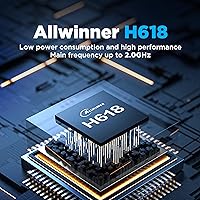
  • The marketed 2.0GHz CPU speed is a variant ceiling, not the standard config — most units run at up to 1.5GHz.

Ratings

The KICKPI K2B Single Board Computer earns a measured but respectable position in the crowded budget SBC market, and the scores below reflect AI analysis of verified global buyer reviews — with spam, bot-driven, and incentivized feedback actively filtered out. Strengths around connectivity and OS flexibility come through clearly, but real pain points around documentation and RAM headroom are just as honestly reflected.

Value for Money
82%
18%
For builders who need a connected, GPIO-equipped board that boots Android or Linux without extra cost, the K2B board punches reasonably above its price tier. Buyers frequently note it competes well against the Orange Pi Zero 3 on a pure feature-per-dollar basis, especially given the onboard Gigabit Ethernet and WiFi 5.
Some buyers feel the 2GB RAM ceiling undermines the value proposition for anything beyond single-purpose workloads. If your project eventually needs more headroom, you may end up buying a second board rather than upgrading, which erodes the initial savings.
Performance
67%
33%
For lightweight tasks — running a Node.js server, driving a kiosk display, or handling basic Android TV navigation — the Allwinner H618 quad-core handles the load without obvious struggle. The hardware video decoder earns genuine praise from users running 4K media files, where the chip does the heavy lifting efficiently.
Push it toward multitasking or heavier Ubuntu workloads and the 2GB LPDDR4 RAM becomes the bottleneck long before the CPU does. Users comparing it to a Raspberry Pi 4 in compute-intensive scenarios consistently note the gap, even accounting for the price difference.
Build Quality
74%
26%
The board feels solid for its weight class — components are well-soldered, the PCB layout is clean, and the physical control buttons have a satisfying tactile response that cheaper boards often skip. Early adopters report no obvious delamination or cold-joint issues after weeks of continuous use.
The absence of any heatsink or mounting hardware in the box is a recurring complaint. At this form factor, passive cooling relies entirely on ambient airflow, and a few users in enclosed enclosures report throttling during sustained GPU workloads.
Connectivity
88%
Dual-band WiFi 5 and Bluetooth 5.2 alongside true Gigabit Ethernet is a strong combination at this price point, and users running IoT sensor hubs or media streaming applications report stable, consistent connections. The Type-C power input is a welcome modern touch that removes the barrel-jack frustration common on older budget boards.
WiFi throughput is 1T1R only, meaning real-world wireless speeds are meaningfully lower than the WiFi 5 label implies. Users in dense wireless environments or those streaming 4K over WiFi rather than Ethernet have noticed dropped frames and inconsistent bandwidth.
GPIO & Expandability
79%
21%
The 20-pin header covers an impressive range of protocols — four I2C channels and two UARTs alone make this Allwinner H618 SBC notably flexible for sensor-heavy or multi-peripheral builds. Robotics hobbyists and automation tinkerers appreciate having PWM and SPI on the same connector without needing a breakout board.
The 20-pin layout is non-standard compared to the 40-pin arrangement Raspberry Pi users are accustomed to, so existing HATs and expansion boards rarely fit. Pinout documentation in English is thin, which means more time spent cross-referencing datasheets than actually prototyping.
OS Support & Compatibility
71%
29%
Having both Android 12 and Ubuntu 22.04 available as official images is a genuine advantage — most builders can pick the environment that matches their project without hacking together unofficial ports. Users report that both OS images boot reliably from eMMC without the SD-card instability that plagues some competing boards.
Android TV performance is functional but not polished; app compatibility is inconsistent and the Play Store experience is limited compared to a proper Android device. Ubuntu image support lags behind upstream kernel versions, and users attempting to run newer packages often hit dependency walls.
Documentation & Setup
48%
52%
The board ships with a preloaded OS, so first boot is genuinely straightforward — plug in power and an HDMI display and you are up and running in minutes. Users with Chinese language skills report the official documentation is actually thorough and well-organized once the language barrier is cleared.
English documentation is sparse to the point of being a real obstacle for many Western developers. Forum support exists but is fragmented, and the KICKPI board lacks the broad Stack Overflow and Reddit coverage that makes Raspberry Pi or even Orange Pi troubleshooting so much faster.
Thermal Management
72%
28%
Passive operation is quiet and in typical open-bench or ventilated-enclosure deployments, thermals stay manageable during standard workloads like web browsing or media playback. No users in the current review pool report outright thermal shutdowns under normal ambient conditions.
There is no onboard thermal regulation feedback visible to the OS by default in all firmware builds, making it harder to monitor temperature programmatically. Sealed enclosures without airflow see noticeably higher skin temperatures, and the board ships with no thermal pad or heatsink to address this.
Media Playback
81%
19%
The hardware decoder handling H.265 and VP9 at 4K 60Hz is a legitimate highlight for a board at this price — users deploying it as a low-cost media player or signage node report smooth, stutter-free playback for most common streaming formats. The HDMI output comes up cleanly on a wide range of displays tested by reviewers.
AVS2 codec support, while listed, is niche and of limited practical value for most Western users. Audio passthrough over HDMI has generated a handful of complaints around compatibility with certain AV receivers, and the SPDIF optical path requires additional configuration not covered in the English docs.
Wireless Performance
63%
37%
For IoT use cases — pushing small MQTT payloads, syncing sensor data, running a lightweight web server — the onboard WiFi is more than sufficient and saves the cost of a USB dongle. Bluetooth 5.2 pairs reliably with standard peripherals like keyboards, mice, and BLE sensors.
The single-antenna 1T1R WiFi 5 radio struggles with range and throughput in real-world environments compared to boards using a 2T2R chip. Several users running the K2B board as a media client over WiFi switched to Ethernet after experiencing buffering, which somewhat undermines the wireless convenience argument.
Storage & Memory
59%
41%
The 8GB eMMC is appreciably faster than SD-card-based boards for OS reads and writes, which makes the overall system feel snappier during boot and app launches. Having both eMMC and an SD card slot gives users a practical backup and expansion path.
8GB fills up quickly once a full Ubuntu desktop environment and development tools are installed, leaving little headroom for project files. The 2GB RAM cap is the more persistent frustration — users report that running a browser, an SSH session, and a background service simultaneously is already pushing the system.
Community & Ecosystem
44%
56%
The board is gaining traction in Chinese maker communities, and there is a growing base of users sharing configurations and custom scripts in dedicated forums. Vendors like KICKPI do appear to respond to technical questions when contacted directly, which is better than some no-name competitors.
Compared to Raspberry Pi or even Orange Pi, the English-language community is essentially nascent as of early 2025. Finding ready-made project guides, OS customizations, or driver fixes in English requires significant independent research, which adds friction for new embedded developers.
Portability & Form Factor
86%
At 1.41 ounces and roughly credit-card adjacent in footprint, the K2B board fits into enclosures and project boxes that most full-size SBCs simply cannot. Makers building wearable prototypes, wall-mounted displays, or compact automation controllers consistently cite the size as a decisive factor in choosing it.
The compact layout means component density is high, and users doing manual rework or soldering modifications report limited clearance around the GPIO header and USB ports. Mounting hole placement is non-standard, which complicates integration with off-the-shelf cases designed for Pi-footprint boards.

Suitable for:

The KICKPI K2B Single Board Computer is a natural fit for makers, students, and self-taught developers who want a capable embedded platform without a significant financial commitment. If your project involves driving a digital signage display, building a compact IoT hub, or experimenting with sensor arrays over I2C and UART, the K2B board covers those bases reliably. It works particularly well as a dedicated single-purpose device — a kiosk controller, a lightweight home automation node, or a low-cost Android media player — where 2GB of RAM is sufficient because the workload is focused and predictable. Developers who are evaluating the Allwinner H618 SoC for a future custom PCB design will also find it a practical and affordable evaluation platform. The dual-OS support means you can prototype in Ubuntu and then test the same hardware under Android without buying a second board, which is a genuine time-saver early in a product development cycle.

Not suitable for:

Buyers expecting a drop-in replacement for a Raspberry Pi 4 or 5 in a general-purpose computing role will likely be disappointed with the KICKPI K2B Single Board Computer. The 2GB RAM ceiling becomes a real constraint the moment you open a browser alongside a background service and an SSH session — that is not a hypothetical edge case, it is a typical developer workflow. If you rely on a rich English-language community for troubleshooting, ready-made project guides, and quick Stack Overflow fixes, this board will frustrate you; official documentation skews heavily toward Chinese-language resources, and the English forum presence is still thin as of early 2025. Anyone building a system that needs sustained compute performance — machine learning inference, real-time video processing, or compiling large codebases locally — should look at boards with more RAM and a stronger CPU, such as the Radxa Zero 3W or an Orange Pi 5 variant. The non-standard 40-pin GPIO footprint also means your existing Raspberry Pi HATs will not transfer over, which adds hidden cost if your project depends on off-the-shelf expansion boards.

Specifications

  • SoC: The board is powered by an Allwinner H618 quad-core Cortex-A53 processor running at up to 1.5GHz, paired with a Mali-G31 MP2 GPU.
  • RAM: 2GB of LPDDR4 memory is soldered onboard, providing the baseline for running Android 12 or Ubuntu 22.04 with lightweight workloads.
  • Storage: 8GB eMMC flash storage is included onboard, offering faster read and write speeds than a comparable SD-card-based setup.
  • OS Support: The board officially supports Android 12.0 and Ubuntu 22.04, with preloaded OS images available for both environments.
  • Display Output: A single HDMI 2.0 port supports resolutions up to 4K at 60Hz with hardware decoding for H.265, VP9, and AVS2 formats.
  • Networking: A single Gigabit Ethernet port delivers wired connectivity at up to 1000Mbps for reliable, low-latency network applications.
  • Wireless: Onboard WiFi 5 (802.11a/b/g/n/ac) dual-band with a 1T1R antenna configuration and Bluetooth 5.2 are provided via the AW869A module.
  • USB Ports: Two USB 2.0 Type-A HOST ports and one USB 2.0 OTG port are included for peripheral connectivity and device flashing.
  • GPIO Header: A 20-pin expansion header exposes two UART channels, one SPI bus, four I2C buses, four PWM channels, one I2S interface, one SPDIF output, and one additional USB line.
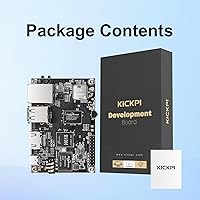
  • Power Input: The board is powered via a Type-C port at 5V DC; no power supply is included in the standard package.
  • Control Buttons: Three dedicated physical buttons — Recovery, Reset, and FEL — are onboard to support firmware flashing and system recovery workflows.
  • Expandable Storage: A MicroSD card slot allows additional storage expansion or alternative OS boot configurations beyond the onboard eMMC.
  • Infrared Receiver: An onboard infrared receiver enables compatibility with standard IR remote controls, useful for media player or kiosk deployments.
  • Dimensions: The board measures 3.15 x 2.20 x 0.63 inches (approximately 80 x 56 x 16mm), placing it in a compact, embedded-friendly form factor.
  • Weight: The bare board weighs 1.41 ounces (approximately 40g), with no heatsink, enclosure, or accessories included.
  • GPU: The Mali-G31 MP2 GPU handles graphics and hardware video decode offloading, supporting OpenGL ES 3.2 and Vulkan 1.1.
  • Manufacturer: The board is designed and manufactured by Shenzhen Oranth Technology Development Co., Ltd, and sold under the KICKPI brand.
  • Availability Date: The product became available on Amazon in November 2024, making it a relatively recent entrant in the budget SBC market.

Related Reviews
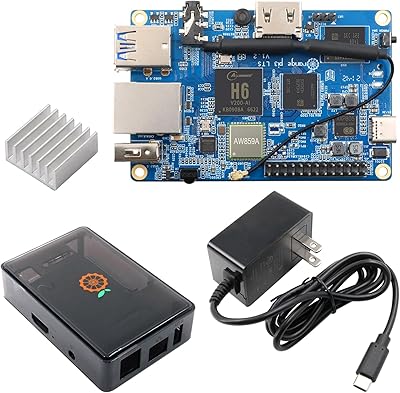
Orange Pi 3 LTS Single Board Computer 2GB RAM 8GB eMMC
81%
87%
Performance
91%
Value for Money
85%
Connectivity
80%
Software Compatibility
78%
Build Quality
More
Boogie Board Scribble n’ Play Drawing Board
88%
88%
Ease of Use
90%
Durability
92%
Portability
91%
Mess-Free Experience
85%
Display Quality
More
LANGTU 104-Key Membrane Keyboard
72%
74%
Build Quality
61%
Typing Feel
83%
Backlight Quality
79%
Keycap Durability
82%
Value for Money
More
KNOWSQT Wired Computer Keyboard
85%
89%
Design & Aesthetics
83%
Typing Experience
94%
Ease of Setup
88%
Build Quality
70%
Key Press Feel
More
Sanyun SW203
Sanyun SW203
80%
86%
Sound Clarity
63%
Bass Response
82%
Soundstage & Imaging
91%
Connectivity & Input Options
78%
Bluetooth Stability
More
Bluedee SK010
Bluedee SK010
84%
94%
Space Efficiency
89%
Bluetooth Connectivity
82%
Mid and High Frequency Clarity
54%
Bass Response
91%
Cable Management
More
Arduino MKR Zero ABX00012
80%
88%
Processing Performance
91%
Built-in SD Card Integration
79%
Audio Capability
86%
Portability & Power Options
63%
3.3V Logic Compatibility
More
OGUPGX EL024 Monitor Soundbar
83%
96%
Space Efficiency
94%
Ease of Installation
88%
Vocal Clarity
82%
Maximum Volume Level
87%
Control Accessibility
More
Nylavee SK700 Computer Speakers
86%
84%
Audio Clarity
68%
Bass Performance
96%
Setup Simplicity
87%
Build Quality
91%
RGB Lighting Aesthetics
More
Smalody 7080BL Computer Soundbar
80%
94%
Ease of Installation
91%
Value for Money
88%
Physical Control Layout
93%
Space Efficiency
41%
Bass Performance
More

FAQ

Unfortunately, no. The K2B board uses a non-standard footprint and mounting hole layout, so off-the-shelf Pi cases will not fit. You will need a generic open-frame SBC case or a custom enclosure — many makers simply 3D-print one to match the exact dimensions.

You get to pick one at a time, but switching is entirely possible. The board ships with both OS images available, and you can flash whichever you need onto the eMMC using the FEL or Recovery button workflow. Some users keep one OS on eMMC and boot an alternative from a MicroSD card.

It depends heavily on what you are building. Running a headless Ubuntu server, a lightweight Python environment, or a Node.js backend is manageable. The moment you add a full desktop environment, a browser, and a few background services simultaneously, the 2GB ceiling becomes a genuine constraint. For desktop-style development, you will feel the pressure.

The standard method uses the FEL button to put the board into USB download mode, then you connect it to a PC via the USB OTG port and use Allwinner's PhoenixSuit or a compatible flash tool to write the image. The official process is well-documented — though primarily in Chinese — and there are community-translated guides available for English speakers.

For low-bandwidth IoT tasks like sending sensor data or running a lightweight web server, the onboard WiFi works reliably. For anything involving sustained data throughput — streaming 4K video wirelessly, large file transfers — Ethernet is noticeably more stable. The 1T1R antenna means the real-world speeds are meaningfully below the WiFi 5 theoretical ceiling.

No, they will not. The K2B board uses a 20-pin GPIO header rather than the 40-pin layout Raspberry Pi uses, so physically and electrically, standard Pi HATs are incompatible. You can still connect sensors, modules, and peripherals directly using jumper wires, but expect to wire things up manually rather than snapping on a pre-built expansion board.

No heatsink or thermal pad is included in the box. For open-bench use or well-ventilated enclosures, passive cooling through the PCB and ambient airflow is generally sufficient for typical workloads. If you plan to run sustained GPU or CPU loads in a sealed case, sourcing a small adhesive heatsink for the SoC is a worthwhile precaution.

This is one of the more significant limitations of the KICKPI board at this stage. Official documentation, SDK references, and the primary community forum are predominantly in Chinese. English resources exist but are scattered — mostly user-contributed translations and forum threads. If you are comfortable hunting through GitHub repos and translated guides, you can manage, but it requires more patience than boards with mature English communities like Raspberry Pi or BeagleBone.

Yes, for hardware-decoded formats it handles 4K content well. H.265 and VP9 files play back cleanly because the Mali GPU offloads the decoding work from the CPU. Software-decoded formats or very high-bitrate streams may stutter, so sticking to hardware-supported codecs is the practical advice for a media player build.

The board requires a 5V supply via USB Type-C — a standard phone charger with sufficient amperage works fine, with 2A or higher recommended to avoid instability under load. No power supply is included in the box, so factor that into your setup. Most builders find they already have a compatible charger on hand.