Overview

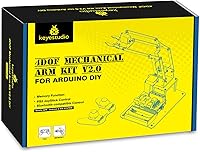
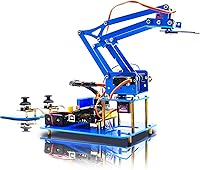
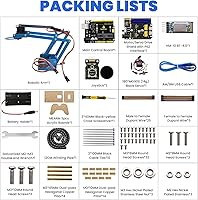
The KEYESTUDIO 4DOF Robot Arm Arduino Kit sits in an interesting middle ground — not a toy, not a professional-grade machine, but a genuine starter engineering project for curious teens and adults who want to get their hands dirty with robotics. The four-degree-of-freedom design is where the real learning happens: each axis of movement teaches you something concrete about servo control and mechanical coordination. Priced in the mid-range, it competes with serious hobbyist kits rather than cheap plastic novelties. Before you order, know that batteries are not included — and neither is the PS2 controller. Assembly itself is a multi-step process that rewards patience, especially if you are new to this kind of build.
Features & Benefits

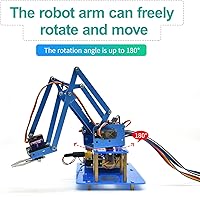
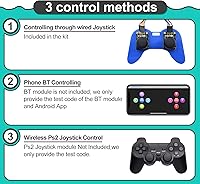
What makes this robotic arm kit genuinely interesting is the range of ways you can control it. Out of the box, the included joystick module lets you start moving servos immediately — no phone needed, no extra gear. Once comfortable, pairing it with the Bluetooth app (available for both Android and iOS) opens up wireless control from your phone, which honestly feels satisfying when it clicks. For the ambitious crowd, sample code is provided to support PS2 wireless control, though you will need to source your own controller. All four 180-degree gear servos respond with decent precision, and the whole project runs within the Arduino IDE, so any existing coding knowledge carries over cleanly.

Best For

This Arduino arm set is best suited to anyone aged 15 and up who already has a basic feel for electronics — think someone who has wired up an LED circuit or uploaded a sketch in Arduino IDE, but has not yet built anything that physically moves. Arduino hobbyists will find it a natural next step beyond breadboard-only projects. It also works well as a structured STEM gift for a motivated teenager or an adult learner who prefers project-based exploration over video tutorials. That said, if someone has zero background in electronics or coding, this kit will frustrate more than it teaches. Absolute beginners should pair it with some foundational Arduino reading before diving in.

User Feedback

Across a few hundred ratings, the Keyestudio arm lands around 4.0 to 4.1 out of 5 — solid enough to suggest it delivers on its core promise, but not universally loved. The most consistent praise focuses on the build process itself and how well the servos respond once everything is wired up correctly. On the flip side, many buyers were caught off guard by the fact that neither batteries nor the PS2 controller come in the box — a frustration that shows up repeatedly even though the listing does mention it. Instruction clarity is another sticking point, with some users finding the documentation too sparse for true newcomers. Plastic component quality gets mixed marks — functional, but not built to withstand regular rough handling.

Pros

  • Three distinct control modes give you genuine flexibility as your skills grow over time.
  • Bluetooth app compatibility with both Android and iOS works without needing extra hardware.
  • Four gear servos with 180-degree range allow surprisingly nuanced multi-directional movement.
  • Full Arduino IDE compatibility means existing coding knowledge transfers directly with no extra learning curve.
  • Sample code is included, so you are not starting completely from scratch on the programming side.
  • Compact packaged size makes this a realistic desk or workbench project, not a space hog.
  • Manufacturer technical support is available, which is a genuine safety net for tricky builds.
  • Mid-range pricing puts it well above toy-grade kits without requiring a serious engineering budget.
  • The assembly process itself is a meaningful learning experience, not just a means to an end.
  • Works well as a structured gift for motivated teens or adult hobbyists who prefer doing over watching.

Cons

  • Batteries are not included, which adds an extra errand and cost before you can do anything.
  • The PS2 wireless controller is also not in the box, despite being featured prominently in marketing.
  • Instructions lack depth for true beginners and can feel sparse when something does not go as expected.
  • Plastic arm components feel adequate but are not built to handle rough or repeated daily use.
  • Servo longevity under sustained load is a concern based on multiple user reports over time.
  • The learning curve is steeper than the listing implies for anyone without prior Arduino exposure.
  • No batteries included means you have to plan ahead before your first test run after assembly.
  • App pairing via Bluetooth can require some troubleshooting, and setup is not always plug-and-play.
  • The review base is relatively modest, making it harder to judge long-term reliability with confidence.
  • Users with no electronics background may find the gap between the instructions and their skill level discouraging.

Ratings

The KEYESTUDIO 4DOF Robot Arm Arduino Kit has been evaluated by our AI rating engine after analyzing verified global buyer reviews, with spam, bot activity, and incentivized feedback actively filtered out to ensure the scores reflect genuine hands-on experience. Across every category below, both the standout strengths and the real frustrations are reflected honestly — nothing has been softened to make this robotic arm kit look better than it is. Buyers at different skill levels had meaningfully different experiences, and those differences are baked directly into each score.
Servo Performance
78%
22%
Most users were genuinely pleased with how responsive the four gear servos felt during their first controlled movements — the 180-degree range gives the arm enough reach and flexibility to grab small objects from multiple angles. For a kit at this price level, the servo feedback felt more precise than many buyers expected.
Under repeated or sustained use, some servos showed signs of weakening over time, with a few buyers reporting jitter or inconsistent positioning after extended sessions. The gear servos are adequate for learning but not built for any kind of continuous operational demand.
Build Quality
63%
37%
The plastic components fit together reasonably well during assembly, and the overall structure holds its shape during normal desk-based use. For a starter engineering kit, the rigidity is acceptable and the arm does not flex or wobble excessively during light grabbing tasks.
The plastic construction is the most common source of disappointment in user reviews — it feels noticeably budget-grade up close, and a few buyers reported cracking or stress marks on joints after moderate use. This is not a kit built to last years of regular handling.
Assembly Experience
71%
29%
Builders with some prior electronics experience described the assembly process as genuinely satisfying — methodical, logical, and rewarding when the arm takes its final shape and moves for the first time. The step-by-step nature of the build is a real teaching exercise in itself, not just a means to an end.
For anyone without prior exposure to wiring or mechanical assembly, the process can turn into a frustrating guessing game. Several reviewers noted that certain steps in the instructions left too much room for interpretation, leading to reassembly and wasted time.
Instruction Clarity
54%
46%
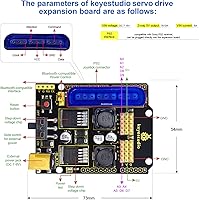
The included instructions do cover the core assembly steps and provide wiring diagrams that are accurate enough for someone who already knows how to read them. Sample code is included for all three control modes, which saves meaningful time on the programming side.
This is one of the weakest areas flagged by buyers, particularly those newer to Arduino. The documentation assumes a level of background knowledge that many first-time kit builders simply do not have, and there is minimal troubleshooting guidance when things do not go as expected.
Control Versatility
83%
Having three distinct control modes in a single kit is a genuine differentiator at this price point. Beginners can start with the physical joystick immediately after assembly, then graduate to app-based Bluetooth control as their confidence grows — each mode feels like a new experiment rather than just a redundant option.
The PS2 wireless mode, while an interesting option, requires the buyer to source their own controller separately, which adds cost and setup friction that not everyone anticipates. The transition between control modes also requires code changes rather than a simple hardware switch, which is an extra step beginners may find cumbersome.
Bluetooth App Control
69%
31%
When the Bluetooth pairing works cleanly, controlling the Keyestudio arm from a phone is one of the most immediately gratifying moments in the entire project — it makes the build feel like a finished, functioning machine rather than a classroom exercise. Both Android and iOS are supported without needing third-party apps.
Pairing reliability was inconsistent across user reports, with some buyers spending considerable time troubleshooting connection drops or failed initial pairings. The experience is smooth once established, but getting there can test patience, especially for less tech-savvy users.
Arduino Compatibility
88%
Working within the Arduino IDE ecosystem is a significant advantage for this kit — the learning materials, community forums, and code libraries available online are enormous, meaning any problem encountered during programming has likely already been solved and documented somewhere. Integration was smooth for users already familiar with the platform.
For buyers who have never used the Arduino IDE before, the initial setup of the software environment adds another layer of friction before the arm can even be tested. This is not a kit-specific problem, but it does raise the real entry barrier for true beginners.
Value for Money
74%
26%
For a mid-range kit that includes four servos, a joystick module, Bluetooth capability, sample code, and manufacturer support, the overall value proposition is reasonable — buyers who put in the time consistently reported feeling the price was justified by what they learned. It delivers more educational depth than cheaper alternatives.
The value calculation shifts negatively once you factor in the additional cost of batteries and a PS2 controller for anyone who wants full functionality out of the box. A few reviewers felt the plastic component quality did not quite match the price expectation.
Packaging & Completeness
61%
39%
The kit arrives in a compact, well-organized package and most buyers found all listed components present and undamaged. The compact box size makes it practical to store or transport, and component organization inside the box is generally tidy.
The absence of batteries and the PS2 controller — both of which feel like natural expectations for a complete kit — created real frustration for a notable share of buyers who did not read the listing details carefully. Packaging does not clearly communicate these omissions at a glance.
Educational Value
82%
18%
For the right audience, this Arduino arm set delivers an unusually well-rounded learning experience — covering mechanical assembly, servo programming, Bluetooth integration, and basic robotics concepts all in one project. Teachers and parents in particular praised how it sustains engagement across multiple sessions, not just one build day.
The educational value drops sharply for users who lack the prerequisite knowledge to follow along, since there is no structured curriculum or scaffolded learning path included. It is a project kit, not a course, and that distinction matters a lot for younger or less experienced builders.
Servo Count and Range
79%
21%
Four independently controlled servos with 180-degree travel gives the arm a movement vocabulary that feels genuinely capable for a starter robotics project — you can position, reach, rotate, and grip in combinations that demonstrate real mechanical thinking. Most users found this more expressive than they anticipated.
The 180-degree limit does restrict certain movement paths, and users who quickly outgrow beginner-level projects found themselves wanting more axes or continuous-rotation options that this kit simply does not offer without significant modification.
Manufacturer Support
72%
28%
Keyestudio's willingness to provide technical support via the product listing is a genuine comfort for buyers who hit a wall during assembly or coding. Several reviewers noted that response times were reasonable and the answers were substantive rather than generic copy-paste replies.
Support quality appeared inconsistent across the review base — some users reported helpful and timely responses, while others described being pointed back to the same documentation that had already confused them. Response availability may also vary by region or time zone.
Footprint and Portability
85%
The assembled arm has a small enough footprint to sit comfortably on a standard desk or classroom workbench without dominating the space. The lightweight plastic construction also means it is easy to move, store between sessions, or demonstrate at a school science fair without logistical hassle.
The compact size is a double-edged trait — while practical for storage, the overall arm reach is limited, which can feel restrictive once a user starts pushing for more ambitious grabbing or stacking demonstrations. There is not much room to grow within this form factor.
Beginner Accessibility
49%
51%
The inclusion of sample code for all three control modes does lower the barrier meaningfully for users who have at least some foundational Arduino knowledge, letting them see a working result without writing every line from scratch. This accelerates the learning loop for intermediate beginners considerably.
For a true zero-experience beginner, this kit is a steep climb. The instructions, code comments, and overall documentation level all assume familiarity with electronics concepts that many buyers in the target age range simply have not built yet, leading to assembly errors and code upload failures that go unexplained.

Suitable for:

The KEYESTUDIO 4DOF Robot Arm Arduino Kit is a strong pick for teens aged 15 and up, as well as adults who already have some passing familiarity with electronics or basic coding — even if they have never built anything that moves before. Arduino hobbyists who have outgrown simple LED and sensor projects will find this a satisfying next challenge, one that introduces servo control and mechanical thinking in a tangible, hands-on way. Parents and educators looking for a structured, project-based STEM activity will appreciate that this is not passive learning — the builder has to think, troubleshoot, and actually make decisions throughout the process. It also appeals to makers who are curious about Bluetooth-based control systems, since the Android and iOS app compatibility lets you experiment with wireless robotics without needing to build custom radio hardware. If the goal is to bridge the gap between software curiosity and physical engineering, this robotic arm kit sits at exactly that intersection.
Not suitable for:

The KEYESTUDIO 4DOF Robot Arm Arduino Kit is genuinely not the right starting point for complete beginners who have never touched Arduino, written a line of code, or wired up a basic circuit — the instructions assume a baseline that many first-timers simply do not have, and the frustration can outweigh the learning. Young children are also a poor match here; the recommended age starts at 15 for good reason, both in terms of the fine assembly work involved and the conceptual understanding required to get anything meaningful out of the experience. Buyers who want a ready-to-run robot out of the box will be disappointed — this is a build-it-yourself project that demands time and patience, not an instant gratification purchase. The plastic construction also means it is not suited for repetitive heavy-duty use; if the goal is long-term durability or professional prototyping, this kit will show its limits fairly quickly. Finally, anyone expecting a full wireless setup at purchase should know upfront that both batteries and the PS2 controller are sold separately.

Specifications

  • Degrees of Freedom: The arm operates across 4 independent axes of movement, giving it a 4DOF (four-degree-of-freedom) mechanical configuration.
  • Servo Type: Four gear servos are included, each capable of rotating across a 180-degree range for precise positional control.
  • Servo Count: The kit includes 4 individual gear servos, one assigned to each degree of freedom in the arm assembly.
  • Control Modes: Three control methods are supported: an onboard joystick module, a Bluetooth mobile app for Android and iOS, and PS2 wireless controller via provided sample code.
  • Compatible Platform: The kit is fully compatible with the Arduino IDE, allowing users to write, upload, and modify code using the standard Arduino development environment.
  • Bluetooth App: A dedicated mobile app is available for both Android and iOS devices, enabling wireless Bluetooth-based control of the arm.
  • PS2 Support: Sample code for PS2 wireless controller support is included in the kit, though the PS2 controller hardware itself is not provided.
  • Package Dimensions: The packaged kit measures 11.61 x 7.95 x 3.03 inches, making it compact enough for desk or workbench assembly and storage.
  • Package Weight: The complete package weighs 1.36 pounds, reflecting the lightweight plastic construction of the arm components.
  • Age Recommendation: Keyestudio recommends this kit for users aged 15 and above, citing the need for a basic theoretical understanding of electronics and programming.
  • Batteries: Batteries are not included in the kit and must be sourced separately before the arm can be powered and operated.
  • PS2 Controller: The PS2 wireless controller is not included; only the sample code and wiring instructions for PS2 integration are provided.
  • Manufacturer: This kit is manufactured by Keyestudio, also known as Keyes, a company specializing in Arduino-compatible electronics and educational maker kits.
  • Assembly Type: The kit requires full DIY assembly, meaning all mechanical components, wiring, and servo installation must be completed by the user before operation.
  • Technical Support: Keyestudio offers manufacturer technical support for assembly and code-related questions, accessible by contacting the seller directly through the product listing.
  • First Available: This product was first listed on Amazon in July 2020 and has accumulated a review base reflecting several years of buyer experience.
  • ASIN: The Amazon Standard Identification Number for this kit is B08B8GJSH9, which can be used to locate the exact listing.
  • Item Model Number: The official model number designated by the manufacturer is KEYESTUDIO Robot Arm Starter Kit.
  • Included Code: Sample Arduino sketches are included to help users get started with each of the three supported control methods without writing code from scratch.
  • Construction Material: The structural arm components are made from plastic, which keeps the overall assembly lightweight but limits durability under sustained heavy use.

Related Reviews

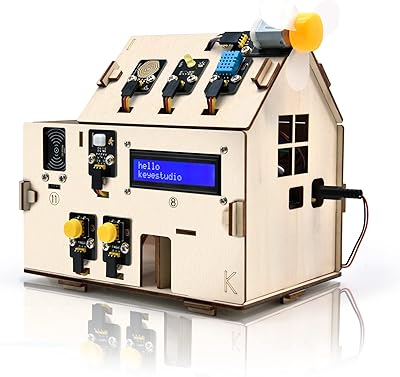
KEYESTUDIO KS0085 Smart Home Arduino Starter Kit
75%
83%
Build Quality
58%
Instruction Clarity
88%
Sensor Variety
62%
Bluetooth App
91%
Educational Value
More
Arduino Student Kit AKX00025
82%
91%
Curriculum Quality
84%
Component Quality
76%
Value for Money
88%
Ease of Getting Started
63%
Component Quantity
More
Arduino Starter Kit K000007
84%
91%
Component Quality
93%
Project Book Quality
92%
Beginner Accessibility
72%
Value for Money
74%
Scope & Depth of Projects
More
Arduino OPLA AKX00026 IoT Kit
77%
88%
Build Quality
79%
Ease of Setup
58%
Value for Money
83%
Connectivity
81%
Sensor Selection
More
FREENOVE Robot Dog Kit FNK0050
82%
92%
Educational Value
86%
Assembly Ease
73%
App Control Experience
80%
Sensor Performance
88%
Build Quality
More
Vilros Arduino Uno Starter Kit
82%
92%
Value for Money
88%
Ease of Use
90%
Component Quality
85%
Instruction Manual
82%
Learning Curve
More
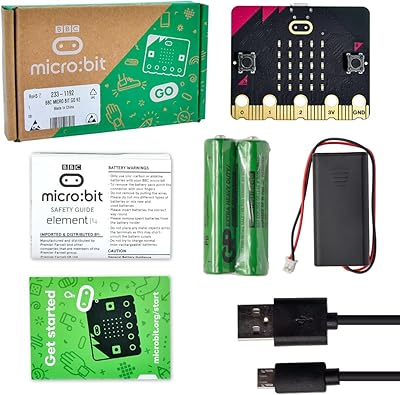
Keyestudio Micro:bit V2 Go Kit
83%
93%
Out-of-Box Experience
96%
Board Authenticity & Quality
91%
Ease of Programming
88%
Onboard Sensor Variety
89%
Value for Money
More
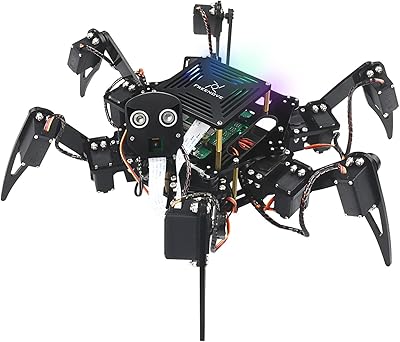
Freenove Big Hexapod Robot Kit
78%
88%
Build Quality
72%
Assembly Experience
84%
Tutorial & Documentation
77%
Value for Money
58%
Ease of Use
More
KEYESTUDIO ESP32 Smart Home Starter Kit
76%
83%
Beginner Accessibility
61%
Content Depth & Longevity
72%
Documentation Quality
78%
Component Quality
81%
Assembly Experience
More
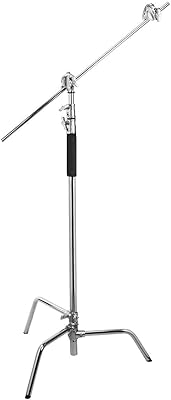
Flashpoint 10' C Stand Kit with Boom Arm
85%
93%
Stability with Heavy Modifiers
88%
Versatility in Lighting Setups
91%
Build Quality & Durability
85%
Ease of Use
60%
Portability/Weight
More

FAQ

Yes, a couple of things. Batteries are not included, so you will need to pick those up separately before you can power the arm. If you want to use the PS2 wireless control feature, you will also need to source your own PS2 controller — the kit only includes the sample code for that integration, not the hardware itself.

Honestly, it is a tough starting point if you have zero prior experience. The KEYESTUDIO 4DOF Robot Arm Arduino Kit assumes you have at least a basic understanding of how Arduino works and can follow wiring diagrams without too much hand-holding. If you or the person you are buying it for are brand new to electronics, spending a few hours with beginner Arduino tutorials first will make the experience significantly less frustrating.
It takes time and patience, but it is manageable for someone with light electronics experience. Expect to spend a few hours on the full build. The instructions cover the process, though some users have found them a bit sparse in places, so having a willingness to troubleshoot and look things up online is genuinely helpful.

Yes. The kit supports Bluetooth control through a companion app that works on both Android and iOS devices. Once paired, you can operate the arm wirelessly from your phone, which is one of the more satisfying features once you get it up and running.

The onboard joystick module is the most immediate way to start playing with the arm right after assembly, with no phone or extra hardware needed. It gives you direct physical control over the servos and is a great way to understand how each axis moves before you start writing your own code.

Each of the four gear servos covers a 180-degree range and responds reasonably well for a kit at this level. You can program specific angles via code, which is where real precision comes in. For casual joystick or app control, the movement is fluid enough for most educational purposes, though it is not surgical-grade accuracy.

It can grab small, lightweight objects — that is part of what makes it a fun demonstration tool. However, the plastic construction and gear servos are not designed for lifting anything heavy or for repeated mechanical stress. Think of it as an educational grabbing demonstration rather than a functional industrial gripper.

You program it using the Arduino IDE, which means you are writing in a C and C++ based language that is standard across the Arduino ecosystem. Sample sketches are included to help you get started, so you are not staring at a blank editor from day one.

This is one area where user experiences vary. Under light, intermittent use for learning and demonstration purposes, the servos hold up reasonably well. That said, if the arm is run continuously or pushed to its mechanical limits repeatedly, some users have reported signs of wear over time. It is better treated as a learning tool than a workhorse device.

It can be a great gift, but with one important condition: the teenager should already have some interest in or exposure to electronics or coding. For a motivated 15 or 16-year-old who enjoys building things and tinkering with tech, this robotic arm kit offers a genuinely rewarding project. For a younger kid or someone who just thinks robots look cool, the learning curve may dampen the excitement pretty quickly.