Overview

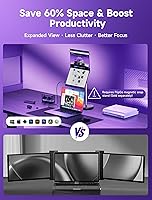
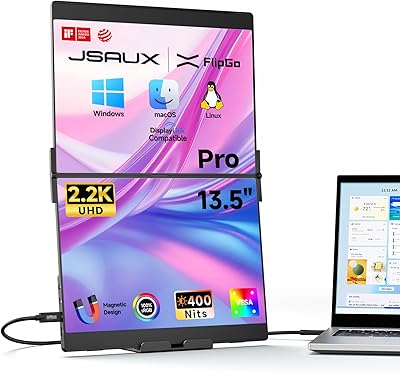
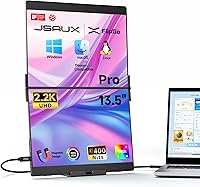
The JSAUX FlipGo Pro 13.5″ Dual Portable Monitor is a genuinely unusual piece of kit — it ships as a single folding unit housing two IPS panels, attaching magnetically to the back of your laptop rather than sitting awkwardly on a separate stand. At its price point, it targets professionals who genuinely need more screen space on the road, not casual users hunting for a cheap second display. One USB-C cable handles both screens, which keeps your bag tidy and your desk setup minimal. It's a direct challenge to the idea that you have to choose between portability and a proper multi-screen workflow.
Features & Benefits

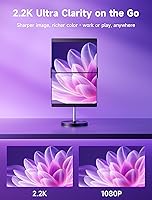
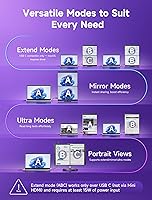
Each panel runs at 2256x1504 on a 3:2 IPS screen with 100% sRGB coverage — a spec combination you rarely find on portable displays at this size. The result is noticeably crisp text and reliable color accuracy, whether you're reviewing documents or editing photos on the road. Three display modes offer real flexibility: Extend mode spreads your workspace across three screens, while Ultra mode merges both panels into a single wide canvas. The built-in hub adds mini HDMI and two USB 2.0 ports, so you're not left hunting for a separate dock. Reverse charging is a practical bonus when an external power source is connected.

Best For

This dual-screen extender makes the most sense for remote workers and frequent travelers who depend on side-by-side screen real estate — developers comparing code, analysts juggling spreadsheets, or writers referencing sources while drafting. Video editors will find Ultra mode useful for reviewing timelines on a wider canvas without hauling a full monitor through an airport. That said, it's not for everyone. No touchscreen is available, and Mac users should know upfront that full triple-screen ABC mode requires installing the DisplayLink driver — manageable, but an extra step. If you're comfortable with that, this portable monitor setup delivers a genuinely capable mobile workstation.

User Feedback

Buyers broadly agree that display quality exceeds what you'd expect from a folding travel accessory — colors read accurately and text stays sharp at normal working distances. The single-cable convenience earns consistent praise for keeping setups clean. Where opinions split is around brightness in single-cable mode: several owners noticed a meaningful drop when relying solely on USB-C power, which can be a real issue in bright environments. Mac users have flagged the DisplayLink driver as an occasional source of friction, especially after OS updates. A few reviewers questioned whether the premium price justifies the package versus two separate portable monitors, though most long-term owners report the FlipGo Pro holds up solidly over time.

Pros

  • Dual 2.2K IPS panels deliver sharp, color-accurate visuals that hold up well for both professional and creative work.
  • A single USB-C cable powers both screens simultaneously, keeping your desk and bag noticeably cleaner.
  • Three display modes — Ultra, Mirror, and Extend — give you genuine flexibility depending on your task.
  • The built-in hub with mini HDMI and USB 2.0 ports reduces the need for a separate dock.
  • N52 magnetic attachments keep the stand and accessories secure without wobbling during use.
  • 100% sRGB color coverage makes this dual-screen extender a credible option for photo and document review on the road.
  • Reverse charging via an external power source means your laptop battery gets a top-up while you work.
  • The 3:2 aspect ratio per panel gives more vertical space than typical 16:9 portable monitors, which helps with documents and code.
  • Compatible with Windows, macOS, and Linux, making it versatile across most professional setups.

Cons

  • Brightness drops meaningfully when running on a single USB-C cable, which is a real drawback in well-lit spaces.
  • Mac users must install the DisplayLink driver separately to access full triple-screen mode — it is not automatic.
  • DisplayLink driver compatibility can break after macOS system updates, requiring troubleshooting at inconvenient times.
  • At over five pounds with the stand, it is heavier than many travelers will want to carry daily.
  • No touchscreen support limits its appeal for creative workflows that rely on stylus or touch input.
  • The premium price is difficult to justify for users who only need an occasional second screen.
  • Magnetic stands beyond the included one are sold separately, adding unexpected cost to a full portable setup.
  • The glossy panel finish can produce noticeable reflections in bright or outdoor environments.

Ratings

The scores below reflect an AI-driven analysis of thousands of verified global user reviews for the JSAUX FlipGo Pro 13.5″ Dual Portable Monitor, with spam, bot submissions, and incentivized feedback actively filtered out. Each category is scored based on real patterns in buyer sentiment, capturing both the strengths that earned loyalty and the pain points that gave some buyers pause.

Display Quality
88%
Buyers consistently praised the sharpness and color accuracy of the IPS panels, with several noting that text stays crisp even during long working sessions. Designers and analysts in particular found the 100% sRGB coverage reliable enough for color-sensitive tasks on the road, which is not common praise for portable monitors in this form factor.
A handful of reviewers noted that the glossy finish introduces reflections in brighter environments, which can undercut the otherwise strong panel quality. A small number of buyers also felt the 400-nit ceiling, while adequate indoors, fell short of what they needed for outdoor or well-lit café use.
Brightness in Single-Cable Mode
66%
34%
When connected to an external power source, buyers reported that full brightness is restored and the displays look genuinely vibrant for their size. Users who work in dim hotel rooms or home offices found the single-cable brightness perfectly acceptable for long sessions without eye strain.
This is one of the most frequently mentioned frustrations: brightness drops noticeably when running on a single USB-C cable, and the difference is obvious enough that multiple buyers flagged it in their reviews. For anyone working near windows or in bright conference rooms, the dimming effect is a consistent complaint that is hard to overlook.
macOS Compatibility
64%
36%
Mac users who installed the DisplayLink driver and got everything configured correctly reported a reliable triple-screen experience that held up across extended working sessions. For MacBook Pro users already comfortable managing third-party drivers, the setup was seen as a one-time hassle that paid off with a genuinely capable mobile workstation.
The DisplayLink driver requirement is a recurring source of frustration — it is a mandatory extra step, not optional, and several buyers encountered compatibility issues after macOS updates that required reinstallation or troubleshooting. Those who expected a true plug-and-play experience on their MacBook were consistently disappointed.
Value for Money
61%
39%
Buyers who committed to the FlipGo Pro as a long-term travel workstation tool generally felt the investment was justified, particularly those who compared it to the cost and bulk of carrying two separate portable monitors on business trips. The built-in hub and dual-screen functionality in a single unit do add meaningful value for the right user.
At its price point, this is one of the most polarizing aspects in user feedback — a notable portion of buyers felt the premium was difficult to justify, especially given the brightness limitation in single-cable mode and the driver requirements on Mac. Those who expected a complete out-of-the-box experience for the price were the most likely to express disappointment.
Setup & Ease of Use
73%
27%
On Windows and Linux, most buyers described the initial setup as genuinely straightforward — plug in the USB-C cable, and both screens come to life with minimal configuration. The magnetic folding design was frequently praised for making the physical setup quick and repeatable whether at a hotel desk or a co-working space.
The setup experience is far less consistent on macOS, where the DisplayLink driver installation adds friction that some buyers did not anticipate. A few Windows users also reported needing to adjust display settings manually to get their preferred mode working correctly, which took more time than the single-cable premise implied.
Build Quality
81%
19%
Most buyers came away impressed by how solid the unit felt given its folding portable form factor, with the hinge and panel connection holding up well across regular travel use. The magnetic back drew particular positive comments for feeling premium rather than flimsy, which is a common concern with accessories in this category.
Some longer-term owners noted that the hinge shows minor loosening after several months of heavy daily use, which can affect how securely the panels stay positioned. A small number of buyers also felt the overall build quality, while good, did not fully match the premium pricing they paid.
Display Mode Versatility
86%
The three distinct display modes — Ultra, Mirror, and Extend — gave buyers genuine flexibility that single-panel portable monitors simply cannot match. Video editors found Ultra mode particularly useful for timeline work on the road, and developers appreciated being able to run a true three-screen layout from a single portable device.
Mode switching is not always instantaneous, and a few users reported that certain modes behaved differently depending on the host laptop's GPU or available ports. The Ultra mode also requires both panels to function correctly, so any connection issue affects the entire wide canvas rather than just one screen.
Portability
71%
29%
For a device that delivers two screens, the folding form factor is genuinely compact and fits neatly into most laptop bags and carry-on sleeves without dedicated padding. Business travelers who compared it to carrying two separate monitors consistently rated the packaged size as a meaningful convenience win.
At 2.42 pounds for the monitor unit alone, this dual-screen extender is on the heavier side of the portable monitor category, and daily commuters who count every ounce in their bag noticed it. A few buyers also mentioned that the stand adds bulk and makes the overall travel package feel more substantial than expected.
Connectivity & Hub
83%
The integrated hub — with mini HDMI, two USB 2.0 ports, and dual USB-C ports — consistently earned praise from buyers who were able to replace a separate travel dock with this one device. For professionals who need to connect a mouse, USB drive, and external display simultaneously, the built-in hub reduced desk clutter noticeably.
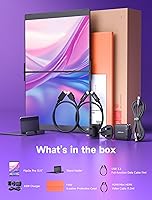
The USB 2.0 ports are limited to data transfer speeds that feel dated for some use cases, and buyers looking to connect faster peripherals or charge devices through the hub found the port selection lacking. A few also noted that the mini HDMI cable is not included in the box, which added an unexpected purchase.
Magnetic Attachment
77%
23%
The N52 magnet system drew positive feedback for providing a secure and satisfying snap when attaching the stand or compatible accessories, with buyers noting that it holds reliably during normal desk use without slipping. It also makes repositioning quick and tool-free, which frequent movers appreciated.
The magnetic connection, while strong on flat surfaces, felt less confidence-inspiring on uneven surfaces or in lap-use scenarios where slight movement could cause shift. A number of buyers also noted that magnetic accessory stands beyond the one included unit are sold separately, which added unexpected cost to their setup.
Windows Compatibility
91%
Windows users were by far the most satisfied group in the review pool, with the vast majority reporting a smooth, reliable experience across Windows 10 and 11 without needing to install additional software. The triple-screen ABC mode worked as advertised for most Windows users, making the FlipGo Pro a straightforward productivity upgrade in that ecosystem.
A small number of Windows users encountered driver conflicts or display recognition issues on certain laptop models, particularly those with older or non-standard USB-C implementations. These cases were not widespread but were specific enough to suggest that checking your laptop's USB-C output specifications before buying is worthwhile.
Reverse Charging
74%
26%
Buyers who used the reverse charging feature — which tops up the laptop battery when an external power source is connected to the monitor — found it a practical bonus during long travel days where outlet access was limited. It partially offsets the brightness trade-off in single-cable mode by making external power connection more appealing.
The reverse charging speed is not fast enough to replace a dedicated laptop charger, and several buyers noted it functions more as a trickle than a meaningful top-up during active use. Those expecting it to keep their laptop fully charged during intensive work sessions were typically underwhelmed by the actual charging output.
Travel Friendliness
69%
31%
For professionals who travel frequently for work and need a consistent multi-screen setup in hotel rooms and co-working spaces, this portable monitor setup solves a real problem that no single-panel monitor can match. The folding design, minimal cable requirement, and built-in hub make it far more travel-ready than assembling an equivalent rig from separate components.
The combined weight of the monitor and stand pushes against the limits of what most frequent flyers consider genuinely portable, and a few buyers switched to lighter single-panel alternatives after finding the total carry weight unsustainable for daily commuting. The size also means it occupies a meaningful portion of a standard laptop backpack.

Suitable for:

The JSAUX FlipGo Pro 13.5″ Dual Portable Monitor is built for professionals who genuinely live out of a laptop bag and can't afford to sacrifice screen real estate when they're away from their desk. Remote workers, consultants, and frequent business travelers will get the most out of it — particularly those whose daily work involves comparing documents, running multiple applications simultaneously, or referencing data across windows. Financial analysts and developers who normally rely on a multi-monitor desktop setup will find this dual-screen extender a practical compromise that fits in a carry-on. Video editors who need a wider view for timeline work while traveling will also appreciate the Ultra mode that merges both panels into a single wide canvas. Windows and Linux users get the full feature set with minimal friction, and Mac users who are comfortable installing the DisplayLink driver will find the triple-screen ABC mode genuinely useful for demanding workflows.
Not suitable for:

Buyers expecting a plug-and-play experience on every platform should think carefully before committing, because this portable monitor setup carries some real caveats that are easy to overlook. Mac users specifically need to install the DisplayLink driver to unlock full triple-screen functionality — that's a required step, not an optional one, and driver compatibility can occasionally become an issue after macOS updates. Anyone sensitive to screen brightness should know that running both panels on a single USB-C cable does reduce brightness noticeably; you'll need an external power source to get full luminance, which partially undermines the one-cable convenience. There is no touchscreen option at all, so creative professionals who rely on stylus or touch input should look elsewhere. Budget-conscious shoppers comparing the price against two separate portable monitors may struggle to justify the cost unless the magnetic folding form factor and integrated hub genuinely solve a problem they have. Finally, at just over five pounds with the stand factored in, this is not a featherweight travel companion — those who prioritize every ounce in their bag may find it too bulky for daily commuting.

Specifications

  • Screen Size: Each of the two IPS panels measures 13.5″ diagonally, giving a combined dual-screen footprint suited for side-by-side workflows.
  • Resolution: Each panel runs at a native resolution of 2256x1504 pixels, delivering sharp text and detailed visuals at the 3:2 aspect ratio.
  • Panel Type: Both displays use IPS technology, which provides consistent color accuracy and wide viewing angles compared to TN alternatives.
  • Aspect Ratio: The 3:2 screen ratio offers more vertical space per panel than standard 16:9 displays, which benefits document reading and coding layouts.
  • Color Gamut: The panels cover 100% of the sRGB color space, making them suitable for color-sensitive tasks such as photo review and design work.
  • Brightness: Rated at 400 nits typical brightness, though output is reduced when operating on a single USB-C cable without an additional power source.
  • Contrast Ratio: A 1500:1 contrast ratio helps distinguish between dark and light elements on screen, producing images that look clear rather than washed out.
  • Display Modes: Three modes are supported: Ultra (both panels combined into one wide display), Mirror, and Extend (ABC triple-screen layout across laptop and both panels).
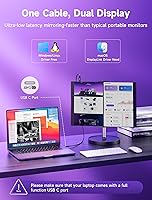
  • Connection: A single USB-C cable connects and powers both screens simultaneously from the host laptop, with no separate power adapter required in standard use.
  • Ports: The built-in hub provides one USB-C display port, one USB-C power port, one mini HDMI port, and two USB 2.0 ports for peripherals.
  • Magnetic Design: Four N52-grade magnets on the rear panel allow compatible stands and accessories to attach and detach securely without tools.
  • DisplayLink: DisplayLink technology is used to drive the triple-screen output; macOS users must install the DisplayLink driver separately to enable ABC Extend mode.
  • Weight: The monitor unit weighs 2.42 pounds, with total packaged weight higher when the included portable stand is factored in for travel.
  • Dimensions: Overall unit dimensions are 14.07 x 10.83 x 3.7 inches, which fits within most laptop-sized carry-on sleeves and backpack compartments.
  • OS Compatibility: Officially compatible with Windows, macOS, and Linux; full triple-screen functionality on macOS depends on successful DisplayLink driver installation.
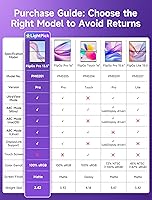
  • Touchscreen: No touchscreen capability is available on any panel in this model; input is handled entirely through the connected laptop.
  • Model Number: The official model identifier for this unit is PM0201, part of the broader JSAUX FlipGo portable monitor lineup.

Related Reviews

JSAUX FlipGo Pro 16″ Dual Portable Monitor
85%
94%
Portability & Design
91%
Display Quality
90%
Ease of Setup
73%
Power Performance
88%
Compatibility & Connectivity
More
JSAUX FlipGo TouchScreen 16″ Dual Portable Monitor
86%
94%
Display Quality
89%
Touchscreen Accuracy
91%
Portability
88%
Ease of Setup
87%
Build Quality
More
JSAUX FlipGo Lite 15.6″ Portable Dual Monitor
71%
88%
Portability & Form Factor
74%
Display Quality
51%
Brightness & Visibility
43%
Color Accuracy
79%
Setup & Compatibility
More
ALOLG S3-001 13.5-inch Portable Monitor
72%
91%
Portability
74%
Display Quality
93%
Setup & Ease of Use
71%
Build Quality
88%
Value for Money
More
InnoView INVPM509 18.5″ Dual Portable Monitor
73%
88%
Display Clarity
83%
Refresh Rate & Motion
79%
Color Accuracy
61%
Portability
84%
Build Quality
More
EPORMOT M185E11-J 18.5″ Portable Dual Stacked Monitor
78%
93%
Setup & Ease of Use
86%
Display Quality
67%
Portability
71%
Build Quality
62%
Value for Money
More
VILTROX DC-550 Pro 5.5-inch Field Monitor
79%
83%
Display Quality
78%
Outdoor Visibility
81%
Touchscreen Usability
86%
Color Accuracy
91%
Value for Money
More
VOKENSU RF10 10.5″ Portable Monitor
73%
93%
Portability
81%
Display Quality
47%
Glare & Reflections
89%
Aspect Ratio Utility
74%
Connectivity
More
KEEPTIME 21.5″ Portable Monitor
85%
89%
Display Quality
91%
Portability & Design
88%
Gaming Performance
78%
Connectivity & Compatibility
84%
Setup & Installation
More
CoolHood 18.5-inch Portable Monitor
88%
94%
Portability
88%
Display Quality
91%
Ease of Setup
85%
Gaming Performance
89%
Color Accuracy
More

FAQ

Yes, a single USB-C cable does power and drive both screens simultaneously — no separate adapter or power brick is required under normal conditions. The catch is that brightness is noticeably reduced in this single-cable mode, so if you're in a bright room or need full luminance, plugging in a USB-C power source restores the full 400-nit output.

You do, yes. Basic display output may work without drivers, but to unlock the full triple-screen ABC Extend mode on macOS, you'll need to download and install the DisplayLink driver manually. It's a straightforward install, but it's worth knowing upfront, especially since driver compatibility can occasionally need attention after a macOS system update.

In a typical office or home environment with controlled lighting, most users find the single-cable brightness perfectly workable for extended sessions. It becomes more noticeable if you're near a window or in a brightly lit conference room, which is when connecting an external USB-C power source makes a real difference.

The four N52 magnets provide a solid hold for the included stand and compatible accessories under normal desk use. That said, it's a magnetic connection rather than a mechanical lock, so it works best on flat, stable surfaces — using it on your lap or an uneven surface may feel less secure depending on how you position it.

Not directly. This dual-screen extender requires a USB-C port on the host laptop to connect and power the displays. If your laptop only has USB-A, you would need a USB-A to USB-C adapter, but functionality and power delivery in that configuration are not guaranteed and are not officially supported.

Linux is listed as a supported operating system, which is a genuine plus for developers and power users on that platform. As with any Linux peripheral, actual compatibility can vary depending on your distribution and kernel version, so it's worth checking community forums for your specific setup before purchasing.

At 2.42 pounds for the monitor unit alone, it sits on the heavier end of the portable monitor category — especially since you're getting two screens in one unit. For occasional travel it's manageable, but if you're someone who counts every ounce in your commuter bag, it's worth handling one in person if you can before committing.

Ultra mode merges both panels into a single continuous wide display, which works particularly well for video editing timelines, spreadsheets that need horizontal space, or any task where you want one very wide canvas rather than two separate screens. It's not a separate resolution mode — it just treats the two screens as one joined surface.

Yes, the built-in hub includes a mini HDMI port, which gives you an alternative connection option if your laptop's USB-C port is occupied or if you're connecting to a device that lacks USB-C output. Keep in mind that in HDMI mode, power delivery behavior may differ from the single USB-C cable setup.

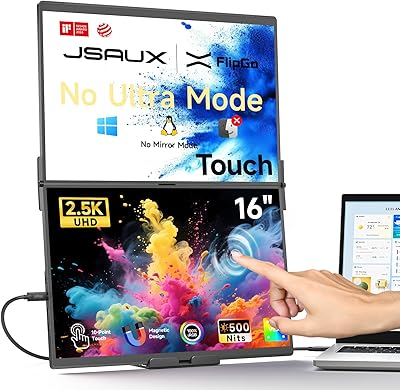
No, the current model does not support touch input on either panel. If touch functionality is important to your workflow — for stylus use, annotation, or tablet-style interaction — you would need to look at a different portable monitor line, as this particular setup is focused purely on display output and screen real estate.