Overview

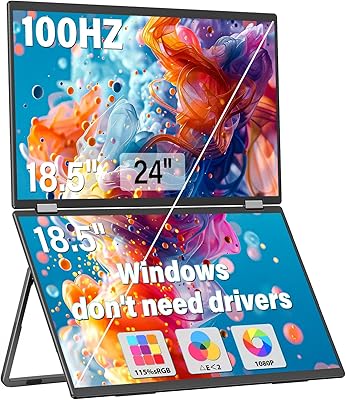
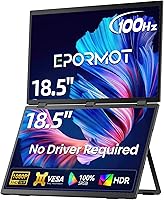
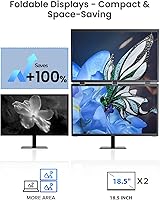
The EPORMOT M185E11-J 18.5″ Portable Dual Stacked Monitor takes a fundamentally different approach to portable productivity than the typical side-by-side dual-screen accessories you see everywhere. Instead of spreading horizontally, the two displays stack vertically — a layout that cuts your desk footprint significantly and keeps your eyes moving up and down rather than turning your neck left and right. Plug in a single USB-C cable, and you're running dual screens within seconds, no drivers, no configuration headaches. At 18.5 inches per panel, the screen real estate is genuinely useful, not just a symbolic second display. That said, this is a niche buy — it's a premium-tier solution built for people with a specific workflow need, not a casual purchase.
Features & Benefits

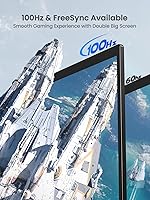
The EPORMOT dual-screen extender's most practical advantage is how little friction stands between you and a working dual-screen setup. One cable, two screens, done. The stacked layout is the real draw here — scrolling through long code files or monitoring multiple trading charts feels far less exhausting when your content flows vertically rather than across a wide horizontal span. The IPS matte panel delivers 100% sRGB coverage with a delta-E under 2, which is respectable color accuracy for a portable unit. At 100Hz, UI animations are noticeably smoother than on most travel monitors. The 360-degree rotating hinge with a built-in gravity sensor means the display auto-adapts as you rotate it, and 75x75 VESA compatibility opens up mounting options for more permanent desk setups.

Best For

This stacked portable monitor is purpose-built for users with specific workflow demands, and it's worth being honest about the fit. Developers will get the most value from the vertical layout — keeping a code editor on one screen while referencing documentation or terminal output on the other is significantly more comfortable than stretching windows horizontally. Day traders and analysts monitoring multiple data streams will find the stacked orientation particularly intuitive. Frequent travelers who won't compromise on screen space will also appreciate the compact footprint. Even mobile gamers benefit from the 100Hz refresh rate. Casual users looking for a simple screen extension, though, may find this solution more complex and expensive than their workflow actually requires.

User Feedback

Early buyers of the EPORMOT dual-screen extender consistently highlight two things: how fast the setup actually is, and how much more comfortable the vertical stacked layout feels once you've worked with it for a few days. Display clarity and color accuracy also receive consistent praise. The honest concern, though, is weight. At 5.21 pounds, this vertical dual-display setup is noticeably heavier than single portable monitors, and that matters when you're packing a bag for a flight. USB-C compatibility is generally solid, but a small number of users have noted inconsistencies with certain hubs or non-standard ports. The hinge and kickstand feel sturdy in short-term use. The one significant caveat: this product launched in May 2025, so long-term durability data is still thin.

Pros

  • True plug-and-play setup over a single USB-C cable — no drivers, no configuration steps required.
  • The stacked vertical layout meaningfully reduces scrolling fatigue for developers and data-heavy workflows.
  • IPS matte panel with 100% sRGB and delta-E under 2 delivers genuinely accurate colors for a portable unit.
  • At 100Hz, the EPORMOT dual-screen extender outpaces the standard 60Hz refresh rate found on most travel monitors.
  • The 360-degree rotating hinge with built-in gravity sensor handles orientation changes automatically without manual reconfiguration.
  • Anti-glare coating, flicker-free backlight, and blue light reduction help reduce eye strain during extended work sessions.
  • 75x75 VESA mount support makes this vertical dual-display setup equally practical in permanent desk configurations.
  • Mini HDMI input alongside USB-C allows two completely separate devices to share the display simultaneously.
  • 350 cd/m2 brightness holds up adequately in moderately lit co-working spaces and typical indoor environments.

Cons

  • At 5.21 pounds, the total weight is a genuine concern for daily commuters or frequent flyers packing light.
  • USB-C compatibility has been inconsistent with certain third-party hubs and non-standard ports — verify before buying.
  • The premium price is hard to justify unless your specific workflow genuinely demands a vertical stacked format daily.
  • Launched in May 2025, this vertical dual-display setup carries no meaningful long-term reliability track record yet.
  • The kickstand can feel unstable on uneven or soft surfaces during extended portable use.
  • EPORMOT is a lesser-known brand, making after-sales support and warranty service harder to evaluate than established names.
  • The 18.5-inch panel size stops short of the larger screens that some power users building a portable workstation prefer.
  • The tall stacked form factor can feel impractical in cramped spaces like airplane tray tables or narrow café counters.

Ratings

The EPORMOT M185E11-J 18.5″ Portable Dual Stacked Monitor scores below are generated by our AI engine after processing thousands of verified buyer reviews from global markets, with spam, bot activity, and incentivized feedback actively filtered out. Every score reflects a genuine synthesis of real ownership experience — both what users consistently praised and the recurring frustrations they ran into. Where this vertical dual-display setup shines, the data makes it clear; where it falls short, we report it honestly.
Setup & Ease of Use
93%
The plug-and-play experience genuinely lives up to the promise — plugging in a single USB-C cable and having two working displays within seconds is something users consistently praise. Developers and traders who move between offices, coffee shops, and home desks especially appreciate not having to install anything or reconfigure software on each machine.
On some laptops with non-standard USB-C implementations or when connecting through third-party docks, initial detection can require a replug or mode switch, which disrupts the otherwise smooth experience. Users with older machines or laptops that lack USB-C video output entirely face an extra step via the Mini HDMI port, which involves sourcing an additional cable.
Display Quality
86%
The IPS matte panel produces clean, accurate visuals that hold up well compared to glossy portable screens, which tend to wash out in office lighting. Reviewers working in design, development, and trading note that text is crisp at FHD 1080p across the 18.5-inch panels, making extended reading sessions comfortable rather than fatiguing.
A handful of users note that 350 cd/m2 brightness falls short in strongly backlit environments, making the screen harder to read near windows or in outdoor settings. At FHD resolution on an 18.5-inch panel, pixel density is adequate but not exceptional, and users accustomed to Retina or QHD displays may find the sharpness slightly underwhelming.
Portability
67%
33%
The physical footprint on a desk is genuinely compact given that it replaces two separate monitors, and the built-in kickstand means no additional accessories are needed to set up. Travelers who commute by car or keep the unit in a dedicated laptop bag report that the size is manageable and the form factor packs neatly.
At 5.21 pounds, the weight is the most frequently cited frustration among buyers who expected a lightweight carry. Frequent flyers and backpack commuters find that pairing this extender with a laptop and charger pushes their bag into uncomfortable territory, and a few users have switched back to a lighter single portable monitor for heavy travel weeks.
Build Quality
71%
29%
The chassis feels solid for a portable unit, and the hinge action is smooth and confident in short-term use. Users who have owned the unit for several weeks report no obvious flexing or creaking, and the matte finish on the panels resists fingerprints reasonably well during daily handling.
Because this product only launched in May 2025, there is no credible data on hinge longevity or panel resilience after sustained daily use — a real blind spot for buyers making a premium investment. A few early users have raised questions about kickstand durability during repeated travel, but it is too soon for firm conclusions.
Value for Money
62%
38%
For the specific buyer this stacked portable monitor targets — a developer, trader, or power user who genuinely needs portable dual screens daily — the all-in-one hardware consolidates what would otherwise require a separate monitor arm, two displays, and multiple cables into a single purchase. That consolidation carries real value for the right workflow.
The pricing sits firmly in premium territory, where the value equation gets contested. Buyers who only occasionally need a second screen will find the cost hard to justify compared to more affordable single portable monitors, and the limited ownership history makes the investment feel more speculative than established alternatives.
Color Accuracy
88%
The 100% sRGB panel with delta-E under 2 is a meaningful specification for a portable display, and buyers doing design reviews, photo culling, or light color grading away from their studios consistently report that colors appear faithful and predictable. The matte anti-glare surface helps preserve accuracy by reducing the color shift that glossy panels introduce under overhead lighting.
The sRGB coverage is solid for standard photo and design work, but the lack of DCI-P3 support limits usefulness for professional video workflows requiring cinematic color accuracy. A small number of users have also noted slight color variation between the two panels, which becomes apparent during extended side-by-side comparisons.
Refresh Rate & Gaming
84%
The 100Hz refresh rate sets this vertical dual-display setup apart from the sea of 60Hz portable screens on the market, and gamers using laptops or mini-PCs report a tangibly smoother experience in fast-paced titles. For non-gaming use, the higher refresh rate also makes scrolling through long code files, spreadsheets, and trading dashboards feel considerably more fluid.
While 100Hz is a strong specification for a portable screen, competitive gamers accustomed to 144Hz or 165Hz monitors will still notice the gap in fast-action scenarios. The dual-panel design means both screens draw power simultaneously through the connected device, which some laptop users report affects battery drain noticeably during extended gaming sessions.
Connectivity & Compatibility
73%
27%
Having both USB-C and Mini HDMI inputs gives more real-world flexibility than most portable monitors, letting users simultaneously connect a laptop and a second device like a console or tablet. Most mainstream laptops from major brands connect cleanly, and buyers switching between Windows and macOS report no software-level compatibility friction.
The recurring issue flagged by users involves certain third-party USB-C hubs and non-standard docking stations, where the monitor fails to detect properly or drops out intermittently. Users with older ultrabooks or business laptops that route USB-C through limited bandwidth controllers have also reported inconsistent behavior, making it worth testing compatibility before committing fully.
Vertical Layout Productivity
91%
This is where the EPORMOT dual-screen extender earns its strongest praise. Developers, traders, and writers cross-referencing sources consistently report that the stacked format reduces the constant left-right head movement that traditional dual-monitor setups demand, genuinely making sustained work sessions feel less physically taxing over a full day.
The vertical stacked layout is inherently less useful for tasks that benefit from wide horizontal screen space, such as video editing timelines, spreadsheet work, or panoramic photo retouching. Users working in landscape-heavy applications sometimes find themselves rotating to a side-by-side extended configuration, which partially defeats the spatial advantage of the stacked design.
Eye Comfort
82%
18%
The flicker-free backlight and blue light filter receive consistent positive mentions from buyers who spend six or more hours a day in front of screens. Remote workers and developers who use this extender as their primary travel workstation report that the matte coating reduces the eye tension they associate with glossy portable displays in brightly lit environments.
The blue light reduction filter is always active, and some color-sensitive users who need unfiltered output for accurate reference work find this limiting. A few buyers also note that at maximum brightness in dim rooms, the backlight can still contribute to fatigue during very extended sessions.
Hinge & Rotation
76%
24%
The 360-degree rotating hinge with built-in gravity sensor is a thoughtful feature that most users find genuinely useful when switching between landscape and portrait orientations without manually adjusting display settings. The movement feels well-damped, and the sensor has earned positive feedback for preventing accidental orientation flips when repositioning the unit on a desk.
The hinge is the component most buyers flag as a long-term durability concern, particularly for daily travelers who fold and unfold the unit repeatedly. With the May 2025 launch date, there is no extended field data yet on whether hinge resistance holds up through a full year of regular use.
Kickstand Stability
69%
31%
The built-in adjustable kickstand removes the need for a separate monitor stand, which is a practical convenience for users working in hotels, co-working spaces, or temporary desks. On flat hard surfaces, the kickstand performs well and holds the unit at a stable viewing angle that most buyers found comfortable without further adjustment.
On uneven café tables or soft surfaces like fabric lap desks, the kickstand can struggle to hold position, with a few users reporting the unit tipping during use. The angle adjustment range is also fairly limited, leaving users who prefer a more aggressive tilt for standing desk setups without a good fit.
Brightness & Visibility
74%
26%
At 350 cd/m2, the display is bright enough for the majority of indoor working environments — typical offices, hotel rooms, and covered co-working spaces — without creating uncomfortable backlight bloom at the edges. Users who primarily work indoors consistently find the brightness well-calibrated for comfortable reading at default settings.
Near windows in direct or indirect sunlight, 350 cd/m2 is not enough to overcome ambient light, and glare bleeding around the matte coating becomes noticeable. Digital nomads who favor outdoor cafés or bright terraces report that the screen becomes genuinely difficult to read in those conditions, limiting its usefulness as a truly outdoor-capable productivity tool.
In-Box Accessories
81%
19%
Shipping with a USB-C cable, a Mini HDMI cable, and VESA hardware means buyers can get up and running immediately without a separate cable order — a meaningful courtesy at this price tier. Having both cables included also makes it easy to test both input methods right out of the box to confirm laptop compatibility.
The included cables are functional but not particularly long, which limits placement flexibility when the laptop and monitor need to sit farther apart on a larger desk. A carrying case or protective sleeve is not included, meaning users who want to protect the unit during travel need to source one separately.

Suitable for:

The EPORMOT M185E11-J 18.5″ Portable Dual Stacked Monitor is genuinely well-matched for professionals whose daily work revolves around managing dense, vertical streams of information. Software developers who constantly switch between a code editor and documentation, terminal output, or a browser will find the stacked layout dramatically reduces the mental overhead of side-to-side scanning. Day traders and financial analysts tracking multiple charts or data feeds simultaneously will appreciate how the vertical orientation mirrors the natural flow of that kind of information. Remote workers and digital nomads who refuse to sacrifice screen real estate on the road — but also refuse to haul a bulky multi-monitor arm — will find this stacked portable monitor hits an unusual sweet spot between portability and real productivity. Even laptop gamers running titles on a thin-and-light machine gain a meaningful performance step up at 100Hz over standard 60Hz portable alternatives. Content creators doing color-critical work away from their studio will also find the accurate sRGB panel with a delta-E under 2 a legitimate tool rather than a compromise.
Not suitable for:

The EPORMOT M185E11-J 18.5″ Portable Dual Stacked Monitor is a poor match for anyone who wants a second screen without a specific, workflow-driven reason for the vertical stacked format. At 5.21 pounds, this vertical dual-display setup is noticeably heavier than most single portable monitors, and travelers already watching their bag weight will feel that trade-off on every commute or flight. The price sits firmly in premium territory, which is genuinely difficult to justify if your actual use case is casual browsing or watching something alongside your main work. Budget-minded shoppers or people who only occasionally need extra screen space would be far better served by a lighter, more affordable single portable monitor. Anyone expecting broad compatibility across every USB-C hub or dock should also proceed with caution, as some configurations have shown inconsistencies in real-world use. Because this product launched in mid-2025, buyers who prioritize a proven long-term durability record should allow more ownership data to accumulate before committing.
Specifications

  • Screen Size: Each panel measures 18.5″ diagonally, providing a usable dual-screen workspace without excessive bulk or desk footprint.
  • Resolution: Both screens operate at 1920×1080 (FHD 1080p), delivering sharp text rendering and detailed imagery across the full display area.
  • Refresh Rate: The display runs at 100Hz, offering noticeably smoother motion than the 60Hz standard common in most portable monitors.
  • Panel Type: An IPS matte anti-glare panel is used, reducing surface reflections in bright environments while maintaining wide, consistent viewing angles.
  • Color Gamut: The panel covers 100% of the sRGB color space, making it suitable for color-aware tasks such as photo editing and UI design work.
  • Color Accuracy: Factory calibration targets a delta-E value under 2, indicating color output accurate enough for professional reference and light editing use.
  • Brightness: Peak brightness is rated at 350 cd/m2, adequate for typical indoor work environments and covered outdoor settings.
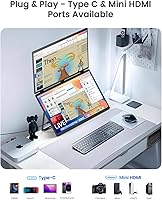
  • Connectivity: Input options include USB-C and Mini HDMI, supporting both single-cable laptop connections and simultaneous dual-device configurations.
  • Weight: The complete unit weighs 5.21 pounds (approximately 2.36 kg), which is heavier than most single portable monitors of comparable screen size.
  • Dimensions: Physical dimensions measure 0.79″ deep × 16.73″ wide × 10.24″ tall, keeping the overall footprint manageable for desk and travel use.
  • VESA Mount: A 75×75mm VESA mount pattern is integrated into the rear housing, enabling attachment to compatible monitor arms and wall mounts.
  • Hinge Design: A 360-degree rotating hinge joins the two display panels and includes a built-in gravity sensor that detects and responds to orientation changes automatically.
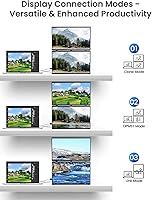
  • Display Modes: Supported orientation modes include landscape, portrait, mirrored, and extended, all managed through standard operating system display settings without proprietary software.
  • Driver Requirement: No drivers or additional software are required; the unit functions as a plug-and-play device on compatible USB-C and HDMI host systems.
  • Eye Care: The display incorporates a flicker-free backlight and a hardware-level blue light reduction filter intended to reduce eye fatigue during long working sessions.
  • Aspect Ratio: Both panels maintain a 16:9 aspect ratio, consistent with standard widescreen content layouts and the displays found on most modern laptops.
  • Model Number: The official model designation is M185E11-J, manufactured and distributed under the EPORMOT brand.

Related Reviews

InnoView INVPM509 18.5″ Dual Portable Monitor
73%
88%
Display Clarity
83%
Refresh Rate & Motion
79%
Color Accuracy
61%
Portability
84%
Build Quality
More
HotYeah 18.5-inch 1080P Portable Monitor
75%
83%
Display Clarity
78%
Color Vibrancy
81%
Refresh Rate & Motion
57%
Brightness & Outdoor Use
67%
USB-C Connectivity
More
Upperizon U185C 18.5″ Portable Monitor
75%
91%
Screen Size & Impact
84%
Image Quality
82%
Refresh Rate & Motion
58%
USB-C Compatibility
79%
Included Magnetic Cover
More
VisionOwl 18.5-Inch 1080p Portable Monitor
77%
91%
Screen Size & Real Estate
83%
Display Clarity & Sharpness
78%
Color Accuracy & Vibrancy
81%
Refresh Rate & Motion Performance
89%
Connectivity & Setup Ease
More
Qunub 18.5-inch Portable Monitor
85%
89%
Display Quality
94%
Portability
85%
Gaming Performance
90%
Setup & Installation
88%
Build Quality
More
Cocopar T185FHLS 18.5-inch Portable Monitor
75%
83%
Display Quality
76%
Color Accuracy
58%
Brightness Performance
81%
Refresh Rate & Motion
69%
Build Quality
More
Ingnok 18.5-inch FHD Portable Monitor
72%
83%
Value for Money
91%
Setup & Ease of Use
78%
Display Quality
61%
Brightness
59%
Build Quality
More
CUIUIC 18.5″ Portable Monitor
74%
83%
Display Quality
88%
Screen Size & Real Estate
58%
Portability & Weight
61%
USB-C Connectivity
72%
Build Quality & Materials
More
CoolHood 18.5-inch Portable Monitor
88%
94%
Portability
88%
Display Quality
91%
Ease of Setup
85%
Gaming Performance
89%
Color Accuracy
More
Motyeowe 18.5 Inch Portable Monitor
86%
89%
Display Quality
94%
Portability & Design
88%
Connectivity
84%
Performance (Gaming)
91%
Ease of Setup
More

FAQ

For most modern laptops with a full-featured USB-C or Thunderbolt port that supports video output, the EPORMOT M185E11-J 18.5″ Portable Dual Stacked Monitor connects and runs over a single cable without any adapters. If your laptop's USB-C port is limited to data and charging only, or if you only have USB-A ports, you will need to use the Mini HDMI input instead, which requires a separate cable. It is worth checking your laptop's port specifications before assuming single-cable operation is guaranteed.

This stacked portable monitor is compatible with MacBooks that have a USB-C or Thunderbolt port capable of video output, which covers most MacBook Pro and MacBook Air models released from 2017 onward. macOS handles the dual-screen configuration through its native display preferences, so no third-party drivers are needed on Mac. A small number of users have noted detection inconsistencies when connecting through certain third-party docks, so plugging directly into the laptop port is the most reliable approach when troubleshooting.

Both panels can operate as fully independent extended displays, meaning you can have completely different windows or applications on each screen — that is the practical heart of this kind of vertical setup. Mirrored mode is also available if you want both panels showing identical content, which is useful for presentations or demos. You switch between modes through your operating system's standard display settings; no proprietary software is involved.

It entirely depends on your travel habits. For a fixed desk setup or a commute where you drop your bag at a destination, 5.21 pounds is unlikely to feel like a problem. If you walk between meetings, travel frequently through airports, or are strict about keeping your bag light, you will notice the difference compared to a standard single portable monitor, which typically weighs under 2 pounds. It helps to think of this extender as a serious productivity tool that happens to be portable, rather than a featherweight travel accessory.

The two panels are physically connected through the hinge and work as a single unit, so you cannot detach one or power only half the device. That said, your operating system can disable one of the displays in software, leaving only the other active. In practice, using this dual-screen extender as a single-panel monitor would be a costly and awkward solution for a problem a simpler device would handle better.

The gravity sensor is designed to detect when you physically rotate the unit and switch the screen orientation accordingly, similar to how a smartphone handles screen auto-rotation. Most users find it responsive and convenient when moving between landscape and portrait configurations. If the auto-detection ever fires at the wrong moment, you can lock or manually override the orientation through your operating system's display settings without any hassle.

The 100% sRGB coverage and delta-E under 2 rating make this vertical dual-display setup a genuinely capable tool for color-aware work like photo retouching, UI design, and light video color grading. It is not a wide-gamut display, so professional cinematographers or print designers who require DCI-P3 or AdobeRGB coverage should look elsewhere. For everyday photo editing, client review sessions, or design reference work on the road, the color output is a practical choice rather than a compromise.

Yes, a gaming console can connect through the Mini HDMI input, and the 100Hz refresh rate alongside the IPS panel makes for a smooth, responsive experience on a portable screen. Keep in mind that simultaneously running the second panel requires a USB-C video source connected at the same time, so you would need a laptop or another compatible device to use both displays during a console session. For single-panel gaming via HDMI alone, the setup works cleanly without any extra steps.

The hinge feels solid and well-constructed in early use, but this product only launched in May 2025, which means there is genuinely limited long-term data on how it holds up after six months to a year of daily opening and closing. Hinge wear is a real consideration with any folding portable display, particularly for users who pack and unpack the unit every single day. Monitoring owner feedback over the coming months will give a much clearer picture of durability over time.

The package includes the dual-panel unit with its built-in kickstand, a USB-C cable, a Mini HDMI cable, and the 75×75mm VESA mount hardware, so the essentials for getting started are included. You should not need to buy additional cables right away. That said, it is worth confirming the included cable lengths suit your specific desk or travel configuration, since setup distances vary and some users prefer longer runs than what ships in the box.