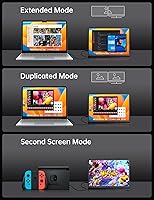
Overview

The VOKENSU RF10 10.5″ Portable Monitor enters a crowded market with one clear angle: give travelers and remote workers a genuinely portable second screen without sacrificing display quality. What separates it from the usual portable monitor crowd is the 3:2 aspect ratio — taller than the standard 16:9 widescreen format, which means more vertical space for reading, writing, and browsing. VOKENSU isn't a household name, and that's worth acknowledging. Still, the RF10 bundles the display, a protective PU leather cover, and an adjustable stand into one package — solid all-in-one value at this budget-friendly price tier. Expect mid-range performance in a genuinely compact form factor.

Features & Benefits

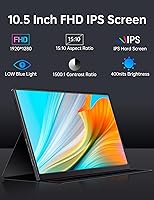
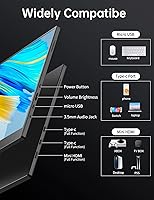
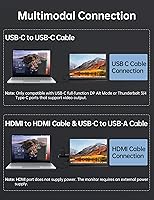
The RF10's 1920×1280 IPS panel delivers noticeably crisp text and solid color reproduction, with 400 nits of brightness and full sRGB coverage keeping things looking accurate under normal indoor conditions. That 3:2 ratio genuinely pays off when you're scrolling through a long document or reviewing code — you see more lines per screen without constantly reaching for the scroll bar. Connectivity is flexible: two USB-C ports and a Mini-HDMI input cover most modern laptops, tablets, and even some consoles. One USB-C cable handles both power and video if your device supports DP Alt mode or Thunderbolt — though it's worth checking your laptop's spec sheet first, since not all USB-C ports carry a video signal.

Best For

This compact travel display is a natural fit for remote workers and freelancers who spend time in hotels, coffee shops, or co-working spaces and want extra screen real estate without hauling a full-sized monitor. Writers, coders, and analysts dealing with long documents or spreadsheets will immediately appreciate the taller aspect ratio. Students in shared spaces can slip it into a bag alongside their laptop without much added bulk. It also covers casual gaming on the go — the HDR support adds some visual depth, though it won't replace a dedicated gaming panel. Budget-conscious buyers exploring dual-monitor productivity for the first time will find it a reasonable and practical starting point.

User Feedback

Owners of this portable monitor consistently praise how light and thin it feels in daily use — the sub-1-lb weight gets frequent positive mentions from people who carry it through airports or between client meetings. Screen clarity earns solid marks too, with many noting the IPS colors hold up well for everyday work. On the downside, the glossy panel is a recurring frustration — bright offices and outdoor settings generate reflections that genuinely hurt visibility. The stand's two fixed angle positions strike some buyers as limiting. A handful of users also hit USB-C compatibility snags with older laptops. Overall, most feel the RF10 offers fair value for its tier, though it doesn't clearly outperform similarly priced rivals.

Pros

  • The 3:2 aspect ratio delivers noticeably more vertical screen space, reducing scrolling in documents and code editors.
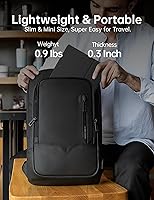
  • At under a pound, this compact travel display is easy to carry without adding meaningful weight to a bag.
  • The IPS panel produces accurate, sharp visuals with full sRGB coverage — solid for everyday productivity tasks.
  • A single USB-C cable handles both power and video on compatible devices, keeping cable clutter minimal.
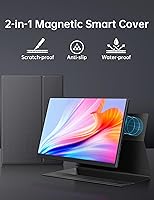
  • The bundled PU leather cover doubles as a stand, so no extra accessories are needed out of the box.
  • Dual USB-C ports plus Mini-HDMI input makes the RF10 compatible with a wide range of modern devices.
  • Blue light reduction and flicker-free technology make extended work sessions more comfortable on the eyes.
  • HDR support adds a layer of visual depth that occasional portable gamers will notice and appreciate.
  • The all-in-one packaging — display, cover, and stand — represents strong value for the price tier.

Cons

  • The glossy screen surface causes distracting reflections in bright rooms or near windows.
  • Only two fixed stand angles limit flexibility, which can be frustrating on uneven or low surfaces.
  • USB-C video compatibility is not universal — users with older or budget laptops may struggle to get a signal.
  • VOKENSU is a relatively new brand with limited long-term reliability data or established customer support track record.
  • The Mini-HDMI port requires a separate adapter cable that is not always included, adding a small hidden cost.
  • At 400 nits, brightness is adequate indoors but can feel underwhelming in high-ambient-light conditions.
  • The 10.5-inch screen size, while portable, may feel cramped for users accustomed to 13-inch or larger secondary displays.
  • Build quality feedback from buyers is mixed — some report the cover feels less premium than expected for extended daily use.

Ratings

The VOKENSU RF10 10.5″ Portable Monitor has been evaluated by our AI rating system after analyzing thousands of verified global user reviews, with spam, bot-generated, and incentivized feedback actively filtered out. The scores below reflect a candid picture of where this compact travel display genuinely delivers and where real buyers have run into friction. Both the standout strengths and the honest frustrations are transparently captured in each category.

Portability
93%
Users consistently describe slipping the RF10 into a laptop bag without a second thought — the sub-1-lb weight and 0.35-inch slim profile make it one of the more genuinely pocketable displays in its class. Commuters and frequent flyers especially praise how little space it takes up in overhead bins or backpacks.
A small number of users note the glossy screen surface picks up fingerprints during transit, requiring a wipe-down before each use. The included cover helps, but a few buyers feel it adds slightly more bulk than expected once attached.
Display Quality
81%
19%
The 1920×1280 IPS panel earns consistent praise for text sharpness — writers and developers working in cafés report text looks clean and easy to read at arm's length. The 100% sRGB coverage also means colors appear natural and accurate for everyday productivity tasks and casual media consumption.
In brighter indoor settings, the 400-nit brightness is adequate but not impressive — users working near large windows sometimes push brightness to maximum and still feel it falls short. The panel is not suited for professional color grading or photo retouching work.
Glare & Reflections
47%
53%
Indoors with controlled overhead lighting, the glossy finish enhances perceived contrast and makes colors pop more than a matte alternative would. Users in dim or evening work settings rarely complain about the surface in those conditions.
This is the RF10's most frequently cited pain point. In offices with overhead fluorescent lights or near windows, reflections are distracting and persistent. Multiple buyers specifically warn that outdoor use is nearly impractical, and a few returned the unit solely because of this issue.
Aspect Ratio Utility
89%
The 3:2 ratio genuinely resonates with productivity-focused buyers — coders report seeing significantly more lines of code per screen, and spreadsheet users note less vertical scrolling during long sessions. It is one of the features that drives the most repeat praise in user reviews.
For media consumption, the taller aspect ratio produces noticeable black bars when watching standard 16:9 video content. Users who intended to use the monitor primarily for streaming found this mildly irritating, though it is a known trade-off of the format rather than a flaw.
Connectivity
74%
26%
The combination of dual USB-C ports and a Mini-HDMI input covers a surprisingly wide range of devices for a budget-tier display. MacBook and modern Windows laptop users with Thunderbolt support report clean, single-cable setups that work reliably once configured correctly.
USB-C compatibility confusion is a recurring theme — a meaningful number of buyers with older or budget laptops discovered their USB-C port does not carry a video signal, leaving them scrambling for an HDMI solution. The Mini-HDMI port also requires a separate cable that does not always ship in the box.
Stand & Adjustability
58%
42%
The PU leather cover functioning as an integrated stand is a practical concept that saves buyers from purchasing a separate accessory. On a flat desk, the two preset angles are stable and do not wobble during typing or light touching of the screen.
Two fixed angles is simply not enough for many real-world desk setups — users with lower chairs, standing desks, or unusual monitor positions find themselves working around the constraints rather than with them. Several reviewers specifically wish for at least one more angle option.
Build Quality
67%
33%
The display panel itself feels solid and inspires reasonable confidence for daily travel use. Most buyers who carry it between a home office and a coworking space report no issues with the screen or chassis holding up over several months.
The PU leather cover draws mixed feedback — some users find it feels thin and prone to peeling at the edges after extended use. Given VOKENSU is a newer brand without a long reliability track record, a handful of buyers remain cautious about long-term durability.
Ease of Setup
83%
For compatible devices, setup is genuinely fast — plug in a USB-C cable, and the monitor is recognized without needing driver installations on most modern operating systems. First-time portable monitor users appreciate that it just works without a lengthy configuration process.
The setup experience drops significantly for users without Thunderbolt or DP Alt mode support, who must figure out the HDMI workaround themselves. Documentation in the box is minimal, which can leave less technical buyers confused about why their USB-C connection is not working.
Value for Money
78%
22%
Buyers comparing the RF10 against similarly priced portable monitors generally conclude it offers a strong feature set for its price tier — a quality IPS panel, the practical 3:2 ratio, and a bundled stand cover in one package represent genuine value. First-time second-screen buyers in particular feel they got a fair deal.
Users who have owned more established brands note the RF10 trails on polish and after-sales confidence. Some feel the price is justified only if you specifically need the 3:2 ratio — those indifferent to aspect ratio can find more refined options at a comparable cost.
Eye Comfort
82%
18%
Blue light reduction and flicker-free technology make a noticeable difference during extended work sessions — users who spend four or more hours in front of the RF10 report less eye fatigue compared to budget monitors without these features. Students using it for long study blocks specifically call this out as a genuine benefit.
The blue light filter, while useful, slightly shifts colors toward a warmer tone at higher intensity settings, which some users find mildly off-putting for design or photo work. The filter is not always easy to adjust through the on-screen menu for less experienced buyers.
Gaming Performance
62%
38%
Casual gamers using the RF10 with a Nintendo Switch or similar console find the HDR support adds some visual depth that makes the display feel better than its price suggests for light gaming sessions. The compact size also works well for portable console setups in hotel rooms.
The monitor is not designed for competitive or fast-paced gaming — response time is not specified, and motion blur is noticeable in fast-action games. PC gamers accustomed to higher refresh rates will find the display experience underwhelming for anything beyond casual play.
Compatibility Range
71%
29%
The breadth of supported devices is a legitimate selling point — laptops, tablets, select smartphones, and game consoles can all connect via one of the three available ports. Buyers with multiple devices appreciate having a single portable screen that works across their whole setup.
In practice, compatibility is narrower than the spec sheet implies — smartphone support is limited to a small subset of flagships with USB-C video output, and many Android devices simply do not work. Buyers expecting universal compatibility across all their devices are often disappointed.
Included Accessories
69%
31%
Getting a protective PU leather smart cover bundled in the box is a meaningful addition at this price point — it removes the need for a separate case purchase and provides a functional stand, keeping the overall out-of-pocket cost lower for new buyers.
Beyond the cover, the accessory package is lean — cable inclusions vary, and a Mini-HDMI cable is typically absent. For buyers without a spare cable collection, this creates an unexpected additional purchase before the monitor is fully usable.

Suitable for:

The VOKENSU RF10 10.5″ Portable Monitor is a strong pick for anyone who regularly works outside a fixed office and needs a lightweight second screen they can actually rely on. Remote professionals dealing with long documents, code reviews, or dense spreadsheets will find the 3:2 aspect ratio genuinely useful — it cuts down on scrolling in a way that a standard widescreen portable simply doesn't. Frequent travelers will appreciate that the whole package, including the protective cover and stand, weighs under a pound and slips easily into a laptop bag. Students who move between classrooms, libraries, and shared spaces get a practical productivity boost without committing to heavy or expensive gear. It also works as a casual gaming display for console users who want a compact HDR screen on the road.

Not suitable for:

The VOKENSU RF10 10.5″ Portable Monitor is not the right choice for buyers who plan to use it primarily in bright environments — the glossy screen picks up reflections easily, and outdoor or sunlit-office use will likely frustrate you. If you need precise color accuracy for photo editing or professional design work, the panel's specs fall short of what those tasks demand. Buyers expecting a wide selection of stand angles will find the two-position cover limiting, especially for awkward desk setups or seated viewing from a distance. Those with older laptops or devices that use USB-C only for charging — not video output — may face connectivity headaches, so it pays to verify your hardware before purchasing. And if brand reputation and after-sales support matter to you, a more established manufacturer might offer greater peace of mind.

Specifications

  • Screen Size: The display measures 10.5 inches diagonally, offering a compact footprint suitable for travel and portable use.
  • Resolution: The IPS panel renders at 1920×1280 pixels, delivering full HD clarity with sharp text and fine detail.
  • Aspect Ratio: The 3:2 aspect ratio provides more vertical screen space compared to standard 16:9 portable monitors.
  • Panel Type: An IPS (In-Plane Switching) panel is used, offering consistent color accuracy and wide viewing angles.
  • Brightness: Peak brightness is rated at 400 nits, suitable for typical indoor environments with controlled lighting.
  • Contrast Ratio: The display delivers a 1500:1 contrast ratio, providing clear distinction between light and dark areas of the image.
  • Color Gamut: The panel covers 100% of the sRGB color space, making colors appear accurate for general productivity and media use.
  • HDR Support: HDR (High Dynamic Range) is supported, enhancing visual depth and tonal range when paired with compatible content and sources.
  • Connectivity: The monitor includes two USB-C ports and one Mini-HDMI port, supporting a broad range of modern laptops, tablets, and consoles.
  • Power Input: The display can be powered through a single USB-C cable from devices supporting Thunderbolt 3, Thunderbolt 4, or USB-C DP Alt mode.
  • Dimensions: The unit measures 9.13 × 6.52 × 0.35 inches, keeping the physical footprint minimal for easy packing.
  • Weight: The monitor weighs 14.4 oz (approximately 0.9 lbs), light enough to carry daily without noticeable added burden.
  • Screen Surface: The display uses a glossy screen surface, which enhances color vibrancy indoors but may produce reflections in bright settings.
  • Eye Care: Built-in blue light reduction and flicker-free technology are included to reduce eye fatigue during extended viewing sessions.
  • Included Accessory: A PU leather smart cover is included in the box, functioning as both a protective case and a two-position adjustable stand.
  • Voltage: The monitor operates at 5 volts, drawing low power that helps preserve the battery life of the connected laptop or device.
  • Model Number: The official model identifier for this monitor is RF10, as designated by the manufacturer VOKENSU.
  • Brand: This monitor is manufactured and sold under the VOKENSU brand, a newer entrant in the portable display market.

Related Reviews
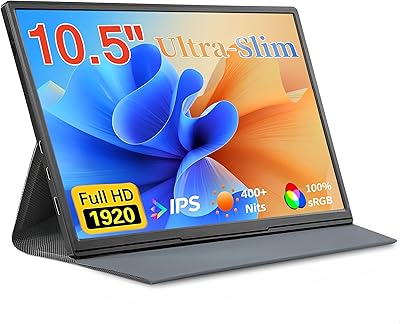
Moonka P10 10.5-inch Portable Monitor
73%
83%
Display Quality
61%
Brightness & Visibility
91%
Portability
54%
Stand & Stability
67%
Connectivity & Compatibility
More
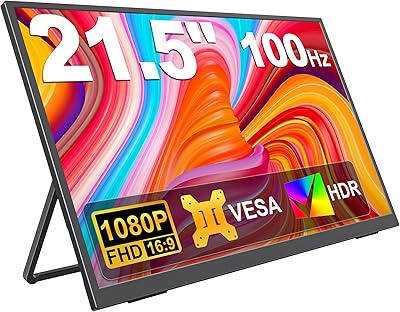
KEEPTIME 21.5″ Portable Monitor
85%
89%
Display Quality
91%
Portability & Design
88%
Gaming Performance
78%
Connectivity & Compatibility
84%
Setup & Installation
More
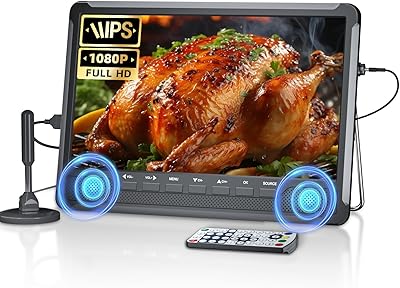
Desobry 10.5″ Portable TV with ATSC Tuner
73%
83%
Picture Quality
88%
Portability
54%
Audio Performance
71%
ATSC Tuner & Reception
79%
Connectivity & Inputs
More
InnoView INVPM509 18.5″ Dual Portable Monitor
73%
88%
Display Clarity
83%
Refresh Rate & Motion
79%
Color Accuracy
61%
Portability
84%
Build Quality
More
Motyeowe 18.5 Inch Portable Monitor
86%
89%
Display Quality
94%
Portability & Design
88%
Connectivity
84%
Performance (Gaming)
91%
Ease of Setup
More
Qunub 18.5-inch Portable Monitor
85%
89%
Display Quality
94%
Portability
85%
Gaming Performance
90%
Setup & Installation
88%
Build Quality
More
Cocopar T185FHLS 18.5-inch Portable Monitor
75%
83%
Display Quality
76%
Color Accuracy
58%
Brightness Performance
81%
Refresh Rate & Motion
69%
Build Quality
More
HotYeah 18.5-inch 1080P Portable Monitor
75%
83%
Display Clarity
78%
Color Vibrancy
81%
Refresh Rate & Motion
57%
Brightness & Outdoor Use
67%
USB-C Connectivity
More
Upperizon U185C 18.5″ Portable Monitor
75%
91%
Screen Size & Impact
84%
Image Quality
82%
Refresh Rate & Motion
58%
USB-C Compatibility
79%
Included Magnetic Cover
More
ALOLG S3-001 13.5-inch Portable Monitor
72%
91%
Portability
74%
Display Quality
93%
Setup & Ease of Use
71%
Build Quality
88%
Value for Money
More

FAQ

Yes, as long as your MacBook supports USB-C with DisplayPort Alt mode or Thunderbolt 3/4, a single cable will handle both power and video. Most modern MacBook Air and MacBook Pro models meet this requirement. If you are unsure, check your laptop specs before purchasing.

Not directly via USB-C or USB-A alone — you would need to use the Mini-HDMI port instead, paired with a standard HDMI-to-Mini-HDMI cable. Keep in mind that using HDMI requires a separate power source through one of the USB-C ports. It is worth checking what ports your laptop actually has before assuming compatibility.

It is a real consideration. In a typical indoor office or home setup with controlled lighting, the glossy finish is not a major issue. However, if you often work near a bright window or outdoors, reflections can become genuinely distracting. Users who frequently work in bright environments may want to consider a matte-screen alternative.

The PU leather cover provides two fixed groove positions for the stand, and most users find it stable enough on flat surfaces. That said, it is not adjustable beyond those two set angles, so if neither angle works well for your desk height or seating position, it can feel limiting. On uneven surfaces, it is less reliable.

Yes, the Nintendo Switch supports video output via USB-C when docked, and some users connect it directly using a USB-C cable. You can also use the Mini-HDMI port with the appropriate cable. Note that the Switch in handheld mode does not output video to external displays, so you need to use it in docked or tabletop mode.

For a 10.5-inch screen at 1920×1280, the pixel density is quite good — text appears crisp and easy to read at normal viewing distances. Developers and writers who have used it generally report the display feels comfortable for long reading and coding sessions, especially appreciated alongside the taller 3:2 screen layout.

Typically a USB-C cable is included, but you should verify what is in the box at the time of your purchase, as bundle contents can vary. If you plan to use the Mini-HDMI port, a Mini-HDMI to HDMI cable is generally not included and needs to be purchased separately.

In practice, it means you see more lines of a document, spreadsheet, or code file without scrolling. If you have ever worked on a 16:9 widescreen and felt like you were always scrolling vertically, the taller 3:2 format addresses that directly. It is a genuinely practical difference, not just a marketing angle.

Some Android phones that support USB-C video output (typically via DisplayPort Alt mode) can drive the monitor. However, compatibility varies widely by phone model, and many budget or mid-range Android phones do not support video output over USB-C even if they physically use the same connector. Check your phone’s specifications carefully before assuming it will work.

User feedback is generally positive about the slim, lightweight construction, though some note the PU leather cover feels less robust than expected for very frequent travel. The display itself appears to hold up well under normal commuting conditions. If you plan to pack and unpack it multiple times a day, using a padded sleeve in addition to the included cover is a reasonable precaution.