Overview

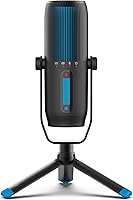
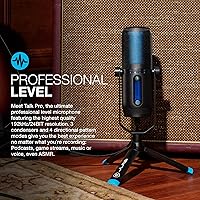
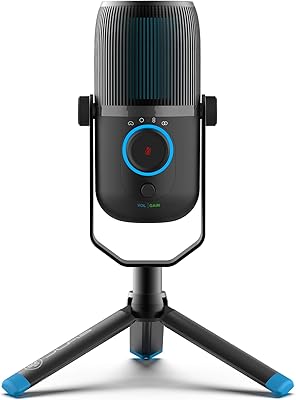
The JLab Talk Pro USB Microphone sits in that interesting middle ground between a basic plug-in mic and a proper studio setup — it targets home podcasters, streamers, and remote professionals who want noticeably better audio without a complicated signal chain. Compared to single-pattern entry-level options, this JLab mic packs three condenser capsules and four polar pattern modes into one unit, which is a meaningful step up. The included 10-foot USB-C cable means you can actually position it where you need it. Build quality is where honest expectations matter: the plastic housing gets the job done, but don't expect the heft of a Blue Yeti or HyperX QuadCast.

Features & Benefits

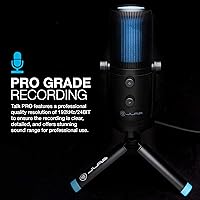
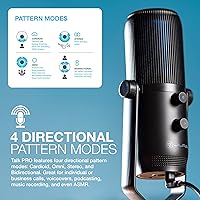
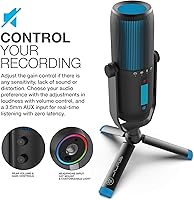
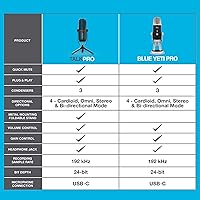
The four polar pattern modes are the headline feature here, and they genuinely cover different recording scenarios. Cardioid works well for solo voice; omni picks up a whole room for group calls; stereo captures ambient width for music; bidirectional is handy when two people share one mic for an interview. The 192kHz/24-bit resolution sounds impressive on paper — and recordings do come out clean and detailed — but truthfully, for spoken word and streaming, most ears won't hear a difference from 96kHz. More practically useful day-to-day: the on-unit gain control, quick-mute button, and a 3.5mm headphone jack for real-time monitoring with zero latency.

Best For

This USB condenser is a strong fit for solo podcasters, streamers, and anyone doing regular video calls who wants real pickup control without learning audio software. Voice-over freelancers will appreciate the pattern flexibility, and ASMR creators specifically will find omni and bidirectional modes useful for capturing subtle sound textures. Where it falls short: professional studio recording is not what this mic was built for. Musicians who need XLR connectivity, precise preamp control, or condenser-grade sensitivity for instruments should look elsewhere. Similarly, if your workspace is acoustically untreated, the mic's sensitivity will pick up more room noise than you'd want in a finished recording.

User Feedback

Owners tend to praise the clear cardioid pickup for voice calls and podcasting, and the long cable gets specific mentions from people who need reach across a larger desk setup. Setup satisfaction is high — most people are recording within minutes of unboxing. The criticism that comes up most consistently is the plastic construction: it functions fine, but it does feel lightweight in hand, which makes some buyers uncertain about long-term durability. A few users note the gain control range could be finer, particularly in quiet environments. On the lower end of ratings, occasional complaints mention the mute button feeling imprecise and minor software recognition hiccups on certain systems.

Pros

  • Four polar pattern modes give real recording flexibility without needing a second microphone or complex routing
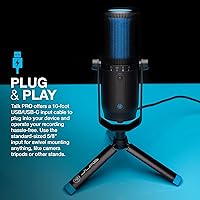
  • The 10-foot USB-C cable is longer than most competitors include, reducing desk cable management headaches
  • Zero-latency headphone monitoring via the 3.5mm jack lets you catch audio issues in real time
  • Plug-and-play setup means no driver installation — it works on most systems within seconds of plugging in
  • On-unit gain and volume controls make live adjustments fast without digging into software menus
  • The 95dB signal-to-noise ratio keeps background hiss low for clean voice recordings
  • Standard 5/8-inch thread mount works with most existing boom arms and tripod stands you may already own
  • The Talk Pro holds up well in voice clarity comparisons against pricier multi-pattern USB mics
  • Quick-mute button is genuinely useful for streamers and remote workers who need instant silence

Cons

  • Plastic construction feels noticeably lightweight, which raises questions about long-term durability with daily use
  • No XLR output limits the mic to USB-only setups with no option to upgrade the signal chain later
  • The gain control range is narrow enough that some users struggle to fine-tune sensitivity in very quiet environments
  • Background noise sensitivity can be problematic in acoustically untreated or open-plan spaces
  • The mute button tactile feedback is soft, making it hard to confirm activation without looking at the unit
  • Some users report occasional device recognition issues on specific operating system configurations
  • The plastic stand and housing can feel less stable on a desk compared to heavier metal-bodied alternatives
  • At 192kHz the file sizes for raw recordings grow quickly, with minimal audible benefit over 96kHz for most use cases

Ratings

The scores below for the JLab Talk Pro USB Microphone were generated by AI after analyzing verified buyer reviews from multiple global markets, with spam, bot-submitted, and incentivized feedback actively filtered out before scoring. Each category reflects the honest distribution of user sentiment — where buyers consistently praised a feature, the score rises; where recurring complaints surfaced, the score drops accordingly. Both strengths and genuine pain points are represented transparently so you can make an informed decision.

Audio Clarity
83%
Reviewers consistently note that voice recordings in cardioid mode come out clean and well-defined, with enough detail to sound professional on podcasts and video calls without post-processing. The 95dB signal-to-noise ratio keeps the noise floor low enough that most buyers are satisfied right out of the box.
In less-than-ideal acoustic environments, the mic's condenser sensitivity works against it — some users report picking up keyboard clicks, HVAC hum, and room echo more than expected, which requires additional treatment or positioning adjustments to resolve.
Polar Pattern Versatility
88%
Having four selectable polar patterns in this price range is genuinely uncommon, and buyers repeatedly call it out as the main reason they chose this mic over single-pattern competitors. The bidirectional and omni modes in particular get positive mentions from interview podcasters and group call participants.
The pattern selector switch lacks tactile precision on some units, and a small number of users report it feeling slightly loose after extended use, making it easy to accidentally nudge the setting during a live session without noticing immediately.
Ease of Setup
92%
The plug-and-play experience is one of the most praised aspects across verified reviews — most users report being fully operational within two minutes of opening the box, with no driver installation required on either Windows or macOS. This is a meaningful advantage for non-technical buyers.
A small but consistent subset of reviewers mentions occasional device recognition issues on specific system configurations, particularly after OS updates, where the mic briefly fails to register until the USB connection is cycled or a different port is used.
Build Quality
58%
42%
The Talk Pro is functional and holds up adequately under normal desk use, and its lighter weight actually makes repositioning it during a session easier than heavier metal-chassis alternatives. Most buyers who use it as a stationary desktop mic report no structural issues over months of ownership.
The all-plastic construction is the single most cited criticism in negative reviews, with buyers describing it as feeling lightweight and somewhat hollow compared to metal-bodied rivals at similar or slightly higher price points. Long-term durability concerns are frequently raised by users who handle the mic more actively.
Value for Money
81%
19%
A meaningful portion of reviewers explicitly state they compared this mic against pricier multi-pattern options and found the Talk Pro competitive enough for everyday voice work at a lower cost. For podcasters, streamers, and remote workers who do not need professional studio performance, the feature-to-price ratio holds up well.
Buyers who push the mic beyond voice use — particularly for instrument recording or ASMR work requiring very fine gain staging — occasionally feel the hardware limitations surface at a level that makes the value proposition feel less compelling compared to alternatives with more refined internals.
Gain Control
63%
37%
Having physical gain and volume knobs directly on the mic body is more practical than software-only adjustments, and buyers doing live streams or calls appreciate being able to make quick corrections without alt-tabbing out of their application mid-session.
The gain control range is a recurring point of frustration — users recording in very quiet environments find the adjustment window too narrow to dial in sensitivity without introducing audible noise, and several reviewers specifically wish for a finer-resolution control rather than the broad sweep the current knob provides.
Headphone Monitoring
79%
21%
The zero-latency 3.5mm monitoring jack is genuinely useful and works as advertised — users who have experienced software-routed monitoring latency before notice the difference immediately, and podcasters in particular appreciate being able to hear their own voice in real time during recording without any perceptible delay.
A few users note that the headphone output volume feels lower than expected at maximum, requiring high-sensitivity headphones to get a comfortable listening level. Buyers using standard over-ear cans occasionally find themselves wishing for more output headroom from the onboard amplifier.
Cable & Connectivity
86%
The 10-foot USB-C cable is longer than what most competing mics include, and reviewers with larger desks or unconventional setups call it out specifically as a practical advantage. The 90-degree gold-plated connector on the mic end reduces port strain and cable fatigue during long sessions.
The cable is USB-A on the computer end, which means users with USB-C-only laptops need an adapter that is not included in the box. This is a minor but avoidable friction point that comes up regularly in reviews from MacBook and recent PC laptop owners.
Mute Button
61%
39%
The dedicated hardware mute button is a feature that streamers and remote workers consistently appreciate conceptually — instant audio cutoff without needing to interact with any software is a real convenience during live situations where fumbling through menus is not an option.
The mute button's tactile feedback is soft enough that confirming its state by feel alone is unreliable, and several reviewers describe unmuting accidentally or remaining muted longer than intended because the button press did not register clearly. A clearer click mechanism or LED status indicator would address this meaningfully.
Polar Pattern Switching
67%
33%
The onboard pattern selector allows users to adapt the mic to different recording contexts — solo narration, group calls, ambient capture — without any software interaction, which is a practical advantage in dynamic home studio environments where the use case changes day to day.
The physical selector mechanism does not have a particularly firm detent between positions, which means the pattern can shift slightly without the user realizing it. A few buyers noticed unexpected audio character changes mid-recording and traced the issue back to an unintentionally shifted pattern selector.
Stand & Mounting
74%
26%
The standard 5/8-inch thread mount means the Talk Pro is immediately compatible with the majority of boom arms, tripod stands, and shock mounts on the market, which is a practical advantage for buyers who already own mounting hardware from a previous microphone setup.
The included swivel adapter is basic, and the mic has no built-in desktop stand, meaning buyers without existing mounting hardware need to purchase a stand separately. This is a minor but real additional cost that the packaging does not make explicit.
Software Compatibility
72%
28%
The Talk Pro works reliably as a plug-and-play USB audio device across Zoom, Teams, OBS, Audacity, GarageBand, and most other major applications without requiring any manual configuration beyond selecting it as the audio input source in the app settings.
A repeating pattern in lower-rated reviews involves intermittent recognition failures on Windows systems after major OS updates, where the mic drops out or is not detected until the cable is re-plugged. While not universal, it surfaces frequently enough to be a legitimate reliability concern for some buyers.
Noise Rejection
66%
34%
In controlled environments — a quiet home office, a carpeted room with soft furnishings — the cardioid pattern does a reasonable job of rejecting off-axis sound, and users doing voice-over work in treated spaces report a clean, focused recording with minimal bleed.
The mic is sensitive enough that untreated rooms introduce noticeable problems: keyboard typing, HVAC noise, and even moderate ambient room sound can bleed into recordings in a way that requires post-processing to address. Dynamic mic users switching to this condenser are often caught off guard by how much more the room matters.

Suitable for:

The JLab Talk Pro USB Microphone is a practical choice for anyone who wants a noticeable audio upgrade without touching audio interfaces, drivers, or complicated software. Solo podcasters will get the most out of the four polar patterns — cardioid for tight voice focus, omni for roundtable-style group calls, and bidirectional for two-person interviews. Remote professionals and freelancers who spend hours on video calls will appreciate the on-unit gain and volume controls, since adjusting levels mid-call without opening system settings is genuinely useful. Content creators moving up from a built-in webcam mic or laptop microphone will hear an immediate difference in clarity and background rejection. ASMR creators in particular have a reason to look here, since the omni and bidirectional modes capture subtle, ambient sound textures that a basic single-pattern mic simply cannot.

Not suitable for:

The Talk Pro is not the right tool for serious music production or professional studio work, and buyers coming from that world should know that upfront. It connects over USB only, which means there is no XLR output, no phantom power routing, and no compatibility with external audio interfaces or preamps — the signal chain is fixed. Musicians tracking instruments or vocals in a treated space will find the plastic build and fixed internal preamp limiting compared to dedicated studio condensers at similar or higher price points. The mic is also sensitive enough that untreated rooms — bare walls, hard floors, open-plan offices — will introduce noticeable room noise and echo in recordings. Anyone expecting premium build quality comparable to metal-bodied rivals should temper those expectations: the Talk Pro is functional and capable, but its plastic housing does not inspire the same confidence during daily handling.

Specifications

  • Polar Patterns: Supports four directional modes: cardioid, omnidirectional, stereo, and bidirectional, selectable directly on the unit.
  • Sample Rate: Records at up to 192kHz for high-resolution audio capture across voice, music, and ambient recording scenarios.
  • Bit Depth: Operates at 24-bit depth, providing a wide dynamic range that reduces noise floor in quiet recording environments.
  • Frequency Response: Covers 20Hz to 20kHz, spanning the full range of human hearing for both voice and musical instrument capture.
  • Signal-to-Noise Ratio: Rated at 95dB, which keeps self-noise low and ensures clean recordings in reasonably quiet spaces.
  • Audio Sensitivity: Sensitivity is rated at 9dB, making the mic responsive to close-range voice without requiring extreme gain settings.
  • Condenser Capsules: Houses three condenser capsules internally, enabling the mic to support its four distinct polar pattern configurations.
  • Connectivity: Connects via a USB-A to USB-C cable with a 90-degree gold-plated connector on the microphone end.
  • Cable Length: Includes a 10-foot (approximately 3 meters) cable, longer than the standard 6-foot cables bundled with most competing USB mics.
  • Headphone Output: Features a 3.5mm headphone jack on the unit body for zero-latency real-time monitoring during recording or calls.
  • Mounting Thread: Uses a standard 5/8-inch threaded insert, compatible with the majority of commercial boom arms, tripods, and desk stands.
  • Dimensions: Measures 8.66 x 3.35 x 1.57 inches, making it a compact upright condenser suitable for most desk setups.
  • Weight: Weighs approximately 501g (1.11 lbs), light enough for repositioning but not as substantial as metal-bodied alternatives.
  • Body Material: Constructed from plastic throughout, which keeps weight low but may feel less premium compared to metal-chassis competitors.
  • Driver Requirement: Requires no additional drivers or software — it is recognized as a standard USB audio device on both Windows and macOS.
  • Controls: Includes three physical controls on the unit: a gain knob, a volume knob, and a dedicated quick-mute button.
  • Warranty: Backed by JLab Audio's two-year limited warranty, which covers manufacturing defects from the date of original purchase.
  • In the Box: Package includes the microphone, the 10-foot USB-A to USB-C cable, and a 5/8-inch swivel mount adapter for stand attachment.

Related Reviews
JLab Talk USB Microphone
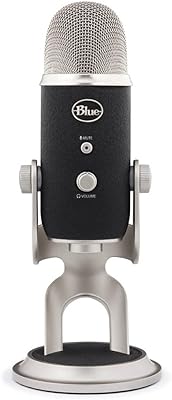
72%
83%
Sound Clarity
88%
Polar Pattern Versatility
93%
Ease of Setup
61%
Background Noise Rejection
58%
Build Quality
More
Blue Yeti Pro USB XLR Condenser Microphone
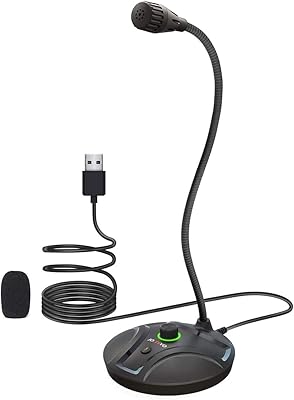
80%
93%
Audio Clarity
88%
Build Quality
91%
Ease of Setup
86%
Polar Pattern Versatility
89%
USB Recording Resolution
More
JOUNIVO JV605 Pro
JOUNIVO JV605 Pro
80%
96%
Ease of Setup
83%
Voice Clarity
71%
Noise Reduction
93%
Mute Button & LED Indicator
88%
Volume Knob
More
Samson G-Track Pro
Samson G-Track Pro
83%
96%
Build Durability
92%
Vocal Clarity
88%
Instrument Integration
94%
Ease of Setup
85%
Polar Pattern Versatility
More
Samson C01U Pro
Samson C01U Pro
83%
93%
Build Durability
88%
Vocal Clarity
82%
Background Noise Rejection
91%
Latency Performance
96%
Ease of Setup
More
COMICA Ejoy Uni PRO(A)
80%
93%
Ease of Setup
78%
Audio Clarity
74%
Noise Cancellation
71%
Wireless Performance
63%
Build Quality
More
Elgato Wave:3 USB Condenser Microphone
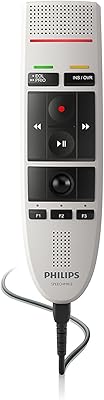
82%
91%
Audio Clarity
88%
Build Quality
93%
Ease of Setup
71%
Wave Link Software
78%
Noise Rejection
More
Philips SpeechMike III Pro Dictation Microphone
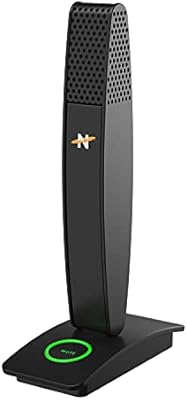
78%
91%
Speech Recognition Accuracy
88%
Noise Cancellation
93%
Build Quality
67%
Ease of Setup
89%
Button & Control Ergonomics
More
Neat Microphones Skyline USB Desktop Condenser Microphone

89%
94%
Audio Quality
91%
Ease of Use
89%
Build Quality
90%
Mute Button Functionality
92%
Value for Money
More
StarTech DK31C3HDPD USB-C USB-A Docking Station
75%
83%
Multi-Display Performance
57%
Setup & Driver Experience
79%
Power Delivery
62%
Apple Silicon Compatibility
71%
Value for Money
More

FAQ

Yes, the Talk Pro is fully plug-and-play on both macOS and Windows. Your computer recognizes it as a standard USB audio input device, so there are no drivers to download or software to configure before you start recording.

Cardioid is the right choice for solo work. It focuses pickup directly in front of the mic and rejects sound from the sides and rear, which means less room noise and a cleaner-sounding recording. The other patterns are worth exploring once you understand your setup, but cardioid is where most people should start.

The included cable has a USB-A connector on the computer end, so you would need a USB-A to USB-C adapter if your laptop only has USB-C ports. The mic end uses USB-C with a 90-degree connector. JLab does not include an adapter in the box, but any standard USB-A to USB-C adapter will work.

The monitoring through the 3.5mm jack is handled directly by the mic hardware rather than being routed through your computer, so there is no perceptible delay. This is meaningfully different from monitoring through software, where even a few milliseconds of latency can feel disorienting when you hear your own voice.

Yes, it works with all major video conferencing platforms. Since the operating system sees it as a standard audio input device, you just select it as your microphone source in the app settings. No special configuration is needed.

The Talk Pro is made from plastic, which keeps it lightweight but does mean it feels less solid than heavier metal-bodied mics. For desk use where it stays in one place, it holds up fine over time. If you plan to pack it in a bag regularly or handle it roughly, a protective case would be a sensible precaution.

The bidirectional pattern is designed for exactly that scenario — it picks up sound from the front and rear of the mic while rejecting the sides. Position the mic between two speakers, switch to bidirectional mode, and both voices will be captured on the same track. It works reasonably well in a quiet room, though a dedicated two-mic setup will always give you more control in post-editing.

For podcasting, streaming, and video calls, the practical difference between 192kHz and 96kHz is essentially inaudible to most listeners. Where higher sample rates matter more is in music production, where you might apply heavy pitch-shifting or time-stretching in post. For voice work, the 192kHz capability is a nice spec on paper, but recording at 48kHz or 96kHz will save storage space with no noticeable quality loss.

Turning the gain down reduces the mic sensitivity, which can help in noisier environments — but it has limits. The Talk Pro is a condenser mic, and condensers are inherently more sensitive than dynamic mics, so if your room has significant echo or ambient noise, lowering the gain alone will not fully solve the problem. Acoustic treatment like a reflection filter or soft furnishings in the room will make a bigger difference than any gain adjustment.

Almost certainly yes. The mic uses a standard 5/8-inch threaded insert at the base, which is the most common mounting standard for USB and XLR mics alike. Most boom arms and desk stands on the market use this thread size, so it should attach directly without an adapter.