

Overview

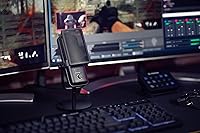
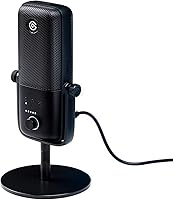
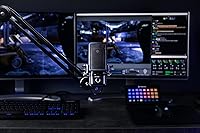
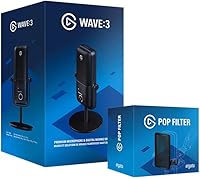
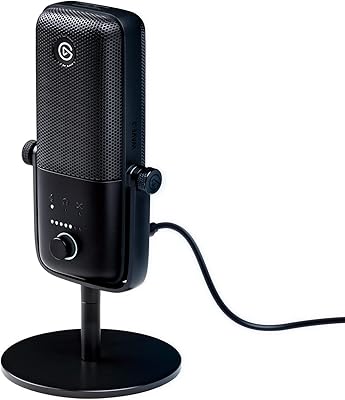
The Elgato Wave:3 USB Condenser Microphone sits at the top of Elgato's Wave lineup, aimed squarely at streamers, podcasters, and home office workers who want professional-sounding audio without buying a separate audio interface. Out of the box, you get the mic plus a bundled anti-plosive shield — a practical inclusion that saves you an extra purchase, though its mount feels less rigid than dedicated third-party options. The alloy steel construction gives it a reassuringly solid feel, and at roughly 1.3 pounds it stays planted without dominating your desk. Setup is just a USB-C cable away — no drivers, no configuration headaches.

Features & Benefits

The cardioid polar pattern does the heavy lifting here — it captures what is directly in front of it and lets ambient room noise fall away, which matters a lot if you are not recording in a treated space. Audio resolution tops out at 96 kHz, 24-bit, meaning your recordings carry fine detail and dynamic headroom that compressed formats cannot fully use but clean exports definitely will. The Wave Link software lets you build two independent mixes — one for your stream, one for your headphones — across up to nine sources. The capacitive mute button is a small but genuinely useful touch: one tap, instant silence, confirmed by an LED ring.

Best For

This Elgato mic makes the most sense for people who want broadcast-quality vocals without learning signal chains or buying extra gear. Streamers get the most value from Wave Link's dual-mix system, especially those already running other Elgato hardware. Remote workers tired of hollow headset audio on video calls will notice an immediate, obvious improvement. Solo podcasters will appreciate the straightforward USB setup, though anyone needing to record multiple people in one room should look elsewhere — this is a single-voice mic by design. Stacked against something like the Blue Yeti, the Wave Link integration is the differentiating factor that justifies the price gap.

User Feedback

Owners consistently praise the vocal clarity and the all-metal build, with many noting the mic still performs like new after a year or more of daily use. The most repeated complaint is the pop filter mount: it clips on rather than threading securely, and some users report it shifting mid-session. Wave Link draws mixed reactions — experienced streamers love its depth, but newcomers sometimes find the interface confusing at first. Compared to similarly priced competitors, most buyers feel the audio quality justifies the cost, though a notable number suggest that simpler bundled software would make the Wave:3 a far easier recommendation for more casual users.

Pros

  • Voice clarity is noticeably better than most headset and entry-level USB microphones straight out of the box.
  • Plug-and-play USB setup requires zero driver installation or audio interface knowledge.
  • The all-metal alloy steel body feels built to last, with no creaking plastic or wobbly joints.
  • Wave Link's dual-mix system gives streamers independent control over what goes to their audience versus their own ears.
  • The capacitive mute button is fast, reliable, and lit clearly enough to check with a glance during a live session.
  • At 96 kHz and 24-bit resolution, recordings carry enough detail for professional editing and post-production work.
  • The cardioid pattern does a solid job rejecting keyboard noise and room reflections when you are speaking directly into it.
  • Supports up to nine audio sources simultaneously inside Wave Link, which is genuinely useful for complex streaming setups.
  • The bundled anti-plosive shield handles everyday plosive sounds well enough for most users without needing an upgrade immediately.

Cons

  • The pop filter mount clips on rather than locking in place, and it can shift or loosen during longer sessions.
  • Wave Link has a noticeable learning curve; new users often need several sessions before the routing logic clicks.
  • No multi-pattern options mean the Wave:3 cannot handle interview-style recording or ambient capture scenarios.
  • The premium pricing is difficult to justify for users who only need a microphone for occasional casual calls.
  • No mobile or tablet compatibility out of the box; USB-A connection requires a separate adapter for modern devices.
  • The fixed stand mount limits positioning flexibility compared to mics designed for boom arm or shock mount setups.
  • Background noise rejection weakens noticeably if you are not positioned closely and directly in front of the capsule.
  • Wave Link is desktop-only software, so there is no way to manage your mix remotely or from a secondary device.
  • Some long-term users report that the LED ring around the mute button can dim unevenly after extended daily use.

Ratings

The scores below reflect an AI-driven analysis of thousands of verified global user reviews for the Elgato Wave:3 USB Condenser Microphone, with spam, bot activity, and incentivized submissions actively filtered out before scoring. Each category captures both what real buyers genuinely praised and where recurring frustrations surfaced, giving you an honest, balanced picture rather than a polished highlight reel. Whether this mic earns a place on your desk depends on your specific setup — and these scores are designed to help you figure that out.

Audio Clarity
91%
Users consistently describe vocal recordings as natural, detailed, and noticeably cleaner than anything they had used at a similar price point before. Podcasters and streamers note that voices come through with a presence and warmth that holds up even after compression in broadcasting software.
A small number of users in acoustically poor rooms — bare walls, hard floors — report that the mic captures more room reverb than expected, which requires post-processing to clean up. At high gain settings, some users noticed a faint self-noise floor that is rarely audible in practice but shows up on sensitive monitoring headphones.
Build Quality
88%
The alloy steel chassis earns frequent praise from users who have owned plastic-bodied USB mics before and immediately noticed the difference in solidity. Several buyers specifically mention that after a year or more of daily use, the body shows no signs of loosening joints, discoloration, or structural wear.
The integrated desk stand, while stable on its own, feels noticeably less refined than the capsule itself — a few users describe it as the weakest link in an otherwise premium-feeling package. The USB-C port on the body has drawn occasional concern from heavy movers who repeatedly connect and disconnect the cable.
Ease of Setup
93%
The plug-and-play USB connection is one of the most praised aspects across all buyer segments — no drivers, no configuration, and no audio interface required. Home office workers frequently mention being up and running on a video call within minutes of opening the box, which is a meaningful advantage over XLR setups.
A handful of users on older Windows machines reported that the device was not immediately recognized and required a system restart to register correctly. This appears to be an edge case rather than a systemic issue, but it does undercut the zero-friction promise for a small subset of buyers.
Wave Link Software
71%
29%
Experienced streamers who took the time to learn Wave Link describe it as one of the most powerful mixing tools available at this price, specifically praising the ability to send a clean vocal-only mix to their broadcast while hearing a full blended monitor mix themselves. The nine-channel routing capability is genuinely useful for complex setups.
The learning curve is the single most cited frustration in software-related reviews — new users frequently describe the interface as unintuitive and report spending hours before the routing logic fully clicks. Casual users who just want clean audio on calls feel the software adds unnecessary complexity they never asked for.
Noise Rejection
78%
22%
The cardioid pattern does a solid job isolating the speaker when the mic is positioned correctly, with many users noting that mechanical keyboard sounds and ambient room noise stay comfortably in the background during recordings. Streamers in busy home environments report that viewers rarely complain about background noise pickup.
Users who sit farther back than roughly 10 to 12 inches from the capsule notice a significant drop in the signal-to-noise ratio, with room sounds becoming more prominent in recordings. The mic rewards proper positioning discipline but is less forgiving than some competing models for users who prefer a more relaxed desk posture.
Pop Filter Performance
66%
34%
The dual-layer steel mesh shield handles typical conversational plosives well enough that most streamers and podcast hosts report never needing to buy a separate foam or fabric filter for standard use cases. The steel mesh design avoids the muffled high-frequency effect that some fabric alternatives introduce.
The clip-on mount mechanism is the most consistently reported hardware complaint in the entire review pool — it sits loosely on the mic body and shifts position during longer sessions without warning. Several users have replaced it with a third-party clamp-style pop filter on a boom arm, which they describe as a clear upgrade in stability.
Mute Button Usability
86%
The capacitive touch mute button with its LED ring is frequently called out as one of the most practical daily-use features on the mic — a quick tap silences the input instantly, and the LED makes it immediately obvious whether you are live or muted without having to check software. Gamers and streamers who multitask particularly value not having to look down.
A few users mention that the capacitive sensitivity is occasionally too responsive, triggering an accidental mute when they graze the body while adjusting the mic's position. There is no way to adjust the touch sensitivity threshold, which makes this more of a muscle-memory issue than a technical flaw.
Value for Money
74%
26%
Buyers who fully utilize Wave Link's mixing capabilities and the broader Elgato ecosystem tend to rate the value very favorably, arguing that replacing its feature set with separate components would cost considerably more. The long-term durability feedback also supports the argument that this is a buy-once product for most users.
Users who primarily need a mic for occasional calls or simple recordings frequently feel they are paying a significant premium for software features they do not use. At its price point, it competes against strong alternatives, and some buyers in retrospect feel a mid-range option would have served their actual needs just as well.
Gain & Volume Controls
83%
The physical gain dial receives consistent praise for being precise and easy to adjust mid-session without reaching for a software panel — a practical advantage during live streams where quick mic adjustments are sometimes necessary. Users appreciate having hardware control that does not require switching focus from their main application.
Some users note that the gain dial lacks numbered markings or detents, making it difficult to return to a specific setting after adjusting it. Returning to a previously calibrated gain level after moving the dial requires guesswork or going back into software to verify input levels.
Compatibility
82%
18%
The broad USB compatibility means the Wave:3 works across Windows, macOS, and most gaming consoles without any configuration, which buyers who switch between devices describe as a genuine convenience. Most users confirm it was recognized immediately by streaming platforms, DAWs, and conferencing software without manual audio routing.
Mobile and tablet users are left out entirely — the USB-A connection requires an adapter for modern devices with USB-C only ports, and neither the mic nor Wave Link officially supports mobile platforms. Users who wanted a portable recording option for smartphones found this a hard limitation.
Headphone Monitoring
84%
The zero-latency headphone monitoring through the 3.5mm jack is praised by users who have dealt with delayed monitor feedback on software-routed setups before — hearing your own voice in real time with no perceivable lag removes a significant source of distraction during live recording sessions.
The headphone output volume is capped at a level that some users with high-impedance headphones find insufficient for comfortable monitoring without a separate headphone amplifier. This is an edge case for most buyers but worth noting for anyone who uses studio-grade monitoring cans.
Desk Footprint
79%
21%
The compact form factor earns positive marks from users with smaller desk setups who were concerned about sacrificing space to a large condenser mic. Several home office workers specifically mention that the mic fits neatly alongside a monitor and keyboard without demanding a dedicated surface area.
The fixed integrated stand means the mic sits at a set height and angle, which is not ideal for all desk heights or chair positions. Users who want to position the capsule at exact mouth level often find they need a boom arm regardless, which raises the question of whether the integrated stand adds much practical value.
Long-Term Durability
85%
A notable portion of long-term reviews — from users who have owned the mic for 18 months or more — describe it as holding up remarkably well under daily streaming and recording use, with no degradation in audio quality or physical condition. The all-metal construction appears to be a genuine advantage here over plastic-bodied competitors.
A small but consistent group of users mention that the LED ring around the mute button showed signs of uneven illumination after extended use, with some sections dimming before others. This does not affect audio performance but does affect the polished aesthetic the product is priced around.

Suitable for:

The Elgato Wave:3 USB Condenser Microphone is built for anyone who wants a significant audio upgrade without the complexity of an audio interface, XLR cables, or external mixers. Streamers get the clearest path to value here — the Wave Link software's dual-mix system lets you pipe clean vocals to your broadcast while hearing a fully blended personal mix in your headphones, all from a single USB connection. Solo podcasters and remote workers will also feel the difference immediately: voices come through with a natural warmth and clarity that headset microphones simply cannot match on video calls or recorded episodes. Gamers who need a reliable, tactile mute option mid-session will appreciate the capacitive touch button, which responds instantly without any awkward fumbling. If you already own other Elgato peripherals, the ecosystem integration through Wave Link adds genuine workflow value that competing USB mics cannot replicate.

Not suitable for:

The Elgato Wave:3 USB Condenser Microphone is not the right choice if you need to record more than one person in the same room, since the cardioid polar pattern is deliberately designed to capture a single voice source. Musicians tracking instruments, voiceover artists working in untreated rooms with significant echo, or anyone who needs multi-pattern flexibility — figure-8 for interviews, omnidirectional for ambient recordings — will find this mic too limiting. The premium price point is also harder to justify if your primary use case is casual video calls a few times a week; a mid-range USB mic at half the price would handle that comfortably. Users who prefer simple, no-software setups may find Wave Link more overhead than they bargained for, especially early on. Finally, buyers who need to connect to a mobile device or tablet without a standard USB-A port will need an additional adapter not included in the box.

Specifications

  • Polar Pattern: Cardioid (unidirectional) pattern captures sound from directly in front while naturally rejecting noise from the sides and rear.
  • Sample Rate: Records at up to 96 kHz, delivering fine audio detail well beyond standard CD-quality capture at 44.1 kHz.
  • Bit Depth: 24-bit resolution provides a wide dynamic range, preserving subtle vocal nuances and giving editors headroom during post-processing.
  • Connection: USB-C to USB-A cable included; the mic draws all power from the host device with no external power supply required.
  • Body Material: Chassis is constructed from alloy steel, contributing to a solid, rattle-free build that holds up under daily desk use.
  • Weight: The microphone unit weighs approximately 1.29 pounds, keeping the desktop footprint stable without requiring a heavy counterweight arm.
  • Dimensions: Package measures 5.91 x 2.76 x 1.57 inches, compact enough to fit neatly on a typical streaming or work-from-home desk setup.
  • Mute Control: A capacitive touch mute button with an integrated LED ring indicator allows instant, silent muting with a single tap during live sessions.
  • Pop Filter: Dual-layer steel mesh anti-plosive shield is included in the box and clips onto the microphone to reduce plosive bursts on letters like P and B.
  • Mixer Software: Compatible with the Wave Link app on Windows and macOS, which supports mixing up to nine simultaneous audio sources across two independent output mixes.
  • Form Factor: Desktop boundary-style form factor with an integrated stand; compatible with standard boom arms and shock mounts via threaded mounting.
  • Compatible Devices: Works with Windows and macOS computers, laptops, and gaming consoles that support USB audio input without additional drivers.
  • Capsule Type: Condenser capsule with a cardioid pickup designed specifically for close-mic vocal applications including streaming, podcasting, and conferencing.
  • Headphone Output: Built-in 3.5mm headphone jack allows zero-latency direct monitoring of your voice while recording or broadcasting.
  • Gain Control: Physical gain dial on the body lets you adjust input sensitivity directly on the microphone without opening any software.

Related Reviews
Elgato Wave:3
Elgato Wave:3
86%
94%
Software Ecosystem
97%
Audio Distortion Prevention
68%
Build Quality & Materials
91%
Ease of Setup
88%
Voice Clarity & Sound Quality
More
Elgato Wave Neo
Elgato Wave Neo
80%
88%
Audio Quality
96%
Ease of Setup
91%
Mute Button & LED Indicator
67%
Build Quality & Materials
83%
Stand & Positioning Design
More
Neat Microphones Skyline USB Desktop Condenser Microphone

89%
94%
Audio Quality
91%
Ease of Use
89%
Build Quality
90%
Mute Button Functionality
92%
Value for Money
More
ikuai 3.5″ USB 3.0 Hard Drive Enclosure
80%
93%
Ease of Setup
71%
Build Quality
62%
Cable Quality & Reliability
88%
Drive Compatibility
74%
Data Transfer Speed
More
CALIONLTD USB Outdoor Power Strip with 3 Outlets and 3 USB Ports
85%
87%
Overall Performance
91%
Durability
84%
Ease of Use
92%
Waterproofing & Weather Resistance
89%
Safety Features (Surge Protection & Overload)
More
Thronmax M8 Pulse USB Condenser Microphone
71%
74%
Audio Clarity
61%
Noise Rejection
58%
Build Quality
89%
Portability
93%
Ease of Setup
More
HyperX SoloCast
HyperX SoloCast
84%
89%
Audio Clarity
97%
Ease of Setup
93%
Mute Functionality
42%
Vibration Isolation
86%
Build Quality
More
JOBY Wavo POD USB Condenser Microphone
76%
78%
Audio Quality
94%
Ease of Setup
62%
Build Quality
74%
Value for Money
57%
Background Noise Rejection
More
AMOOX BM-800
AMOOX BM-800
74%
88%
Value for Money
71%
Audio Quality
93%
Ease of Setup
74%
Build Quality
66%
Noise Isolation
More
HyperX QuadCast S
HyperX QuadCast S
87%
88%
Vocal Clarity
96%
Mute Functionality
91%
Build Quality
84%
Shock Absorption
89%
Gain Control Ease
More

FAQ

No drivers are required. You plug the USB cable into your computer and the operating system recognizes it immediately as an audio input device. The Wave Link app is optional — it unlocks the advanced mixing features, but the mic works perfectly fine without it for basic recording or calls.

Yes, it is fully compatible with both macOS and Windows. The Wave Link software also runs natively on both platforms, so Mac users get the same full feature set as Windows users.

It can connect to gaming consoles via USB and function as a basic audio input, but the Wave Link software is only available on PC and Mac. For console-only setups, you will get clean audio but none of the software mixing features.

The bundled shield handles everyday plosives well enough for most streaming and podcast use. The main complaint from users is that the clip-on mount can shift during longer sessions rather than locking firmly in place. If you record frequently and find it moving, a third-party clamp-style pop filter on a separate arm is a worthwhile upgrade.

Wave Link creates two independent audio mixes from up to nine sources: one that goes out to your stream or recording, and one that only you hear in your headphones. The concept is straightforward, but navigating the routing interface for the first time takes some patience. Most users get comfortable with it after an hour or two of experimenting, though casual users who just want clean vocal audio may find it more than they need.

Yes. The Wave:3 has a 3.5mm headphone jack on the body that lets you hear yourself with zero latency, meaning there is no noticeable delay between speaking and hearing your own voice. This is especially useful when you are recording or going live and need accurate feedback.

For optimal results, position yourself roughly 6 to 12 inches away and speak directly into the front of the capsule. The cardioid pattern is forgiving within that range, but moving significantly further back or off-axis will noticeably reduce clarity and allow more room noise into the signal.

Some keyboard noise will still come through, especially with louder switches, since no cardioid mic completely eliminates nearby sound sources. Positioning the mic closer to your mouth and using the gain control to avoid over-amplifying the input helps significantly. Wave Link also allows you to apply filters that can reduce low-level background noise.

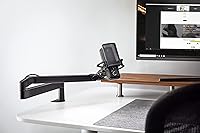
Yes. The base has a standard threaded mount that is compatible with most boom arms and shock mounts on the market. Many users prefer this setup because it keeps the desk clear and makes it easier to position the capsule at mouth level without hunching forward.

Both are well-regarded USB mics at a similar price point, but they take different approaches. The Blue Yeti offers multiple polar patterns including stereo and omnidirectional, which gives it more versatility for different recording scenarios. The Wave:3 trades that flexibility for tighter software integration via Wave Link, a cleaner mixer workflow for streamers, and a more compact single-pattern design. If you are a streamer who wants deep audio routing control and already uses Elgato gear, the Wave:3 is the stronger fit. If you record a wider variety of content or want more pattern options, the Yeti is worth considering.

Where to Buy