



Overview

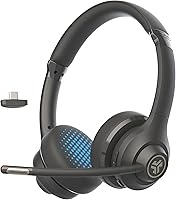
The JLab Go Work Gen 2 arrives in a packed entry-level work headset market with a sensible proposition: flexible connectivity and long-lasting battery life without a premium price tag. This is JLab’s second pass at the Go Work line, and while the improvements over the original are measured rather than dramatic, the overall package is noticeably more considered. At 170g, it wears lightly on the head — a real factor if you’re sitting at a desk for eight hours straight. You get Bluetooth, a USB-C dongle, and a wired cable option, covering most scenarios a remote worker might encounter. Honest caveat: this work-from-home headset is tuned for calls and productivity, not for anyone chasing hi-fi audio quality.

Features & Benefits

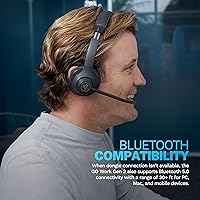
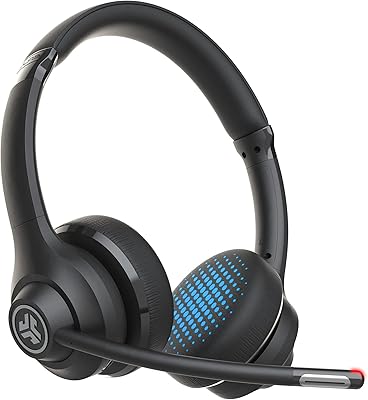
What actually makes the Go Work Gen 2 worth a closer look is how many useful features it packs in at this price. Bluetooth 5.0 multipoint keeps you connected to two devices simultaneously — your laptop and phone, say — so you can pick up a call without fiddling with settings. The rotating boom mic is smarter than it sounds: rotate it up and you’re muted; rotate it back down for calls, with a red LED confirming your status at a glance. The dual MEMS microphone system handles ambient noise well enough for an open-plan office or a busy home environment. Two EQ presets let you dial in a slightly warmer sound once work hours are done.

Best For

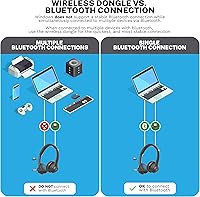
This work-from-home headset suits hybrid workers who switch between a Windows PC and a smartphone throughout the day. The included USB-C dongle is worth calling out specifically — Bluetooth on Windows can be inconsistent with audio devices, and the dongle sidesteps that problem reliably. If you work in a moderately noisy space and need your voice to land clearly on Zoom or Teams calls, this JLab headset handles that without requiring a bigger budget. It’s less of a fit for commuters who need strong noise isolation in transit, or for anyone whose off-hours listening demands are as high as their work call standards.

User Feedback

Across real owner reviews, battery longevity is the most consistent win — people are genuinely surprised it holds up through a full work week without needing a charge. Mic quality on calls gets solid marks; nobody’s calling it studio-grade, but it does what it needs to do on a Google Meet or Teams session. The mute LED on the boom gets specific praise from users who’ve been burned by accidental unmutes — a small feature that earns outsized appreciation. On-ear comfort is the most recurring complaint: the pads can press uncomfortably after three or four hours, and the cushioning is not particularly generous. Multipoint gets mixed reviews on Windows via Bluetooth; on Mac and mobile, it tends to behave.

Pros

  • Battery endurance is exceptional for this price tier — expect to charge it weekly rather than daily.
  • The USB-C dongle is a practical lifesaver for Windows users prone to Bluetooth audio dropouts.
  • Bluetooth multipoint lets you stay connected to your laptop and phone at the same time without re-pairing.
  • The rotating boom mic doubles as a physical mute switch — intuitive and nearly impossible to misread.
  • A red LED on the mic tip confirms mute status visually, eliminating accidental unmute moments on calls.
  • At 170g, this JLab headset is light enough to forget you are wearing it during shorter sessions.
  • Microphone clarity holds up well on Zoom, Teams, and Google Meet without any software tweaking.
  • USB-C charging is fast and universal — no proprietary cables to track down or replace.
  • Onboard controls cover volume, mute, play/pause, and call management without touching your device.
  • Two EQ presets offer a meaningful difference between a flat call-optimized sound and a warmer listening mode.

Cons

  • On-ear padding is thin enough to cause noticeable ear fatigue after three to four hours of continuous wear.
  • Bluetooth multipoint on Windows is unreliable — the dongle works, but it occupies a USB port permanently.
  • No battery percentage indicator means you get a vague low-battery warning instead of a precise read.
  • Passive noise isolation is weak; loud environments bleed through and distract during calls and focused work.
  • The microphone picks up breath and handling noise more than expected in quieter recording conditions.
  • No flat-fold design and no included carry pouch makes bag transport riskier than it should be.
  • Earcup swivel can feel slightly loose after weeks of regular use, which affects long-term confidence in the build.
  • Button tactility is soft and imprecise, making it easy to mis-press adjacent controls without looking.
  • Sound quality during casual music listening is mediocre — narrow soundstage and limited bass depth.
  • Initial multipoint pairing setup is poorly documented and catches out less tech-comfortable users.

Ratings

The JLab Go Work Gen 2 scores here reflect an AI-driven analysis of verified global buyer reviews, with spam, bot submissions, and incentivized feedback actively filtered out before any score was calculated. The result is an honest picture of where this work-from-home headset genuinely delivers and where real users have hit friction — no glossing over the rough edges.

Battery Life
91%
This is the category that earns the most unprompted praise in real reviews. Users working full-time from home consistently report going multiple days — sometimes an entire work week — without reaching for the charging cable. That kind of charging-free stretch is rare at this price point.
A small number of users report noticeably shorter runtime when volume is pushed higher or when call time is heavy. The rated figures hold up under moderate conditions, but power users should temper expectations slightly compared to the headline number.
Microphone Quality
74%
26%
For daily video calls on Zoom, Teams, or Google Meet, the dual MEMS microphone system does its job reliably. Colleagues on the other end of a call rarely complain about clarity, and the background noise rejection handles a moderately busy home environment without drama.
It is firmly a call-grade microphone, not a recording-grade one. Anyone who also podcasts, records voiceovers, or streams will find it falls short quickly. Breath and handling noise are also more noticeable in quieter environments than some competitors at a similar price.
Comfort & Fit
62%
38%
At 170g, the Go Work Gen 2 sits lightly on the head, and for shorter sessions — a couple of hours of calls or a morning of focused work — the on-ear design causes no real issues. Users with smaller heads in particular tend to report a reasonably secure, stable fit.
Extended wear is where the on-ear form factor starts to show its limits. A recurring thread in real user feedback is ear fatigue and mild soreness after three to four hours of continuous use. The earcup cushioning is functional but not particularly plush, and that becomes apparent during long workdays.
Connectivity Reliability
71%
29%
The inclusion of a USB-C dongle is a smart and practical call. On Mac, iPad, and Android mobile, Bluetooth multipoint tends to work smoothly — switching from a laptop call to a phone call happens quickly without manual intervention, which is exactly the use case it was designed for.
Windows via Bluetooth is where things get inconsistent. A meaningful portion of Windows users report audio dropouts, reconnection delays, or multipoint instability — which is precisely why JLab ships the dongle and recommends it for Windows. The dongle itself is reliable, but it does occupy a USB port.
Value for Money
88%
Considered against what the budget headset category typically offers, the Go Work Gen 2 punches meaningfully above its weight. Multipoint Bluetooth, a boom mic with LED mute indicator, multiple connectivity options, and week-long battery life in a single package at this price is a genuinely strong offer.
The value case weakens slightly if you compare it to mid-range headsets that cost a bit more but offer over-ear designs with better passive isolation and softer earcups. For strictly work use it holds up well; for mixed work-and-leisure use, the gap to the next tier starts to feel worth bridging.
Build Quality
69%
31%
The construction feels appropriately solid for a budget work peripheral — not premium, but not flimsy either. The headband has a reasonable range of adjustment, and the hinges feel like they can withstand daily packing and unpacking from a bag without early failure.
The plastic finish picks up light scratches with regular use, and the overall material quality signals the price point clearly. A few users have noted that the earcup swivel feels a touch loose over time, though structural failures are not a dominant complaint in the review pool.
Mute Functionality
86%
The rotating boom mic as a physical mute mechanism is one of the most practically appreciated design choices on this headset. Rotate it up and you are muted; the red LED on the mic tip confirms it visually from across a desk. Users who have accidentally spoken while muted on other headsets specifically call this out as a relief.
The boom mic mechanism, while clever, does occasionally get bumped unintentionally during use — rotating it partway up without fully triggering the mute. It is a minor usability gripe but worth knowing if you gesture a lot or move around while on calls.
Call Switching (Multipoint)
67%
33%
When it works as intended — particularly on a Mac paired with a mobile phone — the multipoint experience is genuinely convenient. Incoming calls on the phone interrupt laptop audio cleanly, and returning to the laptop source after hanging up happens without manual toggling.
The experience is less consistent when Windows is one of the paired devices. Some users report the headset needing to be manually re-selected as the audio output after switching, which defeats the purpose of the feature. It is reliable enough for most users but not bulletproof.
Onboard Controls
78%
22%
All the controls a remote worker actually needs — volume, play/pause, call answer/reject, and mute — are accessible directly from the headset. The button layout becomes intuitive quickly, and not needing to touch the computer for basic call management during a busy meeting schedule is a genuine convenience.
The physical buttons have a somewhat soft tactile response, which makes distinguishing between adjacent buttons by feel alone a minor learning curve. Users who prefer clicky, clearly differentiated controls may find it takes a week or so to stop mis-pressing during meetings.
Sound Quality (Music & Media)
61%
39%
For background listening during focus work — ambient music, podcasts, YouTube — the 40mm drivers deliver an adequate, inoffensive sound. The Music EQ mode adds a modest low-end lift that makes casual listening more enjoyable than the flat Work mode.
Anyone with even moderate expectations for recreational listening will find the soundstage narrow and the overall tuning unremarkable. Bass lacks depth, high-frequency detail is limited, and the on-ear seal is not tight enough to deliver much bass reinforcement in noisier rooms.
Noise Isolation (Passive)
54%
46%
In a relatively quiet home office, the on-ear cups provide enough passive isolation to keep ambient household noise from becoming distracting during calls or focused work. Users in low-noise environments rarely flag isolation as an issue.
The on-ear design simply cannot block environmental sound the way over-ear or in-ear alternatives can. Open-plan offices, cafes, or homes with young children will let significant background noise through. This is not a headset for noisy environments if isolation matters to you.
Charging & Power Management
83%
USB-C charging is the right call, and a roughly two-hour full charge cycle is fast enough that topping up overnight or during a lunch break never becomes a source of anxiety. The standby efficiency is also strong — leaving it on the desk unused over a weekend barely dents the battery.
There is no fast-charge feature, and no battery percentage indicator — just a basic LED that signals low battery without giving you a precise read on how much runtime remains. For most users this is fine, but those who like to monitor charge levels closely will find it imprecise.
Portability
72%
28%
At 170g and with a relatively compact on-ear profile, the Go Work Gen 2 is easy enough to toss into a laptop bag for hybrid office days. It does not fold flat, but the size is manageable and it does not take up a disproportionate amount of bag space.
The lack of a flat-fold design or a carry pouch in the box means it is a bit vulnerable to scratches and pressure damage in a bag. For occasional commuters this is a minor inconvenience; for frequent travelers, it is worth factoring in.
Setup & Pairing Ease
81%
19%
Initial pairing is quick and does not require an app or any software installation. For users who just want to plug in the dongle and get on a call within two minutes of opening the box, this headset cooperates well. The dongle-based connection in particular is nearly instant.
Multipoint pairing requires a bit more patience on the first setup, and some users found the instruction manual unclear on the exact sequence. It is a one-time friction point rather than an ongoing issue, but it does catch out less tech-savvy buyers.

Suitable for:

The JLab Go Work Gen 2 is a natural fit for remote and hybrid workers who spend a significant portion of their day on video calls and need a reliable, low-maintenance headset that keeps up with a full work week without constant charging. If your setup involves a Windows PC and a smartphone running simultaneously, the included USB-C dongle removes the Bluetooth instability headaches that plague many budget headsets on Windows, making this a particularly smart pick for that combination. Hybrid office workers who carry their headset between a home desk and an office desk a few days a week will appreciate the lightweight 170g build and straightforward connectivity options. The rotating boom mic with its physical mute indicator is genuinely well-suited to anyone who juggles frequent back-to-back calls and cannot afford the distraction of hunting for a software mute button. Budget-conscious buyers who need to outfit a home office without overspending will find the feature-to-price ratio here hard to argue with in the entry-level category.

Not suitable for:

The JLab Go Work Gen 2 is a harder sell for anyone whose workday regularly stretches beyond four or five continuous hours of headset use, since the on-ear design and modest earcup padding tend to create noticeable ear pressure and fatigue well before the battery does. If you work in a consistently loud environment — a busy open-plan office, a shared household during school hours, or a cafe — the passive isolation simply will not cut it, and you will be fighting background noise on both ends of your calls. Audiophiles or anyone who doubles their work headset as a primary music listening device will quickly find the sound reproduction flat and the soundstage too narrow for recreational enjoyment. Content creators, podcasters, and anyone recording voiceovers or video narration should look elsewhere, as the microphone is tuned for call intelligibility rather than any kind of studio-adjacent capture quality. Finally, frequent travelers who want a headset that folds compactly and comes with a protective case will find this work-from-home headset less accommodating than purpose-built travel alternatives.

Specifications

  • Form Factor: On-ear (supra-aural) design with padded earcups that rest against the ear rather than enclosing it.
  • Weight: The headset weighs 170g (approximately 6 oz), keeping it lightweight enough for extended desk use.
  • Audio Driver: Each earcup houses a 40mm dynamic neodymium magnet driver with a frequency response of 20Hz–20kHz and 32 ohms impedance.
  • Microphone: Dual MEMS microphone system (JLab C3 Calling) with environmental noise rejection, mounted on a rotatable boom arm.
  • Battery Capacity: Internal 500mAh lithium polymer battery supports rated playback endurance of 55+ hours at 50% volume and 30+ hours of talk time.
  • Charge Port: USB-C charging port with an approximate full charge time of 2 hours from empty.
  • Standby Time: The headset can remain powered on in standby for up to 470 hours before the battery depletes.
  • Bluetooth Version: Bluetooth 5.0 with support for HSP, HFP, A2DP, and AVRCP profiles and a wireless range of 30+ ft (approx. 9.14m).
  • Audio Codecs: Supports AAC and SBC Bluetooth audio codecs; AAC provides improved audio quality when paired with compatible Apple devices.
  • Connectivity Options: Three connection modes are available: Bluetooth 5.0, USB-C dongle (RF wireless), and wired USB-C cable.
  • Multipoint Pairing: Bluetooth multipoint allows simultaneous connection to two devices, enabling hands-free switching between a laptop and a smartphone.
  • Mute Indicator: A red LED at the tip of the boom microphone illuminates to confirm active mute status, visible from a normal seated desk position.
  • EQ Modes: Two onboard EQ presets are available: Work mode for a flatter, call-optimized response, and Music mode for a slightly warmer low-end profile.
  • Onboard Controls: Physical buttons on the earcup provide direct access to volume, play/pause, track skip, call answer/reject, and mute functions.
  • Boom Mic Design: The boom microphone rotates up to activate mute and down to resume capture, functioning as a physical on/off switch.
  • Package Contents: Box includes the Go Work Gen 2 headset, USB-C dongle, USB-C charging and wired-use cable, and a printed user manual.
  • Warranty: JLab provides a two-year limited warranty covering manufacturing defects from the original date of purchase.
  • Bluetooth Range: Rated wireless range is 30+ ft (9.14m) in open space; real-world range will vary depending on interference and obstacles.

Related Reviews
JLab Go Work Wireless Headset

76%
83%
Microphone Quality
91%
Battery Life
61%
Comfort & Fit
78%
Bluetooth Multipoint
74%
Call Clarity (Incoming Audio)
More
dockteck DH0002 M.2 NVMe/SATA SSD Enclosure
84%
88%
Transfer Speed (NVMe)
76%
SATA Drive Performance
83%
Build Quality
93%
Ease of Setup
79%
Thermal Management
More
THKAILAR 256GB USB 3.2 Gen 2 Flash Drive
88%
92%
Performance
89%
Compatibility
85%
Build Quality
90%
Portability
95%
Ease of Use
More
SSK 512GB USB 3.2 Gen 2 Flash Drive
84%
91%
Performance & Speed
88%
Build Quality & Durability
95%
Ease of Use (Plug-and-Play)
87%
Compatibility (USB-A & USB-C)
80%
Portability & Size
More
Timetec 1TB Pro Portable USB 3.2 Gen 2 SSD
88%
93%
Performance
90%
Portability/Size/Weight
92%
Compatibility/Connectivity
95%
Speed (Read/Write)
85%
Value for Money
More
fanxiang FF952 512GB USB 3.2 Gen 2 Flash Drive
88%
94%
Data Transfer Speed
89%
Portability
90%
Build Quality
92%
Ease of Use
77%
Compatibility with Devices
More
Netac Zslim 250GB Portable SSD USB 3.2 Gen 2
87%
90%
Performance
88%
Portability
85%
Build Quality
91%
Ease of Use
92%
Compatibility
More
Sabrent 10-Bay USB 3.2 Gen 2 SATA Docking Station
85%
94%
Ease of Use
88%
Build Quality
79%
Cooling Performance
90%
Speed & Data Transfer
91%
Compatibility with Operating Systems
More
SABRENT 5-Bay USB 3.2 Gen 2 SATA Docking Station
82%
94%
Transfer Speed
88%
Build Quality
90%
Ease of Use
78%
Cooling Efficiency
85%
Flexibility of Drive Management
More
THKAILAR 1TB USB 3.2 Gen 2 External SSD Flash Drive
85%
89%
Data Transfer Speed
91%
Build Quality & Durability
93%
Portability & Size
88%
Compatibility & Connectivity
92%
Ease of Use (Plug-and-Play)
More

FAQ

Windows and Bluetooth audio have a longstanding compatibility headache, and JLab is upfront about it — they actually recommend using the included USB-C dongle on Windows rather than pairing via Bluetooth. The dongle creates a stable, dedicated RF connection that sidesteps most of the dropout and reconnection issues Windows users typically encounter. If you plug the dongle in and forget about Bluetooth entirely on your PC, the experience is reliably solid.

Yes — the Bluetooth multipoint feature lets you stay paired to two devices simultaneously, so you can have your laptop connected for meetings while your phone stays linked in the background. When a call comes in on your phone, the headset switches over automatically. Keep in mind this works over Bluetooth, so if you are using the dongle for your PC, your second device would need to connect via Bluetooth separately.

Most users find the battery endurance lives up to the advertised claim at moderate volume levels — going through a full work week without charging is genuinely achievable. Heavy call usage or higher volume settings will shorten that run, but it is still among the stronger performers in its price range. A full recharge from flat takes around two hours via USB-C.

It is well-suited for everyday video calls on Zoom, Teams, Google Meet, and similar platforms — colleagues consistently report hearing callers clearly without background noise becoming a distraction. That said, it is a call-grade microphone, not a studio one. If you are recording voiceovers, podcasting, or doing any kind of content creation, you will want a dedicated USB mic instead.

The Gen 2 brought refinements rather than a complete redesign: improved microphone processing via the updated C3 Calling system, extended battery endurance over the original, and the addition of the USB-C dongle in the box for more reliable Windows connectivity. The physical design language is similar, but the practical day-to-day experience is meaningfully improved, particularly for Windows PC users.

This is one of the more consistent criticisms from real users, and it is worth being honest about: the on-ear form factor and relatively thin earcup padding start to create noticeable pressure after three to four hours of continuous wear for many people. If your workday involves the headset on your head for six or more hours straight, you may want to consider an over-ear alternative with deeper earcup cushioning. For lighter or broken-up use, the 170g weight keeps it comfortable enough.

The boom microphone arm doubles as a mute switch — rotate it upward and you are muted, rotate it back down toward your mouth and you are live. A red LED at the tip of the boom lights up when mute is active, so you can confirm your status with a quick glance without looking at your screen. Users who have been caught speaking while muted on other headsets specifically highlight this as one of the most useful practical features on this work-from-home headset.

Yes — the included USB-C cable lets you plug directly into a computer and use it in wired mode, which also charges the battery at the same time. It is a useful fallback if you forget to charge overnight and need to get through a morning of calls without cutting anything short.

It is broadly compatible with any device that supports Bluetooth 5.0 or has a USB-C port, which covers Chromebooks, iPads, and Android tablets without issue. The USB-C dongle is plug-and-play on ChromeOS. Multipoint Bluetooth tends to behave particularly well when one of the paired devices is a mobile phone or tablet, so iPad users often have a smooth experience.

Everything you need is included out of the box: the headset, the USB-C dongle for PC connectivity, a USB-C cable for wired use and charging, and a user manual. There is no app to install, no account to create, and no accessories required. You can be on a call within a few minutes of opening the box.