Overview

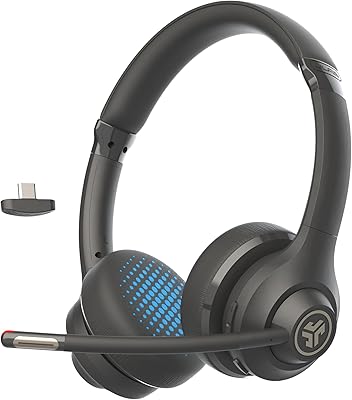
The JLab Go Work Wireless Headset sits in a practical sweet spot for anyone working from home who needs dependable call quality without overspending. It handles the basics well: Bluetooth multipoint keeps you connected to your laptop and phone at the same time, and a wired fallback via USB-C to 3.5mm means you're covered even when the battery runs low. At 170 grams, the on-ear design stays light enough for full-day desk use, though long-wear comfort is worth discussing honestly. Remote workers, hybrid office regulars, and budget-focused buyers looking for a reliable daily driver will find a lot to like here.
Features & Benefits

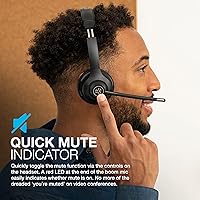
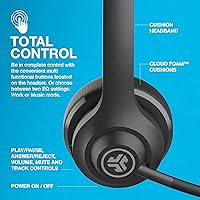
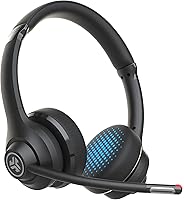
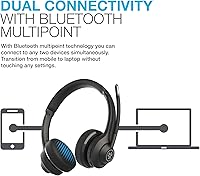
The 45-hour battery life is probably what catches most buyers' attention first — charge it once on a Sunday and you genuinely won't need to think about power again until the weekend. Bluetooth 5.0 multipoint handles the laptop-and-phone juggle without any manual re-pairing, which sounds minor until you've lived without it. The dual MEMS microphone setup does solid work on calls, isolating your voice from background noise in a way that holds up in open-plan or busy home environments. Flip the boom mic up to mute; a red LED tip confirms it instantly. Two EQ presets — Work and Music — round out a genuinely practical feature set.

Best For

This work headset makes the most sense for remote and hybrid workers who routinely switch between a work laptop and a personal phone throughout the day. The multipoint connection removes a small but persistent friction point that adds up over a full week. If your calls and video meetings are the priority and music fidelity is not, this Bluetooth headset delivers exactly where it matters. It is also a strong pick for anyone who does not want to spend heavily on a headset that will spend most of its life sitting on a desk. The visible mute LED alone has saved many an awkward meeting moment.

User Feedback

Buyers consistently highlight mic clarity and battery longevity, with many noting the advertised hours hold up well in real daily use. The mute LED gets called out as genuinely useful — a small detail that earns outsized appreciation. On the critical side, extended wear is the most common complaint; after several hours, on-ear clamping pressure becomes noticeable. Passive noise isolation is average at best, so anyone in a loud space will still hear their surroundings. Music audio quality gets described as functional rather than impressive. Bluetooth device-switching works reliably for most, though a handful of users report occasional connectivity hiccups. Overall, value for money is the theme that runs through nearly every positive review.

Pros

  • Bluetooth multipoint keeps laptop and phone connected simultaneously with no manual re-pairing needed.
  • Battery life genuinely covers a full work week — the advertised 45 hours holds up in real use.
  • The dual MEMS microphone delivers clear outgoing voice quality in moderate home office environments.
  • Red LED mute indicator on the boom mic removes meeting ambiguity at a glance.
  • At 170 grams, the Go Work is light enough that shorter wear sessions feel genuinely comfortable.
  • Wired USB-C to 3.5mm fallback cable is included in the box, not sold separately.
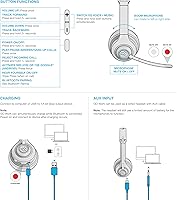
  • Physical on-headset controls handle all daily call and audio functions without touching a device.
  • Two EQ presets let you shift the audio profile between conferencing and casual background listening.
  • JLab includes a two-year warranty, which is above average coverage at this price tier.
  • Setup is fast and driverless across PC, Mac, and mobile without software installation.

Cons

  • On-ear clamping pressure becomes uncomfortable after three to four hours of continuous wear.
  • Passive noise isolation is weak — open offices and busy home environments bleed through noticeably.
  • Music audio quality is flat and uninspiring; the soundstage is narrow with limited bass depth.
  • Some users report Bluetooth handoff hesitation or brief dropouts when actively switching between paired devices.
  • The all-plastic build feels budget-grade and the headband padding compresses with prolonged daily use.
  • No quick-charge feature means a full battery depletion requires a two-hour wait to recover.
  • Microphone performance degrades in louder environments where background noise overcomes the noise cancellation.
  • Battery capacity has been reported to degrade noticeably after roughly a year of heavy daily use.

Ratings

The JLab Go Work Wireless Headset has been put through its paces by thousands of verified buyers worldwide, and our AI-driven scoring system has analyzed that feedback carefully — filtering out incentivized reviews and bot activity — to produce the balanced scorecard below. The scores reflect where this work headset genuinely earns its reputation and where it falls short, because both matter equally to anyone making a real purchase decision.
Microphone Quality
83%
The dual MEMS microphone setup consistently earns praise from remote workers who rely on it for back-to-back video calls. Colleagues on the other end report voices coming through cleanly even in moderately noisy home environments, which is really the headline feature here.
In louder settings — open kitchens, busy co-working spaces — the noise cancellation shows its limits and some ambient bleed comes through. A few users also note the mic picks up more room echo than expected in larger, bare-walled spaces.
Battery Life
91%
The 45-hour claim holds up remarkably well in real use, with many buyers confirming they charge it once on Sunday and forget about it for the entire work week. That kind of reliability removes a daily mental overhead that cheaper headsets often reintroduce.
There is no quick-charge feature, so if you let it fully deplete mid-week, the two-hour charge time can be inconvenient. A handful of users report battery capacity degrading noticeably after roughly a year of daily use.
Comfort & Fit
61%
39%
At 170 grams, the Go Work is light enough that shorter sessions — a morning of calls, a two-hour meeting block — pass without issue. Users coming from heavier over-ear alternatives often appreciate the reduced neck and head fatigue.
On-ear clamping pressure is the single most repeated criticism across user reviews. After three to four hours of continuous wear, many users report soreness at the contact points, which is a real problem for people who live in headsets all day.
Bluetooth Multipoint
78%
22%
The ability to stay paired to a laptop and phone simultaneously without any manual switching is exactly what hybrid workers need, and for most buyers it works as advertised. Transitioning from a desktop call to a mobile notification happens with minimal lag.
A portion of users report inconsistent behavior when actively switching between devices — occasional audio dropouts or the headset hesitating before handing off. It is not a universal issue, but it surfaces often enough in reviews to be worth flagging.
Call Clarity (Incoming Audio)
74%
26%
Voices on calls come through clearly and with enough volume that users rarely need to crank it to maximum. The 40mm drivers handle speech frequencies well, which is exactly what this headset is optimized for.
The audio can sound slightly thin on calls compared to higher-end headsets, lacking the warmth that makes long listening sessions feel natural. Some users with mild hearing difficulties find the top-end a little harsh at higher volumes.
Music Audio Quality
58%
42%
For casual background listening during work hours, the Go Work handles music adequately — streaming playlists or podcast audio while working are perfectly functional use cases. The Music EQ preset adds a modest bass boost that improves the experience.
Anyone who values music fidelity will find the sound flat and uninspiring. Bass lacks depth, the soundstage is narrow, and it simply does not compete with dedicated listening headphones even at the same price point.
Build Quality
69%
31%
The headset feels solid enough for daily desk use, with a hinge mechanism and headband that hold their shape well over time. Most buyers report no creaking or structural issues through several months of normal use.
The all-plastic construction feels budget-grade when handled, and a few users have reported the headband padding compressing and thinning out after extended daily use. It does not feel like something built to last several years of heavy treatment.
Mute Indicator (LED)
88%
The red LED at the tip of the boom mic is a small feature that earns disproportionate appreciation in user reviews. Remote workers in particular cite it as genuinely useful for eliminating the awkward uncertainty during video conferences.
The LED is only visible to others in the room, not the wearer, so you still need to glance at the headset or check your software to confirm your own mute status. Not a dealbreaker, but a detail worth noting.
Connectivity Reliability
72%
28%
Within a normal home office range, Bluetooth stability is solid — walls, a floor below, and standard household interference generally do not cause issues. The 30-foot range claim holds up well in open spaces.
A subset of users report occasional disconnects specifically when paired to certain Windows laptops or when other Bluetooth devices are active nearby. Re-pairing resolves it, but it does happen with enough frequency to appear consistently in reviews.
Ease of Use & Controls
84%
The on-headset buttons are logically laid out and respond reliably, covering all the daily tasks — volume, mute, answering calls — without needing to reach for the connected device. Most users are comfortable with the control layout within a day.
The buttons are small and require a moment of tactile searching when first starting out, particularly the mute toggle during live calls. Users with larger hands or limited dexterity occasionally mention fumbling before muscle memory sets in.
Wired Fallback Option
79%
21%
The included USB-C to 3.5mm cable is a practical insurance policy, particularly useful on long flights, in meeting rooms with desktop systems, or whenever Bluetooth is restricted. Having it in the box rather than as an optional extra is a genuine plus.
The cable connection uses a standard 3.5mm passthrough, which means audio quality in wired mode is dependent on the output device rather than being digitally processed. A few users note slight hiss from certain laptop headphone jacks in wired mode.
Value for Money
86%
At its price point, the Go Work packs in a feature list that competes with headsets costing significantly more. Multipoint Bluetooth, a noise-cancelling boom mic, and a week of battery life in one package is objectively strong value for a work-focused buyer.
Buyers who stretch their expectations into premium audio or all-day comfort territory will feel the compromises more acutely. The value story holds up best when expectations are calibrated to the work-headset category rather than the audiophile or premium comfort segment.
Setup & Compatibility
82%
18%
Pairing is quick across PC, Mac, and mobile without requiring drivers or software installation. Users across operating systems consistently report a plug-and-play experience that requires no troubleshooting out of the box.
A small number of users encountered Bluetooth profile issues specifically with older corporate-managed laptops where HFP or HSP protocol access was restricted. This is an edge case, but worth knowing if IT policy controls device connectivity at your organization.
Noise Isolation (Passive)
53%
47%
The on-ear fit does provide a basic level of physical separation from ambient sound, which is sufficient for a quiet home office or a private room. In those controlled environments, background distraction is manageable.
Passive isolation is noticeably weak compared to over-ear alternatives. In open offices, cafes, or any environment with consistent background noise, sound bleeds in freely, which affects both focus and the quality of incoming call audio for the wearer.

Suitable for:

The JLab Go Work Wireless Headset was clearly designed with a specific type of person in mind: the remote or hybrid worker who spends a meaningful chunk of their day on video calls and needs a headset that just works without constant fussing. If you routinely toggle between a work laptop and a personal phone — jumping from a Zoom meeting to a quick mobile call — the Bluetooth multipoint connection removes a friction point that becomes genuinely annoying over time. The week-long battery life is a legitimate convenience for anyone tired of managing another device's charging schedule. People in quieter home office environments will get the most out of the microphone quality, where the dual MEMS setup shines in controlled conditions. Budget-conscious buyers who need a competent, feature-complete work headset without stepping into premium pricing territory will find the value proposition hard to argue with.

Not suitable for:

The JLab Go Work Wireless Headset is a poor fit for anyone whose primary use case leans toward serious music listening or high-fidelity audio — the 40mm drivers get the job done for calls and background listening, but they will disappoint anyone with real expectations around sound quality. People who wear a headset for six or more consecutive hours daily should approach cautiously; on-ear clamping discomfort is the most consistent complaint from heavy users, and that is a legitimate dealbreaker for an all-day headset. Those working in loud, open-plan offices or busy shared spaces will also find the passive noise isolation underwhelming — ambient sound bleeds in freely, which affects both focus and perceived call quality. If your job demands the most reliable, enterprise-grade Bluetooth stability — particularly on corporate-managed hardware with restricted Bluetooth profiles — there are more dependable options at a higher price. Finally, buyers who place equal weight on leisure audio and work calls should manage expectations: this headset optimizes firmly for the work side of that equation.

Specifications

  • Connectivity: Bluetooth 5.0 with multipoint technology allows simultaneous pairing to two devices; a USB-C to 3.5mm wired option is also included.
  • Bluetooth Range: Wireless range extends to 30+ ft under typical open-space conditions.
  • Battery Life: Rated at 45+ hours of continuous playback on a single full charge.
  • Charge Time: A fully depleted battery reaches full capacity in approximately 2 hours via USB-C.
  • Standby Time: The headset can remain in standby mode for up to 470 hours before the battery is exhausted.
  • Driver: 40mm dynamic neodymium magnet driver with a frequency response of 20Hz–20kHz and impedance of 32 ohms.
  • Output: Maximum output is rated at 117 ±3 dB.
  • Microphone: Dual MEMS microphone array (4015 spec) with C3 noise-cancelling calling technology to isolate voice from ambient sound.
  • Mic Indicator: A red LED at the tip of the rotating boom mic visually confirms when the mute function is active.
  • EQ Modes: Two onboard EQ presets — Work and Music — are switchable directly from the headset controls.
  • Controls: On-ear physical buttons manage volume, play/pause, mute toggle, and call answer/reject functions.
  • Supported Protocols: Supports HSP, HFP, A2DP, and AVRCP Bluetooth profiles; codec support is SBC.
  • Weight: The headset weighs 170g, positioning it on the lighter end of the on-ear work headset category.
  • Charging Port: Charges via USB-C; input power is rated at 5V and 400mA.
  • Battery Capacity: Internal lithium polymer battery capacity is 500mAh.
  • Form Factor: On-ear design with Cloud Foam earcups and a rotating boom microphone that folds upward when not in use.
  • Compatibility: Works with PC, Mac, mobile phones, tablets, and smart speakers across major operating systems.
  • In the Box: Package includes the Go Work headset, a Type-C charging cable, a Type-C to 3.5mm AUX cable, and documentation.
  • Warranty: JLab provides a two-year limited warranty covering manufacturing defects from the date of purchase.
  • Model: Item model number is gowork; ASIN B09674F2X6; first available May 2021.

Related Reviews
JLab Go Work Gen 2
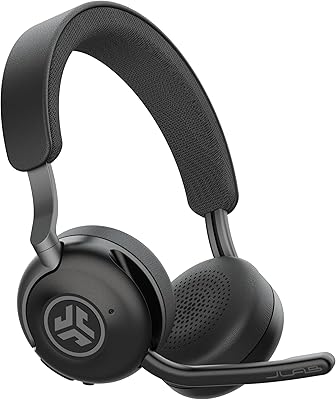
JLab Go Work Gen 2
74%
91%
Battery Life
74%
Microphone Quality
62%
Comfort & Fit
71%
Connectivity Reliability
88%
Value for Money
More
JLab Epic Work Wireless Headset
87%
93%
Comfort & Fit
91%
Call Clarity
88%
Noise Cancellation
95%
Battery Life
85%
Connectivity Reliability
More
JLab Work Buds True Wireless Headset with Boom Mic
84%
89%
Call Clarity
82%
Comfort & Fit
94%
Battery Life
86%
Bluetooth Connectivity
85%
Noise Isolation
More
JLab Go Lux ANC Wireless Headphones
84%
88%
Sound Quality
96%
Battery Life
79%
Comfort
84%
Noise Cancellation (ANC)
82%
Build Quality
More
JLab Go Sport+ Wireless Workout Earbuds
84%
86%
Sound Quality
92%
Comfort & Fit
90%
Battery Life
88%
Build Quality
85%
Sweat & Water Resistance
More
JLab Go Air Pop True Wireless Earbuds
80%
91%
Value for Money
88%
Battery Life
82%
Sound Quality
87%
Water Resistance
84%
Ease of Use
More
JLab Go Pop ANC
JLab Go Pop ANC
76%
93%
Value for Money
71%
Active Noise Cancellation
88%
Battery Life
74%
Sound Quality
67%
Microphone & Call Quality
More
Cisco Headset 561 Wireless DECT Headset
87%
94%
Audio Quality
88%
Comfort for Extended Use
91%
Noise Isolation Performance
85%
Battery Life
92%
Ease of Setup
More
RØDE Wireless GO II
RØDE Wireless GO II
84%
92%
Audio Clarity
86%
Signal Reliability
97%
Internal Backup Recording
94%
Portability & Weight
91%
Setup Speed & Ease of Use
More
JLab Epic Wireless Keyboard
88%
89%
Connectivity & Multi-device Support
87%
Typing Experience
93%
Battery Life
88%
Build Quality
85%
Ergonomics & Comfort
More

FAQ

Yes, that is actually the main reason many people choose the JLab Go Work Wireless Headset. Bluetooth multipoint lets it stay paired to two devices simultaneously, so you can be connected to your laptop for Zoom calls and your phone for personal calls without toggling anything manually.

Quite realistic, based on consistent user feedback. Most people who use it at moderate volume for standard workday hours report charging it once at the start of the week and not needing to plug in again until the weekend. Heavy users pushing higher volumes may see slightly shorter life, but it tracks closely to the advertised figure.

The dual MEMS mic setup performs genuinely well in moderate environments like a quiet home office or private room. In louder spaces — open kitchens, background TV, busy shared apartments — it handles a good amount of ambient noise, though some bleed-through does occur at higher noise levels. For typical remote work conditions, people on the other end of your calls should hear you clearly.

The red LED at the tip of the boom microphone lights up when you are muted. The catch is that it faces outward, so it is more visible to people in the same room than to you personally. For confirming your own mute status, a quick glance at the headset or your conferencing software is still the most reliable method. That said, the visual cue is very useful in shared office environments.

It is a practical fallback more than a primary feature. The included USB-C to 3.5mm cable lets you plug into systems where Bluetooth is restricted — older conference room hardware, airplane entertainment systems, or desktop PCs without Bluetooth. Audio quality in wired mode depends on the output device, and some laptop headphone jacks introduce a faint hiss, but it works reliably when you need it.

Yes, it pairs and works as a standard Bluetooth audio device on both platforms with no driver installation or special configuration required. Call controls like mute and answer/reject work through the on-headset buttons in most setups. Some advanced features like software-level mute sync may vary depending on your operating system and app version, but basic call functionality works out of the box.

This is where honest expectations matter. For sessions up to three or four hours, most users find it comfortable enough given the 170g weight and foam earcups. Beyond that, the on-ear clamping pressure is the most frequently cited complaint in user reviews. If you genuinely wear a headset for six or more hours straight, the Go Work may cause discomfort, and an over-ear design with softer clamping might serve you better.

The Go Work does not include a USB Bluetooth dongle, and the wired connection uses a 3.5mm AUX cable rather than a USB audio connection. If your PC lacks Bluetooth entirely, you can use the included wired cable via a 3.5mm headphone jack. If your PC has neither Bluetooth nor a 3.5mm port, you would need a separate USB Bluetooth adapter or a USB-C to 3.5mm adapter, neither of which are included.

Work mode tunes the audio to prioritize vocal clarity and intelligibility, which makes speech on calls and conferences easier to follow. Music mode adds a modest boost to bass and overall fullness, making background listening more enjoyable during breaks or focused work sessions. You switch between the two directly from a button on the headset — no app or software is required.

The boom microphone rotates upward to a resting position when not in use, which keeps the profile tidy on a desk. The headset does not fold flat in the traditional sense for compact travel storage. It ships in standard retail packaging without a carrying case included in the box — if portability and protection during transit matter to you, a separate pouch or case would be worth picking up.