Overview

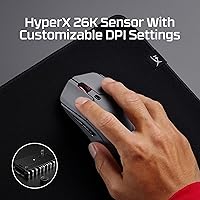
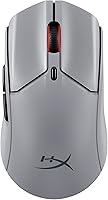
The HyperX Pulsefire Haste 2 Pro Gaming Mouse represents the most technically ambitious entry in HyperX's Haste family, adding a native 4kHz polling rate and extended wireless range to the lightweight foundation that made earlier Haste models popular. Out of the box, the build feels deliberate — the slate grey shell has a purposeful rigidity without feeling dense. At 61 grams, it sits among the lightest wireless mice in its price tier, competing directly with options from Logitech and Razer. Setting up the 2.4GHz dongle takes seconds, and switching to Bluetooth for a laptop or secondary device requires nothing more than holding a button.
Features & Benefits

The headline spec is the 4kHz polling rate, which reports the mouse position to your PC four times more often than a standard 1kHz device. In practice, the difference is perceptible on a 240Hz or higher display — on a 60Hz monitor, you likely won't notice. The HyperX 26K optical sensor tracks cleanly with no detectable angle snapping or prediction, which matters for precise flick shots. The honeycomb shell keeps weight low and improves airflow around your palm, though the open design does catch dust and fine debris over time. Battery life holds up well across weeks of daily sessions before a recharge is needed. NGENUITY software covers DPI adjustments, button remapping, and lighting, though it can feel sluggish to launch.

Best For

This wireless gaming mouse shines in competitive FPS and battle royale settings where low-latency input makes a tangible difference. The polling advantage pays off most at high refresh rates, so if your setup runs 240Hz or above, there's a real argument for this over cheaper alternatives. The medium-sized right-handed shell suits palm and claw grips well, though fingertip grip users may find the body slightly large. Because it handles both 2.4GHz and Bluetooth, it works well for anyone who games on a desktop but also uses a laptop daily. Players stepping up from a wired or older wireless mouse will feel the weight reduction immediately, and the long battery runtime keeps charging interruptions rare.

User Feedback

With 79 ratings averaging 4 out of 5 stars, the Haste 2 Pro earns broadly positive marks but isn't without valid criticisms. Buyers consistently highlight sensor responsiveness and how little fatigue builds up during extended sessions — the weight and grip feel land well with most. Battery life rarely surfaces as a concern, which suggests HyperX's claims hold in real-world use. On the critical side, some users flag the NGENUITY software as inconsistent, with occasional sync issues after Windows updates. A few note that the honeycomb shell accumulates dust faster than solid-body alternatives. At this price point, most buyers feel the performance justifies the cost, though those who don't game competitively may find the premium harder to rationalize.

Pros

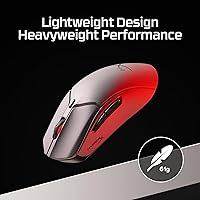
  • At just 61 grams, the Haste 2 Pro is among the lightest wireless mice available at this price tier.
  • The 26K optical sensor tracks with no detectable angle snapping or prediction, which competitive players will notice immediately.
  • Native 4kHz polling delivers genuinely smoother cursor reporting on high-refresh-rate displays.
  • Battery life holds up across weeks of daily gaming before requiring a recharge.
  • Dual wireless modes let you use the same mouse across your gaming PC and a secondary Bluetooth device without adapters.
  • Palm and claw grip users will find the ergonomic shell comfortable during extended sessions.
  • Setup is fast and straightforward — the 2.4GHz dongle requires no driver installation to get started.
  • Cross-platform support covers Windows, macOS, and Linux without additional configuration.
  • Programmable buttons give competitive players meaningful customization options beyond DPI adjustment.

Cons

  • The 4kHz polling advantage is largely wasted on setups running below 240Hz, limiting its value for many buyers.
  • HyperX NGENUITY software is inconsistent and has reported sync issues after Windows updates.
  • The honeycomb shell accumulates dust and debris faster than solid-body mice, requiring more frequent cleaning.
  • Strictly right-handed design excludes left-handed users entirely.
  • Fingertip grip users and those with smaller hands may find the shell dimensions uncomfortably large.
  • At this price point, buyers who game casually may struggle to justify the cost over capable mid-range alternatives.
  • The open shell design offers less tactile grip surface, which can become noticeable during sweaty or intense sessions.
  • No carrying case or travel pouch is included, which matters for users who move the mouse between setups regularly.

Ratings

Our AI-generated scores for the HyperX Pulsefire Haste 2 Pro Gaming Mouse were produced by analyzing verified buyer reviews from multiple global markets, with spam, incentivized submissions, and bot activity actively filtered out before scoring. The ratings below reflect an honest synthesis of real-world user experiences — both the aspects that earned genuine praise and the friction points that consistently surfaced across independent reviewers. Nothing has been smoothed over: if buyers ran into recurring issues, those are reflected in the numbers.
Sensor Accuracy
93%
Competitive players consistently praised the 26K optical sensor for its clean, predictable tracking with no detectable angle snapping or acceleration. In fast-paced FPS titles, flick shots and micro-adjustments registered exactly as intended, which is the baseline expectation at this performance level.
A small number of users noted occasional jitter at very low DPI settings below 400, which is a fairly niche concern but worth flagging for players who prefer extremely low sensitivity configurations.
Polling Rate Performance
88%
On high-refresh-rate displays running at 240Hz or above, the 4kHz polling genuinely produces a smoother, more immediate cursor feel compared to standard 1kHz alternatives. Competitive players upgrading from lower-polling mice noticed the difference during sustained tracking scenarios in titles like Valorant and CS2.
The benefit is almost entirely invisible to users on 144Hz or lower monitors, which represents a significant portion of even dedicated PC gamers. Paying a premium for a feature you cannot actually perceive is a legitimate concern, and reviewers on standard-refresh setups acknowledged the polling advantage felt academic rather than practical.
Weight & Ergonomics
91%
At 61 grams, the Haste 2 Pro is light enough that hand and wrist fatigue become noticeably less of a factor during multi-hour sessions. Palm and claw grip users found the medium-sized right-handed shell natural to hold, and most reported the weight reduction compared to heavier wireless mice was immediately perceptible.
The honeycomb shell provides less tactile grip surface than a solid body, and during intense or prolonged sessions some users found their fingers drifting slightly. Sweat management is not addressed through grip tape or textured side panels in the base configuration, which a few reviewers flagged as an oversight at this price tier.
Battery Life
89%
The battery runtime holds up impressively well in practice — most users reported going two to three weeks between charges during daily three-to-five hour gaming sessions. For gamers who have dealt with battery anxiety on previous wireless mice, this mouse largely removes that concern from the equation.
The advertised 90-hour figure assumes conservative usage with RGB lighting disabled, and heavier use with full lighting active brings that number down considerably. A small number of users also reported that the battery capacity degraded somewhat after several months of regular charging cycles, though this is expected behavior for lithium-based batteries.
Wireless Connectivity
87%
The 2.4GHz connection was stable and dropout-free for nearly all reviewers, even in environments with heavy wireless interference from routers and other peripherals. The ability to switch to Bluetooth for laptop use without carrying an extra dongle was a frequently praised convenience for users who split time between devices.
A handful of users reported that Bluetooth connection quality was inconsistent on certain laptop configurations, occasionally requiring re-pairing after sleep or restart cycles. The 2.4GHz dongle itself is compact to the point where it is easy to misplace, and no storage compartment is built into the mouse body.
Build Quality
79%
21%
The structural rigidity of the shell is solid for a 61-gram mouse — there is no flex or creaking when gripping firmly, which suggests the honeycomb chassis is well-engineered rather than simply hollowed out. The click mechanism feels consistent and not mushy, which is an important baseline for competitive use.
Some reviewers noted the primary click buttons have a slightly higher actuation feel than competitors like Logitech's offering at a similar tier, which is a personal preference issue but worth knowing. The overall fit and finish, while competent, does not quite feel as premium as the price tag implies when handled alongside top-end alternatives.
Software Experience
58%
42%
NGENUITY covers the functional basics well enough — DPI adjustment, button remapping, and RGB customization are all accessible through a reasonably clean interface. For users who configure the mouse once and rarely revisit the software, its shortcomings are largely invisible in daily use.
Software reliability is one of the most consistent criticisms across the review pool. Users reported lost profiles, failed syncs after Windows updates, and sluggish launch times with notable frequency. For a mouse at this price tier, software that requires workarounds to function reliably is a genuine weak point that HyperX has not fully addressed.
Click Feel & Buttons
74%
26%
The primary buttons register cleanly and the side buttons are positioned conveniently for thumb access without accidental activation during normal grip. Most users found the click feedback adequate for both gaming and everyday desktop use without any initial break-in period.
The tactile response of the main clicks is described by some as slightly firm and lacking the crisp snap found on mice using optical switches. Over extended sessions this is not a dealbreaker, but users switching from an optical-switch mouse may notice the difference in feel.
Dust & Maintenance
52%
48%
The open honeycomb design is a direct contributor to the mouse's light weight, and for users who game in clean environments and clean their peripherals regularly, it presents no meaningful issue. Compressed air removes most debris quickly during routine maintenance.
The honeycomb cutouts are a genuine maintenance burden for users who game in dusty environments or near desks with food and drink present. Fine particles settle into the shell within days of cleaning, and fully dislodging debris from interior surfaces requires more effort than wiping down a solid-body mouse. Several reviewers flagged this as unexpectedly tedious.
Grip & Texture
67%
33%
The shell surface provides reasonable friction in dry conditions, and the overall shape makes repositioning the mouse quick and natural during fast-paced gaming. Most users with dry hands reported no grip concerns during standard session lengths.
There is no rubberized coating or grip tape included, which means users with sweaty palms or those gaming in warmer conditions can experience slippage during extended sessions. Competitors at a similar price point often include pre-applied grip tape or textured side panels as standard, making this omission noticeable.
Value for Money
71%
29%
For competitive players who genuinely game at 240Hz or above and can leverage the 4kHz polling rate, the Haste 2 Pro delivers a meaningful hardware advantage that justifies its position in the premium tier. The battery life and sensor quality alone are strong foundations for the asking price.
For casual or semi-competitive users on standard refresh rate setups, the pricing is harder to rationalize when well-regarded alternatives offer comparable wireless performance at lower cost. The software reliability issues and lack of grip tape make the overall package feel slightly incomplete for what is being charged.
Setup & Compatibility
84%
Getting the mouse up and running takes under a minute via the 2.4GHz dongle with no driver installation required, which reviewers across Windows, macOS, and Linux appreciated equally. Cross-platform plug-and-play support is genuinely broad and not artificially restricted.
Bluetooth pairing was occasionally unreliable on macOS, requiring manual re-pairing after system sleep on some hardware configurations. Users on Linux reported that NGENUITY is essentially non-functional on that platform, limiting software-based customization to Windows users only.
Charging Experience
81%
19%
USB charging is straightforward and the cable provided is adequate for desk use. Given how infrequently the mouse actually needs charging during typical use, the recharge process rarely interrupts gaming routines in any meaningful way.
The mouse cannot be used while charging in a practical sense for competitive play, as the cable introduces drag that defeats the purpose of a lightweight wireless design. There is no wireless charging pad compatibility, which some users at this price tier would reasonably expect.
Hand Size & Fit Range
69%
31%
Medium to large hands with palm or claw grip styles get a comfortable, well-supported fit from the shell dimensions. The ergonomic contour reduces strain during sessions exceeding two hours for users in this fit range.
The mouse skews large for small hands, and fingertip grip users found the body length and width worked against their preferred technique. Because the design is strictly right-handed, it also excludes a meaningful portion of potential buyers entirely without any alternative variant available.

Suitable for:

The HyperX Pulsefire Haste 2 Pro Gaming Mouse is purpose-built for competitive PC gamers who play at high refresh rates and want wireless freedom without sacrificing input responsiveness. FPS and battle royale players running 240Hz or higher displays will get the most out of the 4kHz polling rate, where the difference over standard mice becomes genuinely perceptible during fast tracking and flick movements. The right-handed ergonomic shell accommodates palm and claw grip styles comfortably, making it a natural fit for medium to large hands that spend hours on the mouse during long sessions. Anyone who regularly moves between a desktop gaming rig and a laptop will appreciate the Bluetooth mode, which removes the need to carry or swap a dongle. The impressive battery runtime also makes it a strong choice for gamers who find charging interruptions genuinely disruptive to their routine.

Not suitable for:

The HyperX Pulsefire Haste 2 Pro Gaming Mouse is a harder sell for casual or non-competitive gamers who play on standard 60Hz or even 144Hz monitors, since the premium polling rate delivers diminishing returns in those setups. Fingertip grip users or those with smaller hands may find the shell dimensions slightly too large for comfortable all-day use. The open honeycomb design, while effective for weight reduction, collects dust and debris noticeably faster than solid-body alternatives, which can be a real annoyance for anyone who keeps a clean desk or uses the mouse in dusty environments. Buyers who rely heavily on companion software will want to be aware that NGENUITY has a spotty reputation for stability, particularly after system updates. Left-handed users are out entirely, as the shell is strictly right-handed with no mirrored variant available.
Specifications

  • Weight: The mouse weighs 61 grams, placing it among the lightest options in the premium wireless category.
  • Sensor: It uses the HyperX 26K optical sensor, capable of tracking up to 26,000 DPI and a maximum speed of 650 IPS.
  • Polling Rate: The native polling rate reaches up to 4000Hz over wireless, reporting cursor position four times more frequently than a standard 1kHz mouse.
  • Battery Life: HyperX rates the battery at up to 90 hours on a full charge, covering weeks of typical daily gaming use before needing a recharge.
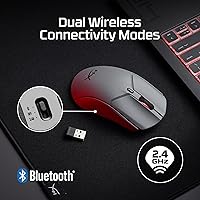
  • Connectivity: Two wireless modes are supported: 2.4GHz via USB dongle for low-latency gaming, and Bluetooth for connecting to laptops or secondary devices.
  • Dimensions: The shell measures 4.89 x 2.63 inches, fitting a medium-to-large right-handed ergonomic form factor.
  • Platform Support: Compatible with Windows, macOS, and Linux operating systems without requiring additional drivers for basic use.
  • Charging: The mouse charges via USB and is fully rechargeable, with no disposable batteries required during normal use.
  • Software: HyperX NGENUITY software enables DPI customization, button remapping, and RGB lighting control on supported platforms.
  • Programmable Buttons: The mouse includes programmable buttons that can be remapped through NGENUITY for custom in-game actions or shortcuts.
  • Form Factor: The shell is designed exclusively for right-handed use with an ergonomic contour suited to palm and claw grip styles.
  • Shell Design: The chassis uses a honeycomb-style open structure to reduce weight and improve airflow, though it collects dust more readily than solid-body alternatives.
  • Color Option: Available in Slate Grey as the primary colorway for this model variant.
  • Manufacturer: Produced by HP Inc. under the HyperX brand, which focuses on gaming peripherals and accessories.
  • Model Number: The official HyperX model number for this mouse is A1KY5AA, useful for warranty and support inquiries.

Related Reviews
Glorious Model O 2 PRO Wireless Mouse
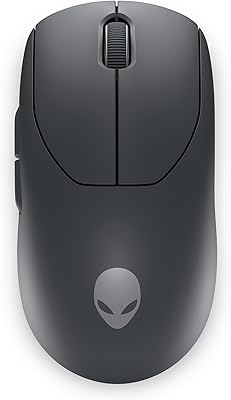
77%
91%
Sensor Performance
93%
Polling Rate
88%
Wireless Performance
83%
Weight & Ergonomics
81%
Click Feel & Switches
More
Alienware Pro Wireless Gaming Mouse
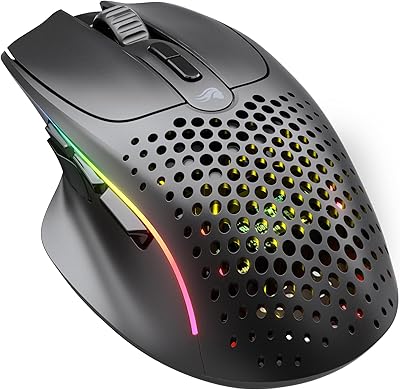
83%
91%
Precision and Performance
74%
Battery Life
88%
Ergonomics and Comfort
84%
Customization Options
90%
Build Quality
More
Glorious Model I 2 Wireless Gaming Mouse
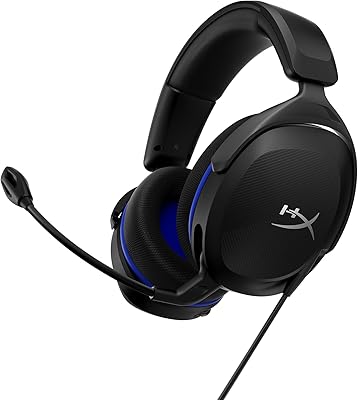
87%
91%
Performance
94%
Ergonomics & Comfort
90%
Battery Life
88%
Customization & Features
85%
Build Quality & Durability
More
Razer DeathAdder V4 Pro Wireless Gaming Mouse
86%
95%
Precision and Tracking
91%
Build Quality
90%
Battery Life
89%
Ergonomics and Comfort
92%
Wireless Connectivity
More
Cherry MC 2.1
Cherry MC 2.1
77%
74%
Sensor Accuracy
71%
Build Quality
82%
Ergonomics & Comfort
88%
On-Board Memory
62%
Software & Customization
More
HyperX Cloud Stinger 2 Core Gaming Headset
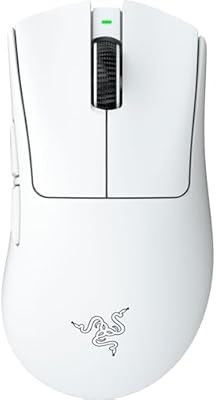
76%
83%
Comfort & Wearability
71%
Audio Quality
68%
Microphone Performance
61%
Build Quality
94%
Ease of Setup
More
SteelSeries Rival 3 Wireless Gen 2 Gaming Mouse
79%
93%
Battery Life
88%
Wireless Performance
86%
Sensor Accuracy
84%
Click Feel & Durability
79%
Build Quality
More
Lamzu Atlantis OG V2 Pro Wireless Gaming Mouse
87%
91%
Precision & Accuracy
89%
Comfort & Ergonomics
71%
Battery Life
85%
Build Quality
94%
Responsiveness (Polling Rate)
More
Logitech G PRO X Superlight
84%
96%
Weight & Ergonomics
94%
Sensor Accuracy
93%
Wireless Performance
91%
Battery Life
84%
Click Feel & Switches
More
Corsair Dark Core RGB Pro SE
81%
93%
Wireless Connectivity
89%
Sensor Performance
91%
Polling Rate
88%
Qi Wireless Charging
86%
Battery Life
More

FAQ

It depends heavily on your monitor. If you are running a 240Hz or higher display, the increased reporting frequency produces a measurably smoother cursor feel during fast movements. On a 60Hz or 144Hz monitor, most users will not notice a meaningful difference in day-to-day use, so it is a feature best appreciated in high-refresh-rate setups.

With typical daily gaming sessions of three to five hours, most users find they charge the Haste 2 Pro roughly once every two to three weeks. The 90-hour figure assumes moderate usage conditions, but even with RGB lighting active you should expect well over a week between charges.

Yes, the mouse works across Windows, macOS, and Linux. Basic functions like cursor movement and clicking work plug-and-play via the 2.4GHz dongle or Bluetooth. Keep in mind that NGENUITY software, used for DPI tuning and remapping, has more limited support outside of Windows.

Unfortunately, no. The shell is a strictly right-handed ergonomic design with no mirrored or ambidextrous variant available in this model. Left-handed users would need to look at a symmetrical or left-handed alternative from a different product line.

Palm and claw grip users tend to get the most comfortable fit from this mouse. The medium-to-large shell dimensions accommodate hands that wrap around the body naturally. Fingertip grip users, or those with smaller hands, may find the length and width slightly awkward over longer sessions.

It is fully plug-and-play for standard use — just plug in the USB dongle and you are ready to go without installing anything. NGENUITY software is optional and only needed if you want to change DPI settings, remap buttons, or adjust RGB lighting beyond the defaults.

The 2.4GHz dongle connection is the recommended mode for any latency-sensitive gaming, as it supports the full 4kHz polling rate. Bluetooth is more practical for everyday desktop use or connecting to a laptop on the go, where the slightly higher latency is rarely noticeable for casual tasks.

It does take a bit more effort than a solid-body mouse. Dust, crumbs, and fine debris settle into the open holes and are not always easy to dislodge with a simple wipe. A can of compressed air works well for routine cleaning, but it is worth knowing upfront if you keep a tidy desk or game in a dusty environment.

A recurring complaint across user reviews is that NGENUITY can be unreliable, particularly after Windows updates, occasionally losing saved profiles or failing to sync properly. For most day-to-day use the mouse functions fine without the software running, but if deep customization is important to you, the software's inconsistency is worth factoring into your decision.

At 61 grams, the Haste 2 Pro is genuinely lightweight by any standard in the wireless category. Many competing wireless mice in the same performance tier land between 70 and 95 grams, so the weight advantage is real and not just a marketing claim. The trade-off is the open shell design, which achieves that figure partly through the honeycomb cutouts rather than purely through materials alone.

Where to Buy