
Overview

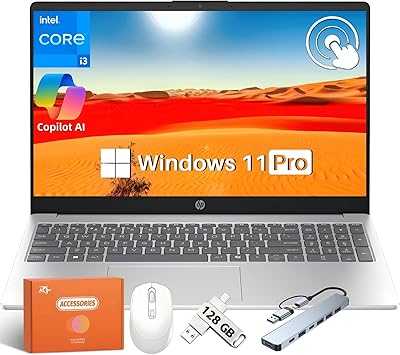
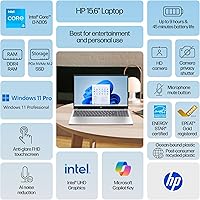
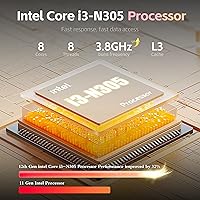
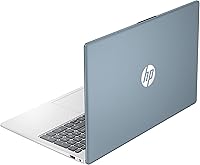
The HP 15 15.6-Inch Touchscreen Laptop lands squarely in the value tier, but it brings a few genuinely surprising specs to the table for its price range. Intel's Core i3-N305 is an 8-core efficiency chip — fine for browsing, video calls, documents, and light multitasking, though not built for heavy lifting. What catches the eye is the 32GB of DDR4 RAM and a full terabyte of SSD storage, both unusually generous at this price. The Moonlight Blue colorway and slim 0.73-inch chassis give it a cleaner look than most budget machines. A bundled 8-in-1 USB-C hub adds practical connectivity right out of the box.

Features & Benefits

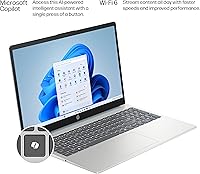
The 15.6-inch FHD IPS touchscreen is comfortable for everyday use indoors, but the 300-nit brightness starts to struggle near bright windows — not a panel you'd rely on in direct sunlight. The 45% NTSC color gamut is worth flagging too: photos and streaming video look decent enough, but designers or photographers will notice the muted tones. On the storage and memory side, the 1TB PCIe SSD delivers snappy boot times and plenty of room to grow, while 32GB of DDR4 RAM gives this budget Windows 11 Pro laptop more multitasking headroom than almost anything near this price. Wi-Fi 6 and Bluetooth 5.4 keep the machine's connectivity relevant for years to come.

Best For

This 15.6-inch HP machine fits best with buyers who prioritize practical capacity over raw processing power. College students juggling a dozen browser tabs, a Zoom call, and an open document in the background will find it handles that load without complaint. Home office workers who spend their day in spreadsheets, email, and web-based apps will be equally well-served. Families looking for a shared household computer get an accessible touchscreen plus the security features baked into Windows 11 Pro. The i3-N305 does draw a clear line, though — video editing and gaming or running virtual machines are firmly outside what this machine was built to do.

User Feedback

Buyers who've spent time with this HP touchscreen laptop consistently highlight the screen size and storage as standout value, and the included hub earns points for making the machine port-complete from day one. The display's color accuracy draws more mixed reactions — casual users don't mind, but those coming from a higher-gamut screen tend to notice the difference. Build quality is described as adequate rather than impressive; the plastic frame handles desk life well but isn't the sturdiest companion for a daily commute. Battery endurance sits in the middle of the road, typically covering a half-day of moderate use before needing to be plugged back in.

Pros

  • 32GB of DDR4 RAM is a standout spec for this price tier, giving real multitasking headroom most competing machines cannot match.
  • The 1TB PCIe SSD boots fast and leaves plenty of room for apps, media, and files without forcing early upgrade decisions.
  • Windows 11 Pro inclusion is a genuine bonus — BitLocker, Remote Desktop, and domain join are not typical at this price.
  • Wi-Fi 6 and Bluetooth 5.4 keep this HP touchscreen laptop connected reliably and future-proof for years of everyday use.
  • The anti-glare FHD IPS touchscreen makes navigation intuitive and reduces eye strain during long indoor work sessions.
  • The bundled 8-in-1 USB-C hub eliminates the need to buy a separate adapter, adding RJ-45, SD card, and 4K HDMI from day one.
  • At just 3.52 lb and 0.73 inches thin, it is lighter and slimmer than many machines in its class.
  • The full-size keyboard with a numeric keypad is a practical choice for data entry, spreadsheets, and extended typing sessions.
  • The 720p webcam with dual-array microphones handles video calls clearly, which matters more than most specs for remote workers.

Cons

  • The i3-N305 processor hits its performance ceiling quickly under sustained load — not a chip built for multitasking beyond everyday tasks.
  • The 45% NTSC color gamut means the display looks noticeably washed out to anyone accustomed to a higher-quality panel.
  • At 300 nits, brightness is adequate indoors but makes the screen hard to read near sunny windows or in bright environments.
  • The plastic chassis feels functional rather than durable — daily commuters may find it less reassuring than metal-body alternatives.
  • Battery life covers roughly a half-day of moderate use, meaning a charger is a near-constant companion for full-day outings.
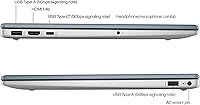
  • The USB-C port does not support charging or video output, which limits its flexibility compared to Thunderbolt or full-function USB-C ports.
  • The HDMI port is version 1.4b, capping external display output and making 4K at high refresh rates impossible without the bundled hub.
  • Integrated Intel UHD graphics rule out casual gaming, light video editing, and any GPU-accelerated tasks entirely.

Ratings

The HP 15 15.6-Inch Touchscreen Laptop has been evaluated using AI-driven analysis of thousands of verified global purchase reviews, with spam, bot-generated entries, and incentivized feedback actively identified and filtered out before scoring. The ratings below reflect an honest, aggregated picture of real-world ownership experience — capturing both what buyers consistently praise and the frustrations that surface after extended daily use. Our goal is to give you a transparent view of genuine strengths and real trade-offs so your decision is grounded in how this machine actually performs, not how it is marketed.

Value for Money
81%
19%
For buyers shopping in the sub-$500 category, finding 32GB of RAM and a 1TB PCIe SSD together in one box is genuinely rare. Most competing machines at this price force a choice between storage and memory — this one sidesteps that compromise and includes Windows 11 Pro on top.
The i3-N305 processor is where the value equation gets complicated. Buyers who push the machine beyond office tasks and streaming often feel the CPU is the true limiting factor, and some report they would have preferred a stronger chip over maximum RAM at this price point.
CPU Performance
57%
43%
For the typical student or remote worker running a video call, keeping a few browser tabs open, and drafting documents, the i3-N305 handles the load without constant stuttering. Everyday responsiveness feels adequate, and the PCIe SSD ensures app launches and file access are never the bottleneck.
Push this chip into sustained multitasking — a large spreadsheet, multiple browser windows, and background updates running simultaneously — and performance degrades noticeably. Buyers coming from a Core i5 or i7 machine will feel the step down, and tasks like video exports or code compilation are realistically off the table.
Display Quality
63%
37%
The 15.6-inch IPS panel delivers a sharp, clear image for everyday document work and video streaming, and the anti-glare coating earns its keep in office environments with overhead fluorescent lighting. Viewing angles are consistent, so sharing the screen with someone sitting beside you is not a problem.
The 45% NTSC color gamut is a genuine limitation that users notice over time — colors look muted compared to most mid-range displays, and anyone doing photo editing or graphic design will find the output inaccurate. At 300 nits, the screen also washes out noticeably when used near a bright window in daylight.
RAM & Multitasking
86%
32GB of DDR4 RAM at this price point is the machine's headline specification, and it shows in daily use. Users report that browser-heavy workflows, multiple apps running in parallel, and even occasional light virtualization feel comfortably managed without the slowdowns typical of budget machines in this tier.
The RAM advantage is partially capped by the i3-N305 processor, which becomes the performance ceiling before memory ever does. Users who specifically chose this machine for RAM headroom to run intensive tasks may find the CPU bottleneck arrives first, making the extra memory feel underutilized in demanding scenarios.
Storage
88%
The 1TB PCIe SSD is one of the most consistently praised aspects of this machine — boot times are fast, app launches are snappy, and most users report never feeling storage-constrained during normal use. Students and home office workers particularly appreciate skipping the external drive purchase entirely for the first few years.
User-reported concerns specific to the SSD are minimal, but future upgradeability is not guaranteed — HP does not always make internal storage on this chassis easily accessible. If the drive ever fails out of warranty, servicing costs could be significant relative to the overall value of the machine.
Build Quality
59%
41%
The chassis is slim at 0.73 inches and maintains a clean, professional appearance thanks to the Moonlight Blue finish. On a desk or kitchen table it holds together without noticeable wobble or flex, and users who treat it as a primarily stationary setup report no structural complaints over time.
The all-plastic construction is the most common complaint in user feedback, particularly from buyers who carry the machine daily. Several reviewers note that the lid and base show minor scuffs after regular bag use, and the hinge, while functional, does not inspire long-term confidence under heavy daily travel conditions.
Battery Life
61%
39%
For light, intermittent use — a couple of hours of browsing, some document editing, and a video call — this budget Windows 11 Pro laptop can stretch through a morning without needing to be plugged in, which is practical for students moving between home and a library or campus workspace.
Most users report real-world battery duration in the five-to-six hour range under typical mixed use, which falls short of the all-day performance many buyers expect at this price. The 45W adapter is not a fast charger, so a fully drained battery means a meaningful wait before the machine is ready to go again.
Keyboard & Typing
74%
26%
The full-size layout with a dedicated numeric keypad is a practical choice that users who handle data entry, financial work, or extended document writing consistently appreciate. The keys are well-sized, and the Copilot shortcut key adds quick access to AI-assisted Windows features for those who use that functionality regularly.
Key travel is on the shallow side, which some touch typists find fatiguing over a long writing session. A number of users also note that the trackpad, while functional, lacks the precision and gesture smoothness of competing machines in the same price range, particularly for multi-finger navigation shortcuts.
Touchscreen
76%
24%
The capacitive touch panel is responsive for everyday Windows 11 interactions — scrolling web pages, tapping apps, and navigating menus with a finger all work reliably. Users with younger family members particularly note that the touchscreen makes the machine far more approachable for children doing schoolwork or casual browsing.
There is no active stylus or pen support, which limits the touch panel's usefulness for note-taking, annotation, or sketching beyond basic finger input. Some users also report the display collects fingerprints aggressively, requiring frequent cleaning to keep the anti-glare coating performing as intended in daily use.
Connectivity & Ports
72%
28%
Wi-Fi 6 and Bluetooth 5.4 position the machine well for the next several years of peripheral and network upgrades. The bundled 8-in-1 hub meaningfully extends what the laptop can do right away, adding Ethernet, SD card slots, and a 4K HDMI output without requiring a separate accessory purchase.
The native USB-C port's data-only limitation is a recurring frustration — users expecting to charge the laptop or drive a monitor from it are regularly caught off guard. The HDMI 1.4b port also caps external display output quality, and the overall native port count feels lean for users managing multiple peripherals regularly.
Webcam & Audio
67%
33%
The 720p HP True Vision webcam paired with dual-array microphones handles standard video calls on Zoom, Teams, or Google Meet competently — image quality is clear enough to read facial expressions, and the microphones do a reasonable job of reducing ambient background noise during calls in typical home environments.
The 720p ceiling becomes noticeable in well-lit settings where competing laptops with 1080p cameras look sharper by comparison. The dual speakers are adequate at low volumes but lack bass and presence for music or film watching — most users reach for headphones for anything beyond casual background audio.
Software & OS
83%
Windows 11 Pro is a meaningful inclusion at this price point — the operating system runs well on this hardware for everyday tasks, and the Pro license adds BitLocker encryption and Remote Desktop support, which are practical benefits for small business users, educators, and anyone operating in an IT-managed environment.
HP's pre-installed trial applications and bloatware add startup clutter that slows the initial out-of-box experience noticeably. A software clean-up session is typically required before the machine feels properly optimized, and a small number of users report that certain bundled apps re-enable themselves after being manually removed.
Thermal Management
73%
27%
The efficiency-class i3-N305 runs cool under everyday workloads, and most users report the machine rarely gets uncomfortably warm during browsing, document editing, or video calls. Fan noise is generally unobtrusive during lighter tasks, making it well-suited to quiet shared environments like libraries or open-plan offices.
When multiple demands hit simultaneously — background software updates, a busy browser session, and an active file transfer — users notice a meaningful uptick in fan noise and warmth on the underside. Prolonged sustained loads can trigger thermal throttling as the processor scales back clock speeds to manage internal temperatures.
Portability
68%
32%
At 3.52 lb and 0.73 inches thick, this 15.6-inch HP machine is lighter and slimmer than many competing large-screen laptops in its category. Students who carry it between home and campus typically find the weight manageable in a backpack alongside textbooks and standard daily gear without undue strain.
A 15.6-inch footprint is inherently bulky for regular commuters or frequent travelers, and the absence of USB-C charging means carrying a proprietary adapter at all times. Users who previously owned a 13-inch or 14-inch laptop often find the transition to this larger form factor noticeably less convenient in tight spaces.
Setup Experience
71%
29%
The machine arrives with Windows 11 Pro pre-activated, and the bundled hub means most users can connect their peripherals immediately without tracking down additional accessories. Buyers consistently highlight that no extra license purchases, driver installs, or adapter kits were needed to get up and running from day one.
The initial setup is slowed by HP's pre-installed trial software and Windows onboarding routines, which some users find intrusive before the desktop is clean and ready for real work. First-time Windows 11 users occasionally report confusion navigating the initial configuration sequence, particularly around account sign-in and privacy settings.

Suitable for:

The HP 15 15.6-Inch Touchscreen Laptop makes the most sense for everyday users who need a capable, large-screen machine without stretching into premium territory. College students are an obvious fit — the generous 1TB of storage and 32GB of RAM mean they can install software, store files, and keep a full browser session running alongside a video call without things grinding to a halt. Home office workers who live in Google Workspace, Microsoft 365, or similar web-based tools will find it more than adequate for a full workday. Families sharing a household computer also benefit from the touchscreen accessibility and the added security controls that come with Windows 11 Pro, like BitLocker encryption and remote desktop access. If your computing day looks like emails, documents, light research, and the occasional video call, this machine covers that ground comfortably and without unnecessary complexity.

Not suitable for:

Buyers who need sustained processing muscle should look elsewhere before considering this 15.6-inch HP machine. The Intel Core i3-N305 is an efficiency-class chip — well-suited to light, steady workloads, but it runs out of headroom quickly when pushed into video editing, 3D rendering, coding compilation, or running multiple resource-heavy applications at once. Creative professionals, developers, and gamers will hit its ceiling fast and find the experience frustrating rather than productive. The 45% NTSC color gamut is also a real limitation for anyone doing color-sensitive work — photo editors or graphic designers accustomed to a wider-gamut display will find the colors noticeably muted. Additionally, users who need a laptop that doubles as a portable workstation — something they carry across campuses or commute with daily — may find the plastic build less reassuring than a magnesium-alloy or aluminum chassis at a similar or slightly higher price point.

Specifications

  • Processor: The Intel Core i3-N305 runs at up to 3.8 GHz across 8 cores and 8 threads, with a 6MB L3 cache designed for efficient everyday computing rather than heavy sustained workloads.
  • RAM: 32GB of DDR4 SDRAM is installed at the factory, offering a level of multitasking headroom that is uncommon for machines in this price segment.
  • Storage: A 1TB PCIe NVMe SSD provides fast read and write speeds along with ample space for applications, documents, and media without requiring a near-term upgrade.
  • Display: The 15.6″ IPS panel delivers Full HD resolution (1920x1080) with 10-point capacitive touch support, a micro-edge anti-glare coating, and wide viewing angles.
  • Brightness: Rated at 300 nits, the screen performs well under typical indoor lighting conditions but struggles to remain fully legible in direct sunlight or near bright windows.
  • Color Gamut: The display covers 45% of the NTSC color space, which is sufficient for everyday tasks and streaming but noticeably limited for color-sensitive creative or design work.
  • Graphics: Intel UHD Graphics are integrated directly into the SoC, sharing system memory, and are capable of handling standard display output and light media playback only.
  • Operating System: Windows 11 Pro (64-bit, English) comes pre-installed, including enterprise-grade features such as BitLocker encryption, Remote Desktop, and domain join support.
  • Wireless: A Realtek Wi-Fi 6 (802.11ax, 2x2) card handles wireless networking, and Bluetooth 5.4 supports peripheral connections with improved range and stability over prior versions.
  • Native Ports: Built-in connectivity includes 1x USB-C 5Gbps (data transfer only), 2x USB-A 5Gbps, 1x HDMI 1.4b, 1x AC smart pin charging port, and 1x headphone/microphone combo jack.
  • Bundled Hub: An 8-in-1 USB-C hub is included in the box, adding 4K HDMI (30Hz), RJ-45 Ethernet, 2x USB 3.0, a full-size SD slot, a microSD slot, and an additional headphone jack.
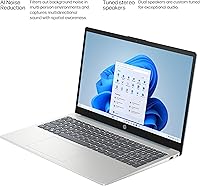
  • Webcam: The HP True Vision camera captures at 720p HD with temporal noise reduction, supported by integrated dual-array digital microphones for clearer audio on video calls.
  • Keyboard: A full-size soft-grey keyboard with a numeric keypad and a dedicated Copilot key is included, offering a practical layout for data entry and extended typing sessions.
  • Audio: Dual integrated speakers deliver stereo sound output, sized and tuned for general media playback and voice communication rather than high-fidelity listening.
  • Power Supply: A 45W Smart AC adapter is included for charging via the proprietary smart pin port; the USB-C port does not support power delivery.
  • Dimensions: The chassis measures 14.17 inches wide, 9.29 inches deep, and 0.73 inches thick, keeping the profile slim relative to its screen size class.
  • Weight: At 3.52 lb (approximately 1.6 kg), the machine is reasonably portable for a 15.6″ laptop, though it is not as light as ultrabook-class alternatives.
  • Color & Finish: The Moonlight Blue colorway gives the plastic chassis a muted blue-grey appearance that stands apart from the typical all-black or silver options common at this price point.

Related Reviews

HP 15.6-inch Laptop 15-ef0021nr, Ryzen 3 3200U, 8GB RAM, 256GB SSD

82%
92%
Value for Money
85%
Performance
83%
Build Quality
89%
Portability
81%
Battery Life
More
HP 2020 15 15.6″ HD Touchscreen Laptop, Intel Core i5-1035G1, 16GB RAM, 512GB SSD
82%
89%
Performance
75%
Display Quality
90%
Portability
80%
Battery Life
85%
Build Quality
More
HP 15-fc0047wm 64GB 4TB Touchscreen Laptop
76%
88%
Performance & Speed
93%
RAM & Multitasking
91%
Storage Capacity
76%
Display Quality
82%
Touchscreen Responsiveness
More
HP 15.6″ Touchscreen Laptop, Intel Core i3-1115G4, 16GB RAM, 1TB SSD
83%
91%
Value for Money
88%
Touchscreen Performance
85%
Battery Life
80%
Build Quality
92%
Storage Capacity
More
HP 15.6″ Touchscreen Core i3 16GB Laptop
75%
81%
Everyday Performance
58%
Display Quality
83%
Touchscreen Responsiveness
86%
RAM & Storage
54%
Battery Life
More
HP 15.6-inch Laptop, AMD Ryzen 7 5700U, 8GB RAM, 256GB SSD
81%
89%
Value for Money
91%
Battery Life
88%
Portability
87%
Processor Performance
71%
Display Quality
More
HP 15.6″ i3 1315U 1TB Touchscreen Laptop
76%
83%
Value for Money
76%
Performance
58%
Display Quality
88%
RAM & Multitasking
86%
Storage
More
HP 15-fc0502nr Ryzen 7 512GB Laptop
73%
83%
Everyday Performance
86%
Value for Money
74%
Build Quality
61%
Display Quality
88%
Storage Speed
More
HP 15-fd0012nr 15.6-Inch Laptop
73%
77%
Performance
59%
Memory & Multitasking
84%
Storage Speed
68%
Display Quality
73%
Battery Life
More
HP 15.6″ Touchscreen i3 Laptop
68%
78%
Value for Money
69%
Performance
61%
Display Quality
82%
Touchscreen Usability
74%
Build Quality
More
HP 15.6 i7-1255U 64GB Touchscreen Laptop
75%
88%
Multitasking Performance
91%
RAM & Storage Value
74%
Display Quality
62%
Seller Upgrade Trust
61%
Battery Life
More

FAQ

No — and this catches a lot of buyers off guard. The USB-C port on this machine is data-only at 5Gbps and does not support power delivery or video output. Charging is handled exclusively through the proprietary AC smart pin adapter that ships in the box, so you will need to keep that cable handy.

Better than you might expect for its price tier, largely because of the 32GB of DDR4 RAM. Keeping a browser with a dozen tabs open alongside a video call and a document is not a problem. Where it shows its limits is under sustained CPU pressure — tasks that keep the processor working hard for extended periods, like background file conversion or software compilation, will slow things down noticeably.

Yes, for everyday touch interactions it works well. Scrolling, tapping app icons, and navigating Windows 11 with your fingers all feel natural. Standard multi-touch gestures like pinch-to-zoom are supported. There is no active pen or stylus support, so if you need precise handwriting or drawing input, you would need to add a compatible passive stylus — though results will vary.

Not really. The Intel UHD integrated graphics can manage very light, browser-based, or older low-demand titles, but anything from the last several years will either run poorly or refuse to launch at all. The i3-N305 processor is built for efficiency, not for the sustained workloads gaming demands. If gaming is part of the plan, this is the wrong machine for that purpose.

Expect somewhere in the five-to-seven hour range for typical tasks — web browsing, writing, and the occasional video call at moderate brightness. Pushing the processor harder or cranking the screen brightness will shorten that window. It is a half-day machine by honest measure, so most people in a full workday environment will want the charger within reach.

For everyday streaming it holds up fine. The FHD IPS panel is sharp enough and the viewing angles are solid, so watching from slightly off-center is not an issue. The 45% NTSC color coverage means colors are a touch muted compared to higher-gamut screens, but most people watching Netflix or YouTube casually will not find it bothersome. Glare near a window is more of a practical concern than color accuracy for most users.

It lands in the middle. The plastic chassis does not flex aggressively on a flat surface and feels reasonably put together for desk or couch use. It is not the rigid, confidence-inspiring construction you get from a metal-body laptop, though. If you are planning to carry it in a bag through a daily commute or toss it around frequently, the materials will feel more budget-grade over time compared to alternatives with aluminum or magnesium frames.

Yes, with some caveats. The built-in HDMI port is version 1.4b, which supports 4K output but only at 30Hz — fine for watching content, less ideal for productivity work where you want a smoother refresh rate. The bundled hub also includes a 4K HDMI output at 30Hz, giving you the same capability over USB-C. For a fluid 4K workspace experience, a higher-spec machine with a newer HDMI or DisplayPort output would serve you better.

For a casual student or home user, the day-to-day experience is nearly identical between the two. But for small business owners, IT-managed environments, or anyone who needs BitLocker full-disk encryption or Remote Desktop access, Pro is a meaningful practical upgrade. Getting it pre-installed here rather than paying for an upgrade license separately is a genuine cost saving worth factoring into the overall value picture.

The full-size layout with a numeric keypad is a real plus, especially for anyone who works with numbers or spreadsheets regularly. Key travel is moderate — not deep or clicky by any measure, but comfortable enough for extended typing without notable fatigue. The Copilot key provides quick access to Windows AI features, which is either a convenience or an irrelevance depending on whether you use that functionality.