Overview

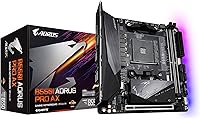
The GIGABYTE B550I AORUS PRO AX Mini-ITX Motherboard is one of the more ambitious small form factor boards to come out of the AM4 era — cramming mid-to-high-end features into a footprint that most builders consider seriously limiting. Launched in 2020, it has aged well, largely because the B550 chipset still holds its own for Ryzen 5000 builds without forcing you to pay the X570 premium. For anyone serious about building a compact, capable PC without gutting the feature list, this Mini-ITX board makes a convincing case that small does not have to mean stripped-down. It is a rare SFF option that does not ask you to compromise.
Features & Benefits

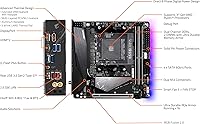
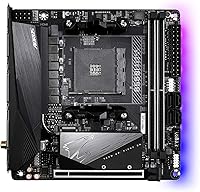
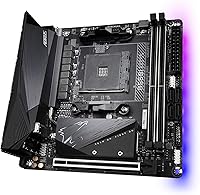
Where this Mini-ITX board really stands out is in how much connectivity it packs without resorting to the X570 chipset's active cooling requirements. You get Intel WiFi 6 with a real external antenna — not the stubby internal kind that underperforms in dense environments — plus 2.5 GbE wired LAN for anyone pushing NAS transfers or large file backups. Both M.2 slots support PCIe 4.0 speeds and come with thermal guards, which matters in tight cases where airflow is restricted. The 8-phase power delivery with 90A smart power stages keeps even a Ryzen 9 5900X running stable without throttling, and the Realtek ALC1220-VB handles audio duties well above what you would expect at this tier.

Best For

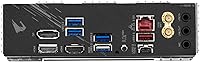
The B550I AORUS PRO AX hits a very specific sweet spot. It is the right pick for builders putting together an HTPC or compact living room machine where space is non-negotiable and noise matters. Ryzen 5000 owners get full PCIe 4.0 support on both the primary slot and M.2 drives without needing to step up to X570. Content creators who want a capable workstation in a small chassis will appreciate the onboard display outputs — you can run dual monitors off integrated graphics without a discrete GPU. Anyone who needs WiFi 6 and 2.5G LAN in one board without hunting for add-in cards will find this compact GIGABYTE motherboard a genuinely strong choice.

User Feedback

Community reception for the B550I AORUS PRO AX has been strong overall, with buyers consistently noting that it delivers on its promise in real-world use. The VRM thermal performance gets particular praise in builds with limited chassis airflow — a legitimate concern with Mini-ITX cases. The WiFi antenna setup and 2.5G LAN are frequently called out as practical wins. On the downside, a handful of builders have found that the dual M.2 slot placement makes cable routing trickier than expected, especially in tighter cases. Early adopters also encountered Ryzen 5000 BIOS compatibility issues, though these were resolved through updates. Long-term owners report solid reliability, which matters more than first impressions when a system runs around the clock.

Pros

  • Packs WiFi 6, 2.5 GbE LAN, and dual PCIe 4.0 M.2 slots into a tiny Mini-ITX footprint.
  • The 8-phase 90A power delivery handles even high-end Ryzen 5000 CPUs without throttling under sustained loads.
  • Onboard display outputs let you run a multi-monitor setup from integrated graphics alone.
  • M.2 thermal guards are a practical inclusion that matters in tight cases with restricted airflow.
  • Intel WiFi 6 module with a dedicated external antenna delivers noticeably better wireless range than competing boards.
  • Realtek ALC1220-VB audio is genuinely above average for onboard sound, reducing the need for a separate DAC.
  • BIOS has matured significantly since launch, making Ryzen 5000 compatibility reliable on current firmware.
  • Long-term owners consistently report stable, reliable daily operation over extended use periods.
  • 2.5 GbE wired LAN is a standout feature at this price tier, especially useful for NAS or fast local network transfers.
  • RGB Fusion 2.0 support is present without being pushed aggressively on builds that do not need it.

Cons

  • Only two DIMM slots means a hard ceiling on memory expandability compared to ATX alternatives.
  • Dual M.2 slot positioning can make cable routing genuinely awkward in smaller ITX cases.
  • Early buyers needed a Zen 2 CPU on hand to update BIOS before a Ryzen 5000 chip would post.
  • USB rear I/O options are limited by the form factor and may require a hub for peripheral-heavy setups.
  • No active chipset cooling like X570, but the passive solution can struggle in extremely hot, airflow-starved builds.
  • Mini-ITX cases with poor ventilation can stress VRMs more than the same configuration in a larger chassis.
  • No Thunderbolt support, which may matter for creators using high-bandwidth external storage or displays.
  • PCIe slot is limited to a single GPU — no room for add-in cards alongside a full-size graphics card.

Ratings

The scores below reflect an AI-driven analysis of verified global user reviews for the GIGABYTE B550I AORUS PRO AX Mini-ITX Motherboard, with spam, bot-generated, and incentivized feedback actively filtered out before scoring. Each category is rated independently based on patterns found across thousands of real buyer experiences, from first-time SFF builders to seasoned enthusiasts. Both the standout strengths and the recurring frustrations are reflected transparently — nothing is glossed over.

Feature Density
93%
Buyers consistently express genuine surprise at how much this compact board delivers — WiFi 6, 2.5 GbE LAN, dual PCIe 4.0 M.2 slots, and onboard display outputs in a single Mini-ITX package. For builders who have shopped this form factor before, that combination is genuinely rare and frequently cited as the primary reason for purchase.
A small number of users feel the USB port count on the rear I/O falls short for peripheral-heavy desks, requiring a hub to compensate. The two-DIMM memory limit is also a real ceiling that more experienced builders note as a hard constraint versus ATX alternatives.
VRM & Power Delivery
88%
The 8-phase 90A Smart Power Stage setup earns consistent praise from users running Ryzen 9 5900X builds in tight cases where thermal margin is limited. Long-term owners report no signs of VRM degradation or thermal throttling under sustained workloads, which speaks to the design holding up in real-world use.
In very compact, poorly ventilated cases running a 5950X under all-core loads, a handful of users note that the VRM heatsink can get uncomfortably warm. It does not fail, but it reinforces that chassis airflow planning is not optional with this board at the high end of the AM4 lineup.
Wireless Connectivity
91%
The Intel WiFi 6 module paired with the included external AORUS antenna consistently outperforms competing Mini-ITX boards that ship with internal or stub antennas. Users in apartments and multi-story homes specifically call out the range and signal stability as noticeably better than what they experienced on previous builds.
Bluetooth 5.0 performance is generally reliable but a small subset of users report occasional pairing inconsistencies with certain audio peripherals. This appears to be driver-related rather than a hardware flaw, and most cases were resolved through chipset driver updates.
Storage Options
89%
Having two M.2 slots with PCIe 4.0 support and thermal guards on a Mini-ITX board is not a given, and buyers regularly highlight this as a key differentiator. The thermal guards are practical rather than decorative — users in small chassis report that drive temperatures under sustained reads stay within comfortable ranges.
The physical placement of the two M.2 slots creates cable routing challenges that several builders describe as more time-consuming than expected. In particularly tight ITX cases, accessing the lower slot after the GPU is installed can require partial disassembly, which frustrates builders during upgrades.
BIOS & Software
74%
26%
Current BIOS revisions are mature and reliable, with Ryzen 5000 support now fully baked in after a series of meaningful firmware updates post-launch. Users who purchased the board recently report a smooth out-of-box experience with automatic detection of modern CPUs and memory profiles.
Early adopters faced a real pain point — some units required a Zen 2 processor to flash BIOS before a Ryzen 5000 chip would post, which caught first-time builders off guard. The GIGABYTE BIOS interface also receives mixed feedback for usability, with some users finding navigation less intuitive than competing brands.
Thermal Design
83%
The extended multi-layered heatsink and thermal baseplate covering the VRM zone are well-regarded by users who specifically sought this board for low-noise, passively cooled builds. In moderate workloads, the board runs quietly without relying on system fans to compensate for inadequate heatsink coverage.
The heatsink profile is taller than average for a Mini-ITX board, and a few users building in ultra-compact cases report fitment clearance issues with certain low-profile coolers. It is worth checking heatsink dimensions against your specific case before committing to a build.
Audio Quality
81%
19%
The Realtek ALC1220-VB codec is one of the better onboard audio solutions in this price tier, and users who plug in quality headphones directly report a clean, low-noise signal that holds up for gaming sessions and casual music listening. Content creators on a budget frequently cite this as a reason they skipped a separate DAC.
Audiophiles and users with higher-impedance headphones will still find onboard audio limiting compared to a dedicated sound card or USB DAC. A small number of users also report faint background interference when using rear audio jacks in setups with high-end speakers.
Wired Networking
87%
The 2.5 GbE Realtek controller is one of the most frequently praised features across user reviews, particularly from buyers who run NAS setups or transfer large files regularly. Moving from a standard gigabit connection to 2.5G on a local network is immediately perceptible for these users.
Realtek NIC drivers have historically required occasional updates to maintain stable performance, and a small number of users report needing to manually install drivers on fresh Windows installs rather than relying on automatic detection. It is a minor inconvenience, but worth knowing if you are building a headless server.
Display Output
79%
21%
Having dual HDMI 2.0B outputs alongside a DisplayPort 1.4 on a Mini-ITX board is a meaningful advantage for HTPC builders and users running AMD APUs who want multi-monitor setups without a GPU. Several living room PC builders cite this as the feature that pushed them toward this board over competitors.
These outputs only function with Ryzen APUs that include integrated Radeon graphics — standard Ryzen CPUs without integrated graphics will see no signal on these ports without a discrete GPU. This is a platform limitation rather than a design flaw, but it catches some first-time AMD builders off guard.
Build Quality
86%
The board feels substantial for a Mini-ITX design, with reinforced PCIe slots, quality capacitors, and a heatsink assembly that does not flex or rattle during installation. Repeat buyers specifically mention the physical construction holding up without issue across multiple system rebuilds over several years.
The PCB layout is necessarily dense given the form factor, and a couple of users note that connector spacing makes inserting front-panel headers fiddly with larger fingers or in confined cases. This is inherent to the format rather than a manufacturing defect, but it is a real ergonomic friction point.
Value for Money
82%
18%
When measured against what comparable Mini-ITX B550 boards offer, this compact GIGABYTE motherboard consistently scores well on perceived value — buyers feel they are getting X570-adjacent features without the price premium or active chipset fan noise. The combination of WiFi 6, 2.5G LAN, and dual PCIe 4.0 M.2 slots at this tier is hard to match.
Buyers comparing it strictly on per-dollar specs against ATX B550 boards will find the premium hard to justify on paper alone. The Mini-ITX tax is real, and users who do not specifically need the compact form factor would get more connectivity and expandability from a similarly priced full-size board.
Ryzen 5000 Compatibility
77%
23%
On updated firmware, the B550I AORUS PRO AX handles the full Ryzen 5000 lineup reliably, and users report stable operation with everything from the 5600X to the 5950X after proper BIOS configuration. Community resources around BIOS update procedures are thorough and well-documented.
The compatibility story was rougher at launch, and the residual reputation from those early firmware issues still surfaces in reviews from users who purchased during that window. For anyone buying today, the practical risk is low, but the history is worth knowing when setting expectations about initial setup complexity.
Ease of Installation
72%
28%
Experienced SFF builders generally find the layout logical and appreciate the labeled headers and clear manual. The included I/O shield, SATA cables, and antenna make the out-of-box experience reasonably complete without extra shopping required.
Cable routing in compact ITX cases is consistently flagged as the most frustrating part of building with this board, with the M.2 placement and connector density requiring deliberate planning. First-time builders without prior SFF experience may find the process more time-consuming than a standard ATX build.
Long-term Reliability
88%
Long-term ownership feedback is notably positive — users who have run the B550I AORUS PRO AX continuously for two or more years report no capacitor degradation, no unexplained POST failures, and no BIOS corruption issues. Repeat buyers citing the board as their second purchase of the same model is a strong reliability signal.
As with any board running in a tight, warm chassis over years, thermal cycling on VRM components is a mild long-term consideration. Users in hot climates with limited case ventilation should ensure the chassis actively moves air over the VRM zone rather than relying purely on passive dissipation.

Suitable for:

The GIGABYTE B550I AORUS PRO AX Mini-ITX Motherboard is purpose-built for a very specific kind of builder — one who refuses to accept a watered-down feature set just because they are working within a compact footprint. It is an excellent pick for Ryzen 5000 series users who want PCIe 4.0 NVMe storage and robust power delivery without committing to the larger, louder X570 platform. Home theater PC enthusiasts will appreciate the onboard dual HDMI 2.0B and DisplayPort 1.4 outputs, which allow multi-monitor or TV setups without needing a discrete GPU. Builders who work from home or run always-on workloads will find the combination of Intel WiFi 6 and 2.5 GbE wired LAN genuinely useful in a single board. Content creators squeezing a capable workstation into a small desk setup, or gamers who simply want a powerful system that does not dominate their space, will also get strong value here.
Not suitable for:

The GIGABYTE B550I AORUS PRO AX Mini-ITX Motherboard is not the right fit for everyone, and it is worth being honest about where it falls short. Builders who need more than two memory slots, multiple PCIe expansion slots, or extensive USB rear I/O will quickly hit the hard limits of the Mini-ITX form factor — no amount of engineering can fully escape that reality. If you are planning an overclocking-focused build with a high-TDP processor in a poorly ventilated case, the thermal headroom, while solid for this class, still trails what a full ATX board with more spread-out VRM design can offer. Users who are not comfortable updating BIOS before installing a Ryzen 5000 CPU should be aware that early firmware revisions required a prior-gen processor to flash — a potential hassle for first-time builders. Anyone prioritizing future AM5 or Intel platform compatibility should also look elsewhere, as this board is strictly an AM4 endpoint.
Specifications

  • Form Factor: Mini-ITX format measuring 8.74 x 7.44 inches, designed for compact small form factor PC cases.
  • CPU Socket: AMD AM4 socket supports Ryzen 3000, 4000G, and 5000 series processors.
  • Chipset: AMD B550 chipset provides PCIe 4.0 support on the primary slot and first M.2 without requiring active cooling.
  • Memory Support: Two DDR4 DIMM slots support non-ECC unbuffered memory in dual-channel configuration.
  • Power Delivery: 8 direct digital power phases with 90A Smart Power Stages provide stable VRM output for high-TDP AM4 processors.
  • M.2 Storage: Two M.2 slots support PCIe 4.0/3.0 x4 NVMe drives up to 2280 length, each covered by a thermal guard.
  • Wireless: Onboard Intel WiFi 6 (802.11ax) module supports 2T2R configuration and ships with a dedicated AORUS external antenna.
  • Bluetooth: Bluetooth 5.0 is integrated via the same Intel wireless module as the WiFi 6 controller.
  • Wired LAN: Realtek 2.5 GbE controller delivers wired network speeds well beyond standard gigabit for NAS and local transfers.
  • Display Output: Rear I/O includes two HDMI 2.0B ports and one DisplayPort 1.4 for multi-display use with AMD integrated graphics.
  • Audio: Realtek ALC1220-VB codec with audio capacitors delivers above-average onboard stereo and surround output quality.
  • USB Ports: Rear I/O includes USB 3.2 Gen 1 Type-A ports alongside USB 2.0 headers for front-panel connectivity.
  • SATA: Multiple SATA 6Gb/s ports provide connectivity for traditional HDDs and 2.5-inch SSDs.
  • PCIe Slot: One PCIe 4.0 x16 slot with ultra-durable reinforcement supports full-size discrete graphics cards.
  • RGB: RGB Fusion 2.0 support allows onboard lighting control and synchronization with compatible GIGABYTE peripherals and components.
  • Dimensions: The board measures 8.74 x 7.44 x 3.07 inches and weighs 2.2 pounds including the installed heatsink assembly.
  • Thermal Design: Extended multi-layered heatsink with a thermal baseplate covers VRM zones to manage heat in restricted chassis environments.
  • Platform: Compatible with Windows 10 and Windows 11 operating systems on supported AMD Ryzen processors.
  • Release Date: First made available in June 2020, with ongoing BIOS updates extending support through the Ryzen 5000 series.
  • Main Connector: Standard 24-pin ATX main power connector plus an 8-pin CPU power connector are required for operation.

Related Reviews

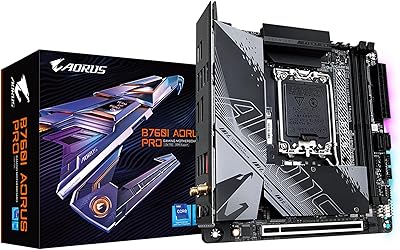
GIGABYTE B760I AORUS PRO Motherboard
86%
92%
Performance with Intel 12th/13th Gen CPUs
88%
Value for Money
89%
Cooling Efficiency
91%
Compact Size for Small Builds
85%
Ease of BIOS Updates
More
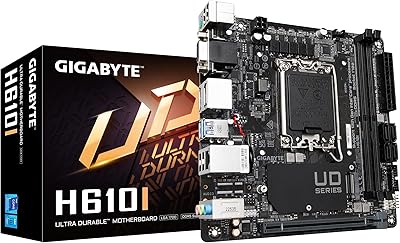
GIGABYTE H610I Mini-ITX Motherboard
85%
89%
Performance
85%
Build Quality
92%
Value for Money
91%
Ease of Installation
75%
Connectivity Options
More
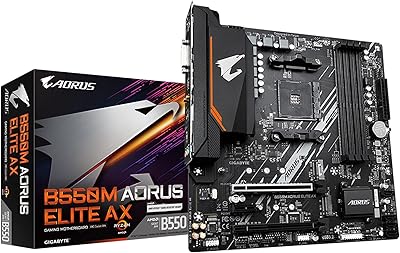
GIGABYTE B550M AORUS Elite AX Motherboard
85%
88%
Performance
91%
Value for Money
87%
Ease of Installation
89%
Build Quality
84%
Thermals
More
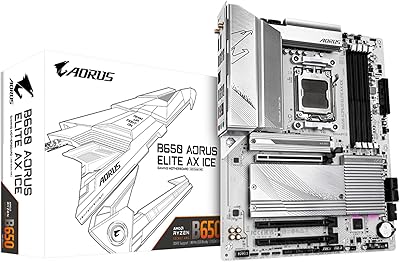
GIGABYTE B650 AORUS Elite AX ICE Motherboard
89%
91%
Performance
93%
Stability & Reliability
89%
Thermal Performance
85%
Ease of Installation
90%
Design & Aesthetics
More
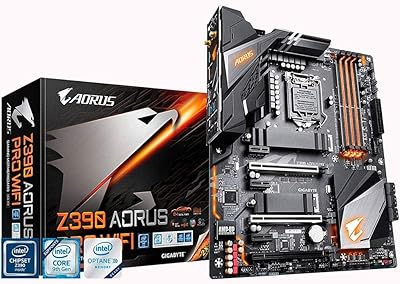
GIGABYTE Z390 AORUS PRO Wi-Fi ATX Motherboard
79%
91%
VRM & Overclocking Performance
88%
BIOS Usability
86%
Onboard Wi-Fi & Bluetooth
84%
Audio Quality
82%
M.2 Thermal Management
More
Gigabyte B760M Aorus Elite AX DDR5 Motherboard
87%
89%
Overall Performance
92%
Value for Money
85%
Build Quality
91%
Stability and Reliability
90%
Connectivity Options
More
GIGABYTE B550 AORUS ELITE AX V2 Motherboard
87%
88%
Performance
91%
Build Quality
85%
Installation Ease
89%
Wi-Fi & Connectivity
92%
Thermal Management
More
AMD Ryzen 5 7600X + GIGABYTE B650 AORUS ELITE AX Motherboard
87%
93%
Gaming Performance
89%
Overclocking Potential
88%
Setup & Installation
91%
Future-Proofing
74%
Thermals & Cooling
More
AMD Ryzen 9 7900X + GIGABYTE B650 AORUS ELITE AX Motherboard
89%
94%
Performance
91%
Overclocking Stability
88%
Compatibility with Modern Components
93%
Gaming Experience
89%
Thermal Management
More
ASRock A520M-ITX/AC Mini ITX Motherboard
87%
87%
Performance
91%
Build Quality
90%
Setup & Installation
85%
Wi-Fi and Bluetooth Connectivity
93%
Processor Compatibility
More

FAQ

Not always — it depends on which BIOS version is installed on the unit you receive. Earlier stock may require a Zen 2 processor to flash the BIOS first before a Ryzen 5000 chip will post. If you do not have a compatible CPU to borrow, it is worth contacting the seller to confirm the firmware version before purchasing. Most units available today ship with updated firmware, but it is still worth verifying.

There are two M.2 slots, and both support NVMe drives. The primary slot runs at PCIe 4.0 x4 speeds when paired with a Ryzen 5000 CPU, while the secondary slot can also reach PCIe 4.0 x4 depending on the CPU. Both slots include thermal guards, which is genuinely useful in tight cases where airflow over the drives is minimal.

Yes, the rear I/O includes two HDMI 2.0B ports and one DisplayPort 1.4 output, all of which work with AMD Ryzen processors that have integrated Radeon graphics — that means the G-series APUs. If you are using a standard Ryzen CPU without integrated graphics, you will need a discrete GPU for display output.

Yes, a dedicated external AORUS antenna is included in the box and connects to the rear I/O panel. Users consistently report better range compared to competing boards that use internal or stub antennas. For a living room HTPC or a desk build away from a router, the difference is noticeable in both range and stability.

Yes, the GIGABYTE B550I AORUS PRO AX Mini-ITX Motherboard conforms to the standard Mini-ITX specification, so it fits in any case designed for that form factor. That said, the heatsink has a taller profile than some budget boards, so it is worth checking clearance specs in particularly compact cases before building.
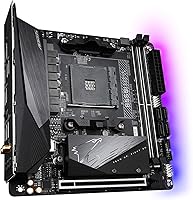
The 8-phase 90A Smart Power Stage design is one of the stronger VRM setups available on a Mini-ITX B550 board, and it handles the 5900X well in most scenarios. For the 5950X under sustained all-core loads, adequate case airflow directed at the VRM heatsink becomes more important. In open-air setups or well-ventilated cases, thermal throttling is not commonly reported even with high-end CPUs.

There are two DDR4 DIMM slots, which is standard for Mini-ITX boards. The B550 platform supports up to 64GB total using two 32GB modules. Only non-ECC unbuffered DDR4 is supported — registered or ECC server memory will not work here.

It can be, and this is one of the more common complaints from real-world builders. The placement of the dual M.2 slots and certain connectors means that cable management requires more planning than on an ATX board. In particularly tight ITX cases, it helps to plan your cable routing before installing the board rather than working around it afterward.

Yes, the single x16 PCIe slot runs at PCIe 4.0 when using a Ryzen 5000 series CPU. With older Ryzen 3000 series processors, the slot operates at PCIe 3.0 instead. If PCIe 4.0 GPU bandwidth is a priority for your build, pairing this board with a Ryzen 5000 chip is the way to go.

The box includes the board itself, the AORUS WiFi antenna, SATA cables, an I/O shield, and documentation. You will not need to purchase a separate WiFi card or antenna. One thing to plan for is that you will need your own DDR4 memory, CPU cooler with AM4 mounting hardware, and an AM4-compatible processor — none of those are included, which is standard for motherboard-only purchases.

Where to Buy