

Overview
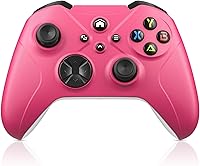
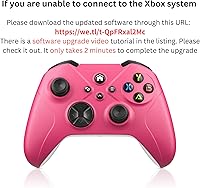
The Gamrombo Wireless Xbox Gaming Controller is a budget-oriented third-party option that launched in mid-2025, aimed at Xbox and PC gamers who want more features without paying premium prices. Gamrombo is a relatively new name in this space, so there is no long track record to lean on. What stands out right away is the triple connection support — Wi-Fi, Bluetooth, and wired USB — which is genuinely uncommon at this price tier. One critical thing buyers need to know upfront: a mandatory software update is required before the controller will pair with Xbox consoles. Skip that step, and frustration is almost guaranteed.
Features & Benefits
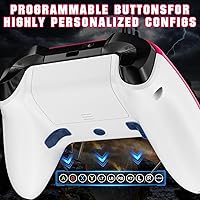
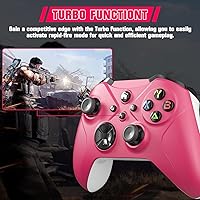
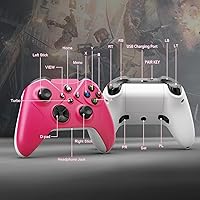
This third-party controller packs a surprising number of features into its modest frame. The two programmable macro buttons on the back can each be mapped to up to 16 actions — handy for games with repetitive skill combos, though expectations should stay grounded compared to something like the Xbox Elite. A 6-axis gyroscope adds motion control, which is genuinely rare at this price. Dual rumble motors handle haptic feedback, and a 3.5mm headphone jack enables direct audio monitoring without any extra adapter. A turbo function rounds things out, though keep in mind the controller runs on AA batteries that are not included in the box.
Best For
This budget Xbox controller makes the most sense as a secondary or backup controller for casual play — not necessarily your primary competitive setup. If you regularly switch between Xbox, PC, and mobile devices like Android or iOS phones, the multi-mode connectivity is a real practical advantage. The back macro buttons also make it worth a look for players curious about paddle functionality without committing to a high-end purchase. One honest caveat: you need to be comfortable running a one-time software update before Xbox pairing. If that kind of initial setup step feels like a dealbreaker, this probably is not the right fit.
User Feedback
With a 3.2 out of 5 rating across 181 reviews, the Gamrombo controller clearly divides opinion. Buyers who are positive tend to highlight the value for money, pointing to multi-platform support and macro buttons at a price where most controllers offer very little. On the other side, the software update requirement frustrates a meaningful share of users who expected plug-and-play behavior straight out of the box. Build quality and joystick longevity surface as recurring concerns, with durability falling predictably short of official Microsoft hardware. The AA battery design draws mixed reactions — some users genuinely prefer swappable batteries over waiting for a charge; others find the added cost and hassle annoying.
Pros
- Supports Wi-Fi, Bluetooth, and wired USB — rare versatility for a controller at this price point.
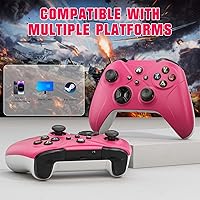
- Works across Xbox Series X, Series S, Xbox One, PC, Android, iOS, and Windows 7 through 11.
- Two programmable back buttons can each be mapped to up to 16 actions, adding real utility for combo-heavy games.
- Built-in 6-axis gyroscope brings motion control support that most budget controllers skip entirely.
- The 3.5mm headphone jack lets you plug in a headset directly without needing an audio adapter.
- Dual rumble motors deliver haptic feedback that keeps casual sessions feeling immersive.
- Turbo function is a practical bonus for genres like shooters or fighting games with rapid-fire inputs.
- AA battery design means you can swap in fresh cells instantly instead of waiting through a charging cycle.
- Priced accessibly enough to work as a guest or backup controller without a significant financial risk.
Cons
- A mandatory software update is required before the controller will pair with Xbox — not plug-and-play out of the box.
- The update process has frustrated a notable share of buyers, with some reporting it is confusing or unreliable.
- Build quality reflects the budget price tier; plastic construction is unlikely to handle years of heavy use.
- Joystick durability is a recurring concern in user reviews, with some noting drift or degraded response over time.
- AA batteries are not included, adding an immediate extra cost right after purchase.
- The 3.2 out of 5 average rating across 181 reviews indicates a genuinely divided user experience.
- Connectivity issues and pairing failures appear as recurring complaints rather than isolated incidents.
- Gamrombo has very limited brand history, with no established track record or robust customer support reputation.
- Macro functionality, while present, is not comparable in precision or depth to dedicated paddle systems on premium controllers.
Ratings
Our AI rating engine analyzed verified global buyer reviews for the Gamrombo Wireless Xbox Gaming Controller, actively filtering out incentivized, bot-generated, and duplicate submissions to surface what real users actually experienced. The scores below reflect a transparent breakdown of where this budget third-party controller genuinely delivers and where it consistently falls short — no spin, no padding. Strengths and pain points are weighted equally so you can make a fully informed call before purchasing.
Value for Money
Setup & Onboarding
Multi-Platform Compatibility
Build Quality
Joystick Precision
Macro & Back Buttons
Connectivity Stability
Haptic Feedback
Audio Jack Usability
Turbo Function
Battery & Power
Ergonomics & Comfort
Gyroscope Performance
Suitable for:
The Gamrombo Wireless Xbox Gaming Controller makes the most practical sense for casual gamers who need an affordable backup or secondary controller without a major financial commitment. If you regularly bounce between an Xbox console, a Windows PC, and a mobile device like an Android phone or iPad, the built-in Wi-Fi, Bluetooth, and wired USB support genuinely covers that kind of multi-device lifestyle in a way that most budget controllers simply do not. Parents looking to equip a younger gamer with a capable starter controller will find the feature set more than adequate for everyday play. The programmable back buttons also make this a reasonable entry point for players curious about macro functionality who are not ready to invest in something like the Xbox Elite series. As long as you are willing to run the required software update before first use on Xbox — a one-time process that is clearly documented — the onboarding experience is manageable for most users.
Not suitable for:
The Gamrombo Wireless Xbox Gaming Controller is a harder sell for anyone expecting the reliability, build quality, or tactile precision of an official Microsoft controller or a well-established third-party brand like 8BitDo or PowerA. Serious or competitive gamers who depend on consistent joystick response and zero connectivity hiccups should look elsewhere, because a 3.2 out of 5 rating across nearly 200 reviews is an honest signal that performance is not universally dependable. Users who are not comfortable running a firmware update before setup — or who have had frustrating experiences with third-party software tools — may find the Xbox pairing process more trouble than it is worth. If you rely on a built-in rechargeable battery and do not want to keep AA cells on hand, this controller's power setup will be an ongoing inconvenience. And if you are buying for a primary, daily-use gaming setup where long-term durability matters, the plastic construction at this price tier is unlikely to hold up the way a higher-end option would.
Specifications
- Brand: Manufactured by Gamrombo, a controller brand that entered the market in June 2025.
- ASIN: The Amazon product identifier for this item is B0FCMBKXR9.
- Dimensions: The controller measures 6.69 x 4.76 x 2.91 inches in its packaged form.
- Weight: The unit weighs 10.2 ounces, making it comparable in heft to standard full-size controllers.
- Connectivity: Supports three connection methods: Wi-Fi wireless, Bluetooth wireless, and USB wired.
- Compatible Platforms: Works with Xbox Series X, Xbox Series S, Xbox One S, Xbox One X, PC, Android, and iOS devices.
- OS Support: Compatible with Windows 7, 8, 10, and 11 on PC.
- Power Source: Powered by 2 x AA batteries, which are not included in the box and must be purchased separately.
- Macro Buttons: Features 2 programmable back buttons (PL and PR), each capable of mapping up to 16 individual button actions.
- Gyroscope: Equipped with a 6-axis gyroscope for motion control input during supported games.
- Vibration: Includes dual rumble motors that provide haptic feedback to both hands during gameplay.
- Audio Output: Built-in 3.5mm headphone jack allows direct connection of a wired headset without an additional adapter.
- Turbo Function: Dedicated turbo input support enables rapid repeated button presses for compatible games.
- Software Requirement: A one-time software update is required before the controller can successfully pair with Xbox consoles.
- Update Source: The firmware upgrade package is available via an external download link provided in the product listing.
Related Reviews
JBL Quantum 910X Wireless Gaming Headset
JBL Quantum 360X Wireless Gaming Headset
Turtle Beach Stealth 600 Gen 3 Headset
Rii RK707 3-in-1 Wireless Game Controller Keyboard
Pulsar X3 Mini Wireless Gaming Mouse
Pulsar X2F Wireless Fingertip Gaming Mouse
Pulsar Gaming Gears Xlite v3 Medium Wireless Gaming Mouse
Alienware Pro Wireless Gaming Keyboard
Alienware Pro Wireless Gaming Headset