Overview

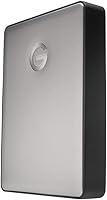
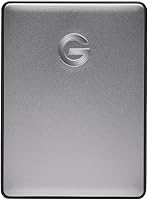
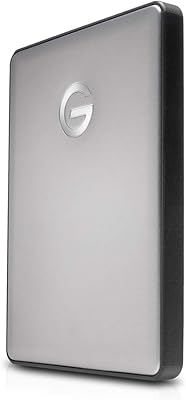
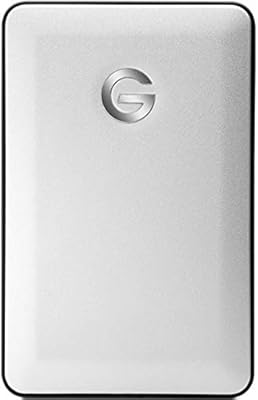
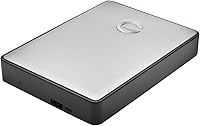
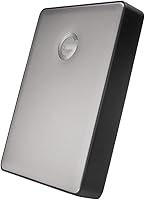
The G-Technology G-DRIVE Mobile 5TB USB-C is G-Technology's answer to the question serious creatives keep asking: can a portable hard drive actually feel premium? Built around a solid aluminum enclosure in space gray, this portable drive sits at the higher end of what you'd pay for a spinning-disk portable — and it makes no apologies for that. It ships formatted for Mac out of the box, so Windows users will need to reformat before use. USB-C connectivity with USB 3.0 and Thunderbolt 3 compatibility rounds out a package clearly designed to fit neatly into a modern Apple-centric workflow.
Features & Benefits

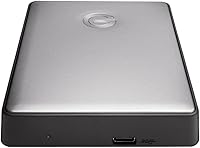
The aluminum shell does more than look good — it gives this aluminum hard drive a noticeably sturdier feel than the plastic-bodied drives that dominate this category. Running over USB 3.1 Gen 1, transfer speeds are solid for moving large RAW photo batches or multi-gigabyte video files, though buyers should keep expectations grounded: this is a mechanical HDD, not flash storage. The Thunderbolt 3 port is a welcome inclusion but won't dramatically outpace USB 3.1 on a spinning disk. At 8.1 ounces with a 0.75-inch profile, it disappears into a camera bag, and being bus-powered via USB-C means one less cable to carry.

Best For

This portable drive is a natural fit for photographers and videographers who regularly move large files between a shooting location and a workstation. If your laptop is a recent MacBook Pro, the G-DRIVE Mobile drops right into your existing setup — no adapters, no reformatting headaches. Travelers and remote workers who prioritize build quality over raw specs will find it equally appealing. It's less compelling for anyone needing SSD-level speeds or for Windows users unwilling to do an initial reformat. Essentially, it suits people who treat storage as a long-term investment rather than a disposable accessory.

User Feedback

Owners consistently highlight build quality as the standout strength — the aluminum chassis makes cheaper plastic drives feel flimsy by comparison. Most are satisfied with transfer performance for everyday backup and file archiving. On the downside, a portion of users notice audible drive noise during sustained heavy reads or writes, which can be distracting in quiet environments. A few Windows buyers initially overlooked the Mac-only default format, though reformatting is reportedly quick. The price remains a recurring talking point — not everyone agrees it's justified — but buyers who knew what they were getting generally report strong long-term satisfaction.

Pros

  • Solid aluminum enclosure feels genuinely premium and survives the rigors of daily bag carry.
  • Bus-powered via USB-C — no power adapter needed, which simplifies travel and on-location setups.
  • 5TB capacity gives photographers and videographers meaningful room for large project archives.
  • Thunderbolt 3 compatibility integrates cleanly into modern MacBook Pro and iMac workflows.
  • Ships Mac-ready with zero setup required for Apple users right out of the box.
  • Passive heat dissipation from the metal chassis keeps the drive cooler during long backup sessions.
  • Slim 0.75-inch profile fits easily into a laptop sleeve or camera bag side pocket.
  • G-Technology's brand reputation for reliability gives long-term confidence in the investment.
  • Reformatting for Windows is straightforward, offering genuine cross-platform flexibility when needed.

Cons

  • Mechanical HDD speeds are a hard ceiling — intensive random-access tasks will feel sluggish regardless of the USB 3.1 interface.
  • Cost-per-terabyte is significantly higher than plastic-bodied alternatives with comparable transfer performance.
  • Ships with only a USB-C to USB-C cable, leaving users with USB-A ports to source their own adapter.
  • No activity indicator light makes it impossible to visually confirm drive operation without checking the OS.
  • Audible mechanical noise under sustained heavy loads can be distracting in quiet working environments.
  • No backup software or drive health utility is included, requiring users to source third-party solutions independently.
  • Thunderbolt 3 branding overstates the real-world speed benefit — a spinning disk cannot leverage that bandwidth.
  • Aluminum finish, while attractive, shows cosmetic scuffs and wear more visibly than matte plastic over time.

Ratings

The G-Technology G-DRIVE Mobile 5TB USB-C earns strong marks overall, but the scores below reflect the full picture — not just the highlights. Our AI has analyzed verified buyer reviews from global markets, actively filtering out incentivized, spam, and bot-generated feedback to surface what real users consistently experienced. Both the genuine strengths and the recurring frustrations are transparently reflected in every category score.
Build Quality
93%
The aluminum chassis is the single most praised aspect of this drive across thousands of reviews. Users coming from plastic-bodied portables consistently describe it as feeling substantially more solid and professional — something photographers and video editors who toss a drive into a bag daily particularly appreciate.
A small number of users noted minor cosmetic scuffing on the aluminum surface after regular pocket or bag carry. The finish, while attractive, shows wear more visibly than matte plastic alternatives over extended daily use.
Portability & Form Factor
88%
At 8.1 ounces and just 0.75-inch thick, this portable drive genuinely disappears into a camera bag or laptop sleeve. Traveling creatives frequently cite its slim profile as a key reason they chose it over bulkier competition, especially on longer shoots or remote work trips.
A few users pointed out that the drive is slightly wider than some ultraslim rivals, meaning it can feel snug in tight pockets. It is not pocketable in the traditional sense, though for bag carry it is a non-issue.
Transfer Speed
71%
29%
For moving large RAW photo batches or multi-gigabyte video files, USB 3.1 Gen 1 throughput is sufficient and consistent. Users backing up a day of shooting or archiving footage report reasonable wait times that do not feel like a productivity bottleneck.
This is a mechanical hard disk, and buyers expecting SSD-like responsiveness will be disappointed. Large sequential transfers are manageable, but random read/write tasks and small-file-intensive workloads feel sluggish compared to flash storage at a similar price point.
Thunderbolt 3 Compatibility
74%
26%
The Thunderbolt 3 port integration is a genuine convenience for MacBook Pro and iMac users who already work within a Thunderbolt ecosystem. It means no dongle or adapter is needed, and it keeps the desk setup clean for professionals with fully TB3-equipped rigs.
Because the internal drive is still a spinning HDD, Thunderbolt 3 provides minimal real-world speed advantage over USB 3.1 in most workflows. Several technically informed buyers felt this spec was more of a marketing inclusion than a functional upgrade for a mechanical disk.
Mac Compatibility
94%
Out-of-the-box Mac readiness is a genuine convenience that saves time on initial setup. For MacBook Pro users in particular, the drive mounts instantly without any driver installation, and the space gray color match is a small but appreciated aesthetic detail in a tidy desk setup.
The Mac-only default format catches some buyers off guard, particularly those purchasing as a gift or for dual-platform use. While reformatting is straightforward, it does require erasing the drive, which is not always obvious to less technical users.
Windows Compatibility
66%
34%
Reformatting for Windows is reportedly quick and uncomplicated for users who are comfortable with Disk Management. Once reformatted, the drive performs reliably on Windows systems with no driver issues reported across a wide range of laptops and desktops.
The Mac-first format means Windows users cannot use the drive immediately out of the box without losing any pre-loaded content. Buyers who did not read the specifications carefully expressed frustration, making this a notable pre-purchase communication gap.
Value for Money
62%
38%
For buyers who specifically need an aluminum-bodied, bus-powered, Thunderbolt 3-compatible portable HDD, the premium pricing feels defensible. Long-term reliability and G-Technology's brand reputation in the creative professional space give some buyers confidence in the investment.
Objectively, the cost-per-terabyte is high compared to plastic-cased alternatives that offer comparable or faster transfer speeds. Budget-conscious buyers and those indifferent to build aesthetics are likely to find better value elsewhere in the portable HDD category.
Cable & Connectivity Included
69%
31%
The included USB-C cable is functional and of adequate length for desktop or laptop use. Users appreciated having a cable ready to go immediately without needing to source a compatible one separately.
Several users noted the drive ships with only a USB-C to USB-C cable, meaning users with older USB-A ports need to supply their own adapter or cable. A USB-C to USB-A cable in the box would have been a practical addition given the broad range of host devices.
Bus-Powered Convenience
91%
Single-cable operation is a genuine quality-of-life feature for mobile professionals. Photographers working on location or editors moving between desks consistently praise not needing a separate power adapter, particularly when working from a laptop with limited available outlets.
On older or lower-powered USB-C ports, a small number of users encountered intermittent recognition issues, likely due to insufficient bus power delivery. This is an edge case, but it is worth noting for users with aging host hardware.
Drive Noise
72%
28%
Under typical workloads — routine backups, moderate file transfers — the drive operates quietly enough that most users in standard environments do not notice it. Casual and moderate users generally report no issues with noise during normal operation.
Under heavy sustained read/write activity, a noticeable mechanical spinning and seeking noise is present, which some users in quiet home offices or studios find distracting. This is expected behavior for a 2.5-inch HDD, but it is a real consideration for noise-sensitive environments.
Heat Management
83%
The aluminum enclosure acts as a passive heat sink, and users running long backup sessions report the drive staying noticeably cooler than plastic-bodied alternatives. This is a meaningful advantage for drive longevity during intensive archiving tasks.
During very long continuous transfers, the casing does become warm to the touch, which occasionally concerns users unfamiliar with passive thermal management. The heat levels observed are within normal operating parameters, but clearer communication about this from the manufacturer would help.
Long-Term Reliability
84%
G-Technology has a strong reputation among creative professionals for producing drives that hold up over years of regular use. Many returning buyers specifically cite positive past experiences with the brand as a primary reason for repurchasing within the G-DRIVE lineup.
As with all mechanical hard drives, long-term reliability is inherently probabilistic, and there are isolated failure reports in the user base. No portable HDD should be treated as a sole backup medium, and a small percentage of users did experience early failures within the first year.
Software & Out-of-Box Experience
76%
24%
The drive requires no software installation for basic operation on a Mac, which keeps the setup experience clean and fast. The lack of bundled bloatware is frequently mentioned as a positive compared to some competing brands that ship with unwanted utilities.
There is no included backup software or drive health monitoring tool in the box, which some buyers expected at this price tier. Users who want scheduled backup automation need to source a third-party solution independently.
Aesthetic & Design Consistency
89%
The space gray aluminum finish is widely praised for looking genuinely premium alongside Apple hardware. For Mac users who care about a cohesive desk setup, the visual match with MacBook Pro and iMac accessories is a small but real source of satisfaction.
The design is understated to the point that some users find it bland, and the lack of any status LED or indicator light means there is no visual confirmation of activity beyond the operating system. A subtle activity indicator would have been a practical design addition.

Suitable for:

The G-Technology G-DRIVE Mobile 5TB USB-C is purpose-built for creative professionals who treat their storage gear as seriously as the rest of their kit. Photographers shooting high-resolution RAW files and videographers working with large ProRes or 4K footage will find 5TB of portable capacity genuinely useful for on-location backups and project archiving. Mac users with a modern MacBook Pro or iMac get a plug-and-play experience with no reformatting or driver setup required, and the space gray aluminum finish integrates naturally into an Apple-centric workspace. Travelers and remote workers who move between locations regularly will appreciate the single-cable bus-powered operation — one less adapter rattling around in a bag is a real convenience. If you already own Thunderbolt 3 peripherals and want a drive that fits that ecosystem without compromise, the G-DRIVE Mobile slots in cleanly. Essentially, this portable drive rewards buyers who prioritize long-term build quality, brand reliability, and ecosystem compatibility over raw speed or rock-bottom cost-per-terabyte.

Not suitable for:

Buyers expecting SSD-level performance should look elsewhere — the G-Technology G-DRIVE Mobile 5TB USB-C is a mechanical hard disk, and no amount of premium branding changes the fundamental speed ceiling of a spinning platter. If your workflow demands fast random read/write performance, such as running applications or editing directly off the drive rather than simply transferring files, you will find this aluminum hard drive frustratingly slow for that purpose. Budget-conscious shoppers will also struggle to justify the cost when plastic-cased portable HDDs at significantly lower prices offer comparable sequential transfer speeds for basic backup use. Windows-primary users are not excluded entirely, but the out-of-box experience requires reformatting, and those who are not comfortable doing that may hit an unnecessary friction point. Anyone working in noise-sensitive environments — quiet studios, shared office spaces — should also be aware that under sustained heavy loads, the mechanical drive does produce audible activity noise. If portability needs to mean true pocket-carry rather than bag-carry, the dimensions may also be slightly limiting compared to ultra-slim alternatives.
Specifications

  • Storage Capacity: The drive provides 5TB of total storage, though actual accessible capacity varies slightly depending on the operating system and formatting used.
  • Interface: Connects via USB 3.1 Gen 1, offering reliable data transfer speeds suitable for large media file workflows.
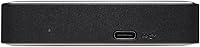
  • Connector Type: Uses a USB-C connector and is also backward compatible with USB 3.0 and Thunderbolt 3 ports.
  • Form Factor: Built around a 2.5-inch internal drive platform, which allows for bus-powered operation without a separate power adapter.
  • Dimensions: The enclosure measures 4.33 x 3.23 x 0.75 inches, making it slim enough to fit easily in a laptop bag or camera case.
  • Weight: The unit weighs 8.1 ounces, keeping it light enough for daily mobile carry without adding meaningful bulk.
  • Enclosure Material: The outer shell is constructed from aluminum, which contributes to both structural rigidity and passive thermal management during sustained use.
  • Default Format: Ships pre-formatted in HFS+ for macOS compatibility, requiring a reformat before use on Windows systems.
  • Power Source: Fully bus-powered via the USB-C cable, eliminating the need for an external power adapter in typical host configurations.
  • Platform Support: Compatible with Mac out of the box and with Windows PCs after reformatting using the host system's disk management utility.
  • Color: Available in Space Gray, designed to complement the aesthetic of modern Apple hardware including MacBook Pro and iMac lineups.
  • Drive Type: Uses a traditional spinning magnetic hard disk rather than flash storage, which affects random-access performance relative to SSDs.
  • Series: Part of the G-DRIVE Mobile lineup from G-Technology, a brand historically focused on professional creative storage solutions.
  • Thunderbolt 3: The USB-C port supports Thunderbolt 3 host connections, though real-world transfer speeds remain limited by the mechanical disk internals.
  • In the Box: The drive ships with a USB-C to USB-C cable; no USB-C to USB-A adapter or backup software is included.
  • Warranty: G-Technology typically backs the G-DRIVE Mobile series with a 3-year limited warranty, though buyers should verify current terms at the time of purchase.

Related Reviews

G-Technology 2TB G-DRIVE Mobile USB-C Portable External Hard Drive
88%
91%
Portability
88%
Transfer Speed
89%
Build Quality
94%
Ease of Use (Plug-and-Play)
92%
Compatibility (Mac/Windows)
More
G-Technology 4TB G-DRIVE Mobile USB-C Portable External Hard Drive
88%
88%
Performance
94%
Portability
91%
Build Quality
89%
Compatibility
95%
Setup & Installation
More
G-Technology G-DRIVE Mobile 1TB USB 3.0 Portable Hard Drive
86%
91%
Portability
87%
Data Transfer Speed
93%
Build Quality
89%
Ease of Use
60%
Windows Compatibility
More
G-Technology 36TB G-RAID with Thunderbolt 3, USB-C
85%
91%
Data Transfer Speed
94%
Build Quality
88%
RAID Configuration Flexibility
86%
Ease of Setup
93%
Connectivity
More
G-Technology 4TB G-DRIVE with Thunderbolt 3
84%
91%
Performance & Speed
88%
Build Quality & Durability
90%
Connectivity & Versatility
67%
Portability & Weight
85%
Setup & Installation
More
G-Technology G-Drive 8TB Thunderbolt 3
89%
95%
Read/Write Performance
92%
Build Quality
90%
Durability
88%
Connectivity Options
93%
Compatibility with Mac
More
WAVLINK WL-ST334UA Dual-Bay USB 3.0 Hard Drive Docking Station

72%
83%
Offline Cloning Reliability
74%
Transfer Speed
79%
Build Quality
91%
Ease of Setup
38%
Mac Compatibility
More
ikuai 3.5″ USB 3.0 Hard Drive Enclosure
80%
93%
Ease of Setup
71%
Build Quality
62%
Cable Quality & Reliability
88%
Drive Compatibility
74%
Data Transfer Speed
More
SSK 4TB SSD USB C Drive
89%
95%
Transfer Speed
88%
Build Quality
91%
Portability/Size
85%
Compatibility
93%
Ease of Use
More
THKAILAR 2TB USB C Flash Drive
86%
91%
Performance
88%
Build Quality
93%
Transfer Speed
89%
Portability
84%
Compatibility
More

FAQ

Yes, it is plug-and-play on any modern Mac. It ships formatted in HFS+, so macOS will recognize and mount it immediately without any drivers or setup steps required.

You can, but not without a reformat first. Out of the box it uses HFS+, which Windows cannot write to natively. You will need to reformat it to exFAT or NTFS using Windows Disk Management before use, which erases any existing content on the drive.

No, this portable drive is fully bus-powered — it draws all the power it needs directly from the USB-C cable connected to your computer. One cable handles both data and power, which makes it genuinely travel-friendly.

The drive has a USB-C connector, so you will need a USB-C port or a USB-C to USB-A adapter. The drive is backward compatible with USB 3.0 speeds through an adapter, but one is not included in the box, so factor that in if your laptop only has USB-A ports.

For large sequential transfers — think backing up a folder of RAW files or moving a multi-gigabyte video project — speeds are solid and consistent with USB 3.1 Gen 1 performance. Do not expect SSD-like responsiveness, though. This is a mechanical hard drive, and tasks involving many small files or random access will feel noticeably slower than flash storage.

In practice, not significantly. The drive's spinning disk is the bottleneck, not the port, so connecting it via a Thunderbolt 3 host does not unlock meaningfully faster speeds over a standard USB 3.1 connection. The TB3 compatibility is more useful for ecosystem convenience than raw performance.

Under light to moderate workloads it is quiet enough that most users do not notice it in a typical environment. During heavy sustained transfers, you will hear the mechanical disk seeking and spinning — it is normal behavior for an HDD, but if you work in a very quiet studio or shared office space, it is worth being aware of.

It does warm up during extended transfers, which is completely normal. The aluminum shell actually helps by conducting heat away from the internals more effectively than plastic would. It should not get uncomfortably hot under typical use, but you will feel warmth if you are touching it during a prolonged backup session.

No bundled software comes in the box. For Mac users, Time Machine works natively with it after setting it up in System Preferences. Windows users will need to source a third-party backup solution separately, such as the built-in File History utility or a dedicated app.

The G-DRIVE Mobile holds up well for bag carry and travel. The aluminum enclosure resists everyday knocks and compression much better than plastic rivals. That said, it is still a mechanical hard drive with spinning platters inside, so it is not drop-proof. Avoid dropping it, especially while it is actively reading or writing data.