Overview

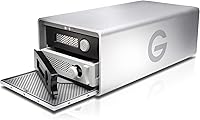
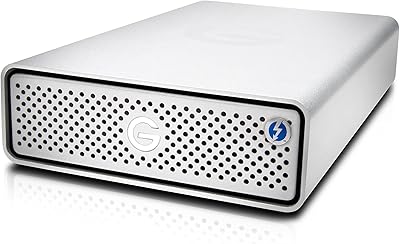
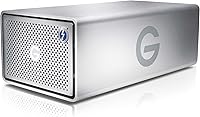
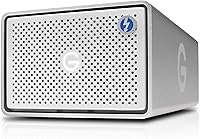
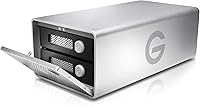
The G-Technology G-RAID TB3 36TB Dual Drive Storage is built squarely for creative professionals who treat storage as a critical part of their workflow, not an afterthought. Housed in a solid all-aluminium enclosure, this G-RAID enclosure has a clean, stackable desktop form factor that looks at home in any serious edit suite. With 36TB of raw capacity spread across two drives, it handles sprawling media libraries — think years of 4K project archives — without much strain. It works across both Mac and PC, and the pricing reflects its positioning: this is not a casual purchase, but a tool designed for people whose work demands real reliability.
Features & Benefits

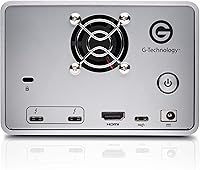
Two Thunderbolt 3 ports are where this Thunderbolt 3 RAID system earns its keep — you can daisy-chain up to five additional devices from a single connection, which means fewer cables and no need for a separate hub. The USB-C and HDMI ports extend its flexibility for mixed desk setups. Inside, dual Ultrastar drives spinning at 7200RPM deliver the consistent throughput that 4K and 6K editing actually demands. RAID configuration happens at the hardware level with no software involved: RAID 0 combines drive speed, RAID 1 mirrors your data for redundancy, and JBOD treats each drive as its own independent volume. Initial setup is refreshingly simple.

Best For

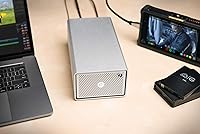
The G-Technology dual-drive unit fits naturally into demanding creative environments. Video editors cutting 4K or 6K raw footage will appreciate the fast, sustained reads that keep timelines moving without dropped frames or stalling. Photographers sitting on terabytes of RAW files finally have room for everything without constantly juggling portable drives. Audio professionals with large sample libraries and dense multi-track projects will find the capacity practical rather than excessive. It also suits studio setups where Thunderbolt daisy-chaining keeps peripherals organized without hub sprawl. For anyone delivering client work where data loss is not an option, RAID 1 redundancy provides meaningful protection without adding operational complexity.

User Feedback

Owners consistently praise the build quality, noting the aluminium chassis feels substantial and well-crafted for something expected to house important files long-term. Speed consistency and the plug-and-play Thunderbolt experience draw repeated positive comments. That said, fan noise during sustained heavy workloads is a recurring complaint — not a dealbreaker for most, but worth considering if your workspace is quiet. A small number of buyers reported drive failures after prolonged use, which points toward maintaining a broader backup strategy regardless of RAID configuration. Some also found switching RAID modes less intuitive than expected, especially without prior hands-on experience. On balance, the majority of users are satisfied, though expectations around longevity vary.

Pros

  • Dual Thunderbolt 3 ports support daisy-chaining up to five devices, eliminating hub clutter in complex studio setups.
  • Hardware-level RAID requires zero software — configure once and the unit handles the rest automatically.
  • 36TB of raw capacity handles years of 4K project archives, RAW photo libraries, and large audio sessions without compromise.
  • The all-aluminium enclosure feels premium and dissipates heat reasonably well during normal workloads.
  • Plug-and-play experience on certified Mac systems is consistently smooth, with no driver headaches.
  • RAID 0, RAID 1, and JBOD modes give professionals meaningful control over the speed-versus-redundancy trade-off.
  • Stackable form factor integrates cleanly into multi-unit studio rigs without wasted desk real estate.
  • The included USB-C and HDMI ports add connectivity flexibility that competing single-interface enclosures lack.
  • Ultrastar drives have a strong industry reputation for endurance in always-on professional environments.
  • For professionals who fully exploit its feature set, the price per terabyte with Thunderbolt 3 performance is competitive.

Cons

  • Fan noise under sustained heavy loads is a recurring complaint, particularly noticeable in quiet home office environments.
  • Switching RAID modes requires a full drive reformat, which can result in unexpected data loss if not planned carefully.
  • Drive failures reported around 18 to 24 months of heavy use suggest this G-RAID enclosure should always be part of a broader backup strategy, not a standalone solution.
  • PC Thunderbolt compatibility is inconsistent, with detection failures reported on non-certified motherboards.
  • The included Thunderbolt cable is shorter than many buyers expect for flexible desk cable management.
  • Setup documentation is sparse and does not adequately explain RAID mode implications for first-time users.
  • At 8.6 pounds and nearly 10 inches long, the physical footprint can feel unwieldy on smaller desks.
  • USB-C speeds drop significantly compared to Thunderbolt 3, catching some buyers off guard during large file transfers.
  • The configuration utility software feels outdated and has seen infrequent updates since the product launched.
  • Legacy Thunderbolt 2 Mac users need a separately purchased adapter, adding unexpected cost that the product listing undersells.

Ratings

Our AI rating system analyzed verified buyer reviews for the G-Technology G-RAID TB3 36TB Dual Drive Storage from across global markets, actively filtering out incentivized, bot-generated, and low-quality submissions to surface what real professionals actually experience day to day. The scores below reflect a balanced synthesis of both enthusiastic praise and honest frustration — nothing has been smoothed over to make this G-RAID enclosure look better than it performs in practice.
Build Quality
91%
The all-aluminium chassis is one of the first things owners comment on — it feels dense and purposeful, not hollow like some competing enclosures in this category. Studio users running multiple units stacked together report that the structure holds up without flex or creaking even after extended daily use.
A handful of buyers noted that the silver finish shows fine scratches over time, especially in shared workspaces where the unit gets moved regularly. The weight at 8.6 pounds also makes repositioning on a crowded desk more of a chore than expected.
Transfer Speed & Performance
88%
Editors working with 4K and even 6K raw footage consistently report that the dual Ultrastar 7200RPM drives sustain throughput without the stuttering that plagues slower storage during long export jobs. Real-world read speeds in RAID 0 mode impressed users who had previously relied on slower USB-based solutions.
A few users noted that sustained write performance during simultaneous read operations — such as editing while rendering a proxy — could dip noticeably. This is more a dual spinning-drive limitation than a product flaw, but it is worth knowing if NVMe-level speeds are your benchmark.
Thunderbolt 3 Connectivity
93%
The dual Thunderbolt 3 ports are a standout feature for studio setups. Daisy-chaining additional drives, displays, or docks from a single cable run is something buyers specifically call out as making their desk cleaner and their workflow more organized without investing in a separate hub.
Compatibility issues were occasionally reported on Windows-based Thunderbolt systems, with a small number of PC users experiencing inconsistent detection on non-certified boards. Mac users overwhelmingly had a plug-and-play experience, but PC users should verify their system's Thunderbolt certification before purchasing.
RAID Configuration Flexibility
79%
21%
Having hardware-level RAID 0, RAID 1, and JBOD options without needing third-party software is genuinely useful for professionals who want to configure once and forget. Photographers backing up client shoots in RAID 1 and video editors chasing speed in RAID 0 both find the flexibility relevant to their actual work.
Switching between RAID modes requires a full drive reformat, which is not immediately obvious from the documentation. Several buyers who tried to change configurations mid-project found the process more involved than anticipated, and the included setup guide does not explain the implications clearly enough for first-time RAID users.
Fan Noise & Acoustics
61%
39%
Under light workloads — browsing archives, slow file transfers, or light editing — the unit runs quietly enough that it disappears into background desk noise. Users in larger studio rooms with ambient sound rarely flagged it as a problem in everyday conditions.
Under sustained heavy loads, the cooling fan becomes audible enough to distract in quiet edit suites or home offices. This is a recurring complaint rather than an isolated report, and users accustomed to fanless SSD enclosures may find the acoustic profile noticeably different from what they expected at this price point.
Heat Management
74%
26%
The aluminium enclosure does a reasonable job of passively dispersing heat from the drives during normal operation. Users running the unit for eight-plus hours in ventilated rack-adjacent setups report surface temperatures that stay manageable throughout the day.
In poorly ventilated spaces or when stacked tightly alongside other equipment, the enclosure can get warm to the touch after prolonged use. A few buyers expressed concern about long-term drive health in these conditions, though no clear pattern of heat-related failure was established in the reviews.
Port Versatility
82%
18%
Having a USB-C port alongside Thunderbolt 3 means the unit is not completely stranded when connected to a machine that lacks Thunderbolt. The HDMI port adds a useful bonus for users who want to loop in a reference monitor without using a separate adapter in their chain.
The USB-C connection is limited to USB 3.1 Gen 2 speeds, which is a real step down from Thunderbolt bandwidth. Users expecting consistent high-speed performance over USB-C were occasionally surprised by the throughput gap, particularly when moving very large media files.
Setup & Initial Configuration
83%
Out of the box, the experience for Mac users is notably smooth — mount, format, and go. The hardware RAID setup eliminates the driver and software friction that plagues some competing products, and most creative professionals had the unit running within minutes of unboxing.
The documentation covering RAID mode selection is sparse, which creates confusion for buyers who are new to RAID concepts. A clearer quick-start guide explaining which mode suits which use case would prevent the configuration mistakes that a recurring subset of reviewers mentioned.
Long-term Reliability
67%
33%
Many buyers report running this G-RAID enclosure daily for over a year without incident, and the Ultrastar drives inside have a solid industry reputation for endurance in always-on environments. Users who treat it as a primary working drive rather than an archive solution tend to be more satisfied with longevity.
A non-trivial number of reviews mention drive failures occurring after 18 to 24 months of heavy use, which is earlier than buyers at this price point expect. It is worth noting that no RAID setup replaces an external backup strategy, and some users learned this the hard way.
Software & Ecosystem Support
71%
29%
G-Technology provides a dedicated RAID configuration utility that handles mode switching without needing third-party tools. For Mac users deeply embedded in the Apple ecosystem, the integration feels natural and the unit shows up reliably in Disk Utility without fuss.
The configuration software feels dated compared to competitors, and updates have been infrequent. Windows users have reported that the utility occasionally fails to detect the unit correctly, requiring workarounds that add friction to what should be a straightforward process.
Value for Money
66%
34%
For a professional who genuinely needs 36TB of fast, RAID-protected Thunderbolt 3 storage in a single enclosure, the price makes more sense than it initially appears — comparable configured alternatives often cost just as much once you factor in drives and enclosure separately.
For anyone whose workload does not fully exploit Thunderbolt 3 speeds or the full capacity, the investment is difficult to justify against more affordable solutions. The value proposition is real, but only for a specific type of buyer with specific demands.
Physical Footprint & Desk Integration
84%
The stackable form factor is a genuine workflow benefit in studios running multiple storage units. The clean rectangular profile and neutral silver finish integrate naturally into existing desk setups without drawing visual attention away from monitors and other primary tools.
At nearly 10 inches long and almost 9 pounds, this is not a unit that adapts well to compact desk setups or mobile use cases. Buyers who underestimated the physical footprint occasionally mentioned it as a frustration after unboxing, particularly in smaller home office environments.
Mac Compatibility
92%
Plug-and-play behaviour on modern Macs running recent macOS versions is consistently praised. Video editors and photographers using Mac Pro or MacBook Pro setups with Thunderbolt 3 report that the unit mounts instantly and behaves exactly as expected without any configuration headaches.
Legacy Mac models with Thunderbolt 2 require an adapter that is sold separately, which some buyers did not account for. While the adapter works, the added cost and occasional compatibility edge cases made a small number of buyers feel the product listing could be clearer about this requirement.
PC Compatibility
63%
37%
When connected to a properly certified Thunderbolt 3 PC motherboard, the unit functions reliably and speed performance holds up well. PC users in creative agencies with certified hardware reported broadly positive experiences comparable to Mac workflows.
Thunderbolt certification inconsistency across PC hardware means the experience is far less predictable on Windows than on Mac. Detection failures, driver conflicts, and erratic performance on non-certified PC hardware are reported often enough that PC-primary users should research their specific system compatibility carefully before purchasing.
Packaging & Unboxing
77%
23%
The unit arrives well-protected with adequate padding, and the inclusion of a Thunderbolt 3 cable out of the box is a detail that budget-conscious buyers appreciate given the cost of quality TB3 cables separately. The packaging presentation matches the product tier appropriately.
Some buyers noted that the cable included is shorter than expected for flexible desk routing, and the documentation pack inside the box is minimal at best. For a product at this price tier, a more thorough getting-started guide and a longer cable would better match buyer expectations.

Suitable for:

The G-Technology G-RAID TB3 36TB Dual Drive Storage was designed with a specific type of professional in mind, and it shows. Video editors and colorists cutting 4K or 6K raw footage will appreciate the combination of sustained Thunderbolt 3 throughput and substantial raw capacity — this is the kind of setup where you can keep active project files, proxy media, and long-term archives all on one unit without constantly juggling external drives. Photographers sitting on years of RAW shoot libraries finally have room to breathe, and the RAID 1 mirroring option provides the kind of automatic redundancy that matters when a client is waiting on final deliverables. Music producers and audio engineers with dense sample libraries and multi-track sessions will find the 36TB headroom genuinely practical rather than excessive. Studio environments running multiple Thunderbolt peripherals benefit most from the daisy-chaining capability, which keeps the desk clean and the cable count low. If your work is Mac-centric and your Thunderbolt 3 setup is already certified, this G-RAID enclosure slots in with minimal friction.
Not suitable for:

Buyers who do not have a clearly professional use case should think carefully before committing to the G-Technology G-RAID TB3 36TB Dual Drive Storage, because the value equation only works when the full feature set is actually being used. Casual home users storing photos and streaming media have far more affordable options that will serve them just as well without the Thunderbolt complexity. PC users without a certified Thunderbolt 3 motherboard will run into detection issues and inconsistent performance, making the experience considerably less reliable than the Mac workflow it was clearly optimized for. Anyone expecting NVMe-level speeds should also recalibrate expectations — two spinning hard drives, however well-configured, have a throughput ceiling that solid-state solutions exceed comfortably. The fan noise under sustained load is a real consideration for anyone working in a quiet home office or acoustically sensitive space. And if you are the type of user who expects to reconfigure RAID modes periodically, the requirement to reformat the drives each time makes this Thunderbolt 3 RAID system less flexible in practice than it appears on paper.

Specifications

  • Total Capacity: The unit provides 36TB of raw storage across two internal Ultrastar hard drives.
  • Drive Type: Two enterprise-grade Ultrastar hard disk drives are housed inside the enclosure.
  • Spindle Speed: Both drives operate at 7200RPM, supporting consistent high-throughput read and write performance.
  • Primary Interface: Two Thunderbolt 3 ports are included, each capable of up to 40Gb/s data transfer bandwidth.
  • Additional Ports: One USB-C port (USB 3.1 Gen 2, up to 10Gb/s) and one HDMI port are also provided on the unit.
  • RAID Modes: The enclosure supports hardware RAID 0, RAID 1, and JBOD configurations, selectable without third-party software.
  • Daisy-Chain Support: Up to five additional Thunderbolt devices can be connected downstream via the second Thunderbolt 3 port.
  • Enclosure Material: The outer chassis is constructed entirely from aluminium, which aids passive heat dissipation and structural rigidity.
  • Form Factor: The unit uses a desktop form factor with a stackable profile designed for studio and workstation environments.
  • Dimensions: The enclosure measures 9.88 x 5.12 x 3.58 inches (L x W x H).
  • Weight: The unit weighs 8.6 pounds, reflecting the dual-drive internal configuration and aluminium build.
  • Platform Support: The enclosure is compatible with both Mac and PC systems equipped with certified Thunderbolt 3 ports.
  • Model Number: The official model identifier for this unit is 0G10810-1.
  • Release Date: This product was first made available in August 2020.
  • Brand: The unit is manufactured by G-Technology, a brand historically focused on professional-grade creative storage solutions.
  • Cooling: An internal active cooling fan supplements the passive aluminium chassis to manage drive temperatures under sustained load.
  • Power: The enclosure uses an external power adapter and requires a mains power connection for operation; it is not bus-powered.
  • Cable Included: A Thunderbolt 3 cable is included in the box, though its length may be insufficient for all desk routing configurations.

Related Reviews

G-Technology 4TB G-DRIVE Mobile USB-C Portable External Hard Drive
88%
88%
Performance
94%
Portability
91%
Build Quality
89%
Compatibility
95%
Setup & Installation
More
G-Technology G-DRIVE Mobile 1TB USB 3.0 Portable Hard Drive
86%
91%
Portability
87%
Data Transfer Speed
93%
Build Quality
89%
Ease of Use
60%
Windows Compatibility
More
G-Technology 2TB G-DRIVE Mobile USB-C Portable External Hard Drive
88%
91%
Portability
88%
Transfer Speed
89%
Build Quality
94%
Ease of Use (Plug-and-Play)
92%
Compatibility (Mac/Windows)
More
G-Technology 4TB G-DRIVE with Thunderbolt 3
84%
91%
Performance & Speed
88%
Build Quality & Durability
90%
Connectivity & Versatility
67%
Portability & Weight
85%
Setup & Installation
More
G-Technology G-Drive 8TB Thunderbolt 3
89%
95%
Read/Write Performance
92%
Build Quality
90%
Durability
88%
Connectivity Options
93%
Compatibility with Mac
More
G-Technology G-DRIVE Mobile 5TB USB-C
79%
93%
Build Quality
88%
Portability & Form Factor
71%
Transfer Speed
74%
Thunderbolt 3 Compatibility
94%
Mac Compatibility
More
LaCie 2big RAID 36TB External Hard Drive
87%
93%
Performance
90%
Reliability
88%
Ease of Setup
95%
Capacity
92%
Data Redundancy
More
G-Technology ArmorATD 4TB Portable External Hard Drive
86%
94%
Build Quality & Durability
89%
Storage Capacity
77%
Data Transfer Speed
90%
Compatibility with Mac & Windows
92%
Shock Resistance
More
G-Technology 1TB ArmorATD Rugged Portable External Hard Drive
88%
94%
Build Quality & Durability
88%
Performance & Speed
85%
Portability & Size
91%
Value for Money
96%
Shock Resistance
More
WD 36TB My Book Duo Desktop RAID External Hard Drive
82%
88%
Performance & Speed
93%
Data Security (Encryption)
96%
Storage Capacity
85%
Ease of Setup & Use
62%
Noise During Operation
More

FAQ

It does work on Windows, but with caveats. Your PC needs a properly certified Thunderbolt 3 port — not just a USB-C port that looks identical. On certified hardware it runs reliably, but users with non-certified boards have reported detection issues. Mac users have a much more consistent plug-and-play experience overall, so if you are on PC, verify your motherboard specs before purchasing.

Think of it this way: RAID 0 combines both drives into one fast volume, so you get maximum speed and all 36TB usable, but if one drive fails you lose everything. RAID 1 mirrors your data across both drives automatically, so you only get 18TB of usable space but your files survive a single drive failure. JBOD treats each drive as a separate independent volume. For client work where data loss is not an option, RAID 1 is the safer choice; for pure speed with a separate backup in place, RAID 0 makes sense.

Unfortunately, no. Switching between RAID modes requires a full reformat of the drives, which means everything stored on the unit will be erased in the process. Plan your RAID configuration before you start storing files, and always make sure you have a backup copy of anything important before attempting a mode change.

This is one of the more honest trade-offs with this G-RAID enclosure. Under light workloads it is barely noticeable, but during prolonged heavy transfers or intensive editing sessions the fan becomes audible. In a shared open-plan studio with ambient noise it blends in fine, but in a quiet home office or acoustically treated space it can be a distraction. It is worth factoring in if you are sensitive to background noise.

G-Technology provides a configuration utility for managing RAID modes, and it handles the core setup without needing third-party tools. That said, the software feels a bit dated and does not walk you through RAID mode implications in much depth. For basic use — plug in, format the drive, start working — most users do not need to touch the utility at all after initial configuration.

Yes, the HDMI port operates independently of the Thunderbolt 3 data path, so you can connect a reference display while simultaneously running storage traffic over Thunderbolt without any conflict. This is particularly handy for colorists or photographers who want a dedicated output monitor as part of a tidy single-cable desk chain.

The 36TB figure is the raw unformatted capacity. After formatting and depending on your chosen RAID mode, the usable space will be lower. In RAID 0 you get roughly 33TB usable after filesystem overhead, while RAID 1 brings that down to around 16 to 17TB since one drive mirrors the other. Always account for this when planning your storage needs.

Yes, that is exactly what the stackable aluminium design and dual Thunderbolt 3 ports are intended for. You can run the second unit downstream from the first using the passthrough Thunderbolt 3 port, and the flat-top chassis means they sit stably on top of each other. This is a popular configuration in studios running multiple G-Technology units.

Even in RAID 1 mode, this unit should not be your only copy of important data. RAID 1 protects against a single drive failure, but it does not protect against accidental deletion, theft, enclosure failure, power surges, or fire. The standard professional recommendation is the 3-2-1 rule: three copies of your data, on two different media types, with one stored off-site. Use this as your fast working drive and primary local copy, but keep an additional backup somewhere separate.

In RAID 0 mode over Thunderbolt 3, real-world sustained read speeds typically land in the range of 380 to 440MB/s depending on the host system and workload. That is sufficient for smooth 4K playback and most 6K proxy workflows. In RAID 1 mode speeds are lower since the unit is writing to both drives simultaneously, which you will notice during large imports. For anything demanding NVMe-tier performance, spinning drives will always have a ceiling that SSD-based solutions do not.