Overview

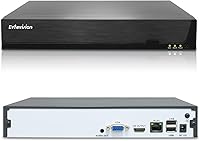
The Evtevision ES-N1916 16-Channel 4K Network Video Recorder is a straightforward, budget-conscious option for anyone building out a home or small business camera system without spending a fortune. It handles up to 4K/8MP resolution footage and uses H.265+ compression to keep file sizes manageable without sacrificing clarity. Setup leans on the Xmeye Pro app — scan a QR code and you're pulling live video on your phone without touching a router config page. One thing worth knowing upfront: no hard drive is included. That catches a lot of buyers off guard. The unit itself is compact, and the dual HDMI and VGA outputs give you solid flexibility when connecting to a monitor or display.
Features & Benefits

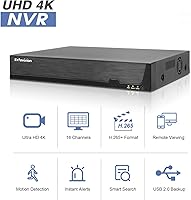
This 16-channel NVR can handle up to 16 IP cameras simultaneously, all at resolutions reaching 4K — more coverage than most home setups will ever need, and useful headroom for small commercial spaces. Third-party cameras using ONVIF or RTSP protocols connect without much fuss, so you're not locked into one brand. That said, AI human and vehicle detection is a different story — it only activates when paired with Evtevision's own smart cameras, which is a real limitation worth planning around. For recording, you get manual, scheduled, and motion-triggered options, plus event-based and smart playback filtering. The single HDD bay accepts drives up to 8TB, and remote access works across iOS, Android, and a PC browser client.

Best For

This network video recorder suits a fairly specific type of buyer. Homeowners wanting a scalable 4K setup without committing to a high-end price point will find it hits a practical middle ground. Small business owners who need to monitor multiple entry points remotely will also find it capable enough for daily use. It's a natural fit for anyone already running Evtevision cameras, since that's the only way to unlock the AI detection features. DIY-minded users comfortable installing a hard drive and doing basic network configuration will get the most out of it. Those upgrading from an older DVR looking for ONVIF-compatible flexibility will appreciate the broader camera compatibility this recorder supports.

User Feedback

Buyers tend to appreciate how quickly this Evtevision recorder gets up and running — the Xmeye Pro app draws consistent praise for making remote viewing accessible without any networking background. Image quality earns positive marks too, though several users note that results vary noticeably depending on which camera brand you pair with the unit. The missing hard drive remains the most common frustration, with many buyers feeling the listing doesn't make it prominent enough before purchase. AI detection feedback is mixed: it performs well when matched with Evtevision's own cameras, but users pairing third-party models are often let down. A handful of reviewers also flag concerns about long-term firmware support and customer service responsiveness.

Pros

  • Supports up to 16 cameras at 4K resolution, giving serious coverage for larger homes or small commercial spaces.
  • H.265+ compression keeps storage consumption low without noticeably sacrificing footage clarity.
  • ONVIF and RTSP compatibility means you are not completely locked into one camera brand for basic recording.
  • Xmeye Pro app gets you to live remote viewing quickly — no port forwarding or networking expertise required.
  • Dual HDMI and VGA outputs make monitor setup flexible without needing an adapter or extra hardware.
  • Single HDD bay accepts drives up to 8TB, providing a solid local storage runway when paired with the right drive.
  • AI human and vehicle detection works reliably when paired with compatible Evtevision smart cameras, cutting down on false alerts.
  • The compact chassis fits easily into a closet or equipment cabinet without dominating the space.
  • At its price point, this Evtevision recorder delivers a channel count and resolution ceiling that most competing options charge significantly more for.

Cons

  • No hard drive is included — and the listing does not make this prominent enough before checkout.
  • AI detection is completely non-functional with third-party cameras, which many buyers only discover after purchase.
  • The 100Mbps Ethernet port can become a bottleneck when streaming 16 high-resolution channels simultaneously.
  • Mobile app stability is inconsistent on older Android devices, with reported disconnections during extended monitoring sessions.
  • Customer support response quality drops off sharply for complex technical issues, especially outside the return window.
  • Only one HDD bay means no local redundancy — a single drive failure wipes all stored footage with no fallback.
  • The PC browser client feels outdated and requires extra configuration steps that the mobile app handles automatically.
  • Long-term firmware support is uncertain, with no published roadmap and slow bug resolution reported by longtime users.
  • Image quality and recording reliability vary noticeably depending on which third-party camera brand you pair with the unit.

Ratings

The Evtevision ES-N1916 16-Channel 4K Network Video Recorder has been evaluated through AI-driven analysis of verified global buyer reviews, with spam, bot activity, and incentivized feedback actively filtered out. Scores reflect the honest spread of real user experiences — the genuine strengths and the frustrations that repeat across independent purchases. Both sides of the ownership picture are represented transparently below.

Ease of Setup
81%
19%
Most buyers report getting cameras connected and live view running within an hour, largely thanks to the QR code pairing via the Xmeye Pro app. For users without a networking background, that kind of friction-free start makes a real difference when setting up a multi-camera system at home or a small shop.
A subset of users hit snags when mixing camera brands during initial configuration, with auto-discovery occasionally missing devices on the same network. The browser-based PC client also draws complaints for feeling outdated and requiring extra steps that the mobile app handles automatically.
Video Quality
78%
22%
When paired with 4K-capable Evtevision cameras, the recorder delivers sharp, detailed footage that holds up well for identifying faces and license plates. H.265+ compression keeps storage consumption reasonable without a visible hit to image clarity under normal lighting conditions.
Image quality drops noticeably when third-party cameras are connected, with some users reporting softer resolution and inconsistent frame rates. Low-light performance also varies significantly depending on the camera model, meaning the NVR itself is not the limiting factor but buyers should not expect uniform results across a mixed setup.
AI Detection Accuracy
63%
37%
Users running a full Evtevision camera ecosystem report that human and vehicle detection works reliably enough to cut down on irrelevant motion alerts from trees or passing shadows. For those buyers, it meaningfully reduces notification fatigue compared to basic motion-only recording.
The AI detection is completely non-functional with third-party cameras, and this limitation is not made clear enough at the point of purchase. Buyers who connected ONVIF cameras expecting the same smart alerts were consistently disappointed, and several noted that even basic motion detection felt less refined outside the Evtevision camera pairing.
Remote Access & App Experience
72%
28%
The Xmeye Pro app covers the core bases well — live viewing, playback scrubbing, and push notifications work reliably for most users on stable home Wi-Fi or mobile data. The initial QR code connection is genuinely quick and does not require port forwarding knowledge, which many buyers specifically called out as a plus.
App stability becomes less consistent for users on older Android versions or slower internet connections, with buffering and occasional login drops reported. Long-term reliability also draws some skepticism, as third-party NVR apps in this price tier have a history of reduced support over time.
Value for Money
84%
At its price point, getting 16-channel 4K recording capability with AI detection potential and ONVIF compatibility is genuinely hard to beat. Buyers upgrading from older 1080p DVR systems consistently express satisfaction with how much more coverage and resolution they gained without a steep spend.
The omission of a hard drive — without sufficiently prominent disclosure — means the real cost of getting the system operational is higher than many buyers anticipated. Factoring in an 8TB drive purchase, the value equation tightens considerably, though it remains competitive against branded alternatives.
Build Quality & Hardware
74%
26%
The metal chassis feels solid for the price tier, and the compact footprint makes it easy to tuck into a closet or mount inside a cabinet without taking up excessive space. The dual HDMI and VGA output ports are a practical touch that most competitors at this price level skip.
The overall finish and port layout feel utilitarian rather than refined, and some users noted that the included power supply runs warm during extended operation. The single USB 2.0 backup speed is also a bottleneck if you need to export large volumes of footage quickly.
Storage Flexibility
69%
31%
Supporting drives up to 8TB in the single HDD bay gives buyers a reasonable runway for continuous recording across multiple cameras. H.265+ compression helps stretch that capacity further than older codec-based recorders at the same drive size.
The single-bay limitation means there is no redundancy — if the drive fails, all local footage is lost with no failover option. Buyers running 16 cameras at high resolution will fill even an 8TB drive faster than expected, and there is no NAS or cloud storage integration to supplement local capacity.
Camera Compatibility
76%
24%
ONVIF and RTSP support opens the door to a broad range of third-party IP cameras, which gives buyers flexibility when building or expanding a system over time. Auto-discovery on the local network works well in straightforward router setups and simplifies adding new cameras without manual IP entry.
Compatibility is not universal — some ONVIF cameras from lesser-known brands connect but deliver reduced frame rates or lose certain features. RTSP is limited to live view only, meaning playback and motion-based recording may not function as expected with cameras outside the Evtevision lineup.
Recording Modes & Playback
77%
23%
The combination of manual, scheduled, and motion-triggered recording modes covers what most home and small business users actually need day-to-day. Smart playback filtering by event type makes it faster to locate relevant clips without scrubbing through hours of continuous footage.
The interface for configuring recording schedules is functional but not intuitive, and new users often need to consult third-party video guides to set it up correctly. Tag-based playback, while useful in theory, requires users to actively mark footage during live view — a step most buyers skip entirely.
Network & Connectivity
71%
29%
The RJ45 Ethernet connection is stable and consistent once configured, and the recorder handles simultaneous live streaming and local recording without visible performance degradation under normal network conditions. Browser-based remote access via HTTP adds a fallback option beyond the mobile app.
The 10M/100M Ethernet port is a noticeable ceiling — gigabit would be preferable when streaming 16 channels at 4K simultaneously, and bandwidth-sensitive setups may experience lag or dropped frames. There is no built-in Wi-Fi, so placement near a wired network point is a hard requirement.
Mobile App Reliability
67%
33%
For straightforward daily check-ins — pulling up a live view of a driveway or storefront — the Xmeye Pro app handles the job without requiring any technical setup beyond the initial QR code scan. Push notifications for motion events arrive promptly under normal conditions.
Users report intermittent disconnections during extended monitoring sessions, and the app's UI design has not kept pace with modern mobile standards. Several buyers flagged that app updates occasionally disrupted previously working configurations, which is a recurring concern with budget NVR software ecosystems.
Long-Term Firmware Support
54%
46%
The recorder has remained functional for buyers who purchased it in earlier production runs, suggesting the core firmware is stable enough for day-to-day operation without frequent updates. Basic features have not regressed across reported update cycles.
Buyer confidence in ongoing firmware development is low — Evtevision does not publish a clear update roadmap, and several users who encountered bugs reported slow or no response from support channels. For a security device, the uncertainty around long-term software maintenance is a legitimate concern that prospective buyers should weigh carefully.
Customer Support
51%
49%
Some buyers report positive experiences when reaching out during the initial setup phase, with email-based responses that walk through basic configuration questions adequately. When the issue is straightforward, resolution is generally achievable within a reasonable timeframe.
Complex technical issues — especially around camera compatibility or firmware bugs — tend to result in slow, templated responses that do not resolve the actual problem. Multiple reviewers noted that post-purchase support quality dropped off significantly once the return window had closed.
Package Contents & Documentation
62%
38%
The included accessories cover the essentials: power supply, USB mouse, and HDD mounting screws are all present and functional out of the box. The QR code pairing guide is clear enough that most buyers get to live view without opening the manual.
The printed documentation is thin and skips over non-trivial configuration steps like static IP assignment or advanced motion zone setup. The absence of a bundled hard drive — and the lack of a recommended drive list in the packaging — consistently catches first-time NVR buyers off guard at the worst moment.

Suitable for:

The Evtevision ES-N1916 16-Channel 4K Network Video Recorder is a practical fit for homeowners and small business owners who want broad camera coverage at 4K resolution without committing to a high-end price tag. If you already own Evtevision IP cameras or plan to build your system around their lineup, you will get the most out of this recorder — including the AI-powered human and vehicle detection that makes alert management actually useful. DIY-minded buyers who are comfortable installing a hard drive and doing basic network configuration will find the setup process genuinely manageable, especially with the Xmeye Pro app handling most of the heavy lifting for remote access. It also makes sense for anyone upgrading from an older analog DVR system who wants to step into the IP camera world with ONVIF compatibility, giving them room to mix and match camera brands as their setup grows over time. Small retail shop owners, property managers monitoring a parking lot or warehouse entrance, and homeowners covering a large property with multiple entry points are the buyers who will find this 16-channel NVR earns its place in a real working security setup.
Not suitable for:

Buyers expecting a fully turnkey, ready-to-record system out of the box will hit a wall immediately — the Evtevision ES-N1916 16-Channel 4K Network Video Recorder does not include a hard drive, and without one, it cannot record or play back footage at all. If you are planning to rely on AI detection features but already own cameras from other brands, this recorder will not deliver what you expect — that functionality is locked to Evtevision's own smart camera models, with no workaround. Users who need a fully managed, enterprise-grade system with redundant storage, gigabit networking, or guaranteed long-term firmware support should look at more established NVR brands with documented update cycles and responsive technical support. Those who are not comfortable with even basic hardware installation — fitting a SATA drive, assigning IPs, or navigating a network settings menu — may find the experience more frustrating than rewarding. Anyone prioritizing seamless cloud backup, NAS integration, or wireless connectivity will also find this network video recorder falls short of what those use cases require.
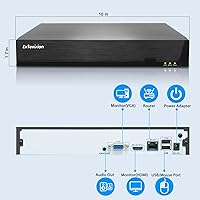
Specifications

  • Model Number: This unit is officially designated as the ES-N1916, manufactured by Evtevision.
  • Channels: Supports up to 16 simultaneous IP camera connections for comprehensive multi-zone coverage.
  • Max Resolution: Capable of recording and displaying footage at up to 8MP/4K per camera channel.
  • Video Compression: Uses H.265+ encoding to reduce storage consumption while maintaining high image fidelity.
  • HDD Support: Houses a single 3.5″ SATA hard drive of up to 8TB capacity — no drive is included in the box.
  • Video Output: Offers one HDMI output at up to 4K resolution and one VGA output at up to 1080p simultaneously.
  • Network Interface: Connects via a single RJ45 port supporting 10M/100M adaptive Ethernet speeds.
  • USB Ports: Equipped with two USB 2.0 ports for mouse input, firmware updates, or local footage backup.
  • Power Supply: Operates on DC 12V power using the included external power adapter.
  • Remote Access: Remote monitoring is supported on iOS, Android, and desktop browsers via the Xmeye Pro platform.
  • AI Detection: Human and vehicle detection is available exclusively when paired with compatible Evtevision smart IP cameras.
  • Protocols: Supports ONVIF and RTSP protocols for integration with compatible third-party IP cameras.
  • Recording Modes: Offers manual, scheduled, and motion-triggered recording modes configurable per channel.
  • Playback Modes: Includes event-based, tag-based, and smart playback filtering for faster clip retrieval.
  • Audio Output: Provides one 3.5mm audio output channel; no audio input is supported on this unit.
  • Dimensions: The chassis measures 10.04″ in length, 9.25″ in width, and 1.69″ in height.
  • Weight: The unit weighs 2.01 pounds without a hard drive installed.
  • Package Contents: Box includes the NVR unit, DC 12V power supply, USB mouse, and a bag of HDD mounting screws.

Related Reviews

Seculink 8-Channel 5MP Network Video Recorder
81%
88%
Video Quality
84%
Motion Detection Accuracy
85%
Storage Capacity & Flexibility
82%
Remote Access Functionality
90%
Ease of Setup
More
Hiseeu KNVR-P-8 8-Channel 4K PoE NVR
73%
84%
Video Quality
79%
Ease of Setup
51%
Camera Compatibility
76%
Storage Flexibility
67%
Remote Access
More
Swann NVR-8580 16-Channel 4K Security NVR
75%
88%
Video Recording Quality
74%
Storage & Retention
86%
PoE Setup & Installation
58%
Camera Ecosystem Compatibility
63%
Mobile App Experience
More
SECULINK NVR1116PF-4K 16-Channel 4K Network Video Recorder
67%
81%
Value for Money
78%
Video Quality Support
83%
Storage Efficiency
54%
Setup & Installation
58%
Remote Access & App Performance
More
REOLINK RLN36 36-Channel Network Video Recorder
76%
91%
Multi-Camera Performance
88%
Storage Capacity
54%
Setup Experience
47%
Camera Compatibility
89%
4K Video Quality
More
Zoom Q2n-4K Handy Video Recorder
73%
93%
Audio Quality
78%
Video Quality (Well-Lit)
44%
Low-Light Performance
92%
Portability
67%
Audio-Video Sync
More
ClonerAlliance UHD Pro (CA-989UP)
83%
94%
Ease of Setup
89%
Recording Quality
96%
PC-Free Functionality
58%
HDMI Compatibility
62%
Audio Support
More
SV3C A08 16-Channel 4K POE NVR
73%
78%
Ease of Installation
86%
Video Quality
89%
POE Port Performance
71%
Channel Capacity & Scalability
67%
AI Detection Accuracy
More
Lorex N800 16-Channel 4K NVR System
75%
88%
Video Clarity
83%
Hybrid Camera Support
86%
Local Storage
91%
No Subscription Model
74%
Smart Detection Accuracy
More
Reolink RLN8-410 8-Channel 2TB NVR
80%
88%
Ease of Setup
91%
Recording Reliability
86%
Video Quality
82%
App & Remote Access
74%
Smart Detection Accuracy
More
ONWOTE PKA801608S 16-Channel 4K PoE Security Camera System
78%
91%
Image Clarity
83%
Night Vision
74%
AI Detection Accuracy
67%
Ease of Installation
69%
Audio Recording
More

FAQ

No — and this is the most important thing to know before buying. The unit ships without any internal storage, so it cannot record or play back footage until you install a compatible SATA hard drive separately. Make sure to factor that into your budget before purchasing.

Any standard 3.5″ SATA hard drive up to 8TB should work. Surveillance-rated drives from brands like Seagate SkyHawk or Western Digital Purple are widely recommended for NVR use because they are designed for continuous 24/7 write cycles, which standard desktop drives are not optimized for.

Yes, as long as your cameras support ONVIF or RTSP protocols, they should connect for basic live viewing and standard motion-triggered recording. Keep in mind that advanced features like AI human and vehicle detection will not work with non-Evtevision cameras — that functionality is exclusive to Evtevision-branded smart cameras.

You do not need to touch your router settings for basic remote access. The Evtevision ES-N1916 16-Channel 4K Network Video Recorder uses the Xmeye Pro app, which pairs via QR code scan and connects through a cloud relay. It is one of the more straightforward remote setups at this price level, though app performance can vary depending on your internet connection quality.

It can, but only when the recorder is paired with Evtevision-compatible smart cameras. In that configuration, the system filters motion events by whether a human or vehicle is present, which significantly reduces alerts triggered by swaying trees or passing animals. With third-party cameras, you get standard motion detection only — no AI filtering.

The recorder supports all 16 channels at 4K simultaneously in terms of hardware specification, but your real-world performance will also depend on your network bandwidth and the write speed of your installed hard drive. On a standard home network with a quality surveillance drive, most users report smooth operation across all channels without noticeable lag.

Yes, it has both an HDMI port and a VGA port, so it works with most modern monitors and TVs. HDMI supports up to 4K output, while VGA tops out at 1080p. You will need to supply your own cable, as neither is included in the box.

For routine check-ins — pulling up a live view or reviewing a recent clip — the app handles the job well for most users. That said, it is a third-party platform, and some users on older Android versions or slower connections report occasional buffering or disconnection issues. It is a solid app for the price tier, but not as polished as proprietary systems from higher-end brands.

Yes, there are a few backup options. You can export clips to a USB drive connected to one of the USB 2.0 ports, or use the network backup function to transfer recordings to a connected PC. There is no built-in cloud storage or NAS integration, so local backup via USB or network export are your main alternatives to the internal drive.

By default, the recorder operates in overwrite mode, meaning it will automatically delete the oldest footage to make room for new recordings once the drive is full. You can configure this behavior in the settings if you prefer it to stop recording instead, but most users leave overwrite mode enabled for continuous unattended operation.