Overview

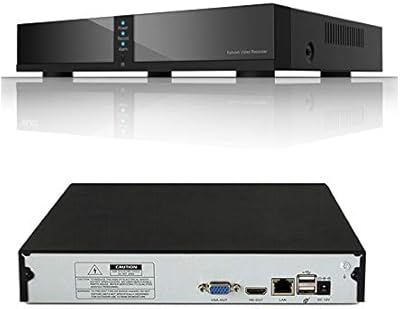
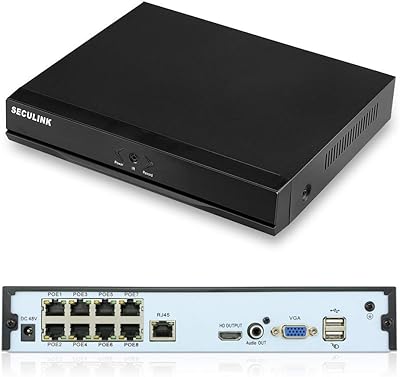
The SECULINK NVR1116PF-4K 16-Channel 4K Network Video Recorder sits in a competitive spot for anyone building out a serious wired surveillance setup without spending a fortune. It connects via Ethernet only — no built-in WiFi — so if your cameras and router are not already wired up, factor that into your planning before buying. What you get is a capable 16-channel recorder with cloud P2P remote access through the XMeye app, which is a meaningful perk at this price point. Just know upfront: no hard drive is included, no POE ports, and absolutely no cameras in the box.
Features & Benefits

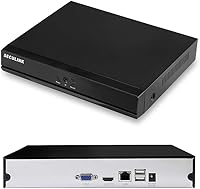
The SECULINK recorder handles up to 16 IP cameras at resolutions ranging from 1080p all the way to 8MP 4K UHD, provided your cameras support it — the NVR itself does not create resolution, it records what the cameras deliver. H.265+ compression is a genuine practical advantage, keeping file sizes lean so a single 6TB drive stretches considerably further than it would on older codecs. Motion-triggered recording adds another layer of storage efficiency. For outputs, you get both HDMI and VGA, and remote monitoring is handled through the XMeye P2P app with push alert notifications when motion is detected.

Best For

This wired security recorder is a strong match for people who already have a structured cabling setup and a collection of ONVIF-compatible IP cameras waiting to be managed under one system. If you are upgrading from an aging 1080p NVR and want future-proof 4K capacity without committing to a high-end enterprise unit, this fills that gap well. DIY installers comfortable logging into a router, assigning IPs, and pairing cameras manually will feel right at home here. It is far less suited to anyone expecting plug-and-play simplicity or wireless camera support — this unit demands a fully wired environment.

User Feedback

With a 3.7-star average across more than 200 ratings, this 16-channel NVR lands in predictable territory: buyers who come in prepared tend to be satisfied, and those who do not often are not. Consistent praise centers on image clarity when paired with quality cameras, plus the compact chassis that fits discreetly on a shelf or in a rack. On the downside, a notable share of reviewers encountered friction during initial network configuration, and the XMeye app draws mixed reliability reports — crashes and connectivity drops come up more than you would hope. Feedback on SECULINK customer support is inconsistent at best.

Pros

  • Supports all 16 channels at up to 8MP 4K resolution when paired with compatible cameras.
  • H.265+ compression meaningfully extends how long a single hard drive lasts under continuous use.
  • Motion-triggered recording keeps storage consumption manageable and makes event review far less tedious.
  • ONVIF conformance opens compatibility to cameras from a wide range of brands, not just SECULINK.
  • Both HDMI and VGA outputs let you connect to virtually any monitor or display without adapters.
  • Cloud P2P remote access via XMeye works without port forwarding, simplifying off-site viewing when it connects cleanly.
  • The compact chassis fits easily on a shelf, in a closet, or alongside other network gear without demanding dedicated rack space.
  • Flexible backup options — USB drive, DVD writer, and network — give you multiple paths to preserve important footage.
  • The price-to-channel ratio is genuinely competitive for buyers who already have cameras and cabling in place.

Cons

  • No built-in WiFi means the recorder is a non-starter for anyone without a wired network infrastructure already in place.
  • No hard drive is included, and no POE ports are available, so the real cost of going live is significantly higher than the unit price.
  • The XMeye app has a documented reliability problem — crashes and dropped connections surface regularly in user feedback.
  • Initial setup is underdocumented, and the included instructions are thin enough to frustrate anyone without prior NVR experience.
  • Customer support from SECULINK is inconsistent, with multiple reviewers reporting slow or unhelpful responses to technical issues.
  • The single drive bay caps long-term storage at 6TB, which may be insufficient for high-channel continuous recording over extended retention periods.
  • Motion detection lacks AI-based filtering, leading to frequent false triggers from lighting shifts, insects, or foliage in outdoor deployments.
  • The local playback interface feels dated and becomes noticeably sluggish when scrubbing through high-resolution multi-channel recordings.
  • Camera compatibility, while broad, is not universal — some budget ONVIF cameras required manual IP configuration to be recognized at all.

Ratings

The SECULINK NVR1116PF-4K 16-Channel 4K Network Video Recorder earns a nuanced scorecard — our AI has analyzed hundreds of verified global buyer reviews, actively filtering out incentivized and bot-generated feedback to surface what real installers and small business owners actually experienced. The scores below reflect both where this wired security recorder genuinely delivers and where it falls short, with no corners cut on the honest side of the ledger.

Value for Money
81%
19%
For a 16-channel unit with 4K capability and cloud remote access, buyers consistently noted that the price undercuts comparable recorders by a meaningful margin. Users who came in with realistic expectations — understanding this is a recorder only — felt the hardware punch above its weight class.
The value proposition erodes quickly once you factor in purchasing a compatible hard drive and ensuring your existing cameras are ONVIF-compliant. A handful of reviewers felt misled by the listing and considered the real-world cost of getting operational to be higher than anticipated.
Video Quality Support
78%
22%
When paired with quality 4K or 5MP IP cameras, users reported impressively sharp footage that held up well during forensic review after incidents. The multi-resolution flexibility — from 1080p through 8MP — means the recorder adapts cleanly to mixed camera setups without forcing a full hardware overhaul.
Several buyers were caught off guard discovering that the NVR itself does not produce image quality — the cameras do. Those who paired the recorder with budget cameras were disappointed with results that had nothing to do with the unit itself, creating a skewed perception of its actual capability.
Storage Efficiency
83%
H.265+ compression drew consistent praise from users who had previously run H.264 systems — many noted their drives lasted noticeably longer before filling up under comparable recording loads. Combined with motion-triggered recording, the system can stretch a mid-sized hard drive across weeks of usable footage.
The 6TB ceiling may feel restrictive for users running all 16 channels continuously at high resolution, particularly in commercial environments that require extended retention periods. Buyers accustomed to NVRs with dual-drive bays noted the single-drive limitation as a long-term planning concern.
Setup & Installation
54%
46%
Users with prior NVR experience or a solid understanding of IP networking found the initial configuration reasonably straightforward. The XMeye P2P setup worked without port forwarding for remote access, which was a genuine convenience that experienced DIY installers appreciated.
This is one of the most consistently flagged pain points across reviews. Newcomers to IP security systems encountered real friction — camera discovery failures, unclear documentation, and router configuration steps that were not explained anywhere in the included materials. Several buyers gave up and returned the unit purely due to setup complexity.
Remote Access & App Performance
58%
42%
The XMeye P2P cloud connection worked reliably for a portion of users, offering genuine convenience for checking live feeds and reviewing motion-triggered clips from a phone while away from the property. Push notifications for motion events functioned as described for most buyers who completed a clean setup.
App stability is a recurring weak point — crashes, intermittent disconnections, and a clunky interface were mentioned across multiple reviews. The XMeye ecosystem is aging and lacks the polish of proprietary apps from larger security brands, which frustrated users accustomed to more modern remote viewing experiences.
Build Quality & Design
74%
26%
The compact metal chassis — measuring just over 10 inches long and under 2 inches tall — fit neatly into home server closets and small business server shelves without demanding dedicated rack space. Users generally found the unit felt solid, not hollow or plasticky, for the price tier it occupies.
At 2.2 pounds the unit is light, and a few buyers noted the chassis feels utilitarian rather than refined. Ventilation concerns were raised by users in warmer environments who ran the recorder continuously, suggesting airflow planning matters more than the compact footprint might imply.
Camera Compatibility
71%
29%
ONVIF conformance gives this 16-channel NVR broad compatibility with cameras from dozens of brands, which is a practical advantage for users building mixed systems or sourcing cameras from multiple suppliers over time. Most standard IP cameras from reputable vendors connected without major issues.
Compatibility is not universal — some users encountered recognition failures with certain budget ONVIF cameras that required manual IP assignment to function. Buyers using proprietary camera ecosystems outside the ONVIF standard found limited or no compatibility, narrowing the realistic camera pool.
Motion Detection Accuracy
67%
33%
Users running the unit in low-traffic environments like driveways and small retail entry points found motion detection responsive enough to catch relevant events without overwhelming storage. The trigger-based recording model meaningfully reduced clip volume compared to continuous recording setups.
Sensitivity tuning options are limited, and false triggers from lighting changes, tree movement, or insects at night were reported by several outdoor-use buyers. The lack of AI-based filtering means users in dynamic environments may end up sifting through a disproportionate volume of non-events.
HDD Compatibility & Installation
69%
31%
Users who installed surveillance-grade hard drives from established brands reported clean recognition and stable long-term operation. The installation process itself is physical and straightforward once the chassis is open, with a standard SATA connection that accepts any compatible 3.5-inch drive.
The drive is not included, which surprised a subset of buyers despite it being noted in the listing. A few users reported compatibility hiccups with older desktop hard drives not rated for continuous surveillance use, leading to recognition errors that were initially misattributed to the recorder.
Connectivity & Network Reliability
76%
24%
In fully wired environments, the Ethernet-based connection delivered stable, uninterrupted operation that wireless-dependent systems simply cannot guarantee. Users who ran the recorder as a permanent wired node on their network reported consistent uptime and reliable local stream performance.
The absence of built-in WiFi is a hard stop for anyone whose router is not within cable reach of the installation location. This is not a workaround situation — it is a structural limitation that eliminates the recorder entirely as an option for users relying on wireless-only infrastructure.
Backup & Archiving Options
72%
28%
The combination of USB flash drive export, USB DVD writer support, network backup, and optional cloud storage gives users a practical range of archiving methods for preserving footage before drive space cycles. For small business users needing occasional clip exports for incident documentation, USB backup worked reliably.
Cloud storage is a separate paid service, not a built-in included feature, and that distinction tripped up buyers expecting complimentary cloud recording. Network backup configuration was also cited as underdocumented, leaving less technical users without a clear path to setting it up.
Customer Support
47%
53%
A small portion of reviewers reported receiving helpful direct responses from SECULINK when they reached out through official channels, particularly for firmware and compatibility questions. For buyers who resolved issues independently, the brand itself rarely became a friction point.
The overall support experience skews negative in the review pool. Slow response times, generic replies that did not address the specific technical issue, and limited English-language documentation were cited repeatedly. Buyers who hit a wall during setup often found no meaningful path to resolution through official support.
Playback & Review Interface
63%
37%
Local playback via HDMI-connected monitor gave users a functional timeline scrubbing experience for reviewing recorded footage, which is adequate for occasional incident review in a small business or home environment. Event-based filtering by motion trigger helped narrow down relevant clips without scrubbing hour by hour.
The interface design feels dated and takes some adjustment for users accustomed to modern DVR or NVR software. Navigating longer recordings was described as tedious by several reviewers, and multi-channel simultaneous playback was noted as sluggish under heavier storage loads.
Documentation & Ease of Learning
44%
56%
Users with prior experience in the XMeye ecosystem or SECULINK products found the learning curve manageable, drawing on familiarity with the interface conventions. Some buyers supplemented the included materials with community forum guides and YouTube tutorials to fill knowledge gaps effectively.
The included documentation is thin and inconsistently translated, creating a real obstacle for first-time NVR buyers. Setup steps for network configuration, camera pairing, and remote access are either absent or vague enough to be unhelpful, which directly contributed to a portion of the negative reviews in the pool.

Suitable for:

The SECULINK NVR1116PF-4K 16-Channel 4K Network Video Recorder is a strong fit for small business owners and homeowners who already have a structured wired network and a collection of ONVIF-compatible IP cameras ready to go. If you are managing a retail space, warehouse, small office, or multi-entry residential property and need to consolidate camera feeds under one recorder without spending heavily, this unit covers a lot of ground at a reasonable cost. It is particularly well-suited to users upgrading from an aging 1080p NVR who want to step into 4K-capable recording without committing to a premium brand price point. DIY security enthusiasts who are comfortable assigning IP addresses, navigating router settings, and troubleshooting camera discovery manually will find the learning curve manageable. Anyone already operating within the XMeye ecosystem will also have a shorter ramp-up time for remote access configuration.

Not suitable for:

The SECULINK NVR1116PF-4K 16-Channel 4K Network Video Recorder is a poor choice for anyone expecting a wireless-friendly or plug-and-play experience — the wired-only Ethernet design is a fundamental constraint, not a minor footnote. If your cameras or router are not within cable reach of your intended recorder location, this unit simply will not work for your setup without significant infrastructure changes. Buyers who do not yet own compatible IP cameras should also budget carefully, as the recorder ships without cameras, a hard drive, or POE ports, meaning the actual cost of a functional system is considerably higher than the unit price alone. Users who rely heavily on a polished mobile app for daily monitoring may find the XMeye interface frustrating — it lacks the refinement of proprietary apps from larger security brands and has a documented history of intermittent connectivity issues. Finally, anyone without the patience or technical background to handle manual network configuration should look at more turnkey solutions before committing here.

Specifications

  • Model Number: This recorder carries the official model designation NVR1116PF-4K, issued by SECULINK.
  • Video Channels: Supports up to 16 simultaneous IP camera inputs for comprehensive multi-zone coverage.
  • Max Resolution: Capable of recording and displaying footage at up to 8MP (4K UHD) per channel when paired with compatible cameras.
  • Supported Resolutions: Accepts camera feeds at 1080p, 3MP, 4MP, 5MP, and 8MP within a single unified system.
  • Compression: Uses H.265+ encoding to reduce file sizes and extend recording duration compared to older H.264-based systems.
  • Video Outputs: Equipped with one HDMI port and one VGA port, allowing simultaneous connection to two separate displays.
  • Connectivity: Connects exclusively via Ethernet; no built-in WiFi or wireless capability is present on this unit.
  • Camera Protocol: Fully ONVIF-conformant, enabling compatibility with IP cameras from a broad range of third-party manufacturers.
  • HDD Capacity: Supports a single internal 3.5-inch SATA hard drive of up to 6TB; no hard drive is included in the box.
  • Backup Options: Footage can be exported via USB flash drive, USB DVD writer, or transferred over the local network.
  • Cloud Access: Remote viewing and motion alert notifications are handled through the XMeye P2P cloud app, available on iOS and Android.
  • Motion Detection: Built-in motion detection triggers recording only when activity is detected, conserving storage and simplifying event review.
  • Dimensions: The unit measures 10.24″ in length, 7.48″ in width, and 1.69″ in height, making it suitable for shelf or closet mounting.
  • Weight: The recorder weighs 2.2 pounds without a hard drive installed, keeping it lightweight and easy to position.
  • POE Support: This model does not include Power over Ethernet ports; cameras must be powered independently through their own power supplies.
  • Storage Alternatives: In addition to local HDD storage, optional cloud storage services can be subscribed to separately for off-site backup.
  • Brand: Manufactured and sold under the SECULINK brand, a supplier specializing in IP-based video surveillance hardware.
  • Availability: The product was first listed in January 2021 and has not been discontinued by the manufacturer as of the latest available data.

Related Reviews

Seculink 8-Channel 5MP Network Video Recorder
81%
88%
Video Quality
84%
Motion Detection Accuracy
85%
Storage Capacity & Flexibility
82%
Remote Access Functionality
90%
Ease of Setup
More
Swann NVR-8580 16-Channel 4K Security NVR
75%
88%
Video Recording Quality
74%
Storage & Retention
86%
PoE Setup & Installation
58%
Camera Ecosystem Compatibility
63%
Mobile App Experience
More
Hiseeu KNVR-P-8 8-Channel 4K PoE NVR
73%
84%
Video Quality
79%
Ease of Setup
51%
Camera Compatibility
76%
Storage Flexibility
67%
Remote Access
More
REOLINK RLN36 36-Channel Network Video Recorder
76%
91%
Multi-Camera Performance
88%
Storage Capacity
54%
Setup Experience
47%
Camera Compatibility
89%
4K Video Quality
More
SECULINK 8-Channel 4K POE NVR
73%
83%
Video Quality
88%
POE Setup Experience
54%
Remote Access & App
71%
Third-Party Compatibility
67%
Build Quality
More
Zoom Q2n-4K Handy Video Recorder
73%
93%
Audio Quality
78%
Video Quality (Well-Lit)
44%
Low-Light Performance
92%
Portability
67%
Audio-Video Sync
More
ClonerAlliance UHD Pro (CA-989UP)
83%
94%
Ease of Setup
89%
Recording Quality
96%
PC-Free Functionality
58%
HDMI Compatibility
62%
Audio Support
More
SV3C A08 16-Channel 4K POE NVR
73%
78%
Ease of Installation
86%
Video Quality
89%
POE Port Performance
71%
Channel Capacity & Scalability
67%
AI Detection Accuracy
More
Lorex N800 16-Channel 4K NVR System
75%
88%
Video Clarity
83%
Hybrid Camera Support
86%
Local Storage
91%
No Subscription Model
74%
Smart Detection Accuracy
More
Reolink RLN8-410 8-Channel 2TB NVR
80%
88%
Ease of Setup
91%
Recording Reliability
86%
Video Quality
82%
App & Remote Access
74%
Smart Detection Accuracy
More

FAQ

No, they do not. The SECULINK NVR1116PF-4K 16-Channel 4K Network Video Recorder is a recorder-only unit — you will need to source your own ONVIF-compatible IP cameras separately. This is one of the most common sources of buyer confusion, so it is worth budgeting for cameras, cabling, and a hard drive before your total cost is accurate.
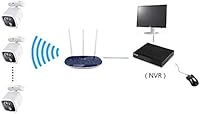
Not directly. The recorder itself connects to your network via Ethernet only and has no built-in WiFi. If a wireless camera also supports a wired Ethernet connection and is ONVIF-compliant, it could work in wired mode, but this unit will not communicate with cameras over WiFi.

A surveillance-rated 3.5-inch SATA hard drive is the right choice here — brands like Seagate SkyHawk or Western Digital Purple are commonly recommended for NVR use because they are built for continuous 24/7 write cycles. Avoid using standard desktop drives, as they are not designed for the sustained workload and can fail prematurely in this application. The unit supports up to 6TB.

You use the XMeye app, available on both iOS and Android. The recorder connects via P2P cloud, which means you typically do not need to set up port forwarding on your router — just scan the QR code from the device interface during setup and link it to your XMeye account. That said, some users have reported intermittent connectivity issues with the app, so expect occasional troubleshooting.

The recorder is capable of handling 4K (8MP) streams, but the image quality you see depends entirely on the cameras you connect. If you pair this wired security recorder with 4K IP cameras, you will get 4K footage. If your cameras are 1080p, that is what you will record and view — the NVR does not upscale or enhance anything.

Yes, and this is one of the more practical aspects of the recorder. It supports 1080p, 3MP, 4MP, 5MP, and 8MP cameras simultaneously, so you can run a mix of older and newer cameras on the same system without being forced to standardize everything at once.

Honestly, it can be challenging. The included documentation is sparse, and the setup process requires you to assign IP addresses, connect cameras to your local network, and configure the recorder to discover them. Experienced DIY installers manage it without much trouble, but first-time NVR buyers have frequently cited the setup process as a frustration point. Searching for community guides or YouTube tutorials specific to this model is strongly recommended before you start.

It works adequately in controlled environments but can be over-sensitive outdoors. The system lacks AI-based filtering, so things like tree branches, passing headlights, or insects at night can set it off. You can adjust sensitivity zones in the settings, which helps, but if you are placing cameras in high-movement outdoor areas, expect to do some fine-tuning before the trigger volume feels manageable.

It is functional but not polished. A meaningful portion of reviewers have experienced app crashes, delayed notifications, and sessions that drop and require reconnecting. For occasional remote check-ins it gets the job done, but if you are counting on rock-solid real-time monitoring from your phone as a daily habit, the XMeye experience may frustrate you compared to the proprietary apps from higher-end brands.

Feedback on this is mixed. Some buyers received helpful responses, particularly for compatibility and firmware questions. However, a notable number of reviewers reported slow turnaround times and replies that did not fully address their specific issue. If you run into a complex setup problem, community forums and third-party resources may ultimately get you to a solution faster than waiting on official support.