Overview

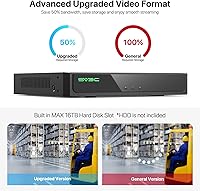
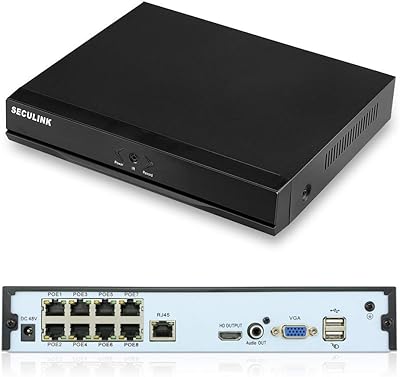
The SV3C A08 16-Channel 4K POE NVR is a wired security recorder built for homeowners and small-business operators who want serious, reliable coverage without paying enterprise prices. Its standout hardware advantage is the 16-channel capacity paired with 8 built-in POE ports, meaning your cameras draw power directly through the ethernet cable — no separate power supplies cluttering the install. The unit outputs up to 4K via HDMI and supports a wide range of IP camera resolutions. Two things worth knowing upfront: the recorder ships in 8-channel mode by default, and the hard drive is sold separately.
Features & Benefits

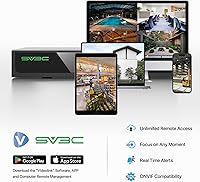
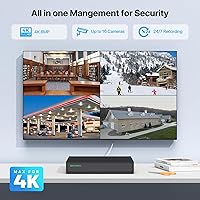
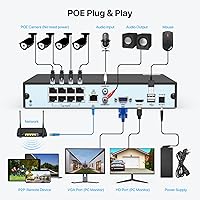
POE, short for Power over Ethernet, means each of the 8 built-in ports delivers both data and electricity to a connected camera — up to 30W per port — so you run a single cable instead of two. Beyond that practical convenience, this 16-channel system handles resolutions all the way up to 12MP and pushes 4K footage to a monitor at 30fps. AI-based detection can differentiate humans from vehicles, cutting down on pointless motion alerts, though it depends on your camera model supporting that feature. Footage review is quick thanks to 16x smart playback, and remote access works through a PC, Mac, or the Videolink mobile app.

Best For

This POE NVR makes the most sense for homeowners who want a clean, wired install where cameras are powered through the cable rather than a wall outlet. It suits anyone who already owns SV3C A-series cameras, since advanced functions like color night vision and two-way audio work without extra browser configuration in that pairing. It also appeals strongly to buyers who prefer local storage over cloud subscriptions — your footage stays on your drive, not someone else's server. DIY installers comfortable with basic router settings and occasional browser-based configuration will get the full value out of it.

User Feedback

Across roughly 60 ratings, the SV3C recorder holds a 4.1-star average, which reflects a genuinely mixed but generally positive picture. Buyers frequently praise how straightforward the initial POE wiring is and note that 24/7 recording runs reliably once the system is configured. The friction tends to show up when people use non-SV3C cameras — advanced settings require browser pre-configuration before the NVR recognizes them properly, which catches some users off guard. The default 8-channel mode is another recurring complaint; several reviewers did not realize they needed to manually enable all 16 channels through the system menu. App stability gets a mixed reception, with some finding remote access dependable and others reporting occasional connection drops.

Pros

  • Eight built-in POE ports power cameras over a single ethernet cable, eliminating messy separate power adapters.
  • Scales up to 16 cameras on one recorder — plenty of headroom for growing a home or small-business setup.
  • 4K HDMI output delivers sharp, detailed footage when paired with a high-resolution camera.
  • No cloud subscription required; all footage stores locally on a drive you own and control.
  • AI human-and-vehicle detection cuts down on pointless motion alerts when used with compatible cameras.
  • 16x fast-forward playback makes reviewing hours of overnight footage genuinely quick.
  • Broad resolution support from 960P up to 12MP means the recorder will not become a bottleneck as you upgrade cameras.
  • The SV3C recorder works with most ONVIF IP cameras for live view and basic playback, offering some brand flexibility.
  • Supports HDDs up to 16TB, allowing weeks of continuous footage retention without overwriting.
  • Comes with a USB mouse, network cable, and power adapter — the basics are covered right out of the box.

Cons

  • Hard drive is sold separately, adding real cost that the upfront price does not reflect.
  • Ships in 8-channel mode by default; unlocking all 16 channels requires a manual menu change that many buyers miss.
  • Third-party camera users must pre-configure advanced features via a browser before connecting to the NVR.
  • Only one SATA slot means a single drive failure results in total footage loss with no redundancy option.
  • The Videolink app received inconsistent reviews, with some users reporting dropped connections and lag on remote access.
  • Expanding beyond 8 POE cameras requires buying and installing a separate external POE switch.
  • AI detection capabilities depend entirely on the connected camera model, not the recorder itself.
  • Documentation does not prominently highlight the 8-channel default or the HDD omission, leading to avoidable buyer frustration.
  • The unit can run noticeably warm under heavy recording load in poorly ventilated install locations.
  • Non-technical buyers may find the browser-based camera configuration process intimidating and poorly guided.

Ratings

The SV3C A08 16-Channel 4K POE NVR has been scored by our AI after analyzing verified global buyer reviews, with spam, bot-submitted, and incentivized feedback actively filtered out. Scores reflect the honest consensus — where this recorder genuinely delivers and where it falls short — so you can make an informed decision before buying.

Ease of Installation
78%
22%
Most buyers running SV3C A-series cameras found the wired POE setup refreshingly straightforward — plug cameras into the back ports, connect a monitor, and the system recognizes them without hunting through menus. The included mouse, cables, and quick-start guide cover the basics well for a DIY install.
Users pairing this with third-party ONVIF cameras hit a wall: advanced features like night vision modes and two-way audio require browser-based pre-configuration before the recorder picks them up correctly. For buyers who assumed true plug-and-play across all brands, that extra step was a genuine frustration.
Video Quality
86%
When paired with high-resolution cameras, the 4K HDMI output is sharp enough to read license plates and identify faces at a reasonable distance. Buyers monitoring driveways and entry points specifically called out how much clarity the footage retained even when zooming into recorded clips.
The recorder itself does not generate image quality — it depends entirely on the connected camera. Users running older 1080P cameras noted no visible upgrade, and the broader resolution range support, while technically impressive on paper, only matters if your cameras can match it.
POE Port Performance
89%
The 8 built-in Power over Ethernet ports are the real practical win here. Buyers retrofitting garages, sheds, and perimeter fences appreciated running a single ethernet cable per camera instead of wrestling with separate power adapters at each install point. Port stability under continuous load was consistently praised.
The built-in POE covers only 8 of the 16 possible channels. Expanding to the full 16 cameras requires an external POE switch for the remaining 8 slots, which adds cost and complexity that the product marketing does not make obvious upfront.
Channel Capacity & Scalability
71%
29%
The ability to scale up to 16 cameras on a single recorder is genuinely useful for properties with multiple entry points, parking areas, and interior zones. Small business owners monitoring retail floors and back-of-house areas simultaneously found the channel count sufficient without needing a second unit.
The factory default locks the unit into 8-channel mode, and a surprising number of buyers did not discover the 16-channel unlock buried in the system menu until after they had already ordered extra hardware. That default is a real usability failure that SV3C should address with a more prominent setup prompt.
AI Detection Accuracy
67%
33%
When the connected cameras support AI classification, the human-versus-vehicle filtering noticeably reduces the number of pointless motion alerts triggered by passing headlights or tree branches. Buyers running compatible A-series cameras in suburban driveways reported a meaningful drop in overnight false notifications.
The AI functionality is camera-dependent, not NVR-dependent, which the product listing does not clarify boldly enough. Several buyers with third-party cameras received no AI-based alerts at all and felt misled. Even with compatible cameras, detection accuracy in low-light conditions drew mixed feedback.
Remote Access & App Experience
62%
38%
The Videolink app lets you pull up live feeds and review recorded footage from a phone or tablet without needing a separate NVR subscription fee, which buyers coming from cloud-based systems found refreshing. Initial P2P setup on a home network was manageable for most technically comfortable users.
App reliability was a recurring pain point. Some users reported dropped connections during remote sessions, a laggy live-view experience on cellular data, and occasional difficulty re-connecting after the app updated. It works, but it does not inspire the kind of confidence you would want from a security tool.
Storage Flexibility
74%
26%
Support for HDDs up to 16TB gives this 16-channel system a genuinely long continuous recording window, especially with efficient compression active. Buyers who prioritize keeping weeks of footage locally — for insurance purposes or incident documentation — appreciated not being capped at a smaller drive size.
There is only one SATA slot and no redundancy option, so a drive failure means lost footage with no failover. The HDD is also sold separately, which adds to the real cost of ownership and occasionally caught buyers off guard who expected something in the box.
Third-Party Camera Compatibility
63%
37%
The ONVIF protocol support does allow a broad range of IP cameras to connect for live viewing and basic playback, which gives buyers some flexibility if they are mixing camera brands across a property. Basic functionality across brands was generally confirmed by users who went through the configuration process.
The compatibility story falls apart quickly once you want features beyond live view. Motion detection sensitivity, video format settings, and night vision mode adjustments all require configuring the camera via a browser before connecting it to the NVR — a process that was poorly documented and frustrating for non-technical buyers.
Playback & Footage Review
81%
19%
The 16x fast-forward playback makes combing through hours of overnight footage practical rather than painful. Buyers investigating a vehicle break-in or package theft appreciated being able to scan a full night of recordings in a matter of minutes rather than scrubbing through manually.
The smart event filter that separates motion clips from continuous recordings requires some familiarity with the interface to use efficiently. A handful of users found the playback UI non-intuitive at first, particularly when trying to navigate recordings across multiple cameras simultaneously.
Build Quality & Hardware
76%
24%
At roughly 4 pounds, the enclosure feels solidly built for its price tier — not flimsy plastic, but clearly not commercial-grade metal either. The rear port layout is practical, and the unit ran quietly during continuous operation, which matters when it is installed in a living space or small office.
Some buyers noted the chassis feels slightly hollow and were uncertain about long-term durability in warmer utility closets or attic installs. There is no built-in fan noise management, and a few users reported the unit running noticeably warm during summer months under heavy recording load.
Value for Money
79%
21%
For buyers who stick within the SV3C ecosystem and understand what they are buying, the price-to-capability ratio is competitive. Getting 16-channel capacity, built-in POE, 4K output, and AI detection support in one unit at this price point is genuinely difficult to match from other established brands.
The value equation shifts once you factor in the separately purchased HDD, a potential external POE switch for cameras 9 through 16, and the time cost of browser-based third-party camera configuration. The all-in cost ends up meaningfully higher than the unit price alone suggests.
Setup Documentation
54%
46%
The included quick-start guide covers the physical install steps clearly enough for basic single-brand setups. Buyers who watched supplemental YouTube tutorials from SV3C generally got up and running without major issues and found the on-screen menu layout logical once they were past initial configuration.
The documentation significantly undersells the complexity of third-party camera integration and the default 8-channel limitation. Both are mentioned in fine print rather than prominently flagged, and several buyers only discovered these constraints after a confusing first-use experience that damaged their initial impression of the product.
Night Vision Support
68%
32%
For SV3C A-series cameras, switching between black-and-white, full-color night mode, and intelligent adaptive modes is handled directly from the NVR interface, which is a genuine convenience. Buyers who prioritized nighttime driveway monitoring with compatible cameras reported strong results.
With third-party cameras, night vision mode selection must be configured through a browser before the NVR will apply it — and even then, not all cameras expose those settings through ONVIF. For mixed-brand setups, night vision management becomes inconsistent and occasionally non-functional.
Network & Bandwidth Management
77%
23%
Because the cameras connect directly to the NVR via POE rather than routing all traffic through a home router, network congestion from the security system is largely a non-issue. Buyers with bandwidth-constrained households appreciated that running 8 cameras continuously did not visibly impact their streaming or gaming.
Remote access still routes through the home network and internet connection, so users on slower broadband plans noticed latency and quality degradation when pulling up live feeds remotely. Local-only setups perform well; remote performance is heavily dependent on upload speed.

Suitable for:

The SV3C A08 16-Channel 4K POE NVR is built for homeowners and small-business operators who want a serious, wired security setup without paying for a commercial-grade system. If you are covering a property with multiple entry points — a driveway, side gate, garage, backyard, and front door all at once — the 16-channel capacity means you will not outgrow this recorder quickly. It is particularly well-matched for buyers already using SV3C A-series cameras, since that pairing unlocks the full feature set, including advanced night vision modes and AI-based detection, without any extra configuration headaches. People who are tired of monthly cloud storage fees will also find this appealing, since everything records locally to a hard drive you own. DIY installers with basic networking confidence — someone comfortable logging into a router or opening a browser-based settings page — will get the most out of it.
Not suitable for:

The SV3C A08 16-Channel 4K POE NVR is not the right choice for buyers who want a truly plug-and-play experience with cameras from other brands. If you already own Hikvision, Reolink, or other ONVIF cameras and expect to unlock every feature immediately, you will likely be disappointed — two-way audio, night vision control, and motion sensitivity all require browser-based setup before the recorder cooperates. It is also a poor fit for anyone who wants to simply unbox the system and start recording that same evening without reading documentation, since the default 8-channel mode and the HDD-not-included situation both require deliberate action before the unit is fully operational. Buyers wanting redundant storage, a second drive slot, or enterprise-grade reliability should look at higher-tier NVR brands. And if your internet upload speed is slow, the remote viewing experience through the Videolink app may be too unreliable to depend on.

Specifications

  • Channel Capacity: Supports up to 16 channels total, though the factory default is set to 8 channels and must be manually changed in the system menu.
  • POE Ports: Includes 8 built-in Power over Ethernet ports compliant with IEEE 802.3at, each delivering up to 30W to connected cameras.
  • Max Resolution: Accepts IP camera feeds at resolutions ranging from QCIF up to 12MP, covering most current and legacy camera hardware.
  • HDMI Output: Outputs video to a monitor or television at up to 4K resolution (3840×2160) at 30 frames per second via the HDMI port.
  • VGA Output: Provides a secondary VGA output capped at 1080P at 30fps for use with older monitors that lack HDMI inputs.
  • Storage Interface: Features a single 3.5-inch SATA slot supporting one internal hard drive; no HDD is included and must be purchased separately.
  • Max HDD Size: Compatible with hard drives up to 16TB, enabling extended continuous or event-based recording before footage is overwritten.
  • AI Detection: Supports human and vehicle classification to filter motion alerts, though this capability depends on the connected camera model, not the recorder itself.
  • Playback Speed: Recorded footage can be reviewed at up to 16x fast-forward speed, making it practical to scan hours of video in a short time.
  • Remote Access: P2P remote viewing is supported on PC, Mac, iOS, and Android devices via the Videolink app, with no mandatory cloud subscription required.
  • Camera Compatibility: Works with SV3C A-series POE cameras natively and supports third-party ONVIF IP cameras for live view, playback, and pan/tilt control.
  • Dimensions: The unit measures 10.24 × 8.66 × 16.93 inches, making it suitable for a shelf, rack, or enclosed cabinet installation.
  • Weight: The recorder weighs 4 pounds without a hard drive installed, keeping the overall footprint light for a 16-channel unit.
  • Video Compression: Uses modern video compression to reduce file sizes and extend hard drive recording capacity compared to older H.264-only systems.
  • Connectivity: Connects to a local network via ethernet; POE cameras communicate directly with the NVR, reducing traffic load on the home router.
  • In-Box Contents: Includes a USB mouse, one network cable, a power adapter, and a printed quick-start guide; no hard drive or cameras are included.
  • WiFi Camera Support: Can work alongside WiFi IP cameras that use a DC power source, though those cameras connect through the network rather than the POE ports.
  • Model Number: The official model designation is A08, which identifies it as part of SV3C's A-series hardware lineup for cross-compatibility purposes.

Related Reviews

SECULINK NVR1116PF-4K 16-Channel 4K Network Video Recorder
67%
81%
Value for Money
78%
Video Quality Support
83%
Storage Efficiency
54%
Setup & Installation
58%
Remote Access & App Performance
More
SECULINK 8-Channel 4K POE NVR
73%
83%
Video Quality
88%
POE Setup Experience
54%
Remote Access & App
71%
Third-Party Compatibility
67%
Build Quality
More
SANNCE N98PBD 8-Channel 4K PoE NVR
67%
78%
Video Image Quality
82%
PoE Port Reliability
51%
Remote App Experience
59%
Setup & Installation
57%
Third-Party Camera Compatibility
More
Lorex N800 16-Channel 4K NVR System
75%
88%
Video Clarity
83%
Hybrid Camera Support
86%
Local Storage
91%
No Subscription Model
74%
Smart Detection Accuracy
More
Swann NVR-8580 16-Channel 4K Security NVR
75%
88%
Video Recording Quality
74%
Storage & Retention
86%
PoE Setup & Installation
58%
Camera Ecosystem Compatibility
63%
Mobile App Experience
More
Hikvision DS-7608NI-Q2/8P 8-Channel PoE NVR
77%
83%
Ease of Camera Setup
91%
Video Recording Quality
88%
Build Quality & Hardware
79%
Remote Viewing via App
84%
Value for Money
More
ONWOTE PKA801608S 16-Channel 4K PoE Security Camera System
78%
91%
Image Clarity
83%
Night Vision
74%
AI Detection Accuracy
67%
Ease of Installation
69%
Audio Recording
More
101AV UND-16 16-Channel Hybrid DVR/NVR
71%
88%
Hybrid Camera Compatibility
83%
Remote Viewing & Mobile App
79%
Value for Money
61%
Setup & Installation Experience
72%
Recording Quality
More
SV3C 4K POE IP Camera 8MP
86%
94%
Video Quality
89%
Night Vision Performance
87%
Ease of Setup
78%
Motion Detection Accuracy
83%
App Integration
More
ONWOTE 8CH 4K NVR Security Camera System
79%
91%
Video Clarity
74%
AI Detection Accuracy
83%
Night Vision Performance
88%
Build Quality & Weatherproofing
71%
Installation Experience
More

FAQ

No, the hard drive is sold separately. You will need to purchase a 3.5-inch SATA HDD independently and install it before recording starts. The unit supports drives up to 16TB, so you have a wide range of options depending on how much footage history you want to keep.

The SV3C A08 16-Channel 4K POE NVR ships with the factory default set to 8 channels, not 16. To unlock all 16, connect the unit to a monitor, go to System, then System, then Limit Channels, select 16 channels, and click Apply. It is an easy fix once you know it exists, but it catches a lot of buyers off guard.
For basic live viewing and playback, yes — most ONVIF-compatible cameras from other brands will connect. However, advanced features like two-way audio, night vision mode switching, and motion detection sensitivity need to be configured through a browser interface on the camera itself before you plug it into this POE NVR. Do not expect those features to just work out of the box with non-SV3C hardware.

Yes. Cameras 9 through 16 can connect via an external POE switch or with DC-powered WiFi cameras joining through your local network. The 8 built-in ports handle the first batch; the remaining 8 slots are available but require separate hardware to power those additional cameras.

No subscription is required. Remote access works through P2P technology built into the recorder, and the free Videolink app on iOS or Android connects directly to your unit. Just be aware that remote streaming quality depends on your home internet upload speed — slower connections will affect the live view experience.

That depends entirely on how large a hard drive you install, how many cameras are running, the resolution they record at, and whether you use continuous or motion-triggered recording. A 4TB drive covering 8 cameras at 1080P with efficient compression typically stores around 14 to 20 days of footage. Installing a larger drive extends that window proportionally.

No — the AI human-and-vehicle classification is a camera-side feature, not a recorder-side one. The SV3C recorder passes through and displays AI detection alerts when the connected camera supports and transmits that data. If your camera does not support AI classification, the recorder cannot generate those alerts regardless of its own specs.

It works reasonably well for most users on a stable home network and decent broadband connection. That said, a portion of buyers reported occasional dropped sessions and some lag when using cellular data. It is functional rather than polished — adequate for checking in or reviewing a clip, but not the smoothest remote access experience you will find in this category.

Yes. Local recording, live viewing on a connected monitor, and playback all work without any internet connection. You only need network access if you want to use the remote viewing features or receive push notifications on your phone. For a fully air-gapped local setup, this recorder functions normally.

Unfortunately, yes. The unit has only one SATA slot, so there is no option to install a second drive for redundancy or automatic backup. A drive failure means recorded footage is gone. If long-term footage retention is critical for your use case — insurance claims, legal evidence, or business compliance — you may want to consider a unit that supports RAID or dual-drive configurations.