
Overview

The EVGA RTX 3060 Ti XC Gaming GPU occupies a confident spot in the mid-to-upper-mid tier of the discrete graphics card market, targeting gamers who want meaningful performance without paying flagship prices. Powered by NVIDIA's Ampere architecture, this Ampere-based GPU delivers tangible improvements in rasterization efficiency and shader throughput — gains that show up in actual frame rate numbers, not just spec sheets. EVGA built a well-deserved reputation for solid hardware and responsive customer support, though the company has since exited the GPU market, which is worth factoring into long-term ownership plans. The LHR variant label barely matters for gamers. Where this card shines is at 1080p and 1440p, with 4K being achievable only in less demanding titles.

Features & Benefits

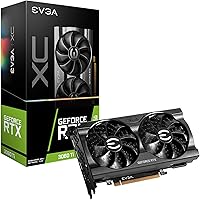
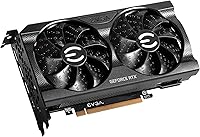
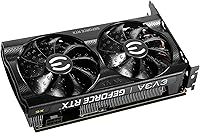
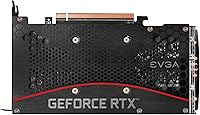
The RTX 3060 Ti XC packs 8GB of GDDR6 memory running at 14,000 MHz — enough headroom for most modern titles at 1440p, though texture-heavy games may push its limits in a few years. The dual-fan cooling setup keeps the GPU in a reasonable temperature range under sustained load, and fan noise stays manageable rather than obtrusive. Structurally, the all-metal backplate adds rigidity that prevents sag and gives the card a solid, premium feel. The air-through PCB design pulls heat out of the card rather than trapping it, which works alongside the unified copper block covering both the GPU die and memory modules for more even thermal distribution. EVGA Precision X1 rounds things out with useful fan curve and overclocking controls.

Best For

This EVGA graphics card is a strong fit for 1080p and 1440p gamers who want high frame rates in competitive shooters or demanding AAA titles without overspending. Its dual-slot footprint and compact dimensions make it a practical choice for mATX and smaller mid-tower builds where larger cards simply won't fit. Ray tracing and DLSS support are real benefits here — you get access to NVIDIA's full feature set at a price that doesn't require weeks of justification. Content creators doing video editing or light 3D rendering will find it capable enough for those workloads too, though heavy production pipelines will eventually want more VRAM. If you valued EVGA's warranty reputation, that remains a meaningful reason to consider this card while units are still available.

User Feedback

Buyers rate this Ampere-based GPU highly, with most praise directed at build quality and thermal performance under sustained gaming loads. The metal backplate and overall fit-and-finish earn frequent compliments, and installation is generally described as straightforward — even in tighter cases, given the card's relatively compact footprint. On the critical side, a handful of reviewers noted a learning curve with EVGA Precision X1, particularly for users new to manual tuning. Some buyers observed that performance in ray tracing-heavy titles occasionally fell short of expectations, which is worth setting realistic assumptions around before purchasing. Long-term reliability feedback skews positive overall, though the fact that EVGA no longer manufactures GPUs raises future support questions that prospective buyers should weigh carefully.

Pros

  • Handles 1080p and 1440p gaming with strong frame rates across a wide range of titles.
  • Compact dual-slot design fits mATX and smaller mid-tower cases without clearance headaches.
  • Ray tracing and DLSS support give you access to NVIDIA's full modern feature set.
  • The all-metal backplate adds real structural rigidity and prevents GPU sag over time.
  • Air-through PCB design moves heat out of the card rather than letting it pool inside the chassis.
  • Unified copper block across the GPU die and memory modules keeps thermals more consistent under load.
  • EVGA Precision X1 offers meaningful control over fan curves and clock offsets for those who want to tune.
  • Installation is straightforward, with a physical footprint that rarely causes fitment issues.
  • 4.5-star buyer consensus reflects genuine satisfaction with stability and day-to-day reliability.
  • LHR variant is essentially irrelevant for gamers and carries no real-world performance penalty.

Cons

  • 8GB VRAM is already feeling tight in some texture-heavy modern titles and will age faster than higher-capacity alternatives.
  • EVGA no longer manufactures GPUs, which raises legitimate questions about long-term RMA and warranty support.
  • Ray tracing performance drops noticeably in shader-intensive scenes — not a card for maxing RT settings in every game.
  • EVGA Precision X1 has a learning curve that frustrates users who are new to manual GPU tuning.
  • The RTX 3060 Ti XC competes against newer-generation cards that may offer better performance-per-watt at similar prices.
  • 4K gaming is technically possible but practically limited — expect compromises on settings in demanding titles.
  • Some buyers reported that real-world performance in the most demanding AAA titles fell short of their initial expectations.
  • No display output variety beyond DisplayPort and HDMI — no USB-C or Thunderbolt option for specialized monitor setups.

Ratings

The scores below were generated by our AI rating engine after analyzing verified owner reviews from buyers worldwide, with spam, bot activity, and incentivized feedback actively filtered out before scoring. What you see here reflects the honest consensus on the EVGA RTX 3060 Ti XC Gaming GPU — both the areas where it earns genuine praise and the friction points that real users encountered after living with the card. Strengths and shortcomings are weighted equally so you get a clear picture rather than a polished highlight reel.

Gaming Performance
83%
At 1080p and 1440p, this Ampere-based GPU delivers frame rates that feel responsive and smooth across a wide library of titles — from competitive shooters to open-world AAA games. Buyers consistently report that the card handles their primary gaming resolution without requiring heavy compromises on visual settings.
In the most graphically demanding modern releases, particularly at 1440p with quality settings maxed, some users noticed frame rate dips that pushed them to reduce texture or shadow detail. The card is not built to coast through every scenario at maximum settings, which is a realistic limitation to acknowledge.
Thermal Management
79%
21%
The unified copper block and air-through PCB design work together to keep GPU and memory temperatures in a stable, controlled range during extended gaming sessions. Buyers in well-ventilated mid-tower cases reported junction temperatures that stayed comfortably within expected operating bounds under sustained load.
In compact cases with restricted airflow, temperatures climb more noticeably, and the dual-fan setup has to work harder to compensate. A handful of users in small-form-factor builds found that GPU temperatures were higher than they anticipated, underscoring that case airflow quality matters a lot with this cooler.
Fan Noise
71%
29%
Under light to moderate gaming loads, the fans operate at speeds most users describe as background-level — present but not intrusive. EVGA Precision X1 gives buyers meaningful control over the fan curve, which lets noise-sensitive users dial things back at the cost of slightly higher temperatures.
Under sustained heavy load — long gaming sessions or benchmark runs — the fans ramp up to a level that is clearly audible in a quiet room. Users without a headset or with an open-air test bench setup noted the noise more than those gaming with audio playing, so perception varies significantly by environment.
Build Quality
89%
The pre-installed all-metal backplate, solid shroud construction, and overall feel of the card left a strong impression on most buyers the moment they handled it. Reviewers frequently called out that the card feels substantial without being unnecessarily heavy, and the PCB shows no flex even when installed in a single-slot motherboard configuration.
A small number of users noted that the fan shroud plastic, while sturdy, does not feel quite as premium as the metal backplate it is paired with. This is a minor aesthetic inconsistency rather than a structural concern, but buyers with very high fit-and-finish expectations may notice the contrast.
Ray Tracing
63%
37%
Second-generation RT cores in the Ampere architecture represent a real improvement over previous generations, and enabling ray tracing in titles with moderate RT implementations produces visibly better lighting and shadow quality. For casual to moderate RT use cases, the RTX 3060 Ti XC offers a functional and reasonably enjoyable RT experience.
In the most RT-demanding titles — particularly those with full path tracing or aggressive global illumination — frame rates drop sharply enough that most users end up using DLSS to recover performance, which introduces its own image quality trade-offs. Buyers expecting to run maximum ray tracing settings in every modern game will frequently be disappointed.
DLSS Support
84%
DLSS support is one of the more practical features of this Ampere-based GPU, and buyers using DLSS-compatible titles reported that it effectively restored frame rates lost to higher resolutions or ray tracing. In games with DLSS Quality mode, the upscaling is subtle enough that most users find the image quality trade-off acceptable.
DLSS is only as useful as the game library supports it, and buyers who primarily play titles without DLSS integration see no benefit. A few users also noted that DLSS Performance mode at 1440p introduces visible softness that some found distracting, particularly in text-heavy UI elements.
VRAM Adequacy
61%
39%
For 1080p gaming across the current mainstream library, 8GB of GDDR6 remains comfortable and rarely becomes the limiting factor. Buyers who stick to this resolution, or who game at 1440p in titles with moderate texture budgets, reported no practical VRAM-related issues during their ownership period.
At 1440p with high-resolution texture packs enabled, a growing number of current titles are beginning to press against the 8GB ceiling, causing stuttering or forced texture quality downgrades. Buyers planning to hold this card for three or more years raised VRAM longevity as their most consistent concern, and it is a fair one given where modern game requirements are heading.
Installation Ease
88%
The card's dual-slot, compact footprint made installation straightforward for the vast majority of buyers, including those building in smaller mATX enclosures where clearance is tight. Multiple reviewers described the physical installation process as one of the smoother GPU upgrades they had done, with no fitment surprises in standard mid-tower cases.
In a small number of very compact mATX cases or those with dense cable routing near the PCIe slot, the power connector placement required some cable management patience. This is not unique to this card, but buyers with unusually tight builds should double-check connector clearance before committing.
Software Experience
67%
33%
EVGA Precision X1 is a genuinely capable tuning and monitoring tool for users who want control over fan curves, clock offsets, and voltage. Buyers familiar with GPU overclocking software found it responsive and feature-complete, with real-time monitoring overlays that work well during gaming sessions.
For users new to GPU tuning software, Precision X1 presents a steeper learning curve than expected, with a UI layout that feels better suited to enthusiasts than first-time overclockers. A handful of reviewers also noted occasional software instability or launch issues that required reinstallation to resolve.
4K Viability
47%
53%
The card can technically output to a 4K display and will run certain less-demanding titles at that resolution with acceptable frame rates. For users with a 4K monitor who play older games, indie titles, or games with generous graphical scalability, 4K is a usable option at reduced settings.
In any demanding modern title at native 4K with high settings, the performance deficit becomes apparent quickly, and most buyers who attempted 4K gaming reported needing to drop to medium or lower settings to achieve smooth play. This card was not designed with 4K as a primary target, and user feedback reflects that clearly.
Long-term Reliability
76%
24%
Buyers who have owned the RTX 3060 Ti XC for a year or more generally reported stable, consistent performance with no hardware failures or degradation issues. The physical build quality of the card, particularly the backplate and cooling assembly, appears to hold up well under regular gaming use.
The fact that EVGA has since exited the GPU market introduces uncertainty around long-term RMA support and firmware updates, which some longer-term owners flagged as a growing concern. While existing warranties may still apply, the lack of an active manufacturer presence is a real factor for buyers who plan to own the card for multiple years.
Value for Money
69%
31%
For buyers who secured this card when it was competitively priced against its contemporaries, the combination of build quality, cooling infrastructure, and gaming capability represented solid value in the mid-to-upper-mid GPU tier. The premium physical features — backplate, air-through PCB, unified copper block — are not always present at this performance level.
With newer-generation cards now available at similar price points and offering better performance-per-watt and more VRAM headroom, the value equation for the RTX 3060 Ti XC has become harder to defend at full asking price. Buyers comparing it against current-generation alternatives will need to weigh the price carefully.
Case Compatibility
86%
At 7.94 inches long and a two-slot profile, this EVGA graphics card fits comfortably in the overwhelming majority of mid-tower and mATX cases without requiring any modifications or bracket removals. Buyers in a range of build sizes consistently reported that physical fitment was a non-issue.
Very compact mATX or mini-ITX cases with GPU length restrictions below 8 inches may not accommodate the card without careful pre-purchase measurement. A small minority of users in extreme small-form-factor builds found the card just slightly longer than their chassis comfortably allowed.
Content Creation
72%
28%
For light-to-moderate creative workloads — video editing at 1080p or 1440p, motion graphics, or occasional 3D rendering — this Ampere-based GPU handles tasks capably and accelerates workflows meaningfully compared to integrated graphics. Buyers using it as a secondary workstation card reported satisfactory results.
Professional or semi-professional creators working with high-resolution footage, complex 3D scenes, or large rendering queues will find 8GB of VRAM limiting sooner than expected. The card is capable for casual creative use, but it is not designed to serve as a serious production workstation GPU.

Suitable for:

The EVGA RTX 3060 Ti XC Gaming GPU is genuinely well-matched for PC gamers who play primarily at 1080p or 1440p and want strong, consistent frame rates in both competitive multiplayer titles and demanding AAA releases. If you are building or upgrading a mid-tower or mATX system where card length and slot width are real constraints, the compact dual-slot footprint makes this a practical choice that larger cards simply cannot match. Gamers who want access to ray tracing and DLSS without paying for a top-tier card will find those features functional and meaningful here, even if they are not at their absolute best. Light content creators — people doing occasional video editing, motion graphics, or 3D rendering on the side — will find the 8GB of GDDR6 memory adequate for most workflows at moderate resolutions. Buyers who historically valued EVGA's warranty service and direct customer support will appreciate the build quality this card reflects, even while acknowledging that ongoing manufacturer support from EVGA is no longer guaranteed given the company's exit from the GPU segment.

Not suitable for:

The EVGA RTX 3060 Ti XC Gaming GPU is not the right call for anyone whose primary goal is high-fidelity 4K gaming across a broad library of titles — the 8GB VRAM ceiling and raw compute headroom will create frustrating compromises in the most demanding scenes at that resolution. Professionals running heavy rendering workloads, machine learning pipelines, or high-resolution video production at scale will hit memory limits sooner than they would like, and a workstation-class or higher-tier consumer card would serve those needs more reliably. Buyers who place significant weight on long-term manufacturer support, direct RMA handling, and ongoing firmware updates should factor in that EVGA has exited GPU manufacturing entirely, meaning future support infrastructure is not what it once was. Anyone eyeing intensive ray tracing across the latest generation of titles should temper expectations — performance with RT enabled can drop noticeably in shader-heavy environments. Finally, if your budget can stretch to a current-generation alternative, comparing this card against newer options before purchasing is a worthwhile step.

Specifications

  • GPU Chip: Powered by the NVIDIA GeForce RTX 3060 Ti, built on the Ampere architecture for efficient rasterization and compute performance.
  • VRAM: Equipped with 8GB of GDDR6 memory, providing adequate bandwidth for most modern titles at 1080p and 1440p resolutions.
  • Memory Clock: The onboard memory operates at 14,000 MHz, contributing to fast texture streaming and reduced stuttering in memory-intensive workloads.
  • GPU Boost Clock: The GPU boost clock is rated at 1,710 MHz, reflecting EVGA's factory tuning above NVIDIA's reference specification.
  • Cooling System: A dual-fan air cooler draws heat away from the GPU and memory through an air-through PCB design that vents warm air out of the card rather than recirculating it.
  • Thermal Block: A unified copper contact block sits across both the GPU die and GDDR6 memory modules, promoting more even heat transfer across the entire board.
  • Backplate: An all-metal backplate comes pre-installed from the factory, adding structural rigidity and reducing the risk of PCB flex or GPU sag over time.
  • Video Outputs: The card provides DisplayPort and HDMI outputs, supporting connection to most modern monitors, TVs, and multi-display configurations.
  • Max Resolution: Capable of driving displays up to 3840x2160 (4K UHD), though sustained 4K gaming at high settings will require lowering detail in demanding titles.
  • Card Dimensions: Measures 7.94 inches long, 4.33 inches tall, and 1.38 inches wide, occupying a dual-slot profile suited to mid-tower and mATX builds.
  • Card Weight: The card weighs 1.65 pounds, which is manageable for a dual-fan design, though a motherboard GPU support bracket is still advisable for long-term builds.
  • Slot Width: Occupies two expansion slots in a standard ATX or mATX motherboard, leaving adjacent slots accessible in most common chassis layouts.
  • PCB Design: The air-through PCB construction channels airflow directly through the board, improving overall thermal efficiency compared to traditional closed-base designs.
  • Companion Software: Compatible with EVGA Precision X1, which provides real-time monitoring, fan curve adjustment, voltage control, and clock offset tuning for enthusiast users.
  • Hash Rate Variant: This is the LHR (Lite Hash Rate) variant, which includes NVIDIA's mining limiter — a distinction that has no practical impact on gaming or general compute performance.
  • API Support: Fully supports DirectX 12 Ultimate, Vulkan, OpenGL 4.6, and NVIDIA-specific features including ray tracing, DLSS, and Reflex for competitive gaming.
  • Power Connector: Requires a standard 12-pin or dual 8-pin PCIe power connector depending on adapter configuration, with a recommended system PSU of at least 650W.
  • Architecture: Built on NVIDIA's Ampere architecture (Samsung 8nm process node), which improved shader efficiency and introduced second-generation RT cores and third-generation Tensor cores.

Related Reviews
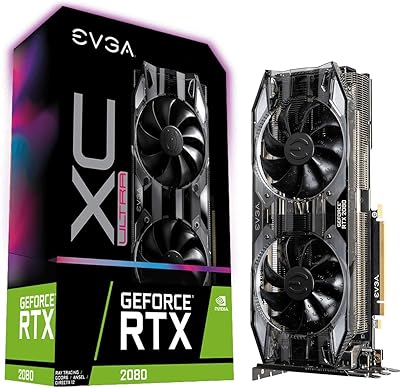
EVGA GeForce RTX 2080 XC Ultra Gaming 8GB
86%
91%
Gaming Performance
87%
Ray Tracing and Visuals
89%
Cooling Efficiency
80%
Noise Levels
93%
Build Quality
More
GIGABYTE RTX 3060 Ti Gaming OC GPU
78%
88%
Gaming Performance
91%
Thermal Performance
86%
Noise Level
67%
Ray Tracing Capability
72%
VRAM Adequacy
More
MSI RTX 3060 Ti X Trio GPU
77%
93%
Thermal Performance
91%
Noise Levels
88%
1440p Gaming Performance
89%
Build Quality
67%
Value for Money
More
EVGA GeForce RTX 2070 XC Gaming 8GB GDDR6 Graphics Card
85%
91%
Gaming Performance
88%
Cooling Efficiency
75%
Ease of Installation
78%
Power Consumption
85%
Build Quality
More
EVGA GeForce RTX 3070 Ti XC3 Ultra Gaming 8GB GDDR6X
86%
93%
Gaming Performance
91%
Cooling Efficiency
85%
Ease of Installation
88%
Build Quality
90%
Noise Level
More
EVGA GeForce RTX 3080 Ti FTW3 ULTRA GAMING 12GB GDDR6X
87%
96%
Gaming Performance
92%
Ray Tracing Performance
94%
Cooling Efficiency
89%
Build Quality
85%
Value for Money
More
EVGA GeForce RTX 3070 Ti FTW3 Ultra Gaming 8GB GDDR6X
85%
93%
Performance in Gaming
88%
Thermal Management
91%
Build Quality
85%
Ease of Installation
78%
Compatibility with PC Cases
More
Thermaltake Shadow 360i Gaming Desktop with AMD Ryzen 5 3600, RTX 3060 Ti, 16GB RAM, 1TB SSD
85%
88%
Performance
91%
Value for Money
85%
Cooling Efficiency
80%
Build Quality
94%
Ease of Setup
More
Skytech Gaming Siege Gaming PC – Intel Core i7 13700F, NVIDIA RTX 4060 Ti, 32GB DDR5, 1TB SSD
87%
94%
Performance in Gaming
92%
Graphics Quality
91%
Processing Speed
88%
Cooling Efficiency
89%
Build Quality
More
GIGABYTE GeForce RTX 3060 Gaming OC 12G
80%
88%
Gaming Performance at 1080p
71%
Gaming Performance at 1440p
86%
Thermal Management
83%
Noise Levels
91%
VRAM Capacity
More

FAQ

It is genuinely capable at 1440p for the vast majority of games. In less demanding titles and competitive shooters, you will see very strong frame rates. In the most graphically intensive AAA games with settings maxed out, you may need to dial back a couple of options, but playable and often excellent performance at 1440p is a realistic expectation.

Under sustained load, the fans are audible but not distracting — most users describe the noise level as moderate and consistent rather than sharp or aggressive. In a closed case with decent airflow, the card tends to settle into a steady fan speed without ramping erratically. If you are particularly noise-sensitive, EVGA Precision X1 lets you create a custom fan curve to find your own balance between temperature and noise.

Almost certainly, yes. At just under 8 inches in length and a dual-slot width, the RTX 3060 Ti XC is notably compact for its performance class. That said, always check your specific case's maximum GPU length spec before purchasing, as some very compact mATX and mini-ITX enclosures can be restrictive even for shorter cards.

It is a fair concern. EVGA no longer manufactures or sells new graphics cards, which means no future product support pipeline and a finite supply of remaining stock. Existing warranty coverage on purchased units may still apply depending on when and where you buy, but you should verify terms carefully before committing. The hardware itself is well-built; the question is mainly about post-purchase support expectations.

Yes, but with realistic expectations. Ray tracing works and is noticeably better on Ampere than on previous generations, but enabling it in demanding titles will cost you a meaningful chunk of frame rate. Using DLSS alongside ray tracing helps recover performance significantly, and for many games that combination produces a solid result. For pure RT-maxed gameplay in the most technically complex scenes, you would need a higher-tier card.

A quality 650W PSU is the commonly cited minimum, and that holds up in practice for a typical gaming system. If your CPU is particularly power-hungry or you have a heavily loaded system, stepping up to a 750W unit gives you comfortable headroom without significantly increasing cost.

It does both. Structurally, the all-metal backplate stiffens the PCB and helps prevent the flex that can occur when a card hangs unsupported from a motherboard slot over time. It also gives the card a cleaner, more finished appearance inside a windowed case. It is a practical addition, not purely cosmetic.

The RTX 3070 does offer a performance step up, particularly in 4K scenarios and very demanding titles at 1440p. If your primary use case is 1440p gaming at high but not maximum settings, the gap between the two cards may not justify the price difference for your situation. If you plan to push 4K seriously or anticipate keeping the card for several years, the 3070 has more longevity. At 1080p, the difference is largely irrelevant.

You can absolutely just install the card and use it with standard NVIDIA drivers — no tuning software required. Precision X1 is optional and aimed at users who want to monitor temperatures, set custom fan curves, or squeeze out a bit of extra performance through overclocking. For most buyers, the card works well right out of the box without touching any additional software.

It is already showing strain in a handful of the most texture-heavy modern titles at higher resolutions and quality settings. For 1080p gaming, 8GB remains comfortable across virtually everything. At 1440p, most games are fine, but a small and growing number of releases with very high-resolution texture packs can push against that limit. If you plan to keep this card for three or more years and game at 1440p with settings maximized, VRAM headroom is a legitimate consideration worth factoring into your decision.

Where to Buy