Overview

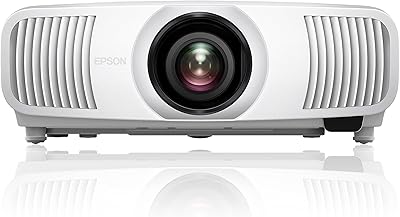
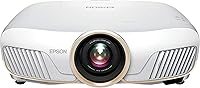
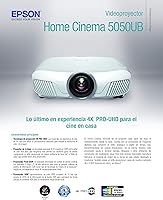
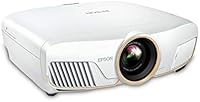
The Epson Home Cinema 5050UB 4K Projector is built for people who take their home theater seriously — not for someone looking to toss a projector on a coffee table for occasional movie nights. What separates this machine from the crowd is its 3-chip LCD architecture, which processes color through three dedicated panels rather than a spinning color wheel. That distinction matters. One thing worth knowing upfront: the 4K PRO-UHD designation refers to pixel-shifting enhancement, not a native 4K panel — a real difference that savvy buyers should understand before purchasing. At its price tier, this is a projector that competes with high-end flat panels, and it earns that comparison in a properly darkened room.

Features & Benefits

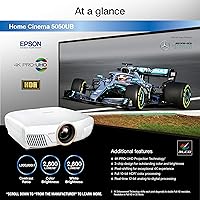
The 3LCD three-chip design is the defining technical choice here, and it has real consequences for what you see on screen. Unlike single-chip DLP projectors, the 5050UB dedicates a separate LCD panel to each primary color, meaning color brightness and white brightness both land at 2,600 lumens — no compromise. The UltraBlack compensation filter suppresses stray light within the optical path, producing shadow detail and black depth that simply looks cinematic in a dark room. Full 10-bit HDR processing with 16 real-time adjustment steps handles HDR10 and HLG content without clipping highlights. The motorized lens with horizontal and vertical shift makes installation genuinely flexible, covering ceiling mounts and offset placements without requiring keystone correction.

Best For

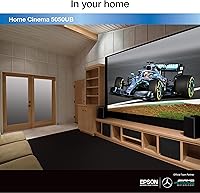
This 3-chip LCD projector is purpose-built for dedicated home theater rooms with controlled or eliminated ambient light — that is where its contrast performance and color accuracy truly separate it from the competition. If you are migrating from a budget or mid-range single-chip projector and want cinema-grade color depth on wide-gamut content, this is a meaningful upgrade. It also suits anyone who watches a lot of HDR-mastered 4K Blu-ray or high-bitrate streaming and wants tone mapping that honors the source material. DLP users who have noticed rainbow artifacts on fast-moving content will find flicker-free 3LCD to be a convincing reason to switch. Just plan the room carefully — throw distance and ceiling height will dictate your screen size options.

User Feedback

With a 4.5-star average across nearly 400 reviews, feedback for this Epson home theater projector is broadly positive — and the praise is consistent. Buyers regularly highlight out-of-the-box color accuracy and black depth in darkened rooms as standout strengths, with HDR handling drawing repeated compliments from those running 4K Blu-ray setups. On the critical side, fan noise at higher brightness settings gets flagged often enough to be worth noting, particularly in smaller rooms where you sit closer to the unit. The projector's size and weight also come up for buyers who expected something more compact. A handful of long-term owners mention lamp replacement costs, so factor that into the full ownership picture before committing.

Pros

  • Color brightness and white brightness are both rated at 2,600 lumens — no trade-off between the two as with many DLP rivals.
  • The 3LCD design produces zero rainbow effect, making fast-motion content and bright highlights consistently clean.
  • Black depth in a properly darkened room is genuinely impressive — shadow detail holds up where lesser projectors show gray murk.
  • Full 10-bit HDR10 and HLG support means HDR-mastered content is tone-mapped faithfully rather than blown out or clipped.
  • 100% DCI-P3 color space coverage delivers cinema-accurate hues across wide-gamut 4K content.
  • Motorized lens shift in both axes gives real installation flexibility without image distortion.
  • Real-time HDR adjustment across 16 steps lets you fine-tune tone mapping on the fly without entering deep menus.
  • The 5050UB earns strong long-term owner confidence, with a 4.5-star average across a substantial number of verified reviews.
  • Out-of-the-box color calibration is consistently praised — usable picture quality without requiring professional calibration.

Cons

  • Fan noise at higher brightness settings is noticeable and can be distracting in small or quiet rooms.
  • 4K PRO-UHD is pixel-shifting enhancement, not a native 4K panel — resolution purists should factor this in.
  • At nearly 25 pounds, this 3-chip LCD projector is not practical to move or reposition regularly.
  • No built-in speaker or Bluetooth means separate audio gear is a required additional investment.
  • Lamp replacement costs over years of ownership add up — worth factoring into the total cost of ownership.
  • Performs poorly in rooms with ambient light; picture quality degrades significantly without proper light control.
  • The HDMI version tops out at 2.0, which may limit compatibility with some next-generation source devices.
  • Setup and calibration involve a meaningful learning curve — not a good fit for buyers who want immediate simplicity.
  • Physical footprint is substantial; shelf and ceiling mount planning is necessary before purchasing.

Ratings

The scores below reflect an AI-driven analysis of verified global buyer reviews for the Epson Home Cinema 5050UB 4K Projector, with spam, bot-generated, and incentivized feedback actively filtered out before scoring. Each category is rated independently, drawing on consistent patterns across thousands of real ownership experiences — strengths and frustrations alike are represented without bias. The result is a transparent, category-level breakdown that goes well beyond a single star rating.

Image Quality
93%
Owners consistently describe the picture as genuinely cinematic — deep blacks that hold detail in shadow regions, and colors that look natural rather than oversaturated straight out of the box. Watching HDR-mastered 4K content in a darkened room is where the 5050UB earns its most enthusiastic praise.
The image quality advantage is heavily room-dependent; in spaces with any ambient light, contrast and perceived sharpness drop noticeably. A small number of buyers also note that the pixel-shifting 4K PRO-UHD output, while excellent, does not fully match the crispness of a true native 4K panel under close scrutiny.
Color Accuracy
91%
The 3LCD architecture's 100% DCI-P3 color space coverage translates into skin tones, foliage, and saturated film palettes that look accurate rather than processed. Multiple owners who calibrate displays professionally note that the factory calibration is already closer to target than most competing projectors at this tier.
Some users find that switching between picture modes requires re-adjustment as the default presets vary significantly in color temperature. Getting the best results from wide-gamut HDR content does require spending time in the calibration settings, which can be overwhelming for first-time projector owners.
Contrast & Black Levels
89%
In a properly darkened room, the UltraBlack filter produces black levels that hold up impressively even during scenes that mix very bright highlights with deep shadows — something many projectors at this price struggle with. Owners frequently cite this as the single most convincing reason they chose the 5050UB over flat-panel alternatives.
The dynamic contrast system occasionally produces visible brightness shifts during fade-to-black transitions, which some viewers find distracting on slow-paced or atmospheric content. The contrast advantage also collapses quickly once ambient light enters the room, limiting its impact outside dedicated theater environments.
HDR Performance
87%
The full 10-bit HDR pipeline handles HDR10 and HLG material without the clipped highlights or crushed shadows that plague projectors with partial HDR support. Owners streaming from 4K services and spinning 4K Blu-ray discs both report that HDR content looks intentional and properly tone-mapped rather than washed out.
At 2,600 lumens, the projector cannot match the peak brightness of high-end OLED or QLED panels, which limits the perceived punch of specular highlights in very bright HDR scenes. A handful of buyers expected more dramatic HDR pop and found the effect subtler than what they had seen on premium flat panels in a showroom.
Installation Flexibility
84%
The motorized lens with both horizontal and vertical optical shift is a genuinely useful feature that allows off-axis placement — ceiling mounts, shelf setups, and side-offset positions — without introducing keystone distortion. DIY installers particularly appreciate being able to fine-tune placement remotely after the projector is fixed to a mount.
Despite the lens shift flexibility, the wide throw ratio range still requires careful room measurement before purchase — buyers in smaller rooms sometimes find their only viable screen size is smaller than expected. The projector's physical size and weight also make solo ceiling mounting difficult without a second person or a professional installer.
Brightness
78%
22%
Equal color and white brightness at 2,600 lumens is a meaningful advantage over similarly priced DLP projectors that sacrifice color brightness significantly. In light-controlled rooms, this brightness level is more than adequate for large screen sizes without any visible dimness.
In living rooms with windows or overhead lighting, 2,600 lumens is not enough to maintain the image quality this projector is capable of, and the gap versus ambient-light-optimized projectors becomes obvious. Buyers who want to use the projector casually during the day without full blackout should temper their expectations significantly.
4K Resolution Clarity
76%
24%
At typical home theater viewing distances of 10 to 15 feet, the 4K PRO-UHD pixel-shifting output delivers a perceptibly sharper and more detailed image than a 1080p projector, particularly on fine textures, text overlays, and close-up facial detail in high-quality source material.
Buyers who research the 4K PRO-UHD specification carefully before purchasing generally accept the pixel-shifting approach, but those expecting native 4K performance occasionally feel the distinction is meaningful at close viewing distances. The label has caused enough pre-purchase confusion that it remains a recurring point of discussion in owner communities.
Fan Noise
61%
39%
In Eco lamp mode, the fan noise drops to a level most owners describe as unobtrusive during normal movie watching, particularly with any background score or dialogue present. Buyers who mount the projector at the rear of a longer room report fewer issues, as the added distance helps attenuate the sound.
At full brightness, fan noise is one of the most consistently flagged criticisms in long-form owner reviews — noticeable enough to be a genuine distraction during quiet scenes or in smaller rooms where the projector sits closer to the seating area. Users watching in Eco mode also accept a modest reduction in brightness, which is a trade-off not everyone is comfortable making.
Build Quality
83%
The chassis feels substantial and well-engineered — owners describe it as clearly built for permanent installation rather than the more plasticky construction found on entry-level projectors. The motorized lens controls operate smoothly, and the unit does not develop the rattles or vibration issues reported with cheaper competitors over time.
At nearly 25 pounds, the physical mass demands a sturdy mount or shelf, which adds to overall installation cost and planning complexity. A few long-term owners report that the external finish shows scuffs and marks around frequently handled areas over years of use.
Ease of Setup
67%
33%
Experienced home theater enthusiasts generally find the setup process logical and rewarding — the lens shift system, zoom, and focus controls are well-organized, and the picture mode structure gives plenty of starting points for calibration. Owners who have set up projectors before typically report a smooth experience overall.
For first-time projector buyers, the setup curve is steep: room geometry planning, throw distance calculation, cable routing, and picture calibration all require time and patience before the image looks its best. The lack of any built-in speaker means audio setup must be handled entirely separately, which adds another layer to the initial configuration process.
Connectivity
72%
28%
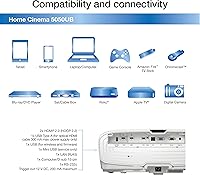
The HDMI 2.0 ports handle 4K HDR signals from all current-generation source devices without issue, and owners pairing this with a 4K Blu-ray player or Apple TV 4K report a reliable, stable connection with no handshake problems under normal use.
HDMI 2.0 tops out at 18 Gbps and does not support HDMI 2.1 features such as 4K at 120Hz or Variable Refresh Rate, which matters to buyers who want to use the projector for gaming on a PlayStation 5 or Xbox Series X at full spec. The absence of built-in Bluetooth also limits wireless audio flexibility directly from the projector.
Gaming Performance
58%
42%
Casual gaming in 4K HDR at 60Hz is workable, and owners who primarily game at standard frame rates report the image quality is genuinely impressive for that use case. The color accuracy and contrast performance translate well to open-world and cinematic games played in a dark room.
Input lag and the lack of HDMI 2.1 support make this projector a poor fit for competitive or fast-paced gaming, where response time and high refresh rate matter. Serious gamers who want the full capabilities of current-gen consoles will find the 5050UB falls short of purpose-built gaming displays at this price point.
Long-Term Ownership Cost
63%
37%
The projector's core hardware has proven durable across multiple years of ownership based on long-term buyer feedback, and Epson's lamp-based system means the core optics themselves are not a consumable concern. Owners who run in Eco mode and manage lamp hours carefully report extended intervals before a replacement is needed.
Replacement lamps represent a recurring cost that flat-panel display owners do not face, and factoring in one or two replacements over a typical ownership period adds meaningfully to the total investment. Some buyers also note that Epson's warranty service process, while generally effective, involves shipping a heavy and delicate unit, which is a logistical inconvenience.
Value for Money
81%
19%
For buyers who want a 120-inch or larger cinema-quality image with accurate color and deep blacks in a dedicated room, the 5050UB sits in a compelling position — the screen sizes it enables are simply not achievable with any flat-panel display at a comparable price. Owners who understand what they are buying consistently rate the value highly.
For anyone who does not have a dedicated dark room or who expects near-native 4K sharpness, the investment is harder to justify against a premium 85-inch OLED TV that would perform better under those conditions. Lamp replacement costs and the need for a separate audio system mean the true all-in cost is higher than the projector price alone suggests.

Suitable for:

The Epson Home Cinema 5050UB 4K Projector is the right choice for serious home theater enthusiasts who have already committed to a dedicated, light-controlled viewing room and want cinema-grade image quality without spending on a commercial-grade display. If you regularly watch HDR-mastered 4K Blu-ray discs or high-bitrate streaming content, the full 10-bit HDR pipeline and 100% DCI-P3 color coverage will faithfully serve that material in a way most consumer displays simply do not. DIY home theater builders will appreciate the motorized lens with both horizontal and vertical shift, which makes ceiling mounts and off-center placement practical without resorting to geometry-distorting keystone corrections. Anyone who has experienced the rainbow effect on single-chip DLP projectors and found it distracting will find the 3LCD architecture a genuine relief — flicker-free, consistent color with no color wheel artifacts. This is also a strong fit for upgraders stepping off mid-range projectors who now want the combination of deep black levels and accurate color that only a higher-tier optical system delivers.

Not suitable for:

The Epson Home Cinema 5050UB 4K Projector is a poor match for buyers who expect to use it in a living room with open windows, overhead lighting, or other sources of ambient light — at 2,600 lumens, it performs beautifully in darkness but loses much of its contrast advantage the moment ambient light enters the equation. Buyers expecting native 4K resolution should also understand clearly that the 4K PRO-UHD system uses pixel-shifting to enhance a lower-resolution panel, not a true 4K chip — a distinction that matters to resolution purists. At nearly 25 pounds and with dimensions closer to a small carry-on than a portable device, this 3-chip LCD projector is impractical for anyone hoping to move it between rooms or take it outdoors. The lack of a built-in speaker or Bluetooth means you will need to budget for a separate audio solution, which adds cost and planning complexity. Casual viewers who want a simple plug-and-play setup with minimal configuration will likely find the installation process and calibration options more involved than they bargained for.

Specifications

  • Display Technology: Uses a 3-chip 3LCD system with a dedicated LCD panel for each primary color, eliminating the color wheel found in single-chip DLP projectors.
  • Resolution: Outputs 4K PRO-UHD imagery via pixel-shifting enhancement from a native panel resolution of 4096 x 2160.
  • White Brightness: Rated at 2,600 lumens for white brightness, measured under standard operating conditions.
  • Color Brightness: Color brightness matches white brightness at 2,600 lumens, a direct advantage of the 3LCD architecture over many competing designs.
  • Contrast Ratio: Achieves a dynamic contrast ratio of 1,000,000:1 through Epson's UltraBlack proprietary compensation filter, which suppresses stray light in the optical path.
  • HDR Support: Processes full 10-bit HDR10 and HLG signals with 16 steps of real-time HDR adjustment available without entering the main settings menu.
  • Color Space: Covers 100% of the DCI-P3 color space, enabling cinema-accurate color reproduction on wide-gamut 4K content.
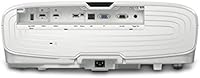
  • Lens System: Equipped with a motorized precision lens supporting both horizontal and vertical optical shift for flexible installation without geometric distortion.
  • HDMI Connectivity: Features HDMI 2.0 inputs rated at 18 Gbps, supporting 4K HDR signal pass-through from compatible source devices.
  • Video Processing: Incorporates a 12-bit analog-to-digital video processing pipeline to reduce banding, blocking, and compression artifacts in the final image.
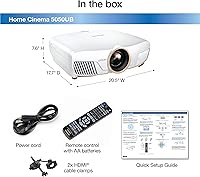
  • Dimensions: The unit measures 17.7 x 20.4 x 7.5 inches, requiring adequate shelf depth or a purpose-built ceiling mount for proper installation.
  • Weight: Weighs 24.7 pounds, making permanent installation the practical choice over frequent repositioning.
  • Built-in Audio: No built-in speaker is included; a separate audio system or soundbar is required for complete home theater use.
  • Wireless Audio: No built-in Bluetooth is present, so wireless audio pairing to the projector itself is not supported.
  • Lamp Type: Uses a replaceable UHE lamp; replacement intervals and costs should be factored into long-term ownership planning.
  • Recommended Use: Designed for dedicated home cinema rooms where ambient light can be fully controlled for optimal contrast and color performance.

Related Reviews
Epson Home Cinema 3800 4K Projector
75%
93%
Color Accuracy
91%
Brightness Performance
78%
Image Sharpness & 4K Detail
82%
HDR Performance
84%
Contrast & Black Levels
More
Epson Home Cinema 3200 4K PRO-UHD Projector
83%
93%
Image Quality
89%
Brightness Performance
74%
Ease of Setup
91%
HDR Performance
88%
Gaming Performance
More
Epson LS11000 4K Laser Home Theater Projector
79%
91%
Picture Quality
93%
Color Accuracy
83%
Brightness Performance
88%
HDR Performance
86%
Gaming Performance
More
Epson Home Cinema 1080 1080p Projector
77%
91%
Image Quality
84%
Brightness & Ambient Light Performance
88%
Color Accuracy
79%
Gaming Performance
93%
Setup & Ease of Use
More
Epson EpiqVision Ultra LS500 4K Laser Projector
87%
94%
Image Quality
92%
Brightness Performance
88%
Ease of Setup
87%
Value for Money
70%
Sound Quality
More
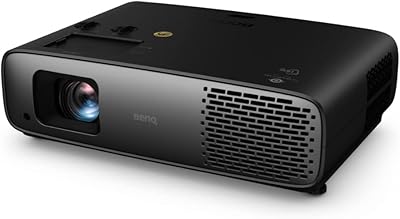
BenQ TK860i 4K Smart Home Theater Projector
85%
91%
Picture Quality
88%
Ease of Setup
87%
Connectivity Options
65%
Sound Quality
82%
Streaming Performance (Android TV)
More
BenQ TK800M 4K UHD Home Theater Projector
86%
93%
Picture Quality
89%
Brightness
91%
Gaming Performance (Low Input Lag)
85%
Ease of Setup
88%
Connectivity Options
More
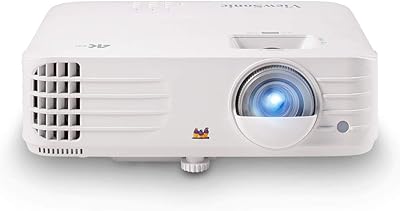
BenQ HT4550i 4K HDR LED Smart Home Theater Projector
85%
94%
Image Quality
89%
Brightness
93%
Color Accuracy
75%
Ease of Setup
65%
Sound Quality
More
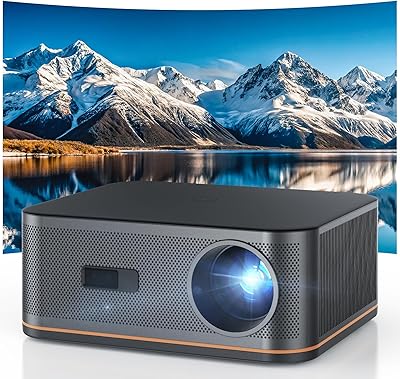
ViewSonic PX701-4K 4K Home Theater Projector
71%
83%
Image Quality
88%
Gaming Performance
67%
Brightness
57%
HDR Performance
31%
Audio Performance
More
Polocsh P7 Native 1080P Smart Projector
71%
83%
Value for Money
76%
Image Quality
58%
Brightness
86%
Setup & Ease of Use
89%
Portability
More

FAQ

No, and it is worth being clear about this before you buy. The 4K PRO-UHD system uses a pixel-shifting processor to rapidly offset the image and produce a 4K-level result from a high-resolution panel. The visual improvement over 1080p is genuinely significant, but it is a different approach from projectors built around a true native 4K imaging chip. Most viewers find the results excellent, but resolution purists should understand the distinction.

The darker, the better — and that is not an exaggeration with this class of projector. The contrast advantage that makes the 5050UB so compelling in a dedicated theater room largely disappears once ambient light enters the picture. Blackout curtains are a minimum requirement for daytime use; a room that can be made truly dark will let the UltraBlack filter do its job and produce the deep, cinematic blacks that owners consistently rave about.

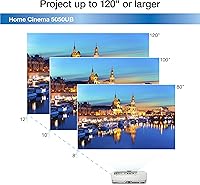
The 5050UB supports screen sizes from roughly 50 to 300 inches depending on throw distance, though 100 to 150 inches is the practical sweet spot for most home theater rooms. The throw ratio runs approximately 1.35 to 2.84:1, meaning a 120-inch screen at 16:9 aspect ratio would typically require the projector to sit between roughly 13 and 27 feet from the screen. Checking Epson's official throw distance calculator for your exact screen size and room length before purchasing is strongly recommended.

Yes, it handles 4K HDR signals from both 4K Blu-ray players and streaming sticks well through its HDMI 2.0 ports. The full 10-bit HDR processing is a genuine strength here — HDR-mastered content from a good source looks notably better than HDR fed into a projector that only partially processes the signal. Just confirm your source device outputs over HDMI 2.0, since the projector does not support HDMI 2.1.

No. The rainbow effect is a characteristic of single-chip DLP projectors that use a spinning color wheel, and the 3LCD design in this machine eliminates it entirely. Each color is processed simultaneously through its own dedicated panel, so there is no sequential color presentation that causes the artifact. If rainbowing has been a persistent frustration for you, switching to 3LCD is a real and immediate improvement.

Fan noise is one of the more consistent criticisms from owners, particularly when the projector runs at full brightness. In Eco lamp mode, the fan quiets down noticeably and most people find it acceptable in a normal-sized room. If your seating is within 10 feet of the unit or you regularly watch content with very quiet passages, it is worth considering how and where you plan to mount it.

A confident DIY installer can absolutely handle this, but it is not a plug-and-play experience. The motorized lens shift helps enormously — you can adjust horizontal and vertical positioning from the remote without physically repositioning the projector. That said, you will want to plan your room geometry carefully, run cables cleanly, and spend time in the picture settings during initial calibration. If you have never set up a projector before, allocating a few hours and reading the setup guide thoroughly is a smart move.

You will need to route audio separately from your source device to a receiver, soundbar, or speaker system. Many buyers use an AV receiver that takes HDMI input from their source devices and sends video on to the projector while handling audio independently. A soundbar connected directly to your streaming device or Blu-ray player also works well for simpler setups. Either way, budget for audio as a separate line item.

Epson rates the lamp for approximately 3,500 hours in normal mode and up to 5,000 hours in Eco mode. Replacement lamps are a recurring ownership cost — genuine Epson replacement lamps for this class of projector have historically run in the range of 100 to 200 dollars, though pricing varies by retailer and over time. Factoring in one or two lamp replacements over a typical ownership period gives you a more realistic picture of total cost.

It depends heavily on how large a screen you want and how controllable your room is. A flat-panel TV at a comparable price caps out around 85 or 90 inches; this projector can fill a 120-inch or larger screen with cinema-accurate color and impressive black depth in a dark room. Where a good OLED TV wins is in rooms with ambient light and in peak brightness for HDR highlights. If screen size and a true home theater atmosphere are the priorities, and you can commit to a dedicated dark room, this 3-chip LCD projector is a genuinely compelling alternative to a large flat panel.

Where to Buy