

Overview
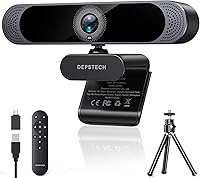
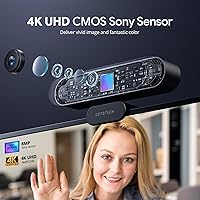
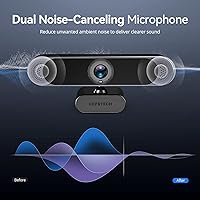
The DEPSTECH DW49 Pro arrived in early 2024 and quickly found its footing as a mid-to-upper tier webcam, currently sitting at #90 in Amazon's Webcams category. What separates this webcam from the crowd isn't just resolution — it's the 1/2.55″ Sony sensor inside. Sensor size determines how much light the camera can work with, which directly impacts color accuracy and detail in everyday lighting. On top of that, this webcam ships with a physical remote control, something most competing models skip entirely. Setup takes under a minute with plug-and-play USB-A connectivity, and a Type-C adapter is included in the box.
Features & Benefits
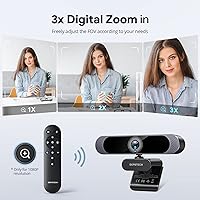
At 4K 30fps, the footage this streaming camera produces is noticeably sharper than what you get from most built-in or budget webcams. The Sony sensor plays a real role here — larger sensors pull in more light per pixel, meaning better contrast and truer colors even in dim rooms. The dual noise-canceling mics handle ambient background noise reasonably well for office and home environments. Autofocus is responsive and can be locked to manual mode via the remote, which is useful when you don't want the camera hunting mid-presentation. One key limitation: the 3X digital zoom only functions at 1080p or lower, not at 4K.
Best For
This webcam makes the most sense for remote workers and educators who spend hours on video calls and want noticeably better picture quality than a laptop's built-in camera provides. The remote is especially practical for teachers — muting, zooming, or toggling focus without reaching for the keyboard keeps sessions running smoothly. Streamers and creators who want 4K output without investing in a full camera setup will find it a capable option. If your home office lighting is inconsistent, the auto light correction does a decent job of compensating. Less ideal for anyone who specifically needs 4K zoom, as that feature tops out at 1080p.
User Feedback
Buyers generally appreciate the image clarity, with many pointing to the Sony sensor as the reason their video calls look sharper than before. The remote gets mixed but mostly positive reactions — people like having it, though a few note it feels a bit plasticky. The microphones earn solid marks in quiet-to-moderate environments, but some users in louder settings feel they don't quite match premium standalone mics. Autofocus hunting in complex backgrounds comes up occasionally in critical reviews, though it's far from a dominant complaint. Overall, sentiment leans positive, with most buyers viewing this as a strong value pick compared to pricier alternatives.
Pros
- The Sony sensor produces genuinely sharper, more color-accurate video than most webcams at this price point.
- Plug-and-play setup works instantly on both Windows and macOS with no drivers or software required.
- The physical remote lets you mute, zoom, and adjust focus without touching your keyboard mid-call.
- Auto light correction handles variable and low-light conditions passively, which is useful in home offices.
- Autofocus is fast and stays locked during normal head movements without constant hunting.
- Dual noise-canceling mics perform reliably in quiet-to-moderate environments for everyday calls.
- USB-A and Type-C compatibility means this webcam works across virtually any modern laptop or desktop.
- At 4K 30fps, video quality holds up well for professional video calls, online teaching, and streaming.
- The DW49 Pro ranks in the top 100 webcams on Amazon, reflecting sustained buyer confidence since launch.
Cons
- The 3X zoom drops video output to 1080p or lower — there is no zoom at native 4K resolution.
- The remote control feels noticeably cheap and plasticky compared to the well-built camera body.
- Three AAA batteries for the remote are not included in the box.
- Microphone performance falls short in genuinely noisy environments and is not a substitute for a dedicated mic.
- No companion desktop software means all adjustments are limited to the remote control's functions.
- Autofocus can hunt and briefly lose focus in cluttered or low-contrast backgrounds.
- The 30fps cap rules this webcam out for any fast-motion or high-frame-rate video work.
- The mounting clip is not tripod-compatible without a separate adapter, limiting placement flexibility.
- A small number of users report the remote becoming unresponsive after several months of regular use.
Ratings
The DEPSTECH DW49 Pro scores below are generated by AI after analyzing thousands of verified global user reviews, with spam, bot, and incentivized feedback actively filtered out. The ratings reflect where this webcam genuinely delivers and where it falls short, giving you a transparent picture before you buy. Both strengths and recurring pain points are factored equally into every score.
Image Quality
Sensor Performance
Remote Control
Microphone Quality
Zoom Functionality
Autofocus
Low-Light Performance
Build Quality
Setup & Compatibility
Value for Money
Ease of Use
Field of View
Frame Rate Consistency
Mounting & Positioning
Suitable for:
The DEPSTECH DW49 Pro is a strong fit for remote workers, online educators, and content creators who spend significant time on video calls and want a meaningful upgrade from a built-in laptop camera. The Sony CMOS sensor — larger than what most webcams in this category use — produces noticeably better color accuracy and detail, which matters when you are presenting to clients or teaching live classes daily. The included remote control is a genuine practical advantage for educators who need to mute, zoom, or adjust focus mid-session without interrupting their workflow. Home office users with inconsistent or dim lighting will also find the auto light correction useful as a passive fix that requires no manual fiddling. If you are working across both Windows and macOS machines, the plug-and-play setup with the included Type-C adapter means zero friction switching between devices.
Not suitable for:
Buyers who specifically need 4K zoom capability should look elsewhere — the DW49 Pro's 3X digital zoom only functions at 1080p and below, and anyone expecting to zoom without sacrificing resolution will be disappointed. Users in loud, open-plan offices or shared workspaces may find the dual microphones inadequate as a standalone audio solution, particularly if clear voice isolation is critical to their work. Content creators who require 60fps for smooth motion capture or fast-moving on-screen action will hit a hard ceiling at 30fps regardless of resolution. The webcam also lacks dedicated companion software, which means power users who want precise manual control over every setting will find the remote-based adjustments too limited. Anyone prioritizing premium build feel throughout will notice the remote control does not match the quality of the camera unit itself.
Specifications
- Video Resolution: Captures video at 4K UHD (3840x2160) at 30 frames per second for sharp, detailed output.
- Sensor: Uses a 1/2.55″ Sony CMOS sensor, which is larger than most sensors found in webcams at this price range.
- Digital Zoom: Supports 3X digital zoom, available only at 1080p resolution and below — not at 4K.
- Microphones: Equipped with dual built-in noise-canceling microphones using PCM audio format for voice capture during calls and recordings.
- Focus System: Autofocus is enabled by default and can be switched to fixed/manual focus mode using the included remote control.
- Light Adjustment: Built-in auto light correction automatically adapts exposure to suit low-light or mixed-lighting environments.
- Connectivity: Connects via USB-A; a USB Type-C adapter is included in the box for use with modern laptops and desktops.
- Compatibility: Works with Windows XP, 7, 8, 10, and 11, as well as macOS, with no additional drivers required.
- Supported Apps: Compatible with Zoom, Skype, Microsoft Teams, YouTube, FaceTime, and Facebook out of the box.
- Remote Control: Includes a physical remote control that requires 3 AAA batteries (not included) and supports zoom, mute, focus toggle, and exposure adjustments.
- Dimensions: The camera unit measures 5.35 x 2.13 x 2.05 inches, making it compact enough for standard monitor or laptop mounting.
- Weight: The webcam weighs 13.4 ounces including the mount.
- Video Format: Records and streams video in AVI format.
- Audio Format: Captures audio in PCM format for uncompressed, clean voice output.
- Model Number: The official model identifier is DW49PRO-JP, used for warranty and support reference.
- Aperture: Maximum aperture is f/1.2, which supports better light intake in lower-light shooting conditions.
- Focal Length: Maximum focal length is 300mm, reflecting the optical reach of the lens assembly.
- Power Source: Powered entirely via the USB connection — no external power adapter or separate power source is required.
- Plug and Play: No software installation is needed; the webcam is recognized automatically upon USB connection on supported operating systems.
- Availability: First listed on Amazon on January 22, 2024, and is currently not discontinued by the manufacturer.
Related Reviews

Ubiquiti UniFi Dream Machine Pro Security Gateway
DS18 PRO-DR1PK44 Compression Driver with PRO-H44/BK Horn
DS18 PRO-ZXI10MBASS 10-inch Mid-Bass Loudspeaker

Cinema Secrets Pro Cosmetics Ultimate Foundation 5-In-1 Pro Palette 500A

Apple MacBook Pro 14-inch M1 Pro Laptop

Cinema Secrets Ultimate Corrector 5-In-1 Palette

HP Pro Tower 290 G9 Desktop (i5-12500, 32GB RAM, 1TB SSD)

VIZONY E1 Pro Smart Projector
JLab JBuds Pro Bluetooth Wireless Earbuds
UTILYZE Radiant Pro