Overview

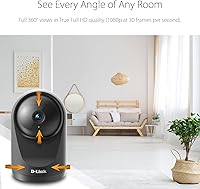
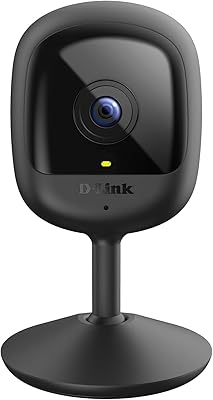
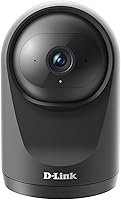
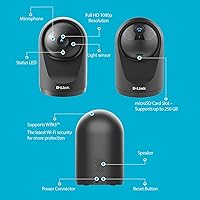
The D-Link DCS-6500LHV2 Pan & Tilt Wi-Fi Camera is a mid-range indoor option from D-Link's Pro Series, built for families and renters who want practical home monitoring without committing to a monthly subscription. This pan-and-tilt camera comes in a compact dome body — just over three inches wide and under five inches tall — light enough to sit on a bookshelf or nursery dresser without any drilling. It's the second-generation V2 model, which brings WPA3 security as a meaningful upgrade over its predecessor. The mydlink app handles setup and remote access, and it connects easily with both Alexa and Google Assistant. One limitation worth knowing upfront: it's corded only, so placement will always be tethered to a power outlet.
Features & Benefits

The motor-driven pan and tilt is where this indoor Wi-Fi camera earns most of its appeal. With 340 degrees of horizontal rotation and 90 degrees of vertical movement, it covers a wide swath of a typical room — and the auto-motion tracking has the camera physically follow whatever triggered the alert. That said, it handles steady walkers and wandering pets better than anything moving quickly. Video is clean at 1080p and 30fps, and the infrared night vision covers up to 16 feet, though reviewers consistently note that larger rooms push it thin. Two-way audio is genuinely useful for talking to kids or pets remotely. One thing to flag: the microSD card for local storage is not included and needs to be purchased separately.

Best For

This pan-and-tilt camera is a natural fit for parents keeping watch over a nursery or playroom — the auto-tracking means the view stays on a crawling baby without you having to manually swivel the camera from your phone. Pet owners get real value from the two-way audio, since talking through the camera can actually settle an anxious animal while you're out. Renters and apartment dwellers will appreciate the tabletop design: no mounts, no holes, easy to relocate. It's also a solid pick for anyone who wants to avoid ongoing cloud fees, since a large-capacity microSD card handles recording locally. If you're already running Alexa or Google Assistant at home, smart home integration works right out of the box.

User Feedback

With a 4.1 out of 5 rating from roughly 480 buyers, the D-Link DCS-6500LHV2 sits in solid but unremarkable territory. Reviewers most often praise the quick app setup through mydlink and how naturally the pan/tilt motor responds to remote commands. Motion alerts also draw consistent positive comments for being timely and accurate. The complaints worth noting: night vision falls short in rooms bigger than a standard bedroom, which tracks with the 16-foot spec limit. Android users have flagged occasional app glitches, and a handful of long-term owners mention Wi-Fi drops after firmware updates. Cloud subscription pricing comes up repeatedly as a frustration. No single flaw is severe, but taken together they explain why this camera hasn't broken into higher rating territory.

Pros

  • Auto-tracking physically moves the camera to follow activity, covering far more of a room than any fixed lens can.
  • The mydlink app setup is consistently praised as quick and low-friction, even for less tech-savvy users.
  • 1080p video at 30fps delivers clear, smooth footage suitable for identifying faces or confirming details.
  • Two-way audio works reliably for speaking to pets or children remotely — not just for passive listening.
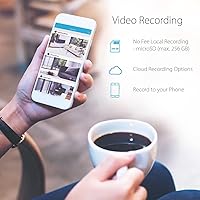
  • Local microSD recording up to 256GB lets you skip cloud fees entirely if you choose.
  • WPA3 encryption gives this pan-and-tilt camera a meaningful security edge over older Wi-Fi camera standards.
  • The drill-free tabletop design makes it genuinely easy to reposition between rooms or take to a new home.
  • Motion and sound alerts are described as prompt and accurate by the majority of long-term owners.
  • Google Assistant and Alexa compatibility plugs cleanly into existing smart home routines without extra configuration.
  • The combination of pan, tilt, auto-tracking, and two-way audio at this price tier is hard to beat for indoor use.

Cons

  • Night vision routinely underperforms in rooms larger than a standard bedroom, despite the official 16-foot rating.
  • Auto-tracking loses fast-moving subjects regularly — it works best with slow, predictable movement only.
  • No microSD card is included in the box, which catches a surprising number of first-time buyers off guard.
  • The power cable is non-negotiable, permanently tying placement to wherever an outlet happens to be.
  • Some Android users report intermittent app crashes and delayed live view loading on the mydlink platform.
  • Cloud storage carries an ongoing subscription cost that is not immediately obvious at the time of purchase.
  • A number of long-term owners have experienced Wi-Fi drops following firmware updates, requiring manual reconnection.
  • The 100-degree field of view is narrower than several competing cameras at a similar price, leaving room corners uncovered.
  • There is no battery backup, meaning any power outage leaves the camera completely offline with no footage captured.

Ratings

The scores and analysis below for the D-Link DCS-6500LHV2 Pan & Tilt Wi-Fi Camera were generated by our AI review engine after processing verified global buyer feedback, with spam, bot-submitted, and incentivized reviews systematically filtered out. Each category score reflects the genuine consensus of real owners, weighted for review quality and long-term usage patterns. Both the strengths that drive positive ratings and the recurring pain points that hold this camera back are reflected transparently — nothing has been softened.
Video Quality
83%
The 1080p footage at 30fps is noticeably smooth and detailed enough that parents can clearly read a clock on the wall or identify someone at the door in the live feed. Reviewers consistently describe the daytime image as sharp and color-accurate, which matters when you are trying to spot a crawling toddler mid-scene.
Where it falls short is low-light performance — the sensor is not particularly large, and once lighting drops below comfortable room levels, the 1080p advantage starts to diminish noticeably. Owners monitoring dimly lit basements or hallways at night report that footage quality is softer than the spec sheet suggests.
Pan & Tilt
81%
19%
The motorized movement earns genuine praise — users describe the motor as responsive and smooth when controlling it manually from the app, without the grinding or hesitation you sometimes find in cheaper cameras. For nursery monitoring or keeping an eye on a pet's favorite corner, the physical range is more than sufficient.
A small number of long-term owners mention wear-related motor noise appearing after several months of continuous use, raising questions about longevity under heavy daily operation. The 340-degree pan also leaves a small dead zone at the rear, which is worth factoring in when deciding where to position the camera.
Night Vision
62%
38%
In a typical nursery or compact bedroom the infrared night vision covers the space adequately, and the Night Color mode adds a subtle improvement over pure IR by preserving slightly more visual detail in low-light conditions. Owners using it specifically in smaller rooms generally rate the nighttime coverage as acceptable for their needs.
The 16-foot rating is optimistic — multiple reviewers note that detail starts degrading meaningfully around 12 to 14 feet, which matters in any room bigger than a standard bedroom. Anyone expecting to monitor a large living room, open-plan kitchen, or long hallway in darkness will likely be disappointed by the practical coverage.
Auto-Tracking
67%
33%
When a subject moves at a natural walking pace or slower, the auto-tracking does exactly what it promises — the camera pivots and follows without any manual input, which is genuinely useful for parents who want hands-free baby monitoring or pet owners checking in remotely from a work meeting.
The tracking algorithm struggles with fast-moving subjects — a running dog, an excited toddler, or anyone moving quickly across the frame will outpace the motor and fall out of shot. Several reviewers describe it as a feature that works in calm scenarios but becomes unreliable the moment anything moves with real urgency.
Two-Way Audio
74%
26%
Users who bought this camera specifically to communicate with pets or children while away from home report the two-way audio as genuinely useful — calling a dog by name or reassuring a child who woke up in the nursery are scenarios that come up repeatedly in positive reviews, and most describe the audio as clear enough for the job.
Audio quality is functional rather than impressive — a noticeable delay and occasional echo are the most common complaints, and the speaker volume is modest enough that it may not carry clearly across a larger room. It is adequate for quick check-ins but not a substitute for intercom-quality two-way communication.
App & Setup
79%
21%
The mydlink app setup process draws consistent praise from buyers across skill levels — most describe plugging in the camera, scanning a code in the app, and being fully connected within about 10 minutes. Live view loads quickly, the interface is clean, and day-to-day navigation feels intuitive even for non-technical users.
Android users in particular flag stability issues — intermittent crashes and moments where the live stream refuses to load are recurring frustrations in negative reviews. A handful of users also report that firmware updates have occasionally broken Wi-Fi connectivity, requiring a full reconfiguration of the camera to restore normal function.
Motion Detection
77%
23%
Owners who rely on motion alerts as their primary notification tool — checking in during work hours or monitoring a front hallway — describe the alerts as timely and accurate without excessive false triggers. The ability to define specific detection zones within the app helps keep notifications relevant and avoids alert fatigue over time.
The sensitivity settings require manual tuning out of the box — detection can occasionally flag minor lighting changes or reflections as motion events, leading to unnecessary phone notifications. Sound detection in particular receives mixed feedback, with some owners describing it as either too sensitive or frustratingly inconsistent depending on the environment.
Local Storage
73%
27%
The option to record locally to a microSD card up to 256GB is one of the more practical differentiators at this price tier — it gives users a genuine path to ongoing recording without paying a monthly cloud fee, which is a significant selling point for budget-conscious families who still want reliable footage access.
The microSD card is not included and must be purchased separately, which catches many buyers off guard after unboxing. Cloud storage is available as an upgrade, but recurring costs draw consistent frustration in reviews — particularly from users who felt the hardware price should have come with at least a starter card included.
Build Quality
76%
24%
The compact dome body feels solid enough for a mid-range product — it does not flex noticeably when handled, and the neutral finish blends into most room decors without drawing attention. At 7.2 ounces, it sits stably on a shelf or dresser without any tendency to tip or shift during normal motor operation.
The plastic construction is unmistakably mid-range — press on the housing and there is some flex, and the overall finish lacks the premium density found at higher price points. A few reviewers also note that the bundled power cable is relatively short, which can limit natural positioning without adding an extension cord.
Wi-Fi Stability
68%
32%
For most users in typical home Wi-Fi environments the camera connects reliably and maintains a stable stream during regular live viewing sessions. The WPA3 encryption also adds a meaningful layer of network security that many competing cameras at this price still do not offer, which resonates with security-conscious buyers.
Firmware updates have been a recurring source of connection problems — a pattern flagged by multiple long-term owners who describe the camera dropping off the network after an update and requiring a manual reset or full reconfiguration. Users with older or congested 2.4GHz networks also report more frequent disconnects than expected.
Smart Home
82%
18%
The Alexa and Google Assistant integration works reliably once configured, and for households already using smart displays like an Echo Show or Nest Hub, the ability to pull up live footage with a voice command is genuinely convenient. Reviewers already deep in one of these ecosystems describe the integration as feeling natural and well-supported rather than bolted on.
Users outside the Alexa or Google Home ecosystem gain little from this feature, and there is no native HomeKit integration, which leaves Apple smart home users relying solely on the mydlink app. The initial linking process through third-party apps can also require several extra steps compared to cameras with native platform support.
Value for Money
78%
22%
At its mid-range price, this pan-and-tilt camera packs more active functionality than most fixed cameras in the same bracket — motorized movement, auto-tracking, two-way audio, local storage support, and smart home compatibility together represent a feature set that would cost considerably more from premium competitors. Buyers who define value by feature count tend to come away satisfied.
Where the value equation weakens is in the hidden extras — a microSD card must be purchased separately for local recording, and cloud storage adds an ongoing fee on top of the hardware cost. Reviewers who expected a more complete out-of-box experience, or who later found competitors offering similar features at lower prices, tend to mark value down.
Privacy & Security
84%
WPA3 encryption is a genuine differentiator at this price tier — most competing cameras still rely on WPA2, and security-aware buyers who prioritize protected transmission of their home footage specifically call out this upgrade as a deciding factor. The local storage option also appeals to users uncomfortable routing footage through a third-party cloud server.
There is no HomeKit Secure Video support, which limits the camera's appeal to Apple privacy-focused users who want end-to-end encrypted cloud storage within their existing ecosystem. There is also no physical privacy shutter, which some users flag as a notable omission when the camera is positioned in a bedroom or personal living space.
Placement Flexibility
58%
42%
The compact tabletop form factor genuinely removes one of the most common installation headaches — there are no tools, no wall anchors, and no landlord permission needed. Renters especially appreciate that repositioning the camera between rooms takes seconds, and the small footprint means it fits on a nightstand or bookshelf without dominating the space.
The corded power requirement is the single biggest placement constraint — without a battery option, you are always tethered to an outlet, ruling out corners of rooms that lack nearby sockets without running an extension cord. No ceiling or wall mounting bracket is included either, so elevated positioning requires sourcing a compatible third-party mount.
Long-Term Reliability
69%
31%
For the majority of everyday users, this indoor Wi-Fi camera performs consistently over months of regular use — the motor holds up well under standard daily activity and motion detection remains accurate without requiring recalibration. Most owners using it as a nursery or pet monitor report no significant hardware surprises within the first year of ownership.
A recurring thread among longer-term reviewers involves Wi-Fi drops appearing after firmware updates, requiring manual intervention and undermining confidence in dependable round-the-clock monitoring. There are also scattered reports of motor noise developing under heavy continuous use — not widespread, but worth noting for anyone planning to run the camera constantly at full auto-tracking.

Suitable for:

The D-Link DCS-6500LHV2 Pan & Tilt Wi-Fi Camera is well matched to households where simplicity and day-to-day flexibility matter more than professional-grade surveillance. Parents with infants or toddlers will find the auto-tracking especially practical — rather than manually adjusting the angle every time a baby rolls across the room, the motor does it automatically, which is a genuine quality-of-life improvement at 2am. Pet owners benefit in a similar way, and the two-way audio means you can actually speak to a dog or cat through the camera while you're out, which tends to be more calming for anxious animals than you might expect. Renters and people who move frequently will appreciate that the compact tabletop design requires zero installation — just plug it in, run through the mydlink app setup, and move it to the next place when needed. Anyone who has grown tired of mandatory cloud subscriptions will also find it refreshing that local microSD recording is a fully supported alternative, keeping ongoing costs genuinely optional. Smart home households already running Alexa or Google Assistant routines will find integration straightforward from day one.

Not suitable for:

The D-Link DCS-6500LHV2 Pan & Tilt Wi-Fi Camera is a poor fit if you need outdoor coverage — it has no weather resistance at all and will not survive rain, humidity, or temperature extremes, so garages and porches are off the table. If you're trying to monitor a large open-plan room or a long hallway, the night vision will likely disappoint; many reviewers confirm it falls noticeably short of the stated 16-foot spec in real-world conditions, and anything beyond roughly 12 to 14 feet tends to look murky. Buyers hoping the auto-tracking will keep pace with a sprinting dog or an energetic older child will find it lags or loses the target — the motor handles slow, predictable movement well, but fast subjects routinely outrun it. Anyone looking for a truly wireless, battery-powered option won't find one here; the power cable is permanent and directly limits placement options. If you're relying entirely on cloud storage as your recording solution, factor in the ongoing subscription cost before purchasing — it is not bundled, and multiple owners cite it as an unwelcome surprise.
Specifications

  • Resolution: Records Full HD 1080p video at 30 frames per second using a 2MP CMOS sensor with H.264 compression.
  • Pan & Tilt: Motorized 340-degree horizontal pan and 90-degree vertical tilt enable near-full-room physical camera repositioning.
  • Viewing Angle: Fixed 100-degree wide-angle lens provides a moderate field of view suitable for standard-sized rooms.
  • Night Vision: Infrared LEDs support night vision up to 16 feet, with Night Color mode enhancing image clarity in low-light conditions.
  • Auto-Tracking: Auto-motion tracking physically rotates the camera in real time to follow a detected moving subject within its range.
  • Audio: Integrated two-way audio with a built-in microphone and speaker allows real-time remote conversation through the app.
  • Local Storage: Accepts microSD cards up to 256GB for on-device local recording; no microSD card is included in the package.
  • Connectivity: Connects over 2.4GHz Wi-Fi using WPA3 encryption, providing improved wireless security over the older WPA2 standard.
  • Smart Home: Compatible with both Amazon Alexa and Google Assistant for voice command control and live feed display on smart screens.
  • App: Operated through the mydlink app, available on iOS and Android, for setup, live viewing, playback, and alert management.
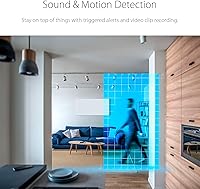
  • Motion Detection: Supports configurable motion and sound detection with alert zones for targeted monitoring of specific areas within the frame.
  • Power: Runs on a corded electric adapter rated at 5V and 3.9W; no battery or wireless power option is available.
  • Dimensions: Measures 3.15 x 3 x 4.8 inches (L x W x H) in a compact dome enclosure designed for tabletop placement.
  • Weight: Weighs 7.2 ounces, light enough to sit stably on a shelf or dresser without additional mounting hardware.
  • Form Factor: Dome-style housing with an integrated tabletop mount requires no wall or ceiling drilling for standard indoor placement.
  • Video Format: Video is encoded in H.264 format, balancing storage efficiency with acceptable image quality for home monitoring purposes.
  • Water Resistance: Rated for indoor use only with no water or dust resistance; outdoor or humid-environment use is not supported.
  • Generation: Second-generation V2 model, updated from the original DCS-6500LH with WPA3 security and revised firmware support.
  • Box Contents: Package includes the camera unit, power adapter, and a quick installation guide; a microSD card is not included.
  • Warranty: Covered under D-Link's limited hardware warranty; buyers should confirm the specific term with their retailer or D-Link directly.

Related Reviews

D-Link DCS-6100LHV2 Compact Full HD Pro Wi-Fi Camera
84%
88%
Video Quality
91%
Ease of Setup
85%
Night Vision Performance
72%
Motion Detection Sensitivity
65%
Wi-Fi Connectivity
More
D-Link DIR-1950 AC1900 Wi-Fi Router
74%
88%
Setup & Installation
63%
Wi-Fi Range & Coverage
78%
Connection Speed
76%
Multi-Device Handling
84%
Parental Controls
More
D-Link AX1800 Mesh Wi-Fi 6 Range Extender
84%
90%
Wi-Fi Range and Coverage
85%
Setup and Installation
88%
Device Compatibility
80%
Wi-Fi Speed and Stability
93%
Security Features
More
D-Link DIR-3040 AC3000 Tri-Band Wi-Fi Router
83%
88%
Performance
91%
Mesh Networking Coverage
85%
Ease of Setup
78%
Voice Control Integration
90%
Parental Controls
More
D-Link Omna 180 Security Camera
77%
84%
Video Quality
88%
Field of View
76%
Night Vision
81%
Two-Way Audio
79%
Motion Alerts
More
AMOROM 2K Pan-Tilt Indoor Security Camera
76%
83%
Video Clarity
67%
Night Vision Performance
86%
Pan-Tilt Control
74%
Wi-Fi Connectivity
58%
App Experience
More
Energizer Smart Wi-Fi Indoor Security Camera
84%
91%
Value for Money
94%
Ease of Setup
88%
Video Quality
87%
Motion Detection Performance
85%
Audio Quality
More
BESDERSEC A6 Pan-Tilt Outdoor Security Camera
74%
88%
Value for Money
91%
Pan & Tilt Coverage
71%
Night Vision Quality
63%
Motion Detection
86%
Setup & Installation
More
Topodome TD-J10A Outdoor Wi-Fi Bullet Camera
72%
83%
Build Quality
81%
Value for Money
71%
Night Vision
74%
Motion & Humanoid Detection
58%
App Experience
More
Kasa Smart EC71 Pan-Tilt Security Camera
78%
91%
Value for Money
88%
Setup & Ease of Use
74%
Video Quality
86%
Pan-Tilt Performance
79%
Night Vision
More

FAQ

No, a subscription is not required for core functionality. You can record locally to a microSD card (up to 256GB, sold separately) and access the live feed through the mydlink app at no ongoing cost. D-Link does offer an optional cloud plan if you want off-device backup, but it is entirely optional.

Most people find it straightforward. You download the free mydlink app, plug the camera into power, and follow the step-by-step in-app instructions to connect it to your home Wi-Fi. The majority of reviewers report completing setup in under 10 minutes, and the app is clear enough that you generally do not need to consult a manual.

It depends on how fast the subject is moving. For a crawling baby, a slowly wandering cat, or a person walking through a room, it works well and follows reliably. For a fast-running dog or an active child, it can lag and occasionally lose the target entirely. It is a genuinely useful feature, but it is best thought of as a helpful assist rather than a failsafe tracking system.

Correct. The D-Link DCS-6500LHV2 Pan & Tilt Wi-Fi Camera supports microSD cards up to 256GB, but you need to supply your own. This catches a fair number of buyers off guard, so it is worth adding a card to your order if local recording is important to you. A Class 10 card is recommended for smooth continuous recording.

The official spec is 16 feet, but in practice many users find the image starts to soften and lose detail around the 12 to 14 foot mark. In a nursery, small bedroom, or compact living room it performs well. In a larger room or an open-plan space, the outer edges of the frame can be too dim to be useful. It is honest night vision for a mid-range camera, not a night-vision upgrade you would find in a professional system.

Both modes are available. Within the mydlink app you can manually swipe on screen to physically rotate the camera in any direction, or you can switch on auto-motion tracking and let it follow movement on its own. Most users find themselves switching between the two — manual control for checking specific spots, auto-tracking for hands-off monitoring.

Yes. This indoor Wi-Fi camera integrates with both Amazon Alexa and Google Assistant, so you can ask your smart display to pull up the live feed using a voice command. The setup requires linking the mydlink skill or action within the respective smart home app, which takes only a few minutes.

It is functional for basic two-way communication — calling a pet by name, talking to a child in another room, or checking in on an elderly family member. Most users describe it as clear enough for its intended purpose, though some note a slight echo or half-second delay. It will not feel like a phone call, but it is well above token-level audio quality.

No. This pan-and-tilt camera is rated for indoor use only and has no weatherproofing or dust resistance. Even a covered porch with humidity or temperature swings can damage the unit over time. If outdoor coverage is what you need, a separate weatherproofed camera model would be the right call.

The pan and tilt motor has not been widely flagged as a durability concern in owner reviews. Wi-Fi connectivity is a more common complaint — a handful of long-term users have reported the camera dropping its connection after firmware updates, requiring a manual reset or reconnection through the app. It does not appear to be a widespread problem, but it is worth knowing about if rock-solid uptime is a priority for you.

Where to Buy