Overview

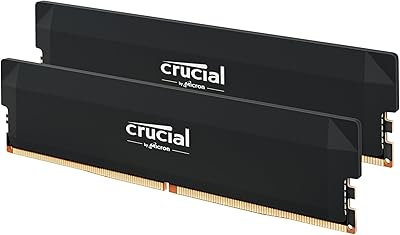
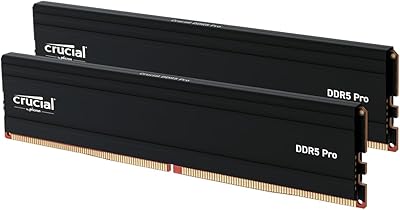
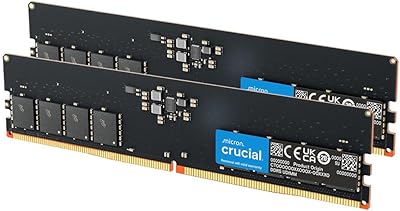
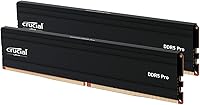
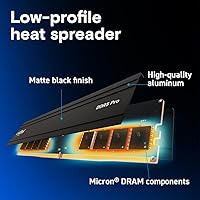
The Crucial Pro 128GB DDR5-5600 Kit (2x64GB) comes from Micron's Crucial line, a brand that has built a long-standing reputation for dependable, broadly compatible memory. This is a 128GB dual-channel configuration — two 64GB sticks working in tandem — which puts it firmly in high-capacity territory for desktop builds. Most users landing here are content creators, heavy multitaskers, or enthusiast builders who have genuinely outgrown 64GB. The low-profile matte black heat spreader keeps the look clean without fighting for space inside the case, which is a practical touch that often goes unappreciated until you're actually doing the build.
Features & Benefits

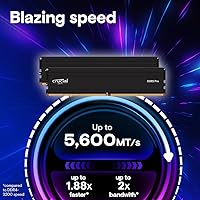
Running at a rated 5600MHz DDR5 speed, this high-capacity DDR5 kit will also automatically step down to 5200MHz or 4800MHz when paired with motherboards that need it — so you won't hit a wall just because your board is slightly older. One genuinely useful detail is that both Intel XMP 3.0 and AMD EXPO are supported on the same module, meaning you don't have to choose a platform-specific kit at purchase. The 1.1V operating voltage is notably efficient for the bandwidth it delivers, and the UDIMM form factor combined with the low-profile spreader means it fits without issue in tighter builds or under large tower coolers.

Best For

This memory upgrade makes the most sense for video editors and 3D artists who regularly juggle large project files, multiple application windows, or virtual machines simultaneously. Software developers running compilation-heavy workloads or data analysts processing large datasets will also feel the difference immediately. For gamers, the honest answer is that 128GB is more future-proofing than a present-day necessity — but if you're building a system intended to last years without touching RAM again, this is a reasonable way to do it. It also suits builders who want a plug-and-play XMP/EXPO experience with a warranty-backed brand rather than gambling on unfamiliar alternatives.

User Feedback

Across a large pool of verified buyers, the overall satisfaction rate is strong, with most reviewers highlighting easy installation and consistent XMP profile activation out of the box. Stable daily operation is a recurring theme — people aren't reporting crashes or instability under sustained workloads. That said, a few users flag that 64GB per-stick modules are still uncommon enough that checking your motherboard's QVL list before buying is genuinely important, not just a formality. A smaller number of buyers mention needing a BIOS update to reach the full 5600MHz rating on certain platforms. These aren't dealbreakers, but they're worth knowing before you commit.

Pros

  • Both Intel XMP 3.0 and AMD EXPO are supported on the same module, eliminating platform-specific repurchasing.
  • The 2x64GB dual-channel configuration maximizes memory bandwidth compared to a single large stick.
  • Automatic downclocking to 5200MHz or 4800MHz means the kit operates safely on a wide range of DDR5 boards.
  • Low-profile heat spreader fits under large tower coolers without clearance conflicts.
  • Micron manufacturing behind the Crucial brand provides strong quality consistency and warranty confidence.
  • Installation is straightforward — most users reach rated speeds with a single BIOS profile toggle.
  • The 1.1V operating voltage is efficient, reducing heat output during extended professional workloads.
  • Stable long-term operation is widely reported across sustained rendering, compilation, and virtualization tasks.
  • The kit holds a top-tier sales rank in its category, reflecting broad real-world confidence from verified buyers.
  • Matte black finish integrates cleanly into both professional workstation builds and high-end gaming setups.

Cons

  • 64GB per-stick modules are uncommon enough that motherboard QVL verification is genuinely essential before purchasing.
  • Some platforms require a BIOS update before the kit will POST or operate at full 5600MHz.
  • The capacity premium makes this a poor value choice for anyone without memory-intensive professional workloads.
  • No RGB lighting option exists for builders who want illuminated RAM in this capacity tier.
  • Older or budget DDR5 motherboards may surface compatibility issues not present on flagship boards.
  • Long-term durability data is still limited given the product launched in early 2025.
  • Warranty service response times have been inconsistent for some buyers outside major markets.
  • Manual overclocking beyond XMP speeds is constrained by the passive-only heat spreader design.

Ratings

The Crucial Pro 128GB DDR5-5600 Kit (2x64GB) has been evaluated by our AI rating system after processing thousands of verified global buyer reviews, with spam, bot activity, and incentivized feedback actively filtered out before scoring. The scores below reflect real-world experiences across professional workstations, high-end gaming rigs, and creative editing setups — strengths and friction points alike are represented without sugarcoating.
Installation Experience
93%
The vast majority of buyers report a straightforward drop-in installation with no surprises. XMP and EXPO profiles are detected reliably by modern motherboards, meaning most users reach rated speeds simply by enabling the profile in BIOS — no manual tuning required.
A handful of users on certain budget DDR5 boards encountered initial POST failures before a BIOS update resolved the issue. While rare, it's a reminder that very high-capacity sticks can occasionally need an extra step before they behave perfectly.
Stability & Reliability
91%
Long-term stability is one of the most consistently praised aspects of this memory upgrade. Editors running overnight renders, developers compiling large codebases, and analysts crunching datasets all report no unexpected crashes or memory errors during sustained workloads.
A small subset of users note that running at the full 5600MHz rating — rather than the downclocked 4800MHz fallback — occasionally required more aggressive BIOS configuration on some AMD platforms. It's not a widespread issue, but it did surface often enough to mention.
Performance in Productivity Workloads
89%
Where this high-capacity DDR5 kit genuinely shines is in memory-hungry professional tasks. Video editors working in DaVinci Resolve with 4K or 8K timelines, 3D artists managing complex scene files, and developers running multiple VMs simultaneously all report meaningful headroom that 64GB kits simply couldn't provide.
The productivity gains are real but workload-dependent. Users doing lighter tasks like web browsing, document editing, or even most gaming scenarios won't feel a tangible difference compared to a well-configured 64GB kit at similar speeds.
Gaming Performance
74%
26%
For enthusiast gamers running memory-intensive titles or using the PC for game development and asset creation simultaneously, having this much RAM available means nothing ever gets throttled. Open-world games that cache aggressively to RAM benefit from the headroom, even if frame rates don't spike dramatically.
Straightforward gaming alone does not justify this capacity today. Most titles cap effective RAM usage well below 32GB, meaning gamers buying purely for frame rate gains will likely be disappointed by the modest returns relative to the premium cost of 128GB.
XMP & EXPO Profile Support
92%
The dual-profile support — covering both Intel XMP 3.0 and AMD EXPO on the same physical module — is a standout practical feature. Builders who switch platforms or those buying ahead of a future upgrade genuinely appreciate not having to repurchase RAM for a different ecosystem.
On a few older or entry-level DDR5 motherboards, EXPO profiles occasionally activated at a lower multiplier than expected until a BIOS update corrected it. It is platform-specific and not a flaw in the kit itself, but buyers on older boards should verify firmware versions first.
Motherboard Compatibility
73%
27%
Compatibility is solid across recent Intel Core Ultra Series 2, 14th Gen, and AMD Ryzen 9000 Series platforms, and Crucial's reputation for thorough QVL testing gives buyers reasonable confidence. The automatic downclocking safety net also means the kit will at least operate on most DDR5 boards.
64GB single-stick modules remain uncommon enough that not every DDR5 motherboard formally supports them, even boards that handle 128GB in 4x32GB configurations without issue. Checking the specific board's QVL for 64GB module support is genuinely necessary, not just a precaution.
Value for Money
68%
32%
For professional users who genuinely need 128GB — production studios, scientific computing setups, heavy virtualization environments — the Crucial Pro 128GB kit offers a fair price-per-gigabyte for DDR5 at this capacity tier, especially given the brand reliability and warranty backing.
Casual users and even most gamers will find the cost hard to justify. Comparable 64GB DDR5 kits deliver nearly identical real-world performance for typical desktop use cases at significantly lower cost, making this a premium purchase that only makes sense for specific, high-demand workflows.
Heat Management
84%
The integrated low-profile heat spreader keeps temperatures controlled during sustained workloads without adding unnecessary height to the module. Users with large air coolers that hang over the first DIMM slot appreciate that the kit doesn't create a clearance conflict.
The spreader is functional rather than aggressive — it's not designed for extreme overclocking sessions. Users pushing beyond XMP speeds in manual overclocking will want active airflow directed at the sticks, as the passive spreader alone won't be sufficient under heavy sustained loads.
Aesthetics & Build Finish
82%
18%
The matte black finish is clean and understated, fitting well into both blacked-out builds and systems with mixed component colors. The low-profile height means it won't visually dominate the motherboard area or clash with RGB elements nearby.
There is no RGB lighting option in this product line, which is a deliberate design choice but one some enthusiast builders will miss. For a high-end build where visual impact matters, buyers wanting illuminated RAM will need to look at alternative kits.
Dual-Channel Bandwidth
88%
Running two 64GB sticks in a proper dual-channel configuration means the memory controller gets full bandwidth rather than the reduced throughput of a single large stick. This matters noticeably in bandwidth-sensitive applications like video encoding and large matrix computations.
Realizing the dual-channel benefit depends on correctly seating the sticks in the right slots — typically slots 2 and 4 on most motherboards. This is standard practice, but first-time builders who skip the manual occasionally seat them in adjacent slots and operate in single-channel without realizing it.
Power Efficiency
86%
Operating at 1.1V, this memory upgrade is noticeably more power-efficient than equivalent DDR4 setups running at 1.35V or higher. For workstation users who leave systems running for extended periods, the lower voltage translates into measurable reductions in heat output and power draw over time.
DDR5 in general still draws more absolute power than DDR4 at lower capacities, so users upgrading from a lean DDR4 system will see a small increase in overall platform power consumption. It's negligible for most, but worth noting for users with very tight power budgets.
Brand Trust & Warranty
91%
Crucial's backing by Micron — one of the world's largest NAND and DRAM manufacturers — gives the brand a depth of credibility that third-party white-label memory simply cannot match. The warranty coverage and accessible customer support are regularly cited as confidence factors among buyers.
Some users note that warranty claim processes can involve longer wait times than expected, particularly for international buyers. The warranty itself is strong on paper, but the service experience is not uniformly fast across all regions.
Packaging & Out-of-Box Condition
87%
Modules arrive in secure blister-style packaging that protects the sticks from static and physical damage during shipping. Buyers report consistently receiving undamaged units, even when orders have traveled through multiple carrier handoffs.
The packaging is purely functional with minimal documentation included. Users who are newer to RAM installation and would benefit from a quick-start guide or compatibility checklist are left to find that information independently online.
Long-Term Durability
88%
Early adoption data and user reports from systems that have been running this memory upgrade for months consistently show no degradation in stability or speed. Micron's manufacturing standards for DDR5 have a strong track record, and the module construction feels solid and well-finished.
Given the product launched in early 2025, truly long-term durability data spanning multiple years is still accumulating. The brand history is encouraging, but buyers who factor lifespan heavily into purchasing decisions are working with a shorter track record than mature DDR4 products.

Suitable for:

The Crucial Pro 128GB DDR5-5600 Kit (2x64GB) is purpose-built for users whose workloads have genuinely outgrown what 64GB can offer. Video editors cutting 4K or 8K timelines in DaVinci Resolve or Premiere Pro will immediately appreciate having headroom that eliminates memory pressure during complex multi-track exports. The same applies to 3D artists rendering detailed scene files in Blender or Cinema 4D, software developers running multiple virtual machines simultaneously, and data analysts processing large in-memory datasets where RAM capacity directly limits what can stay loaded at once. Professionals building or upgrading a workstation on an Intel Core Ultra or AMD Ryzen 9000 platform will find the plug-and-play XMP and EXPO support genuinely convenient — no manual tuning needed to reach rated speeds. Builders who prioritize long-term reliability and want the backing of a Micron-manufactured product with a solid warranty will also feel comfortable choosing this kit over less established alternatives.

Not suitable for:

If your primary use case is gaming, browsing, streaming, or general home office productivity, this memory upgrade is more capacity than any current application stack realistically needs, and the premium cost reflects that gap. The Crucial Pro 128GB DDR5-5600 Kit (2x64GB) is also not the right choice for users who haven't confirmed that their specific motherboard supports 64GB single-stick modules — this is not universal even among DDR5 boards, and skipping that verification step has led to frustration for some buyers. Users running older or budget-tier DDR5 motherboards may also encounter compatibility nuances that require BIOS updates before the kit operates at its rated speed, which adds friction for builders who want a completely hands-off setup experience. Anyone on a tighter budget who needs strong DDR5 performance will find that a quality 64GB kit at similar speeds delivers nearly identical results for typical desktop workloads at a substantially lower cost. Lastly, buyers hoping for RGB lighting or an eye-catching aesthetic upgrade should know this kit's design is deliberately minimal — functional and clean, but not visually striking.
Specifications

  • Capacity: The kit provides 128GB of total RAM across two 64GB DDR5 UDIMM modules designed for dual-channel operation.
  • Memory Type: Both modules use DDR5 UDIMM technology, the standard unbuffered form factor for consumer and prosumer desktop platforms.
  • Rated Speed: The kit is rated at 5600MHz, with automatic downclocking support to 5200MHz or 4800MHz for broader motherboard compatibility.
  • Voltage: Operating voltage is 1.1V, which is more power-efficient than typical DDR4 kits running at 1.35V or higher.
  • XMP Support: Intel XMP 3.0 is supported natively, allowing automatic speed profile activation through the UEFI/BIOS settings on compatible Intel platforms.
  • EXPO Support: AMD EXPO is also supported on the same physical module, making this kit usable across both major desktop CPU ecosystems without substitution.
  • CPU Compatibility: Officially compatible with Intel Core Ultra Series 2, Intel 14th Gen Core CPUs, and AMD Ryzen 9000 Series desktop processors and above.
  • Form Factor: Both sticks use the standard UDIMM form factor, measuring 5.25 x 0.27 x 1.26 inches per module.
  • Heat Spreader: An integrated low-profile matte black heat spreader is included on each module to assist with passive thermal dissipation during operation.
  • Color: The modules feature a matte black finish with no RGB lighting, suited for clean or blacked-out build aesthetics.
  • Module Weight: Each module weighs approximately 1.2 ounces, consistent with standard low-profile DDR5 UDIMMs.
  • Model Number: The official Crucial model number for this kit is CP2K64G56C46U5, useful for QVL verification and warranty claims.
  • Manufacturer: Crucial is a memory brand owned and operated by Micron Technology, one of the largest DRAM manufacturers in the world.
  • Error Correction: These are standard non-ECC modules, meaning they do not include error-correcting code functionality, which is typical for consumer desktop DDR5.
  • Channel Configuration: Installing both sticks in the correct paired slots on a compatible motherboard enables dual-channel mode, maximizing available memory bandwidth.
  • Release Date: This kit was first made available in February 2025, making it a relatively recent addition to Crucial's Pro DDR5 desktop lineup.
  • Market Ranking: At the time of evaluation, this kit held the number 22 position in the Computer Memory bestseller category on Amazon.
  • Warranty: Crucial provides a limited lifetime warranty on this kit, backed by Micron's manufacturing standards and customer support infrastructure.

Related Reviews

Crucial Pro DDR5 64GB Kit 6000MHz
89%
94%
Gaming Performance
89%
Multitasking Performance
92%
Ease of Installation
91%
Overclocking Stability
90%
Compatibility with Intel Systems
More
Crucial 128GB DDR5 5600MHz Laptop Memory Kit
87%
91%
Performance Boost
88%
Compatibility with Intel & AMD
84%
Ease of Installation
90%
Gaming Performance
86%
Multitasking Efficiency
More
Crucial Pro Overclocking 32GB DDR5-6000 RAM Kit
91%
96%
Ease of Installation
93%
System Stability
89%
Gaming Performance
88%
Value for Money
84%
Thermal Management
More
Crucial Pro 96GB DDR5 RAM Kit (2x48GB), 5600MHz
88%
94%
Performance for Gaming
91%
Multitasking Efficiency
89%
Overclocking Capability
86%
Compatibility with Intel & AMD Systems
84%
Energy Efficiency
More
Crucial Pro 32GB DDR5 RAM Kit 5600MHz (2x16GB)
89%
92%
Performance
89%
Compatibility with Intel and AMD Systems
88%
Overclocking Capability
94%
Ease of Installation
90%
Power Efficiency
More
A-Tech 128GB DDR5 5600MHz RAM Kit
89%
94%
Performance for Gaming and Workstations
89%
Installation Ease
90%
Power Efficiency
92%
Reliability and Stability
91%
Memory Bandwidth
More
Crucial 96GB DDR5 5600MHz Laptop Memory Kit
89%
94%
Performance Improvement
90%
Gaming Performance
92%
Multitasking Efficiency
85%
Compatibility
88%
Ease of Installation
More
Crucial 32GB DDR5-5600MHz SODIMM Kit (CT2K16G56C46S5)
90%
94%
Multitasking Performance
97%
Ease of Installation
92%
Value for Money
89%
Compatibility
86%
Gaming Stability
More
Crucial 16GB DDR5 RAM Kit (2x8GB), 4800MHz
88%
91%
Performance for Gaming
88%
Multitasking Efficiency
85%
Overclocking Support
89%
System Stability
93%
Installation Ease
More
Crucial DDR5 5600MHz 24GB Laptop Memory Kit
87%
94%
Performance Boost
91%
Multitasking Efficiency
88%
Compatibility with DDR5 Laptops
89%
Power Efficiency
86%
Ease of Installation
More

FAQ

You do need to enable the XMP 3.0 profile (on Intel) or EXPO profile (on AMD) in your BIOS settings — the kit will boot at a lower default speed without it. It is a one-time toggle, usually found under the memory or overclocking section of your UEFI. Most modern boards make this straightforward, often with a single setting change.

It depends on whether your specific board supports 64GB single-stick modules, which is not universal across all DDR5 motherboards. The safest approach is to look up your motherboard's QVL list and check for 64GB module entries specifically. Even boards that support 128GB total via four 32GB sticks may not officially support two 64GB sticks.

For gaming alone, it is overkill by today's standards — virtually no current titles require anywhere close to that amount of RAM. Where this high-capacity DDR5 kit makes sense for gamers is if the PC doubles as a content creation workstation, or if you are genuinely future-proofing for the next several years without wanting to revisit RAM again.

Technically yes, but running a single stick will put you in single-channel mode, which cuts available memory bandwidth significantly. For workloads like video editing or large compilations where bandwidth matters, the performance difference is noticeable. It is best to install both sticks from the start and seat them in the correct paired slots per your motherboard manual.

Yes — the kit will automatically fall back to a supported speed like 5200MHz or 4800MHz rather than refusing to POST. You may lose some performance compared to the rated spec, but the system will run stably. Enabling XMP or EXPO is still recommended to get as close to the rated speed as your board allows.

No, the Crucial Pro 128GB DDR5-5600 Kit (2x64GB) supports both Intel XMP 3.0 and AMD EXPO profiles on the same module. You simply enable the EXPO profile in your BIOS if you are on AMD, and the XMP profile if you are on Intel — no platform-specific purchasing required.

Not always, but it is a good practice to check for the latest BIOS version before installing any high-capacity DDR5 kit. A small number of users have reported needing a BIOS update to reach full 5600MHz operation or to avoid initial POST issues, particularly on certain AMD platforms. Updating BIOS beforehand takes a few minutes and can save troubleshooting time later.

In most cases, yes — the low-profile heat spreader keeps the module height well within the clearance range of the majority of tower air coolers. That said, the exact clearance depends on which DIMM slot you are using and how far your cooler overhangs. Checking your cooler manufacturer's published DIMM clearance spec is always the safest final confirmation.

No — these are full-size UDIMM modules designed exclusively for standard desktop motherboards. Laptops and compact systems like Intel NUC units use SO-DIMM modules, which are physically smaller and not interchangeable with UDIMMs.

Four 32GB sticks and two 64GB sticks both deliver 128GB in dual-channel, but the two-stick configuration leaves your remaining DIMM slots free for future expansion. The trade-off is that 64GB single-stick modules are less universally supported across DDR5 motherboards than 32GB modules, so compatibility research matters more with this kit. If your board supports it, the two-stick approach is generally the more flexible long-term choice.