Overview

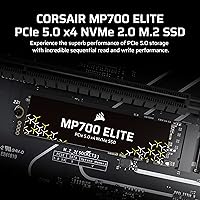
The Corsair MP700 Elite 1TB NVMe SSD arrived in late 2024 as one of the first consumer drives to fully embrace PCIe 5.0 x4 — a generation that doubles the bandwidth ceiling of the already-fast Gen4 standard. Corsair has been a reliable name in PC storage for years, and the Elite branding signals this is their top-tier offering, not a budget entry. That said, it is worth being upfront: if your motherboard predates platforms like Intel's 13th/14th Gen or AMD's Ryzen 7000 series, PCIe 5.0 support likely is not available to you, and this drive's full potential would go untapped. For the right build, the performance jump is real and measurable.

Features & Benefits

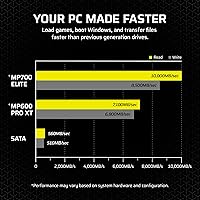
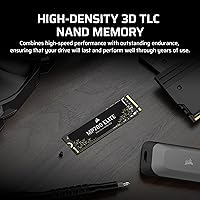
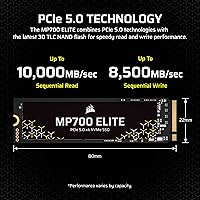
The MP700 Elite pushes sequential reads up to 10,000 MB/s and writes up to 8,500 MB/s — to put that in practical terms, transferring a 100GB 4K video project that might take 30+ seconds on a Gen3 drive can complete in a fraction of that time. The High-Density 3D TLC NAND inside is a meaningful choice over cheaper QLC alternatives: it handles sustained workloads better and degrades more gracefully under repeated writes. The 1,200 TBW endurance rating translates to well over a decade of typical use for most people. DirectStorage support is included, though keep in mind it requires a DirectX12 GPU with Shader Model 6.0, and game adoption is still growing.

Best For

This Gen5 NVMe drive is squarely aimed at builders on modern platforms — specifically Intel 13th/14th Gen or AMD Ryzen 7000/9000 series systems with a PCIe 5.0 M.2 slot. Gamers playing DirectStorage-compatible titles will appreciate the near-instant asset loading, while video editors and photographers regularly moving large RAW files or multi-gigabyte project folders will get the most from its sustained throughput. If you are upgrading from a Gen4 drive, the speed gap is wide enough to feel in daily use. However, if your board only supports PCIe 4.0 or older, you are paying a premium for speeds your system simply cannot deliver — a different drive would be the smarter call.

User Feedback

Early buyers have responded well — this high-speed SSD holds a 4.8-star average across more than 240 ratings, which is a strong early-life signal for a drive launched in late 2024. Most praise centers on straightforward installation, real-world speeds that match advertised figures in benchmarks, and stable thermals for a Gen5 drive. A few recurring caveats are worth noting: the drive ships without a heatsink, which matters at this performance tier since Gen5 controllers can run warm under sustained load — Corsair's SSD Toolbox software helps with monitoring, but some buyers felt a bundled cooler would have been appropriate at this price point. No significant reliability concerns have surfaced yet.

Pros

  • Sequential read speeds up to 10,000 MB/s cut large file transfer times dramatically compared to Gen4 drives.
  • High-Density 3D TLC NAND delivers better sustained write performance and longevity than QLC-based alternatives.
  • Rated for 1,200 TBW, giving most users well over a decade of reliable daily use.
  • DirectStorage compatibility positions the MP700 Elite well for titles that leverage direct GPU asset streaming.
  • Buyers consistently report hitting advertised speeds in real-world benchmarks, not just controlled lab conditions.
  • Standard M.2 2280 form factor makes installation straightforward — no adapters or special tooling required.
  • Corsair SSD Toolbox provides health monitoring and firmware management for ongoing visibility into drive condition.
  • Backward compatibility with PCIe 4.0 slots means the drive is physically usable across a wider range of systems.
  • Early buyer ratings are unusually strong for a recently launched drive, pointing to consistent build quality.

Cons

  • No heatsink is included in the box, a notable omission given how warm Gen5 controllers can run.
  • Requires a PCIe 5.0 M.2 slot to deliver full performance — many current systems still lack one.
  • At 1TB, heavy users with large game libraries or video archives may hit capacity limits sooner than expected.
  • Inserting it into a PCIe 4.0 slot drops speeds to Gen4 levels, making the premium hard to justify on older boards.
  • DirectStorage game adoption remains limited, so buyers banking on that feature alone may wait a while for full value.
  • DirectStorage also demands a DirectX12 GPU with Shader Model 6.0 — an extra compatibility hurdle not every setup clears.
  • Gen5 drives can throttle under sustained load without adequate case airflow or an aftermarket cooler.
  • The price premium over capable Gen4 alternatives is difficult to rationalize for everyday computing workloads.

Ratings

Our editorial AI analyzed verified global buyer feedback for the Corsair MP700 Elite 1TB NVMe SSD, actively filtering out incentivized reviews, duplicate submissions, and low-signal ratings to surface what real users actually experience. Scores across each category reflect a balanced synthesis of both the drive's genuine strengths and the friction points that surface in daily use. Nothing here is airbrushed — if buyers ran into issues, those patterns are reflected honestly in the numbers below.

Sequential Read Speed
94%
Buyers on compatible PCIe 5.0 platforms consistently report benchmark results that land at or very close to the advertised 10,000 MB/s ceiling — a level of spec honesty that earns real trust. In practice, loading a 50GB game installation or duplicating a large video project folder feels noticeably faster than anything Gen4 could deliver.
Reaching that headline number requires a specific and relatively modern platform setup — the right motherboard slot, the right chipset, and adequate airflow. Users who tested this drive on PCIe 4.0 systems saw reads cap around 7,000 MB/s, which is solid but not what they paid for.
Sequential Write Speed
91%
Write performance sits close behind reads at up to 8,500 MB/s, and reviewers doing sustained copy operations — exporting 4K timelines, backing up RAW photo libraries — found the drive held its rated speeds without the mid-transfer throttle that plagues many QLC-based competitors. The TLC NAND choice pays off noticeably here.
A small subset of users noticed modest write speed variation when comparing across repeated benchmark runs, suggesting mild thermal influence even in shorter bursts. This is common at the Gen5 tier, but it reinforces how important airflow and a heatsink become once workloads get heavy.
Real-World Performance
88%
Beyond benchmark scores, users report genuinely faster Windows boot times, snappier application launches, and noticeably quicker game-level transitions compared to their previous Gen4 drives. The improvement is not just a number on a chart — people who upgraded from mid-range Gen4 SSDs describe it as a tangible quality-of-life change in daily PC use.
For tasks like opening browser tabs, loading productivity apps, or casual game play, the gap over a well-tuned Gen4 drive narrows considerably. The MP700 Elite earns its performance reputation most clearly under sustained, large-file workloads — lighter users may find the real-world delta smaller than the spec sheet implies.
Thermal Management
61%
39%
Users who installed the drive in motherboards with built-in M.2 heatsink covers reported stable temperatures and consistent sustained speeds even during lengthy transfers. When thermal conditions are managed, the controller behaves predictably and does not throttle aggressively.
No heatsink is included in the package, and this is the most common complaint across buyer feedback. Gen5 controllers run meaningfully hotter than Gen4 equivalents, and users with open-air builds or minimal case airflow reported temperature spikes that caused performance dips under sustained load. For a premium-priced drive, the omission of even a basic thermal pad feels like a cost cut.
Endurance & Longevity
93%
The 1,200 TBW rating is one of the stronger endurance figures at the 1TB consumer tier, and combined with TLC NAND, it gives buyers a well-founded sense of long-term reliability. Running the numbers, a user writing 300GB per day — a heavy workload by any standard — would still take over ten years to approach that ceiling.
Because the drive is still relatively new to market, multi-year real-world endurance data is not yet available from the user community. The rated figures are credible and backed by Corsair's five-year warranty, but buyers wanting field-proven longevity data will need to wait for the drive to age in the wild.
Value for Money
69%
31%
For builders who have a PCIe 5.0 M.2 slot ready and use their storage hard — video editors, heavy gamers, frequent large-file movers — the performance delivered at this price point is reasonable within the Gen5 segment, especially given the TLC NAND and strong endurance rating.
The value proposition weakens quickly for anyone without a Gen5-capable platform. Competing Gen4 drives offer 70–80% of the practical day-to-day performance at a significantly lower price, which makes this drive a hard sell unless the buyer's system and workload genuinely justify the premium.
Compatibility & Installation
76%
24%
Physical installation is straightforward — the standard M.2 2280 form factor slots in cleanly on any supporting board, and buyers across skill levels report a smooth setup experience with no driver complexity or configuration headaches. The drive is detected correctly by Windows out of the box.
The PCIe 5.0 slot requirement catches a meaningful number of buyers off-guard. Several reviewers noted they only discovered post-purchase that their board lacked a Gen5 M.2 slot, forcing them to either return the drive or accept reduced Gen4 performance. Compatibility research before buying is non-negotiable here.
DirectStorage Support
73%
27%
For users playing on a DirectX12-capable GPU with Shader Model 6.0 support, the infrastructure is fully in place, and early DirectStorage-compatible titles show measurable improvements in asset streaming and level load times compared to drives without the feature.
DirectStorage-enabled games remain a small minority of the overall library as of late 2024, meaning most users will not experience this feature in any title they currently own. It is a forward-looking benefit — useful to have, but not yet a decisive purchase driver for the majority of gamers.
Random I/O Performance
84%
Random read and write speeds — the kind that matter when Windows is multitasking, loading game assets in non-sequential patterns, or handling database-like operations — are strong at the Gen5 tier. Users running demanding multitasking workloads note that system responsiveness holds up well even under concurrent read and write pressure.
Random IOPS figures at the 1TB Gen5 tier are not dramatically ahead of the best Gen4 drives in all real-world scenarios. Buyers who prioritize random performance for server-adjacent or virtualization workloads should cross-reference IOPS specs carefully rather than assuming sequential speed leadership translates directly.
Software & Tooling
83%
Corsair SSD Toolbox receives consistent positive mentions for its health monitoring, temperature readouts, and firmware update workflow. For a free companion utility, it covers the practical bases well, and buyers who have managed other brand SSDs note it feels more polished than several competing tools.
A handful of users reported minor UI quirks or initial detection delays with Toolbox on first setup, though none cited persistent software problems. Corsair's firmware update track record appears solid so far, but with a relatively young product, the full picture on long-term software support is still developing.
Build Quality
86%
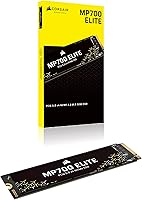
The bare PCB is clean and well-manufactured, with components sitting flush and no cosmetic defects reported across the reviewed units. Buyers handling the drive note it feels dense and purposeful for its tiny footprint, consistent with Corsair's standards on higher-tier products.
Without a bundled heatsink or thermal interface material, the drive is delivered in a fairly minimal state that puts the thermal burden entirely on the buyer's chassis and motherboard. At this price tier, some buyers expected at least a basic aluminum heat spreader as part of the package.
Packaging & Accessories
54%
46%
The retail packaging is clean and appropriately protective for a bare M.2 module, and the drive arrives in good condition. Corsair includes the essential documentation needed for warranty registration and model verification.
Beyond the drive itself, there is essentially nothing in the box — no heatsink, no thermal pad, no mounting screw. For a Gen5 drive where thermal management is a known consideration, the lack of any bundled cooling accessory is a genuine shortcoming that competitors at similar price points have begun to address.
Platform Versatility
66%
34%
Backward compatibility with PCIe 4.0 and 3.0 M.2 slots means the drive will function physically across a wide range of systems, which is useful for users who plan to upgrade their platform in the near future and want to buy the drive ahead of that transition.
The practical value of that backward compatibility is limited — running this drive on a Gen4 or Gen3 platform caps performance well below what the hardware can deliver, undermining the core reason for buying it in the first place. Platform lock-in to modern Gen5 boards is a real and meaningful constraint.

Suitable for:

The Corsair MP700 Elite 1TB NVMe SSD is purpose-built for enthusiast PC builders who have already invested in a modern platform — specifically Intel 13th or 14th Gen, or AMD Ryzen 7000 or 9000 series systems equipped with at least one PCIe 5.0 M.2 slot. If you regularly move large files — multi-gigabyte RAW photo exports, 4K video project folders, or game installs spanning dozens of gigabytes — the raw throughput at this tier translates into real time savings you will notice daily. Serious gamers chasing the fastest possible load times in DirectStorage-compatible titles will find a natural home here, provided they have a DirectX12 GPU with Shader Model 6.0 support. Content creators who treat storage as a production bottleneck, not just a place to park files, will appreciate both the sustained write speeds and the long-term endurance that TLC NAND delivers over cheaper alternatives. This is also a sensible choice for anyone future-proofing a high-end build who wants Gen5 headroom baked in from day one.
Not suitable for:

The Corsair MP700 Elite 1TB NVMe SSD is a poor fit for anyone whose motherboard does not include a PCIe 5.0 M.2 slot — and that covers a large portion of systems built before late 2022. Running it in a PCIe 4.0 slot is technically possible, but speeds cap at Gen4 levels while you pay a Gen5 premium, which is a difficult trade-off to defend. Budget-conscious builders who primarily browse the web, handle office work, or play less demanding games will not perceive any meaningful difference compared to a well-regarded Gen4 drive that costs considerably less. The drive also ships without a heatsink, which warrants real consideration for buyers planning to push it hard in poorly ventilated cases — thermal management falls entirely on the owner. Finally, if 1TB feels tight for your growing library of games and project files, it is worth pausing before committing, because storage needs have a way of outpacing expectations faster than most people anticipate.
Specifications

  • Capacity: The drive provides 1TB of storage, suited for use as a primary OS and game drive on a modern desktop build.
  • Interface: It connects via a PCIe 5.0 x4 NVMe interface, the current highest-bandwidth M.2 standard available for consumer desktops.
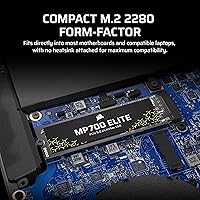
  • Form Factor: The drive uses the M.2 2280 standard, measuring 80mm in length — the most universally supported M.2 size across modern desktop motherboards.
  • Sequential Read: Peak sequential read speed reaches up to 10,000 MB/s under optimal conditions at the 1TB capacity.
  • Sequential Write: Peak sequential write speed reaches up to 8,500 MB/s, placing it among the fastest write-capable consumer drives at the 1TB tier.
  • NAND Type: High-Density 3D TLC (Triple-Level Cell) NAND is used, providing better sustained write endurance and consistency than QLC-based alternatives.
  • Endurance: The drive carries a 1,200 TBW (Terabytes Written) endurance rating, offering well over a decade of headroom for most typical users.
  • DirectStorage: Microsoft DirectStorage is supported for direct GPU asset streaming in compatible games, requiring a DirectX12 GPU with Shader Model 6.0 and Windows 11.
  • Backward Compat: The drive is physically compatible with PCIe 4.0 and PCIe 3.0 M.2 slots, though performance will be capped at the host slot's maximum supported bandwidth.
  • Dimensions: The drive measures 3.15 x 0.87 x 0.09 inches, consistent with a standard heatsink-free M.2 2280 module.
  • Weight: At 0.301 ounces (approximately 8.5g), the bare drive is extremely lightweight and places negligible mechanical load on an M.2 slot.
  • Heatsink: No heatsink is included in the retail package; users with high sustained workloads or limited case airflow are advised to add a compatible third-party M.2 cooler.
  • Color: The drive features a black PCB finish with no additional aesthetic shroud or lighting.
  • Model Number: The official model number is CSSD-F1000GBMP700ENH, useful for compatibility verification, warranty registration, and firmware lookup.
  • Platform Support: Full Gen5 performance requires a desktop motherboard with a PCIe 5.0 x4 M.2 slot, found on platforms such as Intel Z690/Z790 and AMD X670E/B650E.

Related Reviews
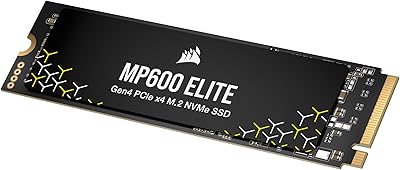
Corsair MP600 Elite 1TB NVMe SSD
82%
93%
Sequential Read Speed
87%
Sequential Write Speed
84%
Real-World Performance
67%
Thermal Management
88%
Value for Money
More
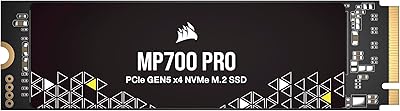
Corsair MP700 PRO 1TB NVMe SSD
76%
94%
Raw Read Performance
88%
Write Performance
61%
Thermal Management
69%
Value for Money
91%
Installation & Setup
More
Corsair MP700 Elite 2TB PCIe 5.0 NVMe M.2 SSD
89%
94%
Performance
93%
Speed & Load Times
90%
Thermal Management
88%
Build Quality
85%
Ease of Installation
More
Corsair MP600 Elite 4TB M.2 PCIe Gen4 NVMe SSD
89%
94%
Performance
93%
Speed for Gaming
96%
PS5 Compatibility
89%
Thermals (Cooling Performance)
91%
Durability
More
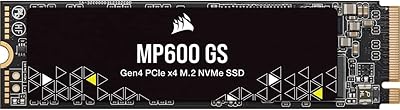
Corsair MP600 GS 1TB PCIe Gen4 NVMe M.2 SSD
87%
94%
Performance
91%
Speed (Read/Write)
88%
Installation & Setup
89%
Compatibility
72%
Thermal Management
More
Corsair MP600 Elite 2TB NVMe SSD
87%
93%
Sequential Read Performance
88%
Sequential Write Performance
96%
PS5 Compatibility & Integration
84%
Thermal Management & Heatsink
91%
Installation Experience
More
RONGSHU RS001 1TB NVMe SSD
75%
91%
Value for Money
88%
Read/Write Speed
93%
PS5 Compatibility
53%
Brand Trustworthiness
71%
Thermal Management
More
TEAMGROUP MP44L 1TB NVMe SSD
89%
94%
Performance
96%
Speed (Read/Write)
85%
Heat Management
91%
Installation Ease
92%
Compatibility
More
GiGimundo G7400 1TB NVMe SSD
86%
92%
Performance
94%
Speed (Read/Write)
84%
Thermal Management
88%
Compatibility with Gaming PCs
72%
Compatibility with PS5
More
Crucial P5 1TB NVMe SSD
84%
91%
Read Performance
88%
Write Performance
86%
Random I/O Responsiveness
71%
Thermal Management
94%
Installation Ease
More

FAQ

The clearest way is to check your motherboard manual or the manufacturer's product page and look specifically for an M.2 slot labeled PCIe 5.0 x4. Boards based on Intel Z690, Z790, or AMD X670E and B650E chipsets are the most common ones to include it. If your board only lists PCIe 4.0 M.2 support, the drive will still install but will not reach its rated speeds.

No, it does not. This matters more than people often realize at the Gen5 tier, since these controllers run noticeably warmer than Gen4 drives under load. If your motherboard includes a built-in M.2 heatsink cover, use it. If not, a low-profile aftermarket M.2 cooler is a worthwhile addition, particularly for sustained workloads like large file transfers or game installations.

It will physically install and function without any compatibility issues. However, speeds will be limited to whatever a PCIe 4.0 x4 slot supports — roughly 7,000 MB/s sequential read — rather than the full 10,000 MB/s the drive is rated for. It works, but you are effectively paying for performance your system cannot deliver.

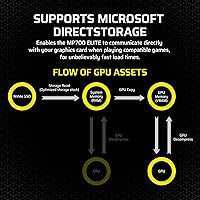
DirectStorage lets supported games stream assets straight from the SSD into GPU memory, reducing CPU involvement and cutting level load times in compatible titles. The real-world impact varies by game, and adoption across the broader game library is still limited as of 2024. Think of it as a forward-looking bonus rather than an immediate headline feature — the drive earns its keep on raw speed alone.

For moderate gaming use, 1TB is workable, but it fills faster than most people anticipate. Several modern open-world or multiplayer titles now exceed 100GB each, and keeping five or six installed at once can leave you managing space regularly. If you also store video projects, RAW photos, or creative assets on the same drive, you may want to plan for secondary storage alongside this one.

TLC stores three bits per cell versus four in QLC, which means it handles repeated write cycles more gracefully and maintains consistent speeds better when the write cache is saturated. QLC drives can throttle sharply during sustained large writes, which is noticeable when copying big files or during long game installations. For anyone writing data heavily and regularly, TLC is the more predictable choice.

The M.2 2280 connector is physically present in some laptops, but almost no current consumer laptops include PCIe 5.0 x4 M.2 support. Beyond the interface mismatch, Gen5 drives produce more heat than typical laptop SSDs, and most laptops lack the cooling headroom to manage it well. This drive is built and rated for desktop use.

Corsair provides a free utility called Corsair SSD Toolbox that covers health status, temperature readings, remaining endurance, and firmware updates. It is straightforward to use and handles the essentials well. Keeping the firmware current is particularly worthwhile on newer Gen5 drives, as early firmware updates often address thermal behavior and stability improvements.

Corsair covers the MP700 Elite with a five-year limited warranty, which is standard for a drive in this performance tier. Registering the product on Corsair's website is recommended as it streamlines any future support or replacement process. Given the 1,200 TBW endurance rating and TLC build quality, the likelihood of hitting warranty issues under normal use is low.

In benchmarks, the gap is dramatic — nearly double the sequential read bandwidth of the fastest Gen4 drives. In day-to-day use, the gains show up most clearly in large sequential transfers: copying a 50GB video project or installing a large game is measurably faster. For general Windows responsiveness and loading smaller applications, the difference over a good Gen4 drive is less pronounced, since those tasks are often bottlenecked elsewhere.