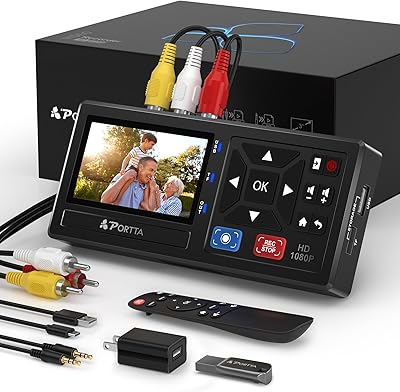
ClearClick Video to Digital Converter 2.0 Mini


Overview
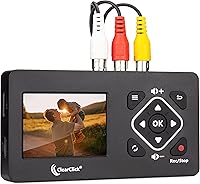
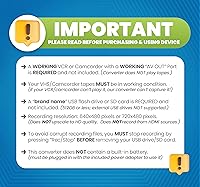
The ClearClick Video to Digital Converter 2.0 Mini is a compact standalone device that does one thing well: it takes analog video from VCRs, Hi8 camcorders, DVD players, and even retro gaming systems and saves it as MP4 files — no computer involved. This is the second generation, which brings genuine improvements over the original, including better audio/video sync and a handy auto-stop function. One important thing to be clear about upfront: a working VCR or camcorder is required — this analog-to-digital converter captures the video signal, but it does not play tapes on its own. Output is standard definition only, which is exactly what these old tapes recorded anyway. ClearClick is a USA-based company offering a one-year warranty and accessible tech support.
Features & Benefits
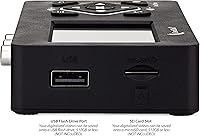
The real appeal of this analog-to-digital converter is how little it asks of you. Plug in the RCA cables from your VCR or camcorder, insert a USB flash drive or microSD card (up to 512 GB, sold separately), hit record, and check the signal on the 2.4-inch LCD screen. The built-in speaker lets you confirm audio is coming through before a full tape runs. One genuinely useful addition in this generation is the auto-stop timer — set it for 60, 90, 120, or 150 minutes and walk away without worrying about wasted storage. You can also pause and resume mid-tape without creating a new file, which helps when skipping blank stretches. Output lands in MP4 format, so files open on virtually any device without conversion.
Best For
This tape digitizer is a natural fit for families sitting on a box of old VHS tapes or Hi8 cassettes — especially those who want nothing to do with software installations or complicated settings. It also works well for seniors and other non-technical users who need to just plug in and press record. Retro gaming fans who run their older consoles over RCA cables will find it a handy capture option too. Where it is less suited is for anyone running a high-volume digitization project with dozens of tapes to get through quickly. For the typical household with a meaningful but manageable collection, the ClearClick Mini capture device lands in a practical sweet spot between budget dongles and professional rigs.
User Feedback
With a 4.4-star average across more than 230 ratings, buyer sentiment skews positive, and the reasons are fairly consistent. The ease of setup comes up repeatedly — connecting cables and pressing record takes minutes, and most people are done before they expect to be. Video quality gets reasonable marks: standard-definition footage suited for home movies, not something you would mistake for a modern recording. The most common source of frustration is discovering that a working VCR or camcorder must be supplied separately — this tape digitizer captures a video signal but cannot play tapes on its own. A handful of reviewers have noted occasional storage card compatibility issues. Buyers who go in with realistic expectations tend to come away satisfied.
Pros
- No computer required — just plug into your VCR or camcorder and start recording directly to a flash drive or microSD card.
- The auto-stop timer (up to 150 minutes) means you can start a tape and walk away without worrying about runaway file sizes.
- MP4 output works natively on smartphones, smart TVs, and most editing software without any conversion step.
- Pause and resume recording mid-tape without creating separate files, which is genuinely useful for skipping blank sections.
- The small LCD preview screen and built-in speaker let you confirm audio and video are coming through before committing to a full recording.
- Compact enough to sit comfortably on a shelf next to a VCR without taking over your workspace.
- Second-generation improvements, especially better audio/video sync, address common complaints from earlier capture devices in this category.
- Backed by a one-year warranty and US-based tech support, which adds real peace of mind for less technical users.
- Standard-definition output is entirely appropriate for the source material — old tapes were never HD to begin with.
- A 4.4-star average across hundreds of real buyer reviews reflects consistently solid satisfaction for the intended use case.
Cons
- A working VCR or camcorder must be supplied separately — this device cannot play tapes on its own, which catches many buyers off guard.
- USB flash drive or microSD card is not included, adding a small but necessary extra purchase before you can start.
- Recording happens in real time, so digitizing a two-hour tape takes two hours — there is no way to speed up the process.
- Storage media compatibility can occasionally be finicky; some users report issues with certain cards or drives not being recognized reliably.
- Standard-definition output is the ceiling — there is no upscaling or image enhancement, so footage will look exactly as old as it is.
- Not practical for anyone with a large tape archive; the one-tape-at-a-time workflow adds up quickly at scale.
- The small 2.4-inch preview screen is functional but not large enough for critically evaluating video quality during capture.
- No built-in editing, trimming, or chapter-marking features — what you capture is exactly what you get as a raw file.
Ratings
Our AI-generated scores for the ClearClick Video to Digital Converter 2.0 Mini were produced by analyzing verified buyer reviews from multiple global markets, with spam, bot-submitted, and incentivized feedback actively filtered out before scoring. Each category reflects the honest distribution of real user sentiment — strengths and frustrations weighted equally — so the numbers you see here tell the full story, not just the flattering parts.
Ease of Setup
Video Output Quality
No-PC Workflow
Audio/Video Sync
Auto-Stop Feature
Storage Compatibility
Build Quality
LCD Preview Screen
File Compatibility
Value for Money
Warranty & Support
Portability
Pause & Resume Function
Suitable for:
The ClearClick Video to Digital Converter 2.0 Mini was clearly built with a specific type of person in mind: someone who has a box of old tapes sitting in a closet and wants to preserve those memories without enrolling in a tech course. It is an ideal fit for families who want to digitize VHS home movies or Hi8 camcorder footage and simply do not want to deal with software, drivers, or tying up a laptop for hours. Seniors and less tech-savvy users will particularly appreciate the straightforward plug-and-record approach — connect the RCA cables from your VCR or camcorder, insert a flash drive, and press record. Retro gaming fans who run older consoles over composite cables will also find this analog-to-digital converter a capable and hassle-free capture option. If your goal is to get a moderate collection of tapes into a format your phone or TV can play, this device hits the mark without overcomplicating the process.
Not suitable for:
There are a few situations where the ClearClick Video to Digital Converter 2.0 Mini is simply not the right tool, and being clear about them upfront will save a lot of frustration. The most important thing to understand before buying is that this tape digitizer captures a video signal — it does not play tapes on its own. A fully functioning VCR or camcorder is a hard requirement, and buyers who overlook this detail tend to be disappointed. The output is also standard definition only, so anyone hoping to upscale old footage to HD or feed a modern high-definition source through it will find it falls short. If you are running a large-scale digitization project — dozens or hundreds of tapes — the real-time recording process will feel slow, and a professional batch-capture setup would serve you better. Finally, buyers who want editing tools, chapter markers, or any post-processing built into the device will need to look elsewhere; this is purely a capture device.
Specifications
- Dimensions: The unit measures 1 x 4.6 x 2.8 inches, making it compact enough to sit comfortably beside a VCR or camcorder on a shelf.
- Weight: At 9.1 ounces, this analog-to-digital converter is light enough to move around easily between setups.
- Recording Resolution: Captures video at standard definition resolutions of 720x480 or 640x480 pixels, consistent with the native quality of VHS and Hi8 source material.
- Output Format: All recordings are saved as MP4 files, a widely compatible format that plays natively on smartphones, tablets, smart TVs, and most video editing applications.
- Storage Media: Records directly to a USB flash drive or microSD card of up to 512 GB capacity; storage media is not included with the device.
- Preview Screen: A built-in 2.4-inch LCD screen allows users to monitor the incoming video signal in real time during capture.
- Audio Monitor: A built-in speaker lets users verify that audio is recording correctly before committing to a full-length tape capture session.
- Auto-Stop Timer: Includes a configurable auto-stop function with preset durations of 60, 90, 120, or 150 minutes to prevent over-recording and unnecessary storage use.
- Pause & Resume: Users can pause and resume recording mid-session without creating a separate file, which is useful for skipping blank or unwanted sections of a tape.
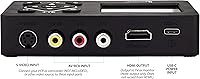
- Connector Type: Connects to source devices via standard RCA composite cables (audio left, audio right, and video), which are the standard output on VCRs, camcorders, and older gaming consoles.
- Compatible Sources: Works with VCRs, Hi8 and standard camcorders, DVD players, DVRs, and retro gaming systems that output via RCA composite connections.
- PC Requirement: No computer, software installation, or driver setup is required at any stage of the recording process.
- Generation: This is the second-generation model (2.0 Mini Edition), featuring improved audio/video sync protection and better overall recording quality compared to the original version.
- Warranty: Covered by a one-year manufacturer warranty backed by ClearClick, a USA-based company with in-house customer support.
- Tech Support: Customer support is provided directly by ClearClick in the United States, accessible for setup assistance and troubleshooting throughout the warranty period.
Related Reviews
UNISHEEN UR230A Video Capture Converter
MYPIN VG0109 Video to Digital Converter
DigitPro VHS to Digital Converter 3.0
READYXIO 3rd Gen VHS to Digital Converter
SoundBeast Video Capture Box 2.0
VIDBOX VCP1M
Zard zoop Mini ATSC Digital Converter Box
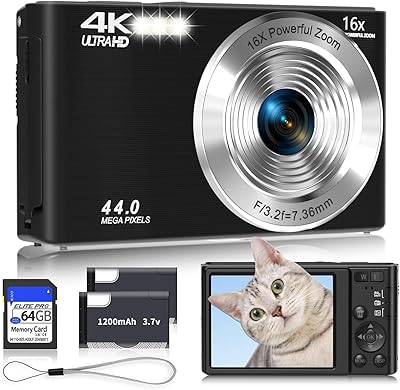
SMARTKLIK DC06 Kids Digital Camera
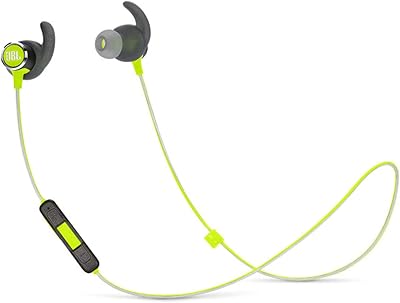
JBL Reflect Mini 2.0 Wireless Sport Headphones