



Overview

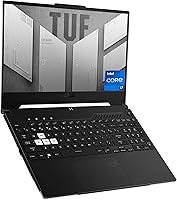
The ASUS TUF Dash 15 2022 Gaming Laptop sits in a tricky spot in the market — thin enough to carry comfortably between classes, yet packing a dedicated GPU that most ultrabooks wouldn't dare include. At just 0.81 inches thick, the chassis manages a slim, understated profile — no RGB-drenched panels, no aggressive venting arrays screaming for attention. The off-black finish actually helps it blend into a boardroom or library setting, which isn't something you can say about most gaming laptops at this price. What really sets it apart in the mid-range tier is the inclusion of DDR5 memory and a PCIe NVMe SSD, both relatively uncommon in 2022 at this segment. It sits above the Acer Nitro 5 in build quality, while staying well below premium territory.

Features & Benefits

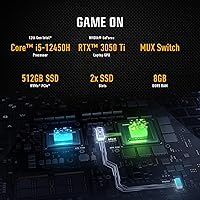
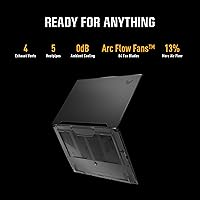
The standout feature here is the MUX switch, which lets the GPU communicate directly with the display, cutting out the integrated graphics middleman entirely. In practice, this translates to noticeably higher frame rates in GPU-bound titles — sometimes 10 to 15 percent better — without any driver gymnastics. The RTX 3050 Ti runs at a respectable 75W total graphics power with Dynamic Boost headroom, which is meaningful in a chassis this slim. The i5-12450H hybrid core design handles background tasks on its efficiency cores while the performance cores focus on the game, helping with multitasking during streams or Discord calls. The 144Hz IPS-type panel is crisp and responsive for esports titles, the Thunderbolt 4 port opens the door to external GPU docks, and Wi-Fi 6 keeps latency low on congested networks.

Best For

This slim gaming machine is a natural fit for college students who need one laptop that can handle coursework during the day and a full gaming session at night, without drawing stares in class. It handles popular esports titles and mid-tier AAA games at 1080p without breaking a sweat, though you shouldn't expect it to push high settings in the most demanding releases. The Thunderbolt 4 port is a genuine draw for creative students connecting external drives or displays for video editing work. Anyone prioritizing a slim, carry-friendly build over raw thermal performance will appreciate the trade-off. It's also a solid entry point for buyers who want next-gen memory and storage without stretching into upper-tier pricing.

User Feedback

Buyers consistently praise the build quality for this price range — the chassis feels solid rather than plasticky, and the display draws particular compliments for its smoothness in everyday tasks. Fans stay surprisingly quiet under light loads, which matters if you're in a shared space. That said, the 8GB of RAM is the most common complaint, and it's a valid one — modern titles are increasingly hungry, and switching between a game and a browser with multiple tabs open can expose the ceiling quickly. Upgrading is possible, but it takes effort. Under sustained gaming sessions, some users report thermal throttling as the slim chassis struggles to shed heat consistently. Battery life is another reality check: real gaming conditions drop well below the advertised five-hour figure, so keep the charger close.

Pros

  • The MUX switch delivers a real, measurable frame rate improvement that most competing laptops at this price simply omit.
  • A 144Hz IPS-type display with a 3ms response time keeps esports and action titles looking smooth without visible tearing.
  • The off-black, low-profile chassis passes for a work or school machine — no aggressive gamer styling to raise eyebrows.
  • Thunderbolt 4 support adds genuine versatility for external GPU docks, high-speed storage, and multi-monitor setups.
  • DDR5 memory and a PCIe NVMe SSD are forward-thinking inclusions that extend this machine's practical shelf life.
  • Wi-Fi 6 keeps online gaming latency low and large download speeds consistent on compatible routers.
  • Build quality feels solid and well-constructed for a mid-range machine, with minimal chassis flex under daily use.
  • The 12th Gen hybrid CPU juggles background tasks and gaming workloads without obvious performance compromises.
  • Fan noise stays impressively subdued under light loads, making this ASUS gaming laptop workable in quiet shared spaces.
  • The fingerprint reader is a polished, practical touch that makes unlocking quick and password-free login reliable.

Cons

  • The 8GB RAM ceiling is a genuine bottleneck — modern titles and multitasking push it to its limit faster than expected.
  • Real-world gaming battery life falls well short of the advertised five hours; keeping the charger handy is non-optional.
  • Sustained heavy workloads can trigger CPU throttling as the slim chassis runs out of thermal headroom over time.
  • The 512GB SSD fills up quickly with modern game installs, and expanding storage is not a simple or casual process.
  • The RTX 3050 Ti hits a hard wall on demanding AAA titles at high or ultra settings — medium at 1080p is the realistic ceiling.
  • Some verified buyers have flagged early driver inconsistencies that required manual updates before performance stabilized.
  • At 7.83 pounds, this slim gaming machine is heavier than its slender profile implies and adds noticeable weight to a daily bag.
  • The port selection is tight — two USB 3.0 ports and one Thunderbolt 4 can feel restrictive in a multi-peripheral desk setup.
  • The display brightness and color accuracy are not tuned for serious photo or video editing, limiting creative professional use.
  • There is no optical drive, which most buyers expect but should confirm before purchasing if legacy media access matters.

Ratings

The ASUS TUF Dash 15 2022 Gaming Laptop earned the scores below from our AI rating engine, which analyzed verified purchase reviews from buyers across multiple global markets — actively filtering out incentivized, bot-generated, and duplicate submissions. The results reflect the full picture: from the features that genuinely impressed buyers in daily use to the pain points they flagged after weeks of real-world ownership. Both strengths and limitations are represented transparently, so you have an honest benchmark before committing.

Gaming Performance
74%
26%
The RTX 3050 Ti with Dynamic Boost running at 75W delivers smooth, playable frame rates in esports titles and mid-range AAA games at 1080p. The hardware MUX switch adds a tangible boost by eliminating the integrated graphics bottleneck — most users report noticeably higher frame rates without any hardware change.
Demanding titles like Cyberpunk 2077 or Elden Ring at high settings will expose the GPU ceiling quickly, and sustained workloads can push the chip toward its thermal limits inside this slim chassis. Players expecting ultra-settings performance at this price tier will come away disappointed.
Display Quality
82%
18%
The 144Hz refresh rate at 3ms response time is noticeably smooth for fast-paced games and everyday scrolling alike, and buyers coming from 60Hz displays consistently remark on how much more fluid everything feels. The IPS-type panel produces solid viewing angles and decent color reproduction for casual content consumption.
For anyone doing color-sensitive photo or video work, the panel brightness ceiling and color gamut coverage fall short of what dedicated creative displays offer. A number of buyers noted the screen can look slightly washed out under bright ambient lighting, limiting practical usability outdoors.
Build Quality
83%
The chassis feels solid and well-assembled for a mid-range gaming laptop, with minimal flex when pressing down on the keyboard deck or twisting the lid open. Buyers frequently note that the machine feels more expensive than its price suggests — a meaningful compliment in a segment prone to hollow-feeling plastics.
The hinge is functional but does not feel as premium as the rest of the build, with a few users noting some play developing after extended daily use. The bottom panel, though solid enough, picks up fingerprints and smudges that show against the matte finish more than expected.
Thermal Management
61%
39%
Under light to moderate workloads, the cooling system does a reasonable job keeping things quiet and manageable, with surface temperatures staying comfortable during everyday productivity tasks. Users who mostly game in shorter bursts report no significant thermal concerns in practice.
Extended gaming sessions are where the slim chassis shows its limits — CPU clock speeds can throttle back noticeably after 30 to 45 minutes of sustained full-load gaming. There is simply less thermal mass here than in bulkier competing designs, and that physical reality becomes apparent under pressure.
Battery Life
47%
53%
For light productivity work — note-taking, web browsing, video streaming — this ASUS gaming laptop can stretch to three or four hours unplugged, which is workable during shorter class sessions or a half-day of desk work. Performance on AC power is immediate and consistent once plugged in.
Active gaming battery life consistently disappoints, with most users reporting 90 minutes or less before needing to recharge. The gap between the advertised five-hour figure and real-world gaming runtime is wide enough that buyers relying on all-day untethered use will find this machine impractical without reliable outlet access.
RAM & Memory
43%
57%
The DDR5 4800MHz memory standard is a forward-looking choice that offers higher bandwidth than the DDR4 found in most competitors at this price, theoretically positioning the machine better for the medium-term future. For lighter gaming sessions in less RAM-hungry titles, the 8GB configuration runs without obvious hitching.
Eight gigabytes is genuinely insufficient for the way most gamers actually use their machines in 2022 — modern AAA titles can use 12GB or more on their own, and leaving a browser or communication app open alongside a game compounds the problem fast. This is the most frequently raised complaint in verified buyer reviews, and it is hard to argue against.
Portability & Design
79%
21%
At 0.81 inches thin, this slim gaming machine stands out in a class of laptops that tend toward chunky, ventilation-heavy builds. The off-black finish looks professional and understated enough to carry into a workplace or classroom without drawing the kind of attention a full-on gaming aesthetic would attract.
The 7.83-pound weight undercuts the portability case somewhat — it is slimmer than most, but not lighter, and carrying it alongside textbooks or work gear adds up noticeably over a long day. Buyers expecting something that feels as light as it looks will need to adjust their expectations.
Connectivity
84%
Thunderbolt 4 is the headline here — it opens the door to external GPU docks, 4K displays, and high-speed NVMe enclosures in a single port, which is a genuinely future-proof addition at this price point. Wi-Fi 6 performs reliably for online gaming and large patch downloads on compatible routers.
The remaining port selection is modest — two USB 3.0 Type-A ports alongside Thunderbolt 4 feels tight for users running a full desk setup with multiple peripherals. Anyone who regularly needs additional USB connections or a wired Ethernet port will likely need to budget for a hub or dock.
Storage
67%
33%
The PCIe NVMe M.2 SSD delivers fast read and write speeds that make Windows boot times and game load screens noticeably quicker than older SATA-based drives. At this price tier, PCIe NVMe storage is not a guaranteed inclusion, so its presence is a practical win for buyers who notice the difference.
Five hundred twelve gigabytes disappears quickly in a gaming context — two or three modern AAA titles can comfortably fill half the drive, and the OS installation claims a meaningful chunk before you install anything. There is no secondary drive bay, meaning expansion requires either replacing the existing SSD or relying on external storage.
Value for Money
71%
29%
The combination of a hardware MUX switch, DDR5 memory, Thunderbolt 4, and Wi-Fi 6 at this price tier is genuinely competitive — each of those features would cost meaningfully more on a premium-branded alternative. For buyers whose gaming habits align with what the RTX 3050 Ti can realistically deliver, this machine represents solid per-dollar value.
The 8GB RAM limitation dents the overall value proposition because many buyers will face an upgrade cost shortly after purchase to keep up with modern gaming demands. Factor in the expense of a RAM upgrade and potentially external storage, and the apparent up-front savings narrow faster than the spec sheet implies.
Keyboard & Trackpad
76%
24%
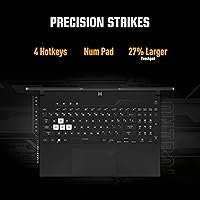
The keyboard layout is comfortable for extended typing sessions, with adequate key travel for a laptop this slim, and the backlighting makes late-night use practical without eye strain. Most buyers coming from a productivity background find it genuinely usable for both coursework and gaming without compromise.
The trackpad is functional but unremarkable — precision is adequate for daily navigation but falls behind the glass trackpads found on premium thin-and-light alternatives at similar prices. Students who rely on the trackpad throughout class sessions will notice the quality gap compared to dedicated productivity-first laptops.
Software Experience
68%
32%
ASUS Armoury Crate gives users straightforward control over fan profiles and the MUX switch without requiring third-party tools, and the pre-installed Windows 11 Home setup is relatively clean compared to manufacturers that bundle excessive trial software. The fingerprint reader integrates reliably with Windows Hello, which buyers consistently flag as a small but appreciated convenience.
A notable subset of buyers reported early driver instability — particularly around GPU and audio drivers — that required manual downloads and reinstalls before the laptop ran cleanly out of the box. Armoury Crate itself has drawn user criticism for background resource consumption and update prompts that interrupt active gaming sessions.
Noise Levels
77%
23%
During productivity tasks and light browsing, the fans stay impressively quiet — quiet enough that using this laptop in a library or shared workspace is genuinely practical without distraction risk. Buyers who split daily use between work and gaming consistently highlight this as a more pleasant experience than they expected.
Under gaming load, the fans spin up to a steady, audible level that is noticeable in quiet rooms, though most users describe it as an even hum rather than an erratic or high-pitched whine. Occasional coil whine has been flagged in a minority of longer-term reviews, though it does not appear to be a consistent or widespread issue.
CPU Performance
78%
22%
The i5-12450H hybrid core architecture handles everyday multitasking efficiently — streaming, browsing with multiple tabs, and running Discord alongside a game all operate without obvious stutter. The performance cores deliver strong single-thread response for gaming scenarios, while efficiency cores absorb background load without competing for resources.
For users planning CPU-intensive creative work like video encoding or 3D rendering alongside gaming, the i5-12450H shows its mid-range limits compared to higher-tier H-series chips in the same generation. Running both CPU and GPU under heavy simultaneous load also compounds the chassis thermal constraints, increasing the likelihood of clock speed reduction.
Upgrade Potential
38%
62%
The M.2 NVMe slot is accessible for storage upgrades, and swapping in a larger SSD is a reasonable option for buyers who find 512GB limiting — it is the one upgrade path that does not require extensive disassembly experience. A larger drive meaningfully extends the machine's practical lifespan at a modest additional cost.
RAM upgrades require full chassis disassembly, which voids the warranty and carries a real risk of damage for anyone not experienced with laptop internals. The slim design leaves no room for additional cooling solutions or drive bays, making the overall upgrade path significantly more restricted than thicker competitors available at the same price.

Suitable for:

The ASUS TUF Dash 15 2022 Gaming Laptop is a strong match for college students who need one machine that can handle coursework during the day and a gaming session at night, without looking out of place in a lecture hall or library. Its slim chassis and restrained off-black styling make it genuinely dual-purpose in a way that louder, more aggressive gaming laptops simply aren't. Students and young professionals who game casually to moderately — think esports titles, Minecraft, or mid-settings AAA releases at 1080p — will find the RTX 3050 Ti hits a comfortable performance sweet spot without overspending. The MUX switch is a particularly smart inclusion at this price tier, delivering a real, tangible frame rate boost that buyers would normally expect from a pricier machine. Those who also need Thunderbolt 4 for creative work — driving an external high-resolution display or connecting a fast NVMe dock for video editing — will appreciate that this laptop doesn't force a choice between portability and connectivity. Buyers who want forward-looking specs like DDR5 memory and PCIe NVMe storage but can't justify stepping up to premium pricing will find this a sensible, well-equipped middle ground.

Not suitable for:

The ASUS TUF Dash 15 2022 Gaming Laptop is a harder sell for anyone planning to push the latest GPU-demanding releases on high or ultra settings, since the RTX 3050 Ti at 75W has real performance ceilings that will show quickly in titles like Cyberpunk 2077 or Microsoft Flight Simulator. Power users who routinely run several heavy applications at once — video rendering alongside a game with a browser full of tabs — will bump into the 8GB RAM limit faster than they'd expect, and expanding it requires more effort than simply swapping a module on most laptops. Anyone who games primarily on battery power should look elsewhere, as real-world gaming runtime falls noticeably short of the five hours advertised, and sustained sessions genuinely require the charger. Users who need a desktop-replacement machine capable of pushing thermals hard for hours at a stretch may find the slim chassis works against them, with throttling becoming a factor under prolonged, intensive workloads. Shoppers who routinely install large game libraries should also account for the fact that 512GB disappears quickly with modern titles, and adding storage is not a simple or casual upgrade on this machine.

Specifications

  • Processor: Powered by the Intel Core i5-12450H with 8 cores (4 performance, 4 efficiency) and a boost clock up to 4.4GHz.
  • Graphics: Equipped with an NVIDIA GeForce RTX 3050 Ti with 4GB GDDR6 VRAM, operating at up to 75W total graphics power with Dynamic Boost.
  • Display: Features a 15.6″ FHD (1920x1080) IPS-type panel with a 144Hz refresh rate and a 3ms response time.
  • RAM: Comes configured with 8GB of DDR5 memory running at 4800MHz.
  • Storage: Includes a 512GB PCIe NVMe M.2 SSD as the sole internal storage drive.
  • Operating System: Ships with Windows 11 Home pre-installed from the factory.
  • MUX Switch: Includes a hardware MUX switch that allows the dedicated GPU to output directly to the display, bypassing the integrated graphics processor.
  • Connectivity: Offers one Thunderbolt 4 port, two USB 3.0 Type-A ports, Wi-Fi 6 (802.11ax), and Bluetooth support.
  • Battery: Runs on a built-in lithium-ion battery with an advertised life of approximately 5 hours under typical mixed-use conditions.
  • Dimensions: Measures 13.94 x 9.88 x 0.81 inches, placing it among the slimmer chassis options available for a laptop with a dedicated GPU.
  • Weight: Weighs 7.83 pounds, which is heavier than its slim profile might suggest.
  • Keyboard: Equipped with a backlit keyboard designed for use in low-light environments.
  • Security: Includes a built-in fingerprint reader compatible with Windows Hello biometric login.
  • Optical Drive: Does not include an optical drive; all software installation and media access requires digital or external methods.
  • Color: Available in Off Black, a muted dark finish that avoids the aggressive aesthetic typical of gaming-focused laptops.

Related Reviews
ASUS TUF Dash 15 2022 Gaming Laptop
75%
88%
Gaming Performance
91%
MUX Switch Advantage
41%
Battery Life
84%
Build Quality & Durability
86%
Portability
More
ASUS TUF A16 16-inch Gaming Laptop
74%
83%
Gaming Performance
81%
Build Quality
77%
Thermal Management
72%
Display Quality
88%
RAM & Multitasking
More
ASUS TUF FX505DT 15.6″ Gaming Laptop
70%
78%
Gaming Performance
84%
Display Quality
83%
Build Quality
76%
Value for Money
81%
Keyboard & Trackpad
More
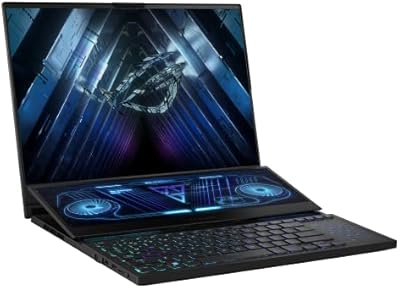
ASUS ROG Zephyrus Duo 16 Gaming Laptop
74%
94%
Display Quality
91%
Raw Performance
76%
Dual-Screen Workflow
78%
Thermal Management
58%
Fan Noise
More
ASUS TUF A16 Gaming Laptop
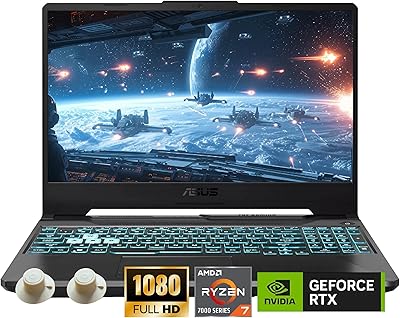
74%
84%
Gaming Performance
71%
Display Quality
83%
Build Quality
58%
Thermal Management
54%
Fan & Noise Level
More
ASUS TUF Gaming A17 2023 Gaming Laptop
72%
88%
Gaming Performance
91%
CPU Performance
74%
Thermal Management
71%
Display Quality
83%
Build Quality
More
ASUS TUF A15 Gaming Laptop, AMD Ryzen 7 7435HS, 64GB RAM, 2TB SSD
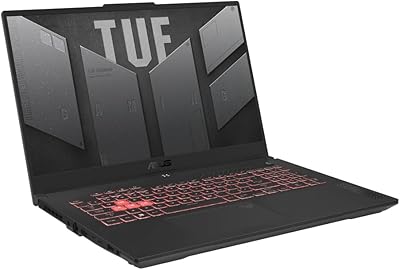
85%
92%
Gaming Performance
88%
Multitasking Capability
85%
Cooling System Efficiency
83%
Build Quality
70%
Portability
More
ASUS TUF F15 Gaming Laptop
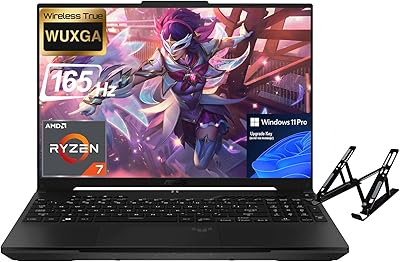
71%
74%
Gaming Performance
81%
Display Quality
86%
Build Quality & Durability
67%
Processor Performance
58%
RAM & Multitasking
More
ASUS TUF Dash 15 2021 Gaming Laptop
71%
74%
Gaming Performance
91%
Portability
83%
Display Quality
58%
Thermal Management
82%
Build Quality
More
ASUS TUF A16 Gaming Laptop, Ryzen 7 7735HS, 64GB RAM, 2TB SSD, 16″ 165Hz
84%
94%
Performance
90%
Display Quality
75%
Battery Life
65%
Portability/Weight
88%
Build Quality
More

FAQ

It depends heavily on what you play. For esports titles like Valorant or Apex Legends, 8GB handles things just fine. But newer, more demanding AAA games — particularly if you also keep a browser, Discord, or streaming software open at the same time — will push you toward the limit faster than you'd expect. It's the single most important practical constraint to weigh before buying, and it's worth being honest with yourself about how you actually use a machine.

Both are technically possible, but neither is quick or casual. RAM access on this TUF Dash 15 requires opening the chassis, which means voiding any remaining warranty and being comfortable with laptop disassembly. Storage is a bit more approachable — the M.2 NVMe slot is reachable, and swapping in a larger drive is a reasonable DIY task for anyone familiar with laptop internals. If upgrades are on your roadmap, factor in the effort and cost before you commit.

Normally, a gaming laptop routes GPU output through the integrated graphics chip before it reaches the display, which introduces latency and costs you frame rate. The MUX switch cuts that middleman out entirely, letting the RTX 3050 Ti communicate directly with the screen. In practice, users report 10 to 15 percent better frame rates in GPU-heavy games just by toggling it on in the ASUS software — no hardware swap needed. It is a genuinely valuable feature and one of the stronger arguments for choosing this machine over similarly priced competitors that lack it.

The advertised five hours reflects light, mixed-use scenarios like web browsing and note-taking — not active gaming. Once you fire up a game, expect somewhere between 90 minutes and two hours of runtime before you need to plug in. This is fairly standard for any laptop with a dedicated GPU running at full load, but it does mean you should treat the charger as a required accessory rather than an occasional backup.

It can under sustained pressure. During shorter gaming bursts, the CPU and GPU perform well without visible issues. But push the machine hard for an extended session — maxed-out settings in a demanding title for an hour or more — and the thin chassis runs out of thermal headroom, which can cause clock speeds to pull back to manage temperatures. Keeping the laptop on a hard, flat surface with the vents unobstructed helps, but the trade-off between portability and sustained thermal performance is real and worth factoring in.

For light or casual editing — cropping images, basic color tweaks, simple video cuts — it will get the job done. For anything that demands color accuracy, though, the IPS-type panel's gamut coverage and brightness are not in the same league as dedicated creative displays. If precise color work is a regular part of your workflow, using an external calibrated monitor through the Thunderbolt 4 port would be a smarter setup.

Quite a bit. You can connect a high-speed external NVMe drive for fast file transfers, a Thunderbolt dock to expand your available ports, or a 4K external display for a more capable monitor setup. For more ambitious users, Thunderbolt 4 also supports external GPU enclosures, which can meaningfully extend graphics performance when you are at a desk. It is one of the more versatile single ports available at this price range.

Under light workloads — browsing, streaming, everyday productivity — the fans are genuinely quiet, often barely noticeable. During active gaming at higher loads, they spin up to a steady, audible hum, but most users describe it as consistent background noise rather than an irritating whine. If you are gaming with headphones on, as most players do, it is essentially a non-issue.

It ships with Windows 11 Home and ASUS's own Armoury Crate utility, which is used to manage fan profiles, performance modes, and the MUX switch toggle. Some users find Armoury Crate genuinely useful; others uninstall it and manage settings manually. Beyond that, there is no heavy stack of third-party trial software, which puts it ahead of many competitors in this category when it comes to out-of-box cleanliness.

For the right student, yes. The understated off-black design does not advertise itself as a gaming machine, which matters in a classroom or library setting. The 144Hz display works equally well for focused study sessions and late-night gaming, and the MUX switch squeezes more performance out of the mid-range GPU than the price alone would suggest. The main things to plan around are the 8GB RAM ceiling, which may require an upgrade sooner than expected, and the limited battery life during active gaming, which makes the charger a daily carry rather than an optional extra.