

Overview

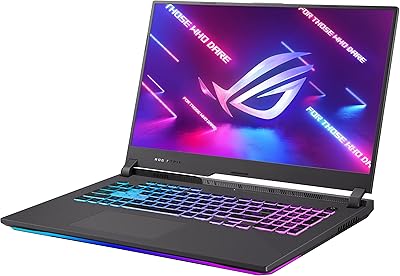
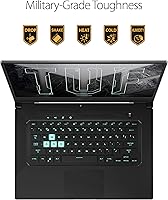
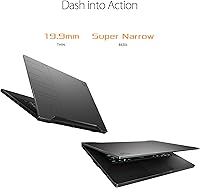
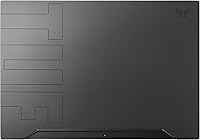
The ASUS TUF Dash 15 2021 Gaming Laptop arrived at a moment when the mid-range gaming laptop market was getting genuinely crowded, and it carved out a real niche by being unusually thin and light for a machine packing a discrete GPU. At 0.78 inches thick and 4.4 pounds, this slim gaming laptop is the kind you can actually toss in a backpack without dreading the commute. The Eclipse Grey finish looks understated — no aggressive gamer aesthetics here — which works in its favor if you use it in professional settings too. Just set expectations clearly: this is a capable 1080p gaming machine, not a replacement for a full-power desktop-class rig.

Features & Benefits

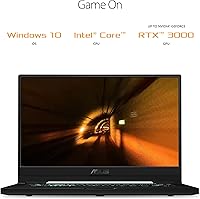
The RTX 3050 Ti is a mid-range GPU, but Dynamic Boost 2.0 pushes power draw up to 75W under load, meaning it punches slightly above what the spec sheet implies during shorter gaming sessions. Pair that with a 144Hz adaptive sync display and fast-paced titles genuinely feel smoother — screen tearing largely disappears in the kinds of games this machine is built for. The i7-11370H handles everyday tasks and gaming workloads well, though it can run warm in a chassis this thin during extended play. Wi-Fi 6 is a welcome inclusion, and the NVMe SSD keeps boot times and game loads snappy compared to older SATA-based storage options.

Best For

This slim gaming laptop makes the most sense for college students and young professionals who need a machine that pulls double duty — productive enough for classwork or meetings during the day, capable enough for gaming at night. If your library leans toward competitive titles like Valorant or Apex Legends, where hitting high frame rates matters more than ray tracing, the TUF Dash 15 handles that workload comfortably. It also suits anyone moving up from integrated graphics for the first time — the performance jump will feel dramatic. Those needing maximum thermal headroom or planning to push demanding AAA titles at ultra settings would be better served by a thicker, heavier alternative.

User Feedback

Owners consistently praise build quality and portability for what this ASUS machine costs — it feels more solid than most thin-and-light competitors in this tier. The display earns specific shoutouts, with buyers noting how good the 144Hz panel looks relative to the price. On the downside, thermal throttling under sustained combined CPU and GPU load is a documented reality; extended demanding sessions push temperatures up and fan noise climbs with them. The 8GB of RAM feels workable today but tight for the long run, and upgrade options are limited. Real-world battery life lands noticeably short of the advertised figure under gaming loads, though light daily tasks fare considerably better.

Pros

  • Genuinely slim and light at under 4.5 pounds — easy to carry daily without fatigue.
  • The 144Hz IPS display looks sharp and smooth for a laptop in this price range.
  • Dynamic Boost 2.0 gives the RTX 3050 Ti a meaningful performance bump during gaming sessions.
  • Wi-Fi 6 support keeps online gaming connections stable and future-proofed.
  • The NVMe SSD delivers fast boot and load times compared to older storage alternatives.
  • Understated Eclipse Grey design works in professional and academic settings, not just gaming ones.
  • Build quality feels solid and well-constructed relative to similarly priced competitors.
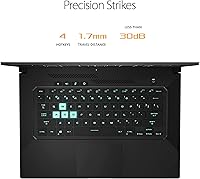
  • Backlit keyboard is comfortable for extended typing sessions, not just gaming.
  • Comes with a free Windows 11 upgrade path included out of the box.
  • Competitive 1080p gaming performance is genuinely strong for the price tier.

Cons

  • Sustained combined CPU and GPU load causes thermal throttling and significantly elevated fan noise.
  • 8GB of RAM is limiting for multitaskers and will feel increasingly tight over time.
  • Real-world battery life under gaming conditions falls well short of the advertised figure.
  • The slim chassis leaves little room for effective heat dissipation during long sessions.
  • Storage at 512GB fills up quickly once a few modern games are installed.
  • GPU performance headroom is limited — demanding AAA titles at high settings will struggle.
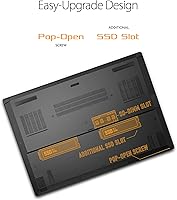
  • RAM upgrade options may be restricted depending on how memory is configured at the factory.
  • Some users report driver or software setup friction out of the box on initial configuration.

Ratings

Our AI rating system analyzed thousands of verified global user reviews for the ASUS TUF Dash 15 2021 Gaming Laptop, actively filtering out incentivized, bot-generated, and duplicate submissions to surface what real buyers actually experienced. The scores below reflect a balanced synthesis of genuine strengths and documented frustrations — nothing is inflated, and the pain points are called out as clearly as the wins.

Gaming Performance
74%
26%
For competitive 1080p titles like Valorant, Apex Legends, and CS2, users consistently report smooth, high-frame-rate experiences that justify the RTX 3050 Ti choice. Dynamic Boost 2.0 gives the GPU a meaningful power bump during gaming bursts, which buyers noticed compared to standard TGP alternatives.
Heavier AAA titles at high settings expose the GPU's mid-range ceiling quickly, with users frequently needing to dial back settings to maintain playable frame rates. The thin chassis limits sustained GPU power delivery over extended sessions, causing occasional dips in demanding scenes.
Portability
91%
At 4.4 pounds and under 0.8 inches thick, this slim gaming laptop draws consistent praise from commuters and students who haul it daily. Reviewers frequently highlight how unusual it is to have discrete GPU performance in a form factor that genuinely fits in a standard backpack without shoulder strain.
The slim profile does come with thermal trade-offs, and a few users note the chassis runs noticeably warm on the bottom during use, which can be uncomfortable on laps during longer sessions. The compact design also leaves no room for an optical drive or Ethernet port without an adapter.
Display Quality
83%
The 144Hz IPS-type panel earns strong marks from users who came from 60Hz displays — the difference in competitive gaming smoothness is immediately apparent. Adaptive sync reduces screen tearing effectively, and color accuracy is well-regarded for a laptop in this tier, making it usable for light photo and video work too.
Brightness falls short in well-lit or outdoor environments, with several reviewers noting the display washes out near windows. It is a solid panel for its price, but buyers expecting premium color gamut coverage comparable to creator-focused laptops will be let down.
Thermal Management
58%
42%
Under light to moderate workloads — browsing, documents, casual gaming — the cooling system keeps things reasonably quiet and temperatures acceptable. Users doing shorter gaming sessions in well-ventilated environments report a stable experience without alarming heat spikes.
Sustained combined CPU and GPU loads push temperatures into throttling territory, which users report causes noticeable performance dips during long gaming sessions or parallel heavy workloads. Fan noise under load is consistently described as loud enough to be distracting in quiet settings like libraries or offices.
Build Quality
82%
18%
The TUF Dash 15 feels more solidly constructed than many competitors at this price point, with a chassis that resists flex during use and holds up well to daily travel wear. Buyers upgrading from budget plasticky laptops frequently comment on how much more premium it feels in hand.
The Eclipse Grey finish attracts fingerprints and light scuffs over time, and a handful of users note the hinge mechanism feels slightly stiff in the first weeks of use. It is well-built, but not at the level of premium aluminum unibody machines that cost significantly more.
RAM & Upgradability
51%
49%
For users sticking to lighter multitasking — a few browser tabs, gaming, and a productivity app running simultaneously — the 8GB configuration covers baseline needs without immediate complaint. The DDR4 3200MHz speed is appropriate for the platform.
Eight gigabytes of RAM is increasingly tight in 2024, and the limited upgrade path due to partially soldered memory configurations frustrates buyers who planned to expand later. Users running Chrome-heavy workflows alongside games report noticeable slowdowns and swap file usage, which cuts into responsiveness.
Storage Performance
79%
21%
The PCIe NVMe SSD delivers fast boot times and snappy game load screens that users upgrading from HDD-based systems find genuinely impressive. Everyday file operations feel responsive, and the drive handles concurrent read and write tasks without obvious stuttering.
512GB fills up fast once modern games — many of which exceed 60 to 100GB each — are installed, and users report needing to manage storage actively or add an external drive within months of purchase. There is no secondary drive bay confirmed accessible in all configurations.
Battery Life
56%
44%
Under very light workloads — streaming video, document editing, or web browsing at moderate brightness — users do report multi-hour battery life that makes it viable away from an outlet for productivity tasks during the day.
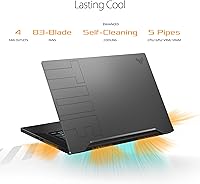
Under gaming loads, real-world battery life drops to roughly 2 to 3 hours, which is a significant gap from the advertised 16-plus hour figure. Several buyers express frustration that they need to carry the power brick to any gaming session, partially undermining the portability appeal.
Keyboard & Typing Experience
77%
23%
The backlit precision keyboard receives positive feedback for key feel and spacing, with users noting it is equally comfortable for long typing sessions as it is for gaming inputs. The backlighting is functional and evenly distributed across keys.
Key travel is somewhat shallow compared to dedicated productivity laptops, which touch-typists coming from thicker machines occasionally find takes adjustment. The trackpad is functional but not exceptional, and most gaming users default to an external mouse anyway.
Connectivity
81%
19%
Wi-Fi 6 support gives this ASUS machine a meaningful edge in congested network environments like dorms and apartments, where older wireless standards struggle with interference. Four USB 3.0 ports cover most peripheral setups without requiring a hub for typical use.
There is no built-in Ethernet port, which requires an adapter for wired gaming — a minor but notable omission for users who prefer wired connections during competitive play. Port variety is adequate but not exceptional compared to thicker laptops with more IO flexibility.
Value for Money
76%
24%
For buyers who specifically need portability combined with entry-to-mid gaming capability, the price-to-performance ratio holds up well, especially given the 144Hz display and Wi-Fi 6 inclusion at this tier. First-time discrete GPU buyers consistently feel they got meaningful value.
Buyers pushing the GPU hard or expecting long-term RAM headroom may feel the value erodes faster than expected as limitations surface. In a competitive market with frequent sales, slight timing differences in purchase price can significantly alter how good the deal feels in hindsight.
Software & Out-of-Box Experience
67%
33%
Windows 10 Home ships cleanly, and the included upgrade path to Windows 11 is appreciated by buyers who want a current OS without paying extra. ASUS Armoury Crate software gives users control over fan profiles and performance modes without needing third-party tools.
Some users report bloatware requiring cleanup on first setup, and driver configuration for optimal GPU performance is not always automatic out of the box. A subset of buyers encountered Wi-Fi driver hiccups early on that required manual updates to resolve fully.
Noise Level
54%
46%
At idle and during light tasks, the TUF Dash 15 runs near-silently, making it unobtrusive in quiet work environments during productivity-focused use throughout the day.
Fan noise under gaming loads is one of the most consistently flagged complaints — reviewers describe it as loud enough to require headphones at all times. In a quiet room during intense gaming sessions, the acoustic signature is hard to ignore without audio playing.

Suitable for:

The ASUS TUF Dash 15 2021 Gaming Laptop is a strong fit for college students and young professionals who genuinely need one machine to cover both work and play without hauling something heavy around campus or between meetings. If your gaming habits center on competitive titles — think Valorant, CS2, Apex Legends, or similarly optimized esports games — the 144Hz display and RTX 3050 Ti will handle those comfortably at 1080p without breaking a sweat. It also makes a lot of sense for first-time discrete GPU buyers stepping up from integrated graphics, where the performance difference will feel substantial. The slim profile and understated look mean it passes in a coffee shop or office setting without screaming gamer, which genuinely matters to a lot of buyers in this segment. Anyone who values portability as a non-negotiable and games at a moderate, casual-to-competitive level will find this ASUS machine hits a practical sweet spot.

Not suitable for:

The ASUS TUF Dash 15 2021 Gaming Laptop is a harder sell for buyers who want to push demanding AAA titles at high or ultra settings, since the RTX 3050 Ti is a mid-range GPU operating in a thermally constrained thin chassis, and sustained heavy loads will cause noticeable thermal throttling and loud fan noise. If you are planning to run GPU-intensive workloads — 3D rendering, video editing at scale, or simulation software — you will hit the ceiling of this machine faster than you might expect. The base 8GB of RAM is workable today but starts to feel tight with multiple applications open, and upgrade paths may be limited depending on the configuration, so buyers who want room to grow should factor that in. Power users who game for hours at maximum settings should look at thicker, heavier laptops with better sustained thermal performance. Finally, anyone expecting advertised battery figures to hold up under real gaming conditions will be disappointed — the real-world numbers fall noticeably short of the claimed ceiling.

Specifications

  • GPU: NVIDIA GeForce RTX 3050 Ti with 4GB GDDR6 memory, running at a base TGP of 60W and up to 75W with Dynamic Boost 2.0 enabled.
  • CPU: Intel Core i7-11370H processor with 12MB cache, boosting up to 4.8GHz across 4 cores and 8 threads.
  • Display: 15.6-inch IPS-type Full HD panel (1920x1080) with a 144Hz refresh rate and adaptive sync support.
  • RAM: 8GB DDR4 SDRAM running at 3200MHz, installed at the factory configuration.
  • Storage: 512GB PCIe NVMe M.2 SSD providing fast sequential read and write speeds compared to SATA-based alternatives.
  • Dimensions: Product measures 14.2 x 9.9 x 0.78 inches (LxWxH), making it one of the slimmest laptops in its GPU class.
  • Weight: The unit weighs 4.41 pounds, keeping it practical for daily carry in a backpack or bag.
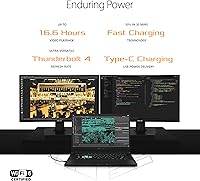
  • Battery: Equipped with a built-in Lithium Ion battery with an advertised runtime of up to 16.6 hours under light use conditions.
  • Wireless: Wi-Fi 6 (802.11ax) and Bluetooth are included for fast, low-latency wireless connectivity.
  • USB Ports: Four USB 3.0 ports are available for connecting peripherals, external drives, and accessories simultaneously.
  • Keyboard: Full-size backlit precision gaming keyboard designed for comfortable use during both gaming sessions and standard typing tasks.
  • Operating System: Ships with Windows 10 Home pre-installed, with a free upgrade path to Windows 11 included.
  • Color: Available in Eclipse Grey, a dark and understated finish that suits both professional and casual environments.
  • Graphics Memory: The RTX 3050 Ti uses 4GB of dedicated GDDR6 VRAM for handling textures, rendering, and gaming workloads.
  • Memory Speed: Installed DDR4 RAM operates at 3200MHz, providing adequate throughput for gaming and multitasking workloads.
  • Optical Drive: No optical drive is included, consistent with the ultraportable slim chassis design of this laptop.
  • Power Input: The laptop operates at 20 volts DC input via its included power adapter.
  • Platform: Built on the Intel Tiger Lake platform, pairing the 11th Gen CPU with PCIe 4.0 storage support.

Related Reviews
ASUS TUF Dash 15 2022 Gaming Laptop
69%
74%
Gaming Performance
82%
Display Quality
83%
Build Quality
61%
Thermal Management
47%
Battery Life
More
ASUS TUF Dash 15 2022 Gaming Laptop
75%
88%
Gaming Performance
91%
MUX Switch Advantage
41%
Battery Life
84%
Build Quality & Durability
86%
Portability
More
ASUS ROG Strix Scar 15 Gaming Laptop
76%
94%
Gaming Performance
91%
Display Quality
89%
CPU & Multitasking
83%
Thermal Management
82%
Keyboard & Input
More
ASUS TUF A16 16-inch Gaming Laptop
74%
83%
Gaming Performance
81%
Build Quality
77%
Thermal Management
72%
Display Quality
88%
RAM & Multitasking
More
ASUS TUF FX505DT 15.6″ Gaming Laptop
70%
78%
Gaming Performance
84%
Display Quality
83%
Build Quality
76%
Value for Money
81%
Keyboard & Trackpad
More
ASUS ROG Strix G17 (2021) Gaming Laptop
84%
91%
Performance
89%
Cooling Efficiency
88%
Display Quality
70%
Battery Life
85%
Portability
More
ASUS TUF A16 Gaming Laptop
74%
84%
Gaming Performance
71%
Display Quality
83%
Build Quality
58%
Thermal Management
54%
Fan & Noise Level
More
ASUS TUF Gaming A17 2023 Gaming Laptop

72%
88%
Gaming Performance
91%
CPU Performance
74%
Thermal Management
71%
Display Quality
83%
Build Quality
More
ASUS TUF A15 Gaming Laptop, AMD Ryzen 7 7435HS, 64GB RAM, 2TB SSD
85%
92%
Gaming Performance
88%
Multitasking Capability
85%
Cooling System Efficiency
83%
Build Quality
70%
Portability
More
ASUS TUF F15 Gaming Laptop
71%
74%
Gaming Performance
81%
Display Quality
86%
Build Quality & Durability
67%
Processor Performance
58%
RAM & Multitasking
More

FAQ

This is one of the more important questions to clarify before buying. Depending on the specific configuration, at least one RAM slot may be soldered to the motherboard, which limits upgrade flexibility. Some units have one accessible SO-DIMM slot, so you may be able to add a second stick, but you should verify this for your exact model number before assuming a straightforward upgrade is possible.

For competitive 1080p titles like Valorant, Apex Legends, or CS2, it performs well and can push well above 60fps on high settings. For heavier AAA titles, expect to run medium settings to stay at smooth frame rates. It is a capable mid-range GPU, not a powerhouse, so managing expectations around demanding modern releases is wise.

Under light workloads — browsing, documents, video streaming — you can get a reasonable runtime that approaches the advertised figure. Under gaming loads, however, expect significantly less, often in the range of 2 to 4 hours depending on settings and brightness. The advertised number reflects best-case conditions, not typical gaming use.

Thermal management is one of the real trade-offs of the slim chassis design. During sustained heavy gaming, both the CPU and GPU can run warm, and the fans will become audibly loud compensating for it. Some throttling under combined peak load is a documented pattern. For shorter gaming sessions or less demanding titles, heat is much more manageable.

It can handle light to moderate video editing — cutting footage, color grading in 1080p, basic effects work — reasonably well. The NVMe SSD helps with file handling speed. For heavy 4K editing or 3D rendering workloads, the 8GB of RAM and mid-range GPU will become limiting factors faster than you might like.

For a primary gaming and work machine, 512GB fills up faster than most people expect once you install a few modern games, which can run 50 to 100GB each. An external SSD or USB drive is a practical workaround, and the four USB 3.0 ports make that easy to connect. It is workable, but budget-conscious buyers should factor in the cost of extra storage.

Yes, especially in fast-paced competitive games — the difference between 60Hz and 144Hz is immediately obvious once you experience it. Motion looks smoother, and the adaptive sync feature reduces screen tearing without needing to cap your frame rate artificially. For productivity use it makes less difference, but it never hurts to have.

Under heavy gaming or sustained CPU workloads, the fans ramp up noticeably and can be distracting in quiet environments. Most users with headphones on will not find it bothersome during gaming, but in a library or meeting setting it may draw attention. Light tasks keep the system near silent.

It is actually one of the better fits for that use case in this price range. The slim profile and modest weight make it easy to carry between classes, the build quality holds up to daily use, and it handles both productivity tasks and casual-to-competitive gaming without needing two separate devices.

If you have a Wi-Fi 6 compatible router, yes — you will see more stable latency and better performance in congested network environments like apartment buildings or college dorms. Even without a Wi-Fi 6 router, the adapter is backward compatible with older standards, so you lose nothing by having it included.