Overview

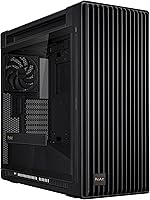
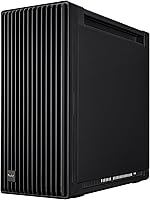
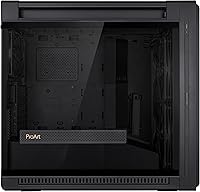
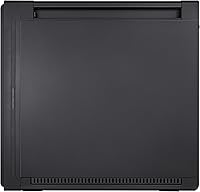
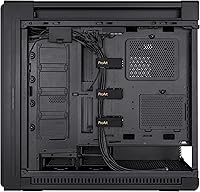
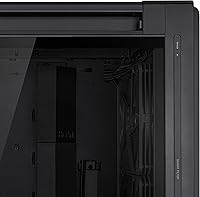
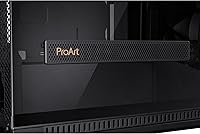
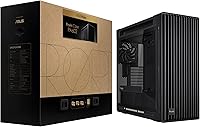
The ASUS ProArt PA602 Full Tower PC Case arrived in early 2024 as a clear statement that serious workstation builders deserve something better than repurposed gaming aesthetics. The ProArt design language is subdued and professional — no RGB strips, no aggressive angles — just clean lines and a tempered glass panel that lets a well-organized build speak for itself. At this price tier, it competes against established full tower heavyweights, but its E-ATX compatibility and generous interior clearance make it a compelling foundation for high-end, expandable systems. If you are building for performance and professionalism rather than flash, this is the case designed with you in mind.
Features & Benefits

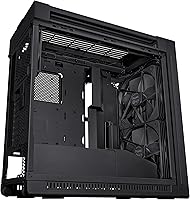
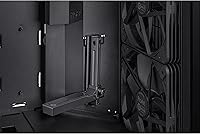
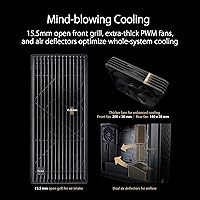
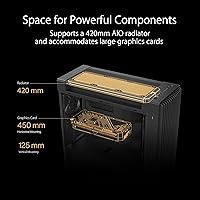
The front intake setup is where the ProArt PA602 earns its thermal credibility. Two 200x38mm fans — notably thicker than the standard 25mm — push meaningfully more air per revolution, and the front mesh panel's 45% porosity keeps restriction low without sacrificing structural integrity. A pair of internal deflectors routes that incoming air toward the motherboard and VRM zone, which matters most when running a high-TDP CPU under sustained load. The 420mm radiator support opens the door to serious AIO and custom loop configurations. Tool-less PCIe mounting, a built-in GPU holder, and an IR dust indicator that alerts you when the filter needs cleaning round out a feature set that prioritizes long-term build health.

Best For

This full tower case is purpose-built for a specific type of builder. Content creators and workstation users running power-hungry CPUs and GPUs will appreciate the structured airflow without having to add aftermarket fans. It suits anyone investing in a 360mm or larger AIO, or planning a custom liquid cooling loop where radiator space is non-negotiable. The integrated wheels are genuinely useful if your desktop moves between a desk and a rack, or you frequently transport your rig to LAN events. E-ATX builders get the clearance they actually need, and the professional look fits office or studio environments where a neon-lit tower would feel out of place.

User Feedback

Across roughly 130 ratings, the ProArt PA602 holds a strong 4.6-star average, and the enthusiasm in written reviews is fairly consistent. Builders repeatedly call out the out-of-box airflow performance and the GPU holder as genuinely useful features rather than checkbox additions. Build quality — particularly the steel chassis and tempered glass panel — draws consistent praise. The weight is a real caveat though: at 35.5 lbs empty, this ASUS creator case is not something you will want to haul frequently without those built-in wheels. A handful of reviewers question the value compared to competitors, and a few note that cable management routing could be more intuitive. The dust indicator gets mixed mentions — some find it practical, others consider it a novelty.

Pros

  • Dual 200x38mm front fans deliver exceptional intake volume without pushing fan RPMs into noisy territory.
  • 420mm radiator support puts serious AIO and custom liquid cooling configurations within reach from day one.
  • Internal airflow deflectors actively direct intake air toward the motherboard and VRM — a thoughtful thermal detail most cases skip.
  • The IR dust indicator removes guesswork from filter maintenance, giving long-term build health a practical edge.
  • Tool-less PCIe retention and an integrated GPU holder make installing heavy modern graphics cards far less stressful.
  • Front panel 20Gbps USB-C is a genuine daily-use upgrade for creators moving large files to external drives.
  • The ProArt aesthetic is clean and professional — this case looks at home in a studio without demanding RGB.
  • Built-in wheels make repositioning a heavy full tower manageable without lifting.
  • The steel chassis and tempered glass panel feel appropriately premium for a build at this investment level.
  • E-ATX compatibility future-proofs the build for motherboard upgrades without requiring a new case.

Cons

  • At 35.5 lbs empty, moving this case without wheels — up stairs or into a vehicle — is a two-person job.
  • No noise-dampening material is included, and the case gets audibly loud under full fan load.
  • Vertical GPU mounting requires a separate riser cable that does not come in the box, adding hidden cost.
  • Cable routing for complex E-ATX builds with multiple drives and thick GPU power cables can get congested quickly.
  • The rear 140mm exhaust fan feels undersized relative to the intake capacity of the two large front fans.
  • The built-in fan hub does not support addressable RGB, limiting integration with RGB fan ecosystems.
  • Traditional 3.5-inch HDD bay count is lower than some competing full towers, which matters for large media storage builds.
  • The value proposition weakens considerably if you are not using the 420mm radiator support or E-ATX compatibility.
  • Plastic trim pieces on interior components feel noticeably cheaper than the premium metal exterior construction.
  • Fan curve tuning is grouped into two sections rather than individual fan control, limiting precise thermal customization.

Ratings

The ASUS ProArt PA602 Full Tower PC Case has been scored by our AI system after analyzing verified buyer reviews from global markets, with spam, incentivized, and bot-generated feedback actively filtered out. Scores reflect the full picture — what this case genuinely gets right and where real builders have run into friction. Both the strengths and the legitimate trade-offs are transparently baked into every category below.
Airflow Performance
93%
The combination of extra-thick 200mm front fans and a 45% porosity mesh panel produces intake volumes that most competing cases simply cannot match with standard 25mm fans. Builders running demanding CPU-GPU combos report noticeably lower sustained thermals compared to their previous mid-tower setups, even before touching fan curves.
The rear 140mm exhaust fan, while adequate, can feel like a bottleneck relative to the sheer intake capacity up front. A few builders swapped it out for a higher-CFM 140mm unit to fully balance the airflow equation.
Build Quality & Materials
91%
The steel chassis feels dense and deliberate — there is no flex in the side panels and the tempered glass does not rattle at fan speeds. Reviewers coming from cheaper full towers consistently flag the tactile quality difference the moment they start handling the ProArt PA602.
A small number of users noted that some plastic interior trim pieces and fan hub covers feel slightly out of step with the premium metal construction. At this price point, consistency of material quality across every component is a reasonable expectation.
Thermal Engineering Design
89%
The dual internal airflow deflectors are an uncommonly thoughtful touch — they physically redirect intake air toward the motherboard VRM area rather than letting it diffuse randomly. In practice, builders running power-hungry CPUs under sustained workloads report more stable VRM temperatures compared to cases relying purely on fan volume.
The deflectors are fixed in position, so builders with non-standard component layouts or particularly tall CPU coolers may find the directed airflow less beneficial than the design intends. More flexible or adjustable deflectors would broaden the benefit.
Radiator & Liquid Cooling Support
92%
Supporting up to a 420mm radiator in the front is a genuine differentiator — it opens the door to high-end 420mm AIOs like the Corsair iCUE Elite or custom loop configurations that most full towers still do not accommodate. Builders planning serious liquid cooling setups call this one of the strongest arguments for choosing this case.
Installing a 420mm radiator while retaining all front fan mounts requires careful planning and sometimes removal of drive cages. A handful of builders noted that the process is not quite as intuitive as the specification implies and benefits from consulting community build logs beforehand.
GPU Mounting & Clearance
88%
The tool-less PCIe retention system and integrated GPU holder make installing long, heavy graphics cards far less stressful than in cases with traditional screw-only brackets. Both horizontal and vertical GPU orientations are supported, which matters to builders who want to showcase their card through the tempered glass panel.
Some users reported that vertical GPU mounting requires a separate riser cable that is not included, adding an extra cost that should be factored into the overall build budget. Clearance for the thickest triple-fan cards in vertical orientation can also be tighter than expected.
Front Panel I/O
86%
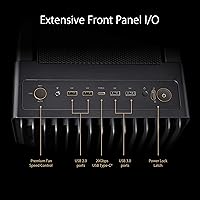
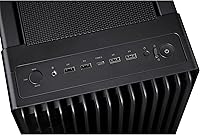
A 20Gbps USB-C port on the front panel is still far from standard at any price point, and for creators regularly transferring large video files or connecting modern peripherals, it is a daily-use convenience that adds up over time. The port selection overall — USB-C plus two USB-A 3.0 ports — covers most real workstation workflows without needing a hub.
Only one USB 2.0 port rounds out the front I/O, which may feel sparse for builders with multiple legacy peripherals. There is also no audio jack combination port — just a headphone and microphone split — which can be a minor annoyance when connecting newer headsets expecting a combined connector.
Dust Management
84%
The front panel IR dust indicator is a standout feature that almost no competing case offers — it monitors filter saturation and signals when cleaning is due rather than leaving owners to guess. For a workstation case that lives in a studio or office, this kind of proactive maintenance reminder has clear practical value.
The indicator works on the front filter but does not monitor secondary intake points, so dust accumulation elsewhere in the case still requires manual inspection. Some buyers also felt the indicator threshold is slightly conservative, triggering reminders before the filter is meaningfully clogged.
Cable Management
72%
28%
There is enough routing space behind the motherboard tray to keep a high-end build looking tidy, and the built-in fan hub reduces the number of cables running to the motherboard fan headers significantly. For moderately complex builds, achieving a clean result is entirely achievable.
For full E-ATX builds with multiple storage drives, thick GPU power cables, and custom loop tubing, the routing channels can get crowded quickly. Several reviewers noted that the documentation for cable routing paths is thin, and working it out independently adds meaningful time to the build process.
Fan Hub & Fan Management
83%
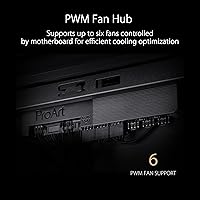
The built-in fan hub with PWM control reduces header clutter on the motherboard and lets builders manage multiple fans from a central point without a separate controller. The two-section PWM control gives a reasonable level of tuning flexibility for balancing noise against airflow.
The hub does not support addressable RGB fan control, which matters to anyone planning to add RGB fans to the system. Some users also reported that the two-section grouping is not always ideal — being able to control each fan independently would suit demanding thermal tuning scenarios better.
Portability & Transport
79%
21%
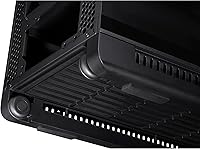
Built-in wheels are a practical and underappreciated feature on a case this large — rolling the ProArt PA602 across a studio floor or positioning it under a desk is genuinely easier than lifting a 35-plus-pound chassis repeatedly. For creators who move their workstation between shooting locations or LAN events, this matters more than it sounds.
The case is still extremely heavy even on wheels, and negotiating stairs or loading it into a vehicle remains a two-person job. The wheels are not lockable, which means the case can drift on smooth floors when cables are being connected or adjusted.
Noise Levels
77%
23%
Under moderate workloads, the stock fan configuration is reasonably quiet — the thick 200mm fans spin at lower RPMs to move the same air volume as smaller fans at higher speeds, which inherently reduces tonal noise. Workstation users in quiet studio environments report acceptable acoustics during typical productivity tasks.
Under full load with all fans at maximum speed, the two large front fans produce a pronounced low-frequency hum that some builders find intrusive. There is no noise-dampening material included, and the case is not marketed as an acoustic solution — buyers prioritizing silence alongside airflow may need to supplement with aftermarket dampening.
Storage Options
71%
29%
The case accommodates multiple SSD and HDD configurations, which covers most workstation storage needs for creator builds involving large media libraries. M.2 drives on the motherboard remain the primary storage path, and the case does not restrict access to those slots.
Traditional 3.5-inch HDD bay count is limited compared to some full tower competitors, which could be a real constraint for builders who rely on large mechanical storage arrays for video or photo archives. Those planning multi-drive NAS-style storage inside the build should verify drive counts carefully before purchasing.
Aesthetics & Design Language
88%
The ProArt aesthetic is genuinely distinctive in a market saturated with aggressive gaming cases. The clean, matte-finished exterior and restrained design look at home in a professional studio or a desk setup where subtlety is the point. The tempered glass side panel frames a well-built interior without demanding RGB to look good.
The styling is deliberately minimal, which will feel too understated for builders who want their case to make a visual statement. There are essentially no customization options for those wanting to personalize the exterior look without third-party modifications.
Value for Money
74%
26%
The feature density at this price tier is hard to argue with on paper — dual oversized intake fans, 420mm radiator support, a dust indicator, and integrated wheels represent genuine added value over barebones full tower competitors. Builders who will actually use those features regularly are getting a purposeful return on the investment.
For builders who only need basic full tower clearance and decent airflow, the premium feels harder to justify — several competing cases offer comparable interior space for significantly less. The value equation depends entirely on how many of the ProArt PA602's specific features align with your actual build requirements.

Suitable for:

The ASUS ProArt PA602 Full Tower PC Case is built for a very specific kind of builder, and it rewards them well. Content creators, video editors, and 3D rendering workstation users who run sustained high-TDP hardware will appreciate how the dual thick-fan intake setup and internal airflow deflectors keep thermals stable over long sessions — not just during short benchmark runs. Anyone planning a 360mm or 420mm AIO installation, or working toward a full custom liquid cooling loop, will find this case one of the few full towers that genuinely accommodates those configurations without compromises. E-ATX motherboard users benefit from the generous interior clearance, and builders who care about a clean, professional-looking result rather than RGB lighting will feel right at home with the ProArt design language. The built-in wheels are a quiet but meaningful advantage for anyone who moves their desktop regularly between a desk, a studio rack, or a LAN event.
Not suitable for:

The ASUS ProArt PA602 Full Tower PC Case is a harder sell for buyers whose needs do not align precisely with its strengths. If you are building a standard mid-range gaming PC that does not require E-ATX support, a 420mm radiator, or workstation-class airflow, there are full towers at a lower price point that will serve you just as well without asking for a premium you will never use. The 35.5 lb empty weight is a real deterrent for anyone who needs to transport the system frequently without a vehicle or a second pair of hands — wheels help on flat ground, but they do not solve the broader portability problem. Acoustic-focused builders will also want to look elsewhere; this case prioritizes unrestricted airflow over noise dampening, and under a heavy workload the stock fans make that clear. Those with limited desk or floor space should also measure carefully — at over 23 inches tall and nearly 22 inches deep, this is a large footprint by any standard.
Specifications

  • Form Factor: Full tower chassis with support for Extended ATX (E-ATX), ATX, Micro-ATX, and Mini-ITX motherboards.
  • Dimensions: The case measures 23.3″ (length) x 22″ (height) x 9.6″ (width), making it one of the larger full tower footprints on the market.
  • Weight: Empty unit weight is 35.5 lbs (approximately 16.1 kg), which should be factored into any transport or desk placement planning.
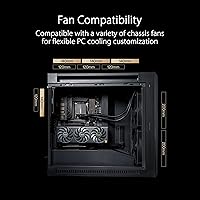
  • Included Fans: Two 200x38mm front intake fans and one 140mm rear exhaust fan are included in the box, all manageable via the built-in fan hub.
  • Radiator Support: Front panel supports radiators up to 420mm; additional radiator mounts are available at the top and rear positions for expanded liquid cooling configurations.
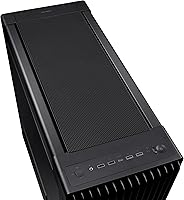
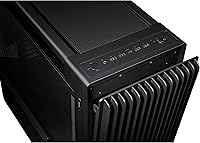
  • Front Panel I/O: Front I/O includes one USB-C port running at 20Gbps, two USB-A 3.0 ports, one USB-A 2.0 port, and separate 3.5mm headphone and microphone jacks.
  • Fan Hub: A built-in fan hub with two-section PWM control is integrated into the chassis, reducing direct header load on the motherboard.
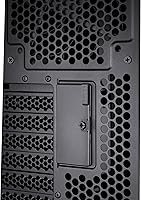
  • GPU Support: Graphics cards can be mounted horizontally or vertically with tool-less PCIe retention; an integrated GPU holder provides mechanical support for heavy multi-fan cards.
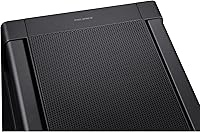
  • Front Mesh Porosity: The front panel grill is rated at 45% porosity, providing high airflow throughput while maintaining structural rigidity and dust filtration.
  • Airflow Deflectors: Two fixed internal deflectors are positioned behind the front fans to direct intake air specifically toward the motherboard and VRM heat zones.
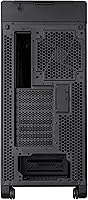
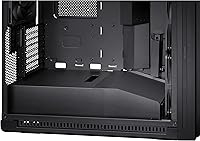
  • PSU Mounting: Power supply unit mounts at the bottom of the chassis, with a shroud to keep cabling tidy and separated from the main component area.
  • Materials: Primary construction uses alloy steel for the frame, with tempered glass for the side panel and plastic used for interior trim and fan hub components.
  • Dust Indicator: An infrared sensor on the front panel monitors filter dust accumulation and provides a visual alert when cleaning is recommended.
  • Transport Features: Four integrated wheels are built into the base of the case, allowing the unit to be rolled across flat surfaces without lifting.
  • Power Lock Latch: A Power Lock Latch mechanism secures the power button against accidental activation during transport or maintenance.
  • PCIe Slots: The chassis provides multiple PCIe expansion slots with tool-less retention brackets to accommodate high-end multi-card or multi-peripheral configurations.
  • Cooling Method: Primary cooling relies on high-volume air cooling via the included fans, with extensive radiator mounting positions supporting both AIO and custom liquid cooling loops.
  • Market Position: Launched in January 2024 and ranked #161 in the Computer Cases category on Amazon, holding a 4.6-out-of-5 average across 131 verified ratings.

Related Reviews

Antec C8 Full-Tower E-ATX PC Case
81%
93%
Build Quality
96%
Cooling Flexibility
89%
Cable Management
91%
Aesthetic Design
74%
Assembly Experience
More
darkFlash DY470 Full-Tower ATX PC Case
80%
93%
Cable Management
78%
Build Quality & Materials
84%
Cooling Potential
91%
Aesthetics & Visual Design
89%
GPU Compatibility & Mounting
More
Antec Flux Pro White Full-Tower E-ATX Case
83%
91%
Build Quality
89%
Airflow Performance
93%
Cooling Headroom & Radiator Support
88%
Fan Inclusion & Value
92%
Design & Aesthetics
More
Antec C8 ARGB Full-Tower PC Case
80%
83%
Build Quality
88%
Thermal Performance
93%
Cooling Flexibility
91%
Aesthetics & Visual Design
74%
Cable Management
More
ASUS TUF GT502 Horizon Mid-Tower Case
80%
91%
Build Quality
83%
Thermal Performance
79%
Airflow Design
94%
Aesthetic Design
81%
Cable Management
More
SAMA V60 Mid Tower PC Case
80%
93%
Out-of-Box Cooling Value
78%
Airflow Performance
91%
AIO & Radiator Flexibility
88%
Tempered Glass & Aesthetics
71%
Build Quality & Materials
More
RUIX OV502 mATX Mini-Tower PC Case

68%
83%
Value for Money
86%
Aesthetic Design
79%
Glass Panel Quality
84%
Component Compatibility
71%
Airflow & Cooling
More
ASUS A21 Micro ATX Mid Tower Case
80%
91%
Value for Money
88%
Cable Management
86%
BTF Compatibility
93%
Component Clearance
89%
Ease of Assembly
More
SAMA S40 Mid Tower ATX PC Case
79%
88%
Airflow Performance
83%
Included Fan Quality
79%
Build Quality & Finish
92%
GPU Compatibility
61%
Cable Management
More
SZSKYING CMSVB-1 Mid-Tower PC Gaming Case
74%
91%
Value for Money
88%
Included Fans
86%
Aesthetics & RGB
61%
Build Quality
74%
Airflow Performance
More

FAQ

Yes, the front of the ProArt PA602 is designed to accept a 420mm radiator, but fitting one alongside the stock fan mounts can require some planning. In most cases, you will need to remove any front drive cage brackets to get the radiator seated flush. It is worth consulting build logs from the community before purchasing your AIO to confirm thickness compatibility with your specific unit.

Yes — a PCIe riser cable is required for vertical GPU mounting and it is not included with the ASUS ProArt PA602 Full Tower PC Case. You will need to purchase a compatible riser cable separately, and it is worth checking the length and PCIe generation rating to make sure it matches your motherboard and graphics card. Factor that additional cost into your build budget before committing to vertical orientation.

The infrared sensor monitors the density of particulate buildup on the front filter and triggers a visible indicator light on the panel when it detects that airflow is being meaningfully restricted. In practice, most users who engage with it find it genuinely useful as a maintenance reminder, especially in dustier environments. It does not monitor every intake point in the case, so you still need to periodically check other areas manually, but for front filter upkeep it works as advertised.

Standard ATX boards work perfectly well in this full tower case — E-ATX is simply the maximum supported size, not the required one. The interior clearance and standoff layout accommodate ATX, Micro-ATX, and Mini-ITX motherboards without any adapters. If you are building on a standard ATX board, you will just have more unused space in the interior, which is not a problem.

On a smooth floor like hardwood, tile, or a studio surface, the built-in wheels make a real difference for repositioning the case under a desk or rolling it into place. They do not solve every transport challenge — stairs, carpet, and loading the case into a car still require lifting, preferably with help. Think of the wheels as a quality-of-life feature for day-to-day adjustments, not a full portability solution.

The two 200mm front fans are notably quieter than smaller fans moving the same volume of air, because they spin at lower RPMs to achieve the same CFM output. Under moderate workloads the system is reasonably unobtrusive. At maximum fan speed under a demanding gaming or rendering session, there is an audible low-frequency hum that some users find noticeable in quiet rooms. The case includes no acoustic dampening material, so if silence is a priority, budget for aftermarket dampening foam.

The built-in hub handles PWM speed control only — it does not support addressable RGB (ARGB) or standard RGB fan lighting signals. If you plan to add RGB fans, you will need to connect their lighting cables directly to a motherboard header or a separate RGB controller. The hub simply will not recognize those signals.

The ProArt PA602 supports a modest number of 3.5-inch HDD bays compared to some competing full towers, which makes it less ideal for builders running large mechanical storage arrays. For most creator workstations relying primarily on M.2 SSDs and one or two 2.5-inch drives, capacity is not an issue. If you are planning a multi-drive HDD configuration for video archives or a NAS-style internal setup, verify the exact bay count against your storage needs before purchasing.

For a straightforward ATX or E-ATX build with a single GPU and a moderate number of storage drives, cable management is manageable with the available routing channels behind the motherboard tray. Where it gets tricky is in dense builds with thick GPU power cables, multiple drives, and custom loop tubing all competing for the same routing paths. The documentation does not walk you through optimal routing strategies in detail, so expect to spend some extra time planning the cable layout, especially on a first build in this chassis.

That is the honest question to ask before buying. The ProArt PA602 is priced to reflect a specific set of premium features — large radiator support, oversized intake fans, the dust indicator, and the professional aesthetic — and if your build does not actually use several of those features, the value proposition weakens. For a standard air-cooled ATX build, there are well-regarded full towers at a lower price point that will perform comparably. This case is at its best when the feature set aligns closely with what your build genuinely demands.