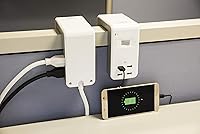
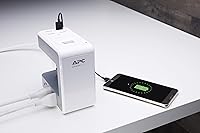
Overview

The APC PE6U4W Desk Mount Surge Protector takes a genuinely clever approach to a common workspace problem: there's never an outlet where you actually need one. Rather than adding another strip to the floor or fishing cables across the room, this desk clamp surge protector attaches directly to your desk edge or cubicle wall, putting power right at hand. APC has built a solid reputation in surge protection over decades, so this isn't an unknown brand making promises it can't keep. At its price point, it targets everyday office needs — protecting a monitor, laptop, and a few peripherals — not industrial or high-draw equipment.

Features & Benefits

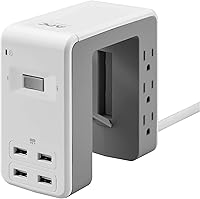
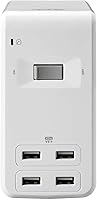
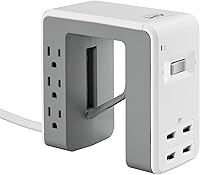
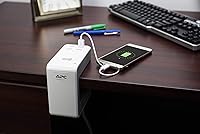
The clamp mechanism is genuinely the standout feature here. It uses a U-shaped bracket that grips desktops or cubicle walls up to 2.4 inches thick, and installation takes maybe two minutes. Once mounted, you get six AC outlets and four USB-A ports — enough to charge a phone, tablet, wireless headphones, and a smartwatch while keeping your monitor and laptop plugged in. The flat, 90-degree power cord is a thoughtful touch; it sits flush against the wall rather than sticking straight out. The 1080-joule surge rating handles the occasional voltage spike that can silently damage office electronics over time. The lifetime warranty rounds things out nicely.

Best For

This desk clamp surge protector is a strong fit for anyone whose outlets are too far from the action — whether that's a corporate cubicle with power only at the floor level, a home-office desk where the nearest wall outlet is behind the furniture, or a standing desk setup where a floor strip just gets in the way. It works especially well for people running several USB-charged devices alongside a laptop and monitor. That said, it's not the right pick for power users running high-wattage gear or anyone who needs more than six plugged-in devices. Think typical knowledge-worker desk, not a video editing studio.

User Feedback

With well over 2,500 reviews averaging 4.5 stars, the APC clamp-on power station has clearly landed well with buyers. People consistently praise how sturdy the clamp feels once tightened, and many comment on how much cleaner their desk looks without a strip running across the floor. The USB ports get frequent mentions for handling daily device charging without fuss. Where opinions get more mixed is around outlet spacing — a few larger wall adapters or power bricks will block a neighboring socket, which is worth planning around. Some users on thicker or non-standard desk edges have also reported a looser-than-expected fit. Long-term durability feedback is mostly positive, though a small number note the clamp plastic feeling less robust after extended use.

Pros

  • Clamps securely to desk edges or cubicle walls, putting power exactly where you need it.
  • Six AC outlets provide enough coverage for a full monitor, laptop, and peripheral setup.
  • Four USB-A ports mean you can charge multiple devices simultaneously without a separate charging hub.
  • The flat, 90-degree plug sits flush against the wall and eliminates the annoying gap most power strips create.
  • APC is a genuinely trusted name in power protection — this is not a no-name import.
  • Lifetime warranty with a connected equipment protection policy adds real long-term value.
  • At roughly 1.5 pounds, it is light enough that the clamp holds it without strain on the desk edge.
  • The six-foot cord gives reasonable reach for most desk configurations without requiring an extension.
  • Mounting takes only a few minutes and requires no tools, making setup genuinely painless.
  • Keeps floors and desk surfaces cleaner by eliminating the sprawling cable runs typical of floor-level strips.

Cons

  • Clamp compatibility is not universal — desks thicker than 2.4 inches will not fit properly.
  • Outlet spacing can be tight; a single large wall-wart adapter may block the socket next to it.
  • No USB-C ports, which is a notable gap as more devices move away from USB-A.
  • The plastic housing feels adequate but not premium — long-term durability gets mixed feedback from some buyers.
  • Six outlets sounds like plenty until you factor in how quickly bulky adapters eat up that count.
  • The clamp grip may feel less secure on rounded, laminate, or non-standard desk edges.
  • No individual outlet switches, so cutting power to one device means unplugging it entirely.
  • The white and gray color scheme may look out of place on darker or wood-finish desk setups.

Ratings

The scores below reflect an AI-driven analysis of thousands of verified global reviews for the APC PE6U4W Desk Mount Surge Protector, with spam, incentivized submissions, and bot activity actively filtered out to surface what real buyers actually experienced. Across more than 2,500 confirmed purchases, patterns emerged around both the things this desk clamp power station genuinely excels at and the specific friction points that frustrated a meaningful portion of users. Both sides are represented here without softening the negatives or inflating the positives.

Mounting Design
88%
The U-shaped clamp is the central reason most buyers choose this over a standard strip, and for the majority it delivers. Users consistently describe a stable, rattle-free grip on standard desk edges and cubicle walls, with installation taking only a couple of minutes and no tools whatsoever.
The clamp's 2.4-inch maximum is a real boundary, not a rough guideline — buyers with solid wood, butcher-block, or thicker standing-desk surfaces frequently report the clamp failing to close flush. Rounded or laminate edges also get flagged as less secure over extended use.
Outlet Spacing
61%
39%
For setups running slim plugs — standard laptop bricks with removable cords, phone chargers with modest adapters, or USB-to-outlet converters — the six outlets feel genuinely well-distributed and accessible without awkward cable angles.
This is the most cited frustration across reviews. One large wall-wart adapter can render the neighboring outlet unusable, and two bulky adapters placed side by side can effectively cut usable AC capacity from six down to four. Buyers with older peripherals or audio gear need to plan carefully.
USB Charging Performance
83%
Having four USB-A ports share a combined 4.8A output works well in real daily use — phones, wireless earbuds, and smartwatches all charge at normal speeds when plugged in simultaneously. Users in cubicle environments frequently highlight how much desk clutter this eliminates by removing the need for a separate charging hub.
The absence of USB-C is increasingly noticeable as newer devices drop USB-A entirely. Users charging a modern tablet or recent Android flagship via USB-C must rely on a separate adapter, which partially defeats the convenience the APC clamp-on power station was purchased to provide.
Surge Protection
74%
26%
At 1080 joules, this desk clamp surge protector covers the kind of everyday voltage spikes that can silently degrade monitors, laptops, and peripherals over months of use. The connected equipment protection policy backing the unit adds a layer of financial reassurance that generic strips at a similar price rarely offer.
This is not a heavy-duty protector, and some technically informed reviewers note that 1080 joules is on the lower end for anyone running a desktop workstation or NAS drive. The protection is adequate for light office loads, but should not be treated as a substitute for higher-joule protection on expensive or sensitive equipment.
Build Quality
69%
31%
The overall construction feels solid enough for standard office use, and the unit holds its mounted position without creaking or slipping in the majority of reported setups. APC's reputation means the internals are generally trusted more than comparably priced off-brand alternatives.
The plastic housing draws consistent criticism from buyers who describe it as feeling hollow or lightweight relative to expectation. A subset of long-term users report the thumbscrew on the clamp becoming harder to adjust over time, and a handful note minor discoloration of the white casing after a year or more of use.
Cable Management
77%
23%
Mounting this under the desk surface rather than placing it on the floor removes a significant source of visible cable clutter. Users who previously had a traditional strip trailing across the floor consistently report a noticeably cleaner workspace after switching to this under-desk power strip.
The unit itself has no integrated cable management clips or cord wrap, so the six-foot power cord running back to the wall outlet can still create a loose cable run depending on the desk layout. Users with longer routing needs end up with excess cord that needs to be managed separately.
Power Cord Design
81%
19%
The flat, 90-degree plug is a detail that buyers notice and appreciate, particularly when the wall outlet sits close to furniture. It allows the plug to sit flush without forcing the desk away from the wall to accommodate a standard straight plug sticking straight out.
At exactly six feet, the cord is sufficient for most setups but leaves no margin for unusual desk positions or rooms where the nearest outlet is further than expected. A few reviewers specifically wished for a nine or ten-foot option, which APC does not appear to offer on this model.
Ease of Installation
92%
Nearly every reviewer who addressed setup called it fast and painless. No hardware, no drilling, and no reading a manual — just position the bracket, tighten the thumbscrew, and plug in. For cubicle users who may not be permitted to modify their workspace, the tool-free approach is particularly valued.
The only installation hiccup that appears repeatedly involves desks with non-uniform or tapered edges, where the clamp can sit at a slight angle. It is not a complicated fix, but it requires some trial-and-error positioning that first-time users do not always anticipate.
Value for Money
84%
The combination of mounting hardware, surge protection, six outlets, and four USB ports at this price tier is difficult to match from a comparably trusted brand. Buyers who have previously purchased generic no-name clamp strips and experienced failures tend to view the APC pricing as justified given the brand's warranty and protection policy.
A small but vocal group of reviewers feel the price is slightly optimistic given the plastic construction and the lack of USB-C — features they note are now standard on newer competing units. The value calculation tilts more favorably for buyers who prioritize brand credibility and warranty coverage over raw specs.
Desk Surface Compatibility
66%
34%
For standard flat-edged desks — the kind found in most offices, cubicle farms, and typical home-office furniture — the clamp fits cleanly and holds without issue. The majority of buyers report a secure fit with no movement during normal use.
Curved desk edges, very thin surfaces, glossy finishes prone to marking, and thick wood slabs all create real compatibility concerns. Some buyers report surface scratching under the clamp pads after extended mounting, particularly on desks without any texture to grip.
Aesthetic Integration
72%
28%
The white and gray finish is deliberately neutral and blends acceptably into most modern office environments. Users with light-colored desks or standard white cubicle panels frequently comment that it sits unobtrusively and does not look like an afterthought bolted onto the workspace.
The color scheme works against buyers with dark wood, black, or industrial-style desk setups, where the white housing reads as visually mismatched. There is only one color option available, so buyers without a neutral desk aesthetic have no alternative to consider.
Long-Term Durability
71%
29%
A meaningful portion of long-term reviewers report using this unit daily for two or more years without any functional degradation. The outlets maintain a firm grip on plugs, the surge protection indicator light remains active, and the clamp holds position without loosening in these cases.
The longer-term outliers tell a different story — the thumbscrew mechanism and plastic clamp housing are the most commonly mentioned failure points over time. Some users also note that the USB ports begin to feel looser after extended daily plug-and-unplug cycles, particularly with heavier cables.
Brand Reliability
91%
APC's decades-long presence in power protection carries real weight with buyers, and it shows in the reviews. Many users cite brand familiarity as the deciding factor over cheaper alternatives, citing prior positive experiences with APC UPS units or other surge protectors in professional and home settings.
A small number of reviewers expressed frustration with the warranty claims process, describing it as more bureaucratic than expected for a relatively straightforward product. The connected equipment protection policy, while generous on paper, requires documentation that some buyers found cumbersome to gather after the fact.

Suitable for:

The APC PE6U4W Desk Mount Surge Protector was built for people whose biggest daily frustration is running out of accessible power at their workspace. It fits cubicle workers especially well — those who spend eight hours a day at a workstation where the only outlets are at floor level or behind a filing cabinet. Home office users with desks pushed against walls will appreciate being able to clamp this directly to the desk edge and immediately free up floor space. If you regularly charge a phone, wireless earbuds, a smartwatch, and a tablet while also keeping a monitor and laptop plugged in, the combination of six AC outlets and four USB ports handles that mix without any creative cable routing. It also suits anyone who values buying from a brand with a real warranty behind it — APC's lifetime coverage and connected equipment protection policy add a layer of confidence that generic strips simply don't offer.

Not suitable for:

The APC PE6U4W Desk Mount Surge Protector is not the right fit for everyone, and it's worth being honest about where it falls short. If your desk is thicker than about 2.4 inches — common with solid wood or some sit-stand desks — the clamp may not close properly, making the whole premise of the product moot before you even plug anything in. Power users running high-draw equipment like space heaters, laser printers, or desktop workstations with large power bricks will quickly find that bulky adapters block neighboring outlets and that 1080 joules of surge protection, while adequate for standard office electronics, is not engineered for demanding loads. Anyone who needs USB-C charging is also out of luck here, since all four ports are USB-A only — a real limitation as more devices drop the older connector. Finally, if your wall outlet is more than six feet from your intended mounting spot, the cord length will force some awkward workarounds.

Specifications

  • Brand: Manufactured by APC, a well-established name in power protection and management equipment.
  • Model Number: The exact model designation for this unit is PE6U4W.
  • Form Factor: U-shaped desk clamp power station designed to mount under a desktop surface or over a cubicle wall partition.
  • AC Outlets: Includes 6 standard AC outlets rated for 110–120V devices commonly used in home and office environments.
  • USB Ports: Features 4 USB-A charging ports with a combined total output of 4.8A for simultaneous multi-device charging.
  • Surge Rating: Provides 1080 joules of surge energy absorption, suitable for protecting standard office electronics from voltage spikes.
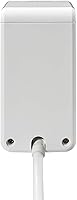
  • Power Cord: Comes with a 6-foot power cord terminated with a flat, 90-degree plug to minimize wall clearance requirements.
  • Clamp Range: The mounting clamp accommodates desk edges and cubicle walls up to 2.4 inches thick.
  • Dimensions: The unit measures 5.31 x 2.72 x 5.2 inches, keeping the footprint compact once mounted.
  • Weight: At 1.52 pounds, the unit is light enough for the clamp mechanism to hold securely without stressing the desk edge.
  • Voltage: Compatible with standard North American 110–120V electrical systems only; not rated for international voltages.
  • Color: Finished in a White and Gray color scheme designed to blend with typical office and home-office environments.
  • Warranty: Backed by APC's lifetime warranty plus a connected equipment protection policy covering up to $50,000 in damages.
  • Plug Type: Uses a flat, right-angle 90-degree plug that sits flush against the wall outlet, reducing wasted space behind furniture.
  • Availability: First made available in November 2018 and has maintained consistent availability through major retail channels since launch.

Related Reviews
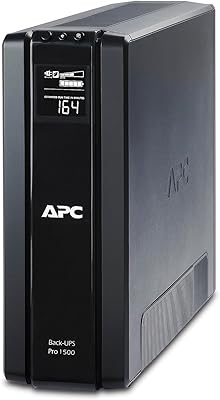
APC BR1500G 1500VA UPS Battery Backup
76%
93%
Voltage Regulation (AVR)
67%
Battery Backup Runtime
88%
Build Quality
84%
Outlet Layout
74%
Battery Longevity
More
APC BE425M UPS 425VA
78%
93%
Reliability & Uptime
74%
Battery Backup Duration
51%
Battery Longevity & Replaceability
96%
Ease of Setup
72%
Outlet Layout & Count
More
APC BK500BLK 500VA Battery Backup UPS
76%
91%
Reliability & Longevity
93%
Ease of Setup
54%
Battery Runtime
88%
Surge Protection
82%
Voltage Regulation (AVR)
More
TenTrend ZM1 Desk Clamp Surge Protector
81%
93%
Ease of Installation
88%
Port Selection & Layout
58%
USB Charging Speed
84%
Clamp Grip & Stability
81%
Surge & Overload Protection
More
APC BE600M1 600VA UPS
80%
93%
Outage Response Speed
88%
Runtime for Network Gear
86%
Surge Protection
91%
Battery Longevity & Replacement
54%
Audible Alarm
More
APC Back-UPS Pro BX1500M 1500VA
79%
83%
Battery Runtime
91%
Voltage Regulation (AVR)
78%
Build Quality & Durability
88%
Ease of Setup
86%
LCD Display & Monitoring
More
Southwire Surge Guard 34931 30A Surge Protector
81%
93%
Surge Protection Effectiveness
89%
Build Quality
88%
LCD Display Clarity
91%
A/C Compressor Protection
86%
Ease of Setup
More
Geeni Surge Ultra 8-Outlet Smart Surge Protector
80%
88%
Ease of Setup
71%
App Performance
91%
Smart Outlet Control
84%
Voice Control
78%
Surge Protection
More
Southwire Surge Guard 50A Portable RV Surge Protector
85%
91%
Surge Protection Performance
88%
Ease of Use
87%
Build Quality and Durability
84%
Diagnostic Features
70%
Portability
More
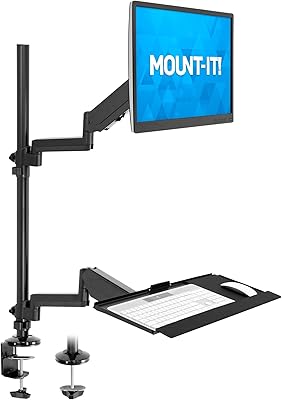
Mount-It! MI-7995 32″ Sit-Stand Monitor Mount
70%
81%
Ease of Installation
67%
Build Quality
72%
Pneumatic Spring Performance
58%
Stability & Wobble
78%
Keyboard Tray Usability
More

FAQ

The clamp is designed to fit surfaces up to 2.4 inches thick. That covers most standard office desks, cubicle walls, and typical laminate or thin wood desktop setups. If you have a thick solid-wood or butcher-block desk, measure before you buy — anything beyond that 2.4-inch limit and the clamp simply won't close far enough to grip securely.

Yes, that's actually one of the intended use cases. The U-shaped clamp is designed to hang over a cubicle partition, which makes it a practical solution when your only outlet is far away from your actual workspace. Just check the wall panel thickness first to make sure it falls within the 2.4-inch maximum.

This is probably the most common complaint from buyers, so it's worth being upfront about it. The outlets are spaced at a standard interval, which means an oversized wall-wart adapter or a chunky power brick can easily overlap and block the neighboring socket. If several of your devices use bulky adapters, plan your layout carefully — you may effectively lose one or two outlets depending on adapter size.

No, all four USB ports are USB-A only. If you rely on USB-C for charging a newer laptop, tablet, or phone, you would need a separate adapter or a different power station. This is a notable limitation worth considering given how many current devices have moved to USB-C.

For a typical office or home-office setup — a monitor, laptop, desk lamp, phone charger, and similar accessories — 1080 joules is generally sufficient to handle the kind of brief voltage spikes that happen during everyday use. It is not designed for high-demand equipment like workstations with multiple GPUs, laser printers, or other heavy-draw devices. Think of it as solid everyday protection for standard electronics, not industrial-grade shielding.

Installation is genuinely straightforward — no tools required. You position the U-shaped bracket around your desk edge, tighten the thumbscrew until it grips firmly, and then plug the cord into your wall outlet. Most people have it set up in under five minutes. The only variable is making sure your desk thickness fits within the clamp's range before you start.

The clamp makes direct contact with the desk, so on delicate or high-gloss finishes there is some potential for light marking, especially over time. If you have a desk with a finish you want to protect, placing a thin piece of felt or rubber padding between the clamp and the surface is a simple precaution many users take.

No, there are no per-outlet switches on this unit. It is either fully on or fully off. If you want to cut power to a specific device without unplugging it, this desk clamp surge protector does not support that — you would need a smart strip or a model with individual outlet controls for that functionality.

The cord is 6 feet long, which covers most standard desk configurations. That said, if your nearest outlet is far from your intended mounting spot — say, on the opposite side of the room or behind a deep cabinet — you may find 6 feet falls a bit short. Using an extension cord with a surge-protected strip is generally not recommended, so it is worth measuring your setup in advance.

APC backs this unit with a warranty that includes coverage for equipment connected to the strip that gets damaged due to a surge the protector fails to stop, up to $50,000. To make a claim, you typically need to contact APC directly, provide proof of purchase, and show that the connected equipment was damaged by a surge event. It adds a real layer of financial protection, though you should review APC's current terms for the exact conditions and exclusions, as warranty policies can be updated.

Where to Buy