Overview

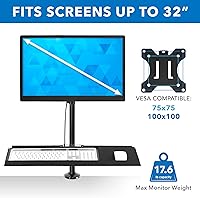
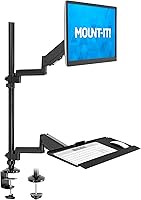
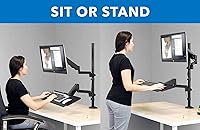
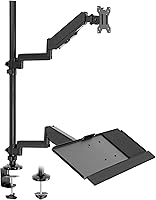
The Mount-It! MI-7995 32″ Sit-Stand Monitor Mount sits in a practical middle ground — not a bare-bones arm, but not carrying the price tag of a premium standing desk converter either. What sets it apart from most monitor arms in its class is the integrated keyboard tray, which turns a single clamp-on mount into a compact workstation. At the heart of the design is a pneumatic spring mechanism that handles your screen's weight and lets you shift positions without fussing with knobs or levers. It supports screens up to 32″ via a standard VESA pattern, making it broadly compatible with most modern monitors.
Features & Benefits

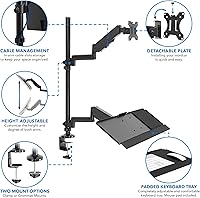
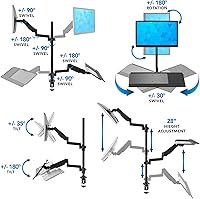
The pneumatic gas spring is what makes this sit-stand monitor arm genuinely useful day-to-day. Rather than tightening a tension knob each time you want to raise or lower your screen, the spring holds the position for you — push up, and it stays up. The arm offers 35° of tilt, 180° swivel, and a full 360° rotation, which is more range than most people will ever use, but handy when you need to share your screen with someone nearby. The built-in cable management channels keep cords hidden along the frame, and the keyboard tray's padded wrist rest adds a tangible ergonomic benefit for anyone typing for hours at a stretch.

Best For

This ergonomic desk mount is a strong fit for people who want to introduce sit-stand movement into their day without committing to a full height-adjustable desk. If your workspace is tight, the combined monitor and keyboard platform saves meaningful surface area compared to a separate keyboard stand and monitor arm. It's particularly well-suited to those dealing with wrist or neck discomfort — the elevated platform and padded tray work together to encourage better posture. Compatible with single-monitor setups running screens up to 32″, it clamps to most standard desks and countertops, so compatibility is rarely an issue. Less ideal for multi-monitor arrangements or ultrawide screens beyond that size.

User Feedback

The Mount-It! keyboard tray mount holds a 3.8 out of 5 rating, which tells a fairly honest story. Buyers who get it right tend to appreciate how quick the initial setup is and how much the keyboard tray improves their daily posture. The more critical reviews, though, are worth reading carefully. Some users report noticeable wobble when the arm is extended to its upper range, and a few mention the gas spring losing tension after several months of regular use. At 21 pounds, installation takes real effort, and a couple of reviewers found cable routing less intuitive than expected. Most agree the value is reasonable, but long-term durability remains a genuine question.

Pros

  • Combines a monitor arm and keyboard tray into one clamp-on unit, saving meaningful desk space.
  • The pneumatic spring makes height adjustments fast and tool-free during the workday.
  • Padded wrist rest on the keyboard tray provides real relief during extended typing sessions.
  • Fits most standard desks via C-clamp or grommet, covering a wide range of home and office setups.
  • Full-motion articulation — tilt, swivel, and rotation — allows precise screen positioning for nearly any chair height.
  • Quick-release VESA bracket makes swapping or upgrading monitors straightforward.
  • Integrated cable channels along the frame keep the desk looking noticeably cleaner.
  • The all-black matte finish suits both home office and professional workplace environments.
  • Installation is manageable solo for most users and typically completed in under an hour.

Cons

  • Gas spring tension reportedly weakens within six to twelve months of regular sit-stand cycling.
  • Screen wobble at maximum arm extension is a recurring complaint, especially on lighter desks.
  • At 21 pounds, the unit is heavy and awkward to position during solo installation.
  • Cable routing channels are too narrow for thick or braided cables, limiting real-world usefulness.
  • The keyboard tray angle cannot be adjusted independently from the arm height.
  • Assembly instructions for spring tension calibration are vague, leading to early setup frustration.
  • Replacement parts are not readily available if the spring or joints fail after the warranty period.
  • The overall visual bulk of this sit-stand monitor arm can feel imposing in smaller or minimalist workspaces.
  • Joint looseness reported by some buyers out of the box raises questions about manufacturing consistency.

Ratings

The Mount-It! MI-7995 32″ Sit-Stand Monitor Mount earns a nuanced scorecard — our AI has analyzed verified global buyer reviews, actively filtering out incentivized and bot-generated feedback to surface what real users actually experience. Across categories from build quality to long-term spring performance, the scores reflect a product that delivers genuine ergonomic value in some areas while falling short of expectations in others. Both the highs and the frustrations are represented honestly here.
Ease of Installation
81%
19%
Most buyers report getting the arm clamped and the monitor attached within 30 to 45 minutes, often without needing a second pair of hands. The quick-release VESA bracket is a genuine time-saver, and the included hardware is generally well-organized.
At 21 pounds, maneuvering the assembled unit onto a desk edge is awkward solo. A handful of reviewers also found the instruction manual vague on cable routing steps, adding unnecessary trial-and-error to the process.
Build Quality
67%
33%
The steel and aluminum frame feels solid at mid-range height, and the clamp mechanism grips most desk edges without creaking. For buyers coming from a basic plastic monitor riser, the step up in perceived sturdiness is immediately noticeable.
Several users describe the arm joints feeling slightly loose out of the box, and the plastic components on the keyboard tray undercarriage look noticeably cheaper than the metal frame. Long-term confidence in the overall construction is a recurring concern in critical reviews.
Pneumatic Spring Performance
72%
28%
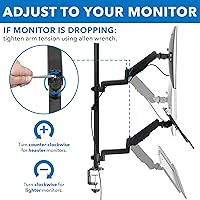
When the gas spring is dialed in correctly for your monitor's weight, height transitions feel effortless — push up and it holds, pull down and it stays. For users running a monitor in the 15 to 22 pound range, the spring performs reliably in the short term.
A consistent thread in negative reviews is the spring losing its hold tension after three to six months of regular up-and-down use. Heavier monitors near the 32-inch size limit tend to drift downward over time, which is a real usability problem for a sit-stand product.
Stability & Wobble
58%
42%
At seated height or mid-range extension, the arm holds a large monitor steadily enough for focused work. The C-clamp base distributes the load reasonably well on thicker, heavier desks.
Raised to near maximum height, screen wobble becomes a common complaint — typing on the attached keyboard tray can cause noticeable vibration to transfer up the arm. Buyers with lightweight or thin desks report the problem is significantly worse.
Keyboard Tray Usability
78%
22%
The inclusion of a padded wrist rest makes a real difference for people who type for several hours daily — wrist fatigue is measurably reduced compared to a flat desk surface. The tray itself fits a standard keyboard and mouse comfortably side by side.
The tray angle is not independently adjustable from the arm height, so some users find they cannot achieve an ideal wrist position without compromising their screen height. Larger mechanical keyboards or those with wrist rests already attached may not sit flat in the tray.
Ergonomic Range of Motion
83%
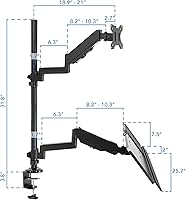
A height adjustment range of nearly 32 inches covers the needs of most users sharing a workstation, and the 35-degree tilt allows comfortable screen positioning whether sitting low in a chair or standing upright. The 360-degree rotation is a practical bonus for portrait-mode creative workflows.
The swivel range stops at 180 degrees, which limits how far you can angle the screen toward a colleague without physically rotating the whole arm. For corner desk setups, reaching an ideal viewing angle sometimes requires repositioning the entire base.
Cable Management
63%
37%
The integrated channels along the frame do a decent job hiding power and data cables from the monitor itself, keeping the main body of the arm looking clean. Buyers who only run one or two cables find the system works without modification.
Running cables through the channels while the arm is in motion is fiddly, and the channels are too narrow for thicker braided cables. Several reviewers note that cable routing instructions are minimal, and the end result often still has visible slack near the base.
Desk Compatibility
76%
24%
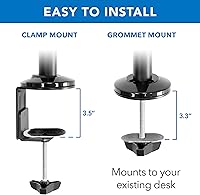
Two mounting options — C-clamp and grommet — give buyers flexibility across most standard office desks, dining tables used as home workstations, and standing desk frames. The clamp handles desks up to 3.5 inches thick, covering the majority of real-world setups.
Thick desks close to the 3.5-inch limit can make the clamp feel insecure, and the grommet option requires an existing hole of the right diameter. Buyers with glass-top or very thin veneer desks have reported surface marking under heavy use.
Monitor Compatibility
84%
Standard VESA patterns are covered well, and the quick-release bracket makes swapping monitors between setups genuinely fast. Most 27-inch to 32-inch flat panels mount without adapters.
Curved monitors near the 32-inch size can push the arm's weight tolerance and worsen spring drift over time. Ultrawide screens beyond 32 inches are not supported, which is a meaningful gap as that format grows more common.
Value for Money
69%
31%
Compared to buying a monitor arm and a separate keyboard tray independently, this ergonomic desk mount bundles the two at a price that initially feels like good value. For a first ergonomic upgrade, the combined functionality is hard to argue with at this tier.
Buyers who keep the unit beyond six months are more likely to question the value, particularly if the spring loses tension or wobble worsens. At this price point, the competition from single-arm mounts with better long-term reviews makes the value case less clear-cut.
Assembly Instructions
54%
46%
The physical hardware kit is complete and most buyers find the mechanical assembly of the arm itself fairly intuitive. Basic steps like attaching the clamp and setting the VESA bracket are illustrated clearly enough.
Spring tension calibration instructions are vague, leaving many users guessing why their monitor drifts after initial setup. The manual does not adequately explain how to route cables or adjust joint friction, which generates a disproportionate share of early frustration in reviews.
Aesthetic & Desk Presence
74%
26%
The all-black matte finish looks professional and blends into most home office and corporate desk environments without drawing attention. The cable management, when set up correctly, contributes to a noticeably cleaner desk appearance.
The arm is visually bulky compared to slimmer single-monitor arms in the same price range, and the keyboard tray adds considerable visual mass below the monitor. In smaller or minimalist workspaces, the overall footprint can feel imposing.
Long-Term Durability
55%
45%
Buyers who use the arm primarily at a fixed height — rather than actively raising and lowering it multiple times per day — tend to report fewer mechanical issues over time. Light-use scenarios seem to preserve spring integrity considerably longer.
For users actually treating this as a sit-stand tool and cycling the height several times daily, reports of spring degradation and loosening joints within six to twelve months are frequent enough to be a genuine purchase risk. Replacement parts are not readily available.

Suitable for:

The Mount-It! MI-7995 32″ Sit-Stand Monitor Mount is a practical fit for home office workers who want to introduce more movement into their day without replacing their existing desk. If you spend long hours typing and feel it in your wrists or neck by afternoon, the combined monitor arm and keyboard tray with wrist rest addresses both problems in one installation. It works especially well for people with a single monitor up to 32 inches who are working on a standard desk and do not want to clutter their surface with separate risers and peripheral trays. Budget-conscious buyers who would otherwise piece together a monitor arm and a keyboard tray independently will find the bundled approach saves both money and desk real estate. It is also a reasonable choice for anyone setting up a shared workstation where different users need to shift the screen height between sitting and standing positions throughout the day.
Not suitable for:

If you plan to actively cycle between sitting and standing multiple times every day, the long-term reliability of this ergonomic desk mount is a genuine concern — user reports consistently point to gas spring degradation within six to twelve months of heavy use, which defeats the core purpose of a sit-stand setup. Buyers running ultrawide monitors or screens larger than 32 inches will need to look elsewhere, as the arm is simply not rated for that format. Anyone working on a lightweight, thin, or glass-top desk may struggle with stability, since the 21-pound unit can stress less substantial surfaces and amplify wobble at extended heights. Multi-monitor users will also find the design limiting, as it only accommodates a single display. Finally, buyers who prioritize premium build quality and expect zero mechanical slack out of the box should temper their expectations — the joint tolerances and plastic keyboard tray components do not match what more expensive arms in this category deliver.

Specifications

  • Model Number: This unit is identified by manufacturer model number MI-7995.
  • Screen Compatibility: Supports flat-panel monitors up to 32″ in size using a standard VESA mounting pattern.
  • Height Adjustment: The arm provides a vertical travel range of 31.8″, accommodating a wide span between seated and standing positions.
  • Tilt Range: The monitor can be tilted forward or backward up to 35 degrees to reduce screen glare and optimize viewing angle.
  • Swivel Range: The arm swivels up to 180 degrees horizontally, allowing the screen to be angled left or right from center.
  • Rotation: Full 360-degree rotation allows the monitor to be used in either landscape or portrait orientation.
  • Mounting Options: Compatible with both C-clamp and grommet desk mounting styles depending on the user's desk configuration.
  • Clamp Thickness: The C-clamp base accommodates desk edges up to 3.5″ thick for a secure, no-drill installation.
  • Grommet Thickness: When using the grommet mount option, the desk surface can be up to 3.3″ thick.
  • Spring Mechanism: A pneumatic counterbalance gas spring enables tool-free height adjustments without manual locking knobs.
  • Frame Material: The main arm structure is constructed from a combination of steel and aluminum for rigidity and load support.
  • Keyboard Tray: An integrated keyboard tray with a padded foam wrist rest is included and mounts below the monitor platform.
  • Cable Management: Channels for routing and concealing monitor cables are built directly into the sides of the arm frame.
  • VESA Mount: A quick-release VESA bracket is included, making monitor attachment and removal faster than traditional bolt-on designs.
  • Product Weight: The fully assembled unit weighs approximately 21 pounds, which has implications for desk stability and solo installation.
  • Package Dimensions: The product ships in a box measuring 33 x 12 x 6 inches, suitable for standard residential delivery.
  • Color: Available in a matte black finish that blends with most office and home desk environments.
  • Product Category: Ranked #465 in Computer Monitor Stands on Amazon as of the most recently available data.

Related Reviews
Mount-It! MI-7934 36″ Dual Monitor Desk Converter
77%
88%
Ease of Assembly
83%
Monitor Arm Stability
79%
Gas Spring Height Adjustment
91%
Work Surface Size
71%
Keyboard Tray Usability
More
VIVO STAND-SIT1KW Sit-Stand Wall Mount Workstation
84%
88%
Ergonomics & Comfort
92%
Space-Saving Design
91%
Height Adjustment Mechanism
67%
Installation Ease
74%
Build Quality & Durability
More
Mount-It! Tripod TV Stand MI-874
85%
91%
Portability
88%
Ease of Assembly
72%
Stability on Uneven Surfaces
60%
Tilt Adjustment Flexibility
94%
Weight Capacity
More
MOUNT PRO Dual Monitor Stand for Desk
85%
88%
Ergonomics
91%
Build Quality
72%
Ease of Installation
85%
Adjustability & Flexibility
94%
Desk Space Efficiency
More
Mount-It! MI-7952 Electric Standing Desk Converter
85%
94%
Ease of Use
90%
Build Quality
88%
Stability
85%
Ergonomics
82%
Assembly Process
More
Mount-It! MI-7945 Mobile Projector Cart
69%
84%
Ease of Assembly
81%
Mobility & Wheel Performance
67%
Shelf Stability
58%
Height Adjustability
71%
Build Quality
More
Mount-It! MI-7983 Triple Monitor Electric Desk Converter
69%
74%
Build Quality & Stability
82%
Electric Height Adjustment
86%
Monitor Arm Flexibility
47%
Assembly Experience
61%
Footprint & Desk Compatibility
More
Mount-It! 39″ Extra Long Dual Monitor Stand Riser
85%
89%
Build Quality
94%
Ease of Assembly
86%
Ergonomics/Comfort
82%
Storage Capacity
91%
Weight Capacity
More
FITUEYES TV Stand with Mount for 32-70 inch TVs
83%
88%
Build Quality
91%
Ease of Assembly
85%
Adjustability (Swivel/Height)
79%
Storage Space
84%
Design/Appearance
More
VEVOR 85-inch Swivel Adjustable Floor TV Stand
74%
86%
Ease of Assembly
74%
Stability & Safety
71%
Swivel Mechanism
83%
Height Adjustability
67%
Build Quality
More

FAQ

It depends on the weight more than the curve. The arm is rated for screens up to 32″, but curved monitors tend to be heavier than flat panels of the same size, and that extra weight can accelerate gas spring wear over time. If your curved monitor falls within the weight tolerance, it will mount physically, but expect more spring drift compared to a lighter flat panel.

No drilling required if you use the C-clamp option, which grips the edge of desks up to 3.5″ thick. If your desk already has a pre-drilled grommet hole, you can use that mounting style instead, which works for desks up to 3.3″ thick. Most standard office desks and home writing desks are compatible with at least one of these two options.

The unit weighs 21 pounds fully assembled, which makes solo installation genuinely awkward. You can do it alone, but having a second person hold the arm steady while you tighten the clamp will save a lot of frustration. Getting the monitor attached to the VESA bracket afterward is much easier once the arm itself is secured.

Honestly, yes — it is a recurring pattern in user reviews. The gas spring performs well early on, but buyers who actively raise and lower the arm several times per day tend to notice the spring losing hold tension within six to twelve months. If you plan to use this as a true sit-stand setup and cycle the height frequently, that degradation is a real risk to factor into your decision.

No, this arm is designed for a single monitor only. If you need to support two screens, you would need to look at a dedicated dual-monitor arm with a wider base and separate VESA plates. Running two monitors from this unit is not supported and would likely exceed the arm's load tolerance.

A standard full-size keyboard and a mouse fit side by side on the tray without much issue. Where it gets tight is with larger mechanical keyboards that have chunky bezels, or if you use a keyboard that already has an attached wrist rest — the tray's padded rest and the keyboard's own rest can conflict. Compact or tenkeyless keyboards have the most comfortable fit.

It works on most standing desk frames as long as the desktop surface is within the clamp or grommet thickness limits. The main consideration is that if you are already using a height-adjustable standing desk, adding a sit-stand monitor arm on top of it can be redundant. Where this product makes more sense is on a fixed-height desk where you want to introduce vertical movement without replacing the desk itself.

Most pneumatic arms have a tension adjustment screw or knob near the spring housing — check the manual for its location on this model. Tightening it slightly should restore some hold. If the drift continues even after adjustment, it typically means the spring has weakened and the arm is no longer counterbalancing the monitor's weight effectively, which is a hardware limitation rather than a user error.

The cable channels run along the sides of the arm frame, so from a front-facing view the setup looks clean. From behind or from the side, cables are partially visible where they exit the channels at the top and bottom. Thicker cables — especially braided HDMI or USB-C cables — often do not fit neatly into the channels, so the result varies depending on your cable setup.

Butcher-block desktops are typically around 1.5 to 1.75 inches thick, which is well within the C-clamp's 3.5-inch limit. The clamp should grip the edge without any problems. Where butcher-block desks can cause issues is surface marking under prolonged pressure from the clamp, so consider placing a thin rubber pad between the clamp jaw and the wood surface to protect the finish.