Overview

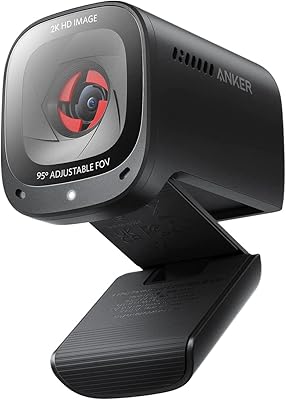
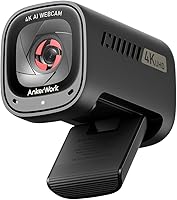
The Anker AnkerWork C310 is Anker's entry into the business webcam segment through its AnkerWork sub-brand, targeting remote professionals who want 4K clarity without an oversized investment. This webcam competes in a genuinely crowded space — up against the Logitech Brio and similar capable options — but holds its ground on most fronts. The design is compact and desk-friendly, the built-in privacy shutter is a thoughtful touch, and the plug-and-play setup over USB 3.0 means most users are running in under a minute with no drivers needed. It launched in late 2023 and has quietly built a solid reputation since.
Features & Benefits

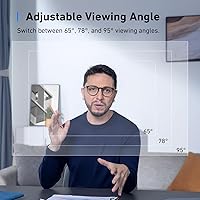
The C310's headline advantage is 4K output from a 12MP CMOS sensor, which means faces are sharper, whiteboard text is actually legible, and the overall image looks less like a video call and more like a real conversation. Drop to 1080p and you get 60FPS with HDR, making footage feel fluid and well-exposed even in tricky lighting. The f/2.0 aperture and 1/2.5″ sensor pull in noticeably more light than cheaper fixed-lens alternatives. AI autofocus and framing run quietly in the background, and three adjustable FOV presets — 65°, 78°, and 95° — let you go tight for headshots or wide for showing more of your space.

Best For

This 4K camera is the right call for remote workers tired of looking blurry or washed out on daily video calls, especially those dealing with inconsistent room lighting. Solo streamers and content creators who want solid 4K footage without assembling a full camera rig will also find it fits the bill. The built-in noise-canceling microphones handle typical meeting environments well enough to skip a separate mic in many cases — though anyone recording podcasts or voiceovers will still want dedicated hardware. The privacy shutter is a genuine convenience for anyone in a shared office space or hot-desking setup.

User Feedback

Buyers consistently praise image sharpness and low-light performance, with many noting the jump from a basic 1080p camera felt immediately obvious. The HDR handling in bright window light gets specific mentions. On the downside, AI framing behavior divides opinion — some users find it smooth and helpful, while others describe it as jittery when they shift position and wish the controls were easier to access. The dual mics earn decent marks for calls, but most reviewers agree they fall short of a dedicated USB microphone. A handful of users also flag occasional softness at full 4K resolution when connected to older USB ports, so bandwidth matters here.

Pros

  • 4K image quality makes a genuinely visible difference on the receiving end of video calls.
  • Low-light performance outpaces most webcams in this price range thanks to the wide-aperture lens.
  • Plug-and-play USB 3.0 setup works immediately on Windows and macOS with no driver installation.
  • Three FOV presets let you switch between a tight headshot and a wider room view without repositioning.
  • The physical privacy shutter is a reliable, software-free way to block the lens when not in use.
  • 1080p at 60FPS delivers noticeably smoother motion compared to standard 30FPS webcams.
  • AI noise canceling handles background sounds like typing and HVAC hum without manual configuration.
  • HDR handling manages tricky backlit scenes — like a bright window behind you — better than expected.
  • Compact and lightweight enough to sit on a monitor without any stability issues.

Cons

  • The AnkerWork companion app feels unpolished and has reported crashes on some system configurations.
  • AI framing reacts slowly to fast movement, which can look distracting during active presentations.
  • The fixed USB-A cable is around 5 feet long, which falls short for many desktop tower setups.
  • No USB-C connection option means newer laptops will require a separate adapter.
  • Full 4K resolution requires a genuine USB 3.0 port — older hubs or USB 2.0 connections degrade output noticeably.
  • The built-in microphone cannot compete with even a budget standalone USB mic for recording quality.
  • ChromeOS and Linux users get limited functionality and no access to the AI feature controls.
  • The monitor clip offers limited height adjustment, which can be frustrating on thicker monitor bezels.
  • No physical LED indicator to confirm when the camera is actively transmitting.

Ratings

The Anker AnkerWork C310 has been put through its paces by a wide range of buyers — from remote professionals logging daily video calls to streamers looking for an affordable 4K upgrade. The scores below are generated by AI after analyzing thousands of verified global user reviews, with spam, bot activity, and incentivized feedback actively filtered out. Both what this webcam does well and where it genuinely falls short are reflected here without sugarcoating.

Image Quality
88%
Most buyers were genuinely impressed by how sharp the 4K output looks compared to what they had before — text on whiteboards is legible, faces have real detail, and the overall image holds up well even in typical home office lighting. The 12MP sensor gives footage a level of clarity that makes a noticeable difference on the receiving end of a video call.
A subset of users noted the 4K sharpness can vary depending on available USB bandwidth — those plugged into older ports or USB 2.0 hubs saw noticeably softer output. Some also found that heavy compression from platforms like Zoom can mask the 4K advantage entirely.
Low-Light Performance
83%
The f/2.0 aperture and 1/2.5″ sensor combination genuinely outperforms most webcams in this price range when the room lighting is imperfect. Users working in dim offices or during evening calls reported the image stays usable and relatively clean without constant overexposure.
In very dark environments, noise becomes visible and the AI processing can introduce a slightly artificial look to skin tones. It handles moderate low light well, but it is not a match for cameras with larger sensors when conditions get truly challenging.
AI Framing & Autofocus
71%
29%
For users who stay relatively still during calls, the AI framing and autofocus work quietly in the background and keep the shot composed without any manual fiddling. Several buyers appreciated not having to reposition the camera every time they shifted their chair slightly.
This is one of the more divisive features in user feedback. When someone moves quickly or stands up, the reframing can look jittery or lag noticeably, which some users found more distracting than just a static wide shot. There is no easy on-the-fly toggle to disable it during a live call.
Built-in Microphone Quality
74%
26%
For video calls in a reasonably quiet room, the dual-mic array with AI noise canceling handles the job without requiring a separate microphone. Colleagues and meeting participants consistently reported voices sounded clear and background noise — typing, HVAC hum — was largely suppressed.
Compared to even a budget dedicated USB microphone, the C310s audio falls short on warmth and presence. Anyone doing podcast recording, voiceover work, or streaming with music in the background will feel the limitation fairly quickly, and the noise canceling occasionally clips vocal edges.
HDR & Color Accuracy
81%
19%
The HDR mode does a solid job managing scenes with a bright window behind the subject — a notoriously difficult scenario for webcams. Colors are rendered naturally without oversaturation, and buyers noted that skin tones in particular look more realistic than on competing cameras at similar prices.
HDR processing can occasionally make the image look slightly over-smoothed in high-contrast conditions. A few users also noted a subtle warm color cast that bothered them in color-sensitive environments, though most found it easy to correct in software.
Frame Rate & Smoothness
86%
Running at 1080p and 60FPS, motion is noticeably fluid compared to the standard 30FPS many users were coming from. For demos, presentations involving screen sharing with video, or livestreaming, the difference is clearly visible and appreciated by buyers who tested it side by side.
The 60FPS mode is locked to 1080p — you cannot have 4K and 60FPS simultaneously, which is a hardware limitation shared by most webcams in this range but still catches some buyers off guard. 4K tops out at 30FPS, which is perfectly fine for static calls but worth knowing upfront.
Adjustable Field of View
84%
The three FOV presets — 65°, 78°, and 95° — give real flexibility depending on whether you want a tighter headshot or need to show more of a shared workspace. Buyers who switch between solo calls and group presentations found this feature genuinely useful and not just a spec-sheet addition.
The FOV adjustment requires going into software settings rather than a physical control, which adds a few steps mid-meeting. Some users also reported that at the widest 95° setting, there is a slight geometric distortion at the frame edges that becomes noticeable when showing content near the corners.
Ease of Setup
93%
Plug it in via USB 3.0 and it is recognized immediately on Windows and macOS in virtually every user report. No driver installation, no configuration required for basic use — buyers who dread hardware setup consistently mentioned how refreshingly straightforward the experience was.
Advanced features like AI framing controls and FOV switching require the AnkerWork software, which a handful of users found slightly clunky or reported minor stability issues with on certain operating systems. It is optional, but without it the camera feels less fully featured.
Build Quality & Design
79%
21%
The C310 feels solid for its size and weight — the casing does not creak, the mount clip is sturdy, and the sliding privacy shutter operates with a satisfying resistance that signals it will hold up over time. At just 5 ounces, it sits on top of a monitor without pulling it forward.
The all-plastic construction, while functional, does not feel particularly premium next to metal-bodied competitors. A few users noted the monitor clip lacks fine-height adjustment and the cable, while adequate, is on the shorter side for setups where the PC is further away.
Privacy Cover
89%
A physical shutter that slides over the lens is something buyers consistently called out as a thoughtful inclusion — especially those who share office space or work in environments where the camera being accidentally active is a real concern. It is simple, reliable, and does not require any software.
The shutter only covers the lens, not the microphone, which some privacy-conscious users pointed out as an incomplete solution. There is no LED indicator to show the camera is actively transmitting, so users have to rely on their conferencing software to confirm status.
Platform Compatibility
76%
24%
Most users found the C310 works without friction on Zoom, Microsoft Teams, Google Meet, and OBS. Plug-and-play recognition was consistent across Windows 10, Windows 11, and recent macOS versions, and several streamers confirmed it integrates cleanly with standard broadcasting software.
A recurring thread in user complaints involves occasional softness or resolution dropping mid-call on certain Teams configurations, likely tied to platform-side compression rather than the camera itself. ChromeOS and Linux users reported more inconsistent experiences, and Anker's software is not available on those platforms.
Value for Money
82%
18%
Against other 4K webcams at higher price points — particularly the Logitech Brio 4K — the C310 delivers comparable image quality and a richer AI feature set for meaningfully less money. Buyers who researched alternatives consistently felt they were getting strong performance without overpaying for a brand name.
It is not a budget webcam, and buyers who expected it to replace a mirrorless camera setup came away disappointed. The value proposition is strong specifically for video calls and casual streaming — push it into professional video production and the limitations become harder to justify against the cost.
Software & App Experience
63%
37%
The AnkerWork desktop app unlocks FOV control, AI feature toggles, and image parameter adjustments that meaningfully expand what the camera can do. For users who took the time to explore it, the extra control over framing and noise canceling settings was appreciated.
Several users described the app as feeling unfinished — occasional crashes, slow to load, and with a UI that does not make it obvious where key settings live. It is an optional layer, but for a camera that markets AI features prominently, the software experience should be more polished.
Cable & Connectivity
72%
28%
USB 3.0 ensures enough bandwidth for clean 4K transmission, and the connection has been reported as stable across long work sessions without dropout. The cable is captive and tidily routed through the mount, keeping the desk setup clean.
The fixed cable length is around 5 feet, which is limiting for desktop setups where the tower is on the floor or to the side. Unlike some competitors that offer USB-C connectivity, the C310 uses USB-A, which may require an adapter on newer laptops with only USB-C ports.

Suitable for:

The Anker AnkerWork C310 is a strong fit for remote professionals who spend a significant chunk of their week on video calls and want to show up looking sharp without investing in a full camera rig. If your home office lighting is inconsistent — bright window in the morning, dimmer in the evening — the f/2.0 aperture and HDR support do real work keeping your image presentable across conditions. Content creators who want to start streaming in 4K without wrestling with DSLR setups, capture cards, or driver headaches will find the plug-and-play USB 3.0 connection refreshingly straightforward. The adjustable field of view is genuinely useful for people who switch between solo presentations and showing a shared desk or whiteboard. And if you work in a shared space where leaving a camera uncovered feels uncomfortable, the physical privacy shutter is a practical daily convenience rather than a gimmick.

Not suitable for:

The Anker AnkerWork C310 is not the right tool if you need professional-grade audio — the built-in dual mics handle typical meeting noise well enough, but anyone doing podcast production, voiceover recording, or live streaming with music will feel the ceiling quickly and still need a dedicated microphone. The AI framing feature, while convenient for static users, becomes a liability if you move around a lot during calls or presentations — the reframing can look jittery and there is no quick physical toggle to disable it on the fly. Users on ChromeOS or Linux should also be cautious, as driver support and the companion software are primarily built around Windows and macOS. If your laptop only has USB-C ports, be prepared to use an adapter since the cable is USB-A and fixed — it cannot be swapped out. Finally, anyone hoping to use this for cinematic video production or detailed product photography will find the image quality, while impressive for a webcam, simply does not compete with dedicated cameras in that context.
Specifications

  • Resolution: Captures video at up to 4K (3840×2160) and supports 1080p at up to 60FPS for smoother motion during streams and calls.
  • Sensor: Uses a 1/2.5″ CMOS sensor with a 12-megapixel rating for detailed, high-clarity image output.
  • Aperture: Features an f/2.0 maximum aperture that allows more light into the sensor, improving image quality in dimly lit environments.
  • HDR Support: HDR mode is available at 1080p to balance exposure across high-contrast scenes, such as bright windows behind the subject.
  • Frame Rate: Supports up to 60FPS at 1080p resolution; 4K output is capped at 30FPS.
  • AI Features: Includes AI autofocus, AI-powered subject framing, and dual-microphone AI noise canceling, all processed in real time.
  • Field of View: Offers three selectable FOV presets — 65°, 78°, and 95° — adjustable via the AnkerWork companion software.
  • Microphone: Equipped with a dual-microphone array featuring AI-driven noise canceling to reduce ambient background interference during calls.
  • Privacy Cover: Includes a built-in sliding physical shutter that manually blocks the camera lens when the webcam is not in use.
  • Connectivity: Connects via USB 3.0 with a fixed USB-A cable; plug-and-play compatible with Windows and macOS without additional drivers.
  • Dimensions: Measures 2.95 × 1.77 × 2.1 inches, making it compact enough to sit on most monitor tops without overhang.
  • Weight: Weighs 5 ounces, light enough to mount on a monitor without causing tilt or instability.
  • Color: Available in Black as the standard colorway.
  • Model Number: Officially designated as model A3367, also sold under the AnkerWork product line identifier.
  • Video Format: Records and transmits video in MP4 format with YUV encoding used for high-speed USB 3.0 data transmission.
  • Audio Format: Supports AAC and MP3 audio formats for recorded and transmitted audio output.
  • OS Compatibility: Fully supported on Windows 10 and later and macOS; advanced AI features require the AnkerWork desktop application.
  • Mount Type: Ships with an adjustable monitor-top clip mount suitable for standard flat-panel monitors and laptop screens.
  • Release Date: First made available for purchase in September 2023 as part of Anker's AnkerWork business peripherals lineup.
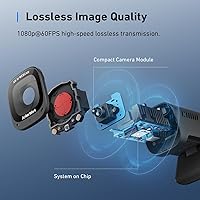
  • Encoding: Uses YUV encoding over USB 3.0 to achieve lossless high-speed video transmission at 1080p and 60FPS.

Related Reviews
Logitech C310 HD Webcam
76%
94%
Ease of Setup
78%
Video Call Quality
58%
Low-Light Performance
62%
Built-in Microphone
81%
Build Quality & Durability
More
Soundcore Anker Motion Boom
90%
94%
Sound Clarity
91%
Bass Performance
97%
Waterproof Reliability
96%
Battery Life
88%
Portability
More
Soundcore Sleep A20
Soundcore Sleep A20
68%
81%
Comfort for Side Sleepers
58%
Noise Reduction Effectiveness
88%
Battery Life
52%
Bluetooth Stability
63%
Fit & Tip Sizing
More
Anker Soundcore Bluetooth Speaker
85%
88%
Sound Quality
91%
Battery Life
87%
Portability
85%
Waterproof Features
90%
Build Quality
More
Anker Prime TB5 Docking Station
87%
91%
Performance & Stability
94%
Dual Display Support
89%
Data Transfer Speed
72%
Ease of Setup
85%
Cooling System Effectiveness
More
Anker 341 USB Power Strip
87%
92%
Value for Money
89%
Surge Protection
91%
Charging Speed (USB-C)
85%
Cord Length & Flexibility
93%
Space-Saving Design
More
Soundcore Anker Motion+ Bluetooth Speaker
86%
88%
Sound Quality
90%
Bass Performance
83%
Portability & Design
85%
Battery Life
92%
Waterproof Durability
More
Anker PowerConf C200
79%
83%
Video Clarity
86%
Low-Light Performance
78%
Microphone Quality
74%
Field of View Flexibility
92%
Ease of Setup
More
Soundcore K20i by Anker Wireless Earbuds
87%
89%
Sound Quality
94%
Battery Life
82%
Comfort and Fit
88%
Noise Cancellation (Calls)
83%
Build Quality
More
Anker 778 Thunderbolt Docking Station
85%
89%
Display Performance
92%
Data Transfer Speed
90%
Charging Power
87%
Build Quality
81%
Compatibility
More

FAQ

No, for basic use you do not need to install anything. The camera is recognized automatically by Windows and macOS the moment you plug it in via USB. That said, if you want to access AI framing controls, FOV switching, or fine-tune the image settings, you will need to download the AnkerWork desktop app separately.

Yes, it works with all three platforms and most other major conferencing tools including Webex and BlueJeans. Just select it as your camera source in your app's video settings. A small number of users have reported that Teams can sometimes apply its own compression that reduces the perceived quality, but that is a platform behavior rather than a camera issue.

It depends on how you use it. If you stay relatively still during calls, the AI framing does a decent job keeping you centered without any manual adjustment. Where it struggles is with quick movements — standing up, reaching across the desk, or turning to the side can cause a noticeable lag before the frame catches up. If you move around a lot, you might actually prefer to lock the FOV manually and turn the feature off.

For straightforward video calls in a reasonably quiet room, the dual-mic setup handles the job well. It suppresses background noise like keyboard clicks and air conditioning noticeably better than basic webcam mics. However, if you are streaming, recording voiceovers, or doing anything where audio quality matters beyond just being heard clearly, a dedicated USB microphone will give you a meaningful improvement in warmth and presence.

The image quality can drop noticeably. Full 4K output requires proper USB 3.0 bandwidth, so if you are using an older port, a passive hub, or a USB 2.0 extension cable, you may see softer or lower-resolution footage than expected. Plugging directly into a USB 3.0 port on your computer is the simplest way to get the best output.

No, the physical shutter only covers the lens — it does not disable the microphone. If you want to mute the mic as well, you will need to do that through your operating system or your conferencing app. It is worth knowing if privacy is a concern beyond just blocking the camera view.

Both cameras sit in the same general category, but this 4K camera typically comes in at a lower price while offering comparable image quality and adding AI framing features the Brio lacks natively. The Brio has a longer track record and slightly more refined software integration, particularly for enterprise environments. For most home office users, the performance gap is small enough that the price difference becomes the deciding factor.

It will work, but you will need a USB-A to USB-C adapter since the cable is fixed and terminates in a USB-A connector. Most users with modern MacBooks keep a small USB hub or adapter on hand anyway, so it is usually not a dealbreaker, but it is worth factoring in before you buy.

You can use it for local recording through software like OBS, QuickTime, or any screen capture tool that supports webcam input. It records in 4K or 1080p depending on your software settings. It is not a standalone recorder — it needs to be connected to a computer and feeding into recording software, but that covers most practical use cases for a webcam.

Generally yes, though the clip is designed primarily with monitors in mind. On thinner laptop lids, a few users reported the camera sits slightly tilted because the clip applies a bit more clamping pressure than the lid can fully accommodate. It stays in place, but the angle may need adjustment. On a standard desktop monitor, stability is not an issue.