

Overview

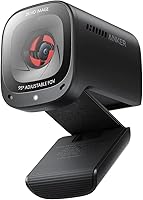
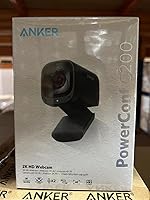
The Anker PowerConf C200 arrived in late 2021 and has quietly become one of the more reliable options in the mid-range webcam space. It sits comfortably between bare-bones 1080p cameras and expensive 4K models — a sensible middle ground for remote workers who want noticeably better video without paying a premium. The design is compact and clip-on, takes seconds to set up, and works straight out of the box on both Mac and PC. What makes this webcam worth a closer look is how well it balances image quality, built-in audio, and everyday usability in a single, unfussy package.

Features & Benefits

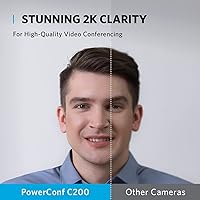
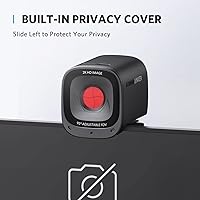
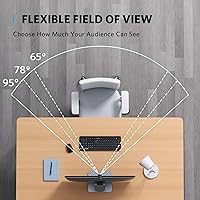
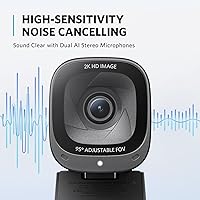
The C200 runs on a 5MP CMOS sensor that captures 2K resolution, and the difference compared to a typical 1080p camera is visible — faces look sharper, text on a whiteboard behind you is actually readable. The adjustable field of view is a thoughtful touch: you can switch between 65°, 78°, or 95° through Anker's software, which is handy if you share a desk or occasionally need to show more of your workspace. Auto-focus is quick and does not hunt noticeably. The dual mics with AI noise cancellation do a solid job reducing fan hum and keyboard noise, though they will not replace a dedicated microphone. The sliding privacy cover feels genuinely useful rather than decorative.

Best For

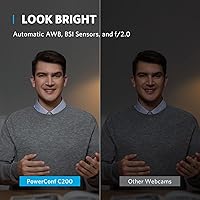
This Anker camera makes the most sense for remote professionals who spend a lot of time on video calls and want a clear, reliable picture without a complicated setup. It is also a strong pick for anyone working in a low-light home office — the sensor handles dim conditions better than most built-in cameras without requiring extra lighting gear. If your audio situation is just a laptop mic right now, the C200's dual mics will feel like a meaningful step up. Less ideal for content creators who need 4K, or users who want a fully hardware-driven experience with no software involvement for framing adjustments.

User Feedback

Across more than 8,000 ratings, this webcam holds a 4.4-star average — which is genuinely hard to sustain at this price point. The most consistent praise involves image sharpness and low-light performance, with many buyers noting how dramatically it outperforms what was built into their laptop. Noise cancellation gets good marks too, particularly from people in open-plan spaces or busy households. On the flip side, some users find the clip mount a bit loose on wider monitor frames, and a handful report long-term reliability concerns after a year or more of heavy use. Strong consensus buy — just not a flawless one.

Pros

  • 2K resolution delivers noticeably sharper detail than standard laptop cameras on daily video calls.
  • Low-light performance is strong enough to skip the ring light in most home office conditions.
  • Dual mics with AI noise cancellation meaningfully reduce fan noise, keyboard clicks, and background chatter.
  • Plug-and-play setup works on both Mac and PC with zero driver installation required.
  • Three field-of-view settings give useful framing flexibility without physically moving the camera.
  • The sliding privacy cover is physical and reliable — no software or indicator lights needed.
  • Auto-focus locks quickly and does not drift or hunt noticeably during normal call movement.
  • Broad OS compatibility means it works across older and newer machines without issues.
  • Compact footprint clips neatly to monitors or laptops without obstructing the screen.
  • At its price tier, the combination of 2K video and noise-canceling audio is genuinely hard to beat.

Cons

  • The field-of-view adjustment requires Anker's desktop app, which some users find unreliable between sessions.
  • App settings can revert after a reboot, turning a simple feature into a recurring nuisance.
  • The clip mount feels noticeably less secure on monitors with thicker or unconventional bezels.
  • No tripod thread or desk stand is included, limiting placement options beyond clipping to a display.
  • A minority of long-term users report hardware degradation — image quality or connectivity issues after extended daily use.
  • Microphone audio can sound thin or over-processed in rooms with hard surfaces or poor acoustics.
  • Color balance drifts toward warm or cool in artificial lighting without manual correction options.
  • Chromebook and Linux compatibility is not officially supported, which is a gap for some work environments.

Ratings

The Anker PowerConf C200 has been evaluated by our AI system after analyzing thousands of verified global buyer reviews, with spam, incentivized, and bot-flagged submissions actively filtered out. The scores below reflect real-world usage patterns across home offices, remote work setups, and everyday video calling environments. Both the strengths that keep this webcam in the top 10 of its category and the friction points that matter to real buyers are transparently represented.

Video Clarity
83%
The 2K resolution is a genuine step up from typical 1080p webcams — meeting participants notice sharper facial detail, and text or whiteboards behind you actually come through legibly. For daily video calls, it consistently outperforms built-in laptop cameras by a clear margin.
It still falls short of 4K options when fine detail really matters, and some users report that compression during video calls can soften the image. The 30fps cap at 1080p is functional but not ideal for anyone who occasionally records or streams.
Low-Light Performance
86%
One of the C200's most praised real-world traits is how it handles dim rooms. Users working at evening hours or in north-facing offices report usable, clean images without needing to add a ring light or desk lamp just to look presentable on a call.
In very dark environments, some noise and softness creep in around the edges of the frame. It handles typical home office dimness well, but do not expect miracles in near-darkness — the sensor has limits that auto-correction cannot fully compensate for.
Microphone Quality
78%
22%
The dual mics with AI noise cancellation do a noticeably better job than any built-in laptop mic. Open-plan workers and people in busy households specifically mention that background chatter, fan noise, and keyboard clicks are significantly reduced during calls.
It is not a microphone replacement — voice can sound slightly thin or processed on some systems, and in reverberant rooms the audio quality drops. Users who record podcasts or produce content will still need a dedicated external mic alongside this camera.
Field of View Flexibility
74%
26%
Having three distinct field-of-view settings — 65°, 78°, and 95° — through software is genuinely useful for people who share a desk or need to occasionally frame a wider shot. It removes the need to physically reposition the camera each time your setup changes.
The software dependency is the catch: the FOV adjustment requires Anker's desktop app, which some users find inconsistent or slightly clunky. On certain systems the settings do not always save reliably between sessions, which becomes a small but recurring annoyance.
Ease of Setup
92%
Plug-in and it works — no driver installation, no account creation, no configuration required on either Windows or Mac. For non-technical users or IT teams deploying across multiple machines, this zero-friction setup is a real practical advantage.
The reliance on a separate app for FOV control slightly undermines the plug-and-play promise. Users who want full control over framing will need to install additional software, which is a minor but fair caveat to the otherwise clean out-of-box experience.
Build Quality
71%
29%
The camera feels solid in hand for its size and weight class — at just 7 ounces, it sits stably on most monitors without wobbling. The sliding privacy cover in particular feels sturdy and satisfying to use, not like a flimsy plastic flap.
The clip mount is where some buyers have concerns — on thicker bezels or ultrawide monitors it can feel less secure, and a few users report it loosening over time with daily adjustments. The overall plastic construction is functional but does not feel premium.
Privacy Cover
88%
The physical sliding cover is one of those features you do not appreciate until you have it. Being able to mechanically block the lens between calls provides genuine peace of mind — no software settings or indicator lights required, just a simple tactile slide.
The cover itself is well-designed but not unique to this model — most competitors now include one. It does not block the microphone, so users who want full audio-visual privacy will still need to mute manually or via software.
Auto-Focus Performance
79%
21%
The autofocus is quick to lock on and does not exhibit the hunting behavior that plagues cheaper webcams — when you lean forward or move around during a call, the image snaps back into focus quickly without distracting drift or lag.
In mixed or shifting lighting conditions, the autofocus can occasionally lose its footing and briefly soften before correcting. It is not a frequent issue, but users who move around a lot or have dynamic backgrounds behind them may notice it more than others.
Compatibility
91%
Support for Windows 7 and macOS 10.11 and later is about as broad as it gets in this category. The C200 works across older office machines, modern MacBooks, and everything in between without any compatibility headaches or driver hunting.
Chromebook and Linux support is not officially documented, which is a gap for users in education or open-source environments. A small number of users also report occasional USB dropout issues on older machines, though this appears to be edge-case behavior.
Value for Money
84%
At its price point, the combination of 2K resolution, noise-canceling dual mics, adjustable FOV, and a privacy cover is hard to match without spending significantly more. For remote workers who need a reliable daily driver, the feature-to-price ratio is strong.
Budget webcams have closed the gap in raw resolution, so the value argument rests on the audio and FOV features working reliably — which they mostly do, but not always. Users who only need basic video and do not care about mic quality may find cheaper options sufficient.
Software Experience
62%
38%
Anker's companion app is clean and not bloated — it covers the essentials without demanding excessive system resources. For users who do use it regularly, accessing FOV settings from a simple interface is preferable to hunting through system menus.
The app is not essential for basic use, but it is the only way to unlock the adjustable FOV, which is a key selling point. Stability and reliability of the app have drawn criticism from some users, with settings occasionally reverting or the app failing to recognize the camera after a reboot.
Long-Term Reliability
67%
33%
The majority of buyers report trouble-free operation over many months of daily use — in an era where peripheral quality can be inconsistent, the C200 generally holds up well under regular home office workloads without degrading noticeably in performance.
A non-trivial minority of reviews mention hardware issues appearing after extended use — image quality degradation, USB connectivity problems, or physical wear on the clip. It is not an alarming failure rate, but it does suggest the long-term durability ceiling is moderate rather than exceptional.
Image Color Accuracy
76%
24%
Colors come through naturally in well-lit settings — skin tones look balanced and backgrounds do not blow out or shift green the way some cheaper sensors do. For standard video calls, the color rendering is pleasing without requiring manual calibration.
In artificial or mixed lighting, the white balance can drift toward warm or cool tones in ways that are noticeable but not severe. Users who appear on camera in tungsten-lit rooms may find the color cast harder to fix without additional software color correction.
Mounting Versatility
69%
31%
The clip mount covers the most common use cases well — standard monitors, laptop lids, and thin-bezel displays all work without issues. The compact footprint also means it does not block much of your screen or interfere with your workspace.
There is no tripod thread or desk stand included, which limits placement options for users who do not want to clip it to a display. The clip also struggles on bezels wider than about an inch, which affects some older monitors and all-in-one desktops.

Suitable for:

The Anker PowerConf C200 is a strong fit for remote professionals who spend a significant portion of their workday on video calls and want a clear, reliable picture without the complexity or cost of a broadcast-grade setup. If your current webcam is the one built into your laptop, this will feel like a meaningful upgrade — sharper image, better low-light handling, and noticeably cleaner audio, all without touching a driver or configuration menu. It particularly suits home office workers whose lighting is inconsistent throughout the day, since the sensor adapts reasonably well to dim conditions that would leave a cheaper camera looking grainy. People who work in noisy environments — shared spaces, busy households, open-plan apartments — will also appreciate the dual mics, which reduce background interference enough to make a real difference on calls. Mac and PC users alike can plug it in and be ready to go in under a minute, and the adjustable field of view gives enough flexibility for different desk setups without requiring a physical repositioning of the camera.

Not suitable for:

The Anker PowerConf C200 is not the right tool for content creators, streamers, or anyone who needs 4K resolution for recording or producing polished video. The 30fps frame rate and 2K ceiling are more than adequate for calls, but they fall short of what you would want if sharp recorded footage matters to your workflow. Anyone expecting the built-in mics to replace a dedicated USB or XLR microphone will be disappointed — they are better than nothing and better than most laptops, but voice can sound processed or thin in rooms with challenging acoustics. If your monitor has a thick bezel or you are using an older all-in-one desktop, the clip mount may feel insecure, and there is no tripod thread or stand included if you prefer placing the camera off-display. Users who want full framing control without installing any software will also hit a wall, since the adjustable field of view only works through the companion app. Chromebook or Linux users should check compatibility carefully, as official support for those platforms is not confirmed.

Specifications

  • Resolution: The camera captures video at 2K (1440p) resolution using a 5MP CMOS sensor, delivering noticeably sharper detail than standard 1080p webcams.
  • Frame Rate: Video is recorded and streamed at up to 30 frames per second at 1080p, which is standard for video conferencing applications.
  • Field of View: Three software-selectable fields of view are available: 65°, 78°, and 95°, allowing flexible framing without physically repositioning the camera.
  • Aperture: The lens has a maximum aperture of f/2.0, which contributes to its above-average low-light performance at this price tier.
  • Focus System: Continuous autofocus is built in, enabling the camera to maintain a sharp image as the subject moves closer or further from the lens.
  • Microphone: Dual stereo microphones with AI-powered noise cancellation are integrated, designed to reduce ambient noise such as fans, keyboard clicks, and background voices.
  • Privacy Cover: A physical sliding cover is built directly into the camera housing, allowing users to mechanically block the lens when the camera is not in use.
  • Connection: The camera connects via USB 2.0 and is fully plug-and-play, requiring no driver installation on supported operating systems.
  • Compatibility: Officially supported on Windows 7 or later and macOS 10.11 or later; no additional software is required for basic camera and microphone functionality.
  • Video Codec: The camera supports both MJPEG and YUV video codec formats, providing flexibility across different video conferencing platforms and recording software.
  • Dimensions: The camera body measures 1.97 × 1.57 × 2.17 inches, making it compact enough to sit unobtrusively on top of a monitor or laptop lid.
  • Weight: The unit weighs 7 ounces, light enough that the clip mount holds it securely on most standard monitor bezels without strain.
  • Mount Type: A clip-on mount is included, designed to attach to the top edge of monitors or laptop screens with standard bezel thicknesses.
  • Sensor Type: The image sensor is a CMOS type, which is standard in this category and contributes to the camera's low-light correction capabilities.
  • Software App: Anker's companion desktop app is required to access the adjustable field-of-view settings; basic camera operation works without the app installed.
  • Color: The camera is available in black, with a matte finish that blends with most monitor and laptop designs.
  • USB Type: The camera uses a USB 2.0 interface, which is sufficient for 2K video streaming and is broadly compatible with virtually all modern computers.
  • Model Number: The official model identifier is A3369, part of Anker's PowerConf peripheral line aimed at remote work and video conferencing users.

Related Reviews
Soundcore Sleep A20
Soundcore Sleep A20
68%
81%
Comfort for Side Sleepers
58%
Noise Reduction Effectiveness
88%
Battery Life
52%
Bluetooth Stability
63%
Fit & Tip Sizing
More
Anker Soundcore Bluetooth Speaker
85%
88%
Sound Quality
91%
Battery Life
87%
Portability
85%
Waterproof Features
90%
Build Quality
More
Soundcore Anker Motion Boom
90%
94%
Sound Clarity
91%
Bass Performance
97%
Waterproof Reliability
96%
Battery Life
88%
Portability
More
Soundcore K20i by Anker Wireless Earbuds
87%
89%
Sound Quality
94%
Battery Life
82%
Comfort and Fit
88%
Noise Cancellation (Calls)
83%
Build Quality
More
Cievie C200 4K Dash Cam
82%
89%
4K Video Quality
91%
Installation & Setup
78%
Wi-Fi & App Control
85%
Night Vision Performance
83%
Build Quality
More
Anker Prime TB5 Docking Station
87%
91%
Performance & Stability
94%
Dual Display Support
89%
Data Transfer Speed
72%
Ease of Setup
85%
Cooling System Effectiveness
More
Soundcore Anker Motion+ Bluetooth Speaker
86%
88%
Sound Quality
90%
Bass Performance
83%
Portability & Design
85%
Battery Life
92%
Waterproof Durability
More
Anker 778 Thunderbolt Docking Station
85%
89%
Display Performance
92%
Data Transfer Speed
90%
Charging Power
87%
Build Quality
81%
Compatibility
More
Anker 341 USB Power Strip
87%
92%
Value for Money
89%
Surge Protection
91%
Charging Speed (USB-C)
85%
Cord Length & Flexibility
93%
Space-Saving Design
More
Anker AnkerWork C310
80%
88%
Image Quality
83%
Low-Light Performance
71%
AI Framing & Autofocus
74%
Built-in Microphone Quality
81%
HDR & Color Accuracy
More

FAQ

For basic use — video and audio on calls — no software is needed at all. Just plug it in and your computer will recognize it automatically on both Windows and Mac. The only reason to install Anker's companion app is if you want to switch between the three field-of-view settings; that adjustment is software-dependent.

Better than most webcams in its class. The f/2.0 aperture and built-in low-light correction mean you can take calls in a room lit only by a desk lamp or a window behind you and still look presentable. It is not a night-vision camera, but dim home office conditions are well within its range.

It depends on your expectations. The dual mics with noise cancellation are a significant step up from any built-in laptop mic, and for video calls they perform well. If you are recording podcasts, voiceovers, or anything where audio quality is a priority, you will still want a dedicated external microphone.

The three FOV settings — 65°, 78°, and 95° — do involve digital processing rather than optical adjustment, so wider settings use more of the sensor while narrower ones crop in. In practice the difference is visible and useful for framing, but the 65° setting will show a slight reduction in overall sharpness compared to the widest view.

Anker does not officially list Chromebook or Linux as supported platforms. Some users report it working as a standard UVC device on Chrome OS and certain Linux distributions, but you would be operating outside official support. If compatibility is critical for you, it is worth testing with a return option available.

On monitors and laptops with standard thin bezels it holds firmly and does not wobble during normal desk use. Where it struggles is on older monitors or all-in-one desktops with thicker, wider bezels — the clip can feel loose in those cases. There is no tripod mount included, so off-display placement is not an out-of-box option.

Yes, it is compatible with all major video conferencing platforms including Zoom, Microsoft Teams, Google Meet, Webex, and most others. Since it is plug-and-play with standard UVC drivers, your conferencing app should detect it automatically as both a camera and microphone input.

The AI noise cancellation processing on the mics is handled internally and cannot be switched off through the standard system audio settings. If you need unprocessed microphone input, you would need to pair this camera with a separate external mic and route audio from that device instead.

Most users report reliable operation over a year or more of regular daily use. A minority of reviews do mention hardware issues appearing after extended periods — connectivity drops or gradual image quality changes — so it is not rated as a set-and-forget device for five or more years, but for typical remote work cycles it holds up well.

No — the sliding privacy cover only blocks the camera lens physically. The microphones remain active regardless of whether the cover is open or closed. If you want full audio and video privacy between calls, you will need to mute the mic separately through your operating system or conferencing app.