Overview

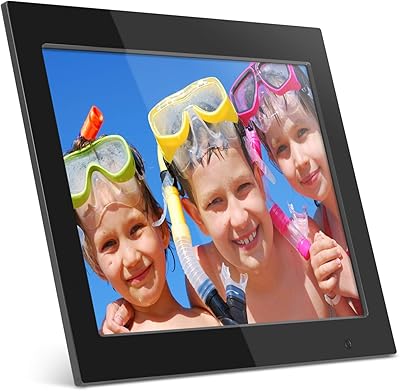
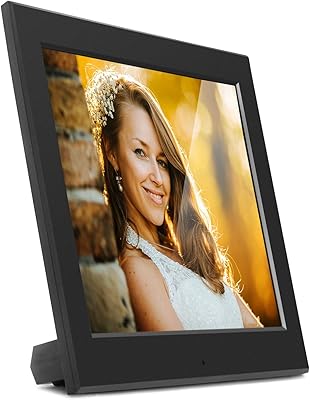
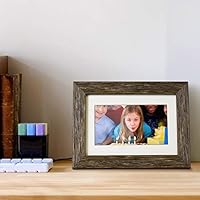
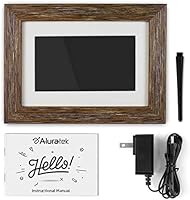
The Aluratek 7-inch Distressed Wood Digital Photo Frame is a straightforward, plug-and-play option built for people who want their photos displayed without any technical hurdles. There's no Wi-Fi to configure, no app to download, no account to create — just insert a USB drive or SD card and it runs. The distressed wood border sets it apart visually from the sea of glossy plastic frames at similar prices, giving it a warmer, more home-friendly look. Screen size and resolution are modest — 7 inches at 1024x600 — so it suits casual everyday display well, but it won't impress anyone expecting sharp, high-definition output.

Features & Benefits

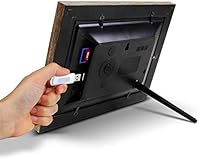
Slot in a USB drive or SD card and the slideshow starts automatically — no menus to navigate, no software to install. That zero-setup experience is genuinely useful, especially for less tech-savvy users. The LCD panel produces colors that are pleasant and reasonably vivid for a 7-inch screen, though fine detail in dense photos can look a bit soft given the 1024x600 resolution. A built-in clock and calendar adds practical value, turning it into something you'd actually glance at throughout the day. Controls sit on the back of the unit, which keeps the front face clean, though reaching around to adjust settings takes a little getting used to.

Best For

This wood photo frame is an excellent choice for grandparents or older relatives who just want to see family photos without dealing with apps, passwords, or Wi-Fi networks. It also works well as a gift — something the recipient can plug in and enjoy immediately, which matters more than people give credit for. Small offices and reception areas benefit from the warm wood look, which is far less clinical than a standard digital frame. If you prefer keeping photos on physical media rather than uploading them to a cloud service, that's exactly how this frame works. Anyone drawn to rustic or farmhouse decor will find it fits right in.

User Feedback

With over 3,000 ratings and a 4.1 out of 5 aggregate score, this Aluratek frame has earned broadly positive reception across a large and varied buyer pool. Most praise centers on how easy it is to get running and how attractive the wood border looks in a home setting — particularly from buyers who purchased it as a gift. That said, recurring criticisms are worth knowing. The absence of a remote control frustrates some users, and the rear-mounted buttons can feel awkward when the frame is wall-mounted. A handful of reviewers also wish for more slideshow customization options. Nothing here is a dealbreaker, but going in with realistic expectations makes the experience much smoother.

Pros

  • Zero setup required — insert a USB or SD card and the slideshow starts automatically.
  • The distressed wood border looks genuinely attractive on a shelf or mantle, unlike typical plastic-bodied frames.
  • Built-in clock and calendar make the frame useful every day, not just as a photo display.
  • No Wi-Fi means no privacy concerns, no firmware dependency, and no account to manage.
  • Lightweight at 1.2 pounds, making it easy to reposition or gift without hassle.
  • Can be wall-mounted or set on a countertop, offering real placement flexibility.
  • Over 3,000 reviews with a 4.1 average rating signals consistently solid real-world satisfaction.
  • Works with USB, SD, and SDHC media, covering the most common physical storage formats most people already own.
  • Clean front face with no visible buttons creates a polished, uncluttered look.
  • Particularly well-received as a gift — recipients tend to find it immediately usable and thoughtfully chosen.

Cons

  • No remote control makes adjusting settings awkward, especially if the frame is mounted on a wall.
  • The 1024x600 resolution looks noticeably soft compared to mid-range and premium competitors.
  • No built-in memory means the USB or SD card must stay inserted at all times during use.
  • Slideshow customization options are limited — interval timing and transition control are minimal at best.
  • Rear-mounted push buttons require reaching around the frame, which feels clunky in regular use.
  • The wood border is a laminated or printed finish, not real wood — it looks the part but may not hold up identically over years of handling.
  • No auto-rotation for portrait-oriented photos can be a frustration for users with mixed photo libraries.
  • Cannot display videos, limiting its versatility compared to some competing frames in the same price range.

Ratings

The scores below for the Aluratek 7-inch Distressed Wood Digital Photo Frame were generated by our AI system after analyzing thousands of verified global buyer reviews, with spam, bot-submitted, and incentivized feedback actively filtered out before scoring. Each category reflects the honest consensus of real owners — the things they genuinely appreciated and the frustrations they ran into after living with the frame day to day. Both the strengths and the shortcomings are represented transparently so you can make a confident, well-informed decision.
Ease of Setup
94%
Buyers consistently describe this as one of the most painless setups they have experienced with any digital frame — insert a USB drive or SD card and the slideshow runs immediately. For gift recipients who are elderly or not tech-inclined, that friction-free start is a genuinely meaningful advantage that gets mentioned repeatedly across reviews.
A small number of users report that the initial menu navigation for adjusting clock settings or slideshow intervals felt unclear without closely reading the manual. Instructions could be more intuitive for buyers who skip documentation entirely.
Frame Design & Aesthetics
88%
The distressed wood-effect border earns consistent compliments for looking far more premium and home-appropriate than the plastic frames dominating this price tier. Buyers in living rooms, bedrooms, and rustic-styled kitchens particularly appreciate how naturally it blends with existing decor rather than looking like a piece of consumer electronics.
A portion of buyers who examine it closely note the finish is clearly a laminated surface rather than real wood, which can feel slightly underwhelming in person if expectations were set by product photos. The effect holds up well from normal viewing distances but less so under close inspection.
Display Quality
61%
39%
Colors are described as reasonably warm and pleasant for everyday family snapshots, and at normal viewing distances the display does the job of showing photos attractively. The 16:9 aspect ratio suits landscape-oriented photos well, and brightness is generally adequate for indoor ambient lighting.
The 1024x600 resolution is the most common technical complaint in the review pool — fine details in photos appear noticeably soft, and anyone accustomed to a modern smartphone screen will find the panel underwhelming. Reviewers who expected HD-level sharpness are consistently disappointed, making expectation-setting critical before purchase.
Ease of Daily Use
78%
22%
Once the slideshow is running, day-to-day operation requires no interaction whatsoever, which is exactly what most buyers want from a display piece. The built-in clock and calendar mean the frame stays useful even when you walk past it without looking at the photos directly.
The rear-mounted push buttons are a recurring irritant for users who want to adjust settings after the frame is placed or mounted. Reaching around the back, especially on a wall-mounted unit, feels clumsy and users frequently wish a remote had been included.
Gift Suitability
92%
This Aluratek frame appears in an outsized number of gift-related reviews, and the feedback from givers and recipients alike is strongly positive. The combination of attractive packaging, immediate usability with no setup required, and a stylish wood aesthetic makes it one of the more thoughtful-feeling gifts in its category.
Buyers giving it to recipients who already own a Wi-Fi-connected frame sometimes find the lack of wireless capability is treated as a step backward rather than a feature. Setting appropriate expectations before gifting is important, particularly for younger recipients accustomed to app-based frames.
Value for Money
73%
27%
At its price point, the distressed wood aesthetic and reliable auto-slideshow functionality represent a fair exchange for buyers whose primary need is simple photo display without ongoing subscriptions or app dependencies. The build quality is solid enough that most owners do not feel shortchanged.
Competing frames at similar or slightly higher prices now offer full HD panels and Wi-Fi sharing, which makes the value calculus tighter than it once was. Buyers who research alternatives before purchasing sometimes feel the feature set lags behind what the price implies.
Build Quality & Durability
76%
24%
The frame feels sturdier than many plastic-bodied competitors in the same range, and the overall construction is described as solid and well-assembled by the majority of reviewers. Long-term owners generally report no issues with screen flickering, button failure, or finish degradation under normal use.
A small but consistent minority of reviews describe quality control issues including screens arriving with dead pixels or units that fail within a few months of use. These seem to be outliers rather than systemic, but they are worth noting for buyers relying on the product for a gift or business display.
Slideshow Functionality
67%
33%
The auto-play feature works reliably on insertion of media, which is the core use case for most buyers, and it handles large photo libraries without skipping or crashing. Photo transitions are smooth enough for casual display purposes.
Slideshow customization options are limited — buyers who want precise control over transition styles, display duration per photo, or playback order find the settings menu sparse. Power users accustomed to feature-rich competitors will find this frustrating, though casual users rarely seem to notice.
Mounting Flexibility
71%
29%
Having both a countertop stand and a wall-mount option gives buyers genuine placement flexibility, and the lightweight 1.2-pound body makes wall installation straightforward without requiring heavy-duty anchors or brackets. Offices and reception areas in particular benefit from the wall-mount option.
The rear button placement becomes a real problem once the frame is wall-mounted — adjusting any setting requires taking it off the wall or awkwardly reaching behind it. A number of reviewers specifically mention pre-configuring all settings before mounting as a workaround they had to figure out themselves.
Clock & Calendar Feature
82%
18%
The built-in clock and calendar are frequently cited as a surprisingly useful bonus that elevates the frame beyond a pure photo display. In bedrooms and home offices, buyers mention glancing at the time on the frame as part of their daily routine, which reinforces its presence as a functional object rather than a novelty.
A few users report difficulty setting the correct time initially due to the abbreviated manual instructions, and there are occasional mentions of the clock resetting after power outages. Neither issue is widespread, but they come up enough to be worth mentioning.
Media Compatibility
79%
21%
Support for USB drives, standard SD cards, and SDHC cards covers the storage formats most households and photographers are already working with, removing the need to buy special media. Buyers report that large photo libraries load and cycle without issues across a range of card brands and speeds.
The absence of built-in memory means the storage card must stay inserted permanently during use, which some buyers find inelegant or slightly inconvenient if they use the same card across devices. There is also no support for newer SDXC card formats, which could limit capacity options for buyers with very large collections.
Brightness & Visibility
69%
31%
Indoors under typical ambient lighting, the display is bright enough to show photos clearly without appearing washed out. Most buyers who use it in living rooms or offices do not report any issues with daytime visibility under normal conditions.
The panel does not perform well in bright, sunlit rooms or near windows, where glare and reduced perceived brightness make photos harder to appreciate. There is no automatic brightness adjustment, so users in variable-light environments have to manage the setting manually.
Privacy & Connectivity Design
86%
The complete absence of Wi-Fi is genuinely valued by a meaningful segment of buyers — particularly those gifting to elderly relatives or placing the frame in a business setting — because it eliminates app permissions, network vulnerabilities, and ongoing account management entirely. This is a real benefit, not just a missing feature.
For buyers who discover after purchase that sharing new photos requires physically swapping out a USB drive or SD card, the lack of wireless capability shifts from a neutral fact to an active inconvenience. This is most commonly raised by buyers who underestimated how often they would want to update the photo library.

Suitable for:

The Aluratek 7-inch Distressed Wood Digital Photo Frame is best matched to buyers who prioritize simplicity and aesthetics over technical features. It's an ideal gift for grandparents or older relatives who have little interest in navigating apps, Wi-Fi settings, or cloud accounts — just load a USB drive with photos and hand it over. Gift buyers in general will appreciate that the recipient can start using it immediately with zero frustration. The warm, distressed wood border finish also makes it a natural fit for living rooms, bedrooms, or home offices decorated in rustic, farmhouse, or vintage styles, where a cold plastic frame would look out of place. Small businesses — a salon, a real estate office, a family-run shop — could also make good use of it as a subtle, attractive display piece on a counter or reception desk.
Not suitable for:

The Aluratek 7-inch Distressed Wood Digital Photo Frame is not the right pick for anyone who wants remote photo sharing, app-based updates, or wireless convenience. If you're hoping to send new photos to a family member's frame without mailing a USB drive, this simply won't do that — and no firmware update will change that, since the hardware has no wireless capability by design. Photo enthusiasts or anyone who cares about sharp, high-resolution display will also find the 1024x600 panel underwhelming, particularly compared to premium competitors offering full HD or higher. The lack of a remote control becomes a real inconvenience if the frame is wall-mounted at any height, since reaching the rear-mounted buttons requires physically accessing the back of the unit. If slideshow customization — transition effects, display timing, ordering — matters to you, this frame offers limited control over those variables.

Specifications

  • Screen Size: The LCD display measures 7 inches diagonally, suitable for tabletop or small wall display settings.
  • Resolution: The panel runs at 1024x600 pixels with a 16:9 aspect ratio, delivering a moderate level of detail appropriate for casual photo viewing.
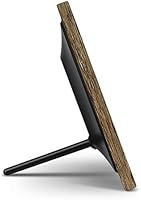
  • Frame Material: The border features a distressed wood-effect finish, which is a laminated or printed surface treatment rather than solid hardwood.
  • Dimensions: The overall unit measures 8.5 x 2 x 5 inches, making it compact enough for a nightstand, shelf, or desk.
  • Weight: The frame weighs 1.2 pounds, light enough to handle easily and mount on most standard wall surfaces.
  • Connectivity: Supports USB flash drives as well as standard SD and SDHC memory cards for photo loading.
  • Wi-Fi: This frame has no wireless connectivity — all media must be loaded via physical USB or SD card.
  • Built-in Memory: The frame includes no internal storage, so a USB drive or memory card must remain inserted during operation.
  • Clock and Calendar: A built-in real-time clock and calendar are displayed on-screen, adding everyday utility beyond photo display.
  • Slideshow: Photos begin playing automatically in slideshow mode as soon as a loaded USB drive or SD card is inserted.
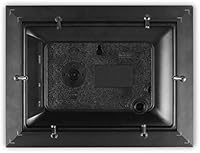
  • Controls: All navigation is handled through push buttons located on the rear panel of the frame.
  • Mounting Options: The frame can be placed on a flat surface using its built-in stand or mounted on a wall using the integrated mounting slot.
  • Remote Control: No remote control is included in the box or available as an official accessory.
  • Video Playback: This frame is designed for photo display only and does not support video file playback.
  • Model Number: The official Aluratek model number for this unit is ADPFD07F.
  • Power: The frame operates via a wired AC power adapter, which is included; it has no battery or portable power option.
  • Supported Formats: The frame is compatible with standard image file formats commonly stored on USB and SD media, including JPEG.
  • Auto On/Off: Some units in the Aluratek line support scheduled on/off timers, though buyers should verify this feature in the included manual for this specific model.

Related Reviews

Atatat P700 7-inch Digital Photo Frame
73%
91%
Ease of Setup
83%
Display Quality
88%
Value for Money
86%
Gift Presentation
74%
Auto-Rotation
More
Aluratek ADMPF315F 15-inch Digital Photo Frame
76%
91%
Ease of Setup
88%
Screen Size & Presence
67%
Image Quality
86%
Storage & Compatibility
74%
Build Quality
More
Atatat 8-Inch Digital Photo Frame
84%
88%
Image Quality
94%
Ease of Setup
90%
Versatility (Display Options)
65%
Build Quality
85%
Functionality (Music & Video Support)
More
Aluratek ASDPF08F 8″ Slim Digital Photo Frame
74%
93%
Ease of Setup
74%
Image Quality
71%
Build Quality
62%
Display Brightness
58%
Aspect Ratio Compatibility
More
eco4life 7-Inch Digital Picture Frame
76%
93%
Ease of Setup
88%
Value for Money
71%
Display Quality
62%
Build Quality
66%
Remote Control
More
Pix-Star 10-inch WiFi Digital Photo Frame
77%
88%
Ease of Setup
91%
Photo Delivery Experience
73%
Display Quality
94%
No-Subscription Value
62%
App Reliability
More
Canvia Kinetic Digital Art Frame 7-inch
84%
88%
Display Quality
92%
Ease of Setup
68%
Battery Life
85%
NFT Display Performance
90%
Portability
More
NexFoto 27-inch Touchscreen Digital Photo Frame
84%
91%
Display Quality
89%
Ease of Setup
88%
Touchscreen Responsiveness
83%
Storage Capacity
85%
Wi-Fi Connectivity
More
Kimire 10-inch WiFi Digital Photo Frame
72%
83%
Image Quality
77%
Remote Sharing Experience
81%
Setup & Ease of Use
61%
WiFi Connectivity
58%
Build Quality
More
Cozyla 10.1-inch WiFi Digital Photo Frame
75%
88%
Ease of Setup
67%
App Reliability
79%
Display Quality
58%
Video Playback
82%
Cloud Storage
More

FAQ

Not at all. The Aluratek 7-inch Distressed Wood Digital Photo Frame is fully plug-and-play — load your photos onto a USB drive or SD card, insert it into the frame, and the slideshow starts on its own. There is no app, no account, and no software installation involved.

No, this frame has no Wi-Fi or Bluetooth capability, so remote photo sharing is not possible. To add or update photos, you need to physically load them onto a USB drive or SD card and insert it into the frame. If remote sharing is important to you, you would need to look at a Wi-Fi-enabled frame instead.

It is a decorative distressed wood-effect finish, not solid or natural wood. It looks convincing and adds genuine warmth to the frame's appearance, but it is a laminated surface treatment rather than actual timber.

For everyday family photos viewed at normal distances, the image quality is pleasant and colors appear reasonably vivid. That said, the 1024x600 resolution is modest — fine detail in complex images can appear a bit soft, and it will not match the crispness of higher-resolution frames. If you plan to display large, detail-rich photos and care about pixel sharpness, you may want to consider a higher-resolution option.

Unfortunately, no — all controls are push buttons located on the rear panel, and there is no remote control included or sold separately. For countertop use this is manageable, but if the frame is wall-mounted at any height, adjusting settings becomes physically awkward.

The frame has no built-in internal memory, so it does not store photos itself. The USB drive or SD card you insert acts as the storage, meaning the card must stay plugged in while the frame is in use. Capacity depends entirely on the storage device you use.

No, this wood photo frame is designed specifically for photo display and does not support video playback. If you need a frame that cycles through short video clips, this is not the right model.

It is genuinely one of the better options for exactly that scenario. The setup involves nothing more complicated than inserting a memory card, and there are no ongoing software updates, passwords, or connectivity issues to troubleshoot. Many buyers specifically purchase this Aluratek frame as a gift for elderly relatives for that very reason.

Both options are available. The frame comes with a built-in stand for countertop or shelf placement, and it also has a wall-mounting slot on the back. Just keep in mind that wall mounting makes the rear buttons harder to access, so set your slideshow preferences before mounting if possible.

Some Aluratek frames in this line include a scheduled on/off timer that can be configured through the settings menu. Whether this specific unit includes that feature is worth confirming in the product manual that ships in the box, as feature availability can vary slightly between model variants.

Where to Buy