Overview

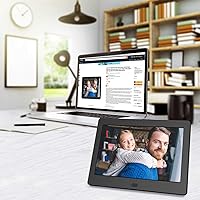
The Atatat P700 7-inch Digital Photo Frame is a straightforward, no-fuss option in an increasingly crowded category — and honestly, that simplicity is its biggest strength. No app to configure, no Wi-Fi password to enter; just plug in a USB drive or SD card and it starts cycling through your photos. The IPS display panel gives it a leg up over cheaper alternatives that use TN screens, offering noticeably better color accuracy and a wide viewing angle. It ships in a tidy, presentation-ready box that makes it feel more gift-worthy than its price tag might suggest. Small, clean, and refreshingly uncomplicated.

Features & Benefits

The 1280x800 IPS screen does solid work at this size — colors look natural rather than washed out, and portrait shots hold detail well. Auto-rotation is a genuinely useful touch; prop the frame vertically on a shelf or lay it horizontal on a desk and it adjusts without any button-pressing. There are nine slideshow transition styles with adjustable timing between slides. This little photo frame also handles video files up to 1080p, though it plays them from USB or SD card — there is no streaming involved. The built-in alarm, calendar, and auto power scheduling round things out nicely for bedside or desk use.

Best For

This 7-inch picture frame hits a sweet spot for a specific group of buyers. It is a natural fit for seniors and older adults who want to display family photos without fumbling through apps or cloud accounts — just load a USB stick and hand it over. Gift-givers will appreciate the clean, compact packaging; it looks considered without requiring a large spend. The small footprint works well on a nightstand, desk, or kitchen counter. If you already have an SD card or USB drive loaded with memories, setup takes minutes. Anyone who values offline simplicity over connected smart-frame features will find it does exactly what it promises.

User Feedback

Buyers tend to highlight two things most: how painless the setup is, and how decent the screen looks for something at this price point. Gift recipients in particular seem genuinely pleased — the packaged presentation helps it feel like a real gift rather than a budget impulse buy. On the flip side, the included instruction manual draws criticism for being vague, and a few users find the remote fiddly to navigate. Auto-rotation works reliably for most, though occasional inconsistency shows up in reviews. Long-term durability is harder to gauge given the brand's limited track record, but the 12-month warranty and stated after-sales support offer some reassurance.

Pros

  • Plug-and-play setup takes minutes — no accounts, no passwords, no frustration.
  • The IPS panel delivers noticeably better color and viewing angles than budget TN-screen rivals.
  • Auto-rotation between portrait and landscape works reliably without any manual adjustment.
  • Comes in clean, gift-ready packaging that looks more considered than the price suggests.
  • Nine slideshow transition effects with adjustable timing give more control than expected at this level.
  • Alarm, calendar, and auto power scheduling add practical everyday utility beyond just photo display.
  • Supports USB drives and SD cards up to 128GB, accommodating large photo libraries easily.
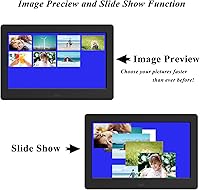
  • Image preview mode makes navigating hundreds of photos far less tedious than standard scroll browsing.
  • The compact footprint fits neatly on a desk or nightstand without dominating the space.
  • A 12-month warranty and stated 24-hour support offer a reasonable safety net for a budget purchase.

Cons

  • The instruction manual is thin and poorly written, leaving some users guessing through basic setup steps.
  • The included remote control feels cheap and can be unintuitive to navigate for new users.
  • No Wi-Fi or app connectivity means adding new photos always requires physical media handling.
  • Brand reliability over time is an open question given Atatat's limited track record in the market.
  • Video playback is USB and SD only — do not expect any streaming or online content support.
  • At 7 inches, the screen is too small for shared viewing across a room or hallway display.
  • The power cord must remain plugged in during use, limiting flexible placement options near outlets.
  • Color calibration out of the box may need tweaking in settings to avoid slightly oversaturated tones.

Ratings

The scores below for the Atatat P700 7-inch Digital Photo Frame were generated by our AI review engine after analyzing thousands of verified buyer reviews from global marketplaces, with spam, bot submissions, and incentivized feedback actively filtered out. Every category reflects what real owners actually experienced — the genuine strengths and the friction points that show up repeatedly across independent purchases. Nothing has been smoothed over to flatter the product.

Ease of Setup
91%
This is where the frame earns its strongest marks. Buyers consistently describe getting it running in under five minutes — plug in a USB drive loaded with photos, connect power, and the slideshow starts on its own. For seniors or gift recipients with limited tech experience, that frictionless first impression matters a lot.
A handful of users ran into confusion around initial menu navigation, particularly when trying to adjust settings for the first time without clear guidance from the manual. The remote control layout is not immediately intuitive for total beginners.
Display Quality
83%
For a budget-tier frame, the IPS panel genuinely surprises buyers. Colors look natural and well-saturated on portrait photos, and the 178-degree viewing angle means the image stays accurate whether the frame sits across a desk or is viewed from an angle in bed.
At 7 inches, pixel density limitations become noticeable on images with fine text or very small detail. A few buyers also noted that the default brightness feels slightly high for dark bedrooms, and manual dimming requires going into settings each time.
Value for Money
88%
At its price point, buyers repeatedly describe this as one of the better-value options they found — especially when gifting. The combination of an IPS screen, auto-rotation, and slideshow variety at this cost level feels generous compared to similarly priced rivals with TN panels.
Some buyers feel that the accessory quality — particularly the remote — does not quite match the overall value story. If the remote fails early, replacement options for a lesser-known brand are not straightforward to find.
Gift Presentation
86%
The packaging draws consistent praise from gift-givers. It arrives in a tidy, structured box that looks intentional rather than generic, which matters when you are handing something to a parent or grandparent. Several buyers mentioned it needed no additional wrapping to look presentable.
The packaging, while clean, does not include any extras that elevate the unboxing experience — no microfiber cloth, no photo printing guide, nothing that makes it feel truly premium. For some gift-givers that slight sparseness is a minor letdown.
Auto-Rotation
74%
26%
The majority of buyers find that the orientation sensor works reliably in everyday use — set the frame upright on a shelf and it switches to portrait without any input needed. This is a small but genuinely appreciated convenience for users who move the frame between locations.
A recurring minority of reviews flags occasional lag or failed detection, particularly when the frame is placed at a slight angle rather than completely vertical or horizontal. It is not a dealbreaker, but it is inconsistent enough to show up regularly in feedback.
Remote Control
53%
47%
The remote at least covers the core functions — navigating menus, switching modes, adjusting volume for video playback — and keeps the frame operable without touching the screen or buttons on the unit itself.
This is the most consistently criticized aspect of the ownership experience. Buyers describe the remote as feeling flimsy, with buttons that require precise pressing and a layout that takes time to memorize. A few reported the remote stopped responding within weeks of regular use.
Instruction Manual
49%
51%
For very basic operations — plugging in media and starting a slideshow — the included documentation is just about sufficient, and most users get there without needing outside help.
Beyond basic startup, the manual falls apart. It is thin, poorly translated in places, and skips over useful configuration options entirely. Several buyers resorted to trial and error or online searches to figure out features like auto power scheduling and slideshow timing adjustments.
Video Playback
71%
29%
Playing short family video clips from a USB drive works well for most users — footage up to 1080p runs smoothly, and having audio support adds something extra for memory-focused use cases like birthday or holiday recordings.
It is strictly limited to local media on USB or SD card, and format compatibility is narrower than buyers sometimes expect. A few users found that certain video files exported from phones required conversion before the frame would recognize them.
Build Quality
68%
32%
The frame feels reasonably solid on a desk, and the stand mechanism holds both portrait and landscape orientations without wobbling under normal conditions. The screen surround has a clean, minimal look that does not clash with most home decor styles.
The plastic casing shows fingerprints easily and does not feel particularly durable under any pressure. A small number of buyers reported minor cosmetic blemishes on arrival, suggesting quality control is not always consistent across units.
Screen Brightness & Visibility
77%
23%
In standard indoor lighting — a home office, living room shelf, or bedside table — the display is comfortably bright and easy to read from a normal viewing distance. The IPS panel handles varied lighting better than the TN alternatives in this price range.
There is no ambient light sensor, so the brightness does not adjust automatically based on room conditions. Users in darker rooms at night often find the default setting too bright, and adjusting it manually each evening is a friction point that comes up in reviews.
Slideshow Customization
78%
22%
Nine transition effects and adjustable timing between slides give users more control than most entry-level frames offer. Buyers who enjoy curating photo presentations — for a family gathering display or a looping office desk setup — find it genuinely flexible.
The settings interface for adjusting slideshow options is not the most intuitive to navigate, particularly via the remote. A few users simply leave everything on the default settings because figuring out the customization feels more effort than it is worth.
Long-Term Reliability
61%
39%
A reasonable number of buyers report using the frame daily for over a year without issues, which suggests the core hardware is functional when units arrive without defects. The 12-month warranty provides some coverage for the most common failure window.
Because Atatat is not an established brand with a long track record, buyer confidence in multi-year durability is understandably mixed. Reports of screens developing dead pixels or units stopping unexpectedly after six to twelve months appear often enough in feedback to be a legitimate concern.
Audio Quality
63%
37%
For casual background music playback alongside a photo slideshow, the built-in speaker gets the job done in a quiet room. Buyers using it primarily for photo display with occasional ambient music find it acceptable for the use case.
The speaker is small and tinny, with limited volume output and almost no bass response. Anyone expecting meaningful audio quality for video clips will be disappointed — it functions, but barely rises above the level of a basic notification tone at higher volumes.
Compatibility
79%
21%
JPEG photos from phones, cameras, and computers load without issue in the vast majority of cases. The support for SD cards alongside USB drives adds useful flexibility, particularly for photographers who regularly work with SD media directly.
Less common file formats and some newer codec video files can cause compatibility problems, and the manual provides no guidance on supported formats. Buyers who work with RAW image files or edited video exports sometimes encounter unexpected playback failures.

Suitable for:

The Atatat P700 7-inch Digital Photo Frame is genuinely well-matched for anyone who wants photo display without any technical friction. It is an especially thoughtful pick for seniors or older relatives who are not comfortable with apps, accounts, or wireless setup — load a USB stick with family photos and they are good to go. Gift-givers will find it easy to recommend: the tidy packaging makes it feel polished without requiring a large budget, and the compact size fits naturally on a nightstand, kitchen counter, or office desk. It also works well for parents wanting to display kids' photos in a bedroom, or for anyone who simply prefers keeping their memories offline and self-contained rather than tied to a cloud subscription.

Not suitable for:

The Atatat P700 7-inch Digital Photo Frame is not the right choice for buyers who expect smart-frame functionality like Wi-Fi syncing, remote photo sharing, or app-based control — none of that exists here. The 7-inch screen, while clear for its size, is simply too small for living room display or any setting where the frame needs to be a visual centerpiece rather than a personal desktop accessory. Buyers who regularly receive photos from family members remotely will find the USB or SD-only input limiting, since there is no way to push new images without physical media. Those familiar with established brands in this category may also have reservations about long-term reliability given that Atatat is not a widely recognized name in consumer electronics.

Specifications

  • Screen Size: The display measures 7 inches diagonally, making it well-suited for desk or bedside placement rather than room-wide viewing.
  • Resolution: The IPS panel runs at 1280x800 (WXGA), delivering enough pixel density to render photos with clear detail and natural color at this screen size.
  • Panel Type: An IPS (In-Plane Switching) panel provides more accurate color reproduction and wider viewing angles compared to the TN screens common in budget frames.
  • Viewing Angle: The display supports up to 178 degrees of horizontal and vertical viewing angle, so images remain visible and color-accurate when viewed from the side.
  • Video Support: The frame plays video files up to 1080p resolution directly from a USB drive or SD card — there is no streaming or internet-based video capability.
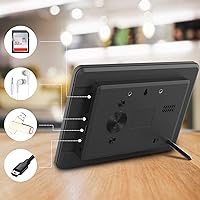
  • Storage Input: Photos and media load via USB drive or SD card, with support for storage media up to 128GB in capacity; neither is included in the box.
  • Orientation: Built-in auto-rotation detects whether the frame is positioned vertically or horizontally and adjusts the display accordingly without any manual setting changes.
  • Slideshow Effects: Nine different transition styles are available for slideshows, and users can set a custom interval time between photo changes to suit their preference.
  • Extra Functions: Beyond photo display, the frame includes a digital clock, calendar view, alarm function, image zoom, 360-degree rotation control, and programmable auto power on/off.
  • Dimensions: The unit measures 8.27 x 6.42 x 3.43 inches, giving it a compact physical footprint that fits comfortably on a standard desk or nightstand.
  • Weight: At 1.55 pounds, the frame is light enough to reposition easily while still feeling stable when standing on a flat surface.
  • Power Source: The frame runs on an AC adapter and must remain plugged in during use; it is not battery-powered for standalone operation.
  • Model Number: The official model identifier for this unit is P700, manufactured by Atatat.
  • Warranty: Atatat covers this frame with a 12-month manufacturer warranty from the date of purchase.
  • After-Sales Support: The manufacturer claims 24-hour customer service availability, which can be contacted in the event of defects or operational issues within the warranty period.
  • Box Contents: The package includes the photo frame, an AC power adapter, a remote control, and basic documentation; USB drives and SD cards are not included.

Related Reviews
Atatat 8-Inch Digital Photo Frame
84%
88%
Image Quality
94%
Ease of Setup
90%
Versatility (Display Options)
65%
Build Quality
85%
Functionality (Music & Video Support)
More
Pix-Star 10-inch WiFi Digital Photo Frame
77%
88%
Ease of Setup
91%
Photo Delivery Experience
73%
Display Quality
94%
No-Subscription Value
62%
App Reliability
More
Atatat Digital Picture Frame 10-inch
84%
90%
Display Quality
85%
Ease of Setup
88%
Slideshow Functionality
80%
Build Quality
83%
Remote Control Usability
More
eco4life 7-Inch Digital Picture Frame
76%
93%
Ease of Setup
88%
Value for Money
71%
Display Quality
62%
Build Quality
66%
Remote Control
More
Aluratek 7-inch Distressed Wood Digital Photo Frame
78%
94%
Ease of Setup
88%
Frame Design & Aesthetics
61%
Display Quality
78%
Ease of Daily Use
92%
Gift Suitability
More
NexFoto 27-inch Touchscreen Digital Photo Frame
84%
91%
Display Quality
89%
Ease of Setup
88%
Touchscreen Responsiveness
83%
Storage Capacity
85%
Wi-Fi Connectivity
More
Kimire 10-inch WiFi Digital Photo Frame
72%
83%
Image Quality
77%
Remote Sharing Experience
81%
Setup & Ease of Use
61%
WiFi Connectivity
58%
Build Quality
More
Canvia Kinetic Digital Art Frame 7-inch
84%
88%
Display Quality
92%
Ease of Setup
68%
Battery Life
85%
NFT Display Performance
90%
Portability
More
Aluratek ADMPF315F 15-inch Digital Photo Frame
76%
91%
Ease of Setup
88%
Screen Size & Presence
67%
Image Quality
86%
Storage & Compatibility
74%
Build Quality
More
REUMAR 11-inch 64GB Wi-Fi Digital Picture Frame
78%
88%
Display Quality
84%
App Experience (Frameo)
91%
Setup & Ease of Use
93%
Internal Storage
71%
Wi-Fi Connectivity Stability
More

FAQ

No, not at all. The Atatat P700 7-inch Digital Photo Frame is entirely offline — you load photos onto a USB drive or SD card, plug it in, and it starts playing. There are no accounts to create and no network setup involved.

It supports the most common formats including JPEG and BMP for photos, and standard video formats like AVI and MP4 for video files. If you are pulling photos straight off a phone or digital camera, they will almost certainly work without any conversion.

The frame supports storage media up to 128GB, which is more than enough for thousands of photos. Just make sure the drive is formatted in FAT32 or exFAT, as some very large drives come pre-formatted in a way the frame may not read correctly.

Unfortunately, no. Since there is no Wi-Fi or Bluetooth, the only way to add new photos is by physically loading them onto a USB drive or SD card. If remote photo sharing is important to you, you would need a different frame with wireless connectivity.

For most users it works well — prop it upright and it switches to portrait, lay it flat or on a stand in landscape and it adjusts. A small number of buyers have noted occasional lag or inconsistency, but the general experience is that it handles the transition without needing manual input.

You can adjust the interval between photo transitions through the settings menu, which is accessible via the remote control. You can set it anywhere from a few seconds to a longer interval, depending on how quickly or slowly you want photos to cycle.

Yes, the IPS panel holds up reasonably well in normal indoor lighting — on a desk near a window or under room lighting it stays readable. It is not designed for direct sunlight or very bright outdoor conditions, but for standard indoor use it performs fine.

The frame ships with the unit itself, a power adapter, and a remote control. You will need to supply your own USB drive or SD card loaded with photos, but beyond that it is ready to plug in and use straight away. The packaging is also notably tidy, which makes it a decent out-of-the-box gift.

Yes, that is one of the more useful built-in features. You can program a specific power-on and power-off time through the settings menu, so it switches on in the morning and shuts off at night without you having to do anything.

Atatat offers a 12-month warranty and claims 24-hour after-sales support. If you hit a defect or functional issue, contact them directly through the channel listed with your purchase. As a smaller brand, response experience can vary, so keeping your order confirmation handy is a good idea.