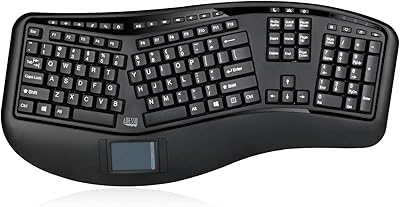
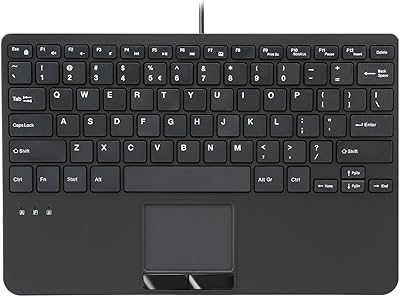
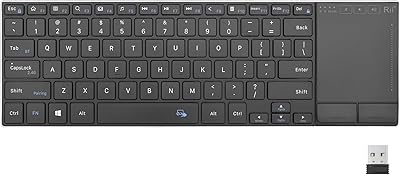
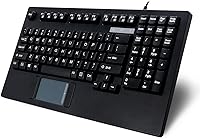
Adesso AKB-425UB Rackmount USB Touchpad Keyboard
Adesso AKB-425UB Rackmount USB Touchpad Keyboard — image 1

Adesso AKB-425UB Rackmount USB Touchpad Keyboard — image 2
Adesso AKB-425UB Rackmount USB Touchpad Keyboard — image 3
Adesso AKB-425UB Rackmount USB Touchpad Keyboard — image 4
Adesso AKB-425UB Rackmount USB Touchpad Keyboard — image 5
Adesso AKB-425UB Rackmount USB Touchpad Keyboard — image 6
Adesso AKB-425UB Rackmount USB Touchpad Keyboard — image 7
Adesso AKB-425UB Rackmount USB Touchpad Keyboard — image 8
Adesso AKB-425UB Rackmount USB Touchpad Keyboard — image 9
85%

Overview

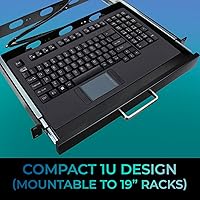
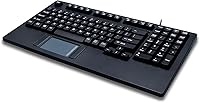
The Adesso AKB-425UB Rackmount USB Touchpad Keyboard is a compact solution designed for industrial and business environments that require space-efficient equipment. Its 1U rackmount design ensures easy installation in 19-inch racks, making it a perfect fit for server rooms and data centers. With a USB-A connection, this keyboard is plug-and-play, requiring no additional software or drivers. Whether you're looking for a practical and compact solution or need something that integrates seamlessly into an existing setup, this rackmount keyboard offers convenience and efficiency.

Features & Benefits

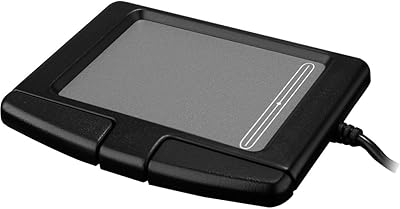
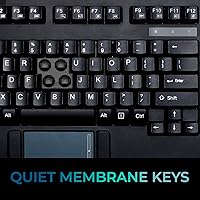
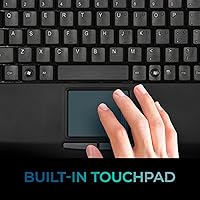
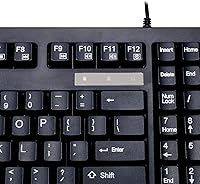
The built-in GlidePoint touchpad sets the Adesso AKB-425UB apart, providing precise control with multi-touch gestures. This feature is especially useful in tight workspaces where a mouse might not be practical. The membrane key switches provide a quiet typing experience, ideal for office environments. In addition, dedicated multimedia and internet hotkeys allow for quick access to common functions like volume control and web browsing. This keyboard’s combination of a touchpad and low-profile design helps streamline work in compact settings, without sacrificing essential features.

Best For

This touchpad keyboard is perfect for businesses that need a space-saving solution in rackmount setups. It’s an excellent choice for users who need to maximize available space while maintaining ease of use, especially in industrial environments or server rooms. Its durable build and compact size make it ideal for professionals working in environments where desk space is limited. If you prefer integrated touchpad controls over traditional mice, or if you're looking for a reliable keyboard in tight setups, this product suits your needs.

User Feedback

Many users appreciate the compact design and how easy it is to install this keyboard into a rackmount system. The keyboard’s plug-and-play setup also makes it accessible for those without technical expertise. However, some users find the touchpad a bit too sensitive, which can lead to accidental movements or clicks. On the positive side, the quiet key switches are well-liked, especially in shared workspaces where noise reduction is crucial. Overall, most users find it a great fit for business and industrial environments, though precision with the touchpad might require some getting used to.

Pros

  • The compact 1U design makes this keyboard ideal for space-saving rackmount setups.
  • Its plug-and-play functionality allows for quick installation without additional software.
  • The GlidePoint touchpad supports multi-touch gestures, offering an integrated solution in tight workspaces.
  • The membrane keys provide a quiet and comfortable typing experience, making it ideal for office environments.
  • The dedicated multimedia and internet hotkeys add convenience for business users.
  • Weighing just 2.85 pounds, this device is lightweight and easy to handle.

Cons

  • The touchpad can be overly sensitive, making precise control difficult for some users.
  • Some users report that the membrane keys don't offer the same tactile feedback as mechanical switches.
  • The design is not suited for users who need a high level of customization or advanced features.
  • The keyboard may feel too basic for those used to more feature-rich models.
  • It's not ideal for extended typing sessions due to the lack of tactile response from the keys.
  • The touchpad area could be larger to accommodate more precise gestures.

Ratings

After analyzing verified user reviews worldwide, across multiple languages and platforms, the ratings for this rackmount keyboard reflect both its strengths and areas for improvement. Only high-quality feedback, free from spam, bot or incentivized reviews, was used to generate these scores. Users have expressed satisfaction with its functionality and compact design, while some challenges with the touchpad’s sensitivity have been noted.

Space Efficiency
91%
Users love the compact 1U design, which fits perfectly in rackmount setups, making it an ideal solution for businesses with limited space. Its small footprint doesn't compromise usability, allowing for efficient workspace organization without clutter.
However, some users find that the compact design might feel too cramped for extended typing sessions, especially for those with larger hands. The space-saving aspect might lead to a slightly more restricted feel compared to larger keyboards.
Ease of Installation
94%
Many buyers highlight how easy it is to set up this rackmount keyboard. The plug-and-play functionality ensures that installation is seamless, with no additional drivers or software required, saving time and hassle for users in busy environments.
A few users mentioned that the lack of software customization options can be limiting for those who want more control over their keyboard settings. While installation is easy, some feel the lack of advanced configuration options could be a downside.
Touchpad Sensitivity
68%
32%
Several users appreciate the responsiveness of the touchpad, especially in environments where desk space is at a premium. The built-in GlidePoint touchpad allows for multi-touch gestures, making navigation smoother for users accustomed to modern touch interfaces.
On the downside, the touchpad sensitivity can be a challenge for some users. It can be too responsive for precise movements, which makes tasks like detailed editing or gaming less comfortable. Some even found it difficult to control, especially in tight workspace setups.
Typing Comfort
85%
The membrane key switches provide a quiet typing experience, which is appreciated by users in office environments. Many reviewers mention that the keys are comfortable to type on for short to medium typing sessions, reducing noise in shared spaces.
However, some users felt that the key presses lack the tactile feedback of mechanical switches, making long typing sessions feel less comfortable. The typing experience might not be as satisfying for those who are accustomed to more responsive keyboards.
Durability
89%
Users generally find this keyboard to be sturdy and well-built, with most noting its ability to withstand the demands of industrial environments. The design and material choices make it a reliable option for businesses requiring long-lasting, rugged equipment.
Some users report that while the keyboard feels durable, it can be prone to wear and tear over time, especially with heavy use. A few have mentioned that the touchpad area could show signs of damage more quickly than expected in harsh environments.
Key Layout
87%
Many users find the key layout on this keyboard intuitive, especially for those familiar with standard 104-key US layouts. The additional multimedia and internet hotkeys provide quick access to frequently used functions, making it more convenient for users in fast-paced work settings.
However, some users feel that the key spacing could be more ergonomic, particularly for those with larger hands. The compact nature of the keyboard may lead to a slightly cramped typing experience, which can be uncomfortable for long-term use.
Compatibility
90%
The keyboard is compatible with a wide range of Windows operating systems, from older versions like Windows 2000 to the latest Windows 10. This broad compatibility makes it a versatile choice for businesses that use various versions of Windows in their systems.
While it works well with Windows, some users who need compatibility with other operating systems, like macOS or Linux, find that it's not as seamless. There may be occasional issues with key mapping or additional driver requirements on non-Windows platforms.
Build Quality
84%
The overall build quality of this keyboard is solid, with a sturdy design that holds up well in demanding environments. Many users feel confident in its longevity and appreciate the durable materials used in its construction.
That said, some users noted that the build quality isn't as premium as other higher-end industrial keyboards. While functional, the keyboard might feel a bit plasticky to some, especially when compared to more expensive models in the same category.
Multimedia Hotkeys
82%
18%
Users enjoy the convenience of dedicated multimedia and internet hotkeys, making it easy to control audio and access common internet functions without interrupting workflow. This feature adds an extra layer of usability for businesses with specific media-related tasks.
On the flip side, a few users mentioned that the hotkeys could be better positioned for quicker access. Some feel that the layout of these additional keys is a bit awkward, and they are harder to reach than expected during regular use.
Touchpad Precision
70%
30%
The GlidePoint touchpad allows for some flexibility in navigation, especially in tight spaces. For users who need a compact solution without sacrificing control, this touchpad provides a useful alternative to an external mouse.
However, the precision of the touchpad is a common complaint. Some users find that it doesn't offer the level of accuracy required for tasks like graphic design or detailed editing. The sensitivity may also make it difficult to use for users accustomed to more traditional input devices.
Value for Money
92%
The keyboard offers excellent value for businesses looking for a cost-effective, space-saving, and reliable option. Users feel that the combination of features, including its robust build and convenient design, justifies the price point.
Some buyers feel that while it provides good value, certain aspects, like the touchpad and key comfort, could be improved for the price. A few wish for additional premium features, such as backlit keys or higher-quality tactile feedback, to justify the cost even further.
Noise Levels
88%
The quiet membrane keys are a standout feature for users in shared office environments, as they don’t produce the loud, clacky sounds of mechanical keyboards. Many appreciate this when they need to focus without disturbing coworkers.
However, while the quiet keys are an advantage in some settings, others miss the tactile feedback and sound of traditional keys, finding them less satisfying for extended typing sessions. A few users mentioned the keys feel a bit too soft, which can reduce typing speed.

Suitable for:

The Adesso AKB-425UB Rackmount USB Touchpad Keyboard is ideal for businesses and industrial environments where space is limited. Its compact 1U design makes it a perfect choice for rackmount setups, allowing users to save valuable space while maintaining functionality. Users who need a quiet and efficient typing experience, such as office workers or those in shared workspaces, will appreciate its membrane key switches. Additionally, the built-in GlidePoint touchpad is a great solution for those working in cramped areas, eliminating the need for an external mouse and saving even more space.

Not suitable for:

This keyboard may not be the best fit for users who prioritize precision or extended typing comfort. The touchpad, while functional, may be overly sensitive for some, making it challenging to use with precision, especially for tasks like detailed editing. Additionally, those accustomed to mechanical keys or needing a more tactile typing experience may find the membrane keys less satisfying for long typing sessions. Finally, users who need extensive customization options or advanced features like backlighting or software control might be disappointed by the product's relatively straightforward, plug-and-play setup.

Specifications

  • Design: Compact 1U rackmount design for easy integration into server racks.
  • Connection: USB-A plug-and-play connectivity for seamless installation without additional software.
  • Touchpad: Built-in GlidePoint touchpad with support for multi-touch gestures.
  • Key Type: Membrane key switches that provide quiet, comfortable typing.
  • Hotkeys: Dedicated multimedia and internet hotkeys for quick access to commonly used functions.
  • Dimensions: Measures 15.6 x 8.3 x 1.5 inches for a compact footprint.
  • Weight: Weighs 2.85 pounds, making it light yet durable for industrial environments.
  • Key Layout: Standard 104 US key layout for familiar typing experience.
  • Touchpad Area: Touchpad measures 3.1 x 1.75 inches for efficient navigation.
  • Compatibility: Compatible with Windows 2000, XP, Vista, 7, 8, and 10 operating systems.
  • Power Source: Powered by a corded electric connection for consistent power delivery.
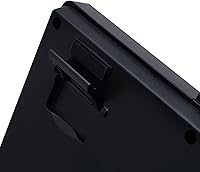
  • Mounting: Designed for easy integration into standard 1U rackmount slots.
  • Build Material: Constructed with industrial-grade materials suitable for business and industrial environments.
  • Touchpad Sensitivity: The touchpad's sensitivity can be adjusted for improved precision, though some users find it challenging to control.
  • Plug-and-Play: No additional drivers or software are required for installation, making it easy to set up.
  • Environmental Use: Designed for industrial and office environments requiring durable and space-efficient peripherals.
  • Keyboard Type: The membrane switches are quieter than mechanical keys, making it ideal for office environments.

FAQ

This keyboard is designed for use in industrial environments and business settings that require space-efficient rackmount integration. It offers a compact 1U form factor and plug-and-play functionality with USB-A connectivity.

Installation is simple thanks to the keyboard's plug-and-play USB-A connection. Just connect it to a compatible USB port on your system, and it should be ready to use without any additional software or drivers.

The keyboard has dimensions of 15.6 x 8.3 x 1.5 inches, designed specifically to fit into a 1U rackmount slot. This compact design makes it a great space-saving option for environments with limited rack space.

The GlidePoint touchpad supports multi-touch gestures, but some users have found it overly sensitive, which can make precision difficult. It works well for general navigation, but may require adjustment for more accurate tasks.

Yes, the keyboard is compatible with Windows 2000, XP, Vista, 7, 8, and 10. It's a plug-and-play device, meaning no additional drivers are necessary for installation on supported operating systems.

The Adesso AKB-425UB uses membrane key switches, which provide quiet and comfortable typing. These switches are ideal for office environments where noise reduction is a priority.

Yes, this keyboard comes with dedicated multimedia and internet hotkeys. These keys allow for quick access to commonly used functions like volume control, media playback, and web browsing.

The keyboard is designed for industrial and business use, offering a durable construction suitable for rackmount environments. However, as with most membrane keyboards, it may not have the long-term durability of mechanical alternatives.

Yes, the compact 1U design makes it ideal for tight spaces, such as server racks or other environments where desk space is limited. The integrated touchpad allows for easier navigation without requiring a separate mouse.

Some users have reported that the touchpad can be too sensitive, making it difficult to use with precision for certain tasks. Additionally, while the membrane keys are quiet, they may lack the tactile feel preferred by those used to mechanical keyboards.