Overview

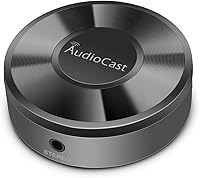
The Acemax M5 AudioCast WiFi Audio Receiver is a compact, no-fuss device built for one purpose: giving your existing wired speakers a wireless streaming upgrade without replacing your whole setup. Rather than Bluetooth, it runs on 2.4GHz Wi-Fi, which means better range and fewer dropouts across a typical home network. It plugs into any speaker system via a 3.5mm audio jack, draws power over USB, and supports AirPlay, DLNA/UPnP, and Spotify Connect out of the box. Worth stating upfront — AirPlay 2 and Chromecast are not supported, so if either of those is on your must-have list, this adapter is not the right fit.
Features & Benefits

The Spotify Connect integration is probably the biggest draw here — it lets you control playback directly from the Spotify app rather than routing audio through a separate interface, which keeps things clean and dependable. AirPlay works well for iPhone and Mac users who want native streaming without extra steps. The AudioCast app unlocks multi-room audio across up to 8 zones, though that syncing runs through the proprietary app rather than native AirPlay multi-room, which is an important distinction. A sleep timer and music alarm add practical everyday utility. The dongle itself is tiny — roughly 2 x 2 x 0.8 inches — easy to tuck behind any bookshelf system or receiver.

Best For

This Wi-Fi audio adapter makes the most sense for people who already own a decent hi-fi setup and simply want to cut the cable. It suits Spotify users especially well, offering stable, app-native playback in a dedicated room without extra hardware overhead. Budget-minded households looking to explore multi-room audio without committing to a full smart-speaker ecosystem will find genuine value here. That said, the setup does ask for some patience with network configuration and a willingness to work within a third-party app. Anyone running a Google or Chromecast household, or expecting voice assistant integration, should look elsewhere entirely.

User Feedback

Across its 685 ratings, the AudioCast M5 sits at 3.6 stars — a score that reflects a divided experience rather than a deeply flawed product. Buyers who lean on Spotify Connect tend to be satisfied, and many specifically praise the reliable Wi-Fi range compared to Bluetooth adapters they had used previously. The frustration usually traces back to the AudioCast app: reviewers describe a clunky interface, occasional crashes, and sparse developer support over time. Multi-room sync is another sticking point, with results varying noticeably by router and firmware version. On audio quality, though, complaints are rare — the hardware itself stays transparent and lets your speakers carry the load.

Pros

  • Spotify Connect works natively, keeping playback control inside the Spotify app without workarounds.
  • Wi-Fi range is noticeably more reliable than Bluetooth adapters in the same price bracket.
  • Compatible with virtually any speaker system that has a 3.5mm analog input.
  • The AudioCast M5 supports AirPlay, DLNA, and UPnP, covering most non-Google streaming scenarios.
  • Tiny footprint means it disappears behind a receiver or shelf without cluttering the setup.
  • USB power can be drawn from the amplifier or receiver itself, keeping cables tidy.
  • Multi-room audio across up to 8 zones is available at a price most competing systems cannot match.
  • The device itself is audio-transparent — your speakers and amp determine the sound quality, not this dongle.
  • TuneIn Radio and Deezer support offer subscription-free listening options through the AudioCast app.
  • Auto-reconnects after power cycling with no manual intervention required.

Cons

  • The AudioCast companion app is outdated, prone to crashes, and receives infrequent updates.
  • Multi-room sync becomes inconsistent with four or more active zones, especially after firmware changes.
  • No 5GHz Wi-Fi band support leaves the device vulnerable on congested 2.4GHz networks.
  • Initial network setup can be genuinely difficult on mesh systems or non-standard router configurations.
  • AirPlay 2 is completely absent, making Apple ecosystem integration significantly more limited than buyers often expect.
  • The 3.5mm-only output rules out digital connections to DACs or amplifiers without an analog input.
  • Long-term software support is uncertain — OS updates have created compatibility gaps that went unaddressed for extended periods.
  • The USB power cable is short, restricting placement if the receiver lacks a conveniently located USB port.

Ratings

The Acemax M5 AudioCast was evaluated by our AI rating engine after analyzing hundreds of verified global buyer reviews, with spam, incentivized, and bot-flagged submissions actively filtered out before scoring. Each category below reflects the honest distribution of real user sentiment — strengths and frustrations weighted equally. The result is a transparent, balanced picture of where this Wi-Fi audio adapter genuinely delivers and where it falls short.

Ease of Setup
81%
19%
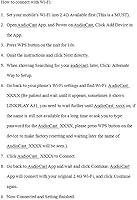
A consistent bright spot across reviews: most users had the AudioCast M5 connected to their speakers and streaming music within minutes, without touching a router setting or reading more than a page of instructions. Non-technical buyers specifically called out how approachable the initial configuration felt.
A subset of users — particularly those on newer dual-band routers — ran into connectivity snags during setup because the device only supports 2.4GHz networks. If your phone automatically connects to the 5GHz band, the pairing process can become unexpectedly frustrating.
Wi-Fi Stability & Range
63%
37%
Compared to Bluetooth adapters in the same price range, this streaming receiver holds a connection over greater distances and through walls more reliably. Users in open-plan apartments reported solid, uninterrupted playback when the router was within a reasonable distance.
Wi-Fi drop-outs are among the most frequently cited complaints in long-term reviews. Several buyers noted that the connection became less stable after weeks of use, requiring device restarts or app re-pairing — an annoyance that compounds over time in daily-use scenarios.
Spotify Connect Performance
78%
22%
Native Spotify Connect is arguably the strongest selling point here. Because playback is handled directly by the device rather than cast from a phone, users found they could lock their phone, take calls, or even step outside without interrupting the music — a meaningful quality-of-life improvement over Bluetooth alternatives.
Some users on updated versions of the Spotify app reported intermittent issues with the device not appearing reliably in the Connect device list, requiring app restarts or a power cycle of the adapter to restore visibility.
AirPlay Compatibility
57%
43%
For Apple device users still using original AirPlay — streaming from an iPhone, iPad, or Mac — the Wi-Fi audio adapter works as expected and provides a clean, low-latency audio stream to connected speakers without requiring the AudioCast app at all.
The lack of AirPlay 2 support is a genuine limitation that has caught many buyers off guard. Anyone expecting multi-room sync, HomePod integration, or Siri handoff via AirPlay will be disappointed — those features simply do not exist here, and the product listing has historically not made this obvious enough.
AudioCast App Quality
49%
51%
The app handles the core job of multi-room audio management and unlocks useful extras like a music alarm and sleep timer that are not available through AirPlay alone. Users who rely on it for whole-home audio on a budget found it functional enough for basic daily routines.
App stability is a recurring pain point, particularly on newer Android and iOS versions. Crashes, slow device discovery, and UI inconsistencies appear regularly in recent reviews, suggesting the app has not kept pace with mobile OS updates — a meaningful concern given how central it is to the product's feature set.
Multi-Room Audio
61%
39%
The ability to push audio to up to 8 zones simultaneously — with the option to play the same track everywhere or different tracks per room — is a genuinely useful capability at this price point. Budget-conscious buyers setting up a small home system found it surprisingly workable.
Multi-room sync is entirely dependent on the AudioCast app functioning correctly, which introduces a fragile dependency. Users with more than two or three units reported sync drift and occasional zones dropping out mid-session, making it unreliable for anything beyond casual background listening.
Sound Quality Passthrough
74%
26%
The adapter itself does not appear to degrade the audio signal in any audible way. Buyers connecting it to quality bookshelf speakers or stereo receivers consistently noted that the sound matched what they expected from the source, with no added noise or coloration.
Output is capped by the 3.5mm analog connection and the source stream quality — there is no optical or digital output for purists. Users with high-end systems who expected bit-perfect or hi-res output beyond standard streaming quality found the connection type limiting.
Build Quality & Design
55%
45%
The compact form factor — barely 2 inches square — means it tucks away discreetly behind a speaker or on a shelf without drawing attention. The minimalist design works in its favor aesthetically, and the light weight means placement is flexible.
The plastic housing feels noticeably budget-grade to the touch, and several long-term users reported that the USB power connection became loose over time. For a device meant to stay plugged in indefinitely, the build durability feels like a weak point.
DLNA & UPnP Support
66%
34%
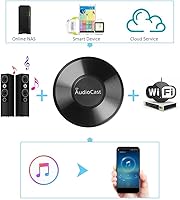
For users running local media servers — whether on a NAS, PC, or home server — DLNA and UPnP support adds real utility beyond cloud streaming services. It works without needing a third-party app, which experienced home network users appreciated.
DLNA behavior can be inconsistent depending on the server software and network configuration. Less experienced users found troubleshooting DLNA connectivity difficult, and documentation from the manufacturer on this front is thin.
Protocol & Service Compatibility
52%
48%
Supporting AirPlay, DLNA, UPnP, and Spotify Connect in a single small device covers a meaningful range of use cases, especially for households that mix Apple devices with PC-based audio or streaming services like Deezer and TuneIn Radio.
The absence of Google Cast, Chromecast, and YouTube Music support eliminates a large and growing segment of the market. Android-first households or anyone deep in the Google ecosystem will find the compatibility gaps too significant to overlook.
Value for Money
68%
32%
As an entry point for adding wireless audio to speakers that have no smart features, the AudioCast M5 delivers a reasonable amount of functionality for the price. If Spotify Connect and basic AirPlay cover your needs, the cost-to-benefit ratio is defensible.
The app reliability issues and questions around long-term hardware durability erode the value proposition over time. Buyers who experienced unit failures within the first year understandably felt the price was not justified by the lifespan they received.
Long-Term Reliability
47%
53%
A portion of buyers have used the AudioCast M5 for a year or more without significant problems, particularly those in stable 2.4GHz Wi-Fi environments with consistent network conditions and older mobile OS versions.
The pattern across reviews points to a reliability curve that declines notably after the first several months. Hardware failures, persistent Wi-Fi instability, and app incompatibility with updated phone software are recurring themes in older, longer reviews — suggesting durability is a genuine risk.
Documentation & Support
41%
59%
Initial setup is guided by a video walkthrough referenced in the product listing, which non-technical users found more helpful than a printed manual. For straightforward installations, this covers the basics adequately.
Beyond the setup video, manufacturer support is limited. Users encountering app compatibility issues, network configuration problems, or hardware faults reported difficulty getting meaningful assistance from Acemax, leaving them to rely on community forums and trial-and-error troubleshooting.
Physical Footprint & Placement Flexibility
77%
23%
At under 3 ounces and barely larger than a large postage stamp in footprint, this Wi-Fi audio adapter fits practically anywhere — behind a bookshelf speaker, velcroed to the back of a stereo cabinet, or sitting flat on a desk. It does not demand dedicated space.
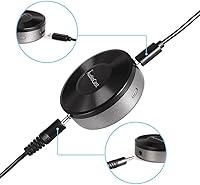
The short cable length on the 3.5mm connection can restrict exactly where the unit sits relative to the speaker input. A few users noted they needed a short extension cable to position it cleanly, adding a minor extra cost and cable management consideration.

Suitable for:

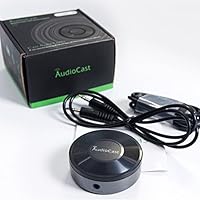
The Acemax M5 AudioCast WiFi Audio Receiver is a well-matched solution for anyone who owns a capable wired speaker system — a vintage stereo receiver, a set of powered bookshelf speakers, or an older hi-fi amp — and simply wants to start streaming music to it without replacing the whole setup. Spotify subscribers will get the most frictionless experience, since Spotify Connect works natively and keeps the familiar Spotify interface in control without routing through a secondary app. Apple device users on AirPlay 1 will also find the integration functional and reliable for everyday streaming from iPhone or Mac. Households looking to experiment with basic multi-room audio on a limited budget will find the up-to-8-zone functionality a meaningful entry point, provided expectations around sync precision are kept realistic. This Wi-Fi audio adapter also suits technically comfortable buyers who are not deterred by mild setup complexity and understand they are adding a bridge device, not a full smart audio platform.
Not suitable for:

The Acemax M5 AudioCast WiFi Audio Receiver is a poor fit for anyone embedded in the Google ecosystem — there is no Chromecast, no Google Cast, and no YouTube Music support whatsoever, and that is not likely to change. Buyers expecting AirPlay 2 functionality, including stereo pairing, Apple Home app integration, or multi-room control through native Apple interfaces, will be disappointed; this device supports AirPlay 1 only. If you rely on a mesh network, a router with non-standard channel settings, or a complex home network setup, the initial configuration process may prove genuinely frustrating rather than just mildly inconvenient. Anyone who wants a polished, consistently maintained companion app should also look elsewhere — the AudioCast app has accumulated years of criticism around stability and UI quality with limited developer response. Finally, buyers seeking a long-term platform with confident software support and ongoing updates should consider more established brands, as the longevity of this wireless streaming dongle's software ecosystem is uncertain.
Specifications

  • Manufacturer: Designed and sold by Acemax, a consumer electronics brand specializing in budget-tier wireless audio accessories.
  • Model Number: The device is designated as the M5, part of the Acemax AudioCast product line.
  • Release Date: The AudioCast M5 was first made available for purchase in February 2017.
  • Dimensions: The unit measures 1.97 x 1.97 x 0.79 inches, making it roughly the footprint of a large postage stamp at about three-quarters of an inch tall.
  • Weight: The device weighs approximately 2.82 oz (80g), light enough to be held in place by its own output cable behind most equipment.
  • Wireless Standard: Connects to home networks via 802.11b/g/n on the 2.4GHz band only; 5GHz networks are not supported.
  • Audio Output: A single 3.5mm stereo analog jack provides the audio output connection to speakers or amplifiers.
  • Power Interface: The unit draws power through a standard USB connection, compatible with any USB-A port or a standard 5V USB wall adapter.
  • Data Transfer Rate: The listed maximum data transfer rate over the Wi-Fi connection is 3 Megabits per second.
  • Protocols: Supported streaming protocols include AirPlay (version 1 only), DLNA, UPnP, and Spotify Connect.
  • Streaming Services: Built-in service support through the AudioCast app covers Spotify, Deezer, and TuneIn Radio; YouTube Music and Google Play Music are not supported.
  • Multi-Room Zones: The AudioCast app supports synchronous or independent streaming to up to 8 separate units on the same Wi-Fi network.
  • App Platform: The companion AudioCast app is available for both iOS and Android devices and is required for multi-room control and certain streaming services.
  • AirPlay Version: Only AirPlay 1 is supported; AirPlay 2 features including stereo pairing and Apple Home integration are not available on this device.
  • Google Cast: Chromecast and Google Cast are explicitly not supported, and the device cannot be used as a target for Google Home, YouTube Music, or any Cast-enabled app.
  • Compatible Inputs: The device is compatible with any speaker system, powered monitor, or amplifier that accepts a 3.5mm analog stereo input.
  • Housing Material: The outer casing is lightweight plastic construction finished in a matte surface, designed for stationary desktop or shelf placement.
  • Firmware Updates: Firmware updates are delivered through the AudioCast app, though update frequency from the manufacturer has been inconsistent since the product launched.

Related Reviews

Fosi Audio BT30D
Fosi Audio BT30D
78%
83%
Sound Quality
88%
Subwoofer Performance
81%
Bluetooth Connectivity
91%
Value for Money
62%
Build Quality
More
Arylic S10+
Arylic S10+
78%
94%
Streaming Protocol Coverage
78%
Audio Output Quality
86%
Multiroom Setup & Reliability
61%
App Experience (4STREAM)
89%
Value for Money
More
BluDento BLT-2
BluDento BLT-2
83%
88%
Sound Quality
84%
Wireless Range
93%
Ease of Setup
76%
Connection Stability
91%
Output Flexibility
More
Philips Car Stereo Bluetooth Audio Receiver
82%
91%
Value for Money
88%
Sound Quality
75%
Bluetooth Performance
92%
Ease of Installation
85%
Connectivity Options
More
BOSS MGV520B Marine Gauge Receiver
73%
86%
Bluetooth Performance
78%
Weatherproofing & Durability
74%
Sound Quality
71%
Installation Experience
81%
Value for Money
More
Cambridge Audio AXR100
81%
92%
Sound Quality
89%
Build Quality
86%
Phono Stage Performance
67%
Bluetooth Reliability
78%
AM/FM Tuner
More
BOSS Audio Systems MGV550B Marine Gauge Receiver
76%
83%
Weatherproofing & Durability
88%
Touchscreen Responsiveness
86%
Bluetooth Connectivity
79%
Built-in Amplifier Output
61%
Installation Experience
More
Denon Professional DN-200BR Bluetooth Audio Receiver
88%
93%
Bluetooth Range
89%
Audio Quality
91%
Build Quality
87%
Ease of Setup
88%
Connectivity Flexibility
More
MOREGAX M18 Bluetooth Audio Receiver Transmitter
74%
91%
Ease of Setup
78%
Connection Stability
73%
Audio Quality
88%
Port Compatibility
67%
Wireless Range
More
1Mii RT5066Pro 2-in-1
73%
91%
Ease of Setup
78%
Audio Quality
63%
Wireless Range (Indoors)
82%
Latency & Audio Sync
86%
Connection Flexibility
More

FAQ

Yes, and this is actually one of the strongest points of the device. Once it is set up on your network, Spotify Connect handles everything — you just open Spotify on your phone, tablet, or computer, select the AudioCast M5 as your output device, and control playback from there. The AudioCast app is not involved in that workflow at all.

No, the Acemax M5 AudioCast WiFi Audio Receiver only supports AirPlay 1. That means no AirPlay 2 features — no stereo pairing, no Apple Home app integration, and no multi-room control through Apple's native interfaces. If AirPlay 2 is important to your setup, this is not the right device.
Unfortunately, no. This adapter has no Google Cast or Chromecast support whatsoever. It will not appear as a cast target in any Google app, and it cannot receive audio from YouTube Music or any other Google service. If your household runs primarily on Google audio products, this device will not integrate with that ecosystem.

Yes, multi-room audio requires one adapter per room. Each unit connects independently to your Wi-Fi network, and the AudioCast app on your phone lets you group them for synchronized playback or send different audio to each room separately. You can run up to 8 units this way. Keep in mind this is not native AirPlay multi-room — it works exclusively through the AudioCast app.

It can work on mesh networks, but a meaningful number of users report configuration difficulty in those environments. The device uses 2.4GHz only, so it will need to see a 2.4GHz SSID. Some mesh systems that broadcast a single combined SSID for both bands can complicate the setup process. If your router setup is non-standard, be prepared for some extra troubleshooting.

The adapter is a passive audio pass-through — it does not process or alter the audio signal in any meaningful way. Your source quality, amplifier, and speakers determine the sound. Users with high-quality downstream equipment consistently report clean, uncolored audio output. The only physical limitation is the 3.5mm analog output, so if your amplifier only has digital inputs, you will need an additional adapter.

The app criticism in user reviews is legitimate and worth acknowledging. It works for basic operations, but its interface is dated and it has become less stable on newer versions of iOS and Android over time. Developer updates have been infrequent, which means compatibility gaps introduced by OS updates do not always get patched quickly. If you plan to use Spotify Connect as your primary method, you can largely sidestep the app — but for multi-room control or built-in service access, you will be using it regularly.

It draws power via USB, so if your stereo receiver or amplifier has a USB-A port — which many modern units do — you can power the adapter directly from the receiver. This keeps the installation clean without needing a separate power adapter. Just note the USB cable included is fairly short, so placement options depend on where that port is located on your equipment.

You can stream from Windows as well. DLNA and AirPlay both support desktop sources — AirPlay works natively on Mac, and Windows users can stream via DLNA-compatible software or third-party AirPlay senders. Spotify Connect also works through the Spotify desktop app on both Windows and Mac, which is probably the simplest cross-platform option.

As of its listed status, the manufacturer has not marked it as discontinued. However, given its 2017 release date and the slow pace of software updates, it is worth being realistic: this is an aging product, and long-term app support is not guaranteed. The hardware itself tends to be reliable, but buyers should factor in the limited software lifecycle when deciding whether it fits their needs for the years ahead.