Zooz ZST39 800 Series Z-Wave USB Stick
Overview
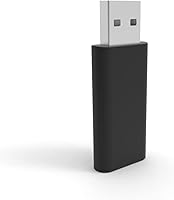
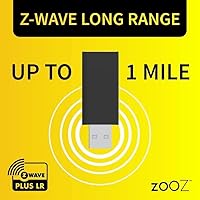
The Zooz ZST39 800 Series Z-Wave USB Stick is Zooz's most capable Z-Wave controller to date, built on the new 800 series chipset that brings genuine Long Range wireless coverage to DIY smart home setups. Let's be direct: this is not a beginner device. If you're not already comfortable navigating Z-Wave networks, automation software, and USB controller configuration, stop here. In practical terms, Z-Wave Long Range means your network can theoretically reach devices up to a mile away — a significant leap from traditional mesh-dependent setups. The stick itself is compact, plugs into any USB 3.0 port, and works within the Home Assistant and HomeSeer ecosystems.
Features & Benefits
The 800 series chipset is the headline here — it's what enables Long Range coverage that older 500 and 700 series sticks simply cannot match. Paired with the S2 security framework, every device pairing is encrypted, which matters more than most users realize until something goes wrong. The ZST39 also supports OTA firmware updates, but only through the Zooz support portal — do not apply updates from any other source or you risk permanently bricking the stick. The full Z-Wave Plus command library gives experienced automation builders access to granular device control. One important reality check: Long Range only works when both your software and your end devices support it on their end too.
Best For
The Zooz 800 series stick is purpose-built for people who already live in the Z-Wave ecosystem and want to push its boundaries. Home Assistant power users running Z-Wave JS will find the most immediate value here, particularly those managing large homes or outbuildings where mesh coverage has always fallen short. It's equally strong for HomeSeer setups and for Raspberry Pi hobbyists running a dedicated automation server. If you're upgrading from a 500 or 700 series controller, this is the natural next step — just don't skip reading the migration warnings first. And if you're brand new to Z-Wave entirely, build some experience before considering this one.
User Feedback
Experienced users consistently praise this Z-Wave controller for reliable device pairing and noticeably improved range compared to previous generation sticks — particularly in larger homes where the old mesh topology was a constant headache. The Home Assistant community has responded positively to the Z-Wave JS integration, calling it stable once properly configured. That said, the configuration process itself draws the most criticism. Several users report a frustrating initial setup, especially those migrating from older hardware. There are also documented warnings about bricking the stick through unauthorized firmware updates — a real risk that Zooz takes seriously in its documentation. Zooz's support team generally earns good marks for responsiveness when things go sideways.
Pros
- Long Range Z-Wave coverage reaches up to a mile, eliminating dead zones in large or multi-building properties.
- The 800 series chipset represents the current top of the Z-Wave standard, offering genuine future-proofing.
- S2 encrypted pairing keeps your network secure without any extra configuration overhead.
- Home Assistant Z-Wave JS integration is stable and well-supported by an active community.
- OTA firmware updates via the Zooz portal mean the stick can improve over time without hardware replacement.
- Full Z-Wave Plus command library gives advanced users granular control over automation logic and device behavior.
- The compact USB 3.0 form factor runs quietly and reliably on always-on machines and Raspberry Pi setups.
- Long-term network stability earns consistent praise from users who run large, heavily automated homes.
- Zooz support staff are technically knowledgeable and generally engage constructively when issues arise.
- Upgrading from a 700 series stick within the same software environment is manageable for prepared users.
Cons
- Long Range functionality is conditional — if your end devices or software do not support it, you will not benefit.
- Applying NVM backups from older Z-Wave sticks will permanently brick the unit with no recovery option.
- Firmware updates must go through the Zooz portal exclusively, creating a single point of failure for maintenance.
- Initial setup under Home Assistant requires solid Z-Wave JS knowledge; skipping documentation leads to hours of troubleshooting.
- No physical status indicator makes visual troubleshooting harder during setup or when diagnosing connection issues.
- The tight USB fit can make the stick awkward to remove in cramped desktop or rack-mounted setups.
- Official documentation assumes a high baseline knowledge level and leaves meaningful gaps for intermediate users.
- Support response times can stretch during peak periods, which is frustrating when a controller issue halts an entire automation setup.
- Users with predominantly older Z-Wave devices will see limited real-world benefit over a less expensive 700 series stick.
- The strict advanced-user requirement means there is no viable learning path on this hardware for those still developing Z-Wave skills.
Ratings
The Zooz ZST39 800 Series Z-Wave USB Stick scores below are generated by AI after systematically analyzing verified buyer reviews from global sources, with spam, incentivized, and bot-driven feedback actively filtered out. This controller sits at an interesting crossroads — praised by experienced home automation builders but humbling for anyone who underestimates its complexity. The scores reflect both where it genuinely excels and where real users have run into friction.
Z-Wave Range Performance
Software Compatibility
Setup & Configuration Experience
Firmware Update Process
Build Quality & Form Factor
Z-Wave Security (S2 Framework)
Value for Money
Compatibility with Raspberry Pi
Zooz Customer Support
Documentation Quality
Network Stability Over Time
OTA Device Update Support
Upgrade Path from Older Sticks
Suitable for:
The Zooz ZST39 800 Series Z-Wave USB Stick is purpose-built for experienced DIY home automation enthusiasts who are ready to push their Z-Wave networks beyond the limitations of older hardware. If you are running Home Assistant with Z-Wave JS on a dedicated machine or Raspberry Pi, this controller slots naturally into that stack and gives you access to the latest Z-Wave Long Range spec — a genuine advantage for large homes, multi-floor setups, or properties with detached structures like garages or workshops. HomeSeer users building out complex automation logic will equally appreciate the full Z-Wave Plus command library and the stable USB 3.0 connection. It is also the right move for anyone upgrading from a 500 or 700 series stick who wants to future-proof their controller without rebuilding their entire device ecosystem. If you already know your way around Z-Wave pairing, S2 security inclusion, and automation software configuration, the ZST39 rewards that knowledge with a noticeably more capable and stable network foundation.
Not suitable for:
The Zooz ZST39 800 Series Z-Wave USB Stick is the wrong tool for anyone who is just getting started with smart home technology or who expects a plug-and-play experience. There is no companion app, no guided setup wizard, and no shortcut around the requirement to understand Z-Wave networks, USB controller configuration, and your chosen automation software at a meaningful technical level. The Long Range capability — often the primary reason buyers choose this over a cheaper stick — only works when your end devices and your software both support the Long Range implementation, which many current Z-Wave devices still do not. Migrating from an older stick carries real risk: applying an NVM backup from a 500 or 700 series device will permanently brick this unit, with no recovery path available. Casual smart home users running a handful of bulbs or plugs through a consumer hub like SmartThings or Wink will find no practical use case for this controller at all. If your Z-Wave device library is mostly older hardware, the headline feature of this stick may remain locked regardless of how carefully you configure the software side.
Specifications
- Brand: Manufactured by Zooz, a brand known for Z-Wave accessories and DIY smart home hardware.
- Model: The model number is ZST39, part of Zooz's 800 series Z-Wave controller lineup.
- Chipset Series: Built on the 800 series Z-Wave chipset, the most current generation available in the Z-Wave standard.
- Protocol: Supports both Z-Wave Plus and Z-Wave Long Range protocols for backward-compatible and extended-range device communication.
- Security: Uses the S2 security framework for encrypted device inclusion, providing robust protection against unauthorized network access.
- Interface: Connects via USB 3.0, ensuring a stable and fast data link between the stick and the host computer.
- Dimensions: Measures 2.2 x 0.8 x 0.2 inches, making it compact enough to remain plugged in without obstructing adjacent ports.
- Weight: Weighs 0.704 ounces, negligible in any always-on desktop or Raspberry Pi deployment.
- Color: Available in black only.
- Long Range Coverage: Z-Wave Long Range mode supports device communication at distances of up to one mile under ideal open-air conditions.
- OTA Updates: Supports over-the-air firmware updates exclusively through the official Zooz support portal; third-party firmware sources will void the warranty.
- Compatible Software: Works with Home Assistant via Z-Wave JS and HomeSeer; other software platforms may work but are not officially supported.
- Host Compatibility: Compatible with standard PCs, laptops, and Raspberry Pi running a supported operating system and automation software.
- Package Contents: Includes one 800 series Z-Wave USB stick; no additional accessories, cables, or software are included.
- Warranty: Backed by a one-year manufacturer warranty from Zooz, subject to proper use as outlined in the product documentation.
- Power Source: Draws power directly from the USB host port; no external power supply or batteries are required.
- Command Library: Supports the full Z-Wave Plus command class library, enabling advanced automation scripting and broad device compatibility.
- NVM Compatibility: NVM backups from 500 or 700 series Z-Wave sticks are not compatible and will permanently damage the device if applied.
Related Reviews
Zooz ZSE18 800LR Z-Wave Motion Sensor
Zooz ZSE11 800LR Z-Wave Multisensor
Avolusion PRO-Z 8TB USB 3.0 External Hard Drive
Avolusion PRO-Z Series 12TB External Hard Drive

GOJO 800 Series Gold & Klean Antimicrobial Lotion Soap, 800 mL Refill (Case of 12)
Fogg 800 Series 150ml Body Spray
Elgato Wave Neo
PAKOTOO PA-800 USB Document Camera