Overview

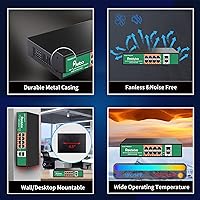
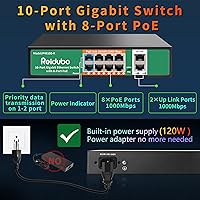
The Reidubo P4810D-K 8-Port Gigabit PoE Switch is a straightforward, no-frills option for anyone who needs to power and connect IP cameras or access points without paying for managed switch features they will never use. It packs 8 PoE+ ports and 2 gigabit uplink ports into a compact metal enclosure, with a built-in 120W power supply — no wall adapter hunting required. The fanless design is not just a spec bullet; it means you can tuck this switch into a living room cabinet or ceiling closet without the constant hum of a cooling fan. With over 170 ratings and a solid 4.3-star average, it has earned a legitimate following among home installers and small-office network builders.
Features & Benefits

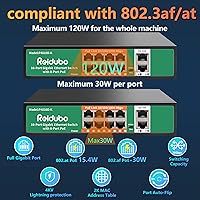
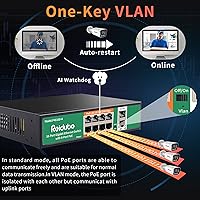
All 8 ports comply with IEEE 802.3af/at, meaning each one can push up to 30W — enough to handle most IP cameras and indoor access points without issue. The total 120W power pool is shared, though, so if you are planning to run six cameras that each draw 20W, the math will not work out. Two dedicated gigabit uplinks give you clean paths to your router or NVR. The hardware VLAN mode is a simple physical toggle that isolates PoE ports from each other, useful for camera network segmentation but not to be confused with a full managed VLAN implementation. QoS support and 4KV lightning protection round out a surprisingly capable feature set for the price tier.

Best For

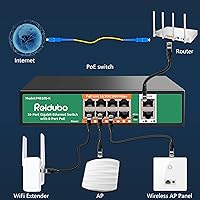
This PoE switch is a natural fit for anyone setting up a home security system with 4 to 8 IP cameras who wants full gigabit speeds without the complexity of a managed switch. It also works well for small access point deployments where reliable power delivery and a couple of uplink options are all that is needed. Installers who want basic network isolation between cameras and other devices will appreciate the VLAN toggle, even if it is not software-configurable. The intelligent PD detection makes it safe to plug in non-PoE devices without worrying about accidental damage. And because it runs completely silent, placement flexibility extends well beyond the server closet.

User Feedback

Owners consistently call out easy plug-and-play setup as a standout quality — unbox it, connect it, and it works. The metal housing draws praise as well, feeling more substantial than many plastic competitors at this price level. On the flip side, the shared 120W budget gets mentioned fairly often, particularly by users running higher-wattage cameras who found themselves doing per-port math after the fact. The physical VLAN toggle divides opinion: some appreciate skipping a web interface entirely, while others wish they had software control. A few buyers note the 2K MAC address table could feel limiting in more complex environments, though for typical small-office or home use, it rarely becomes a real issue.

Pros

  • Full gigabit speeds on all 8 PoE ports — no 10/100 bottlenecks holding back your cameras or APs.
  • Built-in power supply means no separate adapter to source, mount, or replace later.
  • Fanless operation makes it genuinely quiet enough for living rooms, offices, and ceiling installs.
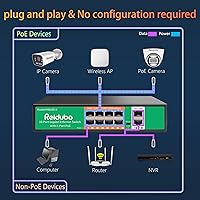
  • Plug-and-play setup takes minutes — unbox, cable up, and the switch handles the rest.
  • Hardware VLAN toggle provides useful camera network isolation without requiring any configuration software.
  • Intelligent PD detection protects non-PoE devices from accidental power delivery damage.
  • 4KV lightning protection adds real-world durability for outdoor camera runs exposed to weather.
  • Metal housing feels noticeably more solid than plastic alternatives in the same price range.
  • QoS support helps prioritize video streams when the switch is under heavier network load.
  • Two dedicated gigabit uplink ports give flexible options for connecting routers, NVRs, or upstream switches.

Cons

  • The 120W shared power budget requires careful planning — running many high-draw devices simultaneously can hit the ceiling fast.
  • No software interface or web GUI means zero visibility into port status, traffic, or error counts.
  • The VLAN mode is a single physical toggle with no granular control over which ports are grouped.
  • 2K MAC address table is tight and may cause instability in environments with many active network clients.
  • No SNMP, port mirroring, or remote management of any kind limits usefulness for IT-managed environments.
  • Wall-mount hardware is not included in the box, requiring a separate purchase for ceiling or wall installations.
  • Brand support and long-term firmware availability are less established compared to Netgear, TP-Link, or Ubiquiti.
  • Only one year of warranty coverage, which is shorter than some competing unmanaged switches in this category.

Ratings

The scores below for the Reidubo P4810D-K 8-Port Gigabit PoE Switch were generated by our AI engine after analyzing verified purchase reviews from buyers worldwide, with spam, incentivized, and bot-generated feedback actively filtered out. Each category reflects the honest distribution of real user experiences — strengths and frustrations alike — so you get a clear, unvarnished picture before you buy.
Ease of Setup
93%
Buyers consistently describe setup as one of the smoothest they have experienced in this category — plug in the power, connect the cables, and devices start receiving power and data within seconds. There is no app to download, no firmware wizard to wade through, and no network configuration required, which home installers especially appreciate.
Because there is zero configuration interface, users who run into a connectivity issue have no diagnostic tools to fall back on. Troubleshooting has to be done the old-fashioned way — swapping cables and rebooting devices — which some users found frustrating when something did not work immediately.
PoE Reliability
88%
Across dozens of real-world deployments involving IP cameras and wireless access points, buyers report consistent and stable power delivery over extended periods. The intelligent PD detection earns specific praise for correctly identifying non-PoE devices and withholding power, preventing accidental damage to standard switches or computers plugged in by mistake.
A small subset of users noted occasional port instability after several months of continuous use, particularly on ports running near the 30W maximum. Whether this reflects a hardware tolerance issue or environmental factors is unclear, but it is worth monitoring in high-load deployments.
Power Budget Adequacy
67%
33%
For typical 4 to 6 camera setups where each device draws around 10 to 15 watts, the 120W shared budget works comfortably with headroom to spare. Buyers running modest home security systems report no power-related issues whatsoever across months of use.
Users who tried to max out all 8 ports with higher-wattage cameras — particularly 4K models drawing 20 to 25W each — hit the power ceiling and experienced devices failing to power on. The 120W pool sounds generous until you do the math, and several buyers felt the listing underplayed this limitation.
Build Quality
82%
18%
The metal enclosure consistently draws positive comments from buyers who have handled cheaper plastic alternatives at similar price points. It feels noticeably more substantial than expected, and the fanless design means there are no moving parts to wear out over time, which bodes well for long-term reliability.
The port labeling and status LEDs are functional but not refined — a few users noted the LED indicators are dim and difficult to read in bright environments. The overall finish has minor cosmetic inconsistencies that do not affect performance but signal the value-tier manufacturing tolerances.
VLAN Functionality
61%
39%
For users who simply want to keep their security cameras isolated from the rest of the home network, the hardware VLAN toggle does exactly what it promises without any configuration. Installers who have dealt with complex managed switch setups appreciate having a one-switch solution for basic segmentation.
Power users and IT-oriented buyers quickly run into the ceiling here — the toggle is binary, all-or-nothing, with no ability to assign specific ports to specific VLANs. Several reviewers felt the VLAN marketing language overstated what is essentially a simple isolation mode, which created disappointment for those expecting managed-switch-style flexibility.
Value for Money
86%
Relative to what you get — full gigabit speeds on all ports, a built-in power supply, metal housing, and basic VLAN isolation — buyers broadly agree this switch punches above its weight at the price point. For a straightforward home camera or AP deployment, it is difficult to find a comparable feature set for less.
The value calculation shifts if your needs grow even slightly beyond the basics. Buyers who later needed port monitoring, more power budget, or real VLAN management found they had to replace the unit entirely rather than upgrade features, making the initial savings feel short-lived in retrospect.
Noise Level
96%
The completely fanless design makes this one of the quietest switches buyers have used, with multiple reviewers specifically mentioning they installed it in bedrooms, living rooms, and open offices without any audible presence. Passive cooling through the metal chassis works effectively in normal indoor temperature ranges.
In very warm environments — think uncooled server rooms or attic installs during summer — the chassis can become noticeably hot to the touch. While this has not translated into widespread failure reports, it raises questions about thermal longevity for installs in high-ambient-temperature locations.
Port Count & Layout
78%
22%
Eight PoE ports covers the majority of home and small-office use cases without requiring a second switch, and the two dedicated uplink ports are positioned clearly at one end of the unit making cable management straightforward. Buyers appreciate not having to sacrifice a PoE port just to connect to their router.
For anyone whose camera or AP count creeps above 8, there is no expansion path with this unit — you will need an additional switch. The physical port spacing is adequate but not generous, and running thick outdoor-rated Cat6 cables into adjacent ports simultaneously can feel cramped.
Lightning & Surge Protection
81%
19%
The 4KV lightning protection on all ports is a feature buyers in storm-prone regions specifically called out as a deciding factor. Several reviewers who had fried previous switches during summer storms reported no damage after lightning events with this unit in line.
4KV protection is solid for residential use but falls short of the 6KV standard that more rugged industrial-grade switches offer. Users in areas with frequent severe electrical storms or exposed outdoor cable runs may still want additional inline surge protection as a precaution.
Compatibility
89%
IEEE 802.3af and 802.3at compliance means this gigabit switch works out of the box with the vast majority of IP cameras, access points, VoIP phones, and other standard PoE devices on the market. Buyers rarely report compatibility issues, and the PD detection layer adds another layer of safety for mixed-device setups.
A handful of users with older or non-standard PoE devices — particularly some proprietary brand cameras — reported the switch failed to negotiate power correctly. These appear to be edge cases involving non-compliant devices, but it is worth verifying your specific equipment against the IEEE 802.3af/at standard before purchasing.
Management & Visibility
44%
56%
For users who genuinely want zero management overhead, the complete absence of a web interface or software is a feature rather than a flaw. There is nothing to misconfigure, no login credentials to forget, and no firmware vulnerabilities to patch — a genuine appeal for non-technical home users.
The total lack of any monitoring capability is a real blind spot for anyone running a business-critical or semi-professional installation. There is no way to check port utilization, identify a misbehaving device, view PoE consumption per port, or remotely diagnose an outage — everything requires physical investigation on-site.
Thermal Performance
74%
26%
Under typical loads in climate-controlled indoor environments, the passive cooling system handles heat dissipation without issue, and the chassis remains warm but not concerning during normal 24/7 operation with 4 to 6 active PoE devices connected.
Running the switch near full PoE capacity in a warm room — above 85°F ambient — causes the chassis to get uncomfortably hot. There are no thermal indicators or automatic throttling to warn you when the unit is under heat stress, which is a gap for installs in less controlled environments.
Mounting & Installation
76%
24%
The compact footprint and light weight make both desktop placement and wall mounting practical options, and the unit sits flat and stable on a shelf without any tendency to shift around when cables are connected. Ceiling closet installs are especially clean given the fanless, silent operation.
Mounting hardware is not reliably included in the box, which catches some buyers off guard during installation. The wall-mount slots are functional but not keyed in a way that locks the unit securely, leaving minor flex when cables are tugged — something that matters more in a permanently installed ceiling or wall setup.
Long-Term Durability
71%
29%
The metal enclosure and fanless design remove two of the most common failure points in budget networking hardware — chassis flex and fan motor burnout. Buyers who have had the unit running continuously for over a year report no degradation in performance or PoE reliability.
Reidubo is a relatively newer brand without the long service track record of established networking vendors, and the one-year warranty period is shorter than some competitors offer. Long-term component reliability beyond 18 to 24 months of continuous operation remains an open question based on the available review pool.

Suitable for:

The Reidubo P4810D-K 8-Port Gigabit PoE Switch is built squarely for home users and small-office installers who want reliable gigabit PoE without the overhead of managed switch configuration. If you are setting up a 4 to 8 camera security system, powering a few wireless access points across a small building, or just need a clean way to consolidate PoE devices onto a single switch, this fits the job well. The built-in power supply removes one more thing to source and manage, and the fanless metal enclosure means you can install it in a living room cabinet, drop ceiling, or a tight utility closet without worrying about noise or bulky external adapters. Installers who want basic camera network isolation will find the hardware VLAN toggle genuinely useful, even if it is not a substitute for enterprise VLAN management. Anyone who values a true plug-and-play experience — no browser interface, no firmware setup, no driver installation — will feel right at home here.
Not suitable for:

The Reidubo P4810D-K 8-Port Gigabit PoE Switch is not the right tool if your deployment demands anything beyond basic network segmentation. Network administrators who need per-port VLAN assignment, SNMP monitoring, port mirroring, link aggregation, or remote management should look at a proper managed switch — the hardware toggle on this unit is simply not designed for those workflows. The shared 120W power budget also becomes a real constraint if you plan to run six or more high-wattage cameras simultaneously; stacking up several 20-25W devices will push or exceed the total available power, forcing you to either stagger loads or invest in a higher-capacity switch. The 2K MAC address table, while adequate for small setups, will feel cramped in any environment with a large number of active network clients. If your installation is growing quickly or involves complex segmentation requirements, spending more upfront on a managed alternative will save frustration down the road.
Specifications

  • PoE Ports: 8 auto-negotiating RJ45 ports support 10/100/1000Mbps speeds and deliver Power over Ethernet compliant with IEEE 802.3af and 802.3at standards.
  • Uplink Ports: 2 dedicated gigabit RJ45 uplink ports allow connection to a router, NVR, or upstream switch at full 1000Mbps speeds.
  • PoE Power Budget: Total PoE power output is capped at 120W shared across all active ports, with a standard per-port output of 15.4W and a maximum of 30W per port.
  • Power Supply: The switch uses a built-in 52V 2.5A power supply accepting AC input from 100–240V at 50/60Hz, eliminating the need for an external power adapter.
  • Switching Capacity: Internal switching capacity is 20Gbps using a store-and-forward forwarding mode for reliable packet handling.
  • MAC Address Table: Supports a MAC address table of up to 2K entries, suited for small to medium home and office network environments.
  • VLAN Support: A hardware toggle enables VLAN isolation mode, which separates PoE ports from each other while maintaining communication through the gigabit uplink ports.
  • QoS: Quality of Service prioritization can be applied to 1–2 ports to help ensure stable throughput for time-sensitive traffic such as video streams.
  • Lightning Protection: All ports include 4KV lightning surge protection to help safeguard connected devices during electrical storms or power fluctuations.
  • Enclosure: The fanless enclosure is constructed from metal, providing passive cooling with no audible noise and reasonable physical durability for the product tier.
  • Dimensions: The unit measures 7.95 × 5.55 × 1.73 inches, making it compact enough for desktop placement or wall mounting in tight spaces.
  • Weight: The switch weighs 2.18 pounds, light enough for ceiling or wall installations without requiring heavy-duty mounting hardware.
  • Operating Temperature: Rated for operation between -14°F and 131°F, covering typical indoor environments and moderately temperature-variable closet or attic installations.
  • Mounting Options: Supports both desktop flat placement and wall mounting, giving installers flexibility in how and where the switch is deployed.
  • Management: Fully unmanaged with no software installation, web interface, or configuration required — the switch is operational as soon as it is powered and cabled.
  • PD Detection: Intelligent powered-device detection automatically identifies whether a connected device requires PoE power, and disables power delivery on ports where it is not needed.
  • Forwarding Rate: Port forwarding rates are 14,880 packets per second at 10BASE-T, 148,800 pps at 100BASE-T, and 1,488,000 pps at 1000BASE-T.
  • Cable Standard: Maximum supported cable run length is 100 meters per port using standard Cat5e or Cat6 Ethernet cabling.
  • PoE Pin Config: Uses End-Span PoE delivery with power on pins 1/2 (positive) and 3/6 (negative), compatible with standard IEEE 802.3af/at powered devices.
  • Warranty: Reidubo provides a one-year product warranty and lifetime technical support for this switch.

Related Reviews

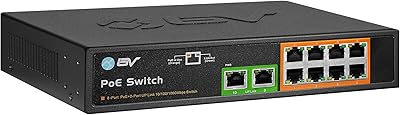
BV-Tech POE-SW802G 8-Port Gigabit PoE+ Switch
79%
94%
Ease of Setup
88%
PoE Reliability
67%
Power Budget
61%
Build Quality
91%
Value for Money
More
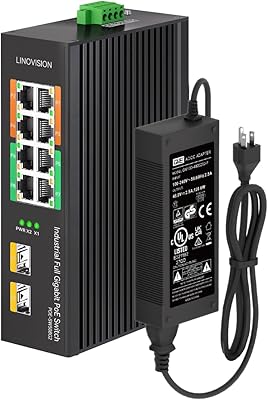
LINOVISION POE-SW508G Industrial 8-Port PoE++ Switch
77%
91%
Power Delivery
88%
Build Quality
93%
PoE Watchdog
84%
Installation Ease
86%
Thermal Performance
More
YuLinca 6-Port Gigabit PoE Switch with 4 PoE+ Ports
87%
95%
Ease of Installation
88%
PoE Functionality
91%
Build Quality
87%
Performance and Speed
94%
Fanless Operation (Noise)
More
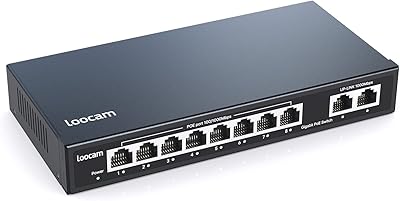
Loocam LNA-SPG1008 8-Port Gigabit PoE Switch
80%
94%
Ease of Setup
76%
PoE Power Delivery
83%
Build Quality
88%
Compatibility
71%
Extended Transmission Range
More
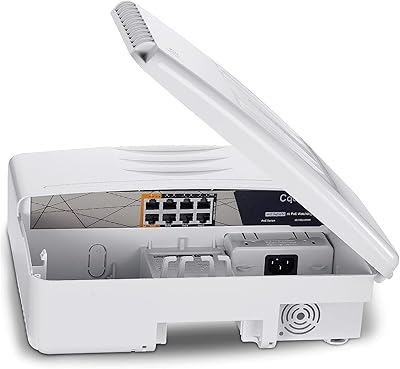
Cqenpr 8-Port 120W Outdoor Gigabit PoE Switch
80%
93%
Ease of Installation
88%
Weatherproof Durability
84%
PoE Power Delivery
79%
AI Watchdog Reliability
82%
Surge & Lightning Protection
More
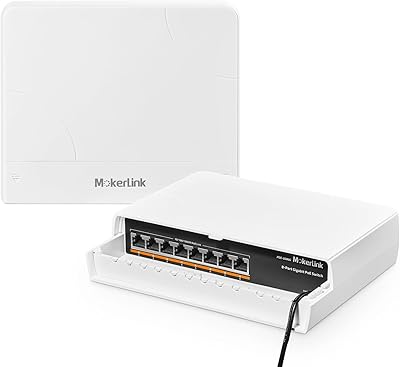
MokerLink 8-Port Outdoor Gigabit PoE Switch
81%
93%
Ease of Setup
84%
Build Quality
81%
PoE Performance
77%
Weather Resistance
89%
Gigabit Throughput
More
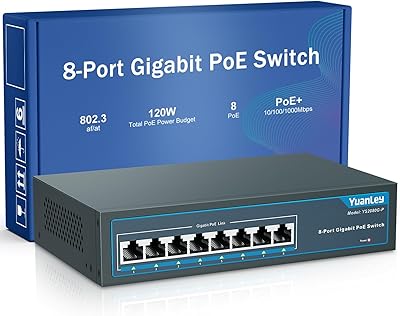
YuanLey 8-Port 120W Gigabit PoE Switch
80%
91%
Value for Money
94%
Ease of Setup
78%
PoE Power Delivery
83%
Build Quality
74%
Thermal Performance
More
NETGEAR GS308EP
NETGEAR GS308EP
81%
88%
PoE+ Performance
91%
Ease of Setup
74%
Build Quality
82%
Network Management Features
93%
Value for Money
More
TRENDnet TPE-TG80G 8-Port Gigabit PoE+ Switch
85%
91%
Build Quality
88%
PoE Reliability
97%
Noise Level
94%
Ease of Setup
67%
Thermal Management
More
TRENDnet TPE-TG82G 8-Port Gigabit PoE+ Switch
78%
93%
Plug-and-Play Setup
78%
PoE Power Delivery
88%
Build Quality
61%
Thermal Management
91%
Network Performance
More

FAQ

No, none at all. The Reidubo P4810D-K 8-Port Gigabit PoE Switch is fully unmanaged, so there is no app, no browser interface, and no driver to install. Plug in the power cord, connect your devices, and it handles everything automatically.
It depends on how much power each camera draws. The total PoE budget is 120W shared across all ports. If your cameras each consume around 10–12W, you will have no problem running all 8. If they are higher-draw models pulling 20W or more each, you will hit the ceiling before all ports are fully loaded, so it is worth checking the wattage specs on your cameras before committing.

In VLAN mode, the PoE ports are isolated from each other — so cameras cannot communicate directly with one another — but all of them can still talk to whatever is connected on the uplink ports, like your NVR or router. You enable it by flipping a physical toggle on the switch itself. There is no software involved, which keeps it simple, but it also means you cannot do granular per-port VLAN assignment.

It runs completely silently. There is no fan in this unit — heat is managed passively through the metal enclosure. That makes it a reasonable choice for any space where fan noise would be annoying, including living rooms, home offices, and open ceiling installations.

As long as your devices are IEEE 802.3af or 802.3at compliant, they should work without any issues. The switch uses intelligent PD detection to confirm whether a connected device actually needs power before supplying it, which also means plugging in a regular non-PoE device will not damage it.

The switch is designed to support wall mounting, but mounting hardware is not confirmed to be included in the box — you may need to source appropriate screws or a mounting bracket separately. The unit is light enough at just over 2 pounds that standard wall anchors handle it without trouble.

The switch will not simply shut down, but it will not be able to supply full power to all ports simultaneously once the budget is exceeded. Devices added beyond the available power headroom may not power on, or may receive insufficient power, which can cause unstable behavior on cameras or access points. It is best to add up your expected per-device wattage before you deploy.

Yes, that is exactly what the two uplink ports are for. You can connect one uplink to your router or modem and use the other for a second switch, NVR, or any other gigabit device that does not need PoE power from this unit.

The rated operating range goes down to -14°F and up to 131°F, which covers most indoor environments including unconditioned garages and utility closets in moderate climates. It is not weatherproof itself, so it should always be in an enclosure if placed anywhere exposed to moisture or direct outdoor conditions.

The main things you give up with this gigabit switch versus a managed alternative are visibility and control — no port statistics, no traffic monitoring, no remote access, no per-port VLAN configuration, and no firmware updates to add features. For a straightforward camera or AP installation where you just need reliable power and connectivity, that trade-off is often perfectly fine. But if your network is growing or you need detailed oversight of what is happening on each port, a managed switch is worth the additional investment.