Overview

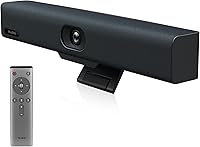
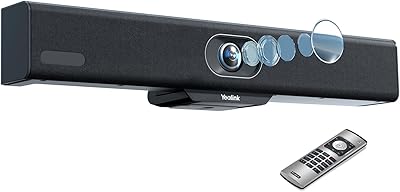
The Yealink UVC34 All-in-One Conference Camera System is a bar-style device designed to replace the tangle of separate cameras, speakerphones, and microphones that clutter most small meeting rooms. Measuring just under 15 inches wide and weighing 3.5 pounds, it sits discreetly on a table or mounts to a monitor without dominating the space. Plug-and-play via USB-A means IT teams can deploy it in minutes — no drivers, no configuration headaches on day one. It carries Microsoft Teams certification and works reliably with Zoom Rooms, Google Meet, and Webex, which matters when your organization needs hardware that just works across platforms without surprises.
Features & Benefits

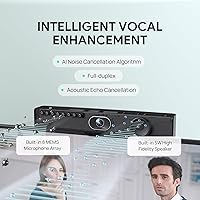
The camera itself captures 4K at 30fps through a 1/2.8-inch CMOS sensor with a 120-degree field of view, wide enough to cover everyone seated around a small table without manual panning. AI auto-framing adjusts the shot automatically as people move or join the conversation, which genuinely reduces the awkward cropping that plagues fixed-angle cameras. Audio is handled by an eight-microphone array with echo cancellation and full-duplex support — two people can speak simultaneously without the system cutting one off. The 5W speaker is adequate for rooms up to roughly six people. One honest caveat: the 5x digital zoom works well at moderate levels but softens noticeably at maximum reach.

Best For

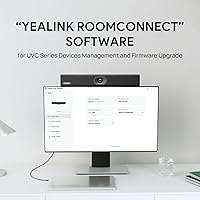
This all-in-one meeting room camera makes the most sense in huddle rooms and small offices seating four to eight people, where running separate AV components would be overkill. It is particularly well-suited to teams that rotate between locations — the single-cable setup means anyone can walk in, plug in, and be ready inside a minute. Organizations standardized on Microsoft Teams will appreciate the native certification. IT managers handling multiple sites will find value in remote device management through Yealink's USB Control Software, though it is worth noting that advanced configuration does require installing that utility rather than working entirely out of the box.

User Feedback

Buyers consistently highlight how straightforward the initial setup is, with many noting that image quality in well-lit rooms exceeds expectations for a bar-format device. Audio performance draws praise in smaller rooms, though a handful of reviewers mention that the speaker can struggle to fill larger spaces clearly. Long-term reliability appears solid based on extended ownership reports, with few complaints about hardware failures. The motorized lens cap earns genuine appreciation as a privacy feature rather than a gimmick. On the critical side, some users feel the value proposition tightens when compared to competing bars, and a few IT professionals note the firmware update process through the software utility could be smoother.

Pros

  • Single USB-A cable handles power, video, and audio — no separate power adapter or hub needed.
  • AI auto-framing adjusts the shot in real time, so no one needs to manually reposition the camera mid-meeting.
  • The 120-degree field of view captures a full small conference table without any physical panning or tilting.
  • Microsoft Teams certification means fewer compatibility surprises during critical calls.
  • The motorized lens cap closes automatically when not in a meeting, offering a hardware-level privacy guarantee.
  • Eight-microphone array with echo cancellation handles cross-talk and room reverb better than most single-mic setups.
  • Works across all major platforms — Zoom Rooms, Google Meet, Cisco Webex, and more — without reconfiguring anything.
  • Remote device management via Yealink USB Control Software saves IT teams from physically visiting each room for updates.
  • Solid build quality with no widespread reports of hardware failure even after extended daily use.
  • Consolidating camera, mic, and speaker into one bar visibly reduces cable clutter and simplifies room setup.

Cons

  • Digital zoom softens noticeably at maximum magnification, making it unreliable for capturing whiteboard detail at a distance.
  • The 5W speaker reaches its limits in rooms larger than a standard huddle space, where voices can sound thin.
  • Advanced configuration requires installing the Yealink USB Control Software — it is not fully configurable through the operating system alone.
  • No wired Ethernet or Wi-Fi connectivity; the device depends entirely on the connected laptop for its network link.
  • Firmware update process through the management software has been described by some IT users as less intuitive than expected.
  • At its price point, buyers considering a dedicated PTZ camera paired with a quality speakerphone may get more flexibility for similar or slightly higher spend.
  • The remote control requires AAA batteries, which feels like an afterthought on an otherwise modern, USB-powered device.
  • No built-in display or touch controls, so room-based call management depends entirely on the connected computer.

Ratings

The scores below reflect AI-driven analysis of verified global buyer reviews for the Yealink UVC34 All-in-One Conference Camera System, with automated filtering applied to remove incentivized, duplicate, and bot-generated submissions. Each category captures both what users genuinely praised and where they ran into frustration, giving you an honest, balanced picture before you commit. No score here is inflated — if a category underdelivers in real-world use, the number reflects that.

Ease of Setup
93%
Users consistently describe the unboxing-to-first-call experience as genuinely fast — plug into a USB-A port, let the OS recognize it, and you are in a meeting within minutes. IT teams deploying across multiple huddle rooms particularly appreciate that no driver installation is required for basic operation.
A meaningful number of users note that once you move beyond basic plug-and-play — configuring AI framing behavior, adjusting speaker tuning, or pushing firmware — the Yealink USB Control Software becomes mandatory, adding a step that catches some buyers off guard.
Video Quality
88%
In well-lit conference rooms, the 4K output consistently impresses remote participants who are used to 1080p webcams, with faces rendered clearly and whiteboard text readable without zooming in. The automatic brightness compensation handles backlit windows and dim overhead lighting better than most competing bars in this category.
Low-light performance, while improved by auto-brightness, still introduces some grain at the edges of a darker room. A handful of users with larger displays on the receiving end note that compression artifacts become more visible at higher zoom levels during screen-share scenarios.
Digital Zoom Performance
61%
39%
At moderate zoom levels — roughly 2x to 3x — the electronic PTZ holds a reasonably sharp image and is genuinely useful for tightening the frame around a smaller group seated in a larger room. The smooth zoom transition avoids the jarring snap effect seen in cheaper alternatives.
At or near maximum 5x zoom, softening is consistent and noticeable enough that users trying to capture whiteboard details or read projected text at a distance are routinely disappointed. This is the single most commonly cited technical limitation across buyer reviews, and it is worth managing expectations upfront.
Audio Clarity
84%
The eight-microphone array handles cross-room pickup well in standard huddle spaces, and the full-duplex capability means both ends of a call can speak simultaneously without the system suppressing anyone. Echo cancellation performs reliably even in rooms with hard reflective surfaces like glass walls.
In rooms with significant ambient noise — open-plan offices with doors ajar, spaces near HVAC vents — the noise suppression occasionally over-corrects and makes voices sound slightly processed. The 5W speaker, while adequate for six people, starts to lose presence in rooms with higher ceilings or carpeted absorption that swallows sound.
AI Auto-Framing
79%
21%
For typical meeting behavior — someone new walking in, a presenter moving to a whiteboard, or a small group shifting around a table — the auto-framing reacts smoothly and keeps the active speaker reasonably centered without distracting transitions. Users running back-to-back Teams meetings appreciate not having to touch the camera between sessions.
In dynamic environments where participants move frequently or the room has uneven lighting, the framing algorithm occasionally makes aggressive crop adjustments that remote participants notice as a distraction. A few IT managers noted the framing can take a beat too long to reacquire focus after someone leaves and rejoins the frame.
Build Quality
82%
18%
The bar feels solid and purposeful in hand — not hollow or plasticky — and users who have been running the same unit daily for over a year report no structural issues or connector degradation. The motorized lens cap mechanism, in particular, draws consistent praise for feeling well-engineered rather than flimsy.
Some users handling the device between locations report that the surface finish scuffs more easily than expected for a business-grade product at this price. A small number of longer-term reviewers note that the lens cap motor occasionally hesitates after many months of daily open-and-close cycles.
Speaker Performance
71%
29%
For a room of four to six people in a standard enclosed space, the 5W speaker delivers clear, balanced audio that makes remote participants sound natural rather than tinny. Users switching from a laptop's built-in speakers consistently notice an immediate improvement in call audio comfort during long meetings.
The speaker reaches an audible limit in rooms seating more than eight people or in spaces with any meaningful background noise, where remote voices become harder to distinguish without straining. Several reviewers explicitly note they supplemented the built-in speaker with a dedicated speakerphone in mid-size rooms, which undercuts the all-in-one value proposition.
Platform Compatibility
91%
Microsoft Teams certification delivers on its promise — Teams calls launch and manage the device without any setup friction, and Zoom Rooms integration is equally reliable. Users who switch between platforms across different client sites report that the UVC34 adapts without requiring any hardware reconfiguration.
A small subset of Google Meet users on older browser versions encountered initial recognition issues that required a permissions reset, and one or two Webex users noted occasional audio sync delays that resolved after a driver cache clear — minor issues, but worth noting for mixed-platform environments.
Privacy Features
89%
The motorized lens cap is the feature buyers mention most often when recommending this bar to colleagues — knowing the camera is physically blocked when not in use provides confidence that software-only privacy switches simply cannot match. It opens and closes reliably in sync with call start and end events across all major platforms tested.
The lens cap behavior is tied to camera activation signals from the host software, which means in rare edge cases where a platform does not send a clean deactivation signal, the cap may remain open momentarily after a call ends. It is uncommon, but security-sensitive organizations should be aware it is not a completely independent hardware interlock.
Remote Management
74%
26%
IT administrators managing multiple rooms across different floors or sites find the Yealink USB Control Software useful for pushing firmware updates and configuration changes without dispatching someone physically — a real operational time-saver at scale. Diagnostic tools within the software are straightforward enough for junior IT staff to use independently.
The firmware update process has drawn criticism for being slower and less intuitive than enterprise IT teams expect from a product at this price point, with some updates requiring multiple steps that are not clearly documented. A few reviewers managing larger deployments noted the software interface feels dated compared to cloud-managed competitors.
Value for Money
76%
24%
For buyers replacing a separate camera, speakerphone, and microphone setup, the consolidated hardware and single-cable installation represent a genuine cost and complexity saving that shows up quickly in deployment time. Organizations standardizing multiple rooms find the per-room cost reasonable relative to equivalent separate-component setups.
Solo buyers or small teams comparing the UVC34 directly against a quality mid-range webcam and compact speakerphone combination may find the premium harder to justify if their room and headcount fall at the lower end of the target range. A few reviewers explicitly felt the value proposition weakened when digital zoom limitations meant they still needed to supplement with a secondary camera for whiteboard capture.
Portability
83%
At 3.5 pounds and with a single cable to manage, this conference bar is genuinely portable between rooms or sites in a way that a fixed AV installation never could be. Remote-first workers who carry it between home offices and client locations describe the setup as quick and consistent enough to feel like a reliable part of their kit.
The bar format, while compact, is still awkward to carry in a standard laptop bag without a dedicated case or sleeve — it is just long enough at nearly 15 inches to not fit comfortably alongside most 15-inch laptops. Users who move it frequently note it would benefit from a purpose-built carry pouch, which is not included.
Long-Term Reliability
81%
19%
The volume of multi-year ownership reviews is encouraging — the majority of users who have run the device daily in a fixed conference room report no hardware failures or degradation in camera or audio performance over time. Build consistency across units also appears strong, with few reports of out-of-box defects.
A portion of longer-term users note that the lens cap mechanism is the most likely component to show wear over time, with occasional hesitation appearing after extended daily use. Software support cadence — specifically the gap between platform updates and corresponding firmware patches — has drawn mild criticism from IT managers who need timely compatibility maintenance.

Suitable for:

The Yealink UVC34 All-in-One Conference Camera System is a strong fit for small to medium businesses that need a reliable, low-maintenance video conferencing solution without the complexity of assembling separate AV components. It works especially well in huddle rooms and dedicated meeting spaces seating roughly four to eight people, where its wide-angle camera and built-in audio can realistically cover the room. Teams that move between office locations or shared workspaces will appreciate that a single USB-A cable is all it takes to get a meeting started on any compatible laptop. Organizations already running Microsoft Teams or Zoom Rooms as their primary platform will benefit from certified compatibility, meaning fewer unexpected issues during calls. IT departments managing multiple rooms across sites will find the remote device management capability a genuine time-saver, reducing the need for on-site troubleshooting for routine configuration or firmware updates.

Not suitable for:

The Yealink UVC34 All-in-One Conference Camera System is not the right choice for larger boardrooms or open-plan spaces where more than eight people need to be captured clearly and audio needs to carry across a bigger area. The built-in 5W speaker, while capable in a compact room, will feel underpowered in any space with significant background noise or longer table distances. Buyers expecting a fully standalone experience with zero software dependency should be aware that unlocking advanced settings and remote management requires installing Yealink's USB Control Software, which adds a step beyond the basic plug-and-play promise. The 5x zoom is electronic rather than optical, meaning anyone who needs tight, crisp close-ups of whiteboards or presentation materials at a distance will likely be disappointed by the softening that occurs at maximum zoom. Finally, teams on a tighter budget who primarily do one-on-one calls or work in very small spaces may find that a simpler, less expensive webcam and separate speakerphone combination covers their needs just as well for less investment.
Specifications

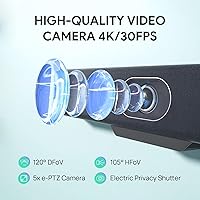
  • Camera Sensor: The UVC34 uses an 8-megapixel 1/2.8-inch CMOS sensor capable of recording and streaming at 4K resolution up to 30 frames per second.
  • Field of View: A 120-degree super-wide-angle lens covers the full width of a small to medium conference table without any physical panning required.
  • Digital Zoom: The camera supports 5x electronic PTZ zoom, allowing closer framing of participants or content without any moving mechanical parts.
  • Microphone Array: Eight built-in microphones work together with Yealink Noise Proof Technology, echo cancellation, and dereverberation to deliver clear pickup in typical meeting room environments.
  • Speaker Output: A single 5W built-in speaker provides full-duplex audio playback, suitable for rooms accommodating up to approximately six to eight people.
  • AI Features: On-device AI handles automatic participant framing and face enhancement, adjusting the camera crop in real time as people enter, leave, or move around the room.
  • Privacy Mechanism: A motorized electric lens cap opens automatically when a video call starts and closes when the session ends, providing a hardware-level visual privacy guarantee.
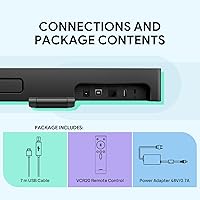
  • Connectivity: The device connects to a host computer via a single USB-A cable that carries both data and power, requiring no external power adapter or additional drivers.
  • Platform Support: The UVC34 is certified for Microsoft Teams and Skype for Business, and is compatible with Zoom Rooms, Google Meet, Cisco Webex, BlueJeans, GoToMeeting, and several additional UC platforms.
  • Dimensions: The device measures 2.16 x 14.96 x 2.16 inches, making it compact enough to sit on a table edge or mount on a monitor without occupying significant space.
  • Weight: At 3.5 pounds, the conference bar is light enough to carry between rooms or locations without requiring dedicated transport equipment.
  • Remote Management: IT administrators can configure, diagnose, and push firmware updates to the device remotely using the Yealink USB Control Software utility.
  • Power Source: The device is powered entirely through its USB-A connection to the host computer; the included AAA batteries are for the optional remote control accessory only.
  • Remote Control: Two AAA batteries are included in the box to power the physical remote control, which allows basic camera and audio adjustments without touching the host computer.
  • Audio Standards: The built-in audio system supports full-duplex communication, meaning both sides of a call can speak simultaneously without the system muting or cutting either party.
  • Image Optimization: Automatic brightness adjustment compensates for dim lighting or backlit environments, helping participant faces remain visible even in challenging room conditions.
  • Form Factor: The UVC34 follows a slim horizontal bar design intended for placement on a conference table or mounted below or above a display in a fixed room setup.
  • Availability: The product has been commercially available since March 2022 and is not listed as discontinued by the manufacturer as of the most recent product data.

Related Reviews
TONGVEO 4K Conference Room Camera System
78%
83%
AI Auto-Tracking Performance
78%
Video Quality
58%
Digital Zoom Quality
74%
Speakerphone Audio Clarity
91%
Ease of Setup
More
Yealink A10 4K Video Conference Camera
86%
91%
Video Quality
88%
Audio Clarity
85%
Ease of Setup
92%
AI Features (Auto-framing & Speaker Tracking)
78%
Software Usability
More
TONGVEO PTZ 3X Wireless Conference Camera System
74%
74%
Wireless Connection Reliability
83%
Video Quality
71%
PTZ Control Responsiveness
78%
Speakerphone Audio Quality
89%
Ease of Setup
More
SANNCE DVR-100 1TB 8CH Security Camera System
74%
83%
Daytime Image Quality
67%
Night Vision Performance
79%
Build Quality & Weatherproofing
74%
DVR Reliability & Performance
81%
Storage & Recording
More
WESECUU 4CAM 4K POE Security Camera System
71%
83%
Image Clarity
78%
Night Vision Performance
71%
AI Detection Accuracy
54%
Mobile App Experience
76%
Setup & Installation
More
Hiseeu 12-Camera 3TB Wireless Security System
70%
83%
Value for Money
76%
Image Quality
71%
Night Vision
78%
Setup & Installation
58%
App Experience
More
ZEROXCLUB B3C 3-Camera Wireless Backup Camera System
76%
84%
Video Signal Reliability
83%
Image Quality
76%
Night Vision Performance
71%
Installation Experience
88%
Weather & Build Durability
More
ONWOTE PKA801608S 16-Channel 4K PoE Security Camera System
78%
91%
Image Clarity
83%
Night Vision
74%
AI Detection Accuracy
67%
Ease of Installation
69%
Audio Recording
More
ZOSI 2K NVR Security Camera System 1TB
76%
83%
Image Quality
79%
Night Vision Performance
76%
AI Detection Accuracy
77%
Setup & Installation
67%
App Experience
More
SMONET 8-Channel Wireless Security Camera System with 4pcs 1080P Cameras and 3TB HDD
85%
91%
Value for Money
96%
Ease of Setup
87%
Video Quality
90%
Night Vision Performance
85%
App Usability
More

FAQ

It works with both. While the UVC34 carries official Microsoft Teams certification, it is also fully compatible with Zoom Rooms, Google Meet, Cisco Webex, BlueJeans, and GoToMeeting. You can switch between platforms on the same device without any reconfiguration.

For basic use, no — just plug it into a USB-A port and your computer will recognize it automatically. That said, if you want to access advanced settings, adjust AI framing behavior, or push firmware updates remotely, you will need to install Yealink's USB Control Software separately.

The 120-degree wide-angle lens and eight-microphone array are well-matched for rooms seating four to eight people comfortably. The 5W speaker holds up well in that range too. For larger rooms with longer table distances or significant background noise, you may find both the audio pickup and speaker output starting to feel stretched.

In well-lit rooms, yes — faces look sharper and text on whiteboards is more legible. The practical difference shows up most when remote participants are viewing on larger screens. In dim conditions, the automatic brightness compensation helps, though no amount of resolution makes up for poor lighting entirely.

At moderate zoom levels, say 2x to 3x, the image holds up well for reframing a smaller group within a larger room. At or near the full 5x electronic zoom, you will notice some softening. It is useful for rough framing adjustments but not reliable for capturing fine detail like handwriting on a whiteboard at a distance.

Yes, it is designed to work either flat on a table surface or mounted below or above a display. The mounting hardware and orientation options let you fix it in a permanent position if the room setup requires it.

The motorized cap opens automatically when your video conferencing software activates the camera, and closes again when the call ends or the camera is deactivated. It is a hardware mechanism controlled by the device itself rather than the software, which is part of what makes it a genuine privacy feature rather than just a software switch.

It generally works through a powered USB hub, but Yealink recommends a direct connection for the most stable performance, particularly for 4K streaming which demands consistent USB bandwidth. If you notice dropped frames or audio glitches through a hub, switching to a direct port usually resolves it.

The framing adjusts gradually rather than snapping abruptly, which helps avoid jarring cuts during a live call. When someone new enters the room, the camera widens its crop to include them over a short transition. It handles typical meeting behavior well, though in very dynamic rooms with constant movement it can occasionally reframe more aggressively than you might prefer.

It is genuinely handy if the device is mounted in a fixed position away from whoever is managing the meeting. You can adjust zoom, switch framing modes, and control basic settings without going back to the laptop. That said, most day-to-day users in a small room will probably manage everything from their computer and rarely pick it up.