Overview

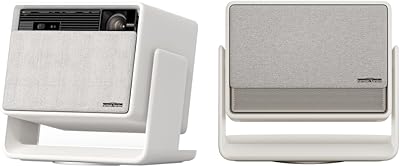
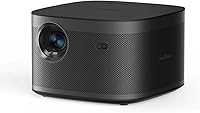
The XGIMI Horizon Pro 4K Home Theater Projector is one of the more thoughtfully designed smart projectors in the premium tier — built for people who want a real cinema experience without bolting a massive TV to their wall. XGIMI has carved out a solid reputation for combining smart software with capable optics, and the Horizon Pro sits near the top of that effort. It brings together true 4K sharpness, Android TV integration, and fast auto-setup in one compact unit. One thing worth stating upfront: Netflix is not supported natively, which is a genuine limitation worth knowing before you commit.
Features & Benefits

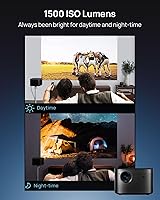
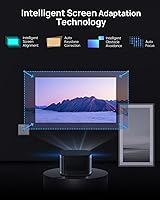
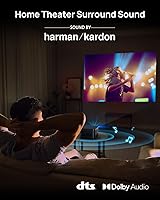
Picture quality is where this smart projector genuinely impresses. The full 4K resolution paired with its X-VUE 2.0 image engine produces crisp, well-saturated images, and HDR10 and HLG support adds real depth to color in compatible content. Brightness is solid for a darkened room, but don't expect it to overpower afternoon sunlight through open blinds — controlled lighting is where it thrives. The auto keystone and focus system is a standout: point it at a wall, and within seconds it corrects tilt, aligns the frame, and dodges obstacles. The built-in Harman Kardon speakers handle most movie nights without requiring a separate soundbar.

Best For

This 4K projector makes the most sense for home cinema enthusiasts who want a large, flexible screen without committing to a permanent TV installation. Renters especially benefit — the intelligent auto-alignment means relocating to a new space and being up and running in minutes, not hours. Families and couples who rotate between movies, sports, and casual streaming will find the Android TV ecosystem covers most bases well. If you already live in the Google ecosystem, the experience feels natural and cohesive. Just know that Netflix users will need a workaround, like plugging in a Fire Stick, which adds an extra layer.

User Feedback

Owners consistently praise image sharpness and color accuracy in dimmer environments, with many saying it genuinely rivals a large flat-panel TV for dedicated movie nights. The auto-alignment feature earns repeated appreciation for making setup feel almost effortless. On the downside, fan noise during long sessions comes up often enough to be worth flagging — not disruptive, but noticeable in quiet scenes. The missing Netflix app remains the single most common frustration, and while workarounds exist, they feel like an unnecessary inconvenience. Overall, most buyers consider it strong value compared to competing smart projectors at a similar price point.

Pros

  • True 4K sharpness delivers a genuinely cinematic image in dark or controlled-light rooms.
  • Auto keystone, auto focus, and obstacle avoidance make repositioning fast and nearly effortless.
  • Built-in Harman Kardon speakers are good enough for casual movie nights without a soundbar.
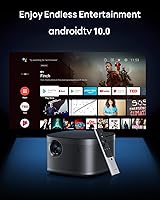
  • Android TV 10.0 gives access to a broad app library with a familiar, easy-to-navigate interface.
  • Chromecast built-in works reliably for casting from phones, tablets, and laptops.
  • HDR10 and HLG support adds real depth and color richness to compatible streaming content.
  • MEMC motion compensation makes sports and fast-action content noticeably smoother.
  • At around eleven pounds, the Horizon Pro is easy to move between rooms or take to a friend's place.
  • Google Assistant voice control handles quick searches and content switching hands-free.
  • AI brightness adjustment helps maintain image consistency as ambient conditions subtly shift.

Cons

  • Netflix is not natively supported — a real inconvenience that requires an external streaming stick workaround.
  • Brightness struggles significantly in rooms with overhead lighting or natural daylight.
  • Fan noise becomes clearly audible during extended viewing sessions, especially in quiet scenes.
  • Only one HDMI port makes multi-device setups like a console plus streaming stick require constant cable swapping.
  • No built-in battery means outdoor or truly portable use always requires a nearby power source.
  • Android TV can slow down or stutter over time, particularly as more apps are installed.
  • The remote control feels budget-grade relative to the overall premium pricing of the unit.
  • Input lag makes it unsuitable for fast-paced or competitive gaming.
  • Customer support response times have drawn mixed feedback from buyers who experienced issues.
  • Long-term software reliability is inconsistent, with some users reporting app crashes after firmware updates.

Ratings

The XGIMI Horizon Pro 4K Home Theater Projector has been evaluated by our AI system after analyzing thousands of verified global user reviews, with spam, bot-generated, and incentivized submissions actively filtered out. The scores below reflect a balanced synthesis of real buyer experiences — capturing both the aspects that consistently impress and the pain points that genuinely frustrate. Strengths and shortcomings are weighted equally, so you get an honest picture before making a decision.

Picture Quality
91%
In a properly darkened room, users consistently describe the image as crisp, vibrant, and genuinely cinematic. HDR content in particular draws praise for its color depth and contrast, with many buyers saying it exceeded their expectations for a projector at this price tier.
In rooms with any meaningful ambient light, the image loses punch and colors wash out noticeably. A few users noted that very bright highlights in HDR content occasionally clip, which suggests the tone-mapping has room for improvement.
Brightness & Ambient Light Performance
67%
33%
For evening movie sessions in a blacked-out or semi-dark room, the brightness holds up well and the AI adjustment does a reasonable job of compensating for minor lighting changes. Most buyers who use it at night report a satisfying, immersive experience.
Daytime or brightly lit room use is where this 4K projector genuinely struggles. Multiple reviewers flagged that even moderate sunlight or overhead lighting washes the image significantly, making it a poor fit for living rooms without blackout curtains.
Auto-Setup & Keystone Correction
88%
The auto keystone, auto focus, and obstacle avoidance system is one of the most praised features across all buyer feedback. Users love being able to place the projector on a coffee table or shelf and have it correct and align itself within seconds — a real-world time-saver.
A small but consistent group of users notes that in unusual placement scenarios — very steep angles or highly reflective surfaces — the auto-correction doesn't fully nail it and manual fine-tuning is still needed. It's not a dealbreaker, but the automation isn't flawless 100% of the time.
Built-in Audio Quality
79%
21%
The Harman Kardon speaker system earns consistent praise for a built-in solution — dialogue clarity is strong, and for casual movie watching or streaming, most buyers find it entirely sufficient without needing a soundbar. The bass has more presence than expected for built-in drivers.
Serious home theater enthusiasts or anyone watching action-heavy content at high volumes will likely want to add external speakers. At louder levels, some buyers report the audio becomes slightly harsh, and the low-end thins out during demanding soundscapes.
App Ecosystem & Smart TV Experience
82%
18%
Android TV 10.0 gives access to a wide range of streaming apps, and Chromecast built-in works reliably for casting from phones and tablets. Google Assistant integration feels natural and useful for quick searches and content navigation without picking up the remote.
The absence of native Netflix support is the single most-mentioned frustration in user feedback. While workarounds like plugging in a Chromecast with Google TV or Amazon Fire Stick are effective, buyers feel they shouldn't have to add hardware to a premium smart projector.
Netflix Compatibility
43%
57%
Users who plug in an external streaming stick — Fire Stick, Chromecast with Google TV — report that the workaround functions well and the HDMI passthrough is clean. So Netflix viewing is possible, just not native.
The lack of a native Netflix app is a fundamental frustration for a large segment of buyers, especially given the asking price. Many reviewers state they only discovered this limitation after purchase, which damages trust in the product experience significantly.
Motion Handling
76%
24%
Sports fans and action movie viewers report that the MEMC motion compensation makes fast-moving content noticeably smoother compared to projectors without it. Panning shots in films and live sports broadcasts look cleaner and more controlled.
Some users sensitive to the soap-opera effect find MEMC processing makes certain content look artificially smooth and prefer to disable it. A few also noted minor motion artifact halos around fast objects with the feature enabled at its highest setting.
Setup & Ease of Use
86%
From unboxing to watching content, most buyers report the setup takes under ten minutes. The intelligent auto-alignment does the heavy lifting and the Android TV interface is familiar enough that even less tech-savvy users feel comfortable navigating it quickly.
Initial Wi-Fi setup and Google account sign-in can be slightly sluggish on the first boot, and the remote — while functional — feels a touch cheap relative to the overall product quality. A handful of users also wished the onboarding process for app setup was more guided.
Build Quality & Design
81%
19%
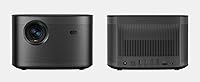
The matte black chassis feels solid and premium in hand, and the compact footprint means it fits naturally on shelves, coffee tables, or entertainment units without dominating the space. Most users feel the physical build matches the price positioning well.
A few buyers noted the ventilation grilles attract dust quickly and can be tricky to clean. The lens cap also lacks a tether, making it easy to misplace during casual use — a minor but recurring complaint in long-term ownership reviews.
Fan Noise
62%
38%
During normal content at moderate brightness settings, the fan operates at a level most users describe as barely noticeable. For the first hour or so of typical use, the thermal management is quiet enough not to interfere with dialogue-driven content.
During extended sessions or when the unit runs at higher brightness demands, fan noise becomes more audible — particularly in quiet scenes or during late-night viewing at low volume. Several long-term owners specifically flag this as something that compounds over multiple hours of use.
Connectivity Options
77%
23%
Bluetooth audio output, dual-band Wi-Fi, HDMI, and USB ports cover the connectivity needs of most users comfortably. Wireless casting via Chromecast works reliably, and Bluetooth pairing with external speakers is straightforward.
Some users wish there were two HDMI ports instead of one, especially when running an external streaming stick alongside a gaming console or Blu-ray player. Swapping cables is a minor but real friction point for multi-device setups.
Value for Money
74%
26%
For buyers who primarily watch content in dark or controlled environments, the combination of true 4K resolution, smart TV integration, and auto-setup feels like fair value at this price point. The all-in-one nature — no soundbar needed for casual use — adds perceived value.
The Netflix gap and brightness limitations in lit rooms make some buyers feel the price is harder to justify compared to competitors who have resolved these issues. A vocal group in user reviews feels the premium ask requires a premium experience without workarounds.
Gaming Performance
58%
42%
Casual and console gaming is generally fine for non-competitive play — the picture quality and screen size make story-driven games visually rewarding. Some gamers appreciate the large image size for open-world and RPG titles.
Input lag is a recurring concern among dedicated gamers, with several users noting it is not suited for fast-paced or competitive gaming. There is no dedicated low-latency game mode, which puts it at a disadvantage against projectors specifically optimized for gaming use.
Portability & Placement Flexibility
83%
At around eleven pounds, the Horizon Pro is portable enough to move between rooms or take to a friend's place for a movie night. The auto-correction means that repositioning does not require tedious manual recalibration — a practical advantage most buyers appreciate.
It is not a truly portable projector in the ultralight sense — there is no built-in battery, so proximity to a power outlet is always required. Users looking for backyard or outdoor use on a truly wireless setup will need a separate power solution.
Long-Term Reliability
71%
29%
A solid portion of long-term owners report the unit performing consistently after one to two years of regular use, with no major hardware degradation in picture quality or speaker performance noted in extended ownership reviews.
A smaller but notable group of users report software-related issues emerging over time — occasional Android TV slowdowns, app crashes, or firmware update hiccups. Customer support response times have also drawn mixed feedback, with some users finding resolution slow.

Suitable for:

The XGIMI Horizon Pro 4K Home Theater Projector is a strong fit for anyone who wants a genuine large-screen cinema experience without committing to a permanent wall-mounted TV. Renters and people who move frequently will appreciate how quickly the intelligent auto-alignment system gets the picture dialed in after repositioning — what used to take 20 minutes of manual fiddling now takes under a minute. Couples and families who do most of their watching in the evening, in rooms where they can control the lighting, will get the most out of its picture quality. If you are already living in the Android and Google ecosystem, the built-in smart platform will feel natural from day one. People who prefer a cleaner setup — one device handling both picture and sound without a separate soundbar — will also find the built-in Harman Kardon audio more than adequate for everyday streaming and movie nights.
Not suitable for:

The XGIMI Horizon Pro 4K Home Theater Projector is the wrong choice if your living room gets a lot of natural light and you are not willing or able to use blackout curtains — the brightness simply cannot compete with a well-lit environment, and the viewing experience suffers noticeably. Dedicated Netflix subscribers should know upfront that the app is not available natively, and while plugging in a Fire Stick or Chromecast with Google TV resolves this, it adds cost and clutter that feels out of place on a premium device. Competitive or reflex-dependent gamers should look elsewhere, as input lag is a real concern and there is no dedicated low-latency game mode. Budget-conscious buyers who expect to get the same experience as a high-end TV without any compromises will likely find the brightness and app limitations frustrating relative to the asking price. Finally, anyone expecting fully plug-and-play Netflix or a two-HDMI setup for multiple devices simultaneously will encounter friction this projector does not resolve out of the box.
Specifications

  • Resolution: Delivers true 4K output at 3840x2160 pixels, producing over 8 million individual pixels per frame for sharp, detailed images.
  • Brightness: Rated at 1500 ISO Lumens with AI Brightness Adjustment that adapts output based on detected ambient light conditions.
  • Image Engine: Powered by the X-VUE 2.0 image processing engine, which handles color calibration, contrast optimization, and overall picture rendering.
  • HDR Support: Compatible with both HDR10 and HLG high dynamic range formats, enabling richer color depth and improved contrast in supported content.
  • Motion Compensation: Equipped with MEMC technology operating at 60Hz to reduce motion blur and judder during fast-moving content such as sports or action films.
  • Speakers: Features dual 8W Harman Kardon built-in speakers tuned for balanced sound reproduction across dialogue, music, and cinematic audio.
  • Audio Formats: Supports DTS-HD, DTS Studio Sound, and Dolby Digital audio decoding for compatibility with a wide range of source formats.
  • Keystone Correction: Auto keystone correction operates across a ±40-degree range on both horizontal and vertical axes to straighten the projected image automatically.
  • Operating System: Runs Android TV 10.0, providing access to over 5,000 applications through the Google Play Store.
  • Voice Control: Google Assistant is built in, allowing hands-free voice search, content control, and smart home device interaction via the included remote.
  • Wireless: Supports dual-band Wi-Fi, Bluetooth audio output, and Chromecast built-in for wireless streaming and device casting.
  • Connectivity: Physical ports include HDMI and USB inputs for connecting external devices such as streaming sticks, gaming consoles, or storage drives.
  • Netflix Support: Netflix is not natively available on this unit; users must connect an external device such as a Fire Stick or Chromecast with Google TV to access it.
  • Dimensions: The unit measures 8.58 x 8.19 x 5.35 inches, making it compact enough to place on a shelf, coffee table, or media console.
  • Weight: Weighs approximately 11 pounds, which is manageable for moving between rooms but requires a power outlet at every location.
  • Model Number: The official manufacturer model number for this unit is XK03H, which can be used to verify compatibility with accessories and firmware updates.
  • Lamp Type: Uses LED-based light source technology, which typically offers a longer operational lifespan compared to traditional lamp-based projector systems.
  • Certifications: Carries Low Blue Light certification from TÜV Rheinland, indicating it has been tested and verified to reduce potentially eye-straining blue light output.

Related Reviews

XGIMI HORIZON Ultra 4K Projector
78%
91%
Image Quality
67%
Brightness & Ambient Light Performance
88%
Color Accuracy & HDR Support
78%
Built-in Audio
82%
Auto Setup & Calibration
More
XGIMI Horizon S Max 4K Projector
79%
91%
Picture Quality
88%
Brightness & Ambient Light Performance
93%
Auto Alignment & Smart Setup
78%
Built-in Audio
84%
Build Quality & Design
More
BenQ TK860i 4K Smart Home Theater Projector
85%
91%
Picture Quality
88%
Ease of Setup
87%
Connectivity Options
65%
Sound Quality
82%
Streaming Performance (Android TV)
More
BenQ TK800M 4K UHD Home Theater Projector
86%
93%
Picture Quality
89%
Brightness
91%
Gaming Performance (Low Input Lag)
85%
Ease of Setup
88%
Connectivity Options
More
Epson Home Cinema 3800 4K Projector
75%
93%
Color Accuracy
91%
Brightness Performance
78%
Image Sharpness & 4K Detail
82%
HDR Performance
84%
Contrast & Black Levels
More
Epson Home Cinema 5050UB 4K PRO-UHD Projector
85%
94%
Picture Quality
90%
Brightness
93%
Color Accuracy
85%
Setup & Installation
91%
HDR Performance
More
Epson Home Cinema 3200 4K PRO-UHD Projector
83%
93%
Image Quality
89%
Brightness Performance
74%
Ease of Setup
91%
HDR Performance
88%
Gaming Performance
More
BenQ HT4550i 4K HDR LED Smart Home Theater Projector
85%
94%
Image Quality
89%
Brightness
93%
Color Accuracy
75%
Ease of Setup
65%
Sound Quality
More
Epson LS11000 4K Laser Home Theater Projector
79%
91%
Picture Quality
93%
Color Accuracy
83%
Brightness Performance
88%
HDR Performance
86%
Gaming Performance
More
XGIMI MoGo 3 Pro Outdoor Projector
76%
83%
Picture Quality
91%
Ease of Setup
61%
Battery Life
88%
Smart OS & App Ecosystem
79%
Audio Quality
More

FAQ

For the vast majority of placements, the auto keystone, auto focus, and obstacle avoidance handle the setup automatically within seconds of powering on. That said, if you are projecting at a particularly steep angle or onto an uneven or reflective surface, you may need to nudge a setting or two manually. Think of the auto-setup as doing about 90 percent of the work reliably.

No, and this is worth knowing before you buy. The XGIMI Horizon Pro 4K Home Theater Projector does not support the Netflix app natively due to licensing restrictions on Android TV. The most popular workaround is plugging a Fire Stick or a Chromecast with Google TV into the HDMI port, which works well but adds a small extra cost and one more remote to manage.
The Horizon Pro can project a very large image — commonly up to 200 inches diagonal depending on throw distance. As a rough guide, you will want roughly 10 to 13 feet of distance for a 120-inch image, though the exact figures depend on your room. The auto-focus adjusts sharpness regardless of size, so you are not locked into one specific distance.

Honestly, a controlled or darkened room is where this projector performs best. In a room with open blinds or overhead lighting, the image washes out and colors lose their impact noticeably. If you primarily watch in the evening or can use blackout curtains, it is excellent. Daytime use in a bright living room will likely disappoint.

For most casual viewing — streaming shows, movies, general family use — the built-in Harman Kardon speakers hold up surprisingly well and many users do not feel the need to add anything. If you are a home theater enthusiast who cares deeply about bass depth and surround immersion, an external audio setup will add to the experience. But it is far from a requirement for everyday use.

During the first hour or so at typical brightness settings, most users barely notice the fan. During longer sessions or when the projector is working harder at peak brightness, it becomes more audible — particularly in quiet dialogue-heavy scenes or late-night viewing at low volume. It is not disruptive by most accounts, but it is something to be aware of if you are sensitive to background noise.

Yes, via the HDMI port. Keep in mind there is only one HDMI input, so if you plan to connect both a console and a streaming stick simultaneously, you will need an HDMI switch. For casual gaming on story-driven titles it works well, but competitive gamers should note that input lag is not optimized for reflex-heavy play.

It works with Apple devices too. Chromecast built-in supports casting from iPhones and iPads through compatible apps, and AirPlay-like mirroring is achievable through Chromecast-enabled apps. The overall experience is more polished if you are in the Google ecosystem, but Apple users are not locked out by any means.

The LED-based light source is rated for a significantly longer lifespan than traditional projector lamps — typically tens of thousands of hours under normal use conditions. This means you are unlikely to need a replacement for many years of regular use, and it eliminates the recurring lamp replacement cost that older projector owners are familiar with.

It works very well in a bedroom setup, arguably better than a living room in some cases, because bedrooms are typically easier to darken and tend to be quieter environments where the fan noise is less of a factor. The compact footprint and fast auto-setup also make it easy to position on a dresser or nightstand without permanent mounting.

Where to Buy