Overview

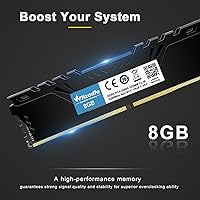
The Wlizedle DDR4 3200MHz 16GB Kit Desktop RAM is a straightforward, no-frills memory upgrade that punches above its price for desktop builders who want more headroom without overspending. At 3200MHz, you get a speed that handles everyday multitasking, web browsing, and light gaming without bottlenecks — a solid sweet spot for modern DDR4 systems. The kit ships as two 8GB sticks, and that matters: running matched modules in dual-channel mode noticeably improves how your system handles memory-intensive workloads compared to a single 16GB stick. Wlizedle isn't a household name like Corsair or Kingston, and that's worth saying upfront — but brand prestige doesn't always equal value, and this kit deserves a fair look on its own terms.
Features & Benefits

The standout practical feature is XMP 2.0 support, which lets compatible Intel and AMD motherboards automatically load the 3200MHz speed profile through BIOS — no manual tweaking required. That said, XMP isn't active out of the box; you need to enable it in BIOS settings, a step first-time builders should be aware of. The aluminum heat spreader keeps things tidy thermally, though 3200MHz doesn't generate enough heat to stress most systems anyway. Running at 1.35 volts keeps power draw low, helpful in tighter or budget-conscious builds. If your board only supports 2666MHz or 2933MHz, the kit will downclock gracefully. The CL16 latency is standard for this speed tier — not exceptional, but competitive for what you're paying.

Best For

This 16GB desktop memory upgrade is squarely aimed at users doing a practical, no-nonsense upgrade rather than a flagship build. If you're coming from 8GB and notice your PC slowing down with multiple browser tabs, video calls, or a game running in the background, moving to 16GB in dual-channel will make a tangible difference. It's a natural fit for mid-range Intel or AMD systems — think B550, B660, or similar boards — where XMP 2.0 is supported but spending big on premium-brand RAM feels unnecessary. Home and office PCs get most of the value here. Competitive gamers or content creators running demanding workloads would likely want faster, better-pedigreed kits, but for the average desktop user, this hits the mark.

User Feedback

The Wlizedle RAM kit holds a strong rating across well over a thousand reviews, which carries real weight at this price point. Most buyers highlight plug-and-play reliability — sticks seat correctly, systems post without drama, and everything just works. Where things get more nuanced is XMP: a handful of users report that manually enabling the profile in BIOS was necessary, which tripped up a few less experienced builders. Quality control appears consistent but not flawless — the occasional dead-on-arrival report does surface. Customer support is generally described as responsive and helpful. Enthusiasts comparing it against Crucial or G.Skill note the lack of brand pedigree, but most everyday buyers report solid value and no regrets for what they spent.

Pros

  • Dual-channel configuration delivers noticeably better real-world responsiveness than a single 16GB stick.
  • XMP 2.0 support makes hitting 3200MHz straightforward on compatible Intel and AMD motherboards.
  • Downclocks automatically to 2933MHz or 2666MHz for seamless use on older or budget boards.
  • Low 1.35V operating voltage keeps power consumption in check during long desktop sessions.
  • Aluminum heat spreader gives each module a clean, tidy look inside any standard mid-tower build.
  • Strong rating across a large number of verified buyers signals consistent plug-and-play reliability.
  • Customer support is widely reported as responsive, with issues typically addressed within a day.
  • Competitive CL16 latency at 3200MHz is on par with similarly priced kits from bigger names.
  • Available in multiple speed and capacity variants, making it easy to match your specific system needs.

Cons

  • Wlizedle does not appear on most motherboard QVL lists, so guaranteed compatibility cannot always be confirmed.
  • XMP 2.0 must be manually enabled in BIOS — not immediately obvious to first-time builders.
  • Brand is relatively new with limited long-term reliability data compared to established memory manufacturers.
  • No RGB lighting option for users who care about aesthetics inside a windowed case.
  • Occasional dead-on-arrival reports suggest quality control, while generally solid, is not flawless.
  • Enthusiast overclockers will find the kit lacks the chip binning transparency offered by premium brands.
  • Sparse official documentation makes it harder to troubleshoot edge-case compatibility issues independently.
  • Not suitable for laptops, servers, or any system requiring ECC or SO-DIMM memory formats.

Ratings

The scores below reflect an AI-driven analysis of verified global buyer reviews for the Wlizedle DDR4 3200MHz 16GB Kit Desktop RAM, with spam, bot-generated, and incentivized feedback actively filtered out to surface authentic experiences. Ratings are built from real-world installation outcomes, daily usage patterns, and honest frustrations shared by desktop builders across a wide range of system configurations. Both the genuine strengths and the recurring pain points are weighted transparently, so you get a clear-eyed picture before deciding.

Value for Money
88%
Most buyers feel they got more than they paid for, especially those upgrading from a single 8GB stick. The dual-channel configuration at 3200MHz, available at a budget-tier price, is a combination that typically costs more from brand-name alternatives — and that difference resonates strongly with cost-conscious desktop builders.
A small segment of buyers who experienced compatibility hiccups felt the savings weren't worth the troubleshooting effort. If a module arrives defective and a return is needed, the time cost can erode the perceived value advantage over buying from a brand with a more streamlined warranty process.
Ease of Installation
84%
The vast majority of buyers report that both sticks seated cleanly into DIMM slots on the first attempt, with systems posting and booting into Windows without any drama. For users upgrading a home office PC or doing a first-time memory swap, the physical install process is about as straightforward as desktop RAM gets.
The experience becomes less smooth once XMP enters the picture — a meaningful portion of reviewers didn't realize 3200MHz isn't active by default and had to research the BIOS enable step on their own. The kit includes no printed guide explaining this, which trips up less experienced builders.
XMP 2.0 Performance
79%
21%
On compatible Intel and AMD motherboards, enabling XMP 2.0 in BIOS successfully pushes the sticks to their rated 3200MHz in most reported cases. Buyers who know their way around BIOS find the process quick and appreciate that the kit holds its rated speed stably during extended daily use.
Not every motherboard plays perfectly with this kit's XMP profile, and a handful of users report needing to manually set memory timings after the XMP profile caused instability. The lack of QVL documentation from Wlizedle makes it harder to verify compatibility ahead of time compared to kits from established brands.
Reliability & Stability
81%
19%
The overwhelming consensus among long-term users is that once the kit is correctly configured, it runs without crashes, blue screens, or errors under typical daily workloads. Many buyers have been using this 16GB desktop memory upgrade for over a year with zero reported issues, which is a meaningful signal at this price point.
There is a small but consistent thread of DOA (dead on arrival) reports and early-failure accounts that slightly undermines confidence in batch-level quality control. These are outliers statistically, but without a clearly documented warranty process, affected buyers have less certainty about their recourse options.
Compatibility Range
74%
26%
The automatic downclocking to 2933MHz or 2666MHz makes this DDR4 kit usable on a wider range of boards than its rated speed suggests. Buyers pairing it with B450, B550, B660, and even some older Z370 Intel boards generally report trouble-free compatibility as long as DDR4 slots are present.
Wlizedle does not publish a QVL or compatibility list, so verifying fit with a specific motherboard requires community research or trial and error. Buyers with less common or older board models have reported inconsistent results, and the absence of official documentation is a real limitation for cautious shoppers.
Thermal Management
76%
24%
The aluminum heat spreader keeps module temperatures in a comfortable range during everyday productivity tasks, light gaming, and office workloads. At 3200MHz, thermal output is modest to begin with, so the spreader does its job adequately without the need for active cooling in standard mid-tower cases.
The heat spreader is functional rather than impressive — buyers running memory-intensive workloads in poorly ventilated cases or compact builds note that temperatures climb more than expected during sustained load. It's not a performance-grade spreader, and enthusiasts pushing the system harder will notice the limitation.
Build & Physical Quality
77%
23%
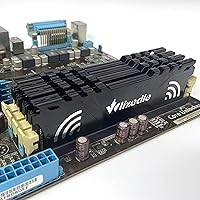
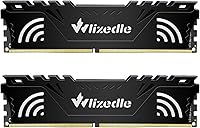
The black aluminum heat spreader gives the sticks a clean, professional appearance that fits naturally in most standard mid-tower builds. Buyers note the modules feel solid in hand and slot in without the flex or resistance sometimes associated with budget memory components.
The finish is basic and utilitarian — there is no RGB, no premium branding, and the aesthetic is purely functional. Buyers building inside windowed cases who care about visual cohesion may find the look underwhelming compared to kits in a similar price bracket that offer at least subtle design detailing.
Plug-and-Play Experience
72%
28%
For users who simply want 16GB running at a safe JEDEC speed without touching BIOS, the kit delivers exactly that — install and go. Home users upgrading a prebuilt PC frequently highlight this simplicity as the main reason they were satisfied, especially those who had no intention of using XMP.
The disconnect between the rated 3200MHz and the default boot speed catches a significant number of buyers off guard. Without clear in-box documentation or even a simple QR code pointing to a setup guide, the kit leans heavily on buyers already knowing how DDR4 XMP activation works.
Customer Support
69%
31%
Buyers who reached out to Wlizedle's support team generally describe the experience as faster and more helpful than expected for a lesser-known brand. Resolution timelines of under 24 hours are frequently mentioned, and several reviewers noted that support staff communicated clearly and offered practical solutions.
The quality of support appears inconsistent — some buyers report prompt resolutions, while others describe follow-up delays or vague responses once issues escalated beyond basic troubleshooting. The lack of a formal warranty card or documented claim process means the experience can vary significantly depending on when and how you reach out.
Performance at CL16
75%
25%
CL16 at 3200MHz is a standard and respectable timing for everyday desktop use, and buyers focused on productivity workloads, moderate gaming, and general multitasking report smooth, responsive system behavior after XMP is enabled. The latency figures are competitive for the price bracket.
Enthusiasts who benchmark their systems note that CL16 isn't particularly tight for 3200MHz, and some competing kits at similar prices offer CL15 or even CL14 timings. For the typical home or office user this is irrelevant, but anyone optimizing for peak system performance will notice the ceiling.
Dual-Channel Effectiveness
83%
Buyers who specifically tested single versus dual-channel configurations report a clear, practical improvement in system responsiveness when both sticks are installed in the correct paired slots. Tasks like running multiple browser tabs alongside a game, or handling large spreadsheets, feel noticeably more fluid with both modules active.
A portion of buyers inadvertently installed both sticks in adjacent rather than alternating slots, missing the dual-channel benefit entirely. The kit packaging does not address this, and without a guide directing buyers to consult their motherboard manual, some users ran single-channel mode without realizing it.
Brand Trust & Documentation
58%
42%
Wlizedle has accumulated a substantial review base for a newer brand, and the consistency of positive feedback from first-time buyers suggests the product performs reliably for most standard use cases. For buyers who prioritize price and are comfortable doing minimal research, the brand delivers on its core promise.
Wlizedle lacks the ecosystem of trust that comes with established memory brands — no published QVL support, no lifetime warranty prominently advertised, and limited third-party review coverage outside of marketplace feedback. Buyers who want that institutional confidence before spending will struggle to find it here.
Low-Voltage Efficiency
82%
18%
Operating at 1.35V, this DDR4 kit draws less power than standard 1.5V DDR3 systems it often replaces, contributing to quieter thermals and a marginal reduction in overall system power consumption. Users with budget power supplies or small form factor builds appreciate this headroom.
The 1.35V spec is standard rather than exceptional for DDR4, so the efficiency benefit is real but not meaningfully differentiated from competing kits. Buyers expecting notable power savings compared to other DDR4 options will find the difference negligible in practice.

Suitable for:

The Wlizedle DDR4 3200MHz 16GB Kit Desktop RAM is a practical choice for everyday desktop users who want a meaningful performance boost without spending on premium-branded alternatives. If you're running a mid-range Intel or AMD desktop — think a B450, B550, B660, or similar board — and still working with a single 8GB stick, this kit gives you both a capacity upgrade and the bandwidth benefits of dual-channel operation in one purchase. It works well for home office setups where the machine handles web browsing, spreadsheets, video calls, and light multitasking, but isn't being pushed into demanding creative or gaming workloads. Budget-conscious PC builders who want 3200MHz speed with XMP 2.0 support, and are comfortable doing a quick BIOS setting change, will find this kit delivers solid daily performance at a fair price point.
Not suitable for:

The Wlizedle DDR4 3200MHz 16GB Kit Desktop RAM is not the right pick for enthusiasts, competitive gamers, or content creators who depend on verified compatibility lists and premium quality assurance. If you're building a high-end system and want RAM that appears on your motherboard's official QVL (qualified vendor list), Wlizedle's limited brand documentation makes that difficult to confirm. Users who expect to skip the BIOS setup entirely and have XMP activate automatically will likely be disappointed — it requires a manual enable step that less experienced builders may find frustrating. Laptop users, server builders, and anyone needing ECC memory for workstation applications should also look elsewhere, as this kit is strictly a non-ECC desktop UDIMM. Those planning to push beyond 3200MHz through aggressive manual overclocking would be better served by a kit from an established enthusiast brand with binned chips and a proven track record.

Specifications

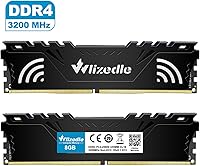
  • Capacity: This kit provides 16GB of total memory, split across two 8GB modules designed to run together in dual-channel mode.
  • Memory Type: Uses DDR4 SDRAM, the standard fourth-generation desktop memory format supported by most modern Intel and AMD platforms.
  • Speed: Rated at 3200MHz (PC4-25600), delivering a data transfer rate suitable for everyday productivity and general desktop workloads.
  • Latency: Operates at a CL16 timing, which is a standard and competitive latency for DDR4 memory running at 3200MHz.
  • Voltage: Runs at 1.35V, a low-voltage specification that contributes to reduced power draw during normal desktop operation.
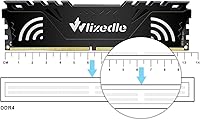
  • Form Factor: 288-pin UDIMM (Unbuffered DIMM), the standard physical format required for consumer desktop motherboards.
  • XMP Support: Supports XMP 2.0, allowing compatible motherboards to automatically load the 3200MHz speed profile via a BIOS setting.
  • ECC: Non-ECC memory, meaning it does not include error-correcting code functionality and is not suitable for server or workstation ECC applications.
  • Compatibility: Designed exclusively for desktop PCs; not compatible with laptops, servers, or systems requiring SO-DIMM or registered DIMM modules.
  • Downclocking: Automatically downclocks to 2933MHz or 2666MHz on systems whose motherboards do not natively support 3200MHz operation.
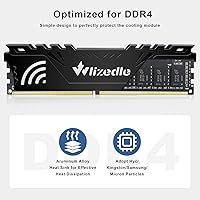
  • Heat Spreader: Each module is fitted with a solid aluminum heat spreader to assist with passive heat dissipation during sustained use.
  • Module Count: Sold as a matched pair of two 8GB sticks, intended to be installed together for dual-channel memory configuration.
  • Color: Both modules feature a black finish, offering a clean, understated look that suits most standard desktop builds.
  • Item Weight: The packaged kit weighs 3.2 ounces, reflecting the lightweight aluminum construction of both memory sticks combined.
  • Package Size: The retail packaging measures approximately 5.98″ x 2.2″ x 1.06″, compact enough for standard shipping and storage.
  • Brand: Manufactured and sold under the Wlizedle brand, a newer entrant in the consumer desktop memory market.
  • Release Date: This product was first made available in June 2022, giving it a few years of real-world buyer feedback to draw from.

Related Reviews
Crucial 16GB DDR4 3200MHz Desktop RAM
78%
93%
Ease of Installation
88%
Compatibility Range
79%
Real-World Performance
91%
Long-Term Reliability
74%
Value for Money
More
Timetec 16GB KIT DDR4 3200MHz Desktop RAM
81%
88%
Value for Money
93%
Installation Ease
82%
Compatibility
86%
Stability & Reliability
62%
Latency Performance
More
A-Tech 128GB DDR4 3200MHz Desktop RAM Kit
87%
92%
Performance
88%
Installation Ease
81%
Compatibility with Systems
90%
Reliability and Stability
85%
Build Quality
More
D DUOMEIQI 32GB Kit DDR4 3200MHz Desktop RAM
87%
91%
Performance for Gaming
88%
Ease of Installation
85%
System Compatibility
92%
Value for Money
87%
Multitasking & Productivity Performance
More
XPG D50 RGB 16GB DDR4 Desktop RAM
85%
88%
Performance at Rated Speed
91%
RGB Lighting Quality
72%
RGB Software Compatibility
93%
XMP Installation & Setup
86%
Motherboard Compatibility
More
DATO DDR4 Extreme 16GB Desktop RAM Kit
80%
91%
Value for Money
93%
Installation Ease
78%
Performance at Rated Speed
74%
Thermal Management
81%
Build Quality
More
Samsung 16GB DDR4 3200MHz SODIMM Laptop RAM
82%
93%
Reliability & Longevity
91%
Installation Ease
83%
System Compatibility
78%
Real-World Performance
84%
Value for Money
More
Wlizedle DDR4 3200MHz 32GB Desktop RAM Kit
79%
91%
Value for Money
88%
Installation Ease
74%
XMP & BIOS Compatibility
83%
System Performance Impact
81%
Thermal Performance
More
Silicon Power DDR4 16GB Kit Desktop RAM
79%
93%
Value for Money
91%
Installation Ease
89%
System Stability
78%
Motherboard Compatibility
74%
Memory Speed Performance
More
Transcend JM3200HSB-16G 16GB DDR4 Laptop RAM
83%
88%
Value for Money
84%
Compatibility
92%
Installation Ease
86%
Performance Improvement
91%
Stability & Reliability
More

FAQ

Yes, this 16GB desktop memory upgrade is compatible with AMD Ryzen systems using boards that support DDR4 memory, such as those on the B450, B550, or X570 chipsets. If your board supports XMP or DOCP profiles, you can enable 3200MHz operation directly from BIOS. Just double-check that your specific motherboard supports DDR4 and has at least two available DIMM slots.

Out of the box, the RAM will default to a lower JEDEC speed — usually around 2133MHz or 2400MHz — until you manually enable XMP 2.0 in your motherboard's BIOS. It takes about 30 seconds to do: enter BIOS on startup, find the XMP or memory profile setting, enable it, and save. After that, your system will run the sticks at the full 3200MHz.

You can, but it's not recommended. Installing a single 8GB module means your system runs in single-channel mode, which noticeably reduces memory bandwidth compared to using both sticks together. The kit is designed to be used as a matched pair, and you get meaningfully better performance when both modules are seated in the correct paired slots on your motherboard.

Yes, it is compatible with Intel 12th and 13th Gen (Alder Lake and Raptor Lake) platforms that support DDR4, typically on B660, H670, or Z690/Z790 boards with DDR4 slots. Note that some newer Intel boards ship with DDR5 slots only, so confirm your specific motherboard accepts DDR4 before purchasing.

As long as your mini-ITX motherboard has standard full-size DDR4 DIMM slots (288-pin), yes — this kit will fit physically. Mini-ITX boards typically only have two DIMM slots, which is exactly what this two-stick kit requires, so it's actually a natural match for compact builds.

Wlizedle advertises customer support availability and responsiveness, but the warranty terms are not as clearly documented as those from established brands like Corsair or Kingston, which often offer lifetime warranties. Before purchasing, it's worth checking the current product listing or contacting Wlizedle support directly to confirm the specific warranty coverage period.

Technically possible, but not advisable. Mixing RAM brands, speeds, or capacities can cause instability, boot failures, or force the system to run all modules at the slowest stick's speed. For reliable performance, it's best to use this DDR4 kit as a standalone matched pair rather than pairing it with existing mismatched modules.

For dual-channel operation, you generally install the two sticks in alternating slots rather than adjacent ones — most commonly slots 2 and 4 (sometimes labeled A2 and B2). Your motherboard manual will show the exact recommended configuration, and it usually takes just a few seconds to look up. Installing them in the wrong slots won't damage anything, but you may lose the dual-channel performance benefit.

No, this kit does not include RGB lighting. Both sticks have a clean black aluminum heat spreader with no LEDs. If aesthetics inside a windowed case matter to you and you want synchronized lighting, you would need to look at a different kit that specifically features RGB.

According to buyer feedback, Wlizedle's support team is generally responsive and aims to resolve issues within 24 hours. If a stick arrives dead or fails early, reaching out to their customer service is the recommended first step. That said, the claims and replacement process may not be as streamlined as with larger, more established memory brands, so keep your order details and any relevant documentation handy.