
Overview

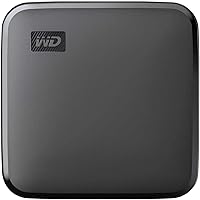
The WD Elements SE 2TB Portable SSD sits in a sweet spot that most buyers are actually looking for: enough performance to leave a spinning hard drive in the dust, at a price that doesn't require a second thought. Western Digital has been in the storage business long enough to earn genuine trust, and this portable SSD reflects that experience — it's well-built, dependable, and doesn't overcomplicate things. Plug it into any PC or Mac and it's ready to go instantly. Two terabytes of solid-state storage is a serious amount of headroom, though there are a couple of trade-offs worth knowing before you commit.

Features & Benefits

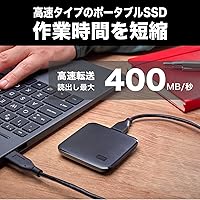
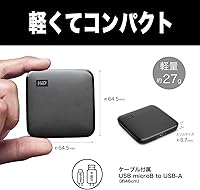
At 400MB/s read speeds over USB 3.0, this pocket-sized drive handles bulk transfers comfortably — moving a folder full of RAW photos or a large video project takes seconds, not minutes. The physical size is genuinely impressive: it weighs under an ounce and the footprint is barely larger than a matchbook, yet it's rated to survive a drop from roughly 6.5 feet. That matters a lot for anyone who travels with equipment. There's no driver installation, no proprietary software — just plug in and start using it. The 2TB capacity gives you room for a full creative archive or a substantial game library without constantly juggling files.

Best For

The WD Elements SE is a natural fit for photographers and videographers who regularly move large files between devices — think a wedding shooter offloading cards at the end of a long day, or a video editor pulling footage between a laptop and desktop. Students switching between home and school setups will appreciate how little space it occupies. Gamers can store and run titles on consoles or PCs without adding any bulk. One honest caveat: if you need the absolute fastest transfer rates or hardware-level file encryption, more specialized drives exist for that. For most people, though, this portable SSD delivers exactly what it promises.

User Feedback

With over 22,000 ratings averaging 4.6 stars, buyer satisfaction here is hard to argue with. The most consistent praise centers on how fast and effortless the setup experience is — no fuss, no learning curve. Users frequently mention size and weight as genuine highlights too. On the critical side, a recurring theme is that real-world speeds can vary depending on USB port quality and background system load. A minority of buyers have flagged inconsistent long-term performance, worth noting if you plan to rely on this as a primary backup drive. The absence of password protection also draws criticism from business users who routinely handle sensitive data.

Pros

  • Two terabytes of SSD storage offers ample room for large media libraries, game installs, and full system backups.
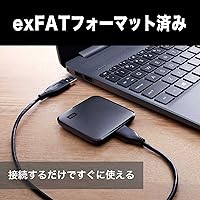
  • Plug-and-play compatibility with both PC and Mac means you are up and running in seconds with zero setup hassle.
  • At under one ounce, this portable SSD is genuinely one of the lightest drives in its class.
  • The compact footprint fits easily in a shirt pocket, making it a practical travel companion.
  • Read speeds up to 400MB/s handle large file transfers far faster than any traditional spinning hard drive.
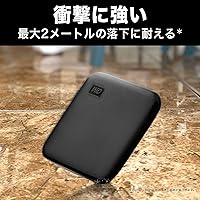
  • Drop resistance up to approximately 6.5 feet provides a meaningful safety net for everyday accidental drops.
  • A 4.6-star average across more than 22,000 ratings reflects consistently strong real-world buyer satisfaction.
  • No proprietary software or driver installation is required, keeping the experience clean and frustration-free.
  • Works across a wide range of devices including laptops, desktops, gaming consoles, tablets, and televisions.
  • Western Digital's reputation in consumer storage adds a layer of confidence for long-term reliability.

Cons

  • USB 3.0 interface caps real-world throughput, making it noticeably slower than newer USB 3.2 or NVMe portable drives.
  • No hardware encryption or password protection is a genuine dealbreaker for anyone storing sensitive or confidential data.
  • Real-world transfer speeds can vary significantly depending on host device USB port quality and system load.
  • No auto-backup software is included, so users who want automated protection must find and configure their own solution.
  • Long-term performance consistency has drawn mixed feedback from a subset of verified buyers, which warrants caution as a primary backup drive.
  • The drive is not waterproof or dustproof, limiting its usefulness in outdoor or industrial environments.
  • Write speeds are not officially specified, which makes it harder to evaluate for workflows that involve heavy write operations.
  • No USB-C cable is included in the box, which can be inconvenient for users on newer laptops without standard USB-A ports.

Ratings

The WD Elements SE 2TB Portable SSD earns strong marks across most categories buyers actually care about, based on AI analysis of thousands of verified global reviews — with spam, incentivized, and bot-generated feedback actively filtered out. Scores reflect the full picture: where this pocket-sized drive genuinely delivers, and where real buyers have run into frustration or unmet expectations.

Transfer Speed
78%
22%
For a USB 3.0 drive, hitting close to 400MB/s in real-world conditions is a genuine win. Photographers offloading a full shoot or remote workers syncing large project folders consistently report that transfers feel fast and responsive compared to anything with spinning platters.
The USB 3.0 interface is the hard ceiling here, and buyers coming from USB 3.2 Gen 2 or NVMe-based portable drives feel the gap immediately. Speed also fluctuates depending on which port you plug into, and some users report noticeably slower bursts under sustained heavy workloads.
Portability
94%
This is where the WD Elements SE genuinely stands apart. Under one ounce and barely larger than a thick credit card, it disappears into a jacket pocket or camera bag without a second thought. Frequent travelers and students consistently cite the size as a deciding factor in their purchase.
The included USB-A cable is functional but adds a little bulk for ultrabook users who have moved entirely to USB-C. A small number of buyers also wish the drive came with a protective pouch or sleeve given how easily it can get scratched rattling around in a bag.
Build Quality
76%
24%
The matte black housing feels solid for its weight class, and the drop resistance rating up to 6.5 feet has held up in real-world accidents reported by users — slipping off desks or tumbling out of bags without any functional damage. Most buyers describe the finish as clean and understated.
It is not ruggedized in any meaningful outdoor sense — no IP rating, no water resistance, no dust protection. A handful of buyers who used it in light rain or dusty environments reported issues. The plastic shell also picks up minor scratches quickly under daily pocket carry.
Setup & Compatibility
93%
Plug-and-play is not a marketing claim here — the drive works immediately across Windows, Mac, gaming consoles, and smart TVs without touching a settings menu. Users switching between a work laptop and a home desktop consistently praise how friction-free the whole experience is.
USB-C laptop users will need an adapter or separate cable right out of the box, which is an annoying first-use friction point. A small number of Mac users also reported needing to reformat the drive before use in certain workflows, particularly for Time Machine backups.
Value for Money
86%
Two terabytes of SSD storage at this price tier is genuinely compelling compared to what the market offered just a few years ago. Buyers upgrading from traditional portable HDDs in particular feel they got significantly more for their money — both in speed and reliability.
When stacked directly against competing drives with USB 3.2 interfaces at similar or slightly higher prices, the value equation gets murkier. Buyers who researched alternatives before purchasing occasionally express mild regret about not paying a little more for a faster interface.
Long-Term Reliability
71%
29%
The majority of buyers who have used the drive for a year or more report no issues — it keeps working, keeps transferring, and shows no signs of degradation under normal use. Western Digital's brand history in storage gives many users confidence in the hardware under the shell.
A consistent minority of verified reviewers have flagged performance inconsistencies appearing months into ownership — slightly slower speeds or occasional detection hiccups. It is not a widespread pattern, but it is frequent enough to be worth noting for anyone relying on this as a sole backup drive.
Capacity
91%
Two terabytes covers a serious amount of ground — a full 4K video library, thousands of RAW images, or a sizable game collection all fit comfortably. Buyers who previously juggled multiple smaller drives describe the upgrade to 2TB as immediately simplifying their workflows.
The actual formatted capacity comes in slightly under 2TB as expected with most storage devices, which surprises some buyers who expect the full advertised figure. There is also no smaller or larger capacity option in this specific model line, which limits flexibility for buyers with different needs.
Security Features
29%
71%
For buyers who store non-sensitive personal media — photos, music, game saves — the absence of encryption is a complete non-issue, and those users appreciate not having to manage passwords or deal with encryption overhead that could theoretically affect performance.
The total lack of hardware encryption or password protection is a legitimate dealbreaker for business users, healthcare workers, or anyone storing confidential files. There is no workaround at the hardware level; software encryption is the only option, and not all users are equipped to set that up correctly.
Noise & Heat
97%
As a solid-state drive, it operates in complete silence and generates almost no perceptible heat even during extended transfers. This is a meaningful upgrade for anyone who found the whirring and warmth of a portable HDD distracting during focused work sessions.
There is essentially nothing negative to report here — this is one of the clearest advantages of SSD technology over mechanical drives. In very rare cases, users report the drive feeling slightly warm after prolonged continuous write sessions, but nothing approaching uncomfortable levels.
Software & Ecosystem
44%
56%
The absence of bundled software is genuinely appealing to users who found the WD software suite bloated or intrusive on older WD drives. Mac users running Time Machine and Windows users using built-in backup tools can get started without uninstalling anything first.
For users who want guided backup automation, scheduled syncing, or drive health monitoring out of the box, there is nothing provided — not even a download link. Buyers who expected Western Digital to include at least basic companion software feel underserved, particularly those who are less technically confident.
Ease of Use
92%
The zero-configuration experience makes this the kind of drive you hand to a family member or colleague with no instructions needed. It shows up on any device as a standard storage volume and behaves exactly as expected, with no learning curve or compatibility surprises for the vast majority of users.
The lack of any status indicator light means users have no visual confirmation that the drive is actively reading or writing — a small but recurring complaint, particularly from users who like to confirm activity before ejecting the drive to avoid potential data corruption.
Cable & Accessories
58%
42%
Including a USB 3.0 cable in the box is a baseline expectation met — at least buyers do not have to hunt for a cable before first use on compatible devices. The cable length is adequate for desktop setups where the computer is nearby.
The cable is USB-A only, which is increasingly awkward in a world where many laptops have dropped USB-A entirely. The drive also ships with no protective sleeve, pouch, or case, meaning buyers who want to protect it during transport have to source their own accessories.
Gaming Performance
81%
19%
On consoles like PS4 and Xbox, the drive handles game storage expansion reliably and load time improvements over the stock internal drives are noticeable for most titles. Gamers looking to free up internal console storage without investing in an internal SSD upgrade find it a practical solution.
On PS5, the drive can only be used as extended storage for PS4 titles and media — it cannot store or run native PS5 games. Some buyers discover this limitation only after purchase, which leads to disappointment from next-gen console users expecting full compatibility.

Suitable for:

The WD Elements SE 2TB Portable SSD is an excellent choice for anyone who moves large amounts of data regularly and wants a drive that just works without fuss. Photographers and videographers will find the 400MB/s read speed more than adequate for offloading high-resolution files quickly between shoots or editing sessions. Students hauling projects between home, the library, and campus get reliable, pocket-friendly storage that handles everything from presentations to large design files without adding weight to a bag. Gamers who want to expand their console or laptop storage without investing in an internal upgrade will appreciate how much content 2TB accommodates. Remote workers who need a dependable backup solution on a tight budget will also be well served — the plug-and-play setup means there is no learning curve, and the brand behind it has a long track record of consistent reliability in the consumer storage market.

Not suitable for:

The WD Elements SE 2TB Portable SSD is not the right tool for every situation, and being clear about that saves a lot of frustration. If you routinely transfer massive video files at the highest possible speeds — think 4K RAW footage on a tight deadline — the USB 3.0 interface will feel like a ceiling compared to faster USB 3.2 Gen 2 or NVMe-based alternatives. Business professionals or anyone who stores sensitive client data on a portable drive should look elsewhere, since this pocket-sized drive offers no hardware encryption or password protection whatsoever. It is also not designed to survive harsh outdoor environments — the drop resistance is a practical bonus for everyday accidents, but it is not waterproof or dustproof, so field researchers or construction workers who need a truly rugged drive should consider purpose-built ruggedized options. Finally, those who want built-in auto-backup software out of the box will need to source a third-party solution, as none is included.

Specifications

  • Storage Capacity: The drive provides 2TB of solid-state storage, suitable for large media libraries, game collections, or full system backups.
  • Drive Type: This is a solid-state drive (SSD), with no moving parts, which contributes to its speed advantage and resilience compared to traditional hard drives.
  • Read Speed: Sequential read speeds reach up to 400MB/s, enabling fast transfers of large files over a USB 3.0 connection.
  • Interface: The drive connects via USB 3.0, which is broadly compatible with most modern computers, consoles, and smart TVs.
  • Form Factor: Built around a compact 2.5-inch form factor, the drive measures approximately 2.54 x 2.54 x 0.34 inches in total dimensions.
  • Weight: The drive weighs just 0.952 ounces, making it one of the lightest 2TB portable SSDs available for everyday carry.
  • Drop Resistance: Western Digital rates the enclosure to survive accidental drops from up to 2 meters (approximately 6.5 feet) onto hard surfaces.
  • Compatible Devices: The drive works with PC, Mac, desktop computers, laptops, gaming consoles, tablets, and select smart televisions without requiring additional drivers.
  • Plug-and-Play: No driver installation or software configuration is required; the drive is recognized and ready to use immediately upon connection.
  • Password Protection: This drive does not include hardware encryption or built-in password protection, so sensitive data is not secured at the hardware level.
  • Auto Backup: No proprietary auto-backup software is bundled with the drive; users must rely on their operating system tools or third-party backup applications.
  • Cable Included: A USB 3.0 cable is included in the box; note that a USB-C adapter or separate cable will be needed for laptops with only USB-C ports.
  • Color: The drive is available in a matte black finish with a compact, understated housing design.
  • Installation Type: The drive is designed exclusively for external use and does not require or support internal installation in any device.
  • Brand & Model: Manufactured by Western Digital, the specific model number is WDBAYN0020BBK-WESN, released to market in June 2021.
  • Platform Support: The drive is officially compatible with both Windows PC and Mac operating systems without any reformatting required for basic use.
  • Warranty: Western Digital typically covers this product line with a limited 3-year warranty, though buyers should confirm current terms directly with the manufacturer.
  • Water Resistance: The drive carries no official IP water or dust resistance rating and should not be exposed to liquids or extreme environmental conditions.

Related Reviews
WD Elements Portable 2TB
75%
96%
Ease of Setup
88%
Reliability & Longevity
93%
Portability & Form Factor
61%
Transfer Speed
84%
Value for Money
More
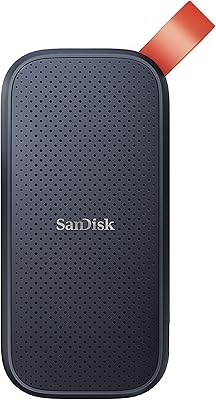
SanDisk Portable SSD 2TB External Drive
78%
83%
Transfer Speed
88%
Build Quality
93%
Portability
81%
Value for Money
61%
Thermal Management
More
ADATA SE880 2TB Portable SSD
87%
95%
Performance (Speed)
91%
Portability (Size and Weight)
89%
Compatibility with Devices
88%
Build Quality
92%
Ease of Use (Setup and Setup Time)
More
SSK SD600 2TB Portable SSD
78%
88%
Transfer Speed (Burst)
63%
Sustained Write Performance
84%
Build Quality & Design
93%
Portability
86%
Cross-Device Compatibility
More
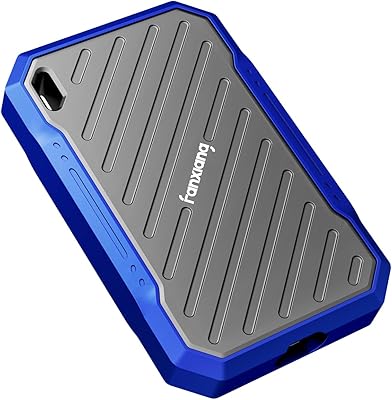
fanxiang PS2100 2TB Portable SSD
88%
94%
Performance
92%
Durability
90%
Portability
75%
Compatibility
88%
Ease of Use
More
Samsung T7 Portable SSD 2TB
87%
93%
Performance & Speed
89%
Build Quality & Durability
91%
Compatibility
88%
Security Features
90%
Portability & Design
More
TEAMGROUP PD1000 2TB Portable SSD
87%
92%
Performance
88%
Durability & Build Quality
90%
Transfer Speed
85%
Portability
89%
Waterproof & Shockproof Features
More
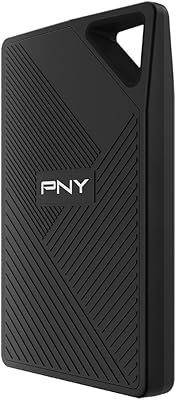
PNY RP60 2TB Portable SSD
79%
83%
Transfer Speed
91%
Build Quality
88%
Durability & Protection
93%
Portability
62%
Host Compatibility
More
Samsung T9 Portable SSD 2TB
89%
93%
Performance
89%
Build Quality & Durability
91%
Data Transfer Speed
88%
Cooling & Thermal Management
85%
Compatibility
More
ORICO B5PLUS 2TB Portable External SSD
74%
94%
Portability
78%
Transfer Speed
73%
Build Quality
81%
Value for Money
91%
Plug-and-Play Ease
More

FAQ

It works immediately without any software or driver installation. Just plug it into a USB port on your PC or Mac and it shows up as a ready-to-use drive. There is nothing to configure unless you want to reformat it for a specific file system.

It depends on the console. PlayStation 4 and 5 typically require the drive to be formatted through the console settings before use, which is a straightforward process. Xbox consoles generally handle the formatting automatically on first connection. Either way, setup on a gaming console takes just a few minutes.

For most editing workflows involving 1080p or standard 4K footage, the 400MB/s read speed is sufficient to play back and edit without significant lag. If you are working with high-bitrate 4K RAW or multi-stream formats, a faster NVMe-based drive would be a safer choice to avoid dropped frames.

The box includes a standard USB 3.0 cable with a USB-A connector. If your laptop only has USB-C ports, you will need to purchase a USB-A to USB-C adapter or a separate USB-C cable, as one is not included.

The drive is rated to survive drops from up to around 6.5 feet onto hard surfaces, which covers most real-world accidents like slipping off a desk or falling out of a bag. That said, it is not waterproof or dustproof, so it should not be exposed to rain, spills, or gritty environments without some protective case.

No, this pocket-sized drive does not have any built-in hardware encryption or password protection. If you store sensitive files and want security, you would need to use software-level encryption tools like BitLocker on Windows or FileVault on Mac, or look for a different drive that includes hardware encryption.

Like most consumer SSDs, performance can dip slightly as the drive fills up, but for everyday use you are unlikely to notice a significant difference until the drive is nearly at capacity. Keeping a reasonable buffer of free space is a good habit regardless.

It is a rated maximum under ideal conditions. Real-world speeds depend on your USB port quality, the host device, and what else the system is doing at the time. Most users see strong speeds in practice, but some variability is normal and is not unique to this drive.

It draws all the power it needs directly from the USB connection, so no external power adapter or separate cable is required. This is one of the reasons it is so portable and convenient for travel.

The difference is substantial. A typical portable HDD tops out around 100 to 120MB/s in real-world use, while the WD Elements SE consistently transfers at several times that rate. Beyond raw speed, the SSD is also completely silent, produces almost no heat, and handles the physical bumps of travel much better than a spinning hard drive would.

Where to Buy