

Overview

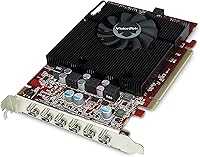
The VisionTek Radeon HD 7750 2GB Graphics Card is a legacy AMD GPU that has carved out a specific and durable niche — not as a powerhouse renderer, but as a dependable workhorse for multi-display and light workstation setups. It has been around long enough that its continued availability speaks for itself; this is a card filling a real gap in the market. With 2GB of GDDR5 memory and support for up to six simultaneous displays via Mini DisplayPort, it targets productivity over raw graphics performance. If you walk in expecting current-gen gaming muscle, you will be disappointed. Walk in expecting a reliable multi-monitor solution for an older or budget system, and it rarely lets you down.

Features & Benefits

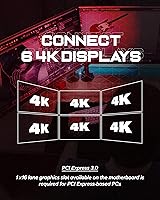
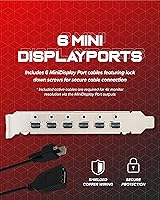
The six Mini DisplayPort outputs are the headline feature here, enabling true AMD Eyefinity configurations across up to six independent screens, each with its own resolution and refresh rate. This multi-monitor GPU also supports a maximum output resolution of 4096x2160 at 60Hz — practical for digital signage or light content monitoring, though not for 4K gaming workloads. The 2GB GDDR5 handles desktop and productivity tasks without breaking a sweat. Broad OS support stretching from Windows Vista through Windows 10 makes it a straightforward fit for legacy deployments. A less obvious bonus: integrated audio over DisplayPort, delivering 7.1 surround sound output without requiring a separate sound card.

Best For

This Radeon HD 7750 makes the most sense for IT professionals and businesses setting up six-screen workstation arrays — think trading desks, surveillance dashboards, or financial monitoring setups where raw rendering power is irrelevant and display count is everything. It also fits naturally into healthcare or marketing environments that need stable, low-maintenance multi-display output. Users with older desktops running legacy Windows builds will appreciate the broad driver compatibility. On the home side, it works well in digital signage or light home theater builds where 4K output quality matters but frame-rate demands do not. This is not a card you buy to play modern games; it is a card you buy to run a lot of screens reliably.

User Feedback

Buyers consistently praise the VisionTek 7750 for hassle-free driver installation and the way it reliably detects all connected monitors right out of the box — a detail that matters more than it sounds when you are managing a six-display rig. The card runs notably cool and quiet under typical loads, which aligns with its low-power design. Where feedback turns critical is gaming: users who tried pushing it with modern titles found the performance underwhelming, which is fair given the hardware generation. A handful of buyers also flagged compatibility issues with specific slim-form-factor cases and certain older motherboards. Overall user sentiment is positive when the card is used as intended, lukewarm when it is not.

Pros

  • Supports up to six independent monitors simultaneously — rare at this price and power level.
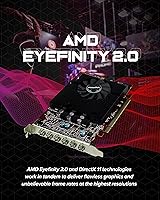
  • AMD Eyefinity 2.0 allows flexible, mixed-resolution multi-display configurations out of the box.
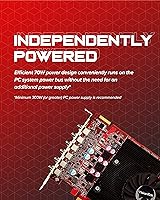
  • Low power draw makes it compatible with older systems that lack high-wattage power supplies.
  • Driver installation is straightforward, and monitor detection is reported as consistently reliable.
  • Integrated audio over DisplayPort means no separate sound card is needed for a clean setup.
  • 4K output resolution support is genuinely useful for digital signage and content display applications.
  • Wide OS compatibility, including legacy Windows versions, suits long-running enterprise deployments.
  • The card runs cool and quiet under typical productivity workloads, requiring minimal active cooling.
  • Build quality is solid for the price tier, with users reporting dependable long-term operation.

Cons

  • Modern games are largely unplayable at acceptable settings due to the aging GPU architecture.
  • Only 2GB of VRAM creates hard limits for any GPU-accelerated creative or compute workloads.
  • No support for current graphics APIs like DirectX 12 or Vulkan limits software compatibility.
  • Some users report fitment problems in slim and small-form-factor cases due to card dimensions.
  • Certain older motherboards have shown compatibility issues that require additional troubleshooting.
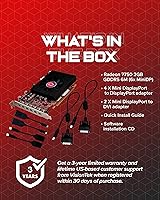
  • All outputs are Mini DisplayPort, so adapters are needed for users with HDMI or DVI monitors.
  • No active cooling solution beyond the onboard heatsink may be a concern in poor-airflow cases.
  • The hardware generation means it will likely lose driver update support in the near future.

Ratings

The scores below for the VisionTek Radeon HD 7750 2GB Graphics Card were generated by our AI after analyzing verified buyer reviews from global marketplaces, with spam, bot-submitted, and incentivized feedback actively filtered out. The results reflect a balanced picture — real strengths celebrated, genuine pain points included. Whether this multi-monitor GPU earns a place in your setup depends heavily on what you actually need it to do, and these scores are built to help you figure that out.

Multi-Monitor Performance
91%
For users building six-screen workstation setups, this Radeon HD 7750 consistently delivers. IT professionals and trading desk operators report all six displays being detected reliably on first boot, with AMD Eyefinity handling mixed resolutions across monitors without requiring manual reconfiguration.
A small number of users found that achieving stable six-monitor output required active Mini DisplayPort adapters rather than passive ones, adding unexpected cost. In rare cases, certain monitor combinations caused display detection to behave inconsistently until drivers were reinstalled.
Driver Installation
88%
Easy setup is one of the most frequently praised aspects of the VisionTek 7750. Users on Windows 7 through Windows 10 consistently report a smooth driver installation process with monitors recognized immediately, which matters a great deal in business environments where IT time is limited.
A handful of users on Windows 8.1 encountered driver conflicts that required manual resolution, and AMD's support resources for this hardware generation are increasingly sparse. Those running niche or legacy operating environments may need to dig for older driver packages independently.
Value for Money
79%
21%
For the specific task of running six displays from a single low-power card, the pricing holds up reasonably well given the scarcity of alternatives at this output count. Buyers repurposing older office desktops find it a cost-effective path to a productive multi-screen environment without a full system upgrade.
At its current price point, some buyers feel the hardware age is difficult to justify against newer cards with fewer outputs but far greater overall capability. If your use case extends even slightly beyond multi-display desktop work, the value proposition weakens quickly.
Gaming Performance
31%
69%
Casual users running older or undemanding titles like browser-based games or legacy desktop games report acceptable results at low settings. The card handles basic 2D and light 3D workloads without issue, which suits the occasional light gaming session on a productivity machine.
Modern gaming is genuinely not possible on this hardware. Users who purchased it expecting to run recent titles were consistently disappointed — frame rates at even low settings are unplayable in most games released in the past five years, and the 2GB VRAM ceiling compounds the problem severely.
4K Output Quality
74%
26%
For digital signage operators and users driving a single 4K display for content viewing or dashboards, the output quality is clean and reliable up to 4096x2160 at 60Hz. Several users in retail and hospitality noted it handles static and video signage content without any visual artifacts.
It is important to be clear: this is display output at 4K resolution, not 4K rendering performance. Users who assumed they could game or run GPU-intensive applications at 4K resolution were disappointed, and the distinction is not always obvious from product listings.
Build Quality
83%
The card feels solid in hand and users consistently describe it as well-constructed for its tier. Long-term buyers running it in office environments for several years report no hardware degradation, connector loosening, or fan failure — a meaningful endorsement for a card used in always-on workstation builds.
The heatsink design is functional but unrefined, and a small number of users noted the PCB finish looks dated compared to more recent hardware. Nothing here is a dealbreaker, but those accustomed to current-generation card aesthetics will notice the age in the physical design.
Thermal Performance
86%
Running cool and quiet is a consistent theme in user feedback. In office and workstation environments where the card is driving multiple displays for hours at a time, users report it never gets uncomfortably warm, and noise is essentially a non-issue even in quiet open-plan settings.
In poorly ventilated cases or compact builds with restricted airflow, a handful of users noticed slightly elevated temperatures under sustained load. The card lacks aggressive active cooling, so case airflow quality does matter more here than it would with a card that has a dedicated high-speed fan.
OS Compatibility
89%
The broad OS support range — from Windows XP through Windows 10 — is a genuine asset for enterprise IT teams managing mixed-generation fleets. Several users specifically called this out as the deciding factor when selecting a GPU for legacy system deployments in regulated industries.
Windows 11 compatibility is not officially supported, and users who have attempted it report inconsistent results. As enterprise environments gradually migrate to newer OS versions, this will become a more pressing limitation for anyone planning a long deployment lifecycle.
Power Efficiency
87%
The low power draw is a practical advantage in real-world deployments. Users with older desktops running modest 300W to 400W power supplies have installed this multi-monitor GPU without any power-related issues, avoiding the cost and complexity of a PSU upgrade.
There is no auxiliary power connector on most configurations, which is usually a benefit, but users with very old or degraded power supplies occasionally reported instability. It is an edge case, but worth confirming your PSU is in good condition before installation.
Adapter Compatibility
61%
39%
Users who sourced quality active Mini DisplayPort adapters for their HDMI or DVI monitors generally had positive experiences, with all displays detected correctly. For setups using native Mini DisplayPort monitors, the experience is even more straightforward with no adapter complexity at all.
The all-Mini DisplayPort output configuration catches buyers off guard regularly. Passive adapters frequently cause detection failures in multi-monitor Eyefinity setups, and the cost of six active adapters adds meaningfully to the total outlay if your monitors do not natively support Mini DisplayPort.
Case Compatibility
67%
33%
In standard mid-tower and full-tower cases, fitment is straightforward and users report no issues with the card's physical dimensions. The weight is manageable and it seats securely in a standard PCIe x16 slot without placing excessive strain on the motherboard.
Slim-form-factor and small desktop cases are a real risk area. Multiple users flagged that the card's length and height made fitment impossible in their compact builds. Measuring available card clearance against the 10.5-inch length before ordering is strongly recommended.
Audio Integration
78%
22%
The built-in 7.1 surround sound output via DisplayPort is a convenient bonus for workstation users who want clean audio routed through their monitors without a separate sound card. In open-plan office builds and home theater setups, users appreciated the simplified cable management this enables.
Audio quality is functional rather than audiophile-grade, and users with higher audio demands noted it does not replace a dedicated sound card for critical listening. A few users also found that audio output behaved inconsistently when switching between active displays in an Eyefinity configuration.
Long-Term Reliability
82%
18%
The card has a long production history, and buyers who have run it for three or more years in productivity environments generally report continued stable operation. VisionTek's reputation for consistent manufacturing quality at the workstation end of the market is reflected in the low rate of hardware failure reports.
As the hardware ages further, finding replacement units or warranty support becomes more challenging. Driver support from AMD is effectively frozen for this architecture, meaning any future OS-level changes that require driver updates will leave this card behind with no manufacturer recourse.

Suitable for:

The VisionTek Radeon HD 7750 2GB Graphics Card is a strong fit for anyone whose primary need is running multiple displays from a single, low-power card. IT managers deploying workstations for trading floors, surveillance monitoring, or financial dashboards will find the six-output setup genuinely practical without the overhead of a high-wattage GPU. Healthcare and marketing offices that need stable, independent screen control across several monitors are equally well-served. It also makes sense for budget-conscious buyers looking to breathe new life into an older desktop without replacing the entire system, especially where the existing power supply is modest. Digital signage operators who need 4K-resolution output for display purposes — not rendering-heavy tasks — will find this multi-monitor GPU more than capable.

Not suitable for:

The VisionTek Radeon HD 7750 2GB Graphics Card is a poor choice for anyone shopping with modern gaming in mind. The GPU architecture is several generations old, and even mid-tier titles from the last few years will run poorly or not at all at acceptable settings. Content creators working with video editing, 3D rendering, or GPU-accelerated software should look elsewhere entirely, as 2GB of VRAM and this hardware tier will create bottlenecks quickly. Buyers with slim or small-form-factor cases should also verify clearance before purchasing, as some users have reported fitment issues. If your workload demands current driver support, Vulkan or DirectX 12 compatibility, or competitive frame rates, this Radeon HD 7750 simply was not built for that.

Specifications

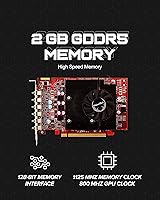
  • GPU: The card is powered by an AMD Radeon HD 7750 graphics processor manufactured by AMD.
  • Memory: It features 2GB of GDDR5 video memory, providing sufficient bandwidth for multi-display productivity workloads.
  • Display Outputs: Six Mini DisplayPort outputs are included, enabling simultaneous connection of up to six independent monitors.
  • Max Resolution: The maximum supported output resolution is 4096x2160 at 60Hz, suitable for 4K display and signage use.
  • Multi-Monitor Tech: AMD Eyefinity 2.0 technology manages multi-display configurations with independent resolution and refresh rate control per screen.
  • Audio Output: 7.1 surround sound audio is delivered through the DisplayPort outputs, eliminating the need for a dedicated sound card.
  • OS Compatibility: The card supports Windows XP, Vista, 7, 8, 8.1, and 10, making it well-suited for legacy and current system deployments.
  • Dimensions: The card measures 10.5 x 8 x 2.5 inches, which buyers should verify against their case clearance before purchasing.
  • Weight: The unit weighs 1.6 pounds, reflecting its standard full-bracket single-slot build.
  • Manufacturer: The card is produced by VisionTek Products, a US-based GPU and peripheral manufacturer with a long track record.
  • Model Number: The official VisionTek model number for this card is 900614.
  • ASIN: The Amazon Standard Identification Number for this product is B00C7EPSVS.
  • Graphics API: The HD 7750 supports DirectX 11 and OpenGL 4.2, which covers most legacy software and older professional applications.
  • Power Interface: The card is designed to operate within a standard PCIe x16 slot power budget, typically without requiring an auxiliary power connector.
  • Cooling: The card uses a passive or low-profile heatsink solution, contributing to its quiet operation under typical productivity loads.

Related Reviews
QTHREE Radeon HD 5450 2GB Graphics Card
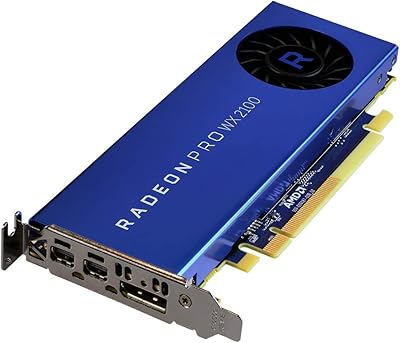
75%
91%
Ease of Installation
94%
Noise Level
86%
Dual Monitor Support
78%
Value for Money
22%
Gaming Performance
More
AMD Radeon Pro W2100 2GB Graphics Card
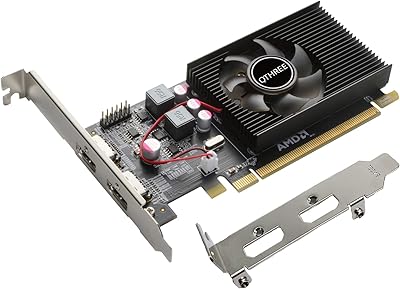
86%
88%
Performance for CAD & 3D Modeling
91%
Value for Money
93%
Ease of Installation
87%
Driver Stability
85%
Compatibility with Software
More
QTHREE AMD Radeon R7 240 2GB Graphics Card
83%
78%
Performance in Gaming
92%
Value for Money
90%
Energy Efficiency
85%
Ease of Installation
88%
Dual Monitor Support
More
QTHREE Radeon HD 6570 1GB GDDR3 Graphics Card
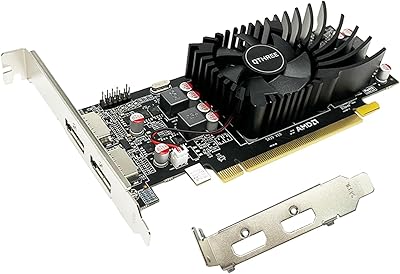
81%
88%
Value for Money
70%
Performance in Casual Gaming
85%
Multi-Monitor Setup
90%
Power Efficiency
60%
Gaming Performance (Newer Titles)
More
VisionTek Radeon RX 550 4GB Graphics Card
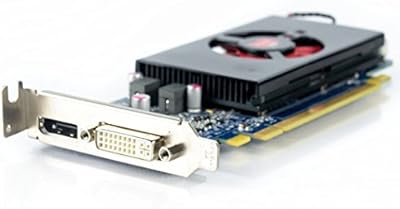
77%
91%
Multi-Monitor Output
93%
Installation Ease
44%
Gaming Performance
89%
Power Efficiency
82%
Build & Form Factor
More
PowerColor AMD Radeon RX 550 2GB GDDR5 Low Profile Graphics Card
83%
91%
Value for Money
85%
Performance for Basic Gaming
96%
Low-Profile Design for Compact Builds
89%
Ease of Installation
92%
Power Efficiency
More
Dell AMD Radeon HD 7570 1GB GDDR5 Low Profile Graphics Card
81%
75%
Graphics Performance
92%
Value for Money
88%
Size and Fit for Small PCs
80%
Multimedia Support
90%
Compatibility with Windows OS
More
NVIDIA NVS 510 Graphics Card 2GB
84%
93%
Multi-Display Support
91%
Energy Efficiency
88%
Ease of Installation
86%
Performance for Business Use
89%
Low-Profile Design
More
SAPLOS GT 730 2GB DDR3 Graphics Card
83%
91%
Value for Money
88%
Performance for Basic Tasks
94%
Quiet Operation
85%
Installation & Setup
62%
Driver Compatibility
More
51Risc Radeon RX 550 4GB Graphics Card
81%
92%
Value for Money
85%
Gaming Performance (1080p)
88%
Power Efficiency
84%
Compatibility with Older PCs
89%
Compact Size
More

FAQ

Yes, the VisionTek Radeon HD 7750 2GB Graphics Card supports up to six simultaneous displays through its six Mini DisplayPort outputs using AMD Eyefinity 2.0. Each screen can be configured with its own resolution and refresh rate independently. You will need Mini DisplayPort cables or appropriate adapters for monitors that use HDMI or DisplayPort connections.

In most configurations, no. The Radeon HD 7750 is designed to draw power entirely through the PCIe x16 slot, which makes it a good fit for older systems or workstations with modest power supplies. That said, always check your specific motherboard documentation to confirm power delivery capacity.

Honestly, not by modern standards. This multi-monitor GPU is built for display output and productivity tasks, not rendering demanding 3D games. Older or less demanding titles may run adequately, but if gaming is your main goal, you would be better served by a current-generation card.

Yes, Windows 10 is fully supported. The card also works with Windows 7, 8, 8.1, Vista, and XP, which makes it particularly useful for businesses running legacy operating environments.

All outputs on this card are Mini DisplayPort, so if your monitors use HDMI, DisplayPort, or DVI connections, you will need the appropriate adapters or cables. Active adapters are generally recommended for multi-monitor Eyefinity configurations to ensure all displays are detected reliably.

Possibly, but not guaranteed. The card measures 10.5 x 8 x 2.5 inches, and some users have reported fitment issues in compact or slim cases. Check your case specifications carefully before ordering, particularly the available card length and slot clearance.

Yes, it can output up to 4096x2160 at 60Hz. This is great for driving a 4K display for signage, dashboards, or desktop productivity. It is worth noting this is display output capability, not 4K gaming performance — the two are very different things at this hardware tier.

Most users describe it as very quiet under normal workloads. The low power consumption of the HD 7750 means it does not generate much heat during typical multi-display desktop use, so the cooling system rarely has to work hard.

Yes. The VisionTek 7750 supports 7.1 surround sound audio output through its DisplayPort connections, so you can send both video and audio to compatible monitors or displays over a single cable without needing a separate sound card.

AMD support for this hardware generation is limited at this point, and active driver development has effectively ended for the HD 7750 architecture. For most productivity and multi-monitor tasks on supported Windows versions, existing drivers work reliably, but buyers should not expect ongoing software updates or new feature support.

Where to Buy