Overview

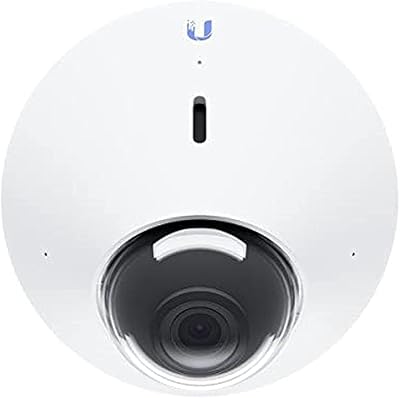
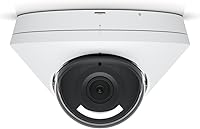
The Ubiquiti UniFi G5 Dome Security Camera comes from Ubiquiti, a networking company better known among IT professionals than typical homeowners, and that pedigree shows the moment you start setting it up. This isn't a plug-and-play gadget you pair with a phone app in five minutes; it's built to live inside Ubiquiti's UniFi Protect ecosystem, which means you'll need a compatible console or NVR already running before this dome camera does anything useful. That requirement immediately narrows the audience. Priced and positioned as a mid-range, prosumer outdoor unit, it's clearly aimed at people who already have UniFi gear at home or in a small office, not someone shopping for a single standalone camera to slap above their front door.
Features & Benefits

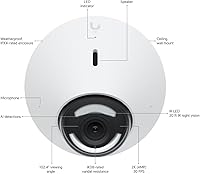
On paper, this UniFi camera records at 2K resolution and 30 frames per second, though Ubiquiti's own spec sheet lists effective resolution numbers that don't always line up cleanly, so treat the marketing figures as a ballpark rather than gospel. What you actually notice day to day is the 102.4-degree field of view, which lets one unit watch a driveway or backyard without needing a second camera angled awkwardly off to the side. Infrared night vision stretches usable detail out to roughly ten meters, useful for catching movement near a gate or fence line after dark. The housing carries an IPX4 weatherproof rating plus IK08 impact resistance, so rain and casual tampering aren't major concerns. Installation runs over a single PoE cable, and once it's online, setup and monitoring happen entirely through the UniFi Protect app.

Best For

This outdoor security camera makes the most sense for households or small offices that are already running UniFi gear, since adding one more unit to an existing console is far simpler than starting from scratch. It's well suited to covered spots like porches, entryways, and eaves, where the IPX4 rating and wide field of view can do real work without being exposed to driving rain. Anyone managing several cameras will appreciate being able to pull every feed into one app instead of juggling separate logins for each brand. It's also a solid pick for spots that see occasional tampering, delivery theft, or rough weather, since the vandal-resistant housing was clearly built with that kind of abuse in mind rather than just looking tough on a spec sheet.

User Feedback

Real-world reactions to this dome camera tend to split along predictable lines. Daytime footage gets consistent praise, with people calling out accurate colors and crisp detail even at the edges of the wide-angle frame. Low-light performance is where opinions diverge; some buyers find it perfectly adequate for a porch or driveway, while others compare it to Ubiquiti's pricier G5 models and come away wishing for cleaner detail after sunset. A recurring complaint is the hidden cost of needing a separate console, which catches first-time UniFi buyers off guard and adds to the total price before the system even works. On the upside, installers consistently mention that the mounting hardware feels sturdy and properly sealed, and a few users note the field of view feels noticeably narrower when mounted indoors than outdoors.

Pros

  • Daytime footage looks sharp and color-accurate, according to consistent buyer feedback.
  • The wide 102.4-degree field of view lets one camera cover a driveway or yard.
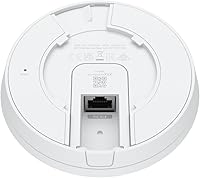
  • A single PoE cable handles both power and data, keeping installs clean.
  • IPX4 weatherproofing and IK08 vandal resistance hold up well in exposed outdoor spots.
  • Centralized UniFi Protect app makes managing several cameras simpler than juggling separate brands.
  • Mounting hardware feels solid and properly sealed, according to installer feedback.
  • Infrared night vision adds useful range for catching movement after dark.
  • Integrates directly into an existing UniFi network without extra configuration headaches.

Cons

  • Requires a separate UniFi Protect console or NVR just to function at all.
  • Added console cost isn't obvious from the camera's listing price alone.
  • Low-light performance trails behind Ubiquiti's higher-end G5 camera models.
  • Field of view feels noticeably narrower than expected when mounted indoors.
  • Spec sheet lists conflicting resolution figures between 2K and 1080p, which is confusing.
  • PoE and ceiling-mount design make it a poor fit for renters or frequent movers.
  • App-based setup may feel unfamiliar to buyers used to simpler consumer cameras.
  • Not a true standalone option compared to cheaper plug-and-play Wi-Fi cameras.

Ratings

These scores for the Ubiquiti UniFi G5 Dome Security Camera are generated by AI after analyzing verified user reviews from buyers worldwide, with spam, bot activity, and incentivized feedback filtered out before any number is calculated. Each category reflects what real owners actually experience day to day, from sharp daylight footage to the added cost of needing a UniFi Protect console. The goal is a transparent breakdown that shows both where this dome camera excels and where it falls short, not a polished marketing score.
Daytime Video Quality
91%
Footage shot in daylight comes through sharp, with colors that hold up well even on a cloudy afternoon. Reviewers checking package deliveries or watching a driveway consistently mention they can read details like clothing or vehicle color without squinting at a blurry frame.
There's not much to complain about here during the day, though a handful of users wish the dynamic range handled harsh backlighting, like a bright sky behind a delivery person, a touch more gracefully. It's a minor gripe rather than a dealbreaker.
Low-Light Performance
64%
36%
Once the IR kicks in, the camera still picks up enough motion and shape to tell a person from a stray cat near the back gate. For a mid-range outdoor unit, that baseline coverage after sunset is genuinely useful.
Compared to Ubiquiti's pricier G5 cameras, fine detail at night softens noticeably, and color is mostly gone once it's fully dark. Buyers expecting crisp, identifiable faces after midnight in a poorly lit yard will likely come away a little underwhelmed.
Night Vision Range
76%
24%
The roughly 10-meter IR range is enough to light up a driveway or side yard, catching motion well before someone reaches the door. For typical residential distances, that's a comfortable working range.
Push past that distance into a large backyard or open lot, and detail drops off fast, leaving mostly silhouettes rather than anything identifiable. It's not meant for long-throw surveillance, and buyers covering bigger properties should plan accordingly.
Field of View Coverage
81%
19%
A 102.4-degree lens does a solid job covering a full porch or driveway from a single ceiling mount, cutting down on the number of cameras needed for typical entry points.
Indoors, that same angle feels tighter than expected, with a few buyers noting it doesn't sweep a full room the way they assumed it would. It's clearly tuned for open outdoor spaces rather than tight interior corners.
Build Quality & Weatherproofing
88%
Installers consistently describe the housing and mounting bracket as solid once it's up, with no rattling or flexing even in windy spots. The IPX4 rating holds up fine under rain and humidity for a covered porch or eave.
IPX4 only covers splashing water, not driving rain or full submersion, so fully exposed mounting spots aren't ideal. Anyone installing in a location with constant direct downpour exposure should plan for extra shelter or a different-rated camera.
Vandal Resistance
83%
The IK08 rating means the dome can take a solid knock or deliberate hit without cracking, which matters for cameras mounted at reachable heights near entryways. It's a noticeable step up from typical plastic consumer cameras in that respect.
No housing is fully tamper-proof, and a determined person with tools and time could still disable or remove it given enough effort. It's vandal-resistant, not vandal-proof, and shouldn't be the only line of defense in high-crime areas.
Installation Simplicity
86%
Running power and data over one PoE cable keeps wiring tidy and cuts down install time compared to separate power adapters and network cables. Anyone who's already pulled Ethernet to a ceiling location will find mounting straightforward.
If a home doesn't already have Ethernet run to the mounting spot, that part of the install gets a lot more involved than a typical battery-powered Wi-Fi camera. It's not a five-minute, stick-it-anywhere setup.
App & Software Experience
79%
21%
Once it's added to a console, the UniFi Protect app makes pulling up live feeds, scrubbing through recorded clips, and setting motion zones genuinely easy. Having every camera in one interface beats juggling separate apps per brand.
The interface leans more toward IT-savvy users than plug-and-play simplicity, and first-timers may need to spend real time in settings menus to get notifications and zones dialed in the way they want.
Ecosystem Requirement
47%
53%
For anyone already running a UniFi console, adding this camera is genuinely painless, just a few taps in an app they already use daily. It slots into an existing setup without needing to learn a second platform.
First-time buyers consistently get caught off guard discovering the camera does nothing without a separate console or NVR purchase, often well after they've already bought it. That hidden requirement is the single biggest source of frustration in user feedback.
Value for Money
69%
31%
Factoring in image quality, weatherproofing, and centralized management, the price feels fair for someone who already owns UniFi hardware and is simply expanding coverage. The cost per camera drops as more units share one console.
For a first-time buyer starting from zero, the real cost includes a console or NVR on top of the camera itself, which pushes the total well past what a single standalone Wi-Fi camera would cost. That math doesn't favor casual, one-camera shoppers.
Spec Sheet Accuracy
54%
46%
When the numbers do line up, the listed 2K resolution and 5MP sensor translate into footage that looks noticeably sharper than basic 1080p cameras at a similar price point, which most buyers can actually see on screen.
Official spec sheets list conflicting effective resolution figures between 2K and 1080p, which makes it hard for shoppers to know exactly what they're buying before checking real footage samples. That inconsistency erodes some trust in the marketing numbers.
Indoor Versatility
58%
42%
It can technically be mounted indoors, and image quality in a well-lit room still looks clean and detailed enough for basic monitoring of an entryway, hallway, or home office space.
It wasn't really designed with indoor rooms in mind, and several buyers noted the field of view feels noticeably tighter inside than it does mounted outside under an open eave. Dedicated indoor cameras will likely cover a room more completely.

Suitable for:

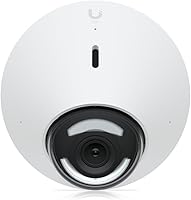
The Ubiquiti UniFi G5 Dome Security Camera is the right call for anyone who already has a UniFi console or NVR running at home and just needs to add eyes on another corner of the property. It fits naturally into setups where someone wants one app showing every camera feed instead of bouncing between three different brands' apps on their phone. Homeowners protecting a porch, driveway, or side entrance will get real use out of the wide field of view and the IK08-rated housing, especially in spots prone to package theft or rough weather. Small offices that already lean on Ubiquiti networking gear for Wi-Fi or switches are a natural fit too, since adding a camera to existing infrastructure is far less hassle than starting a separate system from scratch. It also suits buyers who'd rather pay a bit more upfront for centralized management than deal with several cheap cameras and several separate logins.
Not suitable for:

Buyers who want a simple, standalone camera should think twice before picking up the Ubiquiti UniFi G5 Dome Security Camera, because it does nothing on its own without a compatible UniFi Protect console or NVR already running. That hidden requirement adds real cost and complexity that isn't obvious from the listing price alone, and it can catch first-time buyers off guard. Anyone hoping for flagship-level low-light footage will likely be disappointed too, since feedback consistently points to it falling short of Ubiquiti's pricier G5 models after dark. Renters or anyone who might move frequently may also find the PoE wiring requirement and ceiling-mount design more permanent than they'd like. Finally, if budget is tight, cheaper Wi-Fi cameras with built-in cloud storage will get a basic security job done without any extra hardware investment.

Specifications

  • Video Resolution: Records at 2K HD resolution and 30 frames per second using a 5MP CMOS image sensor.
  • Field of View: Provides a wide 102.4-degree angle of view to cover more ground from a single mounting point.
  • Night Vision: Built-in infrared illumination extends usable night vision detail to roughly 10 meters.
  • Weather Rating: Carries an IPX4 rating, offering resistance to splashing water for covered outdoor installs.
  • Impact Rating: Rated IK08 for resistance to physical impact and casual vandalism attempts.
  • Power Input: Powered over Ethernet (PoE) at 57 volts, drawing approximately 5 watts.
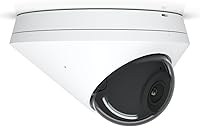
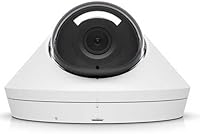
  • Form Factor: Built as a dome-style camera designed specifically for ceiling mounting.
  • Housing Finish: Comes in a white housing finish to blend into most ceiling surfaces.
  • Management App: Configured, viewed, and managed through the UniFi Protect mobile and desktop app.
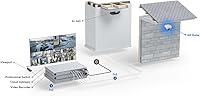
  • Required Controller: Requires a separate, compatible UniFi Protect console or NVR to operate.
  • Mounting Type: Designed exclusively for ceiling mount installation rather than wall or surface mounting.
  • Intended Use: Built and marketed for outdoor security monitoring rather than general webcam use.

Related Reviews

Ubiquiti UniFi Protect G4 Dome Camera
76%
88%
Image Quality
71%
Night Vision Performance
84%
Build Quality & Durability
76%
Installation Experience
91%
Software & App Integration
More
Ubiquiti UniFi G4-Bullet 4MP Outdoor Security Camera
80%
91%
Image Quality
77%
Night Vision
73%
Ease of Installation
93%
Ecosystem Integration
86%
Build Quality
More
Ubiquiti UniFi Security Appliance USG
88%
92%
Performance & Speed
87%
Ease of Setup
90%
VPN Capabilities
88%
Build Quality
94%
Integration with UniFi Controller
More
Ubiquiti UniFi Protect G4-PRO Camera
86%
91%
Video Quality
94%
Ease of Setup
88%
Weather Resistance
80%
Software Integration
85%
Night Vision Performance
More
ANNKE C500 2-Pack 5MP PoE Security Camera
78%
88%
Image Clarity
74%
Night Vision Performance
91%
Build Quality
89%
Weatherproofing
83%
PoE Installation
More
Ubiquiti UniFi G4 Instant
76%
88%
Image Quality
91%
Ecosystem Integration
83%
Installation & Setup
71%
Motion Detection Accuracy
68%
Build Quality & Design
More
ZOSI 1080P 4-in-1 Dome Security Camera
77%
81%
Video Quality
72%
Night Vision
88%
DVR Compatibility
63%
Ease of Setup
86%
Value for Money
More
Amcrest AMC1080DM36-B 1080P Outdoor Dome Security Camera
75%
91%
DVR Compatibility
84%
Daytime Image Quality
67%
Night Vision Performance
88%
Build Quality & Housing
86%
Weatherproofing & Durability
More
TIGERSECU Super HD 1080P Hybrid Dome Security Camera
71%
91%
DVR Compatibility
88%
Image Clarity
86%
Night Vision Performance
84%
Build Quality
83%
Weatherproofing
More
Reolink RLC-520A PoE Dome Security Camera
79%
88%
Image Clarity
82%
Night Vision Performance
74%
Smart Detection Accuracy
91%
Installation Experience
63%
Field of View Coverage
More

FAQ

It does not work on its own. The Ubiquiti UniFi G5 Dome Security Camera needs a compatible UniFi Protect console or NVR already set up on your network before it can record or stream anything, so factor that extra purchase into your budget if you're starting from scratch.
It needs a wired connection. This dome camera connects via a single PoE Ethernet cable, which handles both power and data, so there's no Wi-Fi pairing involved.

The infrared night vision reaches out to roughly 10 meters, which is fine for catching motion near a door or driveway. That said, buyer feedback suggests low-light detail isn't quite as crisp as Ubiquiti's higher-end G5 cameras, so don't expect flagship-level clarity after dark.

It carries an IPX4 splash-resistance rating, which is suited to covered outdoor spots like porches and eaves rather than direct, heavy rain exposure. Installers also report the housing and mounting hardware feel solid once secured.

It's rated IK08 for impact resistance, so it's built to shrug off knocks and casual tampering better than a typical plastic dome camera.

No local storage slot is built into the camera itself. Recording and storage are handled by your UniFi Protect console or NVR, which is part of why that controller is required in the first place.

It does shoot at 2K resolution and 30 FPS using a 5MP sensor, though the manufacturer's own spec sheet lists some inconsistent effective resolution numbers, so it's worth treating the exact figures as a general indicator of quality rather than a precise benchmark.

Technically yes, since it's still a dome camera with a ceiling mount, but it's designed primarily for outdoor use. A few buyers have noted the field of view feels narrower than expected when used indoors compared to open outdoor spaces.

Everything runs through the UniFi Protect app, where you add the camera to your console, name it, and view or export footage. It's straightforward if you're already comfortable with UniFi gear, but there's a learning curve if this is your first networking product from the brand.

If you already own UniFi networking equipment or plan to run multiple cameras off one app, it's a reasonable investment for the centralized management alone. If you just want one simple camera with no extra hardware, a standalone Wi-Fi model will likely save you money and hassle.