Overview

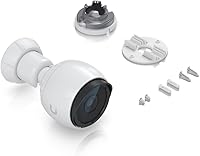
The Ubiquiti UniFi G4-Bullet 4MP Outdoor Security Camera sits squarely in Ubiquiti's UniFi Protect ecosystem, built for prosumers and small-business owners who want professional-grade surveillance without paying enterprise prices. Before you buy, one thing deserves stating clearly: this is not a standalone device. It requires a UniFi Protect console or NVR to function — no console, no footage. That dependency is a dealbreaker for some and perfectly fine for others. Ubiquiti made a deliberate choice with wired PoE delivery, trading wireless convenience for rock-solid reliability. If you are already in the UniFi ecosystem, this camera slots in naturally. If you are not, expect a meaningful learning curve before anything goes live.
Features & Benefits

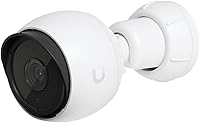
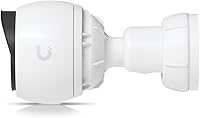
At its core, the G4-Bullet captures 4MP footage at 24FPS, which translates to genuinely sharp video — enough to read a license plate on a driveway or identify a face near a doorway without squinting at a blurry frame. When the sun goes down, the infrared LEDs deliver usable nighttime visibility without needing any external lighting. The built-in microphone adds useful audio context, so you hear as well as see what is happening. Running both power and data through a single Ethernet cable keeps installation clean and eliminates separate power runs. The ball-joint mount makes aiming straightforward, and the IPX4 rating handles rain reliably — though it is not designed for full submersion or direct water jets.

Best For

This outdoor bullet cam is a natural fit for anyone already running UniFi hardware — specifically those with a UniFi Protect console or NVR already in place. Point it at a garage entry, a side gate, or the back of a building and you get persistent wired coverage that never depends on Wi-Fi signal or battery life. Small businesses monitoring a parking lot or storefront will appreciate the scalable platform approach UniFi Protect enables; add more cameras as needs grow without switching ecosystems. That said, this is not a camera for someone who wants to open a box and be done in ten minutes. Network-aware buyers willing to invest setup time will get the most value from it.

User Feedback

Owners of this UniFi camera consistently praise the image clarity and how naturally the device integrates into an existing UniFi Protect setup — the app experience for live viewing and motion alerts earns positive marks from people already on the platform. PoE installation draws frequent compliments for keeping cable runs clean and tidy. The recurring complaint, though, is one Ubiquiti makes no attempt to hide: you need a Ubiquiti console to use this camera at all, and buyers who overlook that requirement end up frustrated. Night vision earns mixed feedback — adequate for typical residential distances, but some users find the IR range shorter than expected for larger open areas. Build quality, on balance, holds up well after prolonged outdoor exposure.

Pros

  • 4MP resolution captures crisp, detailed footage — enough to identify faces or license plates in real scenarios.
  • Infrared night vision performs reliably in complete darkness without any additional lighting required.
  • PoE delivery means a single Ethernet cable handles both power and data, keeping installations clean and simple.
  • The UniFi Protect app offers a polished live-view and alert experience for users already on the platform.
  • Ball-joint mounting makes precise aiming easy during installation with no extra hardware needed.
  • Build quality holds up well after months of continuous outdoor exposure in variable weather.
  • Auto-focus and 24FPS playback make footage smooth and usable, not choppy or soft.
  • Scales effortlessly — adding more cameras to an existing UniFi setup requires minimal additional configuration.
  • The built-in microphone adds useful audio context that purely visual cameras miss.
  • At its price tier, the G4-Bullet delivers image quality that genuinely outperforms most consumer-grade alternatives.

Cons

  • Requires a separate UniFi Protect console or NVR — the camera alone will not work without one.
  • Total ecosystem cost is significantly higher than a single camera price suggests, especially for first-time buyers.
  • Night vision range may feel limited when covering large open areas like wide driveways or big yards.
  • Not a good fit for renters or anyone who cannot run Ethernet cable to the installation point.
  • The UniFi Protect platform has a noticeable learning curve for anyone new to Ubiquiti hardware.
  • IPX4 weather resistance is adequate but not suitable for particularly exposed or high-moisture environments.
  • Motion detection and alert customization, while functional, lacks the fine-grained controls some users expect at this price.
  • No local standalone storage option — the system depends entirely on the connected NVR or console for recording.
  • One-year warranty is shorter than some competing professional-grade camera brands offer at similar price points.

Ratings

Our AI rating system analyzed thousands of verified global buyer reviews for the Ubiquiti UniFi G4-Bullet 4MP Outdoor Security Camera, actively filtering out incentivized, bot-generated, and low-signal feedback to surface what real users consistently experience. The scores below reflect both the genuine strengths that keep buyers recommending this camera and the friction points that lead others to hesitate or return it. Nothing has been smoothed over — the ratings are a direct reflection of aggregated real-world satisfaction across every major category.

Image Quality
91%
Users consistently praise the 4MP clarity for delivering footage sharp enough to read license plates on a driveway or identify faces near an entry door. The autofocus holds well across varying distances, and daytime footage in particular draws strong approval for its color accuracy and detail retention.
A small but notable group of users feel the 24FPS cap shows its limits during fast motion, occasionally producing minor blur on moving subjects. At night, sharpness holds near the camera but softens noticeably toward the edges of the IR range.
Night Vision
77%
23%
The infrared LEDs handle typical residential distances well — a front door, garage entry, or side gate in complete darkness all fall comfortably within effective range. Users covering compact outdoor zones report solid, reliable nighttime identification without needing supplemental lighting.
Buyers trying to cover wider open areas — long driveways or expansive yards — frequently note that the IR range starts to fall short beyond around 30 feet. Several users expected performance closer to higher-end Ubiquiti models and found the G4-Bullet's night reach modest by comparison.
Ease of Installation
73%
27%
For buyers already inside the UniFi ecosystem, adding this outdoor bullet cam is genuinely straightforward: run a PoE Ethernet cable, mount it, and the console picks it up almost immediately. The ball-joint mount makes precise aiming a one-person job with no additional hardware required.
The setup experience drops significantly for first-timers who underestimated the ecosystem dependency. Running Ethernet cable to an outdoor mounting point requires real effort, and users without prior networking experience report the initial configuration as more intimidating than expected.
Ecosystem Integration
93%
Within UniFi Protect, this camera feels genuinely native — it populates in the console instantly, inherits system-wide settings, and plays well alongside other Ubiquiti devices. Users managing multi-camera setups praise how cleanly the G4-Bullet scales without adding complexity to the overall system.
The integration story only works if you are already committed to Ubiquiti hardware. Any buyer who purchased this camera expecting compatibility with third-party NVRs or cloud platforms faces a hard wall, and this remains the most common source of one-star reviews from otherwise avoidable mismatches.
Build Quality
86%
The housing feels solid in hand, and long-term owners report that the camera holds up well after a year or more of continuous outdoor exposure through rain, temperature swings, and direct sun. The overall construction gives a professional rather than consumer-grade impression.
The IPX4 rating covers splashing and rain reliably, but buyers who installed the camera in exposed positions — directly under roof drip lines or in high-humidity coastal areas — have noted faster wear than expected. It is weather-resistant, not weatherproof, and placement still matters.
Value for Money
69%
31%
For buyers who already own a UniFi Protect console, the per-camera cost feels reasonable given the image quality and platform reliability on offer. The long-term value is strong when viewed as one node in a growing, scalable system rather than a standalone purchase.
The true cost of entry is considerably higher than the camera price alone — you need a compatible console or NVR on top of it. Buyers who do the full math against capable consumer cameras sometimes feel the premium is hard to justify unless the rest of the UniFi ecosystem is already in play.
App Experience
81%
19%
The UniFi Protect app earns consistent praise for live viewing responsiveness and a clean interface that makes managing multiple cameras feel organized rather than overwhelming. Motion alert customization and clip review are both functional and quicker to navigate than most competing platforms.
The app has historically shipped with bugs after major updates, and some users report intermittent notification delays that undercut the real-time monitoring experience. Remote access performance can also vary depending on upstream internet speed and Ubiquiti's cloud relay quality.
Audio Quality
66%
34%
Having audio alongside video adds genuine context when reviewing clips — hearing a car door, a conversation, or a dog barking at 2am gives footage a dimension that purely visual cameras miss. Users monitoring entry points specifically appreciate the combined audio-video record for incident documentation.
The built-in microphone is functional rather than impressive — audio clarity drops off quickly with distance, and wind noise in exposed outdoor locations frequently degrades recordings to the point of being unhelpful. It serves as a supplementary feature, not a primary strength.
Motion Detection
74%
26%
Within UniFi Protect, motion detection zones are customizable and generally reliable for triggering alerts on meaningful activity around a garage or entry point. Users report a low rate of missed events once zones are dialed in correctly after initial setup.
False alerts from passing shadows, moving foliage, or changes in lighting remain a recurring frustration for users who have not invested time in fine-tuning detection zones. Out-of-the-box sensitivity settings tend to over-trigger until manually adjusted.
PoE Reliability
94%
One of the most consistently praised aspects across all user feedback is how stable the wired PoE connection is over time. Unlike Wi-Fi cameras that drop, reconnect, or degrade with network congestion, the G4-Bullet simply stays online — users describe months or years of uninterrupted operation.
The reliance on PoE is also the hard constraint that makes this camera impractical for locations where running Ethernet is not feasible. Buyers who assumed Wi-Fi was an option — despite the product description — account for a disproportionate share of returns.
Weather Resistance
78%
22%
Day-to-day outdoor exposure — rain, morning dew, seasonal temperature shifts — is handled comfortably by the IPX4-rated housing, and the majority of long-term users have had no weather-related failures in typical residential or light commercial settings.
IPX4 is a relatively modest protection rating, and users in genuinely harsh environments — heavy coastal moisture, direct rain exposure without overhang, or extreme cold below -10C — have occasionally reported condensation issues or accelerated housing wear over time.
Mounting Flexibility
83%
The ball-joint design genuinely earns its keep during installation, allowing fine directional adjustment without loosening and re-tightening multiple fasteners. Users mounting on soffits, walls, and poles all report that getting the angle right is a one-step process.
The range of motion, while adequate for most standard mounting positions, has limits that show up in awkward installation spots. A small number of users needed a separate mount adapter to achieve the exact angle required for their specific installation geometry.
Setup Documentation
61%
39%
Buyers who approached setup by pairing the physical manual with Ubiquiti's online community resources generally found enough guidance to get up and running without professional help. The UniFi community forums are notably active and cover most common installation scenarios.
The included documentation is minimal and assumes a baseline of networking familiarity that many prosumer buyers do not have. Without community resources or prior Ubiquiti experience, the paper manual alone leaves significant gaps that lead to frustrated support calls or returns.
Scalability
92%
Adding a second, third, or tenth G4-Bullet to an existing UniFi Protect setup requires almost no incremental effort — the platform handles multi-camera management cleanly, and the hardware cost per additional camera stays predictable. Small businesses especially appreciate not having to rebuild infrastructure as they expand.
Scalability is entirely contingent on staying within the Ubiquiti ecosystem. If your needs ever outgrow what UniFi Protect offers, migrating cameras to another platform is not practical — you are committing to Ubiquiti's roadmap and pricing decisions for the long term.

Suitable for:

The Ubiquiti UniFi G4-Bullet 4MP Outdoor Security Camera is purpose-built for buyers who are already invested in the UniFi ecosystem or are ready to build one from scratch. If you own a UniFi Protect console or NVR — or plan to purchase one — this camera slots in cleanly and rewards you with a genuinely polished, centrally managed surveillance setup. Homeowners who want to cover a driveway, garage, or back entry with persistent wired coverage will find the PoE design far more dependable than anything running on Wi-Fi or batteries. Small businesses monitoring storefronts, parking areas, or building perimeters benefit especially from the platform's scalability: add cameras incrementally without replacing your infrastructure. The ideal buyer here is someone with basic networking confidence, a tolerance for an initial setup investment, and a preference for a system that just keeps running once it is configured correctly.
Not suitable for:

The Ubiquiti UniFi G4-Bullet 4MP Outdoor Security Camera is a poor fit for anyone expecting a plug-and-play experience straight out of the box. Without a compatible UniFi Protect console or NVR, the camera does not function at all — this is the single most common source of buyer regret, and it is worth taking seriously before purchasing. If you are looking for a standalone camera that connects directly to a phone app with no additional hardware, you should look elsewhere. Buyers who are uncomfortable with network configuration, IP addressing, or setting up dedicated hardware will likely find the onboarding process frustrating rather than rewarding. The IPX4 rating also means this outdoor bullet cam handles rain and splash exposure well but is not rated for harsh or high-pressure water exposure, so installation placement still matters. Anyone on a tight budget who needs just one camera should also weigh the total ecosystem cost, not just the camera price alone.
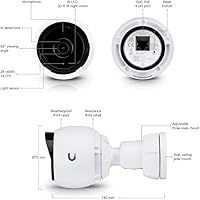
Specifications

  • Resolution: The camera captures video at 4MP (2688 x 1520 pixels), delivering sharp, detailed footage suitable for identifying faces and license plates.
  • Frame Rate: Video is recorded at up to 24 frames per second, producing smooth, usable playback for surveillance review.
  • Night Vision: Infrared LEDs provide low-light and nighttime visibility without requiring any external lighting at the installation site.
  • Power Source: The camera is powered entirely via Power over Ethernet (PoE), drawing 4 watts through a single Ethernet cable that also carries data.
  • Weather Rating: The unit carries an IPX4 rating, meaning it is protected against water splashing from any direction but is not designed for submersion or high-pressure water exposure.
  • Audio: A built-in microphone records audio alongside video, capturing sound context for motion events and live monitoring.
  • Mounting Type: The camera uses a ball-joint mount that allows flexible directional aiming during installation without requiring separate articulating hardware.
  • Form Factor: The bullet-style housing measures 5.51 x 2.95 inches and weighs 458g (1.01 lbs), making it compact enough for discreet outdoor placement.
  • Video Format: Footage is encoded in MPEG-4 format, compatible with playback and storage within the UniFi Protect platform.
  • Focus: The lens uses autofocus to maintain image sharpness across varying distances without requiring manual adjustment after installation.
  • Connectivity: The camera connects via wired Ethernet only for both power and data transmission; it does not operate as a standalone wireless device.
  • Control Method: All camera management, live viewing, and alert configuration is handled through the UniFi Protect mobile and desktop application.
  • Ecosystem Requirement: A compatible Ubiquiti UniFi Protect console or Network Video Recorder (NVR) is required for the camera to function; it cannot operate independently.
  • Warranty: Ubiquiti covers the camera with a one-year limited manufacturer warranty from the date of purchase.
  • Manufacturer: The camera is designed and manufactured by Ubiquiti Networks, headquartered in New York, USA.
  • Model Number: The official model identifier is UVC-G4-BULLET, as designated by Ubiquiti Networks.
  • In The Box: Each unit ships with the camera body, a connection cable, a power cable, mounting hardware, and a user manual.
  • Optical Zoom: The camera supports up to 3x optical zoom, allowing closer inspection of specific areas within the field of view.

Related Reviews
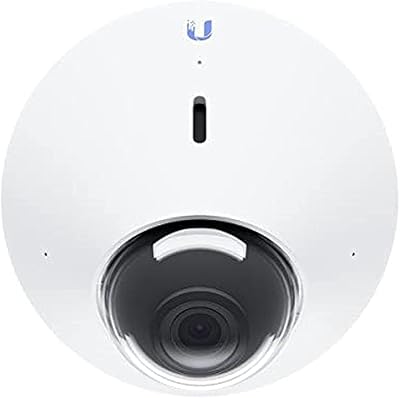
Ubiquiti UniFi Protect G4 Dome Camera
76%
88%
Image Quality
71%
Night Vision Performance
84%
Build Quality & Durability
76%
Installation Experience
91%
Software & App Integration
More
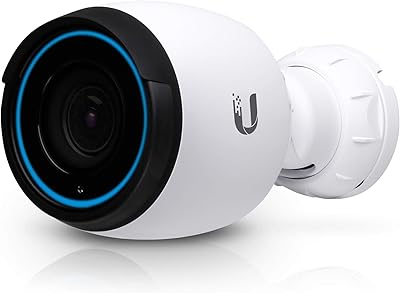
Ubiquiti UniFi Protect G4-PRO Camera
86%
91%
Video Quality
94%
Ease of Setup
88%
Weather Resistance
80%
Software Integration
85%
Night Vision Performance
More
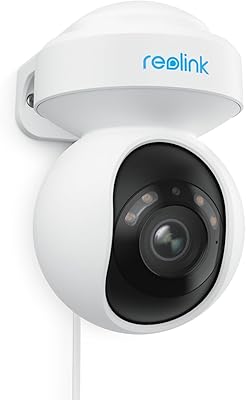
Reolink E1 Outdoor CX PTZ Security Camera
79%
88%
Low-Light Image Quality
71%
Auto-Tracking Accuracy
86%
Installation & Setup
67%
Wi-Fi Stability
82%
AI Detection Accuracy
More
Ubiquiti UniFi G4 Instant
76%
88%
Image Quality
91%
Ecosystem Integration
83%
Installation & Setup
71%
Motion Detection Accuracy
68%
Build Quality & Design
More
Amcrest AMC1080BC28-W Outdoor Bullet Security Camera
73%
83%
Video Clarity
71%
Night Vision
88%
DVR Compatibility
76%
Build Quality
78%
Weatherproofing
More
REOLINK ColorX Outdoor Security Camera CX410W 4MP 2K
86%
94%
Night Vision Performance
89%
Motion Detection Accuracy
87%
Ease of Setup
79%
Wi-Fi Connectivity
91%
Video Quality
More
Real HD 4MP PoE IP Bullet Outdoor Camera
83%
88%
Video Quality
91%
Ease of Installation
89%
Durability/Weather Resistance
85%
Night Vision Performance
87%
Value for Money
More
ONWOTE 16-Channel 6K NVR Security Camera System with 16x 6MP Bullet Cameras
85%
88%
Video Quality
90%
Ease of Installation
84%
AI Detection Accuracy
92%
Storage Capacity
86%
Build Quality
More
Tapo C400 Outdoor Wireless Security Camera
79%
91%
Value for Money
83%
Battery Life
88%
Video Quality (Day)
81%
Night Vision
93%
Ease of Setup
More
GALAYOU G7 4MP Security Camera
85%
91%
Value for Money
88%
Video Quality
94%
Setup & Installation
85%
Motion Detection Accuracy
83%
App Performance
More

FAQ

You need a compatible Ubiquiti UniFi Protect console or NVR in addition to the camera. The G4-Bullet cannot record, store, or stream footage without one. If you are starting from scratch, factor that hardware into your total budget before purchasing.

Officially, it is designed to work within the UniFi Protect ecosystem. Some users have had partial success with third-party platforms via RTSP streaming, but Ubiquiti does not support or guarantee compatibility outside of UniFi Protect. For a fully supported and stable experience, you should plan to use it with Ubiquiti hardware.

The IPX4 rating means it handles rain and splash from any direction reliably, and the housing is built for permanent outdoor installation. It has performed well for users through cold winters and hot summers. That said, IPX4 is not a fully waterproof rating, so avoid positioning it where it will face direct sustained water flow, like directly under a dripping gutter.

For someone familiar with basic networking concepts — running Ethernet, configuring a local network, and using a router — the setup is straightforward. You run a PoE Ethernet cable to the camera, mount it, and add it to your UniFi Protect console. The app walks you through the rest. Total hands-on time for a single camera is usually under an hour once the cable run is done.

The camera requires an 802.3af-compliant PoE switch or injector. Most Ubiquiti UniFi switches include PoE ports that work directly with this camera. If you are using a third-party switch, just verify it supports 802.3af at a minimum — the camera draws only 4 watts, so power budget is rarely an issue.

The infrared night vision is effective for typical residential distances, performing well in the 20 to 30 foot range. For a standard driveway or entry point it works reliably. Larger open areas — long driveways, wide backyards — may push the limits of the IR range, and some users have noted that coverage starts to thin out beyond roughly 30 to 40 feet in complete darkness.

Yes. The Ubiquiti UniFi G4-Bullet 4MP Outdoor Security Camera, when paired with a UniFi Protect console that has remote access enabled, supports live viewing and recorded footage playback from anywhere through the UniFi Protect app on your phone. Ubiquiti handles remote access through its own cloud relay, so you do not need to open ports on your router.

Audio recording behavior depends on how you configure UniFi Protect on your console. You can set it to record audio continuously alongside video or limit recording to motion-triggered clips. Keep in mind that local laws regarding audio recording vary, so check the regulations in your area before enabling continuous audio capture.

The comparison is a bit apples-to-oranges. Consumer cameras are designed for quick, self-contained setups with minimal networking knowledge required. This outdoor bullet cam trades that simplicity for significantly better image quality, wired reliability, and a scalable platform. If you want to grow a multi-camera system over time and do not mind investing in proper infrastructure, the G4-Bullet pulls ahead. If you need one camera up and running in 15 minutes with no extra hardware, a consumer option is more practical.

If the console goes offline, the camera will stop recording since there is no onboard storage on the camera itself. Any footage already saved to the console remains intact when it comes back online. For critical installations, it is worth considering a UPS (uninterruptible power supply) for the console and the PoE switch to keep the system running through brief power interruptions.