Overview

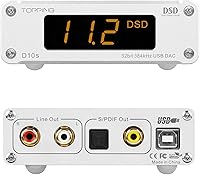
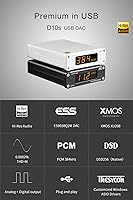
The Topping D10s Hi-Res USB DAC is a desktop decoder built for people who want better sound out of their PC without spending a fortune on a full HiFi rig. Inside, it pairs an ES9038Q2M DAC chip with an XMOS XU208 USB interface, a combination that shows up in plenty of well-regarded gear at this price tier. The housing is a small aluminum box, light enough to tuck behind a monitor, with a digital display that shows the incoming sample rate so you can confirm your music is actually being decoded the way you think it is. As a successor to the original D10, this DAC is meant as a straightforward step up from a computer's built-in audio output.

Features & Benefits

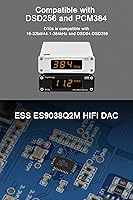
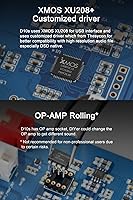
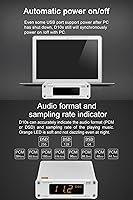
On the spec sheet, this DAC handles PCM audio up to 384kHz/32-bit along with native DSD256, which covers nearly any high-resolution file a typical listener will run into. Topping uses a customized USB driver from Thesycon, and in practice that does help with playback stability, especially once you start feeding it native DSD streams instead of DoP. Output options are generous too: RCA for an amp or active speakers, plus coaxial and optical for routing into an external DAC. There is also a replaceable op-amp socket, a small but appreciated touch for anyone who likes tweaking the sound signature themselves. Measured distortion is impressively low, with THD+N rated under 0.0002%, and an automatic power on/off feature means it just turns off when your PC does.

Best For

The clearest use case for the D10s is sitting between a computer and a pair of active speakers, replacing whatever weak onboard audio chip the PC shipped with. It also works well as a front-end for a headphone amp, since the line-out signal gives that amp something cleaner to work with than a laptop's headphone jack. People who already own a dedicated DAC but need a tidy USB-to-coaxial or USB-to-optical bridge will find it does that job without fuss. Overall, this USB decoder is aimed squarely at budget-conscious listeners who want measurable, real performance gains rather than marketing promises, without venturing into genuinely high-end DAC pricing.

User Feedback

Most owners describe the sound as clean and neutral rather than colored, which tends to be exactly what people want from a DAC in this price range. The build feels solid for its size, and several buyers specifically call out how little desk space it takes up. On the downside, the digital display and controls are fairly basic, so don't expect anything flashy in terms of interface. A handful of users also mention that getting native DSD playback working properly took some extra driver setup, which may frustrate anyone hoping for a true plug-and-play experience. None of these complaints seem to be dealbreakers, but they're worth knowing going in.

Pros

  • Clean, neutral sound signature that doesn't color the music
  • Supports native DSD256 and high-resolution PCM up to 384kHz/32-bit
  • Multiple output options make it flexible for different HiFi setups
  • Replaceable op-amp socket appeals to DIY sound tinkerers
  • Compact aluminum chassis takes up very little desk space
  • Automatic power on/off with the PC adds everyday convenience
  • Measured distortion specs are genuinely strong for this price tier
  • Works well as a clean USB-to-coaxial or USB-to-optical bridge

Cons

  • Digital display and physical controls feel fairly basic
  • Native DSD setup can require extra driver configuration for beginners
  • No built-in headphone amplifier, so it needs a separate amp for headphones
  • Not designed for portable use outside a desktop setup
  • Lacks any app or software interface for adjustments
  • Build materials are functional rather than premium feeling
  • The Topping D10s Hi-Res USB DAC offers no remote control option
  • Limited visual feedback beyond the small sample rate display

Ratings

After analyzing verified owner reviews from desktop audio enthusiasts and casual listeners worldwide, our AI rating engine breaks down how the Topping D10s Hi-Res USB DAC actually performs once it leaves the box. We filter out spam, duplicate posts, and incentivized reviews to keep the scoring grounded in genuine listening experiences. Both the strengths buyers consistently praise and the small frustrations they mention are reflected honestly below.

Sound Quality
89%
Listeners consistently describe the output as clean and neutral, with none of the muddiness people associate with onboard PC audio. Several mention noticeably better separation between instruments when paired with active desktop speakers during everyday listening sessions.
A few users with very high-end amps note the sound is competent rather than thrilling, lacking the warmth some prefer. It's accurate more than characterful, which won't suit listeners chasing a specific tonal flavor.
Build Quality
84%
The aluminum chassis feels solid for its size, and owners frequently mention it doesn't feel cheap or hollow when handled. The compact footprint also makes it easy to fit into a crowded desk setup without it feeling out of place.
Some buyers note the plastic-feeling buttons and small display don't quite match the metal exterior's quality. It's sturdy enough for desktop use but won't impress anyone expecting a premium, heavy-duty feel throughout.
Value for Money
88%
Buyers repeatedly compare the measured specs to far more expensive DACs and come away feeling like they got a deal. For people upgrading from a laptop headphone jack or basic sound card, the jump in clarity feels well worth the cost.
A small number of reviewers who already owned higher-end gear felt the upgrade over their previous budget DAC was incremental rather than dramatic. It's a strong value pick, just not a revelation for already well-equipped setups.
Connectivity & Outputs
91%
Having RCA, coaxial, and optical outputs in one unit gets praised often, since it lets the device serve as both a standalone DAC and a USB bridge to other gear. This flexibility suits people building out a multi-component HiFi chain over time.
The coaxial and optical outputs cap out at lower resolutions than the RCA line-out, which occasionally confuses buyers expecting full DSD256 across every connection. It's a minor limitation but worth knowing before wiring everything up.
Driver & Software Compatibility
78%
22%
Windows users generally find the customized Thesycon driver installs without much hassle and improves stability during high-resolution playback. Once configured, most report it just works reliably across reboots and software updates.
A handful of reviewers mention occasional driver conflicts on certain Windows builds, requiring a reinstall to fix dropouts. Mac and Linux users also get less detailed guidance compared to the Windows-focused setup instructions.
DSD & High-Res Support
86%
Support for native DSD256 alongside high-resolution PCM gets singled out by audiophile reviewers as genuinely useful rather than a marketing checkbox. Those with large hi-res libraries appreciate not having to convert files before playback.
Several buyers found getting native DSD to actually engage took some trial and error with player software settings. It works well once configured, but it's not the kind of feature you can ignore and expect to function automatically.
Ease of Setup
74%
26%
For straightforward PCM playback, most users report plugging it in and having sound working within minutes, with no special configuration needed. The automatic power syncing with the PC also removes a step many didn't expect to appreciate.
Buyers specifically wanting DSD native playback often describe needing to dig into player software settings and driver options. It's not difficult for experienced users, but newcomers to high-res audio may find the initial setup mildly confusing.
Display & Controls
61%
39%
The small digital display showing the active sample rate is appreciated as a quick way to confirm hi-res files are actually being decoded correctly. It's a simple, functional touch that several reviewers find reassuring during use.
This is one of the more frequently criticized aspects, with users describing the display and physical controls as basic and dated-looking. There's no app, remote, or more detailed interface, which some find limiting for everyday adjustments.
Power Convenience
85%
The automatic power on/off syncing with the connected computer gets consistent praise for removing an extra step from daily use. USB bus power also means no separate power brick cluttering the desk.
A few users note that USB bus power can occasionally introduce minor electrical noise depending on the computer's USB port quality. It's not a widespread complaint, but sensitive setups may benefit from a powered USB hub instead.
Customization (Op-Amp Rolling)
71%
29%
DIY-minded buyers genuinely enjoy the replaceable op-amp socket, describing it as a fun way to fine-tune the sound signature without buying an entirely new DAC. It adds a layer of long-term tinkering value for hobbyists.
Casual listeners often report never touching this feature at all, and a couple of reviewers mention the stock op-amp performs fine without needing changes. It's a niche perk rather than something every buyer will use.
Noise Floor & Distortion Performance
92%
Reviewers with measurement tools or sensitive headphones consistently note an impressively quiet background, with the low distortion specs translating into real, audible cleanliness during quiet passages. This stands out as one of the most praised technical aspects.
A few users mention that achieving the lowest noise floor in practice depends heavily on USB port quality and cable shielding, which isn't always obvious to less experienced buyers. Results can vary slightly depending on the rest of the setup.
Portability & Footprint
80%
20%
The compact size makes it easy to tuck behind a monitor or place on a crowded desk without dominating the space. Many buyers specifically mention how little room it takes up compared to bulkier desktop DACs.
It's still designed as a stationary desktop unit rather than something meant to travel, lacking battery power or a rugged carrying option. Anyone hoping to use this DAC on the go will need a different product entirely.

Suitable for:

The Topping D10s Hi-Res USB DAC makes the most sense for desktop listeners who want a clear upgrade over their PC's built-in audio without committing to an expensive HiFi setup. It's a natural fit for anyone running active speakers off a computer, since the line-out connection bypasses the weak onboard sound chip entirely. People feeding a separate headphone amplifier will also benefit, as it gives that amp a cleaner signal to work with than a laptop's headphone jack ever could. Hobbyists who already own an external DAC but need a reliable USB-to-coaxial or USB-to-optical bridge will find it handles that role without complications. It's also a solid pick for budget-conscious audiophiles who want measurable performance gains and don't mind a no-frills design. DIY tinkerers who enjoy swapping op-amps to fine-tune sound character get a bit of extra value here too.

Not suitable for:

Buyers expecting a built-in headphone amplifier should look elsewhere, since the Topping D10s Hi-Res USB DAC is strictly a digital-to-analog converter and won't drive demanding headphones on its own. Anyone wanting flashy software, a touchscreen, or remote control will be underwhelmed by the basic digital display and minimal physical controls. Listeners who plan to rely heavily on native DSD playback should be prepared for some driver configuration, which isn't always intuitive for newcomers to high-res audio. If portability matters, this isn't the right pick either, since it's designed to sit on a desk and stay there. Those chasing flagship-tier measurements or premium build materials may also find it falls short of higher-end alternatives in the same product category.

Specifications

  • DAC Chip: The DAC uses an ES9038Q2M decoding chip from ESS Technology to convert digital audio into an analog signal.
  • USB Interface: An XMOS XU208 chip handles the USB connection for stable data transfer at high sample rates.
  • USB Driver: A customized driver developed with Thesycon is used on Windows to improve compatibility with high-resolution and DSD files.
  • PCM Support: The device supports PCM audio resolutions ranging from 16-bit/44.1kHz up to 32-bit/384kHz.
  • DSD Support: Native DSD64 through DSD256 playback is supported, along with DSD128 over DoP.
  • Outputs: Audio can be sent out via RCA line-out, coaxial digital, or optical digital connections.
  • Coaxial/Optical Limits: The coaxial and optical outputs support PCM up to 192kHz/24-bit and DSD64 over DoP.
  • Op-Amp Socket: A replaceable op-amp socket allows users to swap components to adjust the analog output stage.
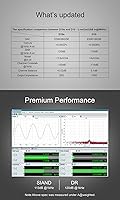
  • Distortion: Total harmonic distortion plus noise is rated below 0.0002% at 1kHz, A-weighted.
  • Signal-to-Noise Ratio: SNR is rated at 120dB at 1kHz, A-weighted, indicating low background noise.
  • Dynamic Range: Dynamic range is rated at 120dB at 1kHz, A-weighted.
  • Frequency Response: Frequency response is rated at 20Hz-20kHz within ±0.1dB and 20Hz-40kHz within ±0.4dB.
  • Power Source: The unit is powered via USB at DC5V/0.5A, drawing power directly from the connected computer.
  • Power Behavior: The device automatically powers on and off in sync with the connected PC.
  • Display: A small digital tube display shows the current sample rate of incoming audio.
  • Chassis Material: The housing is constructed from aluminum for a compact, rigid enclosure.
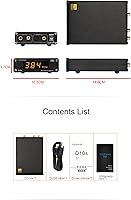
  • Dimensions: The unit measures approximately 10.3cm x 14.6cm x 3.7cm.
  • Weight: The device weighs approximately 323 grams.
  • Color Options: It is available in black or silver finishes.
  • Channel Count: The DAC outputs a standard 2-channel stereo signal.

Related Reviews
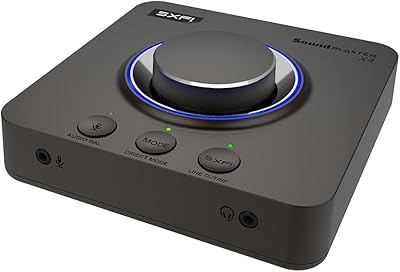
Creative Sound Blaster X4
80%
88%
Audio Quality
91%
Headphone Amplifier Performance
74%
Surround Sound & Virtualization
86%
Build Quality & Physical Controls
92%
Connectivity & I/O Options
More
Creative Sound Blaster X1
81%
88%
Audio Quality Upgrade
73%
Super X-Fi Spatial Audio
86%
Headphone Amplification
93%
Portability & Form Factor
94%
Ease of Setup
More
Creative Sound Blaster Play! 4
81%
88%
Audio Quality Upgrade
84%
Microphone Performance
91%
VoiceDetect Auto-Mute
79%
Noise Cancellation (Two-Way)
93%
Plug-and-Play Ease
More
Edifier G35 Gaming Headset
69%
74%
Sound Quality
61%
7.1 Virtual Surround
63%
Microphone Performance
58%
Comfort & Fit
56%
Build Quality
More
iFi hip-dac3 Portable DAC/Headphone Amplifier
80%
91%
Sound Quality
88%
Build Quality
72%
Portability
79%
Battery Life
93%
IEM Compatibility
More
Topping E50 MQA DAC Decoder
83%
93%
Sound Quality
96%
Distortion & Noise Performance
78%
MQA Decoding
88%
Connectivity & Compatibility
82%
Build Quality & Form Factor
More
Moondrop Dawn Pro
Moondrop Dawn Pro
83%
91%
Audio Performance
93%
Balanced Output Quality
88%
Build Quality
89%
Value for Money
84%
Volume Control
More
FiiO KA5
FiiO KA5
82%
93%
Audio Quality
91%
Balanced Output Performance
89%
Noise Floor & Interference
92%
IEM Compatibility
88%
Value for Money
More
Qudelix 5K
Qudelix 5K
82%
93%
Audio Quality
91%
Balanced Output
89%
Bluetooth Codec Support
94%
Companion App & EQ
88%
Portability & Size
More
Topping E30 II lite DAC Preamp
88%
94%
Sound Quality
89%
Value for Money
91%
Ease of Use
85%
Setup/Installation
88%
Build Quality
More

FAQ

No, it's strictly a DAC, meaning it converts digital audio to analog but doesn't have the power to drive headphones on its own. If you want to use headphones, you'll need to pair it with a separate headphone amplifier through the line-out connection.

Yes, it works with both, though the customized Thesycon driver for smoother high-res and DSD playback is Windows-only. On Mac, it should function as a standard USB audio class device without needing extra drivers for most use cases.

It can take a bit of extra effort compared to plain PCM playback, since you typically need DSD-capable playback software and the right driver installed. It's not overly technical, but it is not quite plug-and-play if you've never configured DSD before.

Yes, that's actually one of the most common ways people use this DAC. You connect the RCA line-out to your active speakers, and it replaces whatever weak audio output your computer was using before.

The D10s is the successor model, generally refined for better USB compatibility and DSD handling compared to the earlier version. If you're comparing the two, expect similar core functionality with some improvements under the hood.

You'll need a standard optical (Toslink) or coaxial digital cable, neither of which is unusual or hard to find. These outputs are handy if you want to send audio to a separate external DAC instead of using this device's internal one.

It depends on how much you enjoy tweaking gear. Swapping op-amps can change the tonal character somewhat, but it's a hobbyist feature rather than something most casual listeners will bother with.

No, the Topping D10s Hi-Res USB DAC draws its power directly from the USB connection, so there's no separate power brick or outlet needed.

There's no fan at all, since this is a passive, fanless DAC. It runs completely silently, which is exactly what you want sitting near a listening setup.

Most listeners report a clear improvement in clarity and noise floor compared to built-in audio, since onboard sound chips are rarely designed with audio quality as a priority. The exact improvement you'll notice depends on your speakers or amp, but the upgrade is generally considered worthwhile at this price point.