Overview

The TenYua USB Cassette Tape to MP3 Converter is a self-contained device built for one straightforward purpose: rescuing old cassette recordings from the shelf and turning them into digital MP3 files — no computer required, no software, no technical headaches. That workflow is the whole point. At its budget-friendly price point, this isn't a professional archiving tool; it's an accessible entry point for everyday people who have a shoebox of tapes they've been meaning to digitize for years. Think older adults, nostalgia hobbyists, or anyone who captured family moments on tape decades ago and simply wants to hear them again.
Features & Benefits

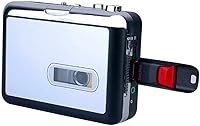
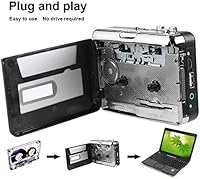
This cassette converter keeps things refreshingly simple. There are two recording modes: Auto mode detects the end of a tape and stops on its own, while Manual mode gives you direct control over when recording starts and stops — useful if you only want to capture specific tracks. Plug in a USB flash drive formatted as FAT or FAT32 (exFAT works too), press play on the tape, and the device writes MP3 files directly to the drive. Worth knowing upfront: it only records while the tape is actively playing. It also doubles as a standalone cassette player, and no driver installation is required.

Best For

This portable tape digitizer is a strong fit for anyone with a box of old cassettes and no interest in fiddling with computer software. It's particularly well-suited to older users or less tech-savvy individuals who want a hands-off process — insert tape, plug in drive, press play. It also makes a thoughtful, practical gift for a parent or grandparent who has home recordings they'd love to revisit. People looking to archive family memories, old mixtapes, or music from decades past will find the appeal obvious. Those expecting high-fidelity audio or advanced editing options, though, should look elsewhere.

User Feedback

With a 3.7-star rating across 67 reviews, opinion on the TenYua Walkman-style recorder is genuinely split. Satisfied buyers tend to praise how easy it is to get started and the fact that it plays tapes reliably. Critics, on the other hand, report inconsistent recording quality, particularly with older or worn tapes that introduce noise and drop-outs. Several users were caught off guard by USB compatibility issues — drives not formatted as FAT32 simply won't work. The recurring theme is expectations: buyers hoping to recover cherished old recordings often come away pleased, while those expecting crisp, clean audio are frequently disappointed.

Pros

  • No computer, software, or technical setup required — just insert a tape and press play.
  • Auto mode handles recording and stopping on its own, useful for unattended sessions.
  • Works as a standalone cassette player too, not only a converter.
  • Compact and lightweight enough to use comfortably at a desk or on a shelf.
  • Compatible with FAT, FAT32, and exFAT USB drives, offering reasonable storage flexibility.
  • A practical, low-cost gift for older relatives with old tapes they want to revisit.
  • Manual mode gives enough control to record only specific sections of a tape.
  • This portable tape digitizer requires no driver installation on any device.

Cons

  • Audio quality is noticeably limited — hiss, muffling, and distortion are common on music recordings.
  • Only records while the tape is actively playing; there is no batch or accelerated conversion.
  • USB drives formatted as NTFS will not work, and the device gives no clear error when this happens.
  • The instruction manual is sparse and leaves out critical setup details most buyers need.
  • Auto mode occasionally stops recording during quiet passages, cutting off content unexpectedly.
  • No track splitting, file naming, or metadata support — everything lands as sequentially numbered MP3s.
  • Build quality feels fragile; the plastic casing does not inspire confidence for long-term use.
  • Requires a constant power source via cable — there is no built-in battery for truly portable use.
  • Older or degraded tapes significantly worsen output quality, with no compensation from the device.
  • Real-time conversion means a 90-minute tape takes 90 minutes — digitizing large collections is slow work.

Ratings

The TenYua USB Cassette Tape to MP3 Converter has been scored below using AI analysis of verified global buyer reviews, with spam, bot activity, and incentivized feedback actively filtered out. The scores reflect a balanced read of real ownership experiences — the genuine wins and the genuine frustrations — so you can set accurate expectations before buying. Both the convenience this portable tape digitizer delivers and the audio quality trade-offs it carries are represented transparently across each category.
Ease of Use
82%
18%
For users with little to no technical background, the setup is about as painless as it gets. Insert a tape, plug in a compatible USB drive, and press play — that is genuinely the whole process. Older adults and first-time digitizers consistently praised how little guesswork was involved.
A handful of buyers were confused by the Auto vs. Manual mode distinction and recorded unintended silence or missed content. The instruction manual is thin, and the lack of any on-screen feedback means you are essentially trusting the device is working until you check the drive.
Audio Recording Quality
54%
46%
For tapes in decent condition containing spoken word content — voice memos, interviews, or family conversations — the output is serviceable and often clear enough to be genuinely useful. Some buyers were pleasantly surprised by how listenable their old recordings turned out.
Music recordings frequently exposed the device's limits. Background hiss, distortion on louder passages, and muffled highs were recurring complaints. This is not a high-fidelity device, and buyers expecting anything close to CD-quality from their old music tapes were regularly disappointed.
USB Compatibility
49%
51%
When buyers used a properly formatted FAT32 drive, the file transfer worked reliably and the MP3 files appeared on the drive without issues. Several users confirmed exFAT drives also worked, giving a bit of flexibility with newer, larger-capacity drives.
This was one of the most common sources of frustration in user reviews. Drives formatted as NTFS or using other file systems simply do not work, and the device gives no clear error message — it just fails silently. Many buyers did not realize their drive needed reformatting until after a failed recording attempt.
Tape Playback Performance
71%
29%
As a basic cassette player, this portable tape digitizer performs adequately. Tapes in good condition play back at the correct speed without noticeable warping or pitch drift, which matters a lot when you are trying to preserve the content accurately.
Worn or older tapes occasionally caused the mechanism to struggle — uneven playback speed and partial dropouts were reported with degraded cassettes. The device has no tape cleaning or tensioning mechanism, so the quality of playback is entirely dependent on the physical condition of the tape itself.
Value for Money
67%
33%
At its budget price point, this cassette converter offers a compelling proposition for someone who just wants to hear their old tapes again without spending heavily. For low-stakes preservation — capturing the content rather than archiving it with precision — buyers generally felt the cost was justified.
Buyers with higher expectations around audio output quality or build durability often felt let down relative to the spend. A few noted that after factoring in a compatible USB drive purchase (if they had to reformat or buy one), the overall value equation felt thinner.
Build Quality & Durability
58%
42%
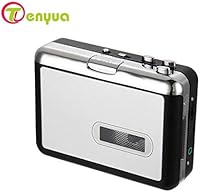
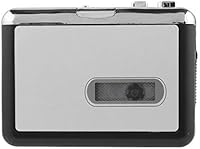
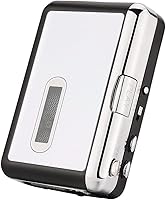
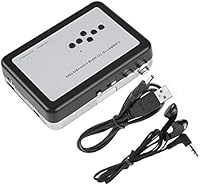
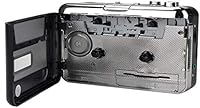
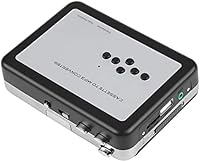
The compact, Walkman-style form factor feels familiar and fits comfortably in hand. The black and silver finish looks presentable, and the overall size makes it easy to store in a drawer or tote bag without taking up much space.
The plastic casing feels noticeably lightweight, and several buyers described a hollow, inexpensive feel when handling it. A few long-term users reported mechanical issues with the tape mechanism after extended use, raising questions about how well it holds up beyond occasional sessions.
Conversion Speed
63%
37%
Since the device records the tape in real time as it plays, there is no waiting around for a separate processing step. You press play and the recording happens simultaneously, which some users appreciated for its simplicity.
Real-time conversion is also the limitation — a 60-minute tape takes 60 minutes to convert, no more, no less. Buyers with large tape collections quickly realized digitizing everything would be a multi-day effort, which was not always clear from the product listing.
Manual vs. Auto Mode Functionality
66%
34%
Auto mode is a practical touch for users who want to walk away and let the device handle stopping on its own. Manual mode gives enough control for anyone who only wants to capture a specific side or track rather than an entire tape.
The Auto mode's end-of-tape detection is not always reliable according to some buyers — it occasionally stopped recording prematurely during quiet passages in music. A clearer explanation of how each mode behaves in different scenarios would have helped reduce confusion.
Software-Free Operation
84%
The complete absence of software requirements is a genuine strength for the audience this targets. No drivers, no installs, no computer — just the device and a USB drive. For non-technical users, this removes what would otherwise be the biggest barrier to getting started.
The trade-off is zero control over output settings. Buyers who wanted to adjust bitrate, trim recordings, or split tracks into individual files had no way to do that on the device itself and needed third-party software after the fact, partly defeating the simplicity appeal.
Portability & Form Factor
76%
24%
The unit weighs just over 11 ounces and fits in one hand, making it easy to use at a desk, on a couch, or wherever your tape collection happens to live. Its Walkman-era shape is immediately intuitive for anyone who used portable cassette players back in the day.
Power is delivered via Micro USB or Mini USB rather than a built-in rechargeable battery, so true on-the-go use requires a power bank or nearby outlet. A few buyers expected a battery-powered option and were caught off guard by the cable dependency.
Output File Organization
44%
56%
Files are deposited directly onto the USB drive as numbered MP3s, which is straightforward enough for users who only need to retrieve the content and do not care about file naming or folder structure.
There is no automatic track splitting, no metadata tagging, and no naming convention beyond generic sequential numbering. Buyers who recorded multi-track tapes found themselves manually sorting and renaming files after the fact, which added unexpected effort to what was supposed to be a simple task.
Sensitivity to Tape Condition
47%
53%
With well-maintained tapes stored in good conditions, the device captures content reliably. Users who tested it on relatively recent or lightly used cassettes generally reported clean playback and acceptable recordings.
Older, degraded, or poorly stored tapes exposed real weaknesses — increased background noise, mechanical resistance during playback, and audio artifacts were common. The device has no built-in compensation for tape age or wear, so results vary widely depending entirely on the cassette's physical state.
Instructions & Setup Documentation
41%
59%
For buyers who figured out the process intuitively or found helpful online guidance, setup was quick. The basic workflow is simple enough that some users got it working within minutes without reading anything.
The included documentation was widely described as sparse, vague, and difficult to follow — especially for older buyers who wanted step-by-step guidance. Critical details like USB format requirements and how recording triggering works were absent or buried, leading to avoidable first-use failures.

Suitable for:

The TenYua USB Cassette Tape to MP3 Converter is built for a specific kind of buyer, and for that buyer it genuinely delivers. If you have a collection of old cassettes — family recordings, personal mixtapes, or home-recorded memories — and your only goal is to get that audio onto a USB drive without touching a computer, this device makes the process as simple as it realistically can be. It is especially well-suited to older adults or less tech-savvy users who find audio software intimidating; there is no installation, no configuration, and no learning curve to speak of. Gift buyers will also find it a practical and thoughtful choice for parents or grandparents sitting on decades of recorded memories they have never found a way to revisit. As long as your tapes are in reasonably good condition and your USB drive is formatted as FAT32, the workflow is plug-in-and-go.
Not suitable for:

The TenYua USB Cassette Tape to MP3 Converter is not the right tool if audio quality is a priority. Anyone hoping to digitize a music collection and end up with crisp, clean MP3s will likely be disappointed — this is a convenience-first device, not a precision audio one. Serious archivists, musicians, or anyone working with valuable or historically significant recordings should invest in a proper audio interface and dedicated software instead. It is also a poor fit for buyers with a large tape library and limited time, since every tape must play through in real time — there is no speed-up option. Users who prefer to organize, tag, or split recordings into individual tracks will find no support for any of that on the device itself. And if your tapes are old, worn, or have been stored in poor conditions, do not expect the device to compensate — it will faithfully capture whatever degraded audio is already there.
Specifications

  • Brand: Manufactured by TenYua, a consumer electronics brand focused on budget-friendly audio accessories.
  • Output Format: Audio is recorded and saved directly as MP3 files onto the connected USB flash drive.
  • USB Formats: Compatible USB flash drives must be formatted as FAT, FAT32, or exFAT; NTFS and other formats are not supported.
  • Conversion Modes: Two recording modes are available: Manual mode for user-controlled start and stop, and Auto mode which detects tape end and stops recording automatically.
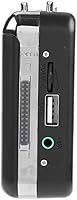
  • Power Connector: The device is powered via Micro USB or Mini USB cable; no internal rechargeable battery is included.
  • Dimensions: The unit measures 6 x 4.5 x 1.6 inches, comparable in size to a classic portable cassette player.
  • Weight: The device weighs 11.2 ounces, making it lightweight enough for desktop or tabletop use.
  • Color Options: Available in a two-tone Black and Silver finish inspired by the aesthetic of vintage Walkman-style players.
  • Computer Required: No computer, software installation, or driver setup is required at any stage of the recording process.
  • Recording Trigger: Recording is activated only while the cassette tape is physically playing; the device does not record silence or standby time.
  • Playback Function: The device doubles as a standard cassette player, allowing tape playback through a connected speaker independently of the conversion function.
  • Compatible Devices: The device is listed as compatible with external speakers via its audio output connection.
  • Category Rank: Ranked number 70 in the MP3 Cassette Player Adapters category on Amazon at the time of this data collection.
  • Avg. Rating: Holds a 3.7 out of 5 star average rating based on 67 verified customer ratings on Amazon.
  • First Available: The product was first made available for purchase in March 2020.
  • Model Number: The official manufacturer model number for this unit is 122355244-1.
  • Use Cases: Designed primarily for cassette tape archiving and MP3 playback, with no support for vinyl, 8-track, or other analog formats.

Related Reviews
BlumWay USB Cassette to MP3 Converter
73%
88%
Ease of Setup
54%
USB Drive Compatibility
67%
Audio Quality
83%
Auto-Reverse Function
76%
Recording Modes (Auto vs Manual)
More
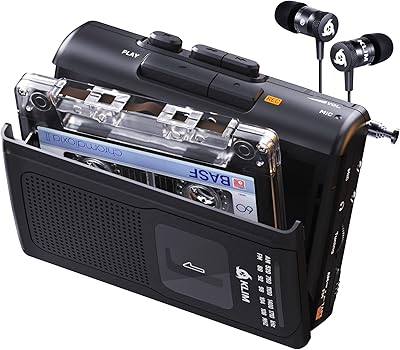
KLIM K7 Portable Cassette Player
77%
91%
Ease of Use
74%
MP3 Conversion Quality
93%
Portability & Form Factor
88%
Bundle Value
82%
Battery Life
More
Maypott Portable Cassette Player Recorder
70%
83%
Value for Money
76%
Ease of Setup
67%
Playback Quality
63%
Digitization Performance
88%
Portability
More
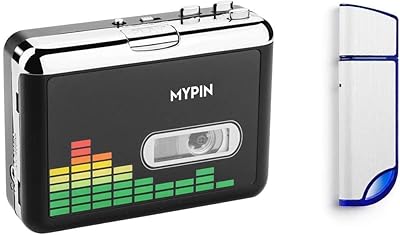
MYPIN 32GB Cassette to MP3 Converter
70%
88%
Ease of Setup
54%
Audio Quality
51%
Auto Track Splitting
72%
Value for Money
47%
Build Quality
More
SEMIER Small Cassette Tape Player Converter
73%
86%
Ease of Setup
67%
Audio Conversion Quality
81%
SD Card Recording
58%
Built-in Speaker
63%
Motor Speed Consistency
More
SEMIER Boombox MP3 Conversion Cassette Tape Player Recorder
83%
88%
Cassette-to-MP3 Conversion Ease
84%
Sound Quality
82%
Portability
65%
Battery Life
78%
Durability
More
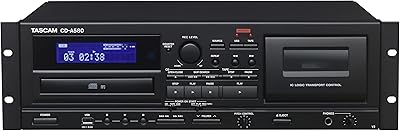
Tascam CD-A580 Rackmount Cassette/CD/USB MP3 Player Recorder Combo
84%
91%
Audio Quality
88%
Durability & Build Quality
85%
Ease of Use
90%
Performance & Stability
92%
Recording Features (Cassette-to-USB, CD-to-Cassette)
More
Janryzone Cassette Player-Converter
82%
89%
Ease of Use
78%
Audio Quality
93%
Portability
85%
Value for Money
65%
Build Quality
More
KLIM K8 Cassette Tape Player
83%
76%
Sound Quality
85%
Recording Functionality
80%
Build Quality
91%
Portability
88%
Ease of Use
More
Reshow 235A Portable Cassette Player
74%
84%
Digital Conversion Ease
78%
Audio Quality (Headphones)
48%
Audio Quality (Built-in Speaker)
88%
USB-C Connectivity
73%
Battery Life
More

FAQ

No, and that is genuinely the whole point of the device. You just plug a USB flash drive into the unit, insert your cassette, press play, and the recording happens automatically. No computer, no software, no account setup — nothing like that.

You need a USB flash drive formatted as FAT, FAT32, or exFAT — those are the only file systems the device recognizes. If your drive is formatted as NTFS (which is common on Windows), it will not work and the device will not tell you why, so it is worth checking the format before you start. You can reformat a drive through your computer in just a minute or two.

Honest answer: it depends on your tape and your expectations. For spoken word recordings — family conversations, voice memos, interview tapes — the output is generally clear enough to be useful. For music, results are more mixed; some buyers were happy, but many noted background hiss and a lack of clarity on louder or more complex recordings. Think of it as a preservation tool rather than a high-fidelity one.

Yes, you can use Manual mode to control exactly when recording starts and stops, so you are not locked into recording an entire side. Just switch to Manual, hit record when you are ready, and stop it when you want. Auto mode is better when you want to record a full side and walk away.

It records in real time, so a 60-minute tape takes 60 minutes to convert. There is no speed-up option. If you have a large collection of tapes, factor that into your planning — it can be a slow process, though many people just let it run in the background while they do other things.

It will play them, but the device cannot compensate for physical tape degradation. Worn tapes may exhibit increased noise, uneven playback speed, or audio dropouts, and those issues will show up in the recording too. If your tapes are in fragile condition, handle them carefully before inserting them, and do not expect the device to clean up audio problems that already exist on the tape.

Yes, it does. You can listen to tapes through a connected speaker without recording anything. It is a fully functional cassette player in addition to being a converter, which is handy if you just want to hear a tape before deciding whether to digitize it.

No, the device does not split recordings into separate tracks. Everything recorded in a single session gets saved as one continuous MP3 file. If you want individual song files, you would need to do that manually afterward using free audio software on a computer, like Audacity.

It does not have a built-in rechargeable battery. It is powered through a Micro USB or Mini USB cable, so you will need a USB power source nearby — a wall adapter, a laptop port, or a power bank all work. Just keep that in mind if you were hoping to use it completely wire-free.

It can be, as long as you set it up correctly for them first. Format a compatible USB drive beforehand, confirm the power cable is ready, and walk them through the basic steps once. The actual day-to-day operation is very straightforward, but the initial setup — especially the USB format issue — can trip people up without a little guidance upfront.