Overview

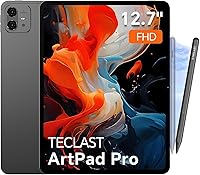
The TECLAST Artpad Pro 12.7-inch Android Tablet enters a crowded mid-range market with a genuine size advantage most budget tablets simply can't match. While 10- and 11-inch slates dominate this price tier, the Artpad Pro's 16:10 widescreen format gives artists and note-takers noticeably more room to work. It runs Android 15 under a custom skin called ArtOS — essentially a reskinned launcher with productivity shortcuts, not a separate operating system. The included T-Pen stylus is worth flagging right away, since many comparable tablets charge extra for one. Performance sits where you'd expect from a MediaTek chip at this price: capable for everyday tasks, but not built for heavy gaming or demanding workflows.
Features & Benefits

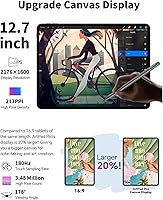
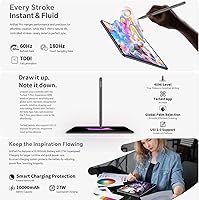
The display is where the Artpad Pro earns its keep. The 2176×1600 IPS panel uses TDDI touch technology, which consolidates touch and display driver layers into one — the practical result is a screen that feels more responsive under a stylus and reads brighter without cranking up the backlight. The bundled T-Pen delivers 4096 levels of pressure sensitivity and supports USI 2.0, meaning third-party styli work too. Battery life is substantial enough for a full day of mixed use, and 30W charging refills it quickly. Built-in 4G LTE and GPS mean this tablet operates independently of Wi-Fi, and Widevine L1 certification ensures Netflix and similar services actually stream in HD.

Best For

This large-screen drawing tablet makes the most sense for hobbyist illustrators and digital artists who want a genuinely large canvas without spending flagship money. Students who annotate PDFs, take handwritten notes, or run two apps side by side will also appreciate the extra width a 16:10 screen naturally provides. Travelers and commuters benefit from built-in LTE and GPS, making it a viable all-in-one device away from home. Sheet music readers and document-heavy professionals get more content on screen per scroll. It is also a solid pick for casual streamers who want proper HD playback without the Widevine workaround that plagues cheaper tablets.

User Feedback

Owners consistently praise the display-to-price ratio and report that the T-Pen feels responsive straight out of the box. The slim profile and manageable weight for a device this size also earn positive mentions. On the flip side, software update longevity is a realistic concern with Teclast — buyers should understand that long-term Android updates are not guaranteed at this price point. Large-screen app optimization can also be hit-or-miss, since many Android apps are still designed around smaller displays. The Mali-G57 GPU handles daily tasks and light creative work without issue but struggles visibly with graphically intensive games. ArtOS gets genuinely mixed reactions — practical shortcuts for some, unnecessary clutter for others.

Pros

  • The 12.7-inch 16:10 screen offers substantially more usable space than typical budget tablets in this price range.
  • T-Pen stylus with 4096 pressure levels ships in the box — no separate purchase required.
  • Widevine L1 certification ensures true HD streaming on Netflix, Disney+, and similar platforms.
  • Built-in 4G LTE and GPS make the Artpad Pro genuinely independent from Wi-Fi networks.
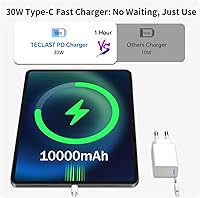
  • Battery size supports a full day of mixed use, and 30W charging keeps downtime short.
  • TDDI display technology reduces touch layer interference, making stylus input feel more direct and responsive.
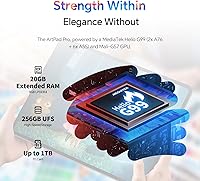
  • 256GB of onboard storage is generous for a device at this price tier.
  • Quad-speaker setup delivers noticeably better audio separation for movies and shows than single or dual-speaker rivals.
  • USI 2.0 stylus compatibility means users are not locked into the bundled pen if they prefer an upgrade.
  • Slim profile and relatively compact footprint for a screen this large make it easy to carry in a standard bag.

Cons

  • Long-term Android update support from Teclast is uncertain, raising concerns about usability after 18 to 24 months.
  • The Mali-G57 GPU struggles noticeably with graphically demanding games and any real video editing workload.
  • ArtOS pre-installed apps and floating UI elements feel cluttered to users who prefer a clean interface.
  • Large-screen Android app optimization remains inconsistent — several popular apps display in stretched phone layouts.
  • Outdoor screen visibility under direct sunlight is a recurring complaint from users.
  • The back panel has a plasticky feel that does not match the slim, modern aesthetic the design suggests.
  • Color accuracy is not sufficient for professional illustration or any color-critical creative work.
  • At close to 3 pounds, one-handed use in portrait mode becomes physically uncomfortable within 20 to 30 minutes.
  • LTE band compatibility varies by region, and some users have reported SIM slot issues with specific carriers.
  • Palm rejection during stylus use occasionally misfires near screen edges, which interrupts longer drawing sessions.

Ratings

The TECLAST Artpad Pro 12.7-inch Android Tablet scores below are generated by AI after analyzing verified global user reviews, with spam, bot-submitted, and incentivized feedback actively filtered out. The result is an honest, balanced snapshot of what real buyers experience — strengths and frustrations included. From artists praising the large canvas to commuters appreciating the LTE independence, the ratings reflect the full picture across every major use case.
Display Quality
84%
Users consistently call out the screen as the standout reason they chose this tablet over smaller rivals. The 16:10 format gives noticeably more room for documents and sketches, and brightness holds up reasonably well indoors. TDDI technology makes the surface feel more direct under a stylus than older layered panels.
Outdoor visibility under bright sunlight gets complaints, with reflections making prolonged use uncomfortable. A handful of users also noted that color accuracy, while pleasant for casual use, falls short of what serious digital artists need for precise color work.
Stylus Performance
79%
21%
The included T-Pen is a genuine bonus — buyers who expected to purchase a stylus separately were pleasantly surprised. Pressure sensitivity feels responsive for handwriting and casual illustration, and the USI 2.0 compatibility means upgrading to a third-party pen is always an option.
Some users report a slight lag when drawing quick, curved strokes at speed, which bothers more experienced illustrators. Palm rejection, while functional in most scenarios, occasionally misfires when resting the hand near the screen edge during long drawing sessions.
Battery Life
88%
For a tablet this size, the battery consistently earns praise. Users working through long study sessions or flights report lasting a full day comfortably with mixed tasks — reading, note-taking, and occasional video. The 30W fast charging refills the battery quickly enough to not feel like a burden.
Running LTE and GPS simultaneously alongside screen-intensive tasks drains the battery noticeably faster, cutting some users' estimates significantly. A small number of users also flagged that aggressive battery optimization in ArtOS occasionally interrupts background app activity.
Performance & Speed
63%
37%
For everyday tasks — browsing, note-taking, document editing, and video streaming — the Artpad Pro handles things without obvious hesitation. Multitasking with two apps in split-screen works fine for the target audience of students and light creators.
The MediaTek chip and Mali-G57 GPU are clearly mid-range, and users who pushed into 3D gaming or heavy video editing ran into dropped frames and sluggish response. This is not a tablet for demanding workloads, and buyers who expected otherwise were disappointed.
Value for Money
82%
18%
When buyers factor in the screen size, the included stylus, Widevine L1, and LTE capability together, the overall package feels competitive against rivals that charge more for fewer features. Students and hobbyist artists in particular feel they are getting a lot of usable real estate for the price.
The value equation weakens for buyers who primarily want a performance-first device. If gaming, video editing, or running demanding apps is a priority, the money is better spent elsewhere. The brand's limited global support network also gives some buyers pause before committing.
Build Quality & Design
71%
29%
The slim profile impresses buyers who handle it in person — at under a third of an inch thick, it feels modern and holds up well for casual daily use. The relatively lightweight body for its screen size makes it comfortable to hold during longer reading or browsing sessions.
The chassis flexes slightly under pressure, and a few users noted the back panel feels more plasticky than the price suggests. It does not feel fragile, but it also does not inspire the confidence of a metal-bodied competitor.
Audio Quality
74%
26%
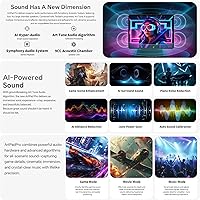
Four speakers make a real difference for media consumption — dialogue in movies and shows comes through clearly, and stereo separation is noticeable when watching landscape video. Users who use the tablet as a casual music companion at a desk or kitchen counter find it more than adequate.
At maximum volume, the sound can become slightly harsh and thin, particularly with bass-heavy content. For headphone users it is a non-issue, but those relying solely on the speakers for music listening found the experience underwhelming compared to dedicated Bluetooth speakers.
Software & ArtOS Experience
66%
34%
Users who took time to explore ArtOS appreciated the sidebar shortcuts and the Smart Button for quick app launching, particularly when switching between a drawing app and a reference browser. The widescreen desktop layout adaptation is a genuinely thoughtful touch for this aspect ratio.
Several users found ArtOS additions cluttered and immediately disabled floating balls and sidebars. Pre-installed apps added friction during initial setup, and uncertainty around how long Teclast will push Android updates to this model is a recurring and legitimate concern.
Streaming & Media Playback
86%
Widevine L1 certification is a real differentiator in this price range, and users who stream Netflix, Disney+, or Amazon Prime Video notice the difference immediately — full HD playback without workarounds. The large screen makes this a legitimately enjoyable couch or travel streaming device.
Some HDR content looks washed out compared to OLED panels, which is expected at this price point but still noted by users upgrading from a premium phone screen. App optimization for the wide format is inconsistent, with some streaming apps displaying black bars on either side.
Connectivity & LTE Reliability
77%
23%
Built-in 4G LTE with GPS makes the Artpad Pro genuinely useful for commuters and travelers who do not want to rely on hotspotting from a phone. Users in urban areas report solid signal handling and appreciate having navigation built in without needing a separate device.
5G Wi-Fi performance is solid close to a router but drops off faster than some rivals at range. A small number of users also reported SIM slot compatibility issues depending on their carrier and region, so checking band compatibility before purchasing is advisable.
App Compatibility & Large-Screen Optimization
58%
42%
Core productivity apps — Google Docs, OneNote, Notability alternatives — work well and take advantage of the extra screen space. Split-screen productivity genuinely benefits from the 16:10 ratio, and users doing side-by-side document comparison praised the layout.
Android's large-screen app ecosystem remains inconsistent, and on a 12.7-inch panel the problem is magnified. Several popular apps stretch awkwardly or default to phone layout with empty sidebars, which is not a Teclast-specific issue but affects the overall experience more visibly here.
Camera Quality
53%
47%
The 13MP rear camera handles document scanning and video calls adequately, which covers the primary use cases for a tablet camera. For scanning notes or capturing whiteboard content in a classroom or meeting, it gets the job done without complaint.
As a camera for actual photography, it is not competitive. Dynamic range is limited, low-light shots are noticeably noisy, and the processing lags behind even mid-range smartphones. Users who expected a capable camera alongside other features came away disappointed.
Long-Term Software Support
47%
53%
The tablet ships with Android 15 out of the box, which means buyers start with a current OS and do not face an immediate update gap. ArtOS receives periodic patches, and the 1-year warranty with 24/7 support does give some reassurance for early issues.
Teclast does not have a strong track record for multi-year Android version updates, and this is the most commonly cited long-term concern in user discussions. Buyers planning to keep the tablet for three or more years should factor in the likelihood of running an outdated OS within 18 months.
Portability & Handling
72%
28%
For a 12.7-inch device, it is slimmer than most users expect and balances reasonably well in landscape mode. Commuters who carry it in a bag alongside a laptop report it adds less bulk than anticipated, and the narrow bezels keep the footprint manageable.
At just under 3 pounds, extended one-handed use — reading in bed or holding it up for long periods — becomes tiring faster than smaller tablets. Users with smaller hands in particular noted the weight distribution made portrait-mode holding uncomfortable after 20 or 30 minutes.

Suitable for:

The TECLAST Artpad Pro 12.7-inch Android Tablet is a strong fit for hobbyist illustrators and digital artists who want a genuinely large drawing surface without stretching into flagship territory. Students who annotate lecture slides, review PDFs, or handwrite notes will find the wide 16:10 screen format particularly useful for split-screen workflows. Commuters and frequent travelers benefit from the built-in 4G LTE and GPS, which removes the need to rely on a phone hotspot for connectivity on the go. Sheet music readers and document-heavy professionals — lawyers, researchers, educators — gain more visible content per scroll than any 10- or 11-inch tablet can offer. The included T-Pen stylus adds immediate out-of-the-box value that meaningfully affects the overall cost comparison. Light media streamers who want HD Netflix or Disney+ on a big screen will also appreciate the Widevine L1 certification that many similarly priced rivals lack.
Not suitable for:

The TECLAST Artpad Pro 12.7-inch Android Tablet is not the right choice for buyers who prioritize raw processing power, whether for 3D gaming, video editing, or running several demanding apps simultaneously — the MediaTek chip and Mali-G57 GPU handle everyday tasks comfortably, but they will visibly struggle under heavier workloads. Professional digital artists who depend on precise color accuracy for print or client work should look at higher-end alternatives with calibrated displays and stronger software ecosystems. Anyone planning to keep their tablet for three or more years and expecting consistent Android version updates should approach this purchase cautiously, as Teclast's long-term software support track record is limited. Buyers who want a lightweight, one-handed reading device may also find the nearly 3-pound body tiring over extended sessions. If a clean, unmodified Android experience is important to you, the ArtOS skin adds a layer of customization that not everyone will want to deal with.
Specifications

  • Screen Size: The tablet features a 12.7-inch IPS display with a 16:10 aspect ratio, offering noticeably more vertical real estate than standard 10- or 11-inch tablets.
  • Resolution: The display outputs at 2176×1600 pixels, delivering sharp text and detailed visuals suitable for reading, note-taking, and casual illustration.
  • Touch Technology: TDDI (Touch and Display Driver Integration) reduces the number of internal touch layers, improving light transmittance and stylus responsiveness compared to conventional IPS panels.
  • Processor: Powered by a MediaTek processor running at 2.2GHz, paired with a Mali-G57 MC2 GPU, positioning the device firmly in the mid-range performance tier.
  • RAM & Storage: Comes with 20GB RAM (which includes virtual RAM expansion on top of physical memory) and 256GB of internal flash storage.
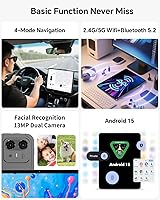
  • Operating System: Runs Android 15 with ArtOS, a Teclast-developed customization layer that adds productivity shortcuts, a global sidebar, and a widescreen-optimized desktop layout.
  • Battery: Houses a 10,000mAh lithium cobalt oxide battery with intelligent charging protection to help preserve long-term cell health.
  • Charging: Supports 30W peak fast charging, allowing the battery to recover substantially faster than the standard 10W or 18W chargers common at this price tier.
  • Stylus: Ships with the Teclast T-Pen stylus, offering 4096 levels of pressure sensitivity and global palm rejection, with support for USI 2.0-compatible third-party active styli.
  • Connectivity: Supports 4G LTE (nano-SIM), dual-band 5G Wi-Fi (802.11a/b/g/n/ac), Bluetooth, and built-in GPS for location-independent use.
  • Widevine Level: Certified at Widevine L1, enabling full HD playback on major streaming platforms including Netflix, Amazon Prime Video, and Disney+.
  • Speakers: Features a quad-speaker array using a 9CC large-chamber design with Teclast's ArtTune audio processing for improved stereo separation and presence.
  • Rear Camera: Equipped with a 13MP rear camera suitable for document scanning, video calls, and capturing reference images.
  • Dimensions: Measures 10.98 × 8.31 × 0.28 inches, making it one of the slimmer large-format Android tablets available at this price point.
  • Weight: Weighs 2.99 pounds, which is manageable for a 12.7-inch device but can become noticeable during extended one-handed or portrait-mode use.
  • Wireless Standards: Supports IEEE 802.11a, 802.11b, 802.11g, 802.11n, and 802.11ac Wi-Fi standards across both 2.4GHz and 5GHz bands.
  • Warranty: Covered by a 1-year manufacturer warranty with 24/7 technical support available for hardware and software issues.
  • Availability Date: First made available on Amazon in June 2025, placing it among the more recently released large-screen Android tablets in its segment.

Related Reviews

PEICHENG PCQ8 Kids Tablet 7-inch Android 12, 32GB
84%
84%
Performance & Speed
91%
Durability & Build Quality
88%
Parental Control Functionality
74%
Display Quality
90%
Storage & Expandability
More
Callsky-Tab Ctab 12 12-inch Android Tablet
76%
83%
Display Quality
88%
Value for Money
61%
Performance
77%
Battery Life
91%
Storage
More
PRITOM K7 Pro 7-inch Kids Tablet
66%
83%
Value for Money
71%
Parental Controls
88%
Ease of Setup
58%
Performance
43%
Battery Life
More
ADREAMER KidsPad10 Pro 10-inch Tablet, 64GB, Android 13
85%
89%
Battery Life
91%
Build Quality
94%
Ease of Use for Kids
87%
Parental Controls
92%
Value for Money
More
qunyiCO Y7 Kids Tablet 7-inch Android 11, 32GB
84%
92%
Value for Money
88%
Durability
85%
Ease of Use
80%
Performance
89%
Parental Controls
More
Geniatech KloudNote Mini 9.7″ E-Ink Tablet
68%
74%
Display Quality
81%
Stylus Performance
78%
Battery Life
41%
Software & App Compatibility
79%
Note-Taking Experience
More
RliyOliy TAB7 7-inch Android Tablet, 2GB RAM, 32GB Storage
80%
91%
Value for Money
75%
Performance
80%
Battery Life
70%
Build Quality
72%
Display Quality
More
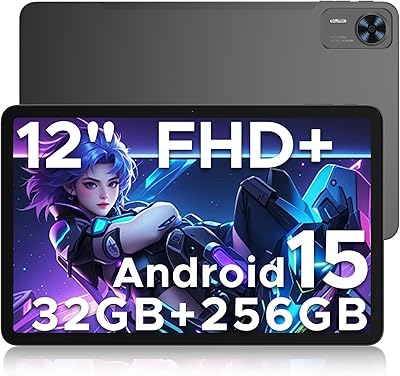
DOOGEE T36 Android 15 Tablet 12-inch 32GB + 256GB Storage
85%
91%
Display Quality
88%
Battery Life
85%
Performance with Multitasking
89%
Build Quality
90%
Storage Capacity & Expansion
More
Azeyou F27 Android Tablet 12 Inch, 20GB RAM, 256GB Storage
83%
88%
Performance
91%
Display Quality
85%
Battery Life
90%
Multitasking Capability
82%
Build Quality
More
HNVHNV E07 7-Inch Android Tablet
64%
83%
Value for Money
51%
Performance & Speed
54%
Display Quality
42%
Battery Life
71%
Build Quality & Durability
More

FAQ

The T-Pen stylus is included with the tablet — no separate purchase needed. It supports 4096 levels of pressure sensitivity right out of the box. If you later want to upgrade to a different pen, the tablet is also compatible with any USI 2.0-certified active stylus.

Yes. The TECLAST Artpad Pro 12.7-inch Android Tablet carries Widevine L1 certification, which is the standard required for HD and Full HD streaming on Netflix, Amazon Prime Video, and Disney+. Many budget tablets only have L3, which locks you into lower-quality streams, so this is a genuine advantage here.
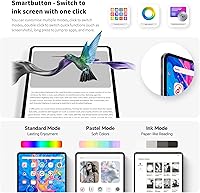
ArtOS is not a separate operating system. It is a custom launcher and interface skin that Teclast has built on top of standard Android 15. You still have access to the Google Play Store and all regular Android apps. ArtOS mostly adds shortcuts, a floating sidebar, and a widescreen desktop layout. Some users love it; others disable most of it immediately and use the tablet like a normal Android device.

With mixed daily use — reading, note-taking, occasional video — most users comfortably get through a full day. Heavier use like continuous streaming with LTE on and the screen at high brightness will drain it faster. The 30W fast charging is a practical help here, as it can meaningfully refill the battery during a lunch break rather than requiring hours at the wall.

This is an honest concern worth flagging. Teclast does not have a strong track record of delivering multiple major Android version updates for its devices. The Artpad Pro ships with Android 15, which gives you a current starting point, but if you plan to keep the tablet for three or more years and care about major OS upgrades, there is a real chance you will be running an outdated version eventually.

For casual games — puzzle apps, card games, light 2D titles — it handles things fine. For graphically demanding 3D games or anything requiring fast, sustained processing, the MediaTek chip and Mali-G57 GPU will show their limits with dropped frames and sluggish performance. This is not a gaming tablet, and it is worth being realistic about that before buying.

Yes, the tablet has a nano-SIM slot for 4G LTE. However, LTE band coverage varies by region and carrier, so you should check that your carrier's bands are supported before purchasing, especially if you are outside major markets. A handful of users have reported compatibility issues with specific carriers, so this step is worth doing.

The 20GB figure almost certainly includes virtual RAM expansion, a common practice where Android devices borrow a portion of the internal storage to supplement the physical RAM. The base physical RAM is lower — likely around 8GB or 12GB — with additional virtual RAM added on top. For everyday tasks and moderate multitasking this works fine, but it is slower than true physical RAM and should not be compared directly to 20GB physical RAM on a different device.

It is genuinely one of the better options at this price for exactly that use case. The 16:10 screen shows more of a page vertically than most tablets in this category, and the resolution is sharp enough that text and notation stay crisp even when you zoom out to see a full page. A USB or Bluetooth page-turner pedal pairs well with it for hands-free reading.

The slim profile is genuinely impressive for the size, and it does not feel fragile. That said, the back panel has a plasticky texture that gives away the price tier if you have handled metal-bodied tablets before. It holds up fine for everyday use, but it does not inspire the same confidence as an aluminum chassis. A case is a sensible investment if you plan to travel with it regularly.